

Unplugging doesn’t have to mean giving up the digital tools your life depends on. If notifications interrupt your focus or scrolling has become automatic, a digital detox how to unplug plan can start with small changes, not a total retreat from technology. You can stay connected to work, family, and essential services while making more room for uninterrupted time.
The goal is to notice which habits leave you feeling distracted and set boundaries that fit your responsibilities. This guide explains how to identify what you want to change, reduce interruptions with practical settings, and create manageable screen-free moments. It also covers ways to replace automatic checking with offline routines that are easier to maintain than a short-lived reset.
- Focus on specific habits you want to change rather than trying to abandon every device.
- Choose between everyday boundaries, scheduled screen breaks, or a time-limited reset based on your responsibilities and goals.
- For a practical digital detox how to unplug plan, start with one goal and pair a clear boundary with a useful device setting.
- Plan an offline alternative for moments when you’d usually reach for your phone.
- Review what felt useful, inconvenient, or difficult, then adjust your routine to make it more workable.
Quick Answer
A digital detox is an intentional change to how you use devices, not a demand to abandon them. To figure out digital detox how to unplug, choose one distracting trigger, set a clear boundary, and plan an offline alternative. Keep essential access available by allowing selected contacts or necessary alerts through.
Start by deciding what you want to change, then choose a manageable approach. The aim is to make device use more deliberate while keeping the tools and connections your responsibilities require.
What a realistic digital detox means
A digital detox is a planned adjustment to device habits, not a medical treatment or a promise of a particular outcome. It can be a temporary reset, such as stepping away from social apps for a set period, or an ongoing boundary, such as leaving your phone outside the bedroom.
The Digital detox overview describes approaches that range from moderating use to complete abstinence. In everyday life, a modest boundary may fit more easily around work and family. For example, keep meals phone-free while allowing calls from selected contacts in case someone needs to reach you.
The first decision: what do you want to change?
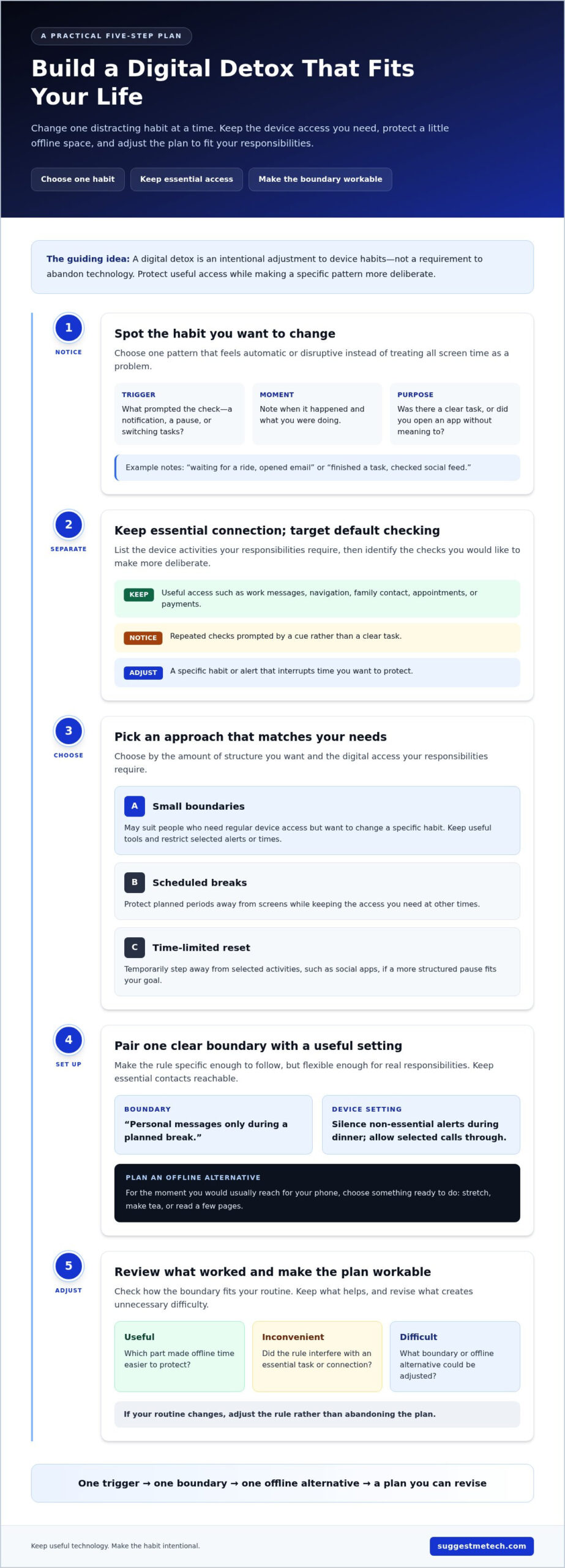
Choose one pattern that feels automatic or disruptive instead of judging all screen time as a problem. Checking messages during every pause, opening a social app without meaning to, or responding to non-urgent alerts during downtime are specific behaviors you can work on.
Then separate those habits from useful device activities. You may rely on your phone for navigation, caregiving, work, or staying in touch. A realistic plan protects that access while changing the cue or routine you want to address.
Use these prompts to define a starting point:
- Choose a trigger: Notice what tends to start the unwanted habit, such as a notification or a quiet moment.
- Set one boundary: Decide what will change, such as checking personal messages only during a planned break.
- Plan an alternative: Pick an offline action for that moment, such as stretching, making tea, or reading a few pages.
Make the boundary specific enough to follow but flexible enough for real responsibilities. You could silence non-essential alerts during dinner while allowing calls from family members through. If your routine changes, adjust the rule rather than abandoning the plan.
You don’t need to disconnect from everything to begin. Changing one habit gives you a practical way to protect offline time while keeping essential tools available.
Why Unplugging Feels Difficult: Triggers, Habits, and Digital Demands
Devices may be essential for work, navigation, family communication, and everyday tasks. The same phone that helps you coordinate your day can interrupt a quiet moment with alerts or make it easy to open an app without deciding to.
These patterns don’t mean ordinary device use is a disorder. They can, however, show where a boundary might help. A digital trigger is a cue, such as a notification or a pause in your day, that prompts you to reach for a screen.
Recognize the moments that pull you back to a screen
Before changing a habit, notice when it happens. Each time you check your phone, make a brief note of the time, what you were doing, and what prompted the check. A few words are enough: “waiting for a ride, opened email” or “finished a task, checked social feed.”
Look for recurring situations, not a perfect record. You might reach for a screen while switching tasks, standing in line, or waiting for someone to reply. The point is to identify cues in your own routine rather than assume one app or alert is the problem for everyone.
Once you spot a pattern, ask whether the check had a clear purpose. Opening a map to find an address is intentional use. Picking up your phone during a pause and moving between apps without looking for anything specific is more likely to be automatic. This distinction helps you target a habit without treating all screen time as unwanted.
Separate essential connection from default scrolling
List the digital activities you need to keep available. Consider work messages, navigation, family contact, appointments, payments, and other daily tasks. Your list depends on your responsibilities, and it can include exceptions for urgent calls or selected contacts.
Then compare those needs with checks that happen without a specific reason, such as reopening an inbox after just checking it or scrolling whenever a spare moment appears. The goal isn’t to label every optional check as bad. It’s to see which ones you’d like to make more deliberate.
- Keep: Device access that supports essential responsibilities or meaningful communication.
- Notice: Repeated checks prompted by a cue rather than a clear task.
- Adjust: A specific habit or alert that interrupts time you want to protect.
This separation makes a digital detox how to unplug plan more realistic: you can reduce default checking without losing useful access. For practical guidance on device habits and settings, explore technology guides and reviews as you consider which tools fit your routine.
Choose a Digital Detox That Fits: Small Boundaries, Scheduled Breaks, or a Full Reset
The right approach depends on what you want to change and how much digital access your responsibilities require. You can reduce interruptions with a small boundary, protect planned offline periods, or try a time-limited reset of selected activities.
You don’t have to delete every app or switch off every device. Compare the options by how much structure you want and which tools need to remain available.
| Approach | May suit | Access you can preserve |
|---|---|---|
| Small boundaries | People who need regular device access but want to change a specific habit. | Work, navigation, family contact, and chosen apps, with selected alerts or times restricted. |
| Scheduled breaks | People who prefer a clear offline window in their day or week. | Essential calls or selected contacts, while other device use pauses during the planned break. |
| Time-limited full reset | People who want a defined pause from one or more distracting activities. | Necessary tools and communication, while chosen apps or optional activities are temporarily avoided. |
When small boundaries are the most practical choice
Small boundaries work well if you rely on your phone throughout the day and want to adjust one part of its role. You might set an app-specific limit, turn off nonessential notifications, or make a part of the day device-free. These changes preserve regular access while reducing a particular source of distraction.
For example, mute social and shopping alerts after work but leave calls from family available. This approach can suit you if a broader break would conflict with responsibilities or feel difficult to maintain. Device settings can help apply the boundary, but first decide what you want the setting to protect.
When a scheduled break or short reset may fit better
A scheduled break creates a planned period away from optional device use, such as during a walk or a recurring block of personal time. A time-limited reset goes further by pausing selected activities for a defined period. Either may suit you if a clear start and end feels easier to follow than making small decisions throughout the day.
Keep the plan specific and adaptable. You might pause a social app while keeping messaging available, or set aside a device-free activity while allowing urgent calls. For a deeper reset, an outdoor camping trip can make unplugging effortless, and platforms like Adventurerz offer plenty of ideas for remote exploration. There’s no universal duration or guaranteed result. Pick a period that fits your commitments, then review whether the arrangement was manageable and useful.
For digital detox how to unplug, choose the lightest approach that addresses the habit you want to change. Add structure if a boundary isn’t enough, or scale back if a reset interferes with essential tasks. The aim is a workable change, not a test of how completely you can disconnect.
How to Unplug: Build a Simple Digital Detox Plan in Five Steps
A workable digital detox plan turns a general intention into a few clear decisions. Keep the first attempt focused: choose the behavior you want to change, decide what access must remain, and prepare for the moments when you usually reach for a device.
A useful boundary specifies when access changes and why. Use these five steps to put it into practice, then adjust the plan to fit your responsibilities.
- Choose one goal. Name a specific habit you want to change, such as checking personal messages during focused work or opening social media whenever you have a spare moment. A narrow goal is easier to act on and review than a broad instruction to “use my phone less.”
- Select a boundary. Decide when or where the habit will change. You might keep your phone away from your desk during a planned work block or pause a chosen app during an evening activity. Make the rule clear enough to follow without renegotiating it every time.
- Adjust your settings. Apple Screen Time and Google Digital Wellbeing can help you see usage patterns and manage selected limits or interruptions. Do Not Disturb can quiet chosen alerts during a protected period without blocking every communication. Review its available exceptions so essential calls, messages, or work alerts can still reach you.
- Plan an offline substitute. Match the replacement to the moment you’re changing. If you usually browse during a planned break, put a book, puzzle, or paper notebook nearby before setting your phone aside. Preparing an activity in advance makes it easier to begin without defaulting to another screen.
- Review and refine. After trying the boundary, note what worked and where it was awkward. If you missed a necessary work message, adjust the alert exceptions. If you kept picking up your phone during a break, make the offline option more accessible or clarify when the break starts and ends.
Build in a fallback before you begin. Keep selected contacts able to reach you, check work obligations at an agreed time, or allow urgent calls through while muting other alerts. The right setup depends on your responsibilities. A detox plan should create intentional pauses, not leave you unsure how to handle something important.
If the plan gets interrupted, treat that as useful information rather than personal failure. A notification may show that an exception needs changing, or a restless pause may signal that you need a more appealing offline activity. Adjust one part at a time and keep the goal practical.
For more ideas on everyday device settings and use, explore SuggestMeTech’s practical technology guides.
Make Unplugging Last: Review Your Boundaries and Adjust Them Over Time
Starting a digital detox sets a direction; maintaining it means making the boundary work as circumstances change. Review what you intended to change and what actually happened, rather than measuring yourself against a universal screen-time target.
A sustainable boundary is one that fits your actual routine. If a rule repeatedly clashes with work, travel, family needs, or daily tasks, revise it. An exception doesn’t have to mean the plan has failed.
Review what changed and what still gets in the way
Compare your goal with what you noticed in daily life. Ask what felt useful, what was inconvenient, and when you slipped back into the old pattern. Recurring exceptions may show that the timing, access rules, or offline activity needs adjustment. For example, a workday boundary may need a different version on travel days.
Use a few simple questions to guide your review:
- Did the boundary address the habit I wanted to change?
- Which situations made it hard to follow?
- What access did I need that the plan didn’t account for?
Keep the parts that fit and change the parts that don’t. If a device-free evening is difficult during a busy family routine, protect a smaller, more realistic window instead. If work demands shift, update notification exceptions or choose a different time for offline activities. Revisit the plan when your schedule changes rather than expecting one rule to fit every season.
Know when self-guided changes may not be enough
General habit guidance can help you make device use more intentional, but it isn’t individualized professional care. Screen use alone doesn’t establish a mental health condition. If distress or concerns about daily functioning persist, consider speaking with a qualified health professional who can offer support suited to your circumstances.
A digital detox how to unplug plan doesn’t need to be rigid to be worthwhile. Treat it as a routine you can adapt: keep useful access, adjust boundaries as life changes, and notice whether your chosen changes still serve their purpose. There’s no single measure of success that applies to everyone.
Start with one review and make one adjustment at a time. Practical technology guides can also help you learn about device settings and other everyday technology choices.
Let Your Offline Routine Grow With You
Choose one small change to try in your current routine. As your responsibilities shift, let the boundary shift too. A digital detox how to unplug plan works best as a personal practice, not a rule you have to follow perfectly or a product you need to buy.
Pay attention to what you want more room for, whether that’s a calmer meal, a focused task, or time with someone you care about. Keep the changes that feel useful, revise what doesn’t fit, and consider how your everyday technology choices can support your priorities.
SuggestMeTech publishes practical technology guides and comparisons to help readers make informed choices. Explore SuggestMeTech’s technology guides and comparisons for ideas you can adapt to your routine.
Start where you are. A deliberate pause can help make your next device choice more intentional.

