

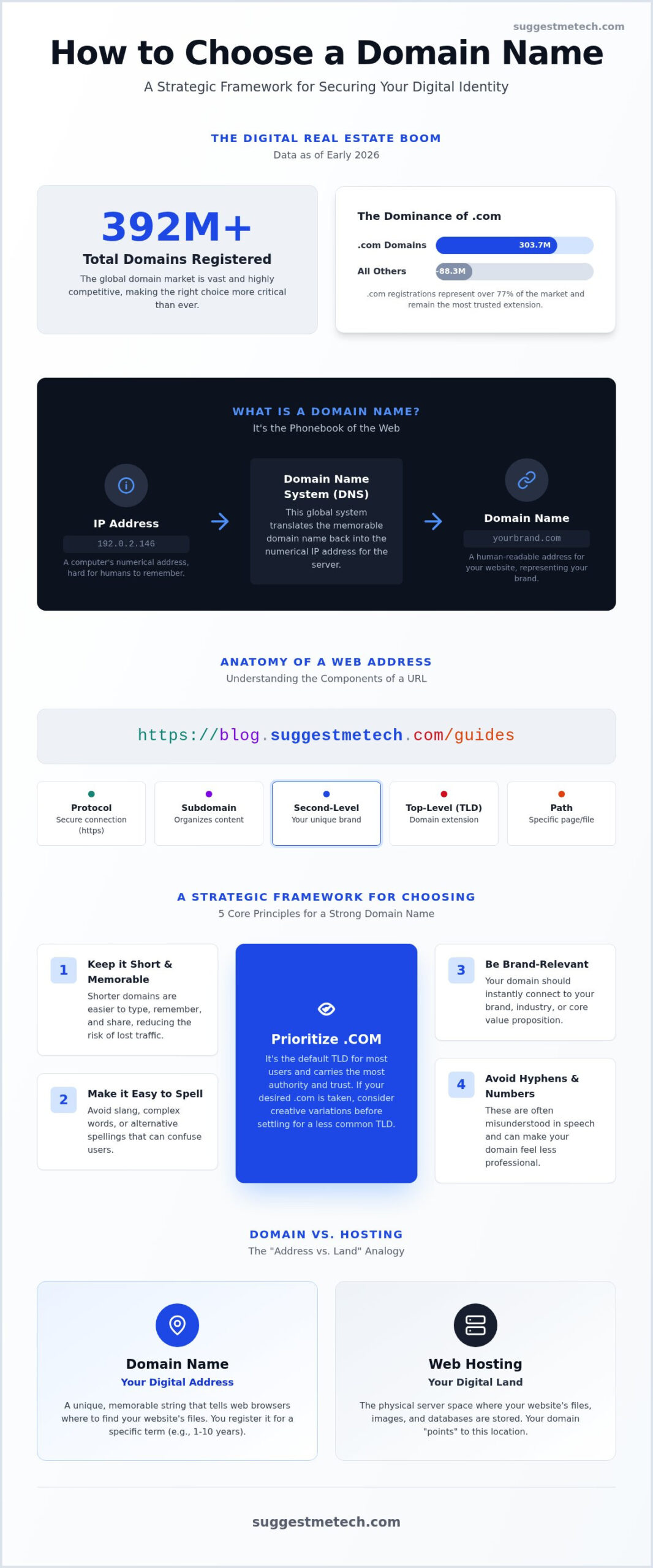
Did you know that over 392 million domain names are already claimed as of early 2026? With .com registrations alone reaching 303.7 million, finding your perfect slice of digital real estate feels less like a creative exercise and more like a high-stakes competitive race. You likely worry about picking a name that limits your future growth or feel overwhelmed by technical jargon like TLDs and DNS. It’s a common stress, especially when you’re trying to figure out how to choose a domain name that balances brand appeal with search engine visibility.
We’re here to simplify these complex choices with a clear, strategic framework. You’ll learn how to select, secure, and future-proof a domain that grows with your business. This guide breaks down the real cost of ownership, explains how to evaluate newer extensions like .ai or the recently launched .latino, and provides a direct path to registration. SuggestMeTech provides these tailored recommendations to ensure you’re making a practical investment for your professional future.
Key Takeaways
- Master the strategic framework for how to choose a domain name that is short, memorable, and easy to spell to prevent traffic loss.
- Navigate the hierarchy of the internet by identifying the specific roles of Top-Level Domains, Second-Level Domains, and subdomains.
- Use the “Address vs. Land” analogy to understand how your domain connects to web hosting and why you might bundle or separate them.
- Protect your digital intellectual property by learning the functional difference between a domain registry and a registrar.
- Apply the “Phonebook of the Web” analogy to understand how domains translate complex IP addresses into human-readable brand names.
What is a Domain Name? Understanding Your Digital Address
Computers communicate through strings of numbers called IP addresses. Since most people can’t remember a random series of digits for every site they visit, we use domain names to bridge the gap. Think of it as the Phonebook of the Web. Instead of memorizing a specific phone number, you just look up a name. A domain name is the permanent home for your digital brand.
If you’re launching a professional project, you need a custom domain. Using a free subdomain like “yourbrand.serviceprovider.com” tells customers that you aren’t fully invested in your business yet. It also makes you dependent on another company’s platform. When you understand how to choose a domain name that you own outright, you gain full control over your brand’s online reputation and portability.
Domain Name vs. URL: Clearing the Confusion
People often use these terms interchangeably, but they represent different things. A URL (Uniform Resource Locator) is the complete web address used to find a specific page, while the domain is just one part of that string. Understanding this hierarchy helps you organize your site architecture as you grow. A standard URL breaks down into three main parts:
- The Protocol: The https:// section tells the browser to use a secure connection to transfer data.
- The Domain: This is the core name you register, such as suggestmetech.com.
- The Path: Everything after the domain, like /guides, points to a specific folder or file on the web server.
How Domains Work: From Browser to Server
When you type a name into your browser, a background process called the Domain Name System (DNS) starts working immediately. It translates the human-readable words you typed back into the numerical IP address the computer understands. This happens in milliseconds, but it’s a multi-step journey. First, your browser asks a DNS resolver for the address. Then, the resolver finds the specific server where your website files are stored. Finally, the server sends the content back to your screen.
Resolution speed is a critical factor in user experience. If your domain’s DNS settings aren’t optimized or your provider is slow, your visitors will wait longer for the site to start loading. Learning how to choose a domain name involves more than just picking a catchy title; it requires a basic grasp of these technical connections to ensure your site remains fast and accessible for every visitor.
The Anatomy of a Domain: TLDs, SLDs, and Subdomains
Every web address follows a specific hierarchy that allows the internet to function as a global network. This structure of domain names is managed by the Internet Corporation for Assigned Names and Numbers (ICANN). ICANN acts as the central coordinator for the global domain database. It ensures every address is unique and properly routed to the correct server. Understanding this hierarchy is the first step in learning how to choose a domain name that serves your business needs and technical requirements.
Choosing Top-Level Domains (TLDs) in 2026
The Top-Level Domain (TLD) is the suffix at the end of your web address. In 2026, the market has expanded significantly. You now have access to generic TLDs (gTLDs) like .com and .net, alongside country-code TLDs (ccTLDs) like .de or .ca for regional targeting. We’ve also seen a surge in industry-specific extensions. For instance, .ai and .tech are now standard for startups, while the .xyz extension reached 10 million registrations this year.
Even with these new options, .com remains the dominant force. By March 2026, .com registrations hit 303.7 million, representing 18% year-over-year growth. Most users still default to typing “.com” when searching for a brand. If you want maximum credibility and global authority, stick with the classic extension whenever possible. It’s the most recognized and trusted suffix in the digital world.
Second-Level Domains and Subdomains
The Second-Level Domain (SLD) is your primary brand identifier. In the address suggestmetech.com, the SLD is “suggestmetech.” This part of the domain is entirely up to you. It should be short, memorable, and reflective of your brand’s mission. Many owners also utilize subdomains to organize complex sites. A subdomain appears before the SLD, such as blog.yourbrand.com or shop.yourbrand.com.
Subdomains are distinct from subdirectories, like yourbrand.com/blog. While a subdirectory is seen as part of the main site by search engines, a subdomain can be treated as a separate entity. This is useful if you’re running a separate software platform, like an e-commerce store, alongside your main content site. Deciding between these structures is a key part of how to choose a domain name strategy that scales. If you’re feeling stuck on the technical details, you can find practical technology guides on our site to help you navigate these setup choices.
How to Choose a Domain Name: A Strategic Framework
Picking a name is an emotional decision, but it requires a logical filter. To master how to choose a domain name, you must prioritize simplicity above all else. Short names are easier to remember and significantly less prone to typos. Aim for two to three syllables or a character count between six and fourteen. If your domain is too long or complex, you’ll lose traffic to “fat-finger” errors on mobile devices where precision is lower.
Avoid using hyphens, numbers, or double letters. Hyphens are often forgotten when people type addresses from memory. Numbers cause confusion; should the user type “5” or “five”? Double letters, like in presssetup.com, often lead to one letter being omitted by mistake. Apply the Radio Test: say your name out loud to a friend. If they have to ask you to spell it, the name isn’t ready for prime time. Before you commit, always perform a thorough search of existing trademarks to ensure you aren’t infringing on another brand’s intellectual property.
Branding vs. Keyword Integration
Using AI Tools for Domain Brainstorming
Generative AI has changed the brainstorming process. Instead of staring at a blank screen, use specific prompts to find synonyms or creative metaphors related to your niche. You can ask for “short, punchy domain ideas for a sustainable garden brand” to get a list of fresh options. Always vet these suggestions for availability and check how they feel to a human audience. For more inspiration on finding your specific niche, check out our guide on How to Start a Blog in 2026. This tool-driven approach makes the process of how to choose a domain name faster and more collaborative.
Registration and Security: Protecting Your Digital Asset
Securing your domain is just as critical as the creative process. You don’t actually buy a domain name forever; you lease it from a registrar for a set period. Think of the Domain Registry as the wholesaler that manages the TLD database, while the Registrar is the retail storefront where you handle your transaction. When you learn how to choose a domain name, you must also learn to spot a high-quality registrar. Avoid companies that lure you in with a low first-year rate only to charge inflated renewal fees or hide “transfer out” penalties in their fine print.
Business continuity depends on your domain remaining active. Set your account to auto-renewal and keep a valid credit card on file. If your registration lapses, your website and email will stop working immediately. This simple “set-and-forget” step prevents competitors from snatching up your brand if you forget a renewal date. Most registrars also add a mandatory ICANN fee of approximately $0.18 per year to every transaction, so don’t be surprised when you see this small line item at checkout.
The Role of WHOIS Privacy and SSL
Every domain registration requires your contact information to be entered into the WHOIS database. This is a public directory that anyone can search. Without privacy protection, your name, email, and phone number are visible to every spammer and telemarketer on the web. This service typically costs between $5 and $15 per year, though some providers offer it for free. Additionally, your domain name needs an SSL certificate to ensure a secure HTTPS connection. While the domain is your address, the SSL is the security system that protects your visitors’ data.
Transferring and Renewing Your Domain
If you’re unhappy with your current provider, you aren’t stuck. You can move your domain to a new registrar using an EPP authorization code, provided the domain has been registered for at least 60 days. Pay close attention to your renewal cycles. If you miss a payment, your domain enters a “Grace Period,” which often lasts 30 days. After that, it hits a “Redemption Period,” where recovery fees can be significantly higher before the domain is eventually released back to the public. For core business assets, registering for five years instead of one provides peace of mind and protects you from annual price hikes.
SuggestMeTech provides authoritative technology reviews and guides to help you compare registrar features and find the most reliable home for your digital brand. Understanding these technical safeguards is the final step in mastering how to choose a domain name that lasts.
Domain vs. Hosting: Connecting Your Address to Your Site
A common point of confusion for beginners is the difference between a domain and web hosting. To keep it simple, use the House and Address analogy. Your domain name is the address on the envelope, telling the post office where to deliver the mail. Web hosting is the actual house, the physical space where your website’s files, images, and databases live. It’s important to realize that a domain name alone does not create a website. It’s simply a pointer. Without hosting, your visitors will see a blank page or a “parked” domain screen.
You have the flexibility to buy these services from the same company or keep them separate. Many people bundle them for convenience, as it simplifies billing and technical setup. However, some professionals prefer to use different providers to avoid having a single point of failure. If you buy them separately, you’ll need to point your domain to your hosting server using Nameservers. This is a simple settings update in your registrar’s dashboard that tells the internet where your “house” is located on the global map.
Why You Need Both to Go Live
The connection between your address and your land happens through a technical handshake involving DNS records. The most common are A Records, which point your domain to a specific IP address, and CNAMEs, which can alias one name to another. If you’re still looking for a place to park your new brand, you can compare top providers in our guide to The Best Web Hosting Services of 2024. Choosing a host with high uptime and fast support is just as vital as knowing how to choose a domain name that resonates with your audience.
Keeping both services with one provider often means the DNS records are configured automatically. If you go the separate route, you’ll just need to copy the two or three Nameserver strings provided by your host into your domain registrar’s “Custom DNS” section. This process usually takes a few hours to propagate across the web, though it can sometimes take up to a full day.
SuggestMeTech’s Recommended Next Steps
Once you’ve mastered the strategy of how to choose a domain name, it’s time to take action. Use these steps to move from an idea to a live project:
- Check Availability: Use a reputable search tool to see if your top choices are available. Don’t wait; good names are claimed every minute.
- Choose Your Platform: Decide if you’ll use a beginner-friendly site builder or a more customizable content management system like WordPress.
Taking these steps immediately ensures that no one else grabs your brand identity while you’re still in the planning phase. Securing your digital real estate is the foundation for everything that follows.
Secure Your Digital Identity Today
Your domain is the foundation of your online presence. By sticking to a short, memorable name and avoiding technical traps like hyphens or double letters, you’ve set your brand up for long-term success. Protecting that asset with auto-renewal and WHOIS privacy ensures your business remains secure and your personal data stays private. Remember that while your domain is your address, your hosting is the land where your site actually lives.
Mastering how to choose a domain name gives you the confidence to build a professional platform that scales with your ambition. SuggestMeTech provides expert analysis of top registrars and unbiased tech comparisons to simplify these complex decisions. Our guides are tailored specifically for small businesses looking for budget-friendly and scalable solutions. Find the perfect home for your new domain in our Hosting Reviews.
You’ve done the research; now it’s time to claim your space on the web and start building something great. We’re here to help you every step of the way as you navigate your technology choices. Don’t wait for your ideal name to be taken by someone else.
Frequently Asked Questions
How much does a domain name typically cost per year?
Standard .com domains typically cost between $10 and $23 per year. Newer extensions like .ai or .tech are more expensive, often ranging from $30 to $100 annually depending on the registrar. You should also account for the mandatory $0.18 ICANN fee added to every registration. While first-year promotions can be as low as a few dollars, always check the renewal rate to avoid budget surprises in your second year of ownership.
Can I get a domain name for free?
You can often get a domain for free when you bundle it with a web hosting plan for the first year. Many providers offer this as an incentive for new customers. Alternatively, you can use free subdomains from site builders, but these lack professional credibility and brand control. For a long-term project, it’s better to invest in a custom domain to ensure you have full ownership and portability of your digital assets.
What happens if I forget to renew my domain name?
If your registration lapses, your website and email services will stop working immediately. Most registrars provide a grace period of about 30 days where you can still renew at the standard price. After this, the domain enters a redemption period where recovery fees increase significantly. If you still don’t renew, the domain is eventually released back to the public, allowing competitors or domain squatters to purchase your brand name and traffic.
Is it better to use .com or a newer extension like .net or .org?
The .com extension remains the gold standard for global trust and memorability, with over 303 million registrations as of early 2026. Use .org if you are running a non-profit and .net if you are in the networking or infrastructure space. While newer extensions like .xyz are growing fast, sticking with .com is usually the safest bet when learning how to choose a domain name that your customers will instinctively remember.
Can I change my domain name after I have registered it?
You cannot technically edit a domain name once it’s registered. If you want a different name, you must purchase a new one and set up a 301 redirect from the old address to the new one. This process tells search engines that your site has moved permanently. Changing names can temporarily impact your search rankings, so it’s vital to follow a strategic framework for how to choose a domain name correctly before you launch your brand.
What is the difference between a domain and a subdomain?
A root domain is your primary web address, like example.com. A subdomain is a prefix added to that domain to organize specific sections of your site, such as store.example.com. While the root domain is your main brand identifier, subdomains allow you to host different platforms or content types under the same umbrella. They are technically distinct entities, which is useful for separating a blog or e-commerce shop from your main business site.
Do I need a domain name for a social media business?
Even if your primary audience is on social media, owning a custom domain is essential for professional credibility. It allows you to create branded email addresses and gives you a permanent home that you own. Social platforms can change their algorithms or terms at any time. A dedicated domain ensures your followers always have a direct way to find your services, products, or contact information regardless of any changes on external platforms.
How do I check if a domain name is already taken?
You can check availability by using a search tool on any reputable domain registrar’s website. Simply type your desired name into the search bar to see if it’s available or if it’s already registered. If the name is taken, the tool will often suggest similar variations or different extensions. You can also use a WHOIS lookup tool to find out when a currently registered domain is set to expire or to see the owner’s contact details.

