

What if the most expensive hosting renewal on your bill was actually the smartest investment for your SEO? It is a common dilemma in 2026. You want the speed of a premium provider but fear the inevitable price jump after your first year. If you’re currently dealing with slow loading times or support teams that go MIA when your site crashes, you know that “cheap” hosting often comes with hidden costs. We’ve spent weeks testing siteground to see if their latest performance tweaks and AI-driven management tools truly set them apart from the budget crowd.
You deserve a website that stays secure and ranks well without requiring a degree in server management. In this guide, you’ll discover if SiteGround’s premium performance justifies its price tag for your specific 2026 goals. We’ll look closely at the new AI Studio features; we will also analyze the Google Cloud infrastructure and provide a clear breakdown of the total cost of ownership over three years. By the end, you’ll know exactly which plan fits your traffic needs and whether it’s finally time to make the switch.
Key Takeaways
- Learn how SiteGround’s transition to an AI-enhanced growth platform automates complex technical SEO and security tasks for you.
- Compare the performance benefits of Google Cloud infrastructure and proprietary speed tools like SuperCacher against budget hosting alternatives.
- Determine if the GrowBig plan is your best option by weighing its advanced features against the entry-level StartUp tier.
- Get a transparent breakdown of siteground renewal rates to ensure your hosting budget remains sustainable over the next three years.
- Walk through the five-minute setup process that takes you from account creation to a fully launched WordPress site.
SiteGround Review 2026: The Evolution of Managed Hosting
SiteGround has fundamentally changed how we think about web servers. In 2026, they have solidified their position as a premium managed hosting provider, moving far beyond the budget host category. Understanding SiteGround’s history helps explain why they moved away from generic tools like cPanel to build their own bespoke infrastructure. Today, the siteground ecosystem is a unified platform that combines high-performance hosting, integrated email marketing, and their new AI Studio. It remains one of the few providers officially recommended by WordPress.org, a distinction they have held since 2005.
This evolution is most visible in their custom Site Tools interface. While competitors still struggle with cluttered dashboards, they use an AI-integrated system to simplify technical tasks. This isn’t just about aesthetics; it’s about reducing the time you spend on backend maintenance so you can focus on growing your business. It makes the user experience much smoother for beginners while keeping advanced tools accessible for developers.
What Makes SiteGround Different in 2026?
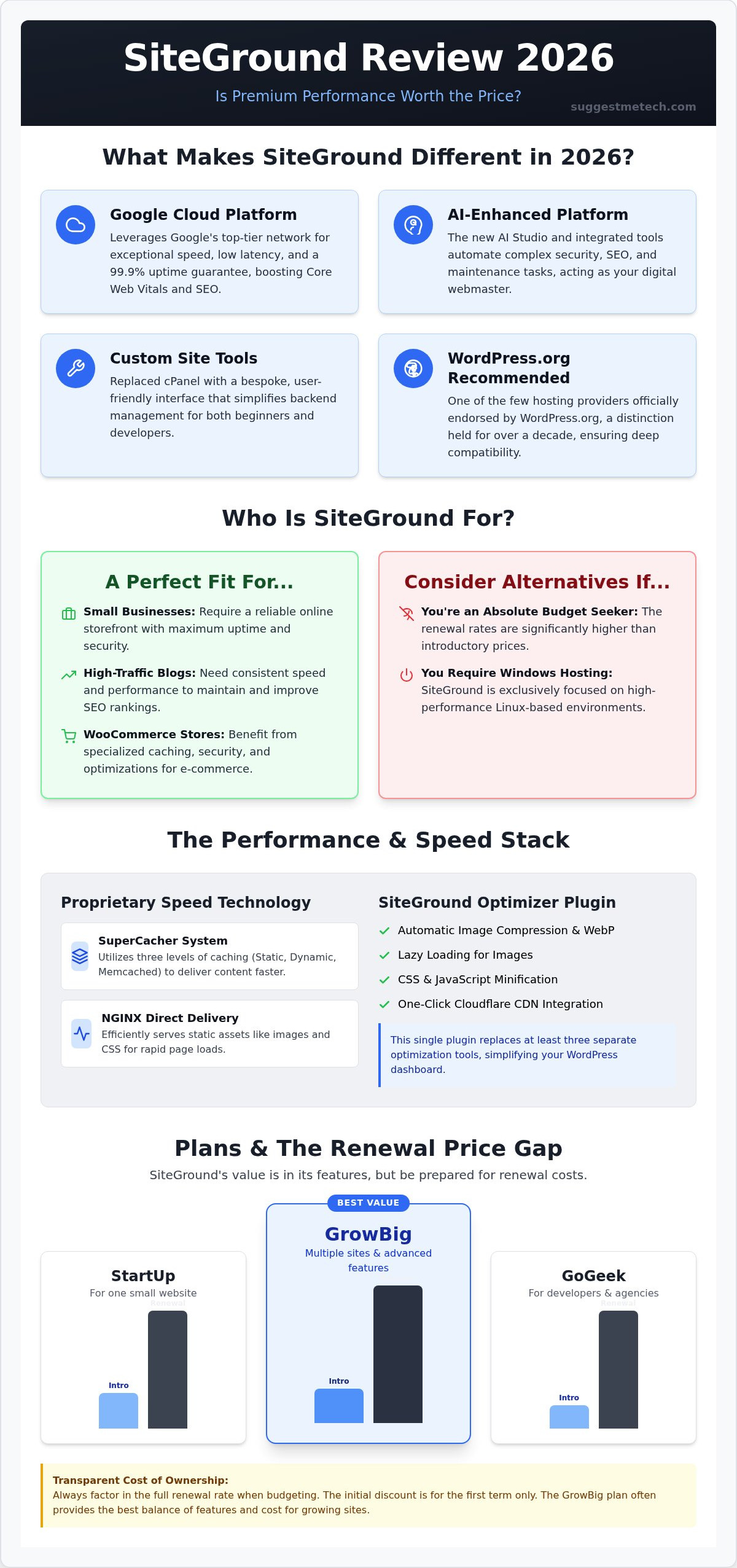
The most significant technical advantage is their deep integration with the Google Cloud Platform. This partnership ensures a 99.9% uptime guarantee and provides a global network that reduces latency regardless of where your visitors live. For those who aren’t tech-savvy, the introduction of AI Studio is a game-changer. It automates site building and routine maintenance, effectively acting as a digital webmaster that keeps your site optimized without manual intervention.
When comparing managed vs. unmanaged hosting, the difference is simple: you’re paying for your time back. With unmanaged hosting, you’re responsible for security patches, server updates, and optimization. They handle all of this automatically. You aren’t just buying disk space; you’re buying an insurance policy against technical failure and security breaches.
Who Should (and Should Not) Choose SiteGround?
This provider is the expert choice for those moving past beginner-level hosting. It’s perfect for certain types of users who prioritize performance over the lowest possible price:
- Small businesses that need a reliable online storefront with high uptime.
- High-traffic blogs that require consistent speed to maintain SEO rankings.
- WooCommerce stores that need specialized security and advanced caching.
However, it’s not for everyone. If you’re an absolute budget-seeker looking for the lowest possible price point, the renewal rates here might surprise you. It’s also not a fit for those requiring Windows-based hosting, as siteground remains focused on Linux-based environments. For everyone else, the peace of mind factor is the real selling point. They handle the security layers and bot protection, ensuring your site stays online while you sleep.
Performance Metrics: Speed, Security, and Google Cloud
Speed isn’t just a technical metric; it’s a critical SEO requirement. By leveraging Google Cloud’s distributed network, siteground ensures your data travels the shortest possible distance to reach your visitors. This infrastructure provides the low latency needed to satisfy modern users who expect instant page loads. Google’s 2026 Core Web Vitals standards place a heavy emphasis on Interaction to Next Paint (INP) and Largest Contentful Paint (LCP). SiteGround’s server stack is specifically tuned to meet these targets out of the box, giving your site a competitive edge in search rankings without requiring manual server configuration.
Beyond the cloud foundation, they use proprietary technology to squeeze every millisecond of performance from their servers. Their SuperCacher system uses three levels of caching to deliver content faster, while NGINX Direct Delivery handles static assets like images and CSS files with extreme efficiency. If you’re still undecided on your setup, you can compare top hosting providers to see how these specific speed technologies compare to standard industry offerings.
The Power of the SiteGround Optimizer Plugin
Most hosting companies give you a server and leave the optimization to you. This plugin changes that by handling front-end and back-end tasks through a single interface. You can delete at least three other plugins because it handles image compression, lazy loading, and WebP conversion automatically. It also includes one-click integration with the Cloudflare CDN. This means your global speed is managed directly from your WordPress dashboard, ensuring that a visitor in Tokyo sees your site as quickly as someone in New York. It’s a practical solution for non-developers who want a fast site without touching a single line of code.
Security and Reliability in the Age of AI
Security remains a top concern as automated attacks become more sophisticated. Their AI Anti-Bot System is a standout feature, blocking millions of malicious attempts every day before they even reach your site. Reliability is further bolstered by geographic redundancy. Because your data is stored across multiple Google Cloud zones, your site stays online even if a specific data center faces an issue. Every siteground account also includes free Let’s Encrypt SSL certificates. These are vital for establishing trust for your domain and ensuring that all data transmitted between your server and your visitors remains encrypted and secure.
SiteGround Plans Compared: StartUp vs. GrowBig vs. GoGeek
Choosing the right hosting plan is a balancing act between your current budget and your future growth. SiteGround organizes its shared hosting into three distinct tiers: StartUp, GrowBig, and GoGeek. While every plan includes the essential security features and Google Cloud infrastructure mentioned earlier, the differences in resource allocation and developer tools are significant. You need to look beyond the price tag to understand how these limits, like storage space and monthly visit estimates, will impact your site’s daily performance.
The GrowBig plan is the “sweet spot” for most users. It allows for unlimited websites and includes on-demand backup copies, which are essential when you’re experimenting with new designs or updates. If you’re currently researching how to start a blog, this plan offers the best long-term value. It provides 20 GB of SSD storage and can handle approximately 100,000 monthly visits, giving you plenty of room to scale without hitting immediate resource walls. For professional users, the GoGeek tier adds white-label site management for clients, priority support, and Git integration for developers who need to manage code versions directly on the server.
StartUp: Is the Entry-Level Plan Enough?
The StartUp plan is designed for simplicity. It’s an excellent choice for a single portfolio site, a small personal blog, or a testing environment for a new project. However, its limitations are strict. You can only host one website, and you’re limited to 10 GB of web space. You’ll likely feel the need to upgrade once you start a second project or realize you need a staging environment to test plugin updates safely. It also lacks the Ultrafast PHP feature found in higher tiers, which can slightly impact loading times as your database grows. If your site receives more than 10,000 visits a month, you’ll quickly outgrow this entry-level option.
Cloud Hosting: Scaling Beyond Shared Limits
Eventually, a successful business might outgrow even the GoGeek tier. When your traffic consistently exceeds 400,000 monthly visits or you require more than 40 GB of storage, it’s time to consider Cloud Hosting. This isn’t just a bigger shared plan; it’s a fully managed environment with dedicated resources. You can specify the exact number of CPU cores and the amount of RAM your site needs, starting with the Jump Start plan which offers 4 cores and 8 GB of RAM. The auto-scaling feature is particularly useful because it automatically adds resources during unexpected traffic spikes to prevent downtime. Compared to traditional VPS alternatives, siteground cloud solutions are much easier to manage because their team handles all server-side technicalities, allowing you to focus on your business instead of server maintenance.
The Catch: Pricing, Renewals, and the Value Gap
Pricing is the most controversial aspect of the siteground experience. While the introductory rates are highly competitive, the renewal jump often catches users off guard. You aren’t just paying for server space; you’re paying for the managed ecosystem of AI tools and premium support we’ve analyzed. When you compare them to other best web hosting budget peers, the price gap is clear. However, the ROI comes from the hours saved on technical troubleshooting. If their support team prevents even one hour of downtime for your business, the higher cost often pays for itself through maintained revenue and SEO stability.
This makes siteground an investment in reliability rather than a pursuit of the lowest price. Budget hosts often save money by limiting their support staff or using older hardware, which can lead to longer resolution times when things go wrong. By choosing a managed provider, you’re effectively outsourcing your server administration. This allows you to focus on content and marketing instead of security patches and server configurations.
Navigating the Renewal Price Jump
Transparency is vital when planning your long-term hosting budget. Most users sign up for a 12-month term to lock in the lowest introductory rate, but they don’t always account for what happens in year two. Users should expect their monthly costs to increase by 400% to 500% once the initial promotional period ends. To manage these costs, some choose to pay for three years upfront, though this requires a larger initial investment. The “loyalty” factor here is tied directly to their support quality; they maintain a 4.8/5 rating on Trustpilot because they actually solve problems quickly, which many users find worth the premium renewal rate.
SiteGround vs. The Competition
The choice between providers often comes down to your specific priorities. If you compare them to Bluehost, you’ll find that Bluehost is often more beginner-friendly for those who want a very simple onboarding process. However, they usually fall behind on support response times and server speed. If you look at Hostinger, they win on raw storage space and significantly lower pricing, but they don’t offer the same level of hands-on managed service. SiteGround wins on support and technical infrastructure but loses on raw storage limits and renewal transparency. If you want to explore more options for your specific team size, check out our full library of authoritative tech reviews to find the perfect fit.
Getting Started: The SiteGround User Experience
Getting started with siteground is a streamlined process designed to remove technical friction for new users. After you complete your purchase, the onboarding wizard takes over. It doesn’t just drop you into a blank dashboard; it provides a guided path from domain pointing to site launch. If you already own a domain elsewhere, the setup instructions provide clear nameserver details to link your URL to your new server. For those who hit a snag, the support team is available 24/7. You can choose between live chat for instant answers or a ticket system for more complex technical inquiries that require a detailed paper trail.
The centerpiece of the initial setup is the WordPress Starter tool. This feature allows you to select a theme and essential plugins through a simple interface, launching a fully functional site in under five minutes. It’s a massive time-saver for anyone who wants to skip the manual installation process. The custom Site Tools dashboard is also much more intuitive than the old industry-standard panels, making it easy to find your files, databases, and security settings without a manual.
Step-by-Step: Launching Your First Site
Your first critical decision during setup is choosing your data center location. Because they leverage Google Cloud infrastructure, you can pick a server location closest to your target audience to ensure the lowest possible latency. Once the server is set, you should immediately set up professional email addresses. Having an address like you@yourdomain.com builds instant credibility with your visitors and is included for free in the dashboard. The 2026 experience is further enhanced by AI Studio. This tool helps you generate initial page layouts and content structures based on your specific niche, giving you a professional foundation to build upon without starting from scratch.
The Migration Process: Stress-Free Moving
Moving an existing website doesn’t have to be a stressful event. The siteground Migrator plugin is a free tool that automates the transfer of your entire WordPress database and file system. You simply generate a unique migration token in your dashboard and paste it into the plugin on your old host. The system handles the rest. If you’ve chosen a GrowBig or GoGeek plan, you can also opt for a professional manual migration where their experts handle the move for you. Before you officially go live, run through this final checklist:
- Confirm your Let’s Encrypt SSL certificate is active for secure browsing.
- Enable the SG Optimizer caching levels to maximize speed.
- Verify your DNS records have fully propagated across all regions.
- Test your contact forms to ensure email delivery is working correctly.
Ready to Upgrade Your WordPress Hosting Strategy?
Choosing a host is about more than just finding the lowest monthly bill. It’s about finding a partner that helps your site grow without technical hurdles. In 2026, siteground remains a top-tier choice because it successfully balances high-end performance with user-friendly automation. By utilizing Google Cloud infrastructure and providing top-rated 24/7 human support, they solve complex server problems before they ever impact your SEO or user experience. While the renewal rates are higher than budget competitors, the official WordPress.org recommendation and the time saved by their AI Studio tools create a significant return on investment for serious creators.
You don’t have to manage your server alone. Whether you’re launching your first project or scaling an established business, having a secure and fast foundation is essential for long-term success. If you’re ready to move past the limitations of budget hosting and embrace a platform built for growth, now is the time to act. Take the next step toward a more reliable and professional web presence today.
Check SiteGround’s Latest 2026 Deals and AI Features
Frequently Asked Questions
Is SiteGround better than Bluehost for WordPress in 2026?
SiteGround is generally better for users who prioritize speed and expert support, while Bluehost remains a budget-friendly entry point for absolute beginners. Their use of Google Cloud infrastructure and proprietary caching often results in faster loading times and better Core Web Vitals scores. If your business depends on SEO and consistent uptime, the technical advantages of siteground usually outweigh the higher renewal costs.
Does SiteGround offer a free domain name with their plans?
No, they don’t typically offer a free domain name with their hosting plans. While many budget competitors use free domains as a marketing hook, this provider invests those resources into server speed and security features instead. You should budget for a separate domain registration fee when setting up your account, though you can easily point a domain registered elsewhere to their servers; you can also discover Whoisvibe to stay informed about your domain’s registration status and renewal schedule.
How much does SiteGround cost after the first year?
Renewal prices for shared hosting plans typically increase by 400% to 500% once the initial promotional period ends. For instance, the StartUp plan renewal rate is approximately $17.99 per month, while GrowBig jumps to nearly $30 per month. It’s vital to factor these long-term costs into your three-year business plan rather than just looking at the introductory discount.
Can I host multiple websites on the SiteGround StartUp plan?
No, the StartUp plan is strictly limited to hosting a single website. If you plan to run multiple blogs or portfolio sites, you’ll need to choose the GrowBig or GoGeek plans. These higher tiers allow for unlimited websites and provide significantly more SSD storage to accommodate the extra data and files for your various projects.
What is the SiteGround AI Studio and how does it work?
SiteGround AI Studio is a collection of tools designed to automate site building and initial content creation. It works by analyzing your business niche and generating custom page layouts and initial copy drafts within the WordPress environment. This helps non-techies launch professional-looking sites quickly without needing to hire a designer or struggle with a blank page.
Does SiteGround provide free email hosting?
Yes, professional email hosting is included at no extra cost on every hosting plan they offer. You can create an unlimited number of accounts using your own domain name directly through the Site Tools dashboard. These accounts include webmail access, spam protection, and the ability to connect your email to third-party apps like Outlook or Gmail.
Is SiteGrounds customer support really 24/7?
Yes, siteground provides genuine 24/7 human support through live chat, phone, and a ticket system. They don’t rely solely on bots for initial troubleshooting; you can reach a real person at any hour of the day or night. Their support team is widely recognized for having a high level of WordPress expertise, which leads to faster problem resolution.
What happens if my website exceeds the monthly visit limit on SiteGround?
Your website won’t be instantly suspended if you go slightly over the estimated visit limit. These numbers are helpful guidelines based on the server resources your specific plan provides. However, if your traffic consistently exceeds these limits, you’ll receive a notification suggesting an upgrade to a higher tier or Cloud hosting to ensure your site remains fast and stable.

