

Moving your digital identity shouldn’t feel like a high-stakes gamble with your business’s online presence. Most people treat a domain move like a complex surgery, but in 2026, it is really just a standardized technical handshake between two servers. Learning how to transfer domain to another registrar is the most effective way to escape rising renewal costs or outdated management tools without losing a single minute of uptime.
We understand the anxiety that comes with technical terms like EPP codes and the mandatory 60-day ICANN transfer locks. It’s frustrating to feel trapped by a provider that no longer serves your needs simply because the transition process seems opaque. This guide simplifies the entire journey, offering a zero-downtime checklist and expert tips tailored to the latest 2026 policy standards. You will learn exactly how to prepare your domain, navigate the “renewal trap” of hidden fees, and complete the move in five to seven days while keeping your website and email fully operational.
Key Takeaways
- Learn how to identify the “renewal trap” and switch to a provider with transparent, long-term pricing structures.
- Follow our pre-transfer checklist to ensure your administrative email is ready and privacy settings won’t block the move.
- Master the technical steps of how to transfer domain to another registrar using our streamlined 2026 execution guide.
- Discover the specific nameserver settings required to maintain 100% website and email uptime during the transition.
- Use our evaluation framework to choose a new registrar that prioritizes security standards like mandatory two-factor authentication.
Why Transfer Your Domain? Understanding the 2026 Landscape
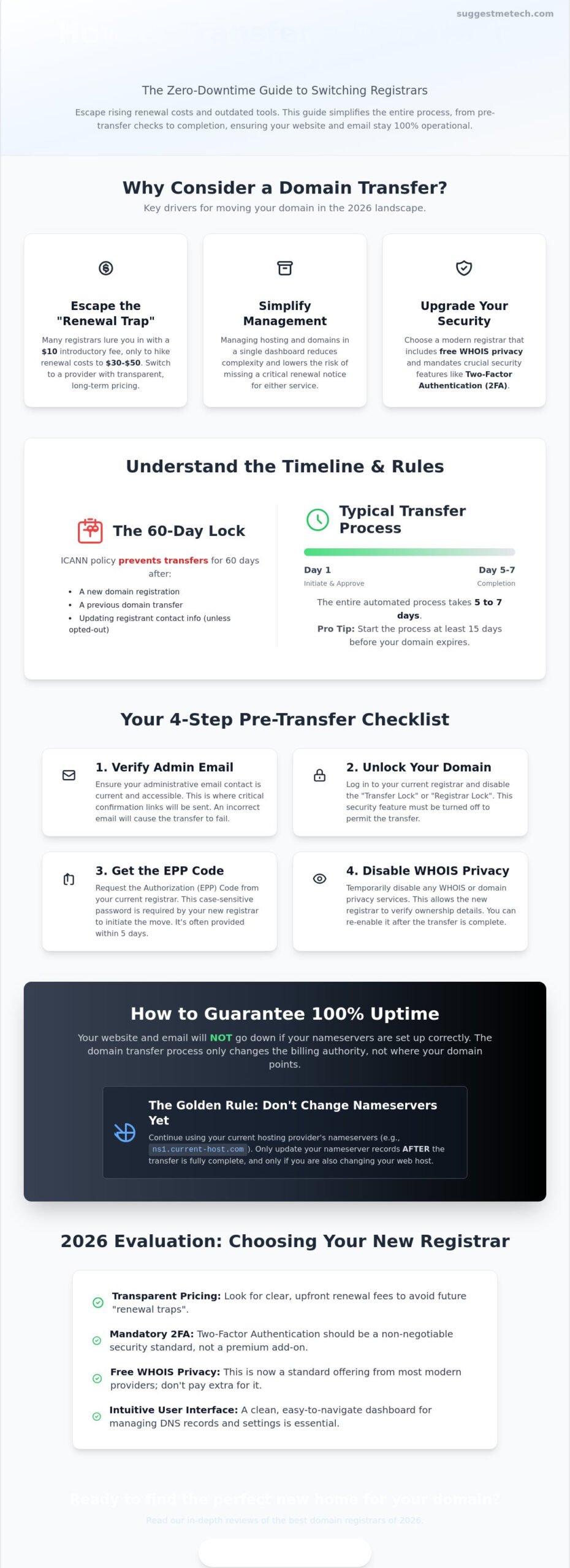
Managing a digital presence involves more than just picking a catchy name. It’s about finding a partner that balances fair pricing with robust security. A Domain name registrar is the entity responsible for managing your domain reservation; however, not all providers offer the same level of service. Many owners begin researching how to transfer domain to another registrar when they realize they’re paying a “loyalty tax.” This common industry practice involves offering a low introductory rate, sometimes as low as $10, only to hike renewal fees to $30 or $50 in subsequent years.
Consolidating your assets is another major driver for a move. Managing your website hosting and domain names in a single dashboard simplifies your workflow and reduces the risk of missing a renewal notice. Security also plays a pivotal role in 2026. While some registrars still charge $15 for WHOIS privacy, many modern providers now include it for free. If your current registrar lacks mandatory two-factor authentication (2FA) or has slow customer support response times, it’s time to evaluate your options. To avoid double billing or service gaps, you should initiate this move at least 15 days before your current registration expires.
The 60-Day Lock Rule and Other Restrictions
ICANN enforces a mandatory 60-day transfer lock after a new registration or a previous transfer. You cannot move your domain during this window. Following the ICANN Transfer Policy update on February 21, 2024, and the full implementation of the new Registration Data Policy on August 21, 2025, you should also be aware of the “Change of Registrant” lock. If you update your name, organization, or email address, your registrar might impose a 60-day lock unless you opt out before making the change. You can check your eligibility by viewing your domain’s status in the WHOIS database; look for “clientTransferProhibited” to see if a lock is active.
Cost Considerations in 2026
Budgeting for a transfer requires looking beyond the initial “Transfer Fee.” Most registrars charge between $10 and $50 for incoming transfers, which typically includes a one-year extension of your registration. Every registration also includes a mandatory ICANN fee of approximately $0.18 per year. Watch out for hidden costs like DNS management fees or premium security add-ons that were previously free. In 2026, typical costs for a standard .com domain remain in the $10 to $50 range, but high-demand TLDs can be significantly higher. Always verify the long-term renewal rate to ensure you aren’t walking into another price hike next year.
Pre-Transfer Checklist: Preparing Your Domain for the Move
Success in moving your digital assets depends entirely on the work you do before clicking the “transfer” button. While the mechanics of how to transfer domain to another registrar are largely automated, your current provider won’t make it easy to leave. You must manually clear the path by ensuring your administrative email is current and accessible. This is where you’ll receive the final confirmation links; if it’s an old employee’s address or an inactive account, your transfer will fail immediately. To avoid being billed twice, aim to start this checklist about 30 days before your current expiration date, even though the actual move usually takes five to seven days.
Once your email is ready, navigate to your domain management list and look for the “Transfer Lock” or “Registrar Lock” setting. This is a security feature designed to prevent unauthorized moves. If the status is “Locked,” the transfer will be rejected by the registry before it even reaches your new provider. Toggling this to “Unlocked” is usually instantaneous, but some registrars may send an additional verification email to confirm the change. Ensuring this is done early prevents the common “Registry Lock” error that stalls many transfer attempts. If you’re looking for a provider that makes these settings easier to manage, our technology reviews can help you find a more user-friendly registrar.
Handling the Authorization (EPP) Code
The Authorization Code, or EPP code, acts as the unique digital key for your domain. You can typically find this under “Security,” “Management,” or “Transfer” settings in your current registrar’s dashboard. Some providers require you to request the code via email, which can take up to 24 hours to arrive. According to ICANN’s official Transfer Policy, your registrar is generally required to provide this code within five days of your request. It’s vital to remember that the EPP code is case-sensitive and often expires after a short period, so don’t request it until you’re ready to start the move.
Disabling WHOIS Privacy
Before the new registrar can accept your domain, you must disable “Domain Privacy” or “Proxy Protection.” This step is necessary because the receiving registrar needs to verify the registrant information against the official data to confirm you are the rightful owner. For a deeper look at how these ownership records work, check out our guide on What is a Domain Name?. Turning off privacy does briefly expose your contact details to the public WHOIS database. You can mitigate this risk by completing the transfer quickly and immediately enabling the free privacy features offered by your new provider once the move is finalized.
The Step-by-Step Transfer Process: Execution
Once you’ve cleared the technical hurdles in your current dashboard, the actual move begins at your new provider’s website. Start by creating a fresh account with your chosen registrar. Most people find that the process of how to transfer domain to another registrar is surprisingly automated once they log in. You’ll typically find a prominent “Transfer” or “Import” button in the main navigation or under the domain management tab. Enter your domain name exactly as it appears in your records, excluding any “www” prefixes.
The system will then prompt you for the Authorization (EPP) code you gathered during your preparation. Paste this carefully, as these codes are case-sensitive and often contain special characters that are easy to mistype. After the system validates the code, you’ll proceed to the checkout. You must pay the transfer fee upfront. This payment usually covers the cost of the move and adds a one-year extension to your existing registration period, ensuring you don’t lose any time you’ve already paid for. Once the transaction is complete, your new registrar will notify the registry to begin the “handshake” between the two providers.
Confirming the Transfer Request
Keep a close eye on your inbox for the Form of Authorization (FOA) email. This is a mandatory security step where you must click a link to officially give the new registrar permission to take control. To speed things up, log back into your old registrar’s dashboard. Many providers have a “Pending Transfers” section where you can manually click “Approve” rather than waiting for the automated system to timeout. While the technical transfer typically takes five to seven days to complete, manual approval can sometimes shorten this window to just a few hours.
Dealing with Transfer Rejections
If your transfer fails, the most common culprit is an incorrect EPP code or a forgotten “Transfer Lock” at your old provider. If you’ve verified both and the transfer is still being blocked, your current registrar might be refusing the release for reasons like outstanding balances or recent ownership changes. In cases where a registrar refuses to release a domain without a valid policy reason, you can escalate the issue through the ICANN dispute resolution process. This serves as a last resort to ensure you maintain your right to move your digital property to a better service provider.
How to Avoid Downtime During a Domain Transfer
The biggest fear in learning how to transfer domain to another registrar is the risk of a dark website or broken email. It’s vital to understand that a domain transfer is a change in ownership management, not a change in web hosting. Your website files and email data stay where they are. However, if your current registrar also provides your DNS hosting, those records might be deleted once the transfer completes. This is why you must back up every record manually before you start. Copying these values into a simple text file ensures you can restore service in seconds if the new registrar doesn’t import them automatically. Most professionals track these three core records:
- A Records: These point your domain to your website’s IP address.
- MX Records: These control your email routing and delivery.
- CNAMEs: These manage subdomains and various alias settings.
For those looking to upgrade their entire setup beyond just the registrar, you can find reliable providers in our guide to The Best Web Hosting Services of 2024.
Managing Nameservers and DNS
Don’t change your nameservers while the transfer is in progress. Doing so triggers a global DNS propagation period that can take up to 48 hours to resolve, leading to unnecessary downtime. Keep your current nameservers active until the transfer is fully finalized at the new provider. Some modern registrars allow you to pre-configure your DNS records in their dashboard before the domain officially arrives. If yours offers this feature, use it to mirror your old settings exactly. This technical preparation is the only way to ensure a seamless handover that’s invisible to your visitors.
Email Continuity Tips
Email is the most sensitive part of this process because MX records are prone to being lost during a registrar switch. If these records disappear, your incoming mail will bounce. To prevent this, consider moving your DNS management to a third-party provider like Cloudflare before you begin the transfer. This separates your DNS settings from your registrar entirely, making the registrar move a “zero-impact” event for your email. Once the transfer window closes, send a test email from an external account to verify everything is still routing correctly. If you need help evaluating which tech tools fit your business best, explore our latest technology reviews for expert guidance.
Choosing Your New Registrar: 2026 Evaluation Framework
Selecting the right destination is the final hurdle in learning how to transfer domain to another registrar. You don’t want to move your assets only to find yourself back in a cycle of high renewal fees and poor support. In 2026, the best providers offer a “Total Cost of Ownership” model. This means they clearly list renewal prices alongside introductory rates so there are no surprises in year two. Beyond price, prioritize a clean user interface. A cluttered dashboard filled with aggressive hosting upsells often leads to configuration errors that can take your site offline. For a deeper look at which platforms are leading the market, you can check our latest technology reviews for objective comparisons.
Security standards have shifted significantly. Mandatory two-factor authentication (2FA) and easy-to-use domain locking should be standard, not paid extras. If a registrar hides these behind a paywall, look elsewhere. Similarly, verify their support channels. While AI bots handle basic queries, you need 24/7 access to human experts who can resolve complex registry disputes or technical propagation issues. Many registrars now offer AI-powered tools, such as business name generators or logo makers, but these shouldn’t come at the expense of reliable, human-led technical assistance.
Top Registrar Recommendations for 2026
For a balanced experience, Namecheap remains a top contender with incoming transfer fees starting around $10.98 for .com domains. Cloudflare is the go-to for those prioritizing cost, as they offer at-cost pricing with no registrar markup, though their TLD support is more limited than others. If you’re setting up a fresh project after your move, our guide on How to Start a Blog can help you integrate your new domain with the right platform. For users managing large portfolios, look for registrars that provide bulk management tools and consolidated billing to avoid the “renewal trap” across multiple assets.
Finalizing the Move
Once the transfer is complete, don’t just walk away. Log into your new account immediately to verify that the expiration date has been extended by exactly one year. Enable auto-renew to prevent accidental expiration, and double-check your WHOIS contact information. Accurate data is essential under the 2025 Registration Data Policy to ensure you remain the legal owner of the domain. Finally, activate your 2FA and domain lock settings to secure your assets against unauthorized transfer attempts in the future. Success means your domain is now cheaper, more secure, and easier to manage than it was last week.
Take Control of Your Digital Property Today
You now have the blueprint to move your domain without the stress of downtime or unexpected fees. By prioritizing your pre-transfer checklist and keeping your DNS records stable, you’ve turned a daunting technical hurdle into a simple administrative task. Mastering how to transfer domain to another registrar is ultimately about more than just saving a few dollars. It’s about securing your brand with a provider that offers full pricing transparency and modern security features like mandatory 2FA.
Don’t let outdated management tools or aggressive renewal hikes hold your project back. If you’re ready to find a more reliable digital partner, check out our top-rated web hosting and domain providers for 2026. Our guides are expertly reviewed by tech veterans and strictly updated for 2026 ICANN standards. We maintain zero-bias affiliate transparency to ensure you get the most practical advice for your specific needs.
Your online presence is your most valuable asset. Take the first step toward a more efficient and secure management experience today. You’ve got the tools and the knowledge to make this transition a success.
Frequently Asked Questions
How long does a domain transfer usually take in 2026?
A domain transfer typically takes five to seven days to complete. While learning how to transfer domain to another registrar, you’ll find this timeline is standard across most providers because it allows for a security window. You can often speed this up by manually approving the transfer in your current provider’s dashboard once the request is initiated. If you don’t take action, the system simply waits for the automated timeout before finalizing the move.
Will my website go offline while the domain is transferring?
Your website will stay online as long as you don’t change your nameservers during the transition. A transfer is an administrative change of ownership, not a change to your site’s files or hosting location. If you keep your current DNS settings active, visitors won’t notice any interruption. Downtime only occurs if you prematurely cancel your old hosting or delete DNS records before the new registrar has them in place.
Can I transfer a domain that has already expired?
You can often transfer an expired domain during the initial grace period, which usually lasts about 30 days. However, it’s much safer to renew it first if you’re close to the expiration date. Some registrars block transfers once a domain enters the “Redemption Period,” which is a more expensive stage after the grace period ends. We always recommend starting the process of how to transfer domain to another registrar at least two weeks before the expiration.
What is an EPP code and where do I find it?
An EPP code, also known as an Authorization or Auth code, is a unique security key required to verify your ownership. You’ll find it within your current registrar’s control panel, typically under “Security,” “Domain Settings,” or “Transfer Out.” If it’s not visible, you may need to click a button to “Request Auth Code” via email. This code is case-sensitive and acts as the final gatekeeper for moving your domain assets safely.
Why is my domain transfer being denied by my current registrar?
Transfers are most commonly denied due to an active 60-day lock following a new registration or a recent change of registrant details. Other reasons include unpaid balances or the domain simply being in a “Locked” status in your dashboard. If you’ve cleared these hurdles and the transfer still fails, check for a “clientTransferProhibited” status in the WHOIS database. This indicates your current provider is still blocking the request at the registry level.
Do I have to pay to transfer my domain to a new host?
Yes, you must pay a transfer fee to the new registrar, which typically ranges from $10 to $50 for standard .com domains. This isn’t just a processing fee; it almost always includes a one-year extension of your domain’s registration. This means you don’t lose the money you’ve already paid to your old provider. You are simply prepaying for your next year of service while moving your management dashboard to a new home.
Can I transfer a domain I just registered last week?
No, you cannot transfer a domain that was registered within the last 60 days. This is a mandatory ICANN policy designed to prevent domain hijacking and fraud. This same 60-day waiting period applies if you’ve already transferred the domain between registrars recently. You’ll need to wait until this security window closes before the registry will allow any further movement to a different provider’s management platform.
What happens to my professional email during a transfer?
Your professional email remains active throughout the process as long as your MX records are correctly pointed to your mail server. Since a transfer only moves the domain’s registration, your actual email data stays with your current provider. To ensure zero interruption, double-check that your new registrar doesn’t overwrite your DNS settings with their own defaults. Maintaining your existing nameservers until the move is complete is the best way to avoid missed messages.

