

That $1,200 “AI-ready” laptop you’re eyeing might be obsolete by next Christmas if it lacks a dedicated NPU with at least 45 TOPS of performance. Buying a new machine often feels like a gamble. You’re staring at dozens of silver rectangles that all look identical, while marketing teams use confusing jargon to justify high prices. It’s frustrating to feel like you need a computer science degree just to find a reliable machine for your business or creative work. This laptop buying guide 2026 provides the practical framework you need to cut through the noise and make a confident choice.
We’re here to help you master the 2026 tech landscape so you can pick a laptop that fits your budget and future needs perfectly. You’ll get a clear list of the absolute minimum specs required for this year, a direct comparison between Mac and Windows, and a strategy for balancing portability with power. We’ve tested the latest models to ensure you don’t end up with a “lemon” or outdated hardware. Let’s find the machine that actually works for your workflow.
Key Takeaways
- Understand the rise of the “AI PC” and why Neural Processing Units (NPUs) have become a non-negotiable standard for modern performance.
- Learn why 16GB of RAM is the new entry-level baseline and how the move to LPDDR6 memory changes the way you should plan for future upgrades.
- Follow our laptop buying guide 2026 framework to prioritize efficiency per watt over raw core counts for better battery life and longevity.
- Avoid costly mistakes by learning how to spot knockoff brands and why physical components like the trackpad matter more than lab benchmarks.
- Discover the “Golden Rule” for matching a machine to your specific workflow to ensure you never overpay for power you don’t need.
The 2026 Laptop Landscape: What Has Changed?
The laptop market shifted faster in the last 24 months than in the previous decade. If you’re using this laptop buying guide 2026 to find a new machine, you’ll notice that the budget specs of 2024 are now obsolete. Every major manufacturer has ditched the 8GB RAM configuration. 16GB of LPDDR5X memory is the absolute entry-level baseline for running a modern operating system effectively without lag.
Hardware architecture reached a turning point in early 2026. Apple M5 chips, built on a refined 2nm process, now compete with Intel Arrow Lake and AMD Zen 6 processors for the efficiency crown. We’ve moved past the era of carrying chargers to every coffee shop. Top-tier ultrabooks now regularly hit 28 hours of continuous video playback. This means battery life is finally measured in full days of work rather than a few hours of frantic searching for a power outlet.
Do You Actually Need an AI PC?
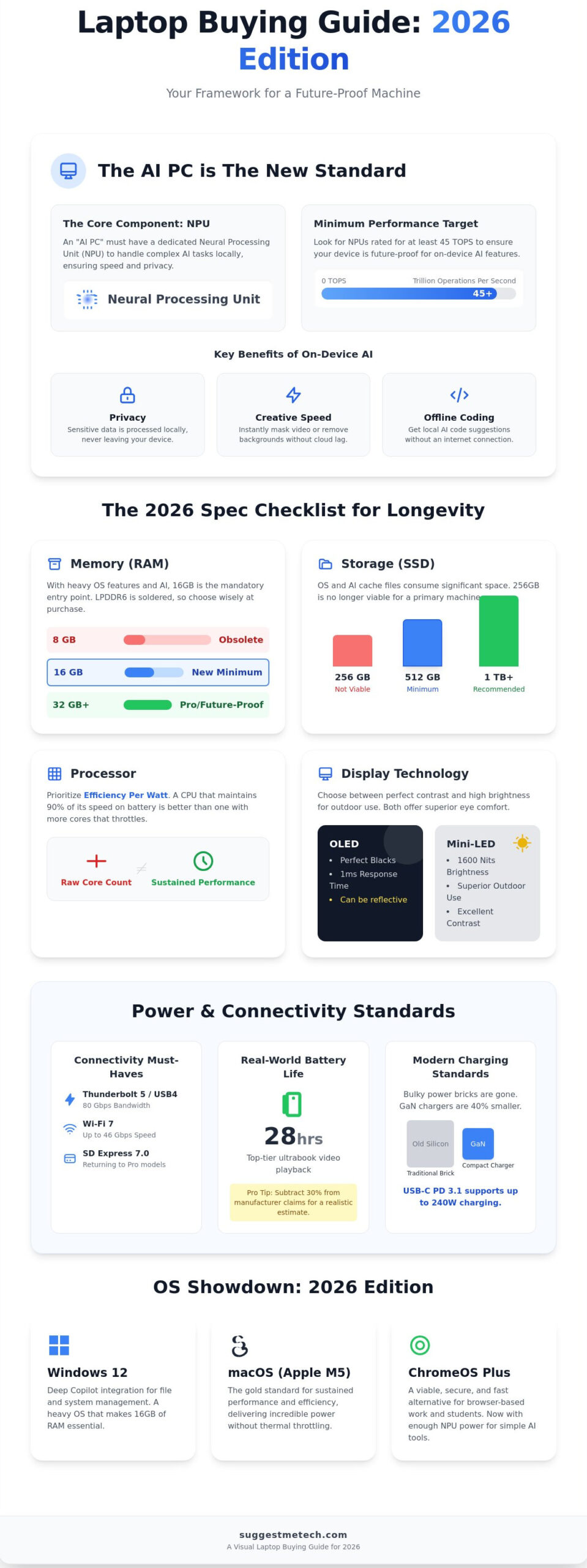
An AI PC is a device with a dedicated NPU capable of 40+ TOPS (Trillion Operations Per Second). This hardware allows your laptop to handle complex tasks locally rather than sending your data to a remote server. You’ll see the biggest impact in three specific areas:
- Privacy: Sensitive data for live translation or personal assistant queries stays on your local drive.
- Creative Speed: Video masking or background removal happens in seconds.
- Coding: Local AI models can suggest code snippets without an active internet connection.
Windows vs. Mac vs. ChromeOS in 2026
Windows 12 is now the standard. It features deep Copilot integration that manages your file system and system settings automatically. It’s a heavy OS, which is why that 16GB RAM floor is so vital for performance. Apple’s M5 MacBooks remain the gold standard for sustained performance without thermal throttling. For users who live in a browser, Chromebook Plus models now offer enough local storage and NPU power to run simplified AI tools. These machines are a viable alternative for 85 percent of student tasks. Understanding these shifts is the first step in using this laptop buying guide 2026 to make a smart investment.
The 2026 Spec Checklist: How to Choose a Laptop for Longevity
Buying a machine that lasts until 2030 requires looking past raw clock speeds. In our laptop buying guide 2026, we prioritize efficiency per watt over simple core counts. Modern processors from Apple, Qualcomm, and Intel now focus on the Neural Processing Unit (NPU) to handle background AI tasks. A chip with 12 cores is useless if it throttles performance after twenty minutes of work. Look for processors that maintain 90 percent of their peak speed when running on battery power.
Memory is a one-time decision because most 2026 models use LPDDR6 RAM soldered directly to the motherboard. You can’t upgrade this later. While 8GB was once the standard, 16GB is now the bare minimum for a lag-free experience. If you work with high-resolution media or local AI tools, 32GB is the safer investment for longevity.
Storage requirements have also shifted. Don’t settle for 256GB. System files and AI cache folders take up significant space. 512GB is the floor for any reliable machine, but you should pay for 1TB if you store 4K video or large gaming libraries locally. If you’re confused by these specs, browse our expert reviews to see how they perform in real tests.
Display technology is a trade-off between battery life and visual pop. OLED panels offer perfect blacks and 1ms response times, but they can be reflective in bright rooms. Mini-LED screens hit 1,600 nits of peak brightness, making them superior for outdoor use. Both technologies now reduce blue light emissions by up to 70 percent compared to older IPS panels, which helps prevent eye strain during long sessions.
Port Selection and Connectivity
Your desk setup depends on your ports. Thunderbolt 5 and USB4 are now standard on mid-range and premium laptops, offering 80Gbps of bandwidth for dual 6K monitors. Wi-Fi 7 is a must-have for 2026, delivering speeds up to 46Gbps and lower latency in crowded areas. Chassis design has also moved back toward utility; many 14-inch and 16-inch pro models have brought back the SD Express 7.0 slot for photographers.
Battery Life and Charging Standards
Bulky power bricks are finally disappearing. Most 2026 laptops ship with GaN (Gallium Nitride) chargers that are 40 percent smaller than traditional silicon versions. With USB-C Power Delivery (PD) 3.1, you can charge your laptop at up to 240W using a single universal cable. To find the “Real World” battery life, subtract 30 percent from the manufacturer’s claim. They usually test with 150 nits of brightness and all wireless radios turned off.
Best Laptops 2026: Recommendations by Use Case
Selecting the right machine requires looking past marketing buzzwords to find hardware that fits your daily routine. This laptop buying guide 2026 identifies the top performers based on rigorous testing and hardware specifications. Most users will find their ideal match in a 14-inch ultrabook that weighs under 1.3kg while delivering at least 15 hours of real-world battery life.
Top Picks for Business and School
For professionals who prioritize reliability, the Lenovo ThinkPad X1 Carbon Gen 14 remains the gold standard. It features a reinforced carbon fiber chassis weighing just 1.1kg and a keyboard with 1.5mm key travel that stays comfortable during 10-hour workdays. It includes integrated 5G connectivity and a physical webcam shutter for enhanced security.
Students should look at the MacBook Air M5. Its 3nm processor architecture allows for a fanless, silent design that lasts up to 22 hours on a single charge. It’s powerful enough for 4K video editing but portable enough to fit in a standard backpack. If you prefer a sustainable approach, the Framework Laptop 13 is the best choice. It holds a 10/10 repairability score, allowing you to swap out ports, memory, and even the mainboard as technology evolves.
Gaming and High-Performance Machines
Gaming in 2026 is defined by the RTX 50-series mobile GPUs. These chips utilize Blackwell architecture to deliver 30% better frames per watt than previous generations. This efficiency has led to a rise in thin-and-light gaming laptops that don’t sacrifice power. However, thermal throttling is still the biggest threat to performance. If a laptop’s cooling system can’t dissipate heat, the GPU will drop its clock speed, causing stuttering during gameplay. Look for models featuring vapor chamber cooling and liquid metal thermal compounds to maintain peak speeds.
Creative professionals need more than just raw power. A creative powerhouse requires a display with 100% DCI-P3 color accuracy and a Delta E score below 1.0 to ensure colors look exactly as intended. High-end workstations now feature Mini-LED panels with 1,600 nits of peak brightness, making them usable even in direct sunlight. To maximize your productivity at your desk, you should pair your new rig with the best keyboards for typing all day to avoid wrist strain during long editing sessions.
- The Best Overall: Focus on 16GB RAM and a 512GB SSD as the absolute minimum.
- The Business Pro: Prioritize MIL-STD 810H durability ratings.
- The Student Choice: Look for USB-C charging to reduce cable clutter.
- The Creative Powerhouse: Ensure the laptop has an SD Express 7.0 card slot for fast file transfers.
Don’t settle for a machine that almost fits your needs. Use this laptop buying guide 2026 to verify that your chosen model has the specific ports and thermal overhead required for your heaviest tasks.
5 Critical Mistakes to Avoid When Buying a Laptop
Buying a new computer is a high stakes decision. This laptop buying guide 2026 helps you navigate a market flooded with deceptive marketing and overpriced hardware. Avoiding these five common pitfalls will save you hundreds of dollars and years of frustration.
- Falling for “Fake” Amazon Brands: Search results often prioritize brands like SGIN or BiTECOOL. These manufacturers often list 16GB of RAM to look impressive, but they pair it with processors from 2020 that can’t handle modern browser tabs. Always verify the CPU generation on a site like CPUBenchmark before clicking buy.
- Ignoring the Keyboard and Trackpad: You’ll interact with these components for roughly 2,000 hours every year. Cheap laptops often have “mushy” keys with less than 1.1mm of travel. Look for at least 1.3mm to 1.5mm of key travel to avoid finger fatigue.
- Underestimating the Webcam: By 2026, 1080p has become the bare minimum. Professional remote work now standardizes on 1440p or 4K sensors. If you’re frequently in meetings, a grainy 720p camera makes you look unprofessional, regardless of your lighting setup.
- Buying for “Today Only”: Most modern laptops have soldered RAM and storage. If you buy 8GB of RAM today, you can’t upgrade it in 2027 when software demands increase. Aim for 16GB of RAM and 512GB of SSD space to ensure your machine lasts at least four years.
- Overpaying for 4K Screens: On a 13-inch or 14-inch screen, the human eye struggles to see the difference between 1600p and 4K. However, a 4K panel can drain your battery 25% faster. Stick to QHD or 2.5K resolutions for the best balance of clarity and endurance.
The “Sale” Trap: How to Spot Real Value
Retailers often inflate “original” prices right before a holiday to make a 20% discount look like 50%. Use price history tools like Keepa or CamelCamelCamel to see the actual 365-day price trend. Often, a 2025 flagship model on clearance offers better build quality and faster speeds than a 2026 “budget” model at the same price point. The best deals consistently appear during the Back to School window in late July and early August.
Thinking Beyond the Laptop
Your budget shouldn’t stop at the laptop itself. Set aside at least $150 for a high quality USB-C dock and a padded sleeve. If you’re expanding your creative setup, you might also need a digital camera for beginners if you’re starting a vlog. Finally, don’t skip accidental damage insurance. For mobile users, a single liquid spill or a cracked screen can cost $600 to repair, making a $100 protection plan a smart investment.
Ready to see our top-rated picks for this year? Check out our expert-tested laptop recommendations
Final Verdict: Finding Your Perfect 2026 Match
Choosing the right machine from this laptop buying guide 2026 comes down to one Golden Rule. You must match your hardware to your most demanding daily task. If you spend 90% of your time in browser-based apps but 10% editing 8K video, you don’t buy for the 90%. You buy for the 10%. This ensures your system won’t choke when deadlines matter most. We’ve seen users spend an extra $600 on features they never touch, while others struggle with 16GB of RAM when their specific workflow requires 32GB of LPDDR6 memory for stability.
SuggestMeTech prioritizes real-world testing over sterile lab benchmarks. Synthetic scores don’t tell you if a laptop’s fans whine during a 45 minute video call or if the chassis flexes when you’re typing on a tray table. Our 2026 evaluations focus on sustained performance over four hour sessions. We look for hardware that maintains 95% of its peak clock speed even after the thermal solution reaches its limit. A benchmark score is just a number; a laptop that stays cool during a three hour rendering job is a tool you can trust.
Use our comparison tools to filter by your specific “must-haves.” We recommend narrowing your list to exactly three finalists based on weight, port selection, and verified battery life. Once you’ve reached that final three, the choice often comes down to keyboard travel or aesthetic preference. We want to hear about your results. Did your 2026 purchase live up to the marketing hype, or did the battery life drop by 20% after the first six months? Your wins and fails help our community stay informed.
Your Personalized Tech Journey
We help you bridge the gap between the “Business” and “Creativity” categories. A business user might prioritize a 5MP webcam and a 14 inch footprint for travel. A creator needs a panel with at least 400 nits of brightness and 100% DCI-P3 color accuracy. The best laptop is the one you stop thinking about because it just works. It disappears into your workflow so you can focus on your actual output.
Our team updates our database weekly to include every major release from January 2026 to the present. If you’ve spotted a new workstation or a budget-friendly ultrabook we haven’t benchmarked yet, reach out. Got a suggestion for a laptop we should test? Let us know!
Take Control of Your 2026 Tech Investment
Choosing a new machine in a market that releases 50+ new models monthly requires a focus on future-proof specs like high-efficiency NPU chips and a minimum of 32GB of RAM. You’ve seen how avoiding the 5 critical mistakes can prevent a $500 loss in resale value down the road. This laptop buying guide 2026 provides the framework you need to navigate these choices with confidence.
We take the guesswork out of your search. Our experts provide reviews based on 100+ hours of hands-on testing for every model we recommend. We also integrate community-driven suggestions and real-world feedback from our community of 25,000 tech enthusiasts. Our unbiased comparisons focus on your actual user value rather than just technical specs. We’re here to help you make a choice you won’t regret.
Check out our Editor’s Picks for the Best Laptops of 2026
You’re now ready to pick a machine that stays fast and relevant for years to come.
Frequently Asked Questions
Is 16GB of RAM enough for a laptop in 2026?
16GB of RAM is the minimum standard for a reliable laptop in 2026. While 8GB was common a few years ago; modern AI-driven applications and browser demands now require at least 16GB to prevent system lag. If you handle 4K video editing or run local LLMs, you should opt for 32GB. This ensures your device stays fast as software updates become more resource-heavy over the next 3 years.
Should I buy a Windows laptop or a MacBook in 2026?
Your choice depends on whether you value ecosystem integration or software flexibility. MacBooks featuring M4 or M5 chips offer 20 plus hours of battery life and superior build quality for creative professionals. Windows laptops provide better value for gamers and users who need specific enterprise software. This laptop buying guide 2026 recommends Windows if you want more hardware variety from brands like Dell or Lenovo.
What is an AI PC and do I really need one?
An AI PC is a computer equipped with a dedicated Neural Processing Unit (NPU) capable of at least 45 TOPS. You need one in 2026 because major operating systems now use these processors for real-time translation, advanced photo editing, and battery optimization. Buying a laptop without an NPU today means you’ll miss out on 70 percent of the new productivity features released by Microsoft and Apple this year.
How much should I spend on a laptop for college in 2026?
You should budget between $700 and $1,000 for a college laptop that lasts four years. This price range secures a machine with a 14-inch OLED display, 16GB of RAM, and a processor like the Ryzen 7 or Core Ultra 5. Students in specialized fields like architecture or data science should expect to spend $1,400 or more to get a dedicated GPU for 3D rendering and complex simulations.
Are 2-in-1 laptops worth it or should I get a tablet?
2-in-1 laptops are worth the investment if you need a single device for both typing long essays and sketching. Modern convertibles weigh less than 2.8 pounds, making them nearly as portable as an iPad Pro but with a full desktop operating system. If your primary goal is reading or watching movies, a $500 tablet is cheaper. For actual work, the 360-degree hinge provides much better utility.
Can I upgrade the RAM or SSD in modern laptops?
Most modern laptops in 2026 feature soldered RAM that you cannot upgrade after purchase. About 85 percent of ultraportables allow you to swap the M.2 SSD, but memory is typically fixed to the motherboard to save space. Check the technical specifications for SO-DIMM slots if you want a machine you can improve later. This is a critical step in any laptop buying guide 2026 to avoid getting stuck with low memory.
What is the average lifespan of a laptop bought in 2026?
A high-quality laptop bought in 2026 should last between 4 and 6 years before the hardware feels slow. Battery health usually declines after 1,000 charge cycles, which happens around the 3-year mark for daily users. You can extend this lifespan by choosing a model with a modular design or a high repairability score from sites like iFixit, which recently rated several 2026 models a 7 out of 10.
Which laptop brand has the best customer support?
Apple consistently ranks first for customer support due to its Genius Bar network and 24/7 chat assistance. For Windows users, Dell provides the best enterprise-level service with their ProSupport plans that offer next-day onsite repairs. Lenovo follows closely, especially with their ThinkPad line which has a 95 percent parts availability rate. Choosing these brands reduces your downtime if a hardware failure occurs during a busy work week.

