

Most people think shared hosting is just the “cheap” option you outgrow in three months, but in 2026, that assumption could cost you a small fortune in unnecessary upgrades. You’ve probably heard the horror stories about websites crawling to a halt because a neighbor on the server spiked in traffic, or renewal bills that suddenly triple without warning. It’s exhausting to feel like you’re stuck choosing between a slow site and a drained bank account. At SuggestMeTech, we believe you shouldn’t have to compromise. You want a website that stays online 24/7 and loads instantly, all while keeping your overhead low.
This guide cuts through the sales jargon to show you how modern shared hosting has evolved into a highly optimized, AI-driven entry point that rivals expensive private servers. We’ll help you decide if this setup fits your specific goals or if your project truly needs more horsepower. We’re breaking down the hidden costs to watch for, the security features that are now mandatory, and our expert requirements for any provider this year. You’ll walk away with a clear understanding of what you’re paying for and the confidence to choose a host that won’t break your budget.
Key Takeaways
- Understand why shared hosting remains the most cost-efficient entry point for new websites by leveraging shared server resources and maintenance.
- Learn how to decode marketing terms like “unlimited bandwidth” to ensure your site has the actual resources it needs to stay online.
- Identify the exact performance benchmarks that signal when it’s time to move from a basic plan to more powerful VPS or dedicated options.
- Discover the essential 2026 security and AI features you must demand from a provider to protect your data and optimize loading speeds.
- Master the setup process with a practical checklist designed to help you avoid hidden renewal fees and technical launch errors.
Understanding Shared Hosting: The Entry Point for Modern Websites
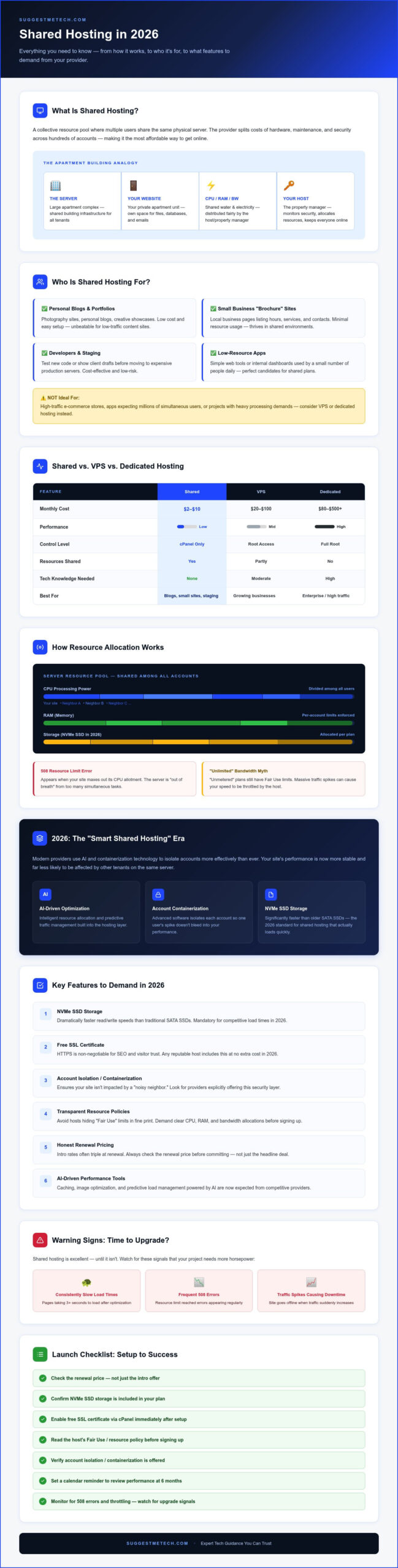
Shared hosting is a collective resource pool managed by a provider where multiple users share the same physical hardware. It remains the most popular entry point for new websites because it splits the costs of server maintenance, security, and high-end hardware among hundreds of different accounts. This makes it an incredibly affordable way to get a professional presence online without needing a background in systems administration.
The core value proposition here is extreme cost-efficiency. Instead of paying for an entire server that you likely won’t fully utilize, you only pay for a slice of it. In 2026, we have entered the era of “Smart Shared Hosting.” Modern providers now use advanced software to isolate individual accounts more effectively than ever before. This means that even though you’re sharing a server, your site’s performance is more stable and less likely to be affected by what your neighbors are doing. It’s a significant upgrade from the unpredictable hosting environments of the past.
The “Apartment Building” Analogy
Think of a server as a large apartment complex. You rent a specific unit within that building. While you have your own private space for your website files and databases, you share the building’s general infrastructure. In this scenario, the CPU, RAM, and bandwidth are like the shared water and electricity lines. If one neighbor leaves every tap running, the water pressure might drop for everyone else; however, the host acts as the property manager. They monitor the building, keep the front gate secure, and ensure that utilities are distributed fairly so that every tenant stays online.
Who is Shared Hosting Truly For?
Not every project requires the massive horsepower of a private server. Shared hosting is the ideal choice for projects that need to be reliable but don’t expect millions of visitors immediately. It’s a practical solution for several types of users:
For these users, the primary goal is a website that stays online 24/7 without a high monthly bill. Shared hosting provides exactly that balance, allowing you to focus on your content while the provider handles the technical heavy lifting.
How Shared Hosting Works: Resource Allocation and Performance
Managing a website shouldn’t feel like a full-time IT job. Most shared hosting plans come with a Control Panel, like cPanel, which acts as your site’s command center. It lets you manage files, emails, and databases through a simple interface rather than typing complex code. While the dashboard looks private, the physical reality is that your site shares its “engine” with many others. Modern providers now use containerization technology to keep these accounts separate, ensuring that one site’s processes don’t bleed into another’s space.
Marketing teams love the word “unlimited,” but in the hosting world, it’s often a bit of a myth. You’ll frequently see “unmetered bandwidth,” which sounds great until you hit a massive traffic spike. It’s vital to understand that unmetered bandwidth still has “Fair Use” limits. If your site suddenly starts pulling massive amounts of data, the host might throttle your speed to protect the rest of the server. If you’re confused by these terms, checking out our expert reviews at SuggestMeTech can help you find a provider with honest resource policies.
CPU and RAM: The Engine of Your Site
The server’s processing power (CPU) and memory (RAM) are divided among all users. If your site tries to perform too many tasks at once, you might see a “508 Resource Limit Reached” error. This is the server telling you it’s out of breath. To avoid this, prioritize hosts that use NVMe SSD storage in 2026. These drives are significantly faster than older SATA SSDs, allowing your site to read and write data almost instantly, which reduces the strain on the CPU.
The “Bad Neighbor” Effect and How to Avoid It
In the past, one site getting hit by a DDoS attack or a viral traffic surge could crash every other site on that server. This is the “bad neighbor” effect. Today, top-tier providers use Cloud Linux or similar resource isolation tools. These create virtual walls around your account. Even if the site next door is struggling, your resources remain protected. From a security perspective, this isolation also means a vulnerability in a neighbor’s outdated plugin shouldn’t give a hacker a backdoor into your files. Always look for “account isolation” in the feature list to ensure your site stays stable and secure.
Shared Hosting vs. VPS and Dedicated Hosting: Which Fits Your Budget?
Choosing the right hosting environment depends on two factors: your technical expertise and your financial overhead. For most beginners, shared hosting provides the best cost-to-performance ratio because the provider handles the complex server administration. If you’re looking for specific recommendations across these categories, our guide to the best web hosting services breaks down the top performers based on speed and reliability tests.
The Key Differences at a Glance
The primary distinction between these tiers is the level of management and resource isolation. Shared hosting is a “hands-off” experience; the host manages security patches, software updates, and hardware health. VPS hosting offers a dedicated slice of a server, giving you more power but often requiring you to handle your own configurations. Dedicated hosting is the “hands-on” peak, where you rent an entire physical machine for maximum performance at a premium price.
- Shared Hosting: Best for budgets under $10 per month. It often includes a free domain name for the first year, making it the most affordable way to launch.
- VPS Hosting: Ideal for growing sites that need guaranteed RAM and CPU but aren’t ready for the cost of a full server.
- Dedicated Hosting: Reserved for high-traffic enterprise sites or complex applications that require total control over the operating system.
When to Choose Shared Over VPS
Many new site owners feel pressured to upgrade to a VPS prematurely. You should stick with a shared plan if your site receives fewer than 20,000 monthly visitors. At this traffic level, the performance gains of a VPS are often negligible compared to the increased cost and technical headache. If you don’t want to spend your weekends running security patches or troubleshooting server errors, the managed nature of a shared plan is your best friend.
This simplicity is especially valuable if you’re starting a new blog or building a small business portfolio. You can focus entirely on creating content and growing your audience while the host ensures the lights stay on. Only consider moving to a VPS when you hit the “tipping point” where your site consistently slows down during peak hours or your monthly visitor count exceeds the limits of your current plan.
Key Features to Demand from a Shared Hosting Provider in 2026
In 2026, a basic shared hosting plan isn’t enough if it doesn’t include modern performance and security tools right out of the box. You shouldn’t have to pay extra for essential features that keep your site functional and safe. Providers have become much more competitive, which means you can now demand high-end technology even on a entry-level budget. SSL is the non-negotiable standard for site trust and SEO; it encrypts the connection between your server and your visitors to protect sensitive data. Without this digital certificate, browsers will flag your site as “Not Secure,” which can destroy your credibility instantly.
Beyond security, look for providers that embrace the rise of AI-driven optimization. Many modern hosts now include built-in tools that automatically compress your images and minify your website’s code. These small changes significantly reduce file sizes and improve loading speeds without any manual effort on your part. You should also ensure your host offers global performance through integration with Content Delivery Networks (CDNs) like Cloudflare. By caching your content on servers worldwide, a CDN ensures your site loads quickly for a visitor in Tokyo even if your main server is in London. If you want to see which providers currently lead the pack in these categories, you can find our latest recommendations at SuggestMeTech.
The “Must-Have” List for 2026
Your checklist for a new plan should prioritize speed and ease of use. Don’t settle for outdated hardware or complex setups that slow you down. Demand these three core features:
- Free SSL Certificates: Look for automated “Let’s Encrypt” integration so your security never expires.
- One-Click WordPress Installation: You should be able to launch your site and create staging environments to test changes safely.
- NVMe SSD Storage: These drives are the gold standard for 2026, offering significantly faster database queries than older storage types.
Support and Reliability Standards
Technical issues don’t follow a 9-to-5 schedule. This is why 24/7 Live Chat support is essential for beginners. If your site goes down at 2 AM, you need a real human who can help you fix it immediately rather than waiting days for an email response. You should also look for a 99.9% Uptime Guarantee. In practical terms, this means your site shouldn’t be offline for more than a few minutes each month. While no host is perfect, this guarantee shows they have the infrastructure to keep your business online around the clock.
Finally, make sure the interface is intuitive. Modern control panels have evolved to be user-friendly and don’t require a computer science degree to navigate. You should be able to manage your emails, backups, and domain settings from a single, clean dashboard. If the backend looks like it was designed in the 90s, it’s a sign the provider hasn’t invested in their own technology recently.
Transitioning from Setup to Success: Your Shared Hosting Checklist
Once you’ve finished the checkout process, the clock starts on your website’s success. A shared hosting account is a powerful tool, but it’s only as effective as the configuration you put behind it. You need to move quickly to secure your brand and optimize your site before the first visitor arrives. Following a structured launch plan ensures you don’t miss the small technical details that often lead to slow speeds or security vulnerabilities later on.
Launch Day Essentials
First, connect your domain name by updating the nameservers in your registrar’s dashboard. This tells the internet exactly where your website files live. Next, set up your professional email addresses. Using a branded address like info@yourdomain.com builds immediate trust that a generic Gmail account simply can’t match. Finally, install a lightweight theme. Since you’re working within a shared environment, bloated themes with heavy code will tank your performance. Stick to minimal designs that prioritize speed and clean code over flashy, resource-heavy animations.
Monitoring Your Growth
Don’t just set it and forget it. Use a third-party uptime monitor to track your site’s availability around the clock. This ensures your host is actually hitting that 99.9% guarantee we discussed earlier. You should also check your resource usage dashboard at least once a week. If you see consistent spikes in CPU or RAM usage, it’s a clear sign that your site is outgrowing its current environment. This is the moment to consider moving to a higher-tier plan or a VPS before your visitors start experiencing lag.
One of the biggest traps for new site owners is ignoring auto-renewal settings. Many providers offer a low introductory rate but triple the price upon renewal. Check these settings in your billing portal now so you aren’t surprised by a massive bill twelve months from now. You should also ensure that your SSL certificate is active and set to auto-renew. A single “Not Secure” tag in a visitor’s browser can drive away the majority of your traffic before they even see your content.
To keep things running at peak performance, implement a caching strategy immediately. This stores a static version of your pages so the server doesn’t have to work as hard for every new visitor. Remember that performance isn’t just about the server; it’s also about the user’s device. If you’re testing your site and it feels slow, it might be a local issue rather than a server problem. Knowing how to clear cache on iPhone or your desktop browser is a basic troubleshooting step every site owner should master to ensure they’re seeing the most recent, optimized version of their work.
Launch Your 2026 Digital Presence with Confidence
Choosing shared hosting in 2026 means you’re getting far more power and security than early adopters ever did. Modern infrastructure has evolved to include containerization and AI-driven optimization, ensuring your small business or personal blog stays competitive without a massive monthly bill. As long as you prioritize providers offering NVMe storage and robust security features like free SSL, you can focus on building your brand while the host handles the technical heavy lifting. It’s a practical, high-value entry point that scales with your ambition.
Success starts with choosing a partner that delivers on its promises. We’ve done the hard work for you by conducting real-world testing on live websites to see which hosts actually perform under pressure. Our team has evaluated over 50 providers for speed and uptime to bring you unbiased recommendations that fit every budget. Check out our top-rated web hosting providers for 2026 to ensure your site is built on a foundation that won’t let you down. Your first website is a big milestone, and with the right plan in place, you’re already one step ahead of the competition. We can’t wait to see what you build.
Frequently Asked Questions
Is shared hosting safe for my website?
Shared hosting is safe if your provider uses modern isolation technology like CloudLinux to prevent cross-site contamination. While you share a physical server, virtual walls keep your data private. You should also ensure your plan includes a free SSL certificate and automated backups. These standard 2026 features protect your visitors and allow you to restore your site quickly if a security vulnerability ever occurs in a third-party plugin.
Can shared hosting handle high traffic spikes?
Shared hosting can handle moderate traffic increases, but it isn’t designed for viral surges or massive marketing campaigns. Most entry-level plans comfortably support up to 20,000 monthly visitors. If you expect a sudden influx of thousands of users at once, the server’s shared resources might struggle to keep up. In these cases, you’ll see slower loading times or temporary downtime until the traffic levels return to a normal range.
Do I get a dedicated IP address with shared hosting?
You typically share an IP address with other websites on the same server. For most projects, this has no impact on your SEO or site performance. If your specific project requires a dedicated IP for specialized software or an older SSL configuration, most providers offer this as a paid monthly add-on. However, modern SNI technology means a dedicated IP is no longer a requirement for having a secure, professional website in 2026.
What happens if my website exceeds the shared hosting limits?
If your site consistently hits its CPU or RAM limits, the host will likely throttle your performance or display a “508 Resource Limit Reached” error. This prevents your site from crashing the entire server. Most providers will send you a notification suggesting an upgrade to a higher-tier plan or a VPS. Your site won’t be deleted, but it may become temporarily inaccessible to visitors until the total resource usage drops.
Is shared hosting the same as WordPress hosting?
Shared hosting is a general category, while WordPress hosting is a specialized version of it. Managed WordPress plans often run on shared servers but include specific server-side caching and security patches tailored for the WordPress platform. If you’re building a site with a different tool, a general shared plan is better. If you’re committed to WordPress, a specialized plan might offer slightly better performance and easier one-click updates for your themes.
Can I host multiple websites on one shared hosting account?
Most mid-tier and premium plans allow you to host multiple domains under a single account. The starter or “Basic” plans usually limit you to just one website to keep costs low. If you plan to run several small blogs or portfolios, upgrading to a “Pro” plan is often the most cost-effective choice. Just remember that all these sites will draw from the same pool of shared CPU and RAM resources on the server.
How much does shared hosting typically cost in 2026?
Prices for a reliable plan generally range from $2 to $10 per month depending on the length of your commitment. You’ll often find the lowest rates when you pay for two or three years in advance. It’s important to watch for renewal rates, as the price frequently increases after the initial promotional period ends. Always check the billing terms to ensure the long-term cost fits your project’s budget before you finalize your purchase.
Is it easy to migrate away from shared hosting later?
Moving your site to a VPS or a different provider is a straightforward process. Most hosts offer free migration services to help you transfer your files and databases without downtime. If you’re doing it yourself, you can use backup plugins or manual FTP transfers to move your data. Starting on a shared plan doesn’t lock you in; it’s a flexible foundation that allows you to upgrade easily as your audience grows and your needs change.

