
What if the secret to your digital security in 2026 isn’t a complex string of characters, but the fact that you never have to type a password again? We’ve all felt that sinking feeling when a login failed message appears because we’ve forgotten yet another unique combination of symbols and numbers. It’s frustrating to juggle dozens of accounts while worrying that a single breach could expose your entire life. Finding the best password manager shouldn’t add to your stress; it should eliminate it. You deserve a solution that makes your digital life feel effortless rather than like a constant chore.
This guide cuts through the noise to help you discover the most secure and user-friendly tools available today. We’ll show you how to protect your identity with vaults that sync across every device and handle the latest Passkey technology. You’ll learn about services that generate unbreakable credentials and offer simple, one-click migration from your old provider. SuggestMeTech has tested the top contenders to ensure you get a clear breakdown of which platform fits your specific needs, whether you’re a power user or just want total peace of mind.
Key Takeaways
- Understand why traditional security is failing against AI-driven phishing and why an encrypted digital vault is now a mandatory tool for your digital life.
- Learn how to evaluate the best password manager based on critical 2026 criteria like zero-knowledge encryption and native Passkey support.
- Discover our top-tested picks for different needs, including the most reliable open-source options and the best “set and forget” services for non-techies.
- Get a step-by-step framework for assessing your device ecosystem and budget to ensure your vault syncs perfectly across iOS, Android, and desktop.
- Find out which specific provider won our final verdict for the average user after rigorous hands-on testing and real-world application.
Why a Password Manager is Essential in 2026
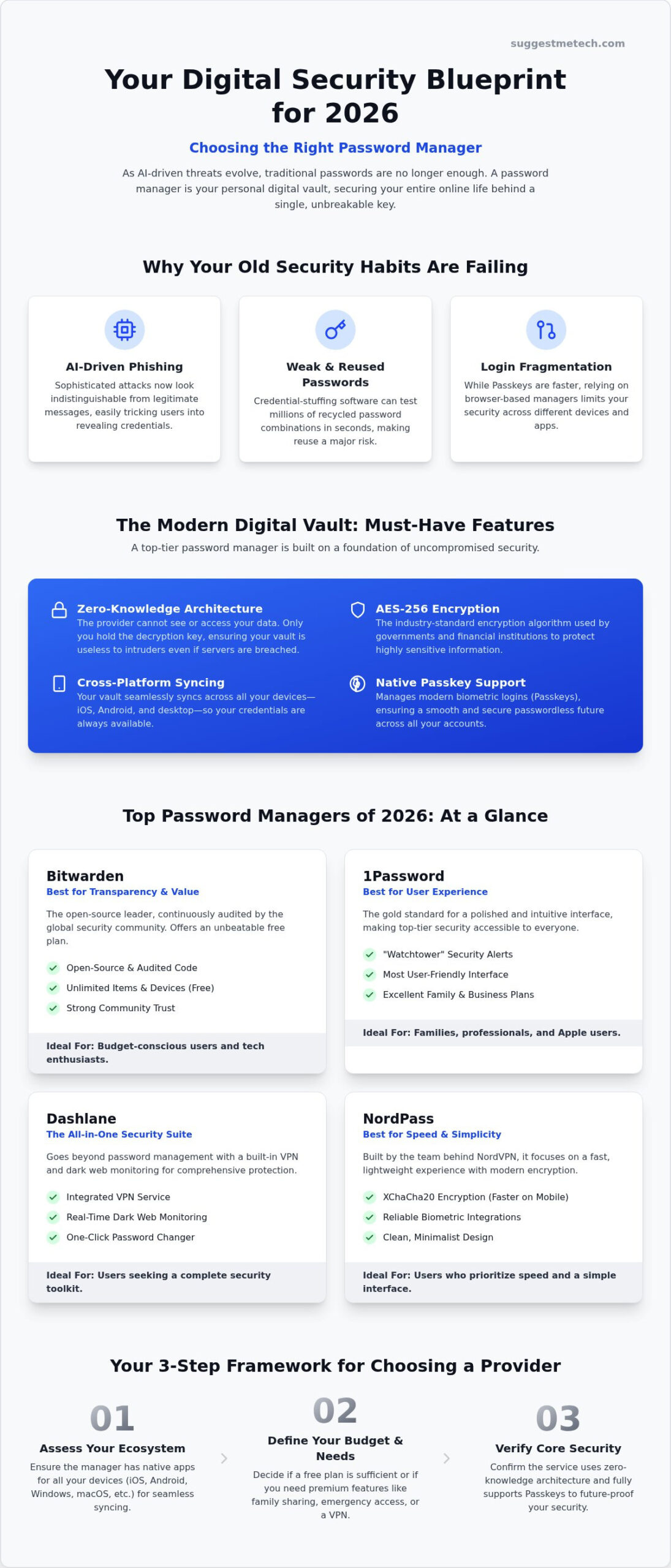
The digital landscape of 2026 is defined by AI-driven phishing attacks that look and sound indistinguishable from legitimate communication. Traditional passwords, even complex ones, are no longer enough to stop sophisticated credential-stuffing software that can guess millions of combinations in seconds. This is why using the best password manager has become a non-negotiable security standard. At its core, a password manager is an encrypted digital vault that stores your credentials, payment details, and identities behind a single, unbreakable key.
We’ve also seen a massive shift toward Passkeys. These biometric-based logins replace traditional strings of text with cryptographic keys stored on your device. While 2026 has made authentication faster, it has also made it more fragmented. Relying on browser-based managers like Chrome or Safari might seem easy, but they often lack the cross-platform flexibility and advanced security features power users need to stay protected across every app and operating system.
The Single Point of Failure Myth
Many people fear that putting all their digital eggs in one basket is risky. However, modern vaults use zero-knowledge architecture. This means the provider has no way to see your data; only you hold the key to decrypt it. It’s much safer to have one exceptionally strong master password protecting an AES-256 encrypted vault than to use 100 weak, recycled passwords that hackers can easily guess. These systems are designed so that even if the provider’s servers are breached, your data remains a scrambled, unreadable mess that’s useless to intruders.
Beyond Just Passwords
A vault does more than just fill in login boxes. It acts as a secure hub for your entire digital identity. You can store secure notes for recovery codes, credit card information for safer checkouts, and encrypted identities for filling out complex forms. This level of organization is particularly useful for managing technical assets like web hosting accounts, where losing access can take your entire business offline.
Most top-tier managers now include emergency access features. This allows trusted family members or business partners to request access to your vault if you’re ever unable to reach it yourself. It ensures your digital legacy isn’t lost while maintaining strict security protocols to prevent unauthorized entry. Choosing the best password manager for your needs means looking for these comprehensive features that go far beyond simple login storage.
The Best Password Managers of 2026: Our Top Picks
Selecting the right security tool is a personal decision that depends on your specific digital habits. To determine the best password manager for 2026, we tested each service against a strict rubric. We focused on zero-knowledge architecture, the reliability of cross-platform syncing, and overall value. A tool is only useful if it works every time you try to log in, regardless of whether you’re on a phone, tablet, or desktop.
Bitwarden continues to lead the pack for transparency and affordability. Because it’s open-source, the global security community constantly audits its code for vulnerabilities. Its free tier is exceptionally generous, allowing you to sync unlimited items across an unlimited number of devices. If you’re looking for a polished, premium experience, 1Password remains the gold standard. Its “Watchtower” feature proactively alerts you to weak passwords and compromised accounts, while its interface remains the most user-friendly on the market.
Dashlane is the top choice for users seeking a comprehensive security toolkit. It includes a built-in VPN and real-time dark web monitoring, providing a layer of protection that goes beyond simple credential storage. For those who value speed above all else, NordPass is a strong contender. It uses the XChaCha20 encryption algorithm, which is generally faster to process on mobile devices, and it offers some of the most reliable biometric integrations we’ve tested.
Best for Families and Students
Best for Business and Professionals
For professionals, security is about risk management and scalability. Business-grade managers offer centralized administrative consoles that allow IT managers to enforce strong password policies across the entire company. These versions often include role-based permissions, ensuring that employees only have access to the specific tools they need for their jobs. They also integrate seamlessly with Single Sign-On (SSO) providers and developer tools. If you’re building a secure workflow for your team, you can explore our expert tech guides to find the right fit for your professional stack.
Key Security Features You Must Not Ignore
In 2026, security isn’t just about the length of your master password; it’s about the underlying architecture of your vault. We’ve entered a post-quantum era where traditional encryption methods face new threats. The best password manager for this year must prioritize forward-thinking protocols like XChaCha20 or post-quantum resistant algorithms. Zero-knowledge encryption remains the absolute baseline for privacy. This ensures that your data is encrypted locally on your device before it ever reaches a server, meaning the provider has no way to see your credentials.
Passkey support has transitioned from a niche feature to a core requirement. Your manager should natively store and synchronize these cryptographic keys across all your devices. This allows you to log in to supported sites using biometrics instead of a traditional password. Additionally, advanced 2FA options are vital. You should look for tools that support hardware security keys like YubiKeys and integrated TOTP (Time-based One-Time Password) generators. These methods are significantly more secure than SMS-based codes, which are vulnerable to SIM-swapping attacks.
Real-time data breach alerts are another essential layer of defense. Top-tier vaults constantly monitor the dark web for your email address and specific account details. If your information appears in a known leak, you’ll receive an immediate notification to update your credentials before hackers can exploit them. SuggestMeTech’s testing found that the speed and accuracy of these alerts vary wildly between providers, so choosing a service with a proven track record is critical.
The Importance of Multi-Device Sync
You need your vault to be accessible wherever you work. Whether you’re using one of the best laptops of 2026 or a mobile device, the experience should be seamless. While browser extensions are convenient, native desktop apps often provide a more secure environment. They operate outside the browser’s sandbox, which reduces the risk of certain cross-site scripting attacks. Mobile accessibility is equally important, as you’ll often need to fill in app logins or payment details while on the go.
Biometric Integration and Security
Using FaceID or fingerprint sensors provides the fastest way to unlock your vault without compromising security. Biometrics are often safer than master passwords in public spaces where “shoulder surfing” is a risk. Biometric salting adds a unique, random string of data to your biometric template before it’s stored, ensuring that your actual physical data is never saved in a reversible format. This ensures that even if someone gained access to the local storage of your device, they couldn’t reconstruct your fingerprint or facial map. When choosing the best password manager, ensure the biometric implementation is robust and integrates natively with your device’s secure enclave.
How to Choose and Set Up Your Password Manager
Finding the best password manager for your lifestyle starts with an honest look at your tech ecosystem. If you jump between an iPhone, a Windows laptop, and an Android tablet, you need a service that offers robust cross-platform support. Don’t settle for a tool that only works on one operating system. You should also determine your budget early on. While free tiers are excellent for individuals, premium plans often unlock critical features like encrypted file storage or integrated VPNs for extra privacy. Take a moment to list your “must-have” features, such as family sharing or hardware key support, before committing to a subscription.
Once you’ve picked a provider, download the app and create your master password. This is the only credential you’ll need to remember, so make it long and unique. Avoid common phrases or personal details. Think of it as the ultimate key to your digital life; it needs to be unbreakable yet memorable enough that you never lose access to your vault. Many modern managers also provide a recovery kit or emergency key. Print this out and store it in a physical safe or a secure location offline.
The Safe Migration Process
Many users hesitate to switch because they fear losing years of saved logins. Moving your data is actually quite simple if you follow a structured path. First, export your current passwords from your browser or old manager into a CSV file. This file is unencrypted, so you must handle it with extreme care. Import that file directly into your new manager’s web vault. Most top-tier services have dedicated import tools for Chrome, Safari, and major competitors to make this transition seamless.
The most important step is the “Clean Up” phase. Once you’ve verified that all your accounts have moved successfully, delete the CSV file from your computer immediately. Empty your trash bin and clear your browser’s saved password list. Leaving unencrypted credentials on your hard drive creates a massive security hole that defeats the purpose of your new vault.
Optimising Your Workflow
A password manager should make your life easier, not harder. Enable autofill settings on your mobile devices right away. This allows your phone to suggest credentials directly inside apps and mobile browsers. You should also install the browser extension on your desktop to handle logins and payment forms with a single click. To keep your security apps running at peak performance, you might need to occasionally perform some device maintenance. You can learn how to clear cache on iPhone to ensure your biometric sensors and autofill scripts trigger without delay. If you’re ready to secure your entire digital footprint, explore our full library of tech reviews for more expert recommendations.
Final Verdict: Which Manager Should You Choose?
Deciding on the best password manager for your needs in 2026 comes down to balancing technical control with daily convenience. For the average user who wants a seamless experience across multiple devices, Bitwarden remains our top overall recommendation. Its commitment to open-source transparency and a robust free tier makes it accessible without compromising on high-end security standards. If you prefer a more polished interface that handles the heavy lifting for you, 1Password is the ideal “set and forget” solution. It offers a refined user experience that feels intuitive even for those who aren’t tech-savvy.
Investing in a premium manager is a small price to pay for superior digital hygiene. Paid versions often include advanced features like real-time dark web monitoring, priority support, and encrypted file storage. These tools act as an early warning system for your digital identity, alerting you to breaches before they become catastrophes. Transitioning to a paid service ensures you have the most resilient defense against the evolving phishing threats we face today.
Before you finalize your setup, use this checklist to ensure your digital life is fully secured:
- Create a unique master password: Ensure it’s at least 16 characters and isn’t used anywhere else.
- Enable multi-factor authentication: Use a hardware key or a TOTP app rather than SMS codes.
- Store your recovery kit: Keep a physical copy of your emergency access codes in a safe place.
- Purge old data: Delete saved passwords from your browsers and clear your cache to remove unencrypted remnants.
- Audit your accounts: Use your manager’s security dashboard to identify and update weak or reused passwords.
SuggestMeTech Recommendation
Your choice should align with your technical comfort level and your household’s needs. If you enjoy configuring your own security settings and value open-source software, Bitwarden is your best bet. Families and professionals who want a streamlined, high-performance tool should look toward 1Password or Dashlane. Most of these providers offer a 14 or 30-day free trial. We highly encourage you to test the interface on both your desktop and mobile device before committing to a long-term plan. A security tool is only effective if you actually enjoy using it every day.
We want to hear from our community to help refine our future guides. Which manager are you using in 2026, and has it caught any recent data leaks for you? Your feedback helps us provide better, real-world advice for everyone. Share your experience with us so we can continue to demystify these essential security tools together.
Secure Your Digital Future Today
Protecting your identity doesn’t have to be a technical headache. You’ve now seen how the right tools simplify your life while providing ironclad security against modern AI-driven threats. Remember that zero-knowledge architecture and native passkey support are no longer optional extras. They’re the mandatory standard for 2026. Whether you opt for a versatile open-source vault or a polished family plan, the best password manager is the one that fits your specific device ecosystem and daily habits. Don’t forget to complete the “clean up” phase by purging old browser data once your migration is finished.
If you’re ready to upgrade your security stack, check out our top-rated security tools on SuggestMeTech. We’ve done the heavy lifting with expert-tested recommendations and practical guides designed for real-world tech challenges. Our zero-knowledge focused reviews ensure you’re getting advice you can trust for both your personal and professional data. We’re here to help you navigate every complex tech choice with confidence and clarity.
Taking this one small step today will give you total peace of mind for years to come. You’ve got the knowledge; now it’s time to lock down your vault and enjoy a safer, more efficient digital experience. Stay secure and keep exploring.
Frequently Asked Questions
Is it safe to store all my passwords in one manager?
Yes, it is significantly safer than using weak, repeated passwords or storing them in unencrypted documents. Modern vaults use zero-knowledge encryption. This means your data is scrambled locally on your device before reaching any server. Even if a provider suffers a breach, hackers see only unreadable code. This centralized approach allows you to maintain unique, complex credentials for every account without the risk of forgetting them.
What happens if I forget my master password?
If you lose your master password, you might lose access to your vault permanently due to zero-knowledge architecture. Providers don’t store your password, so they can’t reset it for you. To prevent this, most services provide a physical recovery kit or emergency access key during setup. You should print this document and store it in a secure, offline location like a home safe or a bank box.
Can a password manager be hacked?
While no system is completely immune, reputable managers are designed so that a server breach doesn’t expose your data. Because of end-to-end encryption, your master password never leaves your device. Hackers would need both your master password and your physical device or 2FA method to gain entry. This layered defense makes them much harder to compromise than standard browser storage or individual website databases.
Do I still need a password manager if I use Passkeys?
Yes, you still need a manager to organize and sync your Passkeys across different platforms. While Passkeys replace traditional passwords for some sites, many services in 2026 still rely on alphanumeric strings. The best password manager will act as a unified hub, storing both your legacy passwords and your modern Passkeys. This ensures a consistent login experience whether you’re using a fingerprint sensor or a traditional login.
Is a free password manager good enough for 2026?
A free manager can be sufficient if you choose a reputable provider like Bitwarden, which offers unlimited syncing on its free tier. However, you’ll miss out on advanced security features like dark web monitoring, priority support, and encrypted file storage. For most users in 2026, the small investment in a premium plan is worth the added protection against sophisticated AI-driven phishing and credential-stuffing attacks.
What is the best password manager for small businesses?
Bitwarden and 1Password are currently the top choices for small businesses due to their robust administrative controls. These platforms allow you to manage employee access through a centralized console and enforce strong security policies. They also integrate with Single Sign-On (SSO) systems. This makes it easier to onboard new team members while maintaining strict role-based permissions for sensitive company data and client information.
How do I transfer my passwords from Chrome to a manager?
You can transfer your data by exporting your Chrome passwords as a CSV file and then importing that file into your new manager’s web interface. Once the import is complete, you must immediately delete the unencrypted CSV file from your computer and clear your browser’s saved list. This prevents a migration gap where sensitive credentials remain exposed on your hard drive after you’ve moved to a secure vault.
Can I share passwords with my family using these tools?
Yes, most top-tier managers offer family plans that include shared vaults for communal logins like streaming services or Wi-Fi passwords. These plans allow you to share access without actually revealing the raw password to other family members. It’s a practical way to keep everyone in your household secure while ensuring that important credentials remain accessible to those who need them in an emergency.

