

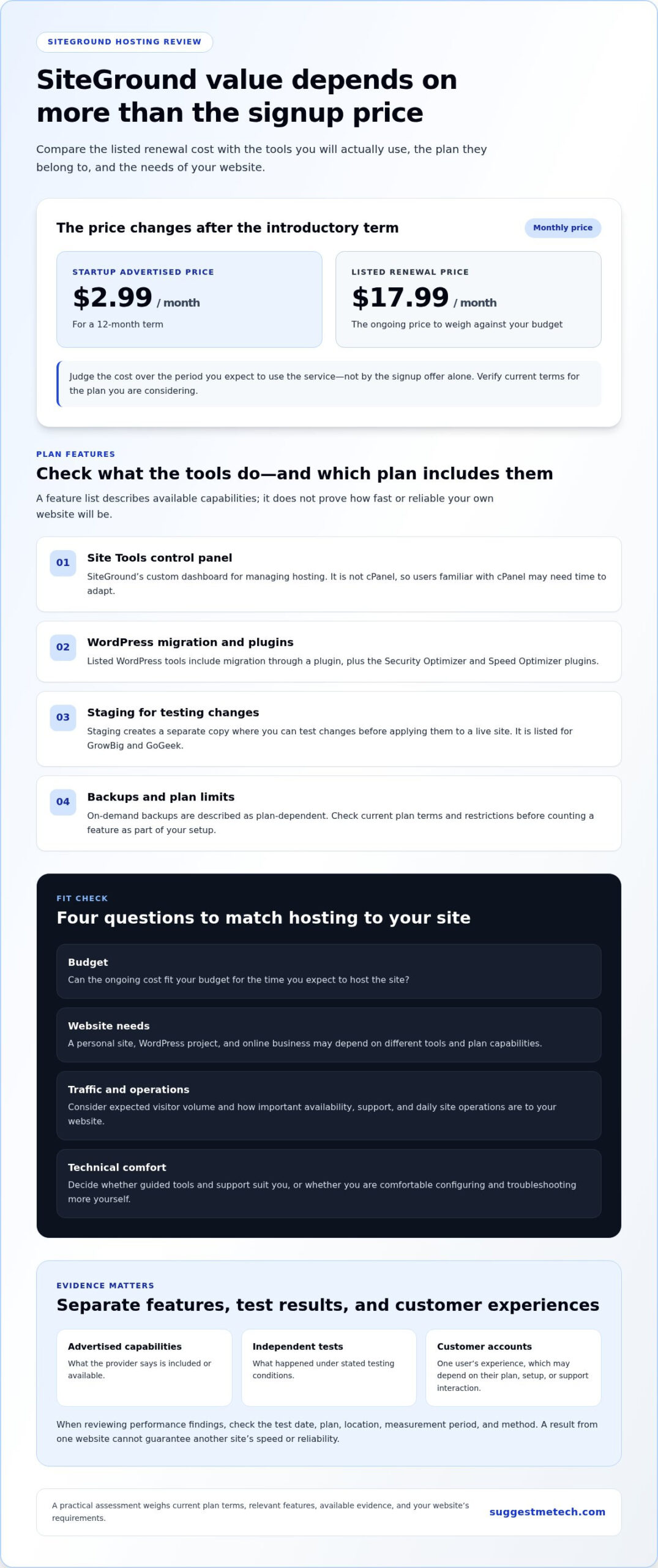
Could a hosting plan that looks affordable at signup still be poor value over time? SiteGround’s entry-level StartUp plan is advertised from $2.99 a month for a 12-month term, while its listed renewal price is $17.99 a month. This siteground hosting review weighs that price change alongside the features and support that may make the higher long-term cost worthwhile.
Whether SiteGround’s performance, security tools, and WordPress features make a practical difference depends on what you’re building and what you’re willing to spend. This review examines the plan details and trade-offs for website owners, from bloggers and small businesses to agencies, with an emphasis on fit and longer-term value rather than the introductory offer or a single performance claim.
Quick Answer
SiteGround may suit website owners who value guided site management, WordPress tools, and support, provided the plan’s ongoing cost fits their budget. Compare the renewal price, features, restrictions, and relevant performance evidence with your site’s needs. Owners of simple websites who prioritize low costs may find a leaner hosting fit more practical.
Key Takeaways
- This siteground hosting review distinguishes advertised features from independently measured results, so you can judge what the evidence supports.
- Check which features apply to the specific plan you’re considering before treating them as part of your website setup.
- Assess uptime, speed, security, and support separately instead of relying on a single performance claim.
- Match SiteGround’s reported strengths and trade-offs to your site’s purpose, budget, and support needs.
- Use a practical decision process: define your requirements, verify current terms, compare evidence, and choose the hosting fit that makes sense for you.
What this SiteGround hosting review evaluates, and what it cannot prove
This siteground hosting review assesses SiteGround’s advertised capabilities, usability, and available evidence about performance, security, and support. It can help you assess whether the service may suit your website, but it can’t guarantee how your own site will perform. Results and customer experiences vary with the plan, website setup, and usage.
Web hosting stores a website’s files on internet-connected servers and makes them available to visitors. A useful review distinguishes what a provider says its service includes from what an independent test measures. A feature list describes potential capabilities, but it doesn’t demonstrate a particular site’s speed or reliability.
How to read a hosting review without overvaluing one score
Separate three kinds of evidence: advertised capabilities, independent test findings, and individual customer opinions. Each answers a different question. A provider’s feature description tells you what it says is available. A test reports what happened under specific conditions. A customer review describes one person’s experience, which may depend on their plan, setup, or support interaction.
Check the test date, plan, location, measurement period, and method when assessing performance findings. A speed result from one site can’t predict another site’s loading time: page size, plugins, traffic, caching, and visitor location all matter. Similarly, a positive account of customer support reflects that reviewer’s interaction, not a promise that every customer will have the same experience.
Review evidence is information gathered from stated sources or tests under specific conditions; it can inform a decision but cannot guarantee results for every plan, website, or user. This review distinguishes provider claims from outside findings and customer accounts, and does not present an unreported benchmark as a firsthand test. A general background source, such as the SiteGround Wikipedia page, can provide company context, but it is not a substitute for current plan terms or disclosed performance testing.
Which website owners are considering SiteGround?
The right evaluation depends on what you’re hosting. A personal website may need straightforward site management and predictable costs. A WordPress project may rely more on platform-specific tools, while an online business may place greater importance on availability, support, and day-to-day operations. These are different requirements, not reasons to assume every site needs advanced features.
Use your own circumstances to assess fit:
- Budget: Consider the cost over the period you expect to use the service, not just the signup offer.
- Traffic expectations: A low-traffic portfolio and a busy store have different demands. Estimate visitor volume to identify which capabilities matter.
- Technical comfort: Decide whether you prefer guided tools and support or are comfortable configuring and troubleshooting more yourself.
The sections that follow compare SiteGround’s features and available evidence with these practical needs, rather than treating one score or a long feature list as a complete verdict.
SiteGround’s hosting features and usability: what to assess
SiteGround’s feature set includes a custom control panel, WordPress tools, and plan-dependent options such as staging and on-demand backups. Their value depends on the website you manage and the plan you choose. Compare each capability with a real task you need to complete, then check its availability and restrictions in the current plan terms.
Setup and day-to-day website management
A control panel is the dashboard used to manage a hosting account and its website. SiteGround calls its custom panel Site Tools, rather than cPanel. A panel brings hosting tasks together in one place. Beginners may appreciate a guided interface, while users accustomed to industry-standard tools may need time to adapt to a proprietary one.
Consider which tasks you’ll manage regularly and whether the interface suits your technical comfort. For example, a simple personal site may need only basic account and website controls, while a business site with several installations may call for more frequent management. Don’t assume a long feature list improves your workflow unless you expect to use those features.
WordPress and online-store considerations
SiteGround’s WordPress tools are relevant to WordPress sites, but they don’t make every plan or setup equivalent. The listed tools include automated migration through a plugin and the Security Optimizer and Speed Optimizer plugins. Staging, which lets you test changes on a separate copy before applying them to a live site, is listed for GrowBig and GoGeek.
WooCommerce is a useful example of a more involved WordPress project, but its presence alone says nothing about store performance. Consider your product catalogue, extensions, traffic patterns, and the consequences of downtime. Match those demands to plan limits and current compatibility information instead of assuming a tool or feature applies to every tier.
| Capability | Practical value | Best-fit user |
|---|---|---|
| Site Tools control panel | Provides a custom dashboard for hosting management; users accustomed to cPanel may need to adapt. | Site owners open to using SiteGround’s interface. |
| Automated WordPress migration plugin | Provides a migration route for moving a WordPress site. | WordPress owners planning a host move. |
| Staging on GrowBig and GoGeek | Allows testing changes away from the live website. | WordPress users who update or redesign their sites. |
| On-demand backups on GrowBig | Offers an additional backup option when making planned changes. | Site owners who want a backup before a specific update. |
| Git integration on GoGeek | Supports version-control workflows for managing code changes. | Developers and teams using Git. |
Use the table as a shortlist, not a guarantee that a feature fits every account. Plan names, included tools, and restrictions can change, so check the current terms for the tier you’re considering. This siteground hosting review is most useful when it connects a feature to a real task, such as testing a WordPress update. For broader context, explore technology reviews that compare how providers package their capabilities.
SiteGround performance, security, and support: weighing the evidence
Performance, security, and support are separate considerations: whether a website remains reachable, how quickly its pages load, what protections are included, and how support performs. Available review findings offer useful signals, not guarantees. One published assessment describes uptime positively, site speed less favorably, and security and support strongly. Those observations need context before they can guide a specific hosting decision.
What uptime and site speed tell you
Uptime measures whether a website is available to visitors; page speed measures how quickly its pages load. They both affect the visitor experience, but they aren’t interchangeable. Uptime tells you whether a site can be reached, while page speed tells you how quickly it responds.
The available assessment characterizes SiteGround’s uptime positively and its speed less favorably. Its summary doesn’t provide a test date, measurement period, or methodology, so it can’t support a numerical performance comparison or predict results for every customer. A site’s theme, plugins, caching setup, and visitors’ locations can affect loading time. A lean blog and a store with large images and multiple add-ons may behave differently on the same hosting service.
| Evidence source | Reported finding | Limitation | Reader relevance |
|---|---|---|---|
| Published review assessment | Describes uptime positively and speed less favorably. | The available summary doesn’t state the test method, date, or measurement period. | Use as an editorial signal, not a forecast for your site. |
| SiteGround security feature descriptions | List SSL certificates, a web application firewall, an anti-bot system, and automated backups. | A listed feature doesn’t independently demonstrate how well it performs in practice. | Compare included protections with your site’s security needs. |
| Published support assessment | Describes support as fast and helpful. | This is one review’s assessment, not a guarantee of each customer’s experience. | Consider it alongside the current support channels and terms. |
| Individual customer reviews | May describe specific support or hosting experiences. | Without dated, usable review evidence, they don’t establish a broad service trend. | Look for recent, detailed accounts relevant to your situation. |
How to assess security and customer support claims
SiteGround’s listed security tools describe what the provider says it includes; they don’t, by themselves, prove an independently tested security outcome. For example, a firewall is designed to filter potentially harmful web traffic, while backups can help restore site data. Their value depends on implementation, plan terms, and the website’s needs.
Positive assessments of SiteGround’s security and support should be understood as findings from the review evidence, not universal guarantees. Before choosing a plan, check current security inclusions, support channels, and service terms. Weigh each source separately rather than turning one favorable account into a promise about availability, speed, protection, and assistance.
Who should choose SiteGround, and who may prefer another hosting fit?
SiteGround may suit website owners who value its management tools, WordPress features, or the support described in the review evidence. It may be less compelling for someone with a simple site whose main priority is keeping hosting costs low. The right fit depends on what you need hosting to handle and the current terms of the plan.
Consider your website’s purpose, expected traffic, budget over time, and comfort with setup or troubleshooting. A feature is valuable when it addresses a real need.
When SiteGround may make sense
SiteGround is worth considering if guided site management, WordPress tools, or access to support are priorities. For example, a WordPress publisher who wants to test changes on a staging copy may find a plan with that feature useful. Positive review findings on uptime and support can inform your decision, but they don’t guarantee the same experience for every site or customer.
A business website or online store could also be a potential fit if availability and help with hosting issues matter to its operations. That doesn’t guarantee more sales or make higher-tier capabilities necessary. Compare the tasks your site requires with the plan’s current inclusions, limits, and renewal terms.
When another hosting approach may fit better
Budget-conscious owners of personal sites should compare total value carefully. If you’re publishing a basic portfolio that rarely changes, tools for staging, development, or managing several sites may add little practical benefit. Paying for capabilities you won’t use can make a plan harder to justify, even when its feature list looks extensive.
Hosting categories also serve different needs. Shared hosting places multiple websites on the same server, while VPS hosting provides a more isolated virtual server environment. Cloud hosting uses connected computing resources, and managed WordPress hosting focuses on support and services for WordPress sites. These broad descriptions don’t determine a provider’s exact performance, limits, or cost; compare the specific offer with your requirements.
| Hosting category | May suit | Consider the trade-off |
|---|---|---|
| Shared hosting | Personal sites, smaller projects, or owners seeking a straightforward starting point. | Check resource limits and whether the included tools match your needs. |
| VPS hosting | Owners who need more control over a virtual server environment. | Consider whether you’re comfortable with the additional management involved. |
| Cloud hosting | Sites seeking a hosting setup built around connected resources. | Compare its specific plan structure and cost with your expected requirements. |
| Managed WordPress hosting | WordPress owners who prioritize platform-focused management and support. | Check the WordPress services and restrictions included in the offer. |
For a simple site, a lower-cost option may be more appropriate if it meets your requirements. If WordPress management or support saves time on a business-critical site, SiteGround’s value may be easier to justify. Use this siteground hosting review as one input, and explore web-hosting comparisons to weigh different approaches against your site’s purpose, plan terms, and budget.
Final SiteGround verdict: make a decision using current terms and your needs
SiteGround is a conditional choice, not a universal recommendation. Its management tools, WordPress features, and positive support findings may appeal to owners who value guidance and are comfortable with the ongoing cost. A simple personal site on a tight budget may not need those extras. Base your decision on what your site requires and what the current plan includes.
Use this siteground hosting review as a framework: define your needs, verify the plan terms, compare the evidence, and decide whether the trade-offs suit your situation.
A practical pre-purchase checklist
Work through these checks before choosing a plan. They help separate useful capabilities from features that may not matter to your site.
- Define the site’s job. Note whether it’s a personal website, WordPress publication, or business site, and list any store functions it needs.
- Estimate practical demands. Consider expected traffic, the tools you’ll use, and whether you prefer guided management or more control.
- Verify current terms. Review plan features, restrictions, renewal terms, and included services on SiteGround’s current plan information.
- Compare the evidence. Look for independent tests with stated methods and dates. Read recent customer feedback for relevant recurring themes rather than relying on one score.
This order matters: an advertised feature helps only if it matches a real requirement, and an independent test applies only within the conditions it measured.
The bottom line for different website owners
Personal websites: SiteGround may be more than you need if the site is simple and minimizing ongoing spend is the priority. Compare the full-term cost with a simpler hosting option before deciding.
WordPress users: The available WordPress tools and plan-dependent staging may be useful if you regularly update or test your site. Check that the specific plan includes the capabilities you intend to use.
Business sites: SiteGround may be worth considering if management tools and support matter to your operations. Verified positive support and uptime findings are relevant signals, but they don’t guarantee a particular outcome or commercial return.
The review’s clearest potential advantages are its custom management tools, WordPress-focused capabilities, and favorable support assessment. The main considerations are renewal value, less favorable speed descriptions in independent testing, and adapting to a custom panel rather than cPanel. Treat these as decision factors, not universal results.
SiteGround is best suited to website owners who value guided management and WordPress tools enough to justify the current plan terms, while budget-first owners with simple sites may prefer a leaner fit.
For another perspective, compare hosting reviews on SuggestMeTech and weigh each option against your site’s needs before you choose.
Choose hosting with your next stage in mind
Your hosting choice should work for the website you have now and the changes you reasonably expect next. Decide which matters most: keeping costs predictable, having tools that simplify site management, or getting support when a hosting issue interrupts your work. That priority can help you distinguish useful value from features that simply look impressive on a plan page.
Use this siteground hosting review as one input, alongside current terms and the needs of your own setup. SuggestMeTech publishes technology reviews and comparisons focused on evidence, limitations, and best-fit guidance, helping you assess options against the factors that matter to you.
Compare hosting reviews and find a better fit for your website to weigh your options before choosing.
FAQs
Is SiteGround a good web hosting provider?
SiteGround may be a good provider if its service matches your priorities and the total commitment fits your budget. Identify what successful hosting means for you, such as straightforward account management, help resolving issues, or room for your site to grow. Then compare those needs with the current plan terms. A provider’s general reputation alone can’t tell you whether its service fits your particular website.
Is SiteGround good for WordPress websites?
SiteGround can be considered for a WordPress website, but suitability also depends on the site’s theme, plugins, and maintenance needs. For a practical compatibility check, list the plugins and integrations your site depends on, then review whether they work as expected in your intended hosting setup. A personal blog with a few extensions may have different requirements from a membership site with several connected services.
Is SiteGround suitable for a WooCommerce store?
SiteGround may suit a WooCommerce store if the selected plan can support the store’s workload and operating requirements. Assess more than the product catalogue: consider checkout steps, payment integrations, inventory updates, and extensions that affect orders. Before relying on the setup for live sales, test a complete customer journey, from product selection through order confirmation, and check that essential functions remain dependable during routine updates.
How much does SiteGround hosting cost?
SiteGround’s cost depends on the hosting type, plan, billing term, and whether an introductory offer applies. For a realistic budget, compare the amount due at signup with the amount charged after the initial term, and account for any optional services you intend to use. Review the checkout summary and current plan page before purchasing, since a promotional monthly figure may not reflect the longer-term expense.
Does SiteGround include website migration?
SiteGround provides an automated migration option for WordPress sites. A move still needs planning: note your current domain settings, email arrangements, and any third-party services connected to the site. After the transfer, check key pages, forms, login access, and links before directing visitors to the new setup. These checks can catch issues that may not be apparent from moving the website files alone.
Can SiteGround host more than one website?
SiteGround can host multiple websites on some plans, but the allowance depends on the plan you select. If you’re planning to combine a personal site, a portfolio, and a small business site in one account, map out their storage needs and management requirements first. Also consider whether keeping sites together suits your workflow or whether separate accounts would make ownership and administration clearer.

