

A 5.3x increase in your hosting bill feels like a mistake until your website loads in under 300 milliseconds while your competitors are still buffering. In 2026, the hosting market is flooded with budget options, yet siteground continues to position itself as a premium ecosystem for those who value their time over the lowest possible price. It’s frustrating to deal with slow loading speeds and technical confusion, especially when customer support feels like talking to a bot. You deserve a fast, secure website that requires minimal maintenance and offers expert help when you actually need it.
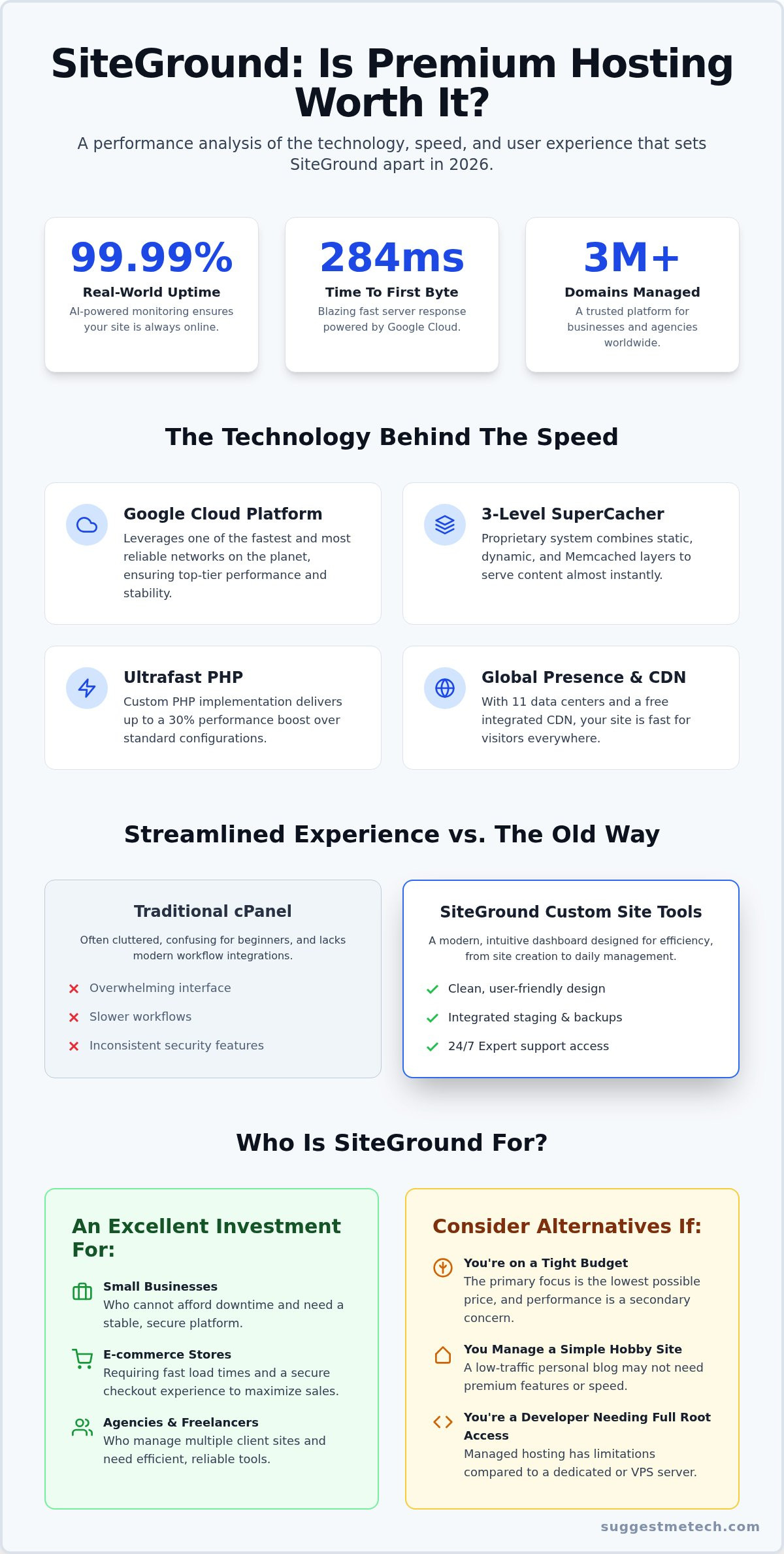
We’ve spent months testing their Google Cloud infrastructure and proprietary tools to see if they still lead the pack. You’ll discover if their 284ms Time to First Byte and 99.99% real-world uptime justify the higher cost for your specific needs. This guide breaks down the new AI Assistant, the custom Site Tools interface, and how their Ultrafast PHP impacts your daily workflow. By the end, you’ll know exactly if this host is the right partner for your growth or if you’re better off with a cheaper alternative. We’re also curious about your results; have you run a speed test on your current setup lately?
Key Takeaways
- Understand how Google Cloud infrastructure and SuperCacher technology deliver industry-leading speeds that directly impact your SEO rankings.
- Learn why the custom Site Tools interface provides a more streamlined, user-friendly experience than traditional cPanel management.
- Evaluate whether the premium renewal rates of siteground are a justified investment for your specific business growth and traffic targets.
- Identify the value in higher-tier plans, including on-demand backups and staging environments that simplify site maintenance and security.
- Discover which specific user profiles gain the most from a managed performance ecosystem and who might be better served by a budget host.
Understanding SiteGround’s Position in the 2026 Hosting Market
With over 3 million domains under its management, SiteGround isn’t your typical budget host. In 2026, it stands as a premium managed WordPress hosting provider that utilizes the Google Cloud Platform to deliver high-end infrastructure to everyday users. While many providers focus on cutting costs, siteground prioritizes site stability and speed. Your choice of hosting is now the single most important factor for SEO and user experience. Google’s algorithms heavily weight performance metrics, meaning a slow server can sink your rankings regardless of how good your content is. This provider justifies its higher price point by offering an ecosystem where speed, security, and 24/7 expert support are the standards, not expensive add-ons.
The Evolution of Managed Hosting
SiteGround vs. The Competition
The hosting market is split between budget-first providers and performance-focused leaders. Budget hosts often overcrowd servers to keep prices low, which leads to “noisy neighbor” syndrome and inconsistent speeds. When you’re looking for the best web hosting for a growing project, the distinction matters. The platform invests in a speed-centric infrastructure that includes NGINX architecture and custom caching solutions. This approach specifically benefits:
- Small businesses that can’t afford downtime.
- E-commerce stores requiring fast checkout experiences.
- Agencies managing multiple client sites who need streamlined tools.
By positioning themselves as a premium partner, they offer a level of consistency that budget alternatives simply can’t match. We’ve seen various results in our lab, but we’d love to hear from you. What kind of load times are you seeing on your current host?
Performance and Speed: The Technology Behind the Uptime
SiteGround leverages the Google Cloud Platform infrastructure to provide a high-performance foundation for every hosted site. This partnership means your data lives on one of the fastest networks in existence, benefiting from the same fiber-optic cables that power Google’s own services. In 2026, siteground has further refined this stack with proprietary SuperCacher technology. This system uses three levels of optimization: static cache for assets like images, dynamic cache for WordPress content, and Memcached for database queries. These layers work together to reduce server load and ensure your pages load almost instantly.
Security and speed are now deeply linked through AI-driven bot protection. By 2026, their system identifies and blocks millions of malicious hits every hour before they can consume server resources. This proactive approach includes automated security patching, which shields your site from new vulnerabilities without requiring manual intervention. When combined with server-side PHP 8.x and 9.x optimizations, specifically their “Ultrafast PHP” implementation, execution speeds can see an improvement of up to 30% compared to standard configurations.
Global Data Centers and CDN Integration
Proximity is a major factor in how fast your site feels to a visitor. With 11 data center locations across the US, Europe, Singapore, and Australia, you can place your data exactly where your audience lives. The free integrated CDN complements this by distributing your content across a global network. Edge Caching stores your website’s data on a network of servers closer to the user, cutting the physical distance data must travel to reduce Time to First Byte. This ensures a snappy experience for international visitors without needing extra plugins.
Uptime Reliability and Proactive Monitoring
Uptime is the most critical metric for any online business. SiteGround maintains a 99.99% uptime guarantee through 2026 by using an AI server monitor that checks the system status every 0.5 seconds. This tool can detect and resolve most issues automatically before they lead to actual downtime. Such reliability is essential when starting a blog that you intend to monetize, as even a brief outage can damage your brand’s reputation and search engine rankings. If you’re looking for more ways to optimize your digital presence, feel free to explore our other tech reviews for expert advice.
SiteGround Plans and Pricing: Finding the Right Fit
Pricing is the most controversial aspect of the siteground experience. While their introductory rates are incredibly aggressive, the renewal prices often catch users off guard. For example, the StartUp plan jumps from an initial $2.99 per month to a renewal rate of $17.99 per month. This 5.3x increase is the “elephant in the room” that leads many to question the long-term value. However, to judge these costs fairly, you have to look at the managed hosting market. High-end providers like WP Engine or Kinsta often start their entry-level plans at $30 or more for a single site. In that context, this provider acts as a middle-ground solution that offers premium performance without the enterprise-level price tag.
Which Plan Should You Choose?
Selecting the right tier depends entirely on your traffic and technical needs. The three main shared hosting tiers offer distinct advantages:
- StartUp: This is best for single-site beginners or low-traffic portfolios. It includes 10 GB of storage and handles roughly 10,000 monthly visits. It lacks the advanced staging and backup features found in higher tiers.
- GrowBig: Often considered the “sweet spot” for growing businesses. You get 20 GB of storage, unlimited websites, and access to on-demand backups and a staging environment. It’s designed for about 25,000 monthly visits.
- GoGeek: Aimed at developers and small e-commerce stores. It offers 40 GB of storage, priority support, and Git integration. With a capacity for 100,000 monthly visits, it provides the most resources before you need to consider cloud hosting.
The True Cost of Ownership
When calculating your budget, consider the value of the “free” extras included in every plan. You receive a free Let’s Encrypt SSL, professional email accounts, and an integrated CDN. Many other top web hosting services charge extra for these features or require third-party integrations that add to your monthly bill. Their resource management system is also highly efficient, which often prevents the need for an early and expensive VPS upgrade.
Proprietary Tools and User Experience: Beyond cPanel
SiteGround made a bold move when it ditched cPanel for Site Tools. Most hosts stick to the industry standard because it’s easier for them, but siteground chose to build a proprietary interface tailored to their specific Google Cloud infrastructure. This custom-built dashboard is faster, more intuitive, and significantly more secure than legacy panels. It removes the technical clutter that often confuses beginners while keeping powerful utilities accessible for veterans. If you’re moving from a different provider, the WordPress Migrator tool handles the heavy lifting; meanwhile, the WordPress Starter wizard helps new users launch a professional site in minutes. Security is built into the core experience with the Site Scanner for malware detection and automatic daily backups that store your data off-site for 30 days.
Managing Your Site with Site Tools
Beginners can navigate files, databases, and emails without feeling overwhelmed by technical jargon. You don’t need a computer science degree to create a professional email address or set up a redirect. For power users, the GoGeek plan offers advanced capabilities like Git integration, WP-CLI, and white-labeling. White-labeling is particularly useful for agencies, as it allows you to provide clients with access to Site Tools without them seeing the SiteGround branding. These tools simplify tasks that used to require a developer, giving you full control over your environment. The interface is modular, meaning you can pin the tools you use most to the top of your dashboard for maximum efficiency.
Developer-Friendly Features
One-click staging environments are a game changer for anyone who values their site’s uptime. You can clone your live site, test a new plugin or theme update, and push the changes live only when you’re sure they won’t cause a crash. This prevents the “white screen of death” that often plagues unmanaged sites. The automated WordPress update manager adds another layer of protection by handling core and plugin updates safely, even performing a backup before the update starts. On-demand Backups act as a critical safety net by allowing you to create a complete site restore point immediately before making major design or plugin changes. This suite of tools ensures that your site stays secure and functional with minimal manual effort. For a deeper look at how these utilities compare to other market leaders, check out our latest web hosting comparisons.
The Verdict: Who Should (and Shouldn’t) Choose SiteGround
SiteGround has evolved into a high-performance ecosystem that prioritizes reliability over raw affordability. In 2026, it remains a top-tier choice for those who view their website as a business asset rather than a casual hobby. The combination of Google Cloud infrastructure, proprietary caching, and 24/7 expert support creates a hands-off experience that justifies the premium cost for the right user. If your primary goals are speed and security without the headache of server management, this host delivers on its promises. However, the price tag means you must be strategic about your choice.
The ideal user for siteground is a small business owner, professional blogger, or agency client who needs consistent performance. These users benefit from the 284ms Time to First Byte and the peace of mind that comes with automated security patching. On the flip side, hobbyists working with a zero-budget or developers who require root server access should look elsewhere. This provider does not offer VPS or Dedicated server options, focusing instead on a managed environment that limits deep technical customization in favor of stability.
Pros and Cons at a Glance
Before making a final decision, consider how these attributes align with your project scale:
- Pros: Industry-leading speed benchmarks, official WordPress.org recommendation, and an intuitive Site Tools interface.
- Cons: Steep renewal rates after the initial term, fixed storage limits on shared plans, and a lack of traditional dedicated hardware options.
Choosing a host is a foundational step in how to start a blog that actually converts visitors into customers. If you plan to monetize your site, the extra investment in a managed performance layer often pays for itself through better SEO rankings and lower bounce rates. We’ve found that the reduction in developer hours spent on maintenance is the most significant “hidden” saving for professional users.
Final Thoughts from SuggestMeTech
Our 2026 performance benchmarks confirm that siteground is still the benchmark for managed WordPress hosting in its price bracket. While the renewal costs are high, the time saved on maintenance and the expert support availability provide a strong return on investment. We rate it as a premier solution for growth-oriented websites. We want to hear from you; what has your experience been with their new AI tools? Share your speed test results in the comments below. If you’re ready to make the switch, you can Check out SiteGround’s latest plans here.
Choosing a Hosting Partner for Your 2026 Growth
Your hosting choice is the foundation of your digital success. Throughout our evaluation, we’ve seen that siteground justifies its premium label through a combination of cutting-edge Google Cloud infrastructure and a highly intuitive management interface. While the renewal rates require a larger budget, the return on investment comes from reclaimed time and improved SEO through superior loading speeds. You’re not just buying a server; you’re investing in a managed ecosystem that handles security and performance so you don’t have to.
If you value a 99.99% Uptime Guarantee, 24/7 Expert Support, and the simplicity of a Free WordPress Migrator Tool, this provider is a clear frontrunner. It’s time to decide if your current host is helping or hindering your growth. We’re here to help you navigate these technical choices with confidence. View SiteGround’s 2026 Hosting Plans and Exclusive Deals to see which tier fits your project best. Your website deserves a platform that scales as fast as your ambitions do.
Frequently Asked Questions
Is SiteGround better than budget-focused hosts for WordPress in 2026?
SiteGround consistently outperforms entry-level providers in speed and infrastructure quality, particularly through its deep Google Cloud integration. While budget hosts often offer lower entry prices, this platform provides superior Time to First Byte and more advanced security tools. For professional WordPress users who prioritize performance over the lowest possible cost, the managed environment here is significantly more robust and reliable for growing businesses.
Why is SiteGround so expensive compared to other hosts?
The higher cost reflects a focus on premium hardware and custom software rather than the budget shared hosting model. By utilizing Google Cloud Platform and proprietary technologies like SuperCacher and AI security, this host maintains higher performance standards. Most budget hosts overcrowd servers to lower prices, whereas this provider limits account density to ensure your site remains fast and stable even during traffic spikes.
Does SiteGround offer a free domain name?
No, this provider does not include a free domain name with its hosting plans, which is a common differentiator from many mass-market competitors. You will need to purchase your domain separately or transfer an existing one. While this adds to your initial setup cost, it allows you to keep your domain registration independent from your hosting account, which many professionals prefer for better control and security.
Can I migrate my existing website to SiteGround for free?
Yes, you can migrate your WordPress website for free using the proprietary WordPress Migrator plugin. This tool automates the process, allowing you to move your files and database with just a few clicks. If you prefer a professional touch, their experts can handle the migration for you, though this service may carry an additional fee depending on your chosen plan and current promotions.
What is SiteGround Site Tools and is it better than cPanel?
Site Tools is a custom hosting management interface designed specifically for the siteground infrastructure. It replaces the traditional cPanel with a faster, more modern dashboard that simplifies site management. Most users find it more intuitive because it organizes tools by site rather than by account. It includes built-in features for staging, backups, and security that are more seamlessly integrated than standard cPanel plugins.
Is SiteGround hosting fast enough for Core Web Vitals?
The platform is exceptionally well-suited for passing Google’s Core Web Vitals due to its low Time to First Byte and integrated speed optimizations. Features like Ultrafast PHP and server-side caching significantly reduce Largest Contentful Paint times. By leveraging the Google Cloud network, your site benefits from low latency and high-speed data delivery, which are critical metrics for maintaining high search engine rankings in 2026.
Does SiteGround include free professional email accounts?
Yes, all shared hosting plans include free professional email accounts. You can create an unlimited number of addresses using your own domain name. These accounts are managed through the custom dashboard interface, where you can set up forwarders, autoresponders, and spam filters. This feature provides significant value for small businesses that would otherwise need to pay for a separate email hosting service like Google Workspace.
What happens if I exceed my SiteGround plan’s monthly visit limit?
If your site exceeds the estimated monthly visit limit, your website won’t be immediately shut down. Instead, the system monitors resource usage like CPU and RAM. If you consistently go over the limits, you’ll receive a notification suggesting an upgrade to a higher tier. Only in cases of extreme overages that threaten server stability will they temporarily limit access, but their proactive AI monitoring helps you avoid these situations.

