

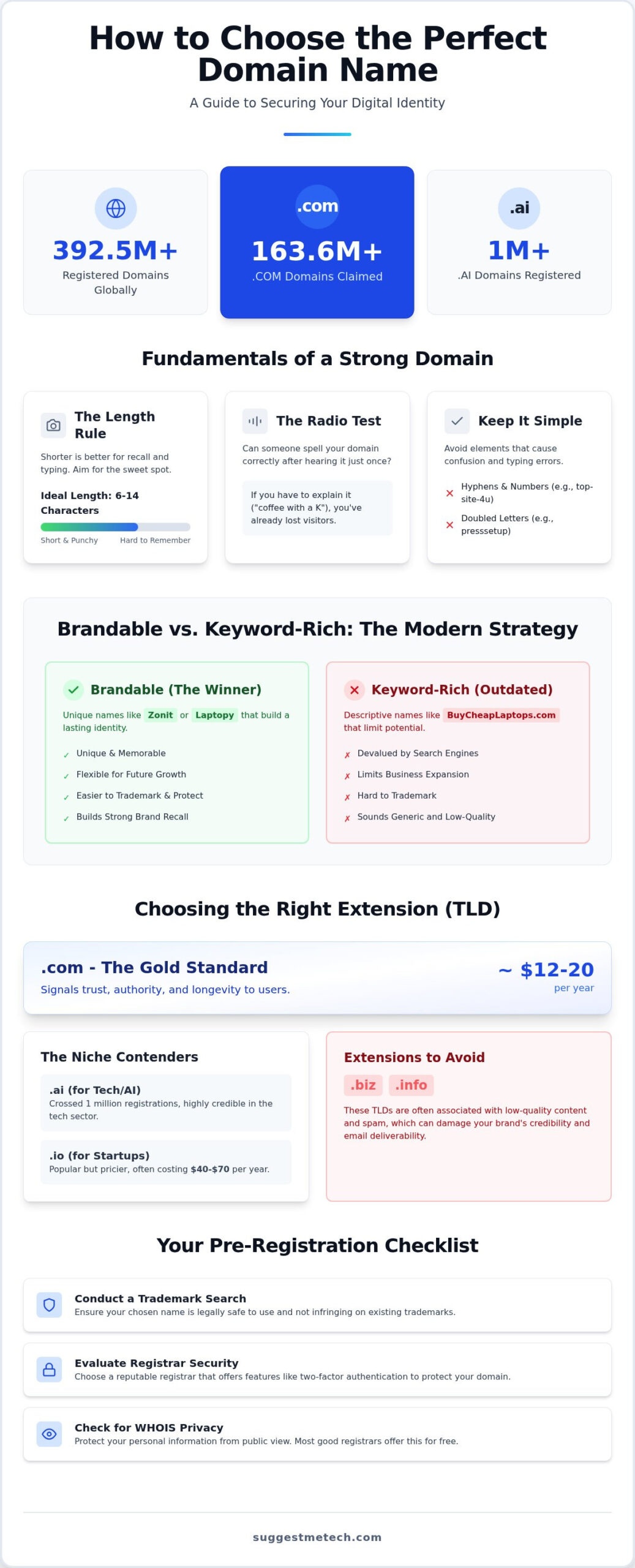
Did you know there are now over 392.5 million registered domains globally? With 163.6 million .com names already claimed, finding your perfect digital address often feels like searching for a needle in a haystack. It’s frustrating to watch your favorite ideas hit a “taken” wall or worry that a trendy extension might limit your growth. You aren’t alone in feeling overwhelmed by the sheer volume of choices. This guide provides a direct framework for how to choose a domain name that is memorable, brandable, and legally secure.
SuggestMeTech is here to help you move past the confusion of new extensions like .ai, which crossed one million registrations earlier this year. We’ll evaluate the 2026 ICANN new gTLD program and show you how to secure a name that fits your budget and professional requirements. You’ll finish this guide with a shortlist of five viable names and the confidence to register them properly. Let’s build a foundation that sets your website up for long-term success. We want to hear your ideas, so feel free to share your naming hurdles as we go through these steps together.
Key Takeaways
- Prioritize simplicity and memorability to ensure your brand remains easy for users to find and share.
- Learn how to choose a domain name that balances the authority of a .com extension with the specific branding benefits of newer TLDs.
- Transition from outdated keyword-rich strategies to a brandable approach that offers better long-term flexibility and trademark protection.
- Protect your investment by conducting thorough trademark searches to ensure your chosen name is legally safe to use.
- Evaluate registrar security and hosting bundles to find the most cost-effective and secure way to claim your digital identity.
The Fundamentals of a Strong Domain Name
Your domain name is your website’s unique digital identity. It’s the first thing customers see and the last thing they remember. Think of it as your virtual storefront’s sign. Understanding the basics is the first step in learning how to choose a domain name that lasts for years. To understand the underlying technology, the Domain Name System (DNS) serves as the directory that maps your chosen name to your server’s IP address. If you’re just starting, check out What is a Domain Name? for a foundational look at how these addresses work.
When you’re learning how to choose a domain name, you must apply the “Radio Test.” Can someone spell your domain correctly after hearing it once on a podcast or in conversation? If you have to explain that “it’s coffee with a K and a hyphen,” you’ve already lost potential visitors. Avoid numbers and special characters that force users to switch keyboards on their mobile devices. Simplicity is the key to preventing user frustration.
The 15-Character Rule
Shorter is almost always better for user recall. While the maximum length is 63 characters, you should aim for 15 or fewer. Industry data on top-ranking sites shows that the most successful domains typically stay within a 6 to 14-character range. Short names are punchy and significantly reduce the risk of typos. You should also watch out for doubled letters. A name like “presssetup.com” is a common trap because people naturally miss one of the repeating letters when typing quickly. It’s better to pick a name where each word ends and begins with different characters to keep the visual flow clean.
Memorability vs. Descriptive Accuracy
Years ago, the standard strategy was to find an “Exact Match Domain” like BuyCheapLaptops.com. Search engines eventually devalued these names to prevent low-quality sites from gaming the system. Today, the trend favors brandable names like “Laptopy” or “Zonit.” These names are unique, easier to trademark, and don’t box you into a specific product category if you decide to expand your business later. You want to balance what you do with who you are as a brand. The Brandability Quotient for 2026 is the measure of how effectively a domain evokes an emotional response while remaining phonetically intuitive and visually distinct. This balance ensures your audience remembers you without needing a generic, clunky description.
Choosing the Right Extension (TLD) in 2026
The hierarchy of Top-Level Domains (TLDs) has expanded significantly, but the decision process remains centered on trust. While .com remains the gold standard with over 163.6 million registrations as of early 2026, you now have hundreds of alternatives. When learning how to choose a domain name, you’ll find that .com is still the default for mobile keyboards and the first extension users guess. Following expert SEO domain advice suggests that while search engines treat most TLDs equally, the psychological impact on users is real. A .com extension immediately signals authority and longevity to a first-time visitor.
Psychology plays a huge role in how visitors perceive your brand. An “unusual” extension can sometimes cause hesitation for non-tech audiences. If your target market is less familiar with the digital landscape, they might worry about the security of a site ending in a TLD they’ve never seen before. Balance your desire for a creative name with the need to appear established and safe.
The Rise of .ai and .io
Tech-specific TLDs have seen explosive growth. The .ai extension officially crossed one million registrations in January 2026, signaling its mainstream acceptance in the technology sector. These extensions are now highly credible for startups and AI-focused firms. However, be prepared for a higher price tag. While a .com typically costs between $12 and $20 per year, a .io domain can range from $40 to $70 annually. If your business is strictly local, a regional TLD like .co.uk or .ca might be a better choice to signal geographic relevance.
Extensions to Avoid
Not all extensions are created equal. You should generally steer clear of TLDs like .biz or .info, which have historically been associated with lower-quality content. Using these can negatively affect your brand’s perceived trust and may even impact email deliverability if mail servers flag the extension as high-risk. Before you commit to a new TLD, use this checklist:
- Is the extension easy to remember and spell?
- Does it align with your industry (e.g., .shop for retail)?
- Are there hidden renewal fees that jump after the first year?
- Does the registrar offer WHOIS privacy for free?
Avoid “free” domain extensions offered by site builders. These often come with restrictive terms that make it difficult to move your site later. As you research how to choose a domain name, remember that long-term stability beats a cheap first-year price. For more detailed evaluations of specific registrars, you can check out our latest technology reviews and guides to ensure you’re getting a fair deal.
Brandable vs. Keyword-Rich: Which Strategy Wins?
Deciding between a brandable name and a keyword-heavy one is a critical step in learning how to choose a domain name. Historically, “Exact Match Domains” (EMDs) like BuyCheapCoffee.com dominated search results. However, Google devalued this strategy years ago to prevent low-quality sites from ranking solely on their name. Today, search engines prioritize user experience and brand authority over simple keyword strings; you can check out JustSEO for more insights on how to optimize your presence for both Google and AI search engines. If your name looks like a series of keywords, users might perceive it as spammy or untrustworthy.
Brandable names offer superior flexibility and trademark protection. They allow you to build a unique identity that isn’t tied to a single product or service. If you’re looking for a middle ground, “Partial Match” names work well. These combine a brandable word with a broad keyword, such as “CloudPeak” for a computing service. This gives you a slight relevance boost while keeping the name unique. Understanding this balance is essential when you learn how to start a blog, as your name dictates your entire marketing roadmap.
AI tools are excellent for brainstorming, but they require a strategic approach. Instead of asking for “domain names for a bakery,” prompt the AI to find metaphors or synonyms related to “warmth,” “crust,” or “morning.” This leads to more creative results. Always vet AI suggestions for unintended meanings in other languages or “weird” slang connotations. In 2026, the best tools fall into three categories:
- Semantic generators that focus on meaning and associations rather than just keywords.
- Phonetic tools that prioritize how the name sounds and its rhythmic flow.
- Visual generators that suggest names based on potential logo aesthetics and brand feel.
Future-Proofing Your Name
Avoid the “Niche Trap.” A name like “BestBicycleSeats.com” might seem perfect today, but it limits your growth if you ever want to sell helmets or entire bikes. Think about where your business will be in 5 to 10 years. Successful brands often scale from narrow to broad. Amazon started with books, but its name allowed it to become the “everything store.” Pick a name that provides room for evolution without requiring a total rebrand. You want a name that stays relevant as your team size grows and your service offerings expand.
Avoiding Legal and Technical Pitfalls
One of the most dangerous mistakes you can make when learning how to choose a domain name is assuming that “available” means “safe to use.” Domain registrars only check if a name is technically unclaimed. They don’t check for trademark infringements. Before you hand over your credit card, you must conduct a thorough search using the Trademark Electronic Search System (TESS) or your local equivalent. Using a name that belongs to another business can lead to expensive legal battles or a forced rebrand just as you’re starting to grow. It’s better to spend thirty minutes on research now than thousands on legal fees later.
Avoid “Copyright Squatting.” This happens when you register a name that is intentionally similar to a famous brand, hoping to capture their traffic. It’s a quick way to get your domain seized. You should also treat hyphens and numbers as technical poison. They’re difficult to communicate over the phone and often lead to typos. If your domain is “best-coffee-2026.com,” half your audience will forget the dashes or type the word “twenty-twenty-six” instead. These characters fail the radio test we discussed earlier and weaken your professional image.
Social Media Availability Check
Consistency is vital for your brand’s digital footprint. Your domain name should ideally match your @handles on Instagram, X, and TikTok. If the domain is free but your primary handle is taken by an active user, you might want to reconsider the name entirely. Use tools that scan 100+ platforms simultaneously to ensure you can secure a unified identity. If a handle is taken by an inactive account, you can try reaching out, but it’s usually faster to find a name that is clear across the board. A fragmented brand name makes it much harder for customers to find you on different apps.
Technical Red Flags
Always read your domain name out loud and write it down without spaces. You want to avoid unintentional word combinations, like the infamous “penisland.com” for Pen Island. It’s a simple check that prevents massive embarrassment. You should also investigate the domain’s history. Use the Wayback Machine to see if the address was previously used for spam or adult content. A “dirty” history can make it harder for your site to rank in search results. Finally, ensure your registrar includes WHOIS privacy. In 2026, protecting your personal data from harvesters is a non-negotiable step for any serious website owner. Don’t leave your home address and phone number in a public database.
If you’re still unsure about which provider offers the best security features, read our latest technology reviews and guides to find a registrar that puts your privacy first.
From Idea to Ownership: How to Register Your Domain
Once you’ve applied the framework for how to choose a domain name, it’s time to claim your digital property. Selecting a registrar is just as important as the name itself. You need a provider that offers pricing transparency, robust security features, and reliable support. Avoid companies that hide “introductory” rates in small print only to double the price upon renewal. Look for registrars that include WHOIS privacy by default rather than charging it as a separate add-on fee.
Many people consider the “Free Domain with Hosting” offers common in the industry. These bundles can save you money upfront, but you should check the long-term renewal costs for both services. If you’re looking for a reliable package that combines these elements, our guide on the Best Web Hosting Services of 2024 breaks down which providers offer the best value for beginners. The checkout process is usually straightforward, but stay alert for “pre-checked” boxes for services like site builders or email marketing tools you might not need yet.
Always enable auto-renewal during the checkout phase. Forgetting to renew your domain is the fastest way to lose it to a competitor or a domain squatter. Most registrars allow you to register for up to ten years in advance, which can provide peace of mind and protect you from annual price hikes.
Bundling vs. Decoupling
Deciding whether to keep your domain and hosting in one place is a common dilemma. Bundling offers simplicity because you only have one bill and one login to manage. However, decoupling, or using a dedicated registrar separate from your host, provides an extra layer of security. If your hosting account is ever compromised, your domain remains safe in a different location. If you choose to decouple, you’ll simply point your domain to your host by updating the Nameservers or A Records in your registrar’s dashboard.
Post-Registration Checklist
Your work isn’t finished once you’ve paid. You must complete a few technical steps to ensure your site stays active and professional. Follow this checklist immediately after purchase:
- Verify your email: ICANN requires you to click a link in a verification email within 15 days, or they’ll suspend your domain.
- Set up professional email: Use your new domain to create an address like hello@yourdomain.com to build immediate trust with your audience.
- Lock your domain: Ensure the “Registrar Lock” is enabled in your settings to prevent any unauthorized transfer attempts.
Learning how to choose a domain name is a major milestone, but these final technical details protect your investment for the long haul. Take the time to secure your settings now so you can focus on building your content. For additional support in growing your digital footprint, you can visit Local Point Marketing to learn how local SEO strategies can help your new site stand out in search results.
Secure Your Digital Identity Today
Selecting a domain is the cornerstone of your online presence. You now have a practical framework for how to choose a domain name that balances memorability with long-term brand flexibility. Remember to prioritize names that pass the radio test and avoid the technical poison of hyphens or numbers. By vetting your choice through trademark databases and checking social handle availability, you’re protecting your business from future legal headaches. This strategic approach ensures your digital address is both future-proof and user-friendly for years to come.
Your domain is just the beginning of your digital journey. Once you’ve secured the perfect address, you’ll need a stable, high-performance environment to build your site. Our team provides expert tech-savvy advice to help you navigate these complex choices with confidence. Our 2026 Tested and Reviewed guides offer the most reliable data available today. Find the perfect home for your new domain in our Best Web Hosting Guide to discover budget-friendly recommendations that set you up for success. We’re excited to see your vision come to life online.
Frequently Asked Questions
Is it better to buy a .com or a newer extension like .tech?
.com is the most trusted extension for general audiences, but .tech is an excellent choice for demonstrating industry expertise in specialized markets. While .com is the default for mobile keyboards, .tech signals a specific focus on innovation and modern software development. You should choose based on your target audience’s technical literacy. If your users are tech-savvy, a niche extension adds brand value without sacrificing credibility or user trust.
How much should I realistically pay for a new domain name?
You should expect to pay between $10 and $25 per year for standard extensions like .com, .net, or .org. Tech-specific TLDs like .io are significantly more expensive, often ranging from $40 to $70 annually. Always check if WHOIS privacy is included for free, as some registrars charge an extra $10 to $15 for this service. Avoid paying thousands for premium aftermarket domains unless your brand requires a specific, short, and memorable name.
Can I change my domain name later without losing my SEO rankings?
You can change your domain name without losing your rankings by implementing permanent 301 redirects from the old URLs to the new ones. This process tells search engines that your content has moved permanently and transfers your existing authority. However, you might experience a temporary dip in traffic while Google recrawls your new site. It’s vital to update your internal links and notify search engines through their webmaster tools to minimize the impact on your visibility.
What is the difference between a domain registrar and a web host?
A domain registrar is a service that handles the registration and management of your website’s address, while a web host provides the server space where your files live. Think of the registrar as the service that assigns your street address and the web host as the company that builds the physical house. You can buy these services from the same company or keep them separate for added security. SuggestMeTech offers guides to help you navigate these provider choices.
Should I include keywords in my domain name for better SEO?
Including keywords is no longer a requirement for high rankings because search engines now prioritize brand authority and user intent. When you’re learning how to choose a domain name, focus on memorability rather than stuffing it with search terms. A brandable name is easier for users to remember and share on social media. While a broad keyword can provide context, an exact match domain often looks spammy and limits your future business growth and expansion.
What happens if the domain name I want is already taken?
If your ideal name is taken, your first step should be checking alternative extensions like .co or .net to see if they fit your brand. You can also add a short prefix or suffix, such as “get” or “app,” to keep the core brand name. If the domain is parked, you might be able to buy it on the aftermarket, though prices there range from hundreds to millions of dollars. Always have a shortlist of backup names.
Is it worth buying multiple extensions (like .com and .net) for the same name?
Buying multiple extensions is a smart move to protect your brand from competitors and domain squatters who might try to impersonate you or capture your traffic. You don’t need to build separate websites for each one. Instead, you can simply redirect the extra extensions to your primary .com address. This ensures that even if a customer types the wrong extension, they still land on your official site. It’s a low-cost way to secure your identity.
How do I check if a domain name has a bad history or was blacklisted?
You can check a domain’s history by using the Wayback Machine to see what content was previously hosted there and if it was used for spam. It’s also important to use online blacklist tools to see if the domain was ever flagged for malware. Understanding how to choose a domain name involves ensuring the address has a clean reputation. A domain with a history of spam can be difficult to rank and might be blocked by providers.

