
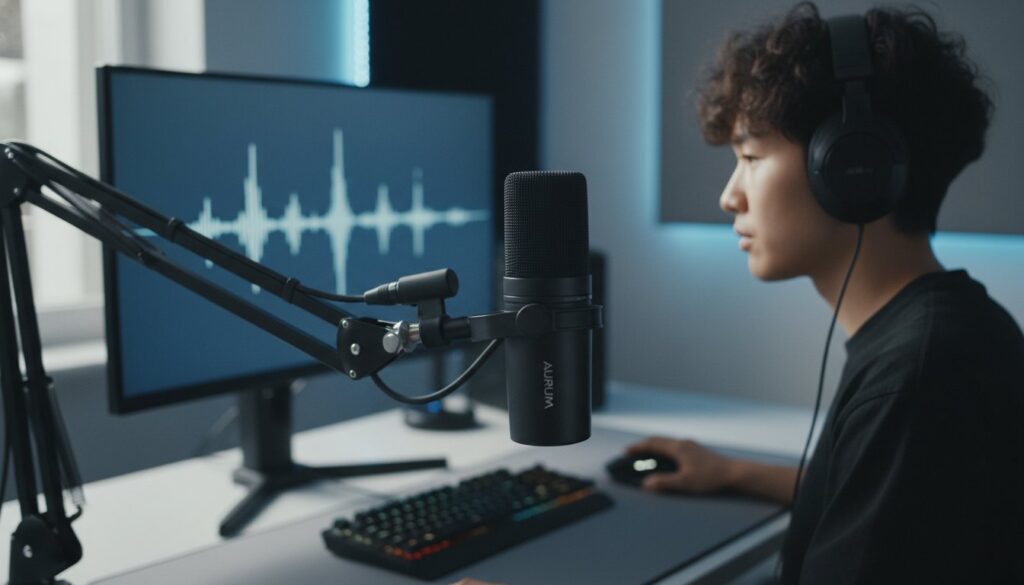
What if the most expensive microphone on the market is actually the worst choice for your specific workspace? It is a common trap; many creators spend hundreds of dollars on studio-standard gear, only to realize it captures every hum of their computer fan and click of their mechanical keyboard. You want your voice to sound rich and professional, but the technical jargon surrounding USB versus XLR connections often makes the buying process feel like a chore. Finding the best microphone for streaming and podcasting shouldn’t require a degree in acoustic engineering.
We understand that you want a setup that works the first time you plug it in. Our expert guide is here to help you find the perfect match for your unique environment, ensuring your audience hears you with crystal clear presence. We’ll cut through the noise to compare the latest 2026 releases, including the hybrid Shure MV7+ and the powerful Shure SM7dB. You will discover exactly which USB and XLR options offer the best value, the simplest setup process, and the flexibility to grow alongside your channel as your audience expands.
Key Takeaways
- Choose between the plug-and-play ease of modern USB-C connections and the professional durability of a modular XLR setup.
- Learn why dynamic microphones are the practical choice for most home environments to keep background noise from ruining your recordings.
- Compare our expert reviews of the latest 2026 models to identify the best microphone for streaming and podcasting for your specific voice.
- Identify the non-negotiable accessories, like boom arms and shock mounts, that instantly improve your vocal presence and workspace ergonomics.
- Follow our “Starter to Pro” roadmap to build an audio setup that grows with your channel without wasting money on overhyped gear.
USB vs. XLR: Choosing Your Connection Path
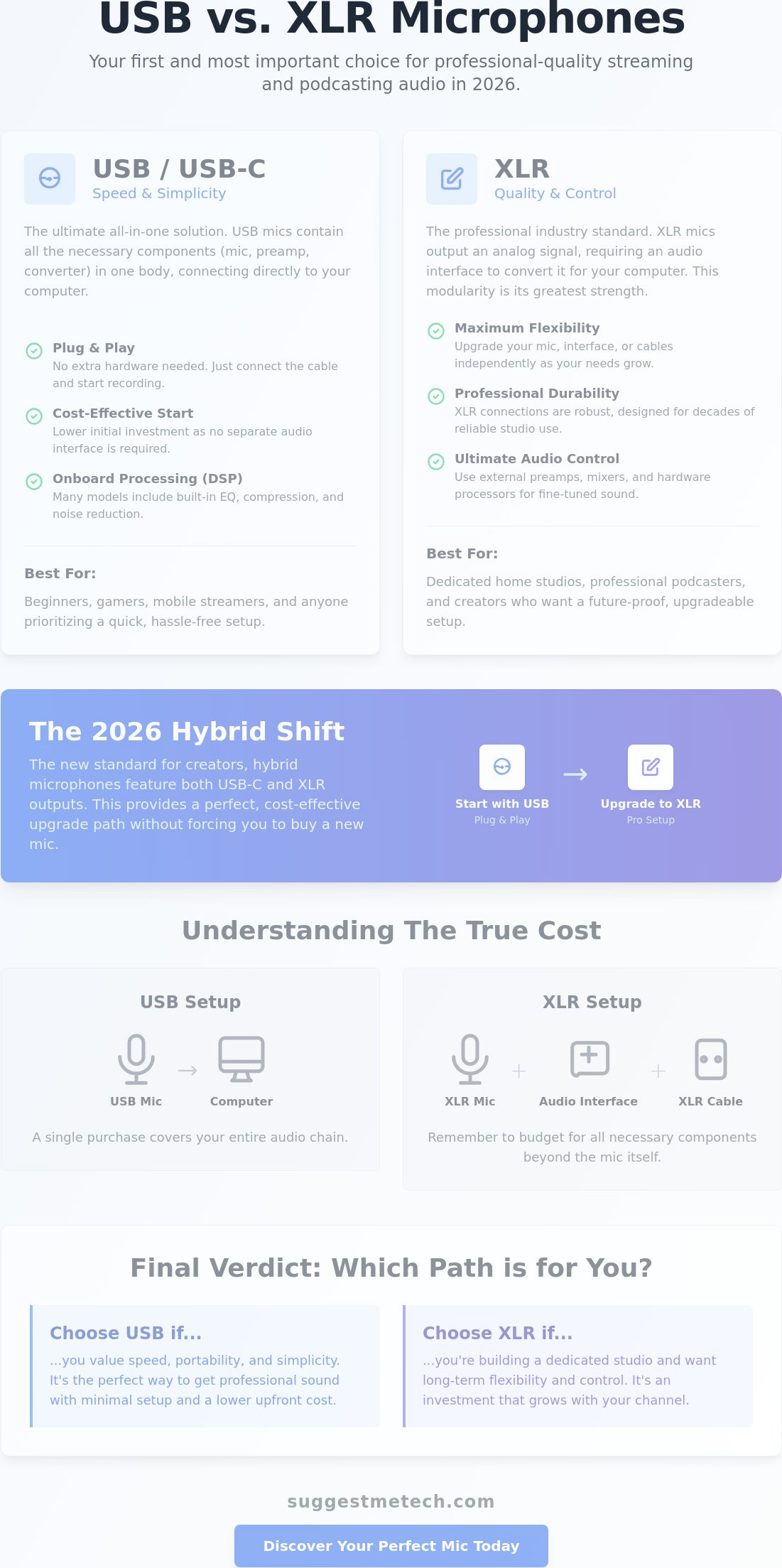
Choosing the best microphone for streaming and podcasting often starts with a single question: USB or XLR? This decision dictates your entire workflow, your desk space, and how much you will spend on extra gear. To make an informed choice, it helps to look at the history and technology of microphones, which shows how we moved from simple analog diaphragms to the complex digital processors we use today. In 2026, the gap between these two formats has narrowed, but the functional differences remain significant for your daily production.
High-fidelity USB-C microphones have dominated the market for their plug-and-play simplicity. They’re no longer just “budget” options; many now feature high-resolution converters that capture professional-grade audio without an external interface. However, XLR remains the gold standard for those who value durability and modularity. An XLR setup allows you to swap out individual components, like your interface or your cables, without replacing the microphone itself. This modularity is the key to a setup that lasts for decades rather than just a few years.
The USB Advantage: Speed and Simplicity
USB microphones are the ultimate solution for creators who need to move fast. They’re ideal for gaming, quick remote interviews, or travel setups where carrying an extra audio interface is impractical. By 2026, USB technology has evolved to rival mid-range XLR quality, offering 24-bit depth and high sample rates that satisfy most streaming platforms. Many modern USB mics also include built-in Digital Signal Processing (DSP). This means you can apply compression, EQ, and noise reduction directly on the hardware, saving your computer’s CPU for gaming or video encoding. It’s a “set it and forget it” approach that appeals to creators who want to focus on content rather than engineering.
The XLR Ecosystem: Quality and Control
Professional podcasters still swear by analog XLR connections because of the control they provide. While a USB mic is an all-in-one unit, an XLR mic is just one part of a signal chain. You’ll need an audio interface to convert that analog signal into digital data for your computer. This setup introduces “phantom power” for sensitive mics and allows you to use hardware preamps or “cloudlifters” to boost quiet dynamic mics without adding hiss. If you want the best microphone for streaming and podcasting that can grow with you, the XLR ecosystem is the way to go. You can start with an affordable dynamic mic and eventually upgrade to a high-end studio model while keeping the same interface and cables.
The Hybrid Shift: Your 2026 Upgrade Path
The most exciting development in 2026 is the rise of hybrid microphones. Models like the Shure MV7+ and the Rode PodMic USB feature both USB-C and XLR ports on the same body. This solves the “wasted money” problem that many beginners face. You can start by plugging directly into your laptop via USB. Later, when you’re ready to invest in a professional mixer or interface, you don’t need to buy a new microphone. You simply switch to the XLR port. This creates a clear, cost-effective upgrade path that doesn’t force you to choose between simplicity today and professional expansion tomorrow.
Finally, be aware of the hidden costs associated with the XLR path. While a standalone XLR mic might look cheaper on paper, you must budget for an audio interface, quality XLR cables, and potentially a signal booster. If you’re on a tight budget and need a simple setup, a high-end USB-C mic is often the more practical financial choice. If you’re building a permanent home studio, the long-term flexibility of XLR is worth the initial investment.
Dynamic vs. Condenser: Which One Wins for Home Studios?
The search for the best microphone for streaming and podcasting often leads creators to a crossroads between dynamic and condenser technology. While marketing materials frequently highlight the “crystal clear” detail of condenser mics, they rarely mention the “Room Factor”. Your recording environment is the most important piece of gear you own. If you are recording in a standard bedroom or home office without acoustic foam or heavy curtains, the technology inside your mic will determine whether you sound like a pro or someone trapped in a tin can.
Dynamic microphones are the unsung heroes of the home studio. They use a durable capsule design that requires significant sound pressure to move the diaphragm. This means they naturally ignore the hum of an air conditioner or the click-clack of a mechanical keyboard. This physical limitation is actually a benefit for most creators. By focusing only on the sound source directly in front of them, dynamic mics provide that classic, intimate “radio voice” that audiences love. If you want to see how professional engineers manage these different patterns and room acoustics, offers excellent practical examples of placement.
Dynamic Microphones: The Background Noise Killers
Dynamic capsules are built for rejection. They are less sensitive to high frequencies, which is where most annoying background noises live. If you don’t have a soundproof booth, a dynamic mic is almost always the safer bet. These models allow you to record in less-than-ideal conditions while maintaining a professional presence. Legendary choices like the Shure SM7dB or the budget-friendly Rode PodMic USB are specifically designed to thrive in untreated spaces. You can find more detailed breakdowns of how these models perform in real-world tests at SuggestMeTech to see which fits your specific workspace.
Condenser Microphones: Studio Precision
Choosing the best microphone for streaming and podcasting requires an honest assessment of your room. Don’t buy a sensitive condenser mic just because a famous YouTuber uses one in a multi-million dollar studio. If your neighbor is mowing the lawn or your PC fans are spinning at full speed, a dynamic microphone will save you hours of frustration in post-production editing.
The Best Microphones for Streaming and Podcasting in 2026
Finding the best microphone for streaming and podcasting in 2026 requires looking past marketing hype to find hardware that solves your specific workflow challenges. Whether you need a plug-and-play solution for a bedroom desk or a broadcast-grade setup for a dedicated studio, the current market offers more versatility than ever before. We have evaluated the top releases based on their vocal clarity, build quality, and ease of integration into modern production software.
The Shure MV7+ ($299.00) stands out as the best overall choice for most creators. It is a hybrid USB-C and XLR dynamic microphone that bridges the gap between beginner simplicity and professional expansion. This model features a customizable LED touch panel and powerful onboard DSP, including a Digital Popper Stopper and a real-time Denoiser. These tools allow you to clean up your audio before it even reaches your computer, making it the “hybrid king” for 2026.
For those seeking the ultimate vocal presence, the Shure SM7dB ($549.00) is the premium professional standard. It builds on the legacy of the SM7B by adding a built-in preamp with a selectable boost of +18dB or +28dB. This internal boost eliminates the need for an external preamp like a Cloudlifter, simplifying your signal chain while maintaining the rich, warm tone that professional broadcasters demand. It is a heavy investment, but it provides a level of detail and noise rejection that few other mics can match.
Top Picks for Streamers and Gamers
Streamers need gear that integrates seamlessly with tools like OBS and Streamlabs while looking great on camera. The following options are built with the modern gaming setup in mind:
- Rode PodMic USB ($209.00): A versatile dynamic mic with both XLR and USB-C connectivity. It features a high-power neodymium capsule and an internal pop filter, making it perfect for high-energy gaming sessions where you might get loud.
- Elgato Wave DX ($99.99): This is our top budget pick for 2026. It is a dedicated XLR dynamic microphone designed to work perfectly with Elgato’s Wave Link software. It offers excellent background noise rejection for its price point.
- Aesthetics: Models like the MV7+ offer customizable lighting, which helps you match your microphone to your room’s RGB theme for a cohesive on-camera look.
Top Picks for Professional Podcasters
In a podcasting environment, the focus shifts to long-form comfort and the ability to record multiple people in the same room. The best microphone for streaming and podcasting in this category must have superior off-axis rejection to prevent “bleed” from other speakers.
The Shure SM7dB excels here because its cardioid pattern is exceptionally tight. If you are recording a multi-person show, these mics won’t pick up the person sitting across from you. Additionally, the durability of these dynamic capsules ensures they can handle hours of daily use for years without degradation. If you are just starting and don’t want to manage complex gain settings, the “plug-and-play” nature of the Rode PodMic USB via its digital connection provides a professional sound with almost zero configuration required.
If you’re still undecided, our team at SuggestMeTech provides deeper hands-on comparisons to help you match these specs to your specific voice type and room size. Choosing the right tool today ensures you won’t have to rebuy your gear when your channel starts to grow.
Essential Accessories: Beyond the Microphone
Buying the best microphone for streaming and podcasting is only half the battle. A high-end mic captures everything, including the vibration of your PC fans or the thud of you bumping your desk. To achieve professional results, you need a supporting ecosystem that isolates your voice and cleans up your environment. Without these tools, even a $500 microphone can sound amateurish in a typical home office.
Most microphones come with a small desk stand. These are convenient space-savers, but they are prone to picking up mechanical noise. A boom arm is non-negotiable for serious creators. It moves the mic closer to your mouth while isolating it from your keyboard and mouse clicks. Similarly, shock mounts act as a suspension system to catch vibrations, while pop filters catch “plosives,” which are the harsh “p” and “b” sounds that can clip your audio. While some 2026 models like the Rode PodMic USB have these built-in, external versions often offer superior protection for long-form content.
Monitoring is another critical step. You can’t fix audio problems if you can’t hear them in real-time. Using high-quality headphones ensures you catch background hiss or digital clipping before you finish your recording. Finally, address your room acoustics. You don’t need a professional studio; simple additions like heavy curtains, a thick rug, or a few strategically placed foam panels can absorb reflections. This makes even a budget-friendly Elgato Wave DX sound like it belongs in a broadcast booth.
Boom Arms and Desk Mounting
Traditional spring-loaded arms are versatile and easy to adjust on the fly. However, low-profile arms have become the preferred choice for streamers in 2026 who want a clean, unobstructed view on camera. When choosing an arm, check the weight capacity. A heavy professional mic like the Shure SM7dB requires a heavy-duty arm with reinforced joints to prevent it from sagging mid-stream. Look for models with integrated cable channels to keep your desk clutter-free and professional.
Software and Digital Processing
Professional audio is 50% hardware and 50% digital processing. In 2026, AI-driven noise suppression tools like Nvidia Broadcast have become essential for removing persistent background sounds like AC hum or distant traffic. Once the noise is removed, you should apply basic EQ to add “body” to your voice and a compressor to keep your volume levels consistent. This prevents your audience from having to reach for their volume knob when you get excited or lean away from the mic. It is a best practice to always record a “dry” backup track without these effects. If your AI suppression accidentally cuts out a word, you will have the raw audio to fix the mistake in post-production.
For more detailed guides on building your full production suite, explore our curated equipment lists at SuggestMeTech.
Final Verdict: Building Your Professional Audio Setup
Choosing the best microphone for streaming and podcasting is a decision that should prioritize your specific environment over raw technical specs. In 2026, the market is saturated with high-end options, but the “best” tool is the one that removes friction from your creative process. For most creators, the Shure MV7+ ($299.00) is our definitive #1 pick. Its hybrid design means you aren’t locked into a single ecosystem, and its onboard noise-cleaning features solve the most common home studio problems before they even reach your recording software.
Remember that your content type dictates your hardware requirements. If you are a high-energy gamer, a dynamic microphone like the Rode PodMic USB is your best friend because it won’t distort when you get loud. Conversely, if you are producing ASMR or intimate voiceover work, a sensitive condenser mic will capture the “air” and detail you need, provided your room is quiet. Don’t fall into the trap of thinking a higher price tag automatically equals better sound. A $549.00 Shure SM7dB will sound worse than a budget mic if you haven’t mastered basic gain settings or room treatment.
Scaling Your Setup
Your audio journey should follow a logical roadmap. Many creators start with a high-quality USB-C connection to keep their desk clean and their setup simple. You’ll know it is time to move to a dedicated XLR interface when you need to record multiple people in person or when you want to use specialized analog hardware. If you are integrating your audio into a larger blogging or content creation workflow, having a reliable XLR chain offers the professional durability needed for daily production. However, don’t rush the upgrade. Focus on your vocal delivery and script quality first; these skills offer a better return on investment than any piece of gear.
Next Steps to Launch
Before you hit the “Go Live” button or record your first episode, run a comprehensive audio test. Listen for the “noise floor” when you aren’t speaking and check that your voice doesn’t clip when you get excited. We recommend creating a simple “Setup Checklist” for every session:
- Check cable connections for any loose fits or static.
- Ensure your boom arm is positioned roughly four to six inches from your mouth.
- Verify that your software is using the correct input device rather than your webcam mic.
- Record 30 seconds of “room tone” to help your noise suppression software calibrate.
The tech landscape moves fast, and we are here to help you stay ahead of the curve. If you have specific questions about matching a mic to your room size or budget, join our community for personalized tech recommendations at SuggestMeTech. We value your input and are ready to help you build the perfect setup for your unique voice.
Level Up Your Audio Production
Professional sound in 2026 is no longer reserved for those with soundproofed studios and massive budgets. You’ve learned that the best microphone for streaming and podcasting is the one that complements your specific environment and workflow. Whether you choose the plug-and-play simplicity of a hybrid USB-C model or the modular power of a full XLR signal chain, the focus remains on delivering clear, engaging audio to your audience. Remember to prioritize room treatment and the right accessories, as these often make a bigger difference than the mic’s price tag.
Our team is dedicated to helping you navigate these complex gear choices without the stress. We base our guides on 2026 industry-standard testing and unbiased affiliate reviews, following a hands-on assessment of 50+ models to ensure accuracy. If you’re ready to find your perfect match, check out our tailored tech recommendations on SuggestMeTech. Building a professional setup is a journey of constant improvement, and we’re excited to see where your voice takes you. Your audience is waiting, so get out there and start creating.
Frequently Asked Questions
Do I need a 4K microphone for podcasting?
No, “4K” is a video resolution term and does not exist in the world of audio hardware. Microphones are measured by sample rate and bit depth rather than pixels. A standard recording at 24-bit and 48kHz or 96kHz provides more than enough fidelity for any professional platform. You should ignore any marketing that misapplies video terminology to sell audio gear.
What is a cardioid polar pattern and why do I need it?
A cardioid polar pattern captures sound in a heart-shaped area directly in front of the mic while rejecting noise from the back. It is essential for home creators because it isolates your voice from background distractions like computer fans or street traffic. This specific pattern is a key feature when looking for the best microphone for streaming and podcasting in an untreated room.
Can I use a streaming microphone for work-from-home meetings?
Yes, you can use any streaming microphone as a high-quality input for Zoom, Teams, or Slack. Your colleagues will notice a significant improvement in your vocal clarity compared to a standard laptop mic or a cheap headset. If you’re looking to leverage this professional edge to secure your next big career opportunity, you can discover Job Hunt Mode Blog for company-specific application guides. Just remember to select the new microphone as your primary input device in your meeting software settings to ensure it is active.
How much should I spend on my first professional microphone?
You should expect to spend between $100 and $300 for a reliable entry-level professional setup. The Elgato Wave DX offers great value at $99.99, while the hybrid Shure MV7+ sits at the higher end of that range for $299.00. Spending more than $300 is usually unnecessary until you have invested in acoustic treatment for your recording space.
Do I need a separate audio interface for a USB microphone?
No, USB microphones have a built-in audio interface that converts your analog voice into digital data for your computer. This plug-and-play design makes them the best microphone for streaming and podcasting for beginners who want a simple setup. You only need a separate interface if you decide to buy a dedicated XLR microphone that requires phantom power.
What is the difference between a dynamic and a condenser mic?
Dynamic mics are less sensitive and better at ignoring background noise, whereas condenser mics capture more detail but require a silent, treated room. Dynamics are rugged and ideal for high-energy gaming or loud environments. Condensers are better suited for voice acting or ASMR where you need to capture every subtle nuance of a performance.
How far should I be from my microphone when speaking?
You should generally stay between four to six inches away from most dynamic microphones to achieve the best sound. This distance allows for the “proximity effect,” which adds a pleasant warmth and depth to your voice. If you move too far away, your voice will sound thin and the microphone will begin to pick up more room echo.
Is a pop filter actually necessary for streaming?
Yes, a pop filter is necessary to prevent “plosives” from distorting your audio during a live broadcast. These are the bursts of air from letters like P and B that can cause a harsh popping sound. While some modern microphones include internal filters, an external mesh or metal shield provides an extra layer of protection for professional results.

