

Your tech stack should be your most productive employee, not your most expensive hobby. If you feel like you’re spending more time fighting with mismatched apps than actually billing clients, you aren’t alone. Subscription fatigue is a common hurdle, and it’s frustrating when manual admin tasks eat away at your profit margins. Finding the best software for freelancers in 2026 is no longer about collecting the most tools; it’s about building a connected ecosystem that handles the heavy lifting for you.
We know you want a professional appearance without the headache of tools that don’t talk to each other. This guide promises to help you cut through the noise and build a streamlined, automated workflow that scales. We’ll explore the latest in AI-driven automation, all-in-one project management, and direct invoicing tools that keep your profits clear. From Trello’s updated automation runs to Notion’s integrated AI, we’ve evaluated the options to help you choose the right fit for your specific needs. Let’s look at the essential tech you need to reclaim your billable hours and grow your business with confidence.
Key Takeaways
- Learn how to transition from a side-hustle mindset to a professional entity by building a digital infrastructure that functions as your business’s backbone.
- Compare the best software for freelancers in 2026 across project management and financial categories to find the right balance for your specific workflow.
- Identify specialized tools for technical writers and developers, including cloud environments and AI-powered coding assistants, to boost your niche productivity.
- Master the “Trigger-Action” framework to automate manual admin tasks and connect your CRM directly to your project management tools.
- Future-proof your business by evaluating software based on data portability and API access to ensure your tech stack scales as you grow.
Why Choosing the Best Software for Freelancers Defines Your Success
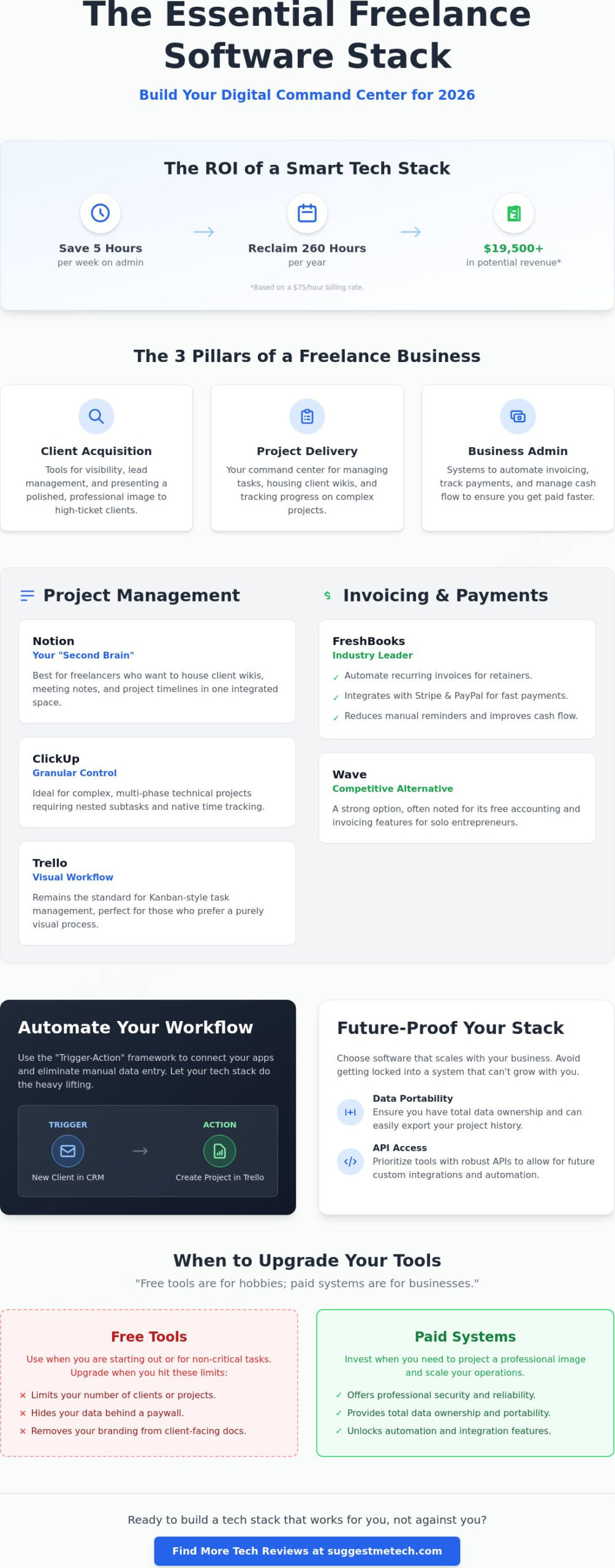
A freelance software stack is the digital infrastructure of your solo business. It isn’t just a collection of apps; it’s the foundation that supports your growth. When you move from a casual side hustle to a professional entity, your tech requirements change. You stop looking for “free forever” tools and start looking for systems that save time. High-performing freelancers organize their tech around three specific pillars: client acquisition, project delivery, and business admin. Without a clear strategy, you’ll likely face subscription fatigue. This happens when you pay for five tools that all do the same thing, or worse, tools that don’t talk to each other. Choosing the best software for freelancers means finding the minimum viable stack that provides maximum output.
Your client acquisition strategy often starts with visibility. Many professionals begin their journey on freelance marketplace websites to build a portfolio. However, as you scale, your stack must evolve to handle direct leads and complex contracts. This transition requires tools that present a polished, authoritative image to high-ticket clients. If your invoicing looks amateur or your project updates are messy, you’ll struggle to justify premium rates. Professional tech signals that you’re a business owner, not just a gig worker.
The ROI of a Professional Tech Stack
Efficiency has a direct impact on your bank account. Consider the math of your work week. If you save just five hours of manual admin every week through automation, you reclaim 260 hours per year. For a freelancer billing $75 per hour, that’s $19,500 in potential revenue you previously lost to “busy work.” Professional tools also build the trust necessary to close bigger deals. Clients feel safer when you use secure, industry-standard platforms for communication and file sharing. Keep in mind that even the best software for freelancers requires the best laptops to run efficiently without lag or crashes during client presentations.
Free vs. Paid: When to Upgrade Your Tools
Many freelancers stay on free plans for too long. Use the “Growth Trigger” framework to decide when to pay. If a free tool limits your number of clients, hides your data behind a paywall, or removes your branding, it’s costing you money in lost opportunities. Paid SaaS tiers often offer better security and total data ownership, which are vital for long-term stability. You don’t want to lose your entire project history because a free service changed its terms. Remember this rule: “Free tools are for hobbies; paid systems are for businesses.” When you invest in your tools, you’re investing in your ability to scale.
The Essential Freelance Software Stack for 2026
Building an efficient business requires a modular approach to your tools. You need a setup where each app has a specific job and communicates with the rest of your system. In the current market, the best software for freelancers prioritizes integration over individual features. A disjointed stack leads to manual data entry, which is the fastest way to kill your productivity. Your goal is to create a digital command center that handles the repetitive parts of your day so you can focus on deep work.
Project Management: Your Digital Command Center
Choosing a project management tool depends on how you process information. Notion is the premier choice for freelancers who want a “second brain.” It allows you to house client wikis, meeting notes, and project timelines in one place. If your work involves complex, multi-phase technical projects, ClickUp provides the granular control you need. It offers nested subtasks and native time tracking that Notion sometimes lacks. For those who prefer a purely visual workflow, Trello remains the standard for Kanban-style task management. Before committing to a specific platform, you can read our curated technology reviews to see how these options compare in real-world scenarios.
Invoicing and Payments: Getting Paid Faster
Cash flow is the lifeblood of any tech-based side hustle. You need a system that makes it easy for clients to pay you immediately. FreshBooks is an industry leader because it integrates directly with payment gateways like Stripe and PayPal. This allows you to automate recurring invoices for retainer-based work, ensuring you get paid on time without sending manual reminders. Wave is a competitive alternative for those who need basic accounting without a monthly fee. Both tools allow you to track expenses for tax season, which eliminates the need for messy manual spreadsheets. Professional invoicing software doesn’t just collect money; it provides a paper trail that protects your business during audits.
Communication and scheduling are the final pieces of the puzzle. Slack is essential for real-time collaboration, keeping client messages out of your personal inbox. When a text explanation isn’t enough, Loom allows you to send quick video walkthroughs to provide technical clarity. To stop the back-and-forth email chain for meetings, use Calendly or TidyCal to automate your scheduling funnel. Finally, tools like Toggl or Harvest are mandatory for accurate billing. Even if you don’t bill by the hour, tracking your time reveals which projects are actually profitable and which are draining your resources. Using the best software for freelancers ensures that every minute spent on a project is accounted for and every invoice is professional.
Best Software for Freelancers with Specialized Tech Skills
While general admin tools keep your business running, specialized niches require a different level of technical integration. The best software for freelancers in technical fields must bridge the gap between “running the business” and “doing the work.” If you’re a developer, designer, or data analyst, your tech stack is your primary production line. A writer’s needs for documentation differ wildly from a developer’s requirements for environment parity. You need tools that fit your specific workflow without adding unnecessary friction.
Content and Blogging Tech Stacks
Technical writers and bloggers often face a choice between Markdown editors and traditional Content Management Systems (CMS). Markdown editors like Obsidian or VS Code are perfect for documentation and technical guides because they keep the focus on structure and code snippets. However, when you’re building a public-facing portfolio or a client’s site, a robust CMS is essential. Choosing the best web hosting is a critical decision here; your site’s speed and uptime directly reflect your technical competence. If you’re just starting, follow our guide on how to start a blog to establish a solid foundation for your digital presence. These tools ensure your content is portable and professional.
Development and Coding Freelance Essentials
For freelance developers, the best software for freelancers includes tools that ensure code security and environment consistency. GitHub Copilot has become a standard for speeding up boilerplate code, while Docker allows you to mirror a client’s production environment exactly on your local machine. This prevents the “it works on my machine” excuse that damages client trust and delays project delivery.
Managing client codebases securely is non-negotiable. Use SSH keys and password managers to handle access without risking leaks. To ensure you’re billing accurately for every line of code, integrate time-tracking plugins directly into your IDE. Tools like WakaTime or Harvest’s VS Code extension track active coding time automatically. For remote collaboration, platforms like Tuple or Slack’s huddles provide the low-latency screen sharing needed for pair programming and technical debugging. These integrations turn your editor into a business-ready workstation.
Design and Data Visualization
Designers rely on Figma for collaborative UI/UX work and Adobe Creative Cloud for heavy-duty asset creation. The key here is asset management; tools like Eagle help organize thousands of design files so you don’t waste billable hours searching for a specific logo or icon. Data freelancers, on the other hand, need reliable Python environments like Jupyter Notebooks and visualization tools such as Tableau or PowerBI. These specialized tools don’t just help you work; they allow you to deliver the high-level insights that justify your premium freelance rates. When your specialized software works in harmony with your admin stack, you spend less time on setup and more time on high-value output.
How to Automate Your Freelance Business Workflow
Automation is the bridge that turns a collection of apps into a unified business operating system. Most people look for the best software for freelancers by comparing individual features, but the real value lies in how these tools talk to each other. By implementing a “Trigger-Action” framework, you ensure that repetitive tasks happen in the background without your manual intervention. For example, when a client signs a contract (the trigger), your system should automatically create a project folder, send an intake form, and post a notification to your team chat (the actions).
Connecting your CRM to your project management tool is the first step in scaling. If you use a CRM like HubSpot or Pipedrive, you can sync it directly with Notion or ClickUp. This eliminates the need to copy-paste client details every time a lead becomes a project. Similarly, syncing your time logs from Toggl or Harvest directly to your invoices in FreshBooks ensures you never miss a billable minute. This level of integration provides a professional experience for your clients while protecting your profit margins. It’s about building a system that works while you sleep.
The Glue: Using Zapier or Make.com
To build these connections, you need “middleware” like Zapier or Make.com. While Zapier is user-friendly, tech-savvy freelancers in 2026 often prefer Make.com for its ability to handle complex, branching logic. You should start by setting up three essential automations today:
- Syncing lead form submissions from your website directly to your CRM.
- Creating a task in your project management tool whenever a specific calendar event is created.
- Generating a Slack or email notification the moment a client pays an invoice.
Centralizing these notifications reduces context switching, allowing you to stay in “deep work” mode for longer periods. For more detailed comparisons on these integration platforms, check out our latest technology guides and reviews.
AI Automation in 2026
Artificial intelligence has evolved significantly, moving beyond simple chatbots to sophisticated workflow assistants. In 2026, you can use AI to generate initial proposal drafts based on previous project data or summarize lengthy contracts to highlight key clauses. AI-driven tools like Fireflies or Otter now integrate with Zoom and Google Meet to automatically generate meeting notes and assign action items in your project manager. AI in 2026 is a freelancer’s junior associate, not their replacement. It handles the low-level administrative heavy lifting, giving you more time to focus on high-level strategy and creative execution. Using the best software for freelancers means leveraging these AI capabilities to maintain a competitive edge in a crowded market.
Choosing the Right Infrastructure for Long-Term Growth
Your business infrastructure should be built for where you want to be in three years, not just where you are today. When you evaluate the best software for freelancers, portability is a non-negotiable feature. You must always ask if you can export your data easily. If a platform locks your project history or client contacts behind a proprietary format, they effectively own your business trajectory. Future-proofing also requires looking for tools with robust API access. This allows your stack to remain flexible, ensuring that as your needs evolve, your tools can still talk to the new systems you adopt.
SuggestMeTech recommends two distinct paths based on your current business stage. For those just starting, a “Starter Stack” focuses on low overhead and high impact. This typically includes Trello’s free plan for task management, Wave for basic accounting, and Slack’s free tier for communication. If you’re ready to scale, the “Pro Stack” is the best software for freelancers who need total control. This involves moving to Notion or ClickUp for integrated project management, FreshBooks for automated financial tracking, and Make.com for advanced workflow logic. Investing in these professional tiers pays for itself through reclaimed time and better data visibility.
Security and Privacy Compliance
Security is a competitive advantage, not an afterthought. If you work with global clients, you must ensure your tools help you stay compliant with GDPR or CCPA regulations. A business-grade password manager is a mandatory investment to prevent breaches and manage client credentials safely. Don’t rely on browser-based saving. Use encrypted file sharing for sensitive technical documentation to ensure that your intellectual property and client data remain protected. Implementing Two-Factor Authentication (2FA) across every app in your stack is the simplest way to protect your professional reputation.
Building Your Brand Identity
Professionalism is often a matter of perception. Using custom domain names and branded email software immediately separates you from the casual “side-hustle” crowd. Clients are more likely to trust a freelancer who operates through a polished, cohesive digital presence. High-end professionals often white-label their client portals to provide a seamless experience that feels like an extension of their own brand. These small tech choices justify higher rates and help secure long-term contracts. We want to know what’s working for you. Participate in the SuggestMeTech community to share your current stack and see how other tech-based freelancers are optimizing their workflows for 2026.
Build Your Future-Proof Tech Stack Today
Success in the freelance market requires more than just talent; it demands a digital infrastructure that works as hard as you do. You’ve learned that the best software for freelancers isn’t just a collection of apps. It’s a connected ecosystem that prioritizes data portability, secure automation, and niche-specific functionality. By moving from disconnected free tools to a professional, integrated stack, you reclaim billable hours and present a polished image to high-value clients.
Don’t let subscription fatigue or manual admin slow your growth. Our 2026 expert-vetted software lists are designed for real-world practical application, helping you cut through the noise with ease. Join our community of 10,000+ tech-savvy readers who rely on our hands-on assessments to make informed decisions. Explore our curated Tech Review Guides for more recommendations and find the specific tools that fit your unique workflow. You have the skills to excel, and with the right tech behind you, your business has no limits.
Frequently Asked Questions
What is the best all-in-one software for freelancers?
Notion is currently the top choice for an all-in-one workspace because it combines notes, databases, and project tracking in a single platform. While specialized tools exist for specific tasks, Notion’s flexibility allows you to build a custom dashboard that replaces several standalone apps. It’s the best software for freelancers who want to centralize their business documentation and client wikis in one searchable location.
How much should a freelancer spend on software per month?
Most freelancers should budget between $30 and $100 per month for a professional software stack. A starter stack might only cost $15 for basic accounting, while a pro-tier setup with advanced automation and premium project management can reach higher totals. Focus your spending on tools that directly reclaim your billable hours, such as automated invoicing or high-speed hosting, rather than collecting apps you don’t use.
Is Notion better than ClickUp for freelance project management?
Notion is superior for documentation and creative brainstorming, while ClickUp excels at complex task management and multi-phase workflows. If your work requires deep knowledge management and client portals, Notion is the better fit. Choose ClickUp if you need granular subtasks, native time tracking, and detailed Gantt charts to manage technical development cycles or large-scale production schedules.
What software do I need to start a tech-based side hustle?
To launch a tech-based side hustle, you need a minimum viable stack consisting of a project manager, a time tracker, and a professional invoicing tool. Using the best software for freelancers early on, like Trello for tasks and Toggl for time tracking, prevents admin chaos as you scale. This foundation ensures you appear professional to your first clients while keeping your profit margins clear from day one.
Can I run a freelance business using only free software?
You can start with free software, but you’ll likely hit limits on automation and data ownership as you grow. Free plans, like Trello’s 10-board limit or Zapier’s 100-task cap, are excellent for testing workflows. However, once manual tasks start eating into your billable time, the cost of a paid subscription is usually lower than the value of the hours you’ll save.
How do I automate my freelance invoicing process?
Automate your invoicing by using a dedicated platform like FreshBooks or QuickBooks Solopreneur that integrates with your time tracker. You can set up triggers where a completed project phase automatically generates a draft invoice. Connecting these tools via Make.com or Zapier ensures that client data flows directly from your CRM to your billing software, which reduces errors and gets you paid faster.
What is the most secure way to share files with freelance clients?
The most secure way to share files is through encrypted cloud storage services that offer end-to-end encryption and mandatory Two-Factor Authentication. Tools like Proton Drive or Tresorit protect sensitive technical documentation from unauthorized access. Avoid sending large files as email attachments; instead, provide clients with secure, time-limited links to specific folders within your protected environment to maintain total control over your data.
Do I need a CRM as a solo freelancer?
You don’t necessarily need a dedicated CRM if you’re managing fewer than five active leads at a time. A simple database in Notion or a specialized board in Trello can track your sales pipeline effectively. You should only invest in a standalone CRM when your lead volume becomes too complex to manage manually or when you need advanced email tracking and automated follow-up sequences.

