
Did you know that a single extra step at login can block over 99.9% of account compromise attacks? In 2026, relying on a password alone is like locking your front door but leaving the key in the lock. We understand that adding layers to your digital life often feels like a chore, especially when you’re already juggling dozens of logins. It’s frustrating to deal with extra steps, and the fear of getting locked out if you lose your phone is a valid concern. This guide offers two-factor authentication explained in plain English, stripping away the jargon to show you exactly how to shield your personal data.
You’ll master the essentials of 2FA and learn how to set it up without the stress of losing access. We’ll provide a clear framework for choosing the best method for your needs, whether that’s using the latest passkeys or a dedicated hardware key. The latest NIST guidelines and FIDO standards have made these tools more accessible than ever. By the end of this article, you’ll have the confidence to manage your recovery codes and keep your digital identity secure without the technical headache.
Key Takeaways
- Understand why 2FA acts as a digital deadbolt by using the physical card and PIN analogy to secure your access.
- Get two-factor authentication explained through the three pillars of identity to ensure your security layers are truly effective.
- Compare the security levels of hardware keys versus authenticator apps to find your ideal balance of safety and convenience.
- Master the use of recovery codes to eliminate the fear of being permanently locked out of your digital life.
- Prioritize your account security by identifying which platforms must have 2FA enabled to protect your finances and personal data.
What is Two-Factor Authentication? The Digital Deadbolt Explained
At its core, two-factor authentication is a security process that requires two different types of evidence before granting access to an account. It isn’t just a second password; it’s a requirement for two distinct forms of identification. Think of it like using an ATM. To withdraw cash, you need your physical debit card and your secret PIN. Having just one of those items won’t get you any money. This is two-factor authentication explained in its simplest form: a double-check system that ensures you are the only person who can access your data.
Most of us grew up using Single-Factor Authentication (SFA), which only asks for something you know, like a password. However, we’re now facing the “Password Paradox.” You might have a 20-character password that’s incredibly complex, but if that password is stolen in a massive data breach, its length doesn’t matter. Once a hacker has that “key,” they’re in. 2FA acts as a digital deadbolt. Even if a thief manages to steal your password, they still can’t open the door because they lack the second factor, which is usually something you physically possess.
Why Passwords Alone Are Failing in 2026
By 2026, AI-driven brute force attacks have become terrifyingly efficient. Hackers now use sophisticated AI agents to guess passwords at speeds we couldn’t imagine a few years ago. This makes even “strong” passwords vulnerable. We also see a massive rise in credential stuffing. Credential stuffing is the automated use of leaked passwords across multiple platforms. If a small, insecure website where you used an old password gets hacked, attackers will immediately use automated scripts to try those same credentials on your bank, email, and social media accounts.
The Core Goal: Making Stolen Credentials Useless
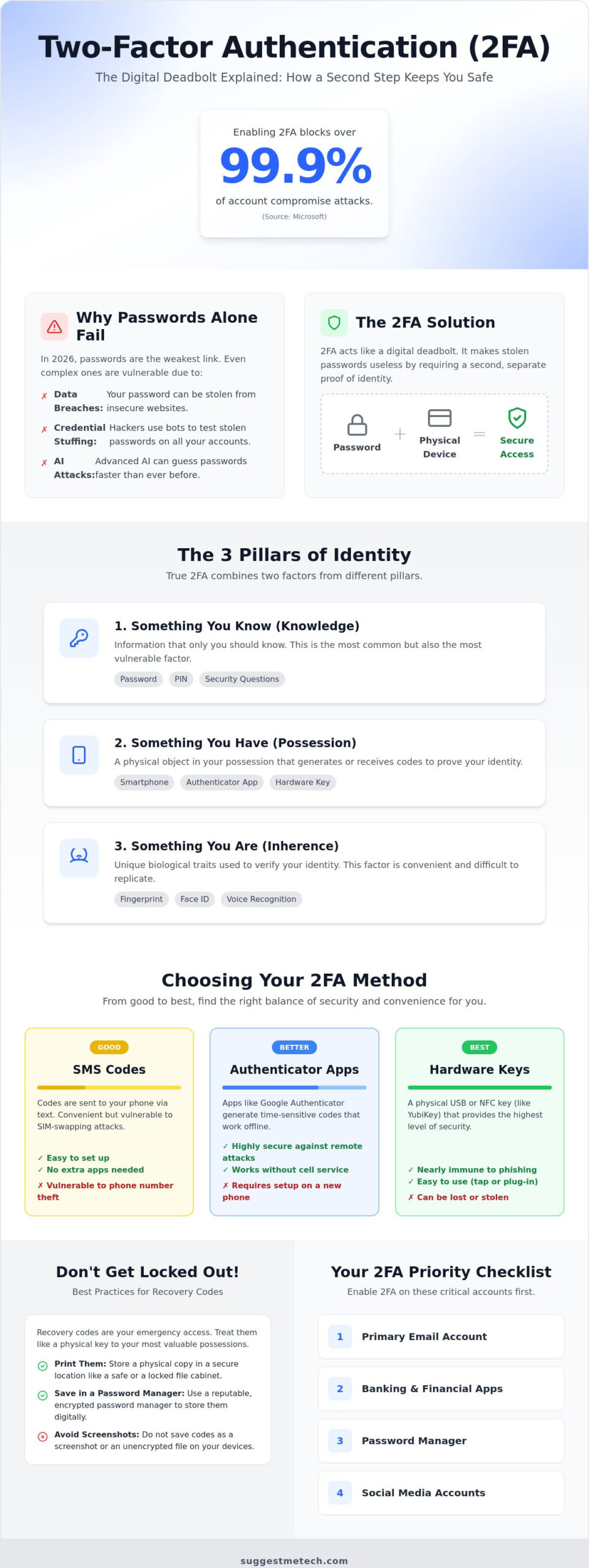
The primary objective of 2FA is to make stolen data worthless to a criminal. Microsoft reports that enabling MFA can block over 99.9% of account compromise attacks. This statistic should give you immense peace of mind. While security is about hardening your accounts against intruders, privacy is about controlling who has access to your personal information. 2FA protects both. By understanding The 3 Pillars of Identity, you can see how combining something you know with something you have creates a robust barrier. It turns a stolen password from a devastating security failure into a useless string of text that can’t do any harm.
The 3 Pillars of Identity: How 2FA Actually Works
To understand how 2FA keeps you safe, you need to look at what security experts call the factors of identity. A factor is simply a piece of evidence that proves you are who you say you are. For a login to count as true 2FA, you must provide two different types of evidence. This is a core part of having two-factor authentication explained correctly. If a site asks for your password and then asks for your mother’s maiden name, that isn’t actually 2FA. It’s just two-step knowledge. Since a hacker who steals your password manager likely has access to both, true security only comes from mixing different categories.
Factor 1: Something You Know (Knowledge)
This is the most common factor and includes your passwords, PINs, and secret security questions. While essential, knowledge factors are the most vulnerable to leaks because they can be shared, guessed, or stolen. Even if you clear cache on iPhone to keep your device running smoothly, your knowledge factors remain stored in your memory or a digital vault. In 2026, the password is no longer the final destination; it’s just the first gate an intruder has to pass.
Factor 2: Something You Have (Possession)
This factor requires a physical object that you own. It could be your smartphone running an authenticator app, an SMS code sent to your number, or a dedicated hardware key like a YubiKey. Many modern apps use TOTP, or Time-based One-Time Passwords. These are codes that expire every 30 seconds, ensuring that a stolen code is useless almost immediately. Your device acts as a physical key to a digital lock. This physical requirement is a major reason why government experts emphasize Why Your Password Is No Longer Enough to stay protected in a world of remote hackers.
Factor 3: Something You Are (Inherence)
This is biometrics. It uses your unique physical traits, such as your fingerprint, FaceID, or voice recognition. It’s incredibly convenient because you can’t forget your face or leave your thumb at home. However, biometrics shouldn’t be your only line of defense. If biometric data is ever leaked from a cloud server, you can’t change your fingerprint like you can change a password. Most modern devices store this data locally in a secure enclave rather than the cloud to protect your privacy and ensure your sensitive traits stay on your device.
Having two-factor authentication explained through these three pillars helps you see exactly where your security might be thin. For more hands-on advice on protecting your digital footprint, you can explore our latest technology reviews and guides to stay ahead of emerging threats.
SMS vs. Apps vs. Keys: Choosing Your 2FA Method
Security isn’t one-size-fits-all. When you look at the different ways to secure your accounts, you’re essentially choosing a point on the spectrum between maximum convenience and maximum security. This hierarchy is essential for having two-factor authentication explained in a way that actually helps you decide which method to use for your specific needs. Generally, the ranking goes from physical hardware keys at the top, followed by authenticator apps, with SMS codes bringing up the rear as the least secure option.
The Pros and Cons of SMS 2FA
SMS 2FA is the most common method because it’s incredibly easy to use. There’s no app to install, and it works on every mobile phone in existence. However, it’s also the most vulnerable. Hackers use a technique called “SIM swapping” to bypass this layer. They trick your mobile carrier into porting your phone number to a device they control. Once they have your number, they receive your login codes instead of you. While SMS is better than using no protection at all, you should avoid it for your primary email, banking, or any account that holds significant value.
Why Authenticator Apps Are the Gold Standard
For most SuggestMeTech readers, authenticator apps like Google Authenticator or Authy are the best middle ground. These apps generate codes locally on your device, meaning they don’t require a cellular signal to work. This makes them much harder to intercept than a text message. Microsoft provides a deep dive into the technical side of two-factor authentication if you want to see the enterprise perspective. These TOTP codes change every 30 seconds to prevent reuse by hackers who might be watching your screen. If you’re worried about losing your phone, Authy offers encrypted cloud backups, while Google Authenticator focuses on device-only storage for maximum privacy.
Hardware Keys: For the Security-Conscious
If you want the highest level of protection, hardware keys like a YubiKey or Google Titan are the way to go. These are small physical devices that plug into your USB port or connect via NFC. They are virtually un-phishable because the login only completes when the physical key is present. These are ideal for anyone running a business or managing best web hosting accounts where a single breach could be catastrophic. While they require a small investment, they provide a level of certainty that software-based methods simply can’t match.
For business leaders who want to maintain high standards across all areas of operational safety beyond digital logins, you can learn more about Be-Safe Technologies Ltd to discover how their digital platforms support Environment, Health & Safety (EHS) management.
Overcoming ‘Lockout Anxiety’: Best Practices and Recovery
The most common reason people hesitate to enable extra security is “lockout anxiety.” It’s the nagging fear that if your phone falls into a lake or gets stolen, you’ll be permanently barred from your own digital life. We want to put those fears to rest. Having two-factor authentication explained isn’t just about the technology; it’s about the safety nets that keep you in control even when things go wrong. If you follow a few simple steps, you’ll never have to worry about being locked out of your accounts.
The secret to total confidence is the “Rule of Two.” You should always have at least two ways to access your most important accounts. When you first enable 2FA, almost every service will provide you with a set of “Backup Codes” or “Recovery Codes.” These are one-time-use master keys designed for emergencies. If your primary device is gone, these codes are your golden ticket back into your account. Treat them with the same level of care you’d give to a physical spare key to your home.
Where to Safely Store Recovery Codes
Where you store these codes is just as important as having them. For physical storage, the “Fireproof Safe” method is excellent. Print your codes and keep them in a safe or a locked filing cabinet. If you prefer digital storage, use an encrypted note within a dedicated password manager. You should never store these codes in your primary email inbox. If a hacker manages to get into your email, they’ll find the keys to every other account you’ve worked so hard to protect. Keeping them separate ensures that a single breach doesn’t lead to a total takeover.
What to Do If You Actually Lose Your 2FA Device
If the worst happens and your device is gone, stay calm and follow a simple triage process. Use one of your backup codes to log in from a trusted computer that you’ve used before. Once you’re in, your first priority is to de-authorize the lost device. This kills any active sessions, ensuring that whoever finds your phone can’t use it to access your accounts. Be prepared for a “cooling off” period. Many platforms now enforce a 48 to 72-hour wait for security changes after a recovery attempt. This delay is a vital safety feature; it gives the real owner time to stop a fraudulent recovery attempt by a hacker.
To stay on top of your security, perform a quick 2FA hygiene check once a year. Verify that your backup codes are still accessible and remove any old tablets or phones from your “trusted devices” list. For more practical advice on managing your digital footprint, explore our latest technology reviews and guides to find the tools that fit your lifestyle.
Securing Your Digital Life: Where to Enable 2FA Today
Now that you’ve had two-factor authentication explained, it’s time to put that knowledge into action. You don’t need to secure every single forum account today, but you must protect the foundations of your digital presence. Think of this as a priority list for your digital safety. If you are planning to start a blog, for instance, 2FA isn’t just a setting. It’s an insurance policy for your hard work and financial investment. Modern hardware makes this easier than ever. Many of the best laptops released in 2026 come with built-in biometric sensors and dedicated security chips that handle factors locally, removing the friction from your daily login.
The ‘Big Three’ Accounts to Secure First
- Your Primary Email: This is the “Keys to the Kingdom.” If a hacker gets into your email, they can use the “forgot password” feature on almost every other account you own.
- Financial and Banking Apps: This is a non-negotiable step. Protecting your bank accounts, credit cards, and investment portfolios with an authenticator app adds a vital layer between a thief and your money.
- Domain Registrars and Hosting: If you’re building a brand, protect your domain name. Losing access to your domain can lead to your entire website being redirected or held for ransom.
Step-by-Step: Enabling 2FA on Most Platforms
While every website looks a little different, the process for enabling 2FA is remarkably consistent. You’ll start by logging into your account and navigating to the “Settings” or “Account Profile” menu. From there, look for a tab labeled “Security” or “Privacy.” You should see an option for “Two-Factor Authentication” or “Multi-Factor Authentication.” Select your preferred method; we strongly recommend using an authenticator app over SMS whenever possible. The site will likely show you a QR code to scan with your app. Once synced, you’ll enter a verification code to confirm the link is active. The final and most critical step is to save your recovery codes in a secure location as we detailed in the previous section.
Securing your digital life is an ongoing process, but starting with these high-stakes accounts will immediately reduce your risk of identity theft and data loss. We want to hear from you as you take these steps toward a more secure 2026. Which account are you securing first? Let us know!
Take Control of Your Digital Security
You’ve now seen two-factor authentication explained as the essential digital deadbolt it is. By moving beyond simple passwords and embracing authenticator apps or hardware keys, you’re effectively closing the door on 99.9% of automated attacks. This simple shift in your digital habits transforms a vulnerable login into a robust fortress. Remember that your recovery codes are the ultimate safeguard. Keep them safe in a fireproof location or an encrypted vault, and you’ll never need to worry about losing access to your accounts again. For businesses seeking a comprehensive cybersecurity strategy, M.I.S. Support, Inc. provides proactive managed IT services and compliance solutions to ensure your operations remain secure.
Our team at SuggestMeTech is dedicated to providing user-first comparative analysis and community-driven tech recommendations. We’ve expertly tested security features across various platforms to ensure you have the best advice at your fingertips. Whether you’re securing a personal email or launching a new professional project, we’re here to help you navigate the landscape with confidence. Ready to build a secure website? Check out our top-rated web hosting picks for 2026. Taking these small steps today ensures your data stays private and your online presence remains under your control. Stay safe out there!
Frequently Asked Questions
Is 2FA the same as Multi-Factor Authentication (MFA)?
2FA is a specific type of Multi-Factor Authentication. While MFA can involve three or more layers of security, 2FA specifically requires exactly two different types of evidence. Think of it like a rectangle and a square; every 2FA setup is MFA, but not every MFA setup is limited to just two factors. Both aim to provide the same core benefit of two-factor authentication explained throughout this guide: protecting your identity beyond just a password.
Can 2FA be hacked or bypassed by sophisticated attackers?
Yes, though it’s significantly harder than stealing a password. Sophisticated attackers might use “adversary-in-the-middle” attacks to intercept codes in real time or use session hijacking to steal your login “cookie” after you’ve already authenticated. This is why phishing-resistant methods like hardware keys are superior to SMS. Despite these rare risks, 2FA still stops 99.9% of automated attacks according to Microsoft’s data, making it an essential defense for everyone.
What happens if I lose my phone and don’t have my backup codes?
You’ll need to go through the platform’s official account recovery process. This usually involves proving your identity through other means, such as a verified secondary email address or a “cooling off” period that can last up to 72 hours. If you haven’t saved your backup codes and don’t have a secondary trusted device, you risk permanent account loss. Always check if you have a secondary email or phone number linked to your account as a final safety net.
Do I have to enter a code every single time I log in?
No, you don’t have to enter a code every time if you use the “Trust this device” option. Most platforms only prompt for a 2FA code when you log in from a new browser, a different location, or after you’ve cleared your cache. This balances high security with daily convenience. You should only trust personal devices that are password-protected and never use this feature on public or shared computers where others could gain access.
Is biometrics (FaceID/Fingerprint) considered a form of 2FA?
Biometrics are considered one of the three pillars of identity, specifically “something you are.” On its own, using FaceID to unlock your phone is single-factor authentication. To qualify as 2FA, the biometric check must be combined with another factor, like a password or a physical token. Modern passkeys often combine these by requiring a biometric scan to unlock a cryptographic key stored on your device, providing a seamless and highly secure login experience.
Which authenticator app is the best for beginners in 2026?
Authy is often the best choice for beginners because it offers encrypted cloud backups. This means if you lose your phone, you can recover your accounts on a new device using your master password. Google Authenticator is also excellent but focuses on local-only storage, which is more private but carries higher risk if you lose your device. Both apps are free and work on almost every major platform, making them accessible to anyone starting their security journey.
Should I use 2FA for every single website I use?
You should prioritize accounts that contain sensitive personal or financial information. While it’s great to have two-factor authentication explained for every site, managing codes for a low-stakes forum might feel like overkill. Focus on your “Big Three”: primary email, banking, and any platform where you’ve stored credit card details. If an account has the power to reset other passwords or access your money, it must have a second layer of protection enabled.
Does enabling 2FA slow down my computer or phone?
No, enabling 2FA does not impact the performance of your hardware. The authentication process happens only during the login phase and doesn’t run background processes that drain your battery or slow your CPU. The only “slowdown” is the few extra seconds it takes you to verify your identity. Modern devices with dedicated security chips and biometric sensors make this process nearly instantaneous, ensuring your security doesn’t come at the cost of a smooth experience.

