

Did you know that a “guaranteed” 99.9% uptime still allows your website to stay dark for nearly nine hours every year? That is a massive window for lost revenue and missed sales. Most business owners see those high percentages and assume their site is bulletproof, only to be met with confusing jargon and excuses when the server finally fails. It’s frustrating when you’re losing money and your host points to a contract you barely recognize.
We believe you should feel like a partner, not just a line item. This guide focuses on understanding web hosting uptime guarantees so you can stop guessing and start holding your provider accountable. You’ll learn how to decode the math behind those “five nines” and how to find the hidden traps in your Service Level Agreement (SLA) before you pay your next invoice. We want to make sure you know exactly what you are paying for in a market where technical specs often hide the truth.
We will walk you through a practical strategy for monitoring your own site uptime and ensuring you get every credit you’re owed. From calculating real-world downtime to navigating the 2026 hosting landscape, we have the definitive answers you need to protect your business.
Key Takeaways
- Learn why 100% uptime is a marketing myth and how to set realistic expectations for your site’s availability.
- Save time by understanding web hosting uptime guarantees and the specific math that determines how much downtime is actually allowed.
- Uncover hidden clauses in Service Level Agreements (SLAs) that define what your host does and does not consider “downtime.”
- Establish a strategy for using third-party monitoring tools to hold your provider accountable with objective proof.
- Identify the key infrastructure markers, such as hardware redundancy, that signal a truly reliable hosting partner.
What is a Web Hosting Uptime Guarantee?
An uptime guarantee is a commitment from a provider that your website will remain accessible to users for a specific percentage of time during a billing cycle. While it sounds like a technical promise, it is actually a financial one. If the host fails to meet this threshold, they usually offer a small credit toward your next bill. Understanding web hosting uptime guarantees starts with recognizing that these numbers represent the maximum amount of downtime a host thinks they can get away with before they have to pay you back.
You will often see 100% uptime advertised, but in the world of infrastructure, this is largely a marketing myth. No system is perfect. Hardware eventually fails, software requires security patches, and human error is inevitable. Even the most robust systems are built around high availability principles, which focus on minimizing single points of failure rather than promising a zero percent chance of an outage. A host claiming 100% uptime is simply saying they are willing to bet their own money that they won’t go down, not that it is technically impossible.
It is also vital to distinguish between server uptime and website availability. Your server might be running perfectly, but if a database error or a plugin conflict makes your site unreachable, the host’s guarantee often won’t apply. They’ve kept the “lights on” in the data center, even if your specific room is locked from the inside. Most guarantees only cover the host’s infrastructure, not your specific application or site code.
The Role of the Service Level Agreement (SLA)
The Service Level Agreement, or SLA, is the legal backbone of any uptime promise. This is the document you must read before committing to a multi-year plan. It defines exactly what “downtime” means. For instance, many hosts do not count scheduled maintenance as downtime. If they take your site offline for four hours on a Tuesday night for server upgrades, those hours usually don’t count against their 99.9% guarantee. Without understanding web hosting uptime guarantees through the lens of the SLA, you might find yourself frustrated when a host refuses to pay out for a known outage.
Why Uptime Matters for Your Business
Uptime is the heartbeat of your digital presence. When your site goes dark, the damage starts immediately. Search engines like Google prioritize user experience; if their crawlers find a dead link too often, your SEO rankings can slip. Beyond search, there is the immediate impact on your bottom line. If an e-commerce store earning $500 an hour goes down for two hours, that is $1,000 in lost revenue that a $5 hosting credit will never replace. Consistency builds trust, and a reliable site ensures that trust remains intact.
Decoding the Percentages: The “Nines” of Uptime
In a school setting, a 99% score is an effortless “A.” In the hosting world, that same 99% is often considered a failing grade. Understanding web hosting uptime guarantees requires a shift in how you view these decimals. While the difference between 99% and 99.9% looks tiny on paper, it represents the difference between your site being down for an entire long weekend or just a single workday morning. In 2026, the industry standard for high availability has shifted toward 99.99%, as modern cloud infrastructure makes total hardware failure less common.
The type of hosting you choose sets a hard ceiling on these numbers. Shared hosting plans typically hover around 99.9% because your site lives on a single server alongside hundreds of others. If that one machine needs a reboot, every site on it goes dark. VPS and Cloud hosting usually offer 99.99% because they can migrate your site to a healthy server if one node fails. Enterprise level dedicated setups aim for the gold standard of “Five Nines” (99.999%), which requires massive redundancy and expensive failover systems that most small businesses don’t actually need.
The Math of Downtime: Minutes per Year
To truly grasp what you are signing up for, you have to look at the cumulative time lost over a full year. These numbers are non-negotiable facts of mathematics:
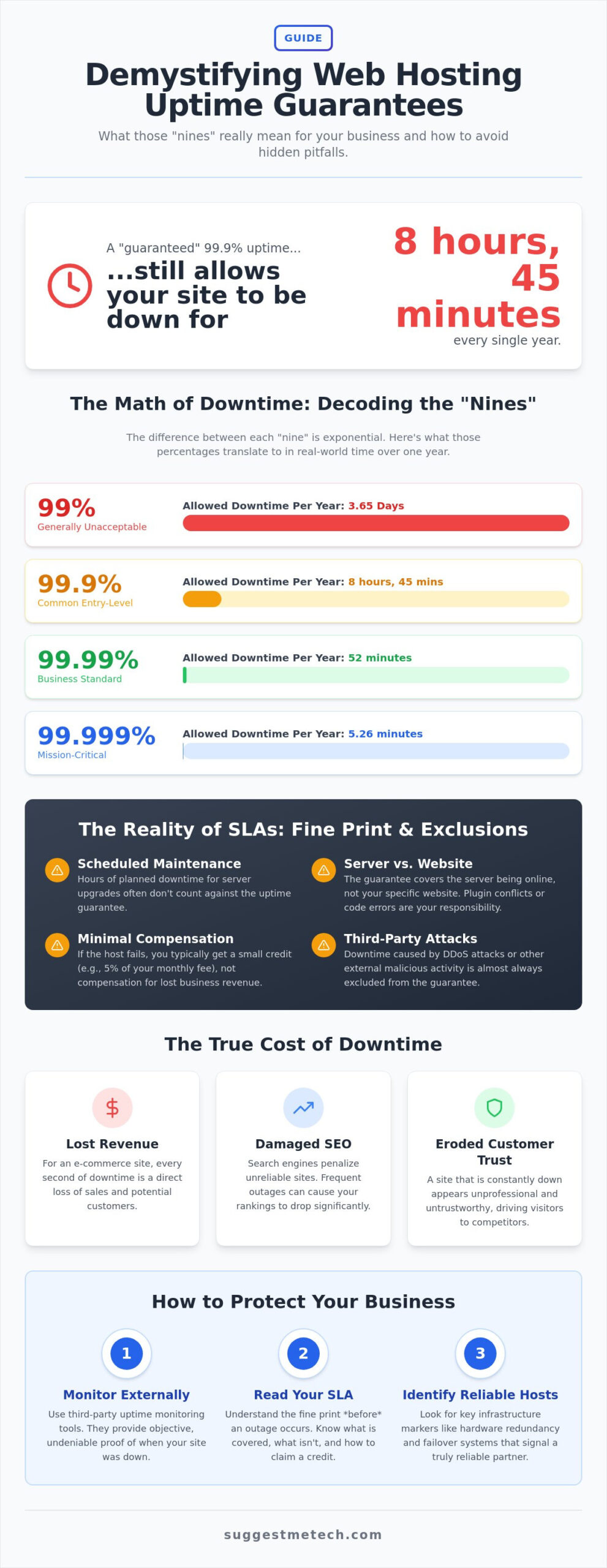
- 99% Uptime: Allows for 3.65 days of downtime per year. This is generally unacceptable for any professional site.
- 99.9% Uptime: Allows for 8 hours and 45 minutes of downtime per year. This is the common “entry-level” standard.
- 99.99% Uptime: Allows for only 52 minutes of downtime per year. This is the sweet spot for growing businesses.
- 99.999% Uptime: Allows for a mere 5.26 minutes of downtime per year. This is reserved for mission-critical infrastructure.
Choosing the Right Level for Your Needs
Don’t pay for nines you don’t need. If you run a personal blog or a portfolio site, a 99.9% guarantee is perfectly acceptable. A few hours of downtime spread across a year won’t break your bank. However, if you run a SaaS platform or a high-traffic e-commerce store, 99.99% is your baseline. The extra “nine” acts as an insurance policy against the massive revenue drops that occur during even short outages. For a deeper look at which providers consistently hit these targets, you can browse our best web hosting reviews to see real-world performance data.
The cost-benefit analysis is simple. Moving from three nines to four nines often involves a jump in price because the host must invest in better hardware and proactive monitoring. If your business loses more than the price of the upgrade during a single hour of downtime, the investment pays for itself instantly. Understanding web hosting uptime guarantees is about matching your budget to the actual cost of your site being offline.
The Reality of SLAs: Fine Print and Exclusions
Many business owners view an uptime guarantee as a safety net for their revenue. In reality, these guarantees are financial contracts designed to limit the host’s liability, not to fully compensate you for lost business. When you dig into the Service Level Agreement (SLA), you’ll find that “100% uptime” often comes with a long list of asterisks. Understanding web hosting uptime guarantees requires looking past the marketing headlines and into the specific conditions that allow a host to legally deny your claim for a refund.
The most important thing to remember is that an SLA is a financial guarantee, not a technical one. It doesn’t mean the server won’t fail; it simply means the host agrees to pay a small penalty if it does. However, the host gets to define what counts as a failure. If your site is down but the host’s internal “ping” test shows the server hardware is still receiving power, they may argue that their guarantee remains intact. This creates a gap between your site being offline and the host being “at fault.”
Common SLA Exclusions to Watch For
Most hosts exclude several scenarios from their uptime calculations. If your site goes down for any of these reasons, you likely won’t see a dime in credit:
- Scheduled Maintenance: This is the most common exclusion. Hosts often reserve 4 to 8 hours per month for server updates and security patches. Even if your site is dark during this time, it doesn’t count against their percentage.
- DDoS Attacks: If your site is targeted by a malicious traffic spike that overwhelms the server, most hosts consider this an “external event” beyond their control.
- User-Inflicted Errors: If a plugin conflict, a corrupted database, or a botched PHP update takes your site down, the host isn’t responsible. The server is fine; your application is broken.
- Force Majeure: Natural disasters, fires at the data center, or global fiber optic cable cuts are almost always excluded from compensation.
Compensation vs. Losses
The math of hosting credits is rarely in the customer’s favor. A typical SLA might offer a credit of 5% of your monthly bill for every hour of downtime, while top-tier hosts might offer 100% of the daily fee. Even with a generous payout, the numbers don’t add up for a business. If you pay $30 a month for hosting and your site goes down for two hours during a holiday sale, a $3 credit does nothing to recover the thousands of dollars in lost orders.
Finally, don’t expect the host to volunteer a refund. Most providers require a “self-reporting” process. You must monitor your own site, document the outage with timestamps, and submit a formal claim within a specific window, which is often 30 days. If you don’t ask, you don’t get paid. Understanding web hosting uptime guarantees means accepting that the burden of proof rests entirely on your shoulders.
How to Hold Your Host Accountable
If you rely solely on your host’s internal status page, you are likely missing the full picture. These dashboards are often updated manually or have significant lag times that fail to capture “micro-outages.” True accountability requires an independent source of truth. Understanding web hosting uptime guarantees means moving beyond a host’s promises and creating your own “Evidence Kit” to prove when those promises are broken.
Most providers won’t proactively offer you a refund when their servers fail. They wait for you to complain. By the time they acknowledge an issue, you might’ve already lost hours of potential sales. To protect your business, you need a system that watches your site as closely as you do.
Essential Uptime Monitoring Tools
You don’t need a massive budget to track your site’s performance. Several tools offer reliable “heartbeat” monitoring, which pings your site at regular intervals (usually every 1 to 5 minutes) to check for a response.
- SiteGuardian: A dedicated monitoring service for small businesses; you can visit SiteGuardian to get reliable uptime tracking and instant alerts.
- Professional Monitors: Robust services that offer detailed reports and pings from multiple global locations for increased accuracy.
- Better Stack: Combines monitoring with professional status pages and incident management tools.
Configure these tools to send instant alerts via SMS or Slack. This ensures you’re the first to know about an issue, often before your host even realizes there’s a problem. If you’re looking for a provider that performs well under this kind of scrutiny, check out our tested and reviewed hosting picks for 2026.
Step-by-Step: Claiming Your Hosting Credits
Winning a dispute over downtime requires objective proof. When your monitoring tool flags an outage, immediately start documenting the specifics. Save the exact start and end times, and take screenshots of any specific error codes like a 500 Internal Server Error or a 504 Gateway Timeout. These codes help prove the issue was server-side rather than a local connection problem on your end.
Once your site is back online, open a support ticket. Avoid emotional language and focus on the facts. State the total duration of the outage and cite the specific section of your SLA that covers compensation. For example, you might say: “My site was down for 45 minutes on July 12, which exceeds the allowed monthly downtime for our 99.99% guarantee. I’m requesting the appropriate account credit as outlined in the Service Level Agreement.”
If a host denies a valid claim, don’t give up immediately. Ask for a technical explanation of why the outage was excluded. Sometimes, a firm but polite follow-up is enough to get a credit even if they technically have an excuse in the fine print. Understanding web hosting uptime guarantees gives you the leverage to speak their language and demand the service you paid for.
Finding a Host with a Reliable Guarantee
Finding a host that actually delivers on its promises requires looking beneath the surface of the sales page. By 2026, the shift to cloud hosting and edge computing has fundamentally changed how we view reliability. Unlike traditional single-server setups, modern cloud infrastructure distributes your site across multiple nodes. If one piece of hardware fails, another immediately takes its place. This self-healing architecture is the most reliable indicator that a host values actual uptime over simple marketing slogans. Understanding web hosting uptime guarantees in this new environment means prioritizing hosts that invest in this level of technical redundancy.
Hardware quality remains a critical factor. High-performance NVMe storage and the latest AMD EPYC or Intel Xeon processors don’t just make your site faster; they’re built for the rigorous demands of a 24/7 digital economy. A host that is transparent about its hardware stack is usually one that has nothing to hide regarding its performance. When you combine top-tier hardware with edge computing, which caches your site’s data closer to your users, you create a buffer against localized outages that might otherwise take your business offline.
Infrastructure Redundancy: Beyond the Marketing
True reliability is built on layers. You should look for providers that boast N+1 redundancy, which means they have at least one independent backup for every critical system, including power supplies and cooling units. Network redundancy is just as vital. A reliable host connects to multiple Tier-1 network carriers; if one provider has a fiber cut, your traffic simply reroutes through another. We also recommend looking for Anycast DNS, which distributes your site’s “address book” across global servers to prevent connection failures. For a list of providers with these proven track records, see our guide on The Best Web Hosting Services of 2024.
User Reviews vs. SLA Promises
The SLA tells you what the host is legally required to do, but user reviews tell you what they actually do when things go wrong. Search for independent testing sites that use third-party tools to track uptime over several months. Pay close attention to how a host’s support team responds during a crisis. A guarantee is only as good as the person on the other end of the live chat when your site is dark. If you are just starting out, you can find several reliable starter hosts in our guide on How to Start a Blog in 2026.
Before you sign a contract, use this final evaluation checklist:
- Does the host offer a clear, easy-to-read SLA?
- Is scheduled maintenance excluded from the uptime percentage?
- Does the infrastructure include N+1 power and network redundancy?
- Is the compensation for downtime paid in cash or account credits?
- Does the host provide a public status page with historical data?
Understanding web hosting uptime guarantees empowers you to make a choice based on data rather than hope. By focusing on infrastructure and transparency, you ensure your site remains the reliable “heartbeat” of your business.
Secure Your Site’s Future with Smarter Hosting Choices
Mastering the math behind those “nines” and understanding web hosting uptime guarantees is the first step toward protecting your digital presence. You now know that an uptime promise is a financial contract, not a technical impossibility of failure. By looking past the marketing headlines and into the specific exclusions of your SLA, you can avoid the frustration of denied credits. Setting up independent monitoring ensures you have the objective proof needed to hold your provider accountable for every second of downtime.
We’ve done the heavy lifting to simplify your search. Our team has tested over 50 hosting providers for 2026 uptime consistency to deliver independent, data-driven reviews. Whether you are a solo creator or managing a team of 100, our practical advice helps you skip the jargon and find a partner that truly values your availability. You don’t have to settle for a host that hides behind fine print when things go wrong.
Find the most reliable providers in our Best Web Hosting Guide and secure a foundation that keeps your business online. You have the knowledge to demand better service; now it’s time to put it into action.
Frequently Asked Questions
Is 99.9% uptime actually good for a small business?
99.9% uptime is the industry baseline, but it still allows for almost nine hours of downtime every year. For a personal blog or a portfolio, this is usually perfectly fine. However, if your business generates significant revenue every hour, those nine hours could represent a major financial hit. You need to weigh the cost of a higher-tier plan against the risk of being offline during peak traffic.
What is the difference between uptime and availability?
Uptime is a measure of the server’s power status, while availability measures whether your site is actually usable. This distinction is vital for understanding web hosting uptime guarantees. A server might be “up” and running in the data center, but if a network routing error makes your site unreachable, your availability is zero. Most guarantees only protect you against the server hardware failing.
Does “scheduled maintenance” count toward my uptime guarantee?
No, scheduled maintenance is almost always excluded from your host’s uptime guarantee. Hosts use these windows for critical security updates and hardware improvements that keep the server healthy. Since these events are planned, providers don’t count them as “downtime” in their SLA. Always check your host’s notification settings so you aren’t surprised by a planned midnight outage.
How much compensation can I really expect if my site goes down?
Expect a small credit toward your next bill rather than a cash refund for lost sales. Most top-tier hosts offer credits ranging from 5% of your monthly fee to a full day’s worth of service for every hour of downtime. These payouts are almost always capped at your total monthly hosting cost. A host will not compensate you for a $500 missed order.
Can a web host guarantee 100% uptime?
A host can promise 100% uptime as a marketing guarantee, but it is technically impossible to achieve in reality. Hardware fails and software eventually needs updates. When a host offers a 100% guarantee, they’re simply stating they’ll provide a credit for every second of downtime, not that the site will never go dark. It’s a sign of confidence in their infrastructure, but outages can still occur.
What happens to my SEO if my website is down for a few hours?
Short outages of an hour or two usually won’t destroy your SEO, but consistency is key for search rankings. Google wants to send users to reliable destinations. If your site is frequently down when a crawler visits, your crawl budget might decrease. Over time, persistent reliability issues can signal to search engines that your site provides a poor user experience.
What is the best free tool to monitor my website uptime?
There are several reliable tools for users who are just starting with understanding web hosting uptime guarantees. These services ping your site at regular intervals and send alerts the moment they detect a failure. While free versions may lack advanced features, they provide the objective data needed to prove an outage occurred and request a credit from your host.
Do I need a higher uptime guarantee for a WordPress site?
Your CMS choice doesn’t change the server’s requirements, but it does change your risk profile. WordPress sites often go down due to plugin conflicts or database errors that have nothing to do with the host’s hardware. While a high guarantee is helpful, you also need proactive monitoring to ensure your specific application is running, as most SLAs won’t cover software-related crashes.

