
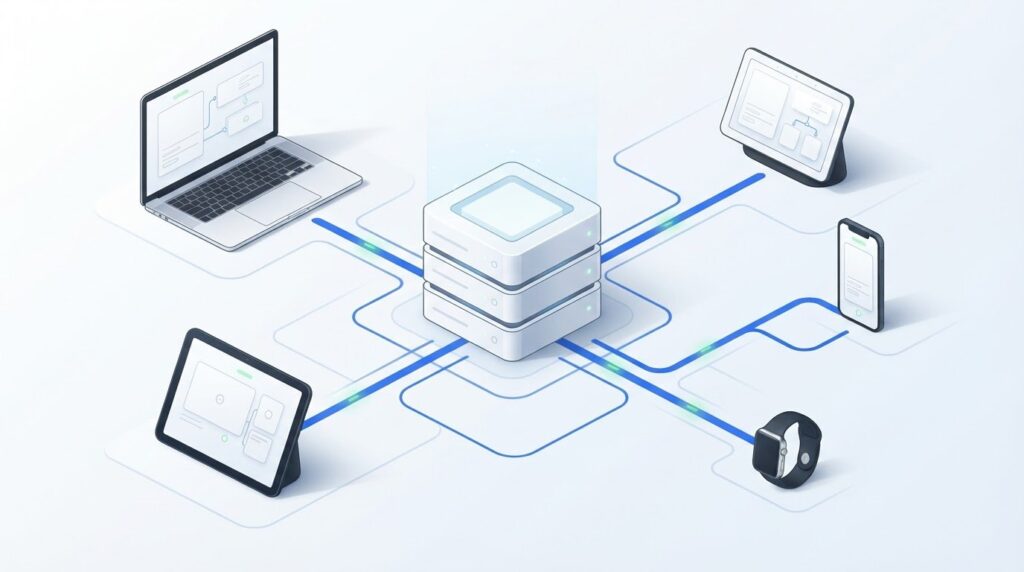
What if you could reuse website content without tying it to one website design? What is headless CMS, and does your project need one? The idea is simpler than the name: a headless CMS stores and organizes content, then delivers it through an API, a connection that lets software exchange information, to websites, apps, or other digital channels.
The key decision is whether the added flexibility is worth the extra setup. A headless CMS gives developers more control over how content appears, but your team also takes responsibility for building and maintaining the front end, the part people see and use. This guide explains how the architecture works, compares it with a traditional CMS, and shows when multiple channels or a custom-built site may justify the added complexity.
Key Takeaways
- Decide whether separating content management from presentation fits the needs of your project.
- Trace how content moves from the CMS to a website or app to understand where APIs fit in.
- Compare editing workflows and implementation effort, not just front-end flexibility.
- Use your channel needs, editorial process, team skills, and maintenance capacity to guide the decision.
- Inventory your content and prototype a representative experience before committing to a full implementation.
Quick Answer
A headless CMS stores and organizes content separately from the presentation people see on a website or app. It delivers content through APIs, which let software request and exchange information. Developers decide how each experience displays that content, gaining flexibility while taking on more responsibility for building and maintaining the front end.
In a headless CMS architecture, the content system manages information while a separate layer turns it into a visitor-facing experience. The two parts communicate, but they don’t have to use the same design or technology. This can make content easier to reuse, although each experience still needs to be built and supported.
What does “headless” mean in a CMS?
The “head” is the front end, the pages and controls people see and use. The CMS is where editors create, update, and organize content. A headless system separates content management from a particular presentation layer. The term and architecture are also described in this Headless CMS overview.
For example, an editor could create an article once in the CMS. A website might display it as a full story, while a mobile app presents the same title and text in a compact reading view. The content is managed centrally; each front end determines how it appears.
How do APIs connect content to an experience?
An API, or application programming interface, is a defined way for one piece of software to request information from another. A website or app can request specific content, such as an article title, body, or publication date. The CMS returns the requested data, and the front end places it into its own layout.
This exchange can happen whenever a page or screen needs content. The API is the connection, not the design. It doesn’t decide whether a headline appears above an image or how a page works on a phone.
Why does structured content matter?
Headless systems commonly store content in structured fields rather than treating every page as one finished layout. An article might have separate fields for its headline, author, body, and summary. Those fields make individual pieces easier for different front ends to use, provided each experience is designed to handle them.
Structure requires planning. If editors need a new field or content type, the team may need to update both the content model and the front-end code that displays it.
What a headless CMS does, and does not do
A headless CMS manages and delivers content; a separate front end presents it to visitors. The CMS doesn’t necessarily provide a visual page builder or show editors exactly how every page will look before publication. Editing and preview tools vary by platform, so the term alone doesn’t tell you what an editorial workflow includes.
In practice, the CMS may hold reusable information while developers build the layouts and behavior for each channel. Editors can focus on content, but the team must also plan for creating and maintaining the experiences that use it.
How a Headless CMS Delivers Content to Websites and Apps
A headless CMS sends content to a website, app, or other digital experience through an API. Editors manage content in the CMS, while a separate front end requests the data it needs and presents it on a screen.
To see how a headless CMS works in practice, follow one piece of content from entry to display. The steps are straightforward, though the tools and workflow vary by platform and project.
From content entry to a published page
Imagine an organization publishing an event announcement. Its content model includes reusable fields such as a title, image, date, and body text. The website and mobile app can request those fields, then display them in layouts suited to each screen.
- An editor creates the content. They enter the announcement’s details into the CMS fields and save it, often through a publishing workflow.
- The front end requests content. The website or app uses the CMS API to request the announcement it needs.
- The CMS returns the requested data. The response contains relevant fields in a format the application can process.
- The front end displays it. The website places the information into a page layout; the app can present the same content in a screen designed for mobile use.
This sequence separates the editorial task from the design decision. An editor updates the event details once in the CMS, while each front end controls how they appear. Reuse depends on the content fields and each application’s ability to work with them.
REST, GraphQL, and structured content in simple terms
REST and GraphQL are different ways applications can request data from an API. With REST, an application typically requests information from a defined endpoint. GraphQL lets the application specify which fields it needs in a request. Neither term describes how a page looks; each describes how software asks for content.
CMS responses are often organized as JSON, a text format that represents data as named fields and values. For instance, a response could pair a “title” field with the announcement’s headline and a “body” field with its text. The front end reads those values and places them in the right parts of its interface.
API styles, field structures, and editorial workflows differ across headless CMS platforms. Before planning around one, find out how it models and delivers content and whether that fits the publishing process. For further context on evaluating digital tools, explore practical technology guides.
Headless CMS vs. Traditional CMS: Compare Flexibility, Editing, and Complexity
A traditional CMS commonly combines content management and presentation in one system. A headless CMS separates those responsibilities: it manages content, while a distinct front end determines how visitors see it. Neither approach is automatically better. The right fit depends on your channels, editorial workflow, and the team’s capacity to build and maintain the experience.
Compare how each model affects everyday publishing and project effort, not just technical flexibility.
| Factor | Traditional CMS | Headless CMS |
|---|---|---|
| Architecture | Content tools and presentation are commonly part of one system. | Content management and the front end are separate components. |
| Presentation control | Pages often use the CMS’s themes, templates, or page-building tools, with customization varying by platform. | Developers build or select the front end independently, allowing distinct experiences for different channels. |
| Editing workflow | Editors may manage content and pages in one interface, sometimes with a visual preview. | Editors work in the CMS; preview and page-management features depend on the implementation. |
| Implementation effort | Often involves fewer separately managed components for a straightforward website. | Requires coordination between the CMS, front end, and the processes that connect them. |
The traditional model brings the page and content workflow together. The headless model lets the presentation layer be built separately, but shifts more responsibility for connecting and maintaining components to the project team. Features and effort vary by platform and site requirements.
When a traditional CMS may be the simpler fit
A traditional CMS can suit a project centered on one website, especially when editors need to create content and manage page layouts through an integrated workflow. A small team may also prefer fewer separately managed components, with publishing and presentation handled in a more unified setup. This can reduce coordination overhead, though traditional platforms can still be customized or expanded as a project grows.
Choose this approach when its built-in editing and page tools support the way your team works, and separate front ends don’t solve a clear need.
What flexibility a headless approach adds, and costs
A headless approach can support different front ends using shared content. For example, a business could present the same product information on a branded website and in a separate app, each with its own design and navigation. This control is useful when channels need distinct experiences, but creating and maintaining each front end takes development work. The team also needs to coordinate content fields with front-end updates.
Editor previews and publishing workflows aren’t guaranteed by the architecture. They depend on the CMS and how the team connects its editing tools to the presentation layer.
Hybrid implementations are also possible. A project might keep a traditional CMS for its main website while using headless delivery for a specific app or other channel. This can be a middle ground when only part of the publishing setup needs separation.
When Should You Choose a Headless CMS for a Project?
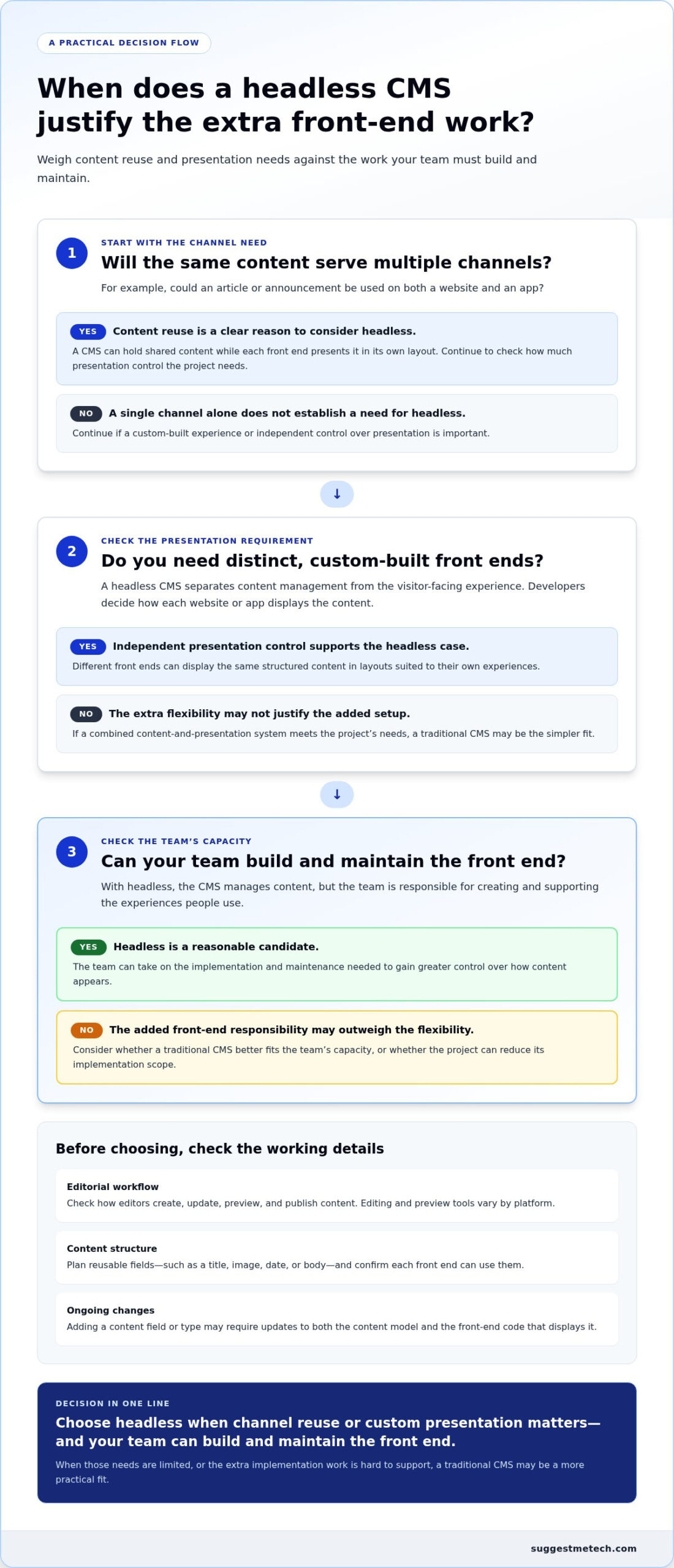
A headless CMS may fit a project when content needs to serve several digital channels and the team can support separate front ends. An integrated CMS may be more practical when straightforward website publishing is the main goal. Choose based on channel requirements, editorial needs, team skills, and maintenance capacity, not because an architecture is fashionable.
Understanding the architecture clarifies the choice, but the project’s publishing needs should decide it. Start by documenting how content will be created, where it must appear, and who will keep each part working.
Questions to answer before selecting a CMS
Write down what the project needs before comparing platforms. Include today’s publishing workflow and realistic plans for adding channels. These questions can help distinguish a genuine need for separation from a preference for newer technology.
- Which channels will use the content? List the website, mobile app, or other digital experiences that need to publish or reuse the same material. Note where content can be shared and where each channel needs different information or presentation.
- Who owns the front end? Identify the people responsible for building, updating, and maintaining the visitor-facing experience. Consider whether the team has the skills and time to handle changes outside the CMS.
- What do editors need? Record whether editors rely on page previews, revisions, publishing approvals, or control over page layouts. Clarify which tasks they should be able to complete without developer involvement.
- Who maintains the full setup? Account for ongoing work across the CMS, front end, and the connection between them. Even a design that meets current needs needs a clear owner for future updates.
How to assess the trade-offs for your team
Compare the editorial experience your team expects with the development work it can sustain. A content team that needs to assemble and preview pages independently may favor an integrated workflow. A team serving distinct website and app experiences may value separate presentation control, provided it can coordinate content changes with front-end updates.
Keep future plans specific. If the same content is likely to serve additional digital experiences, separating content from presentation may make reuse a useful design goal. If those channels are only a possibility without a defined need, the extra components and coordination may not be justified yet.
Document requirements before evaluating platforms. Separate editorial needs, such as approvals and previewing, from front-end decisions, such as layouts and user interactions. Then compare how each architecture supports those needs and what work it leaves to the team. This also makes a hybrid option easier to assess: some projects may benefit from an integrated website while using headless delivery for a particular channel.
Use practical technology guides to compare options against your project’s real requirements rather than choosing by trend alone.
How to Plan a Headless CMS Project and Take the Next Step
Plan a headless CMS project by documenting what content exists, where it needs to appear, and how people will publish and maintain it. Then map the content model, test one representative experience, and review the workflow with editors and developers. A small pilot can expose practical gaps before you consider a broader migration.
Keep editorial requirements distinct from front-end design and technical delivery decisions. Editors need a workable way to create, revise, preview, and publish content. Developers need to decide how that content will be requested and presented across the planned experiences.
A practical planning sequence for evaluating headless CMS
Start with the current publishing process, not a platform shortlist. Record content types, channels, owners, and any steps that depend on a particular website or tool. This inventory helps reveal what should be reused, what needs a channel-specific version, and where responsibilities may change.
- Inventory content and channels. List articles, product information, or other content types, along with the website, app, or digital experiences that use them. Note who creates, reviews, and publishes each type.
- Map fields and relationships. Identify the information each experience needs, such as a title, summary, image, or related content. Mark which fields can be shared and which need to differ by channel.
- Separate editorial and delivery needs. Document how editors should work independently from decisions about page layouts, front-end behavior, and API delivery. This keeps workflow requirements distinct from design preferences.
- Prototype one representative journey. Use a typical piece of content and follow it from entry through display in a planned experience. Review the result with editors and developers, noting unclear steps, missing fields, and maintenance tasks.
- Review before expanding. Use pilot findings to adjust the content model and workflow. Decide whether the approach meets project needs before planning a wider migration.
For example, a publication could pilot one article type across its website and app. Editors can assess whether the fields and preview process make sense, while developers examine whether both experiences can use the content as intended. Test a representative task, not just whether content can be entered.
Questions to resolve before implementation
Before moving beyond the pilot, agree on how editors will preview content, revise drafts, and publish approved updates. Clarify how changes and corrections will be handled across channels so the editorial process remains clear as content is reused.
- Editorial ownership: Who creates and approves content, and how do editors review its presentation before publishing?
- Technical ownership: Who maintains the CMS setup, API integration, and each front end after launch?
- Evaluation criteria: How will the team assess usability, compatibility with planned experiences, and ongoing complexity?
Use the answers to compare CMS approaches against documented project needs. If a simpler integrated workflow meets those needs, separation may add work without enough value. If the pilot demonstrates a clear need to reuse content across distinct experiences, a headless approach may warrant further evaluation.
Turn Your CMS Decision Into a Clear Next Step
Before choosing a platform, turn your project requirements into a short decision record: what your team needs to publish, which experiences must support it, and who will own ongoing changes. That record keeps discussions focused on practical fit rather than assumptions about headless CMS or which architecture seems more modern.
Use it to assess options against the same criteria, then identify a small test that can answer remaining questions. A useful evaluation considers whether editors can work comfortably, whether the approach fits the planned experiences, and whether your team can maintain it over time.
SuggestMeTech publishes technology guides, reviews, and comparisons focused on evidence, usability, compatibility, and practical trade-offs. Explore practical technology guides from SuggestMeTech to support your next technology decision.
You don’t need the most complex architecture to make a sound choice. Start with what your project needs, test your assumptions, and use the results to decide which approach to take.
Frequently Asked Questions
These answers cover common questions about CMS terminology, editorial tasks, and the responsibilities teams should consider during an evaluation.
What is a headless CMS, in simple terms?
A headless CMS is like a shared content library that doesn’t dictate how every screen looks. Editors maintain information in one place, while separate website or app experiences decide how to present it. For example, a support team might update a troubleshooting guide once, while a website displays it as an article and a help interface organizes it into expandable answers.
How does a headless CMS work?
A headless CMS makes saved content available to connected applications according to the platform’s publishing rules. Editors prepare and publish an entry, and the website or app uses its integration to retrieve it. If a page shows old or missing information, the team can check whether the entry was published, whether the application requested the right content, and whether the front end maps the returned fields as intended.
Is a headless CMS better than a traditional CMS?
No single approach is better for every project. Compare what each option makes easier: managing pages in an integrated editor or adapting shared content for separate experiences. For a small organization with a simple website and limited development capacity, an integrated CMS may reduce coordination. A team with distinct channel requirements may prefer more presentation control, if it can support the added work.
Can a headless CMS be used with a website and mobile app?
Yes. A company could manage help articles in a CMS and make them available to both its public support site and an in-app help area. The app might display shorter sections or organize articles around common tasks, while the website uses a fuller page layout. Each destination needs a connection to the CMS and a design suited to how its users seek help.
Do you need coding skills to use a headless CMS?
Editors may not need coding skills to fill in existing content fields or follow an established approval process. Development skills are generally needed to create or change the website or app experience and connect it to the CMS. Before choosing a setup, test a routine editorial task, such as correcting a link or changing a heading, and identify whether an editor can complete it without developer assistance.
What is the difference between headless CMS and decoupled CMS?
The terms can overlap, and platforms don’t always use them consistently. “Headless” generally refers to a CMS that supplies content without providing the visitor-facing presentation layer. “Decoupled” often describes a system that separates content management from presentation but may retain an optional or default delivery layer. Since labels alone don’t establish available features, compare how a specific platform handles templates, APIs, previews, and publishing.

