
What if every website you visited could see a digital fingerprint that points directly back to your internet connection? It sounds like a scene from a spy movie, but it’s actually the basic reality of how the internet functions. You likely realize your devices need a way to talk to each other, but the technical side of networking often feels like a wall of confusing jargon. It’s frustrating to feel like your privacy is at risk just because you don’t understand the “language” of your router or why the world is suddenly switching between different versions of these digital labels.
This guide provides what is an IP address explained in plain English, so you can stop worrying and start taking control of your digital footprint. We’ll break down the 2026 shift toward IPv6, which has now reached a global adoption rate of 45.36 percent, and even look at the experimental IPv8 drafts currently being discussed by researchers. You’ll learn exactly why hackers can’t find your street address with just an IP, how to protect your identity, and the practical differences between static and dynamic addresses for your home or business devices.
Key Takeaways
- Understand how IP addresses act as a digital mailing address to ensure your data packets reach the right destination every time.
- Learn why the shift from IPv4 to IPv6 is essential for connecting billions of new devices in our growing digital world.
- Get what is an IP address explained in terms of privacy, including exactly what information your ISP and websites can see.
- Discover the functional differences between static and dynamic addresses to help you choose the right setup for servers or remote work.
- See how your IP address impacts your web hosting choices and technical projects like starting a professional blog.
Defining the IP Address: Your Digital Home’s Mailing Address
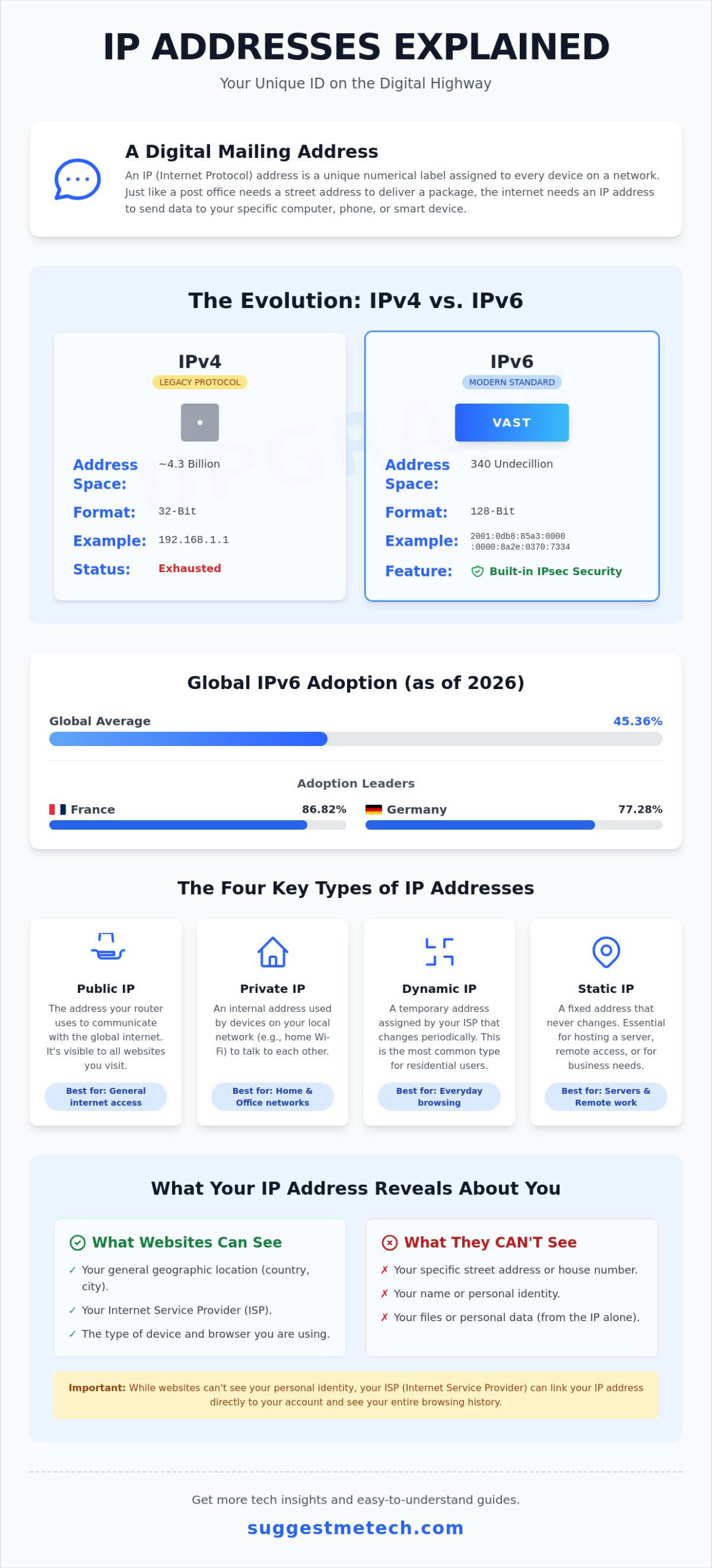
Understanding what is an IP address explained starts with a simple concept: every device needs a name. An IP (Internet Protocol) address is a unique numerical label assigned to every device connected to a computer network. Think of it as a digital mailing address. Just as the post office needs your street address to deliver a package, the internet needs an IP address to deliver data to your specific laptop or phone. This is What is an IP Address? in its simplest form: a way for computers to identify each other and exchange information securely.
The “Protocol” part of the name is actually the most important bit. Think of the protocol as the universal language of the internet. It’s the agreed-upon set of rules that ensures a server in Tokyo can talk to a smartphone in London without any translation errors. These rules govern how data is chopped up into small packets, labeled, and sent across the wire. Without these rules, the internet would be a chaotic mess of data with no destination. It’s the difference between a stack of loose papers and a carefully addressed envelope.
There is also a key distinction between your individual device and your network’s gateway. Your home router acts as a gatekeeper. It has a single public IP address that the rest of the world sees. However, inside your home, your router assigns private IP addresses to your tablet, smart TV, and laptop. This setup keeps your internal network organized and adds a layer of security by hiding your specific devices behind a single entry point.
The Relationship Between IP Addresses and Domain Names
Computers love numbers. Humans prefer words. It’s much easier to remember “Google.com” than a string of digits like “142.250.190.46”. This is where the Domain Name System (DNS) comes in. It acts as the internet’s phonebook, translating the names you type into the IP addresses the network understands. When getting what is an IP address explained, you’ll see that these two systems work together seamlessly. If you’re curious about how those text-based names are registered and managed, check out our guide on What is a Domain Name? for a deeper dive.
Why Every Connected Device Needs an IP
The Internet of Things (IoT) means almost everything is connected now. Your smartphone, smart fridge, and even your Wi-Fi lightbulbs all require an IP address to function. Your router manages this local traffic using a process called DHCP, which automatically hands out addresses as devices join the network. Problems arise if two devices end up with the same address, which is known as an IP conflict. When this happens, neither device can connect properly because the network doesn’t know where to send the data. It’s like two houses on the same street having the exact same house number; the mail carrier wouldn’t know which door to knock on.
IPv4 vs. IPv6: Understanding the Evolution of IP Addresses
The internet grew faster than anyone imagined in the early 1980s. When engineers first created IPv4, they used a 32-bit system that allowed for roughly 4.3 billion unique addresses. At the time, it seemed like an infinite supply. However, the explosion of smartphones, laptops, and smart home devices led to a period of “Address Exhaustion.” By the end of 2025, the total public IPv4 address pool sat at approximately 3.687 billion addresses, showing a slight contraction from previous years. When looking for what is an IP address explained, it’s vital to realize that IPv4 is now a legacy system that we’ve essentially outgrown.
IPv6 is the modern solution designed to fix this scarcity. It uses a 128-bit address format, which provides a staggering 340 undecillion unique combinations. That is enough for every grain of sand on Earth to have its own connection many times over. Beyond just providing more space, IPv6 introduces critical security improvements. Unlike its predecessor, IPv6 was built with IPsec (Internet Protocol Security) as a core requirement, providing better encryption and authentication options right out of the box. Understanding these Types of IP Addresses helps you see why the transition is about safety and efficiency as much as it is about finding more room for devices.
The 2026 State of IPv6 Adoption
As of May 11, 2026, global IPv6 adoption has reached 45.36 percent. Countries like France and Germany are leading the way with adoption rates of 86.82 percent and 77.28 percent respectively. Most modern networks use a “Dual Stack” approach. This means your device uses both IPv4 and IPv6 simultaneously to ensure you don’t lose access to older websites while benefiting from the better mobile performance of the newer protocol. You don’t need to buy new hardware for this switch; your current router and ISP likely handle it in the background. If you want to keep up with the latest networking trends and hardware, check out our technology reviews for practical advice on modern setups.
How to Tell the Difference
Spotting the difference between the two versions is simple once you know what to look for. IPv4 addresses use four sets of numbers separated by periods, like 192.168.1.1. In contrast, IPv6 addresses are much longer and use both numbers and letters (hexadecimal) separated by colons, such as 2001:0db8:85a3:0000:0000:8a2e:0370:7334. While the newer format looks intimidating, it’s actually more organized and allows for hierarchical network management. This makes it easier for internet service providers to route traffic across the globe. Even as we adopt IPv6, researchers are already looking ahead; an Internet-Draft for IPv8 was submitted in April 2026, showing that the evolution of how we connect is a never-ending process.
Types of IP Addresses: Public, Private, Static, and Dynamic
Not all IP addresses serve the same purpose. Your public IP is your “face” to the internet. It’s the address assigned by your ISP that every website sees when you visit. In contrast, your private IP is for internal use only. This distinction is a core part of what is an IP address explained. While your public address must be unique across the entire globe, your private address only needs to be unique within your own home or office. This layered approach is fundamental to How IP Addresses Work, as it allows billions of devices to connect without needing billions of individual public entries.
Shared IPs are another common variation you’ll encounter in the digital space. With a shared IP, hundreds of different websites might live on the same physical server and use the exact same numerical address. The server simply uses the domain name to figure out which specific site the visitor wants to see. This method is much more affordable than giving every small blog its own unique public address, making it the standard for most entry-level web services.
Static vs. Dynamic: Which Do You Have?
Most home users have a dynamic IP address. Your ISP assigns these from a large pool, and they often change every time you reboot your router or after a specific time limit expires. This system is cost-effective for providers and adds a small layer of privacy for you. However, if you’re hosting a professional server, gaming heavily, or need reliable remote access to your home computer, you might need a static IP. A static IP never changes. It’s like having a dedicated parking spot rather than hunting for a new one every day. This choice is a critical factor when evaluating The Best Web Hosting Services of 2024, as certain advanced projects require that permanent “home” on the web.
Private IPs and Your Local Network
Have you ever noticed your computer’s internal IP starts with 192.168? You aren’t alone. This is a reserved range used specifically for private networks. Your router uses a process called Network Address Translation (NAT) to act as a middleman for your home. When your laptop sends a request to a website, the router swaps your private IP for its public one. When the data returns, the router remembers which device asked for it and sends it to the right place. This allows your printer to talk to your laptop without exposing either device directly to the open internet. It’s a simple but effective security shield that keeps your internal traffic organized and safe.
IP Addresses and Your Privacy: What Can Someone Actually See?
There is a common fear that having your IP address exposed is like leaving your front door unlocked. Let’s clear that up. An IP address does not reveal your name, phone number, or exact street address. While some sources might suggest hackers can find your front porch using just these numbers, that isn’t how the tech works. Having what is an IP address explained from a privacy perspective means understanding that it primarily reveals your general geographic area, such as your city or ZIP code, and the name of your Internet Service Provider (ISP).
Websites use this data to customize your experience. If you’ve ever seen a weather report or local news site automatically show your town, they’re using your IP to guess your location. It’s also how streaming services enforce regional restrictions; they check your IP to ensure you’re in a country where they have the rights to show specific movies. However, the real privacy risk comes from tracking. Advertisers can link your IP to your browsing habits over time, building a profile of your interests without ever knowing your legal identity.
How to Mask Your IP Address
If you want to keep your location private, you have several options. A Virtual Private Network (VPN) is the most reliable tool. It replaces your real IP with one from a remote server, making it look like you’re browsing from a different city or country. Proxy servers offer a simpler version of this for basic tasks, though they often lack the encryption of a VPN. For those who need extreme anonymity, the Tor browser routes your traffic through three different layers of encryption, though this significantly slows down your connection speed.
How to Find Your Current IP Address
Finding your own address is easy. To see your public face to the world, simply type “What is my IP” into any search engine. To find your private internal address on Windows, open the Command Prompt and type “ipconfig”. On a Mac, you’ll find it under System Settings in the Network tab. You might notice this number changes when you switch from your home Wi-Fi to mobile data. This happens because your phone is jumping from your home router’s gateway to your cellular provider’s network, which assigns you a completely new label from their own pool. If you want to stay updated on the best tools for digital security, explore our latest technology reviews and guides for expert recommendations.
Why IP Addresses Matter for Your Tech Projects
If you’re planning a new digital venture, these numbers become more than just technical labels. They are the backbone of your online reputation. Having what is an IP address explained in the context of business means looking at how your server identifies itself to the rest of the web. For instance, when Starting a Blog in 2026, you’ll need to decide between shared and dedicated hosting. This choice determines whether you share an IP address with hundreds of other sites or have your own unique identifier. A dedicated IP gives you more control over your server environment and is often required if you plan to install specific security certificates or run advanced scripts.
Troubleshooting is another area where IP knowledge pays off. If your internet feels sluggish or won’t connect, “renewing” your IP address is a standard pro move. This tells your router to drop its current connection and request a fresh one from your ISP. This simple step often clears up routing errors or address conflicts that cause “no internet” messages. For high-security projects, you can use whitelisting. This allows only specific, trusted IP addresses to access your server or home network, creating a digital VIP list that keeps unauthorized users out of your private data.
IPs and Web Hosting Performance
Does a dedicated IP help your SEO? While search engines don’t give you a direct ranking boost for having one, a dedicated IP protects your reputation. If you’re on a shared IP and a “neighbor” on that same server sends mass spam, your email deliverability could suffer. This happens because the IP itself gets blacklisted by email providers. Even if you’re using one of the Best Laptops of 2026 with massive processing power, your connection is still limited by the quality and reputation of your IP protocol. Choosing a hosting provider that manages their IP pools carefully is essential for long-term project success.
Next Steps: Mastering Your Digital Presence
Take a moment each month to check your router’s admin panel for unauthorized devices. If you see a weird device name with its own local IP, it’s time to change your Wi-Fi password immediately. When your mobile connection acts up, the first step is often a network reset. Learning How to Clear Cache on iPhone and resetting network settings forces your device to grab a fresh IP and clear out old DNS data. Ultimately, an IP address is a tool. Once you have what is an IP address explained for your specific needs, you gain total control over your digital privacy and network performance.
Take Control of Your Digital Identity
Understanding what is an IP address explained in simple terms gives you the power to navigate the web with confidence. You now know that these numerical labels are more than just tech jargon; they’re the essential rules that keep our global network organized. From the shift toward 2026 updated networking standards like IPv6 to the practical security benefits of masking your public face with a VPN, you’ve gained the tools to protect your privacy and optimize your home connection. Whether you’re troubleshooting a router or launching a new server, these fundamentals ensure you’re never left in the dark.
Our mission is to help our 10,000 monthly readers demystify complex technology through expertly curated tech reviews and simplified guides. If you’re ready to put this knowledge into practice for your next project, Check out our guide to the Best Web Hosting Services to see how IPs impact your site! Mastering your digital footprint is the first step toward building a faster, safer, and more professional online presence. We’re here to help you every step of the way.
Frequently Asked Questions
Can someone find my physical home address from my IP?
No, an IP address cannot reveal your specific house number or name to a regular person or website. It generally identifies your city and your Internet Service Provider. To get your actual street address, a person would typically need a legal court order to force your ISP to release that private registration data. This is a common point of confusion when getting what is an IP address explained to new users.
Does my IP address change when I restart my router?
It depends on your service plan. Most residential users have dynamic addresses that change whenever the router reboots or the ISP’s lease on that number expires. If you pay for a static IP, it will remain the same regardless of how many times you restart your hardware. This is common for business users who host their own servers or websites.
Is it illegal for someone to know my IP address?
It is not illegal for someone to know your IP address. Since every website you visit needs this number to deliver content, it’s essentially public information. Having what is an IP address explained from a legal standpoint means realizing it’s a digital label, not a private secret. While knowing the address is legal, using it to launch a cyberattack or track someone without consent is a serious offense.
How do I hide my IP address for free?
You can use the Tor browser or a reputable free VPN service to mask your location without spending money. While free options often have slower speeds or data limits, they are effective for basic privacy. Another simple method is using a public Wi-Fi network, which replaces your home IP with the network’s own address. These tools ensure your digital footprint stays private.
Why does my phone have a different IP than my laptop on the same Wi-Fi?
This happens because of your router’s internal organization. While both devices share one public IP to talk to the world, your router assigns unique private IPs to keep local traffic organized. This ensures your laptop’s print job doesn’t accidentally end up on your phone screen. These internal numbers, often starting with 192.168, are only visible within your own home network.
What is an ‘IP leak’ and why should I care if I use a VPN?
An IP leak occurs when your real, ISP-provided address is visible even when your VPN is turned on. This often happens through security flaws in web browsers or misconfigured software. It’s a major concern for privacy-conscious users because it defeats the purpose of using a VPN to hide your digital footprint. Regularly testing your connection for leaks is a vital part of maintaining online anonymity.
Can two different houses have the same public IP address?
Yes, this is becoming more common through a technology called Carrier Grade NAT (CGNAT). Some ISPs group hundreds of homes under a single public IP address to save space. While this doesn’t usually affect basic browsing, it can cause issues for gamers or people trying to host their own home servers. It’s a common workaround for the ongoing shortage of available IPv4 addresses.
Do I need to change my IP address regularly for security?
For the average user, manually changing your IP address isn’t a security requirement. Most ISPs handle this automatically through dynamic addressing. However, if you’re being targeted by a specific network attack, such as a DDoS, changing your IP can provide immediate relief by cutting off the attacker’s path to your network. For daily use, focusing on strong passwords and a reliable VPN is more effective.

