

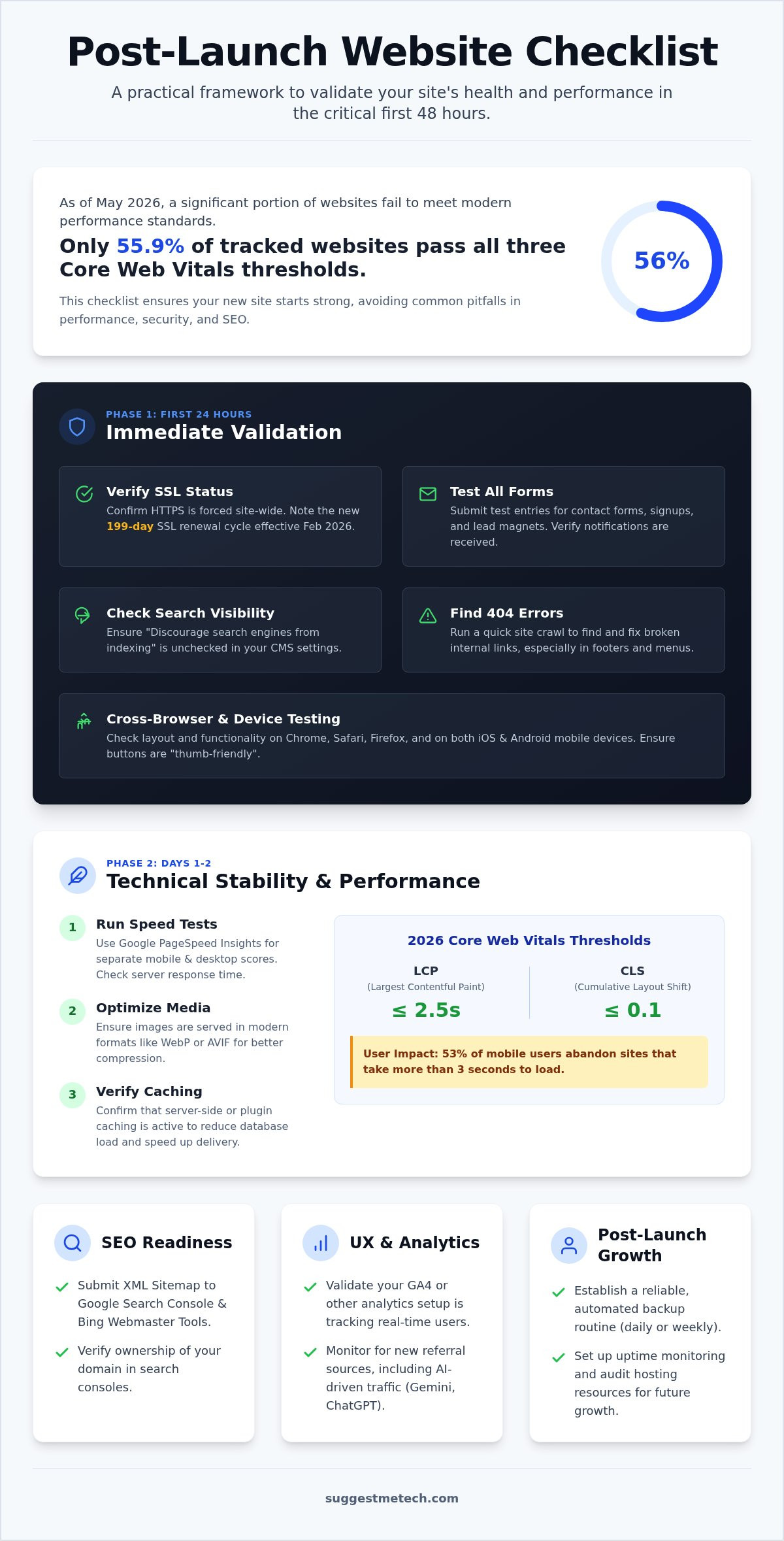
Did you know that as of May 2026, only 55.9% of tracked websites actually pass all three Core Web Vitals thresholds? It’s a sobering reality for any business owner or developer who just hit the “publish” button. You’ve likely spent months perfecting every page, so the fear of broken links or slow load times is enough to cause serious anxiety. Knowing exactly what to check after launching a new website is the only way to move past the stress and ensure your site actually performs for your visitors.
We understand that a launch is a transition, not a finish line. You need to know that your site is functional, secure, and visible to search engines immediately. This guide provides a practical, step-by-step framework to validate your site’s health during the critical first 48 hours. We will walk through the essential 2026 updates you need to master, from the new 199-day SSL certificate renewal cycle to tracking AI-driven traffic from tools like Gemini and ChatGPT in GA4. By the end of this checklist, you’ll have the peace of mind that your data is being tracked correctly and your site is ready for its first visitors.
Key Takeaways
- Test your contact forms and verify your SSL status immediately to prevent security warnings and missed conversion opportunities.
- Our guide explains exactly what to check after launching a new website, including how to submit your sitemap for faster indexing.
- Set up real-time performance monitoring to ensure your site meets 2026 Core Web Vitals standards for speed and stability.
- Validate your analytics setup to accurately track user behavior and new traffic sources like AI assistants.
- Establish a reliable maintenance routine with automated backups and hosting resource audits to support your site’s post-launch growth.
Immediate Validation: The First 24-Hour Checklist
The moment your site goes live, the clock starts ticking. While the comprehensive web development phase is behind you, the first 24 hours are critical for catching technical glitches before they impact your brand’s reputation. Knowing exactly what to check after launching a new website ensures you don’t lose leads to a broken form or a “Not Secure” warning. This window is your best opportunity to fix errors while traffic is still ramping up.
Start with your security layer. As of February 2026, the maximum validity period for SSL certificates is 199 days. This means your renewal and validation cycles are shorter than in previous years. If your certificate isn’t active or was configured incorrectly during the move from staging to production, visitors will see a massive security warning that drives them away. Verify that your HTTPS protocol is forced and that your domain correctly points to your hosting nameservers. DNS propagation can take time, but you should see consistent results across most regions within a few hours.
Next, look at your search engine visibility settings. It’s a common mistake to leave the “Discourage search engines from indexing” box checked in your CMS settings. If this remains active, Google won’t crawl your site, and your SEO efforts will stall before they begin. While you’re at it, run a quick crawl to find 404 errors. Broken links often hide in the footer or within deep-linked navigation menus that were overlooked during the final push. When you’re determining what to check after launching a new website, catching these “page not found” errors early prevents a poor first impression.
Testing Forms and Conversion Paths
Don’t assume your contact forms work just because they functioned on a staging server. Submit a test entry on every single form, including newsletter signups and lead magnets. You need to verify that the confirmation email or “Thank You” page triggers correctly and that the data actually lands in your CRM or team inbox. If your team doesn’t receive the notification, your launch is effectively failing to generate business from the start.
Browser and Device Compatibility
Your site might look perfect on your high-resolution desktop monitor, but that’s only part of the story. Open your URL in Chrome, Safari, and Firefox to check for rendering inconsistencies. Mobile testing is even more vital. Check the layout on both iOS and Android devices. Ensure that buttons are large enough to be “thumb-friendly” and that no text overlaps on smaller screens. If a user can’t easily tap your primary call to action, they will likely abandon the site within seconds.
Technical Stability: Monitoring Performance and Speed
Once you’ve confirmed your site is live and secure, you must turn your attention to the engine under the hood. A beautiful design won’t save a site that feels sluggish or unresponsive. When determining what to check after launching a new website, technical stability is a non-negotiable priority because 53% of mobile visitors will abandon a page if it takes more than three seconds to load. You can’t rely on how the site feels on your office Wi-Fi; you need hard data from the field.
Start by running a baseline speed test using Google PageSpeed Insights. This tool provides separate scores for mobile and desktop, which is vital since your mobile audience likely faces more hardware and connection constraints. Pay close attention to your server response times. If your hosting provider isn’t delivering the speed you were promised during the setup phase, your entire user experience will suffer. If you find your current provider is consistently slow, it’s a good idea to consult our hosting reviews to find a more capable partner for your growth.
You should also verify that your media is optimized. Modern websites in 2026 should serve images in modern formats like WebP or AVIF rather than old-school JPEGs. These formats offer superior compression without sacrificing visual quality. Finally, ensure your caching layer is active. Whether you use a dedicated plugin or server-side caching, this technology stores a “static” version of your pages to reduce the load on your database. A 0.1-second improvement in website load time can increase retail conversion rates by 8.4% according to data from Shnoco, making every millisecond of optimization worth the effort.
Optimizing Core Web Vitals
Google uses specific “field data” to rank your site, so you must meet the 2026 thresholds for a “good” rating. Your Largest Contentful Paint (LCP) should be 2.5 seconds or less to ensure users see your main content quickly. Additionally, monitor your Cumulative Layout Shift (CLS); this should be 0.1 or less to prevent annoying “jumps” where text or buttons move as the page finishes loading. Site speed is the single most important factor for retaining new visitors because it directly dictates whether a user stays to engage or bounces in frustration.
Managing Site Cache
Testing your site while logged in as an admin can give you a false sense of speed. Always test in an Incognito or Private window to bypass your local browser cache and see what a new visitor actually experiences. If you’re making live updates, you may need to learn how to clear cache on iPhone to verify that your mobile changes are appearing correctly for users on the go. Don’t forget to purge your Content Delivery Network (CDN) like Cloudflare after major CSS or JavaScript changes to ensure your global audience isn’t stuck seeing an outdated, broken version of your site.
SEO Readiness: Connecting to Search Engines
A fast, secure website is a ghost town if search engines don’t know it exists. While your technical foundation is now solid, you must actively invite Google and Bing to crawl your pages. The transition from a development environment to a live domain often leads to overlooked settings that can stall your organic growth for weeks. Your priority here is to remove any barriers between your content and the bots that index it.
Start by verifying your site in Google Search Console (GSC) and Bing Webmaster Tools. These platforms are your direct line of communication with search engines. Once verified, submit your XML sitemap. This file acts as a roadmap, telling bots exactly which pages are most important. You should also audit your robots.txt file. Developers sometimes use this file to block bots from seeing the site during construction. If you don’t update it post-launch, you might accidentally block critical CSS or JavaScript files, which prevents search engines from rendering your site correctly.
Metadata also requires a final sweep. Every page on your site needs a unique Title Tag and Meta Description. Duplicate metadata confuses search engines and makes your listings look unprofessional in search results. When you’re finalizing what to check after launching a new website, remember that Google has simplified its reporting. They’ve moved away from the broad “Page Experience” report to focus more directly on HTTPS status and the Core Web Vitals we discussed in the previous section. Ensuring these technical signals are clear is the fastest way to build initial search authority.
Indexation Request and Monitoring
Don’t wait for Google to find you. Use the URL Inspection tool in GSC to “Request Indexing” for your homepage and primary landing pages. This signals that your site is ready for immediate review. Over the next few days, monitor the “Coverage” report. If you see pages listed as “Excluded,” investigate why. Often, this happens because canonical tags are incorrectly pointing to old staging URLs instead of your live production links. Consistent canonicals ensure Google knows which version of a page is the “official” one to show users.
On-Page SEO Audit
Perform a manual check of your H1 headings. Every page should have exactly one H1 that contains your primary keyword to clearly define the topic. Accessibility is also an SEO factor. Since nearly 96% of homepages currently have WCAG accessibility violations, adding descriptive Alt text to your images gives you a competitive edge. Finally, click through your internal links. Verify they’re all functional and lead to relevant content rather than dead ends. This simple step keeps users on your site longer and helps search bots discover your deeper pages.
User Experience & Analytics: Tracking the Right Data
Tracking your visitors is about more than just seeing a high number on a dashboard. It’s about understanding how they interact with your content and where they might be facing friction. When considering what to check after launching a new website, your analytics setup is the most powerful tool for future growth. As of May 2026, GA4 is now capable of measuring traffic from AI assistants like Gemini and ChatGPT. If your tracking isn’t configured correctly from day one, you’ll lose valuable insights into how these emerging AI-driven platforms are referring users to your site.
Beyond basic pageviews, you should configure custom “Events” to track specific actions. Knowing if someone clicked a “Download PDF” button or interacted with your pricing table is far more useful than knowing they simply landed on the page. For a visual perspective, consider installing a heatmap tool like Hotjar. These tools show you exactly where users click and how far they scroll. If you’re looking for more ways to optimize your digital toolkit, check out our latest software reviews for recommendations on the best tracking platforms.
Verifying Analytics Tracking
To confirm your setup is working, open your site in a separate browser and check the “Real-time” report in GA4. You should see your own session appear instantly. While you’re in the settings, confirm that “Enhanced Measurement” is enabled. This feature automatically tracks scrolls, outbound clicks, and site searches without extra coding. Also, check your data retention settings. The default is often set to only two months, which is insufficient for year-over-year analysis; change this to 14 months to preserve your long-term data.
User Feedback Loops
Quantitative data tells you what is happening, but qualitative feedback tells you why. Add a simple “Was this page helpful?” widget to gather immediate reactions from your audience. You can also gain immense value by inviting a colleague to perform a specific task, like finding a specific contact detail, while you watch their screen. This often reveals navigation hurdles you never noticed. Finally, monitor your internal search bar queries. If users are constantly searching for a specific term, it’s a clear sign that you should make that information easier to find in your main navigation.
Post-Launch Growth: Marketing and Hosting Maintenance
The adrenaline of launch day often fades into a false sense of security. However, the work of maintaining and growing your digital presence is just beginning. When you’re determining what to check after launching a new website, you must look beyond the front-end visuals and focus on the infrastructure that keeps your business online. A successful launch is only as good as the maintenance strategy that follows it.
Start by reviewing your hosting plan’s resource usage. The initial traffic spike from your social media announcements can strain your CPU and RAM, especially on entry-level shared hosting plans. If you notice performance dips or server errors during peak times, it’s a clear sign that you’ve outgrown your current environment. If your provider is struggling to keep up with your new traffic, check our guide on the best web hosting to find a service that offers better scalability and speed.
Once you’ve confirmed the server is stable, drive your first wave of referral traffic. Announce your launch through your email list and social media channels. This initial surge isn’t just for ego; it provides the real-world data your analytics tools need to start identifying user behavior patterns. While you’re at it, schedule your first automated backup. Knowing what to check after launching a new website must include verifying that your safety net is functional. If an update fails or a file gets corrupted, having a clean version to revert to will save you hours of downtime.
Security and Backup Protocols
Security is an ongoing commitment, not a one-time setup. Enable Two-Factor Authentication (2FA) on your CMS and hosting account immediately to prevent unauthorized access. You should also verify that your backup files are stored in a separate location from your main server, such as a cloud storage provider. This ensures that if your server hardware fails, your data remains safe. Finally, check for any plugin or software updates that were released during your final development cycle to patch any new vulnerabilities.
Long-Term Content Strategy
Your website is a living document that requires fresh content to stay relevant in search results. Plan your next three articles today to maintain your momentum. If you’re new to content creation, follow our guide on how to start a blog to build a sustainable workflow. Set a calendar reminder for a “30-Day Health Check.” This dedicated time allows you to review your analytics trends, update your “About” page with any new team members or services, and ensure your contact information remains accurate as your business evolves.
Secure Your Digital Future
Hitting “publish” is a massive milestone, but your site’s long-term success depends on the actions you take in the following days. You’ve now learned how to validate your security protocols, monitor 2026 Core Web Vitals, and connect your content to search engines. By following this structured approach, you’ll never have to wonder what to check after launching a new website again. These steps move you from a state of post-launch anxiety to a position of data-driven confidence.
Your journey doesn’t end here. Maintaining peak performance requires the right tools and a reliable infrastructure. We provide practical guides for beginners and pros alike to help you navigate these technical choices. Check out our expert reviews of the best web hosting services to ensure your site stays fast and secure. Our team performs in-depth performance testing of top hosts so you can make an informed decision without the guesswork. You’ve built something great; now give it the stable home it deserves. We are here to help you grow every step of the way.
Frequently Asked Questions
How long does it take for a new website to show up on Google?
It typically takes between four days and four weeks for a new site to appear in Google search results. This timeline depends on how quickly bots crawl your pages and whether you’ve submitted your XML sitemap to Google Search Console. You can often speed up this process by using the URL Inspection tool to request a manual crawl of your homepage immediately after your site goes live.
Why is my new website not showing up when I search for its name?
Your site might not appear for its name because it hasn’t built enough “authority” in the eyes of search engines yet. New domains need time to earn trust and accumulate initial backlinks. If you’ve already verified that your robots.txt file isn’t blocking bots, try searching for “site:yourdomain.com” to see if your pages are indexed. If they are, your brand name rankings will improve as you gain traffic.
Do I really need Google Analytics if I just launched a small blog?
You absolutely need analytics regardless of your site’s size. Without a tool like GA4, you can’t see which topics resonate with your audience or where your visitors are coming from. Even for a small blog, tracking data from day one allows you to identify trends and adjust your content strategy before you waste time on low-performing topics. It’s the only way to measure if your growth efforts are actually working.
What should I do if I find a broken link after my site is live?
Update the link or implement a 301 redirect as soon as you find a broken URL. Broken links frustrate users and can negatively impact your search rankings if you leave them unaddressed. Use a simple link checker tool to scan your entire site every few days during the first month. This helps you catch errors before your visitors do and maintains a professional experience for everyone.
How often should I back up my new website in the first month?
You should back up your website daily during the first month. This period often involves frequent tweaks, plugin installations, and content updates that could potentially break your layout. Keeping daily copies ensures you never lose more than 24 hours of work if a technical conflict occurs. Most managed hosts offer automated daily backups, but you should also keep a manual copy stored in a separate cloud location.
Can I change my hosting provider right after launching if the site is slow?
You can certainly change providers if your current host isn’t meeting the speed standards we discussed. Sluggish performance often stems from overloaded servers or poor resource management. Just make sure to perform a full backup before the move and test the new environment thoroughly. A smooth migration ensures your database and files stay intact while your site benefits from the improved hardware and faster load times.
Is it normal to have zero traffic in the first week after launch?
It is completely normal to see zero organic traffic in your first week. Search engines need time to index and rank your content appropriately. Focus on driving referral traffic through social media and email newsletters during this initial phase. This early activity helps search bots recognize that your site is active and provides useful information to real users, which can eventually lead to better organic rankings.
What is the most important technical thing to check on day one?
Verifying your SSL certificate and testing your contact forms are the most critical tasks. When you are deciding what to check after launching a new website, security and communication must come first. A site that shows a “Not Secure” warning or fails to capture lead data will lose potential customers instantly. Ensuring these two elements work perfectly protects your reputation and ensures you don’t miss any business opportunities.

