

Most “free” design tools are actually just expensive subscriptions waiting to happen. You spend an hour perfecting a post only to find a massive watermark blocking your work at the finish line. It’s a common pain for creators who want to build a brand without a massive budget. Finding reliable free graphic design tools for social media shouldn’t feel like a trap. Whether you’re struggling with complex software or a limited selection of stock photos, you deserve a workflow that’s fast and effective.
We’ve done the heavy lifting to find the most powerful options available in 2026. You’ll discover how to create professional, scroll-stopping posts in minutes without spending a penny. With over 260 million monthly users on platforms like Canva and new AI features now standard across the industry, the right choice depends on your specific goals. This guide breaks down the top ten tools, comparing everything from storage limits to template quality. We’ll help you maintain branding consistency and access high-quality assets so you can focus on growing your audience.
Key Takeaways
- Learn how AI-driven features in 2026 have leveled the playing field, making free platforms a legitimate alternative to expensive professional software.
- Compare the specific AI suites and storage capacities of Canva, Adobe Express, and VistaCreate to find your ideal primary design hub.
- Identify specialized free graphic design tools for social media that excel at high-engagement formats like short-form video and complex infographics.
- Learn to navigate the “freemium” model by identifying which tools offer watermark-free exports and the best licensing for commercial use.
- Master the art of building a “zero-budget design stack” by combining complementary tools into one cohesive and professional creative workflow.
The Evolution of Free Social Media Design Tools in 2026
Social media design has undergone a massive shift. We’ve moved away from complex manual layering toward intuitive, AI-powered generation. In 2026, the barrier between professional and amateur results has almost vanished. For 90% of creators, free tools now provide everything needed to compete with high-end agencies. This change is driven by mobile-first workflows and the integration of generative AI directly into the browser. You no longer need a high-end workstation to create stunning visuals.
Before choosing a platform, it’s helpful to understand the core principles of the craft. What is graphic design? Historically, it required years of technical training. Today, it’s about visual communication through prompts and automated layouts. The current landscape focuses on speed and accessibility. These free graphic design tools for social media allow anyone to produce high-quality content without a steep learning curve or a financial investment.
Small businesses now use these platforms as central hubs for their digital presence. Using free graphic design tools for social media doesn’t just create images; it helps integrate broader tech needs. You can sync your brand colors across blog headers, email templates, and ad campaigns with a few clicks. This level of integration ensures your branding remains consistent without hiring a full-time designer. It’s a practical solution for budget-conscious creators who need to move fast.
What Makes a Great Free Design Tool Today?
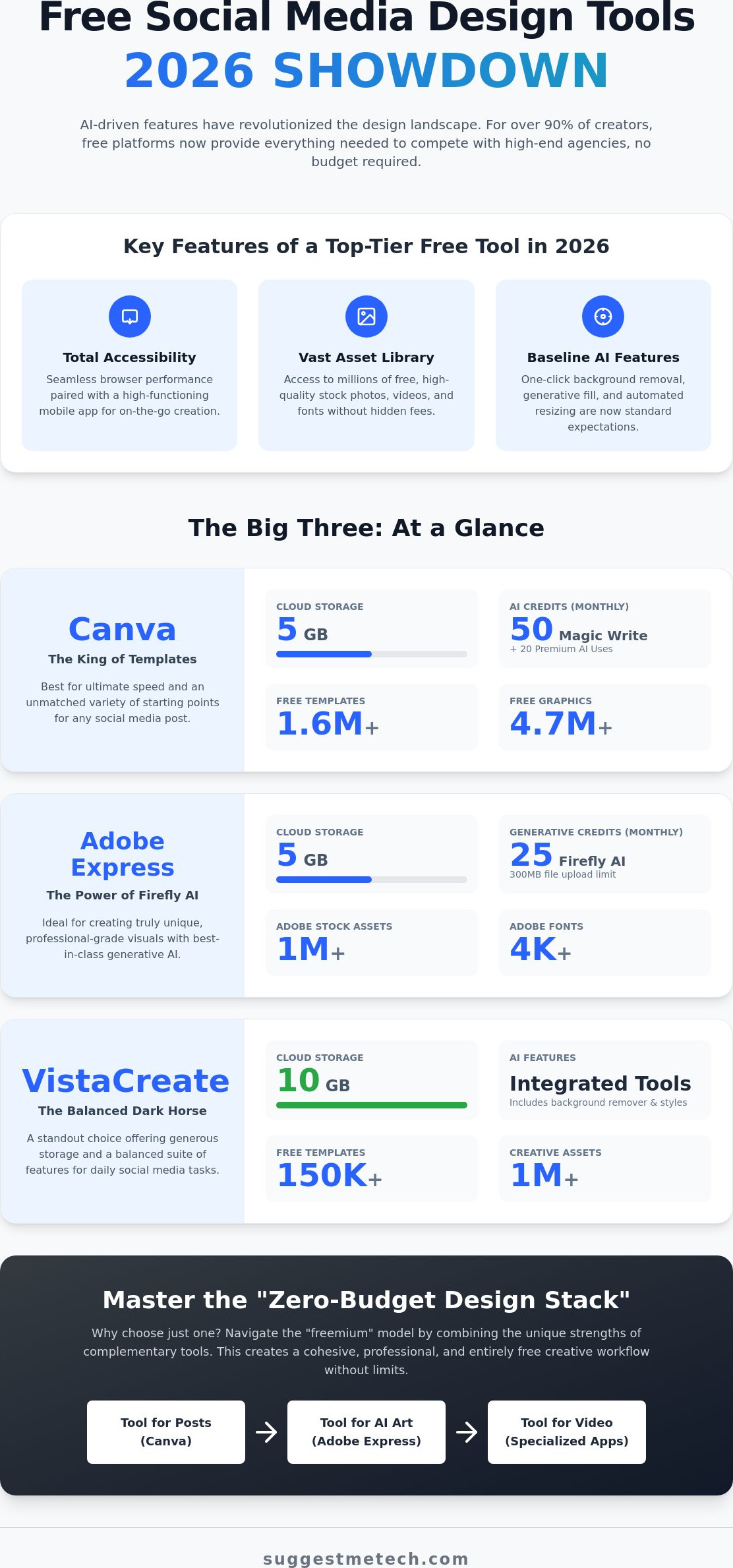
Accessibility is the top priority. A great tool must work seamlessly in a browser while offering a high-performance mobile app for on-the-go editing. The asset library is equally vital. We look for platforms offering millions of free stock photos, videos, and fonts without hidden costs. AI integration, specifically one-click background removal and generative fill, is no longer a “pro” feature. It’s a baseline requirement for efficiency. If a tool doesn’t offer these, it’s likely falling behind the 2026 standard.
The Role of AI in 2026 Content Creation
AI has democratized complex tasks that used to take hours. Features like automated resizing allow you to turn one Instagram post into a TikTok cover or a LinkedIn banner instantly. Beyond visuals, many platforms now offer AI-generated captions based on the image content itself. Even vector editing is now accessible through prompt-based adjustments in free tiers. This shift allows you to focus on the strategy of your content rather than the technical minutiae of pixel placement.
The Big Three: Canva, Adobe Express, and VistaCreate Compared
Choosing between the industry leaders often comes down to how much help you want from artificial intelligence. Most creators looking for free graphic design tools for social media want a balance of speed and high-end quality. Canva, Adobe Express, and VistaCreate all offer powerful free tiers in 2026, but their specific limits on storage and AI credits create very different user experiences for daily workflows.
The user interface is the first major hurdle. Canva remains the most approachable for absolute beginners because its search engine is highly intuitive. Adobe Express feels more like a professional editor, which might intimidate some, while VistaCreate sits comfortably in the middle. If you’re building a new brand, you can evaluate these design tools based on your specific technical comfort level to ensure you don’t waste time on a steep learning curve.
Canva: The King of Templates
Canva is the undisputed leader for template variety. With over 1.6 million free templates and 4.7 million graphics, you can find a starting point for any niche in seconds. The 2026 free plan provides 5GB of cloud storage, which is plenty for static images. However, the AI “Magic” suite has strict boundaries. You’re limited to 50 total uses for “Magic Write” and only 20 “Premium AI uses” per month. It’s the best choice for quick Instagram stories and Facebook posts where speed is your top priority.
Adobe Express: The Power of Firefly AI
Adobe Express is the best option for creators who want professional-grade generative AI. The free tier includes 25 generative AI credits per month powered by Adobe Firefly, allowing for unique image generation that doesn’t look like a standard template. You also get access to over 1 million Adobe Stock assets and 4,000 fonts. While the 5GB storage limit matches Canva, be aware of the 300MB file upload limit. It’s ideal for high-quality photo manipulation and creating one-of-a-kind AI art for your feed.
VistaCreate: The Dark Horse for Social Media
VistaCreate is a standout choice because of its generous 10GB storage limit. This is double what Canva and Adobe offer on their free plans, making it the practical choice for creators who handle many large files. It offers 100,000 templates and a robust Brand Kit feature for free. While the tutorial base is smaller than Canva’s, the unique video templates and design assets are less overused. It’s perfect for small businesses that want a distinct visual style without the “Canva look” everyone else has.
Collaboration features on these free plans are functional but limited. All three allow you to invite team members to edit designs, but you’ll often hit a paywall if you need advanced version history or shared brand folders. For most solo creators or small teams, these free collaboration tools are more than enough to maintain a consistent posting schedule.
Niche Free Tools for Video, Infographics, and Branding
While the “Big Three” platforms offer versatility, relying on a single editor often leads to a generic visual style. Audiences in 2026 are quick to spot overused templates. To truly stand out, you need specialized free graphic design tools for social media that handle specific formats like short-form video or data-driven graphics better than all-in-one editors. Diversifying your toolkit helps you avoid “template fatigue” while ensuring your content remains fresh and engaging.
Specialized tools allow for a level of customization that general platforms often lack. Whether you’re aiming for professional authority on LinkedIn or viral growth on TikTok, choosing a niche tool can save you hours of manual editing. At SuggestMeTech, we focus on real-world application; we know that the best tool isn’t always the most famous one, but the one that fits your specific workflow requirements.
CapCut: The Essential Tool for Short-Form Video
Short-form video is the dominant content type in 2026. CapCut has become the essential choice for TikTok and Reels because it offers watermark-free exports even in 4K resolution. Unlike static design tools, it provides auto-captioning and trending audio integration directly in the free tier. It’s the top choice for video-first strategies because it prioritizes motion and rhythm over static layouts. If your goal is high engagement through movement, this is your primary asset.
Piktochart and Venngage: Free Infographics for LinkedIn
Authority on professional networks like LinkedIn often comes from data. Piktochart and Venngage allow you to turn complex numbers into digestible, aesthetic social graphics. While their free tiers have limits on the number of active projects, they offer superior chart-building features compared to standard editors. Using these specialized free graphic design tools for social media helps you present research and statistics in a way that boosts your professional credibility and encourages shares.
Snappa and Desygner: Speed and Simplicity
Sometimes speed is more important than deep customization. Snappa is designed for the “one-minute” workflow, making it perfect for busy entrepreneurs who need a quick post without the distraction of too many features. It limits the number of downloads per month on the free plan but offers a highly focused experience. Desygner, on the other hand, provides advanced mobile editing. It’s the ideal choice for on-the-go creators who need to edit high-quality graphics from a smartphone between meetings or while traveling—a common scenario for members of travel-focused networks like Nomadipity.com.
The “Free” Reality Check: Limits, Watermarks, and Licensing
Most free graphic design tools for social media operate on a freemium model. This strategy attracts you with powerful features but places strategic roadblocks to encourage a paid subscription. You aren’t just getting a tool; you’re entering a marketing funnel. Understanding these limitations before you start designing saves you from the frustration of a project you can’t actually use. It’s about knowing exactly what you’re giving up in exchange for a zero-dollar price tag.
Storage is the first major hurdle. As we’ve noted, Canva and Adobe Express offer 5GB of cloud storage, while VistaCreate provides 10GB. While this sounds generous, high-resolution video and complex project files consume this space quickly. If you hit these limits, you’ll need to delete old projects or upgrade. You can find the right software guide on our site to help you compare these technical trade-offs more deeply before committing your workflow to one ecosystem.
Navigating Export and Resolution Limits
Export quality is where many free plans falter. For example, VEED limits free video exports to 720p resolution and adds a watermark. In contrast, CapCut allows for watermark-free exports even in 4K, which is a rare find in 2026. If you’re designing for print or high-end displays, a 72dpi export won’t cut it. You also need to watch for feature paywalls. Canva’s free plan doesn’t allow for downloading images with transparent backgrounds, a vital feature for logo design and branding. Always check the export settings before you spend an hour on a complex layout.
Commercial Licensing for Free Assets
The “Commercial Use” trap is a serious risk for small businesses. Just because a font or photo is available in a free tool doesn’t mean you can legally use it in a paid advertisement. You must read the fine print. Many AI-generated assets have specific licensing terms that vary between platforms like Adobe Firefly and Canva’s Magic Media. To stay safe, we recommend supplementing your tool’s library with truly free stock photos from sources like Unsplash or Pexels. These platforms offer clearer commercial licenses that protect your brand from future legal headaches. Consistency is key, but legal compliance is mandatory.
Maximizing these free tiers requires a multi-tool strategy. Don’t try to make one platform do everything. Use Canva for its massive template library, but switch to CapCut for watermark-free video exports. By combining the strengths of different free graphic design tools for social media, you can bypass the most restrictive paywalls. This approach lets you maintain a professional presence without ever opening your wallet.
Building Your Zero-Budget Design Stack
Creating a professional visual identity doesn’t require a single, expensive software suite. In 2026, the most efficient creators use a “best-of-breed” approach. This means you pick the strongest features from multiple free graphic design tools for social media and combine them into one seamless workflow. By moving projects between specialized apps, you bypass individual platform limitations and avoid the generic look of overused templates.
Maintaining brand consistency across different tools is your biggest challenge. We recommend keeping a simple digital “style sheet” with your brand’s hex codes and font names. Since most free plans, like Canva’s, limit you to a single three-color palette, having these codes ready allows you to manually set your colors in any app. This small step ensures your Instagram posts, LinkedIn infographics, and TikTok covers all look like they belong to the same company.
The Ultimate Free Workflow for 2026
A professional workflow follows a logical progression. Start with ideation; use the generative AI features in Adobe Express or Canva to brainstorm layouts and color schemes. Once you have a concept, move to the design phase. Use Canva’s massive library for layout, but if you need high-end photo manipulation, pull that asset into Adobe Express for a Firefly AI polish.
The final step is the video polish. Take your static designs and bring them into CapCut to add motion, trending audio, and 4K exports without watermarks. If you are using these tools to grow a website, check our guide on how to start a blog in 2026. This multi-app strategy gives you the power of a pro studio for zero dollars.
Connecting Design to Your Tech Ecosystem
Your designs don’t exist in a vacuum. High-quality graphics are essential for your social feed, but they also play a vital role in your website performance. Large, unoptimized files can slow down your page speed, hurting your SEO. Always compress your exports before uploading them to your site. To ensure your site loads fast, pair your optimized designs with the best web hosting services we’ve tested.
Hardware also impacts your creative speed. While many of these tools are browser-based, handling high-resolution video and multiple browser tabs requires reliable processing power. If you find your browser lagging while editing, it might be time for an upgrade. See the best laptops of 2026 to find a machine that handles modern web-based design suites with ease.
Eventually, you might outgrow these free tiers. It’s time to pay when your team grows beyond two editors or when you consistently hit storage limits that slow down your production. For creators handling specialized projects like wedding or event footage, outsourcing to See More Edits can save hours of post-production time. Until then, these free graphic design tools for social media provide everything you need to build a world-class brand on a budget.
Launch Your 2026 Content Strategy
Building a professional brand in 2026 doesn’t require a massive marketing budget. By combining the strengths of different free graphic design tools for social media, you can bypass paywalls and create high-quality content that truly stands out. Success lies in a multi-tool workflow. Use specialized editors like CapCut for video and Piktochart for data visualization while relying on platforms like Canva for quick templates. Always stay mindful of licensing and storage limits to ensure your business remains legally compliant and efficient.
Choosing the right tech shouldn’t be a guessing game. At SuggestMeTech, we provide practical, real-world testing and authoritative tech comparisons to help you make informed decisions. Our user-first recommendations are designed to solve your specific problems without the industry jargon. Explore more expert tech recommendations at SuggestMeTech to find the best hardware and software for your growing brand. You have the tools and the strategy; now it’s time to start creating and connecting with your audience.
Frequently Asked Questions
What is the best free graphic design tool for social media for beginners?
Canva is the top recommendation for beginners due to its intuitive drag-and-drop interface and massive library of over 1.6 million free templates. You don’t need technical skills to start creating. Most users can produce their first post in under five minutes. It remains the most approachable option among all free graphic design tools for social media because it prioritizes simplicity over complex manual controls.
Can I use Canva for free for my business without legal issues?
You can use Canva’s free plan for business purposes, but you must stick to the “Free” labeled assets. Using premium elements without a subscription results in watermarked designs that aren’t professional or legal for commercial use. Always verify the specific licensing terms for AI-generated content, as these can change. Staying within the free asset library ensures your brand remains compliant while keeping costs at zero.
Are there any free graphic design tools that don’t have watermarks?
CapCut is a standout choice in 2026 because it allows watermark-free exports even in 4K resolution. Canva and Adobe Express also provide watermark-free downloads, provided you only use their free-tier elements. If you accidentally include a “Pro” graphic or stock photo, the system will add a watermark at the export stage. Always double-check your asset labels before finalizing your design to avoid this pitfall.
Is Adobe Express better than Canva for social media posts?
The choice depends on your specific design needs. Adobe Express is superior if you want high-end generative AI features through Adobe Firefly or need precise photo manipulation tools. Canva is generally better for creators who prioritize speed and a vast selection of pre-made templates for every niche. If you want unique AI-generated art that doesn’t look like a template, Adobe Express is the stronger contender.
How can I create professional social media graphics with no design experience?
Start by selecting a high-quality template that matches your brand’s aesthetic. Instead of building from scratch, use the pre-set layouts in tools like VistaCreate or Canva and simply swap the placeholder text and images. This approach uses professional design principles like hierarchy and balance without requiring you to learn them. Stick to a consistent two-color palette to maintain a polished, cohesive look across your entire feed.
What are the best free tools for creating social media videos?
CapCut is the current leader for short-form video due to its trending audio integration and 4K export capabilities. It offers more robust editing features than the video tools found inside Canva or Adobe Express. For those who need quick, template-based videos, Canva’s video editor is a solid secondary choice. Using specialized free graphic design tools for social media ensures your video content meets the high engagement standards of 2026.
Do I need a high-end laptop to use these online design tools?
You don’t need a powerful workstation because these tools are primarily browser-based. Most of the heavy processing happens on the platform’s servers rather than your local machine. However, having at least 8GB of RAM and a stable internet connection is recommended for smooth performance. If you plan to edit 4K video in CapCut, a more modern device will prevent browser lag during the rendering process.
Can I remove backgrounds for free in these graphic design apps?
Adobe Express includes a one-click background removal tool in its free tier, which is a significant advantage over its competitors. Canva typically restricts this feature to its Pro subscribers, though they occasionally offer limited AI credits for free users. If background removal is a core part of your workflow, Adobe Express is the most practical choice. It saves you from using third-party sites that often reduce your image quality.

