

Why are you still paying a “loyalty tax” for an email service that was only affordable for the first twelve months? Many entrepreneurs choose GoDaddy for its low entry price, but the “renewal shock” of paying $8.99 per month for a resold Microsoft 365 plan can quickly derail a small business budget. If you’re tired of aggressive upselling and technical hurdles while managing DNS records, it’s time to explore godaddy email alternatives that offer more value for your money.
We understand that your email is the lifeblood of your professional identity, and switching providers often feels like a daunting task. You deserve a platform with predictable pricing and modern tools that don’t require a degree in IT to manage. SuggestMeTech has done the heavy lifting by comparing the most reliable providers on the market today. This guide reveals the seven best options for 2026, focusing on seamless migration, better storage, and deeper integration with the apps you use every day.
Key Takeaways
- Identify why moving away from resold Microsoft 365 plans can instantly lower your overhead and give you direct administrative control.
- Compare the top godaddy email alternatives for 2026, including privacy-first options like Proton and high-value suites like Zoho.
- See how integrating email with your web hosting provider can eliminate separate monthly fees while maintaining a professional image.
- Follow our simplified migration guide to move your mailboxes and DNS records without risking downtime or losing important client messages.
- Understand the “Introductory Price Trap” so you can choose a provider with predictable costs as your business scales.
Why Switch? The Real Cost of GoDaddy Email in 2026
Choosing an email hosting service is one of the first things a new business does. GoDaddy is often the default choice because they bundle email with domain registration. However, it’s vital to understand that GoDaddy isn’t providing its own unique infrastructure. Instead, they operate primarily as a reseller for Microsoft 365. GoDaddy Email acts as a middleman between your domain and Microsoft servers, often adding a premium for support and billing integration.
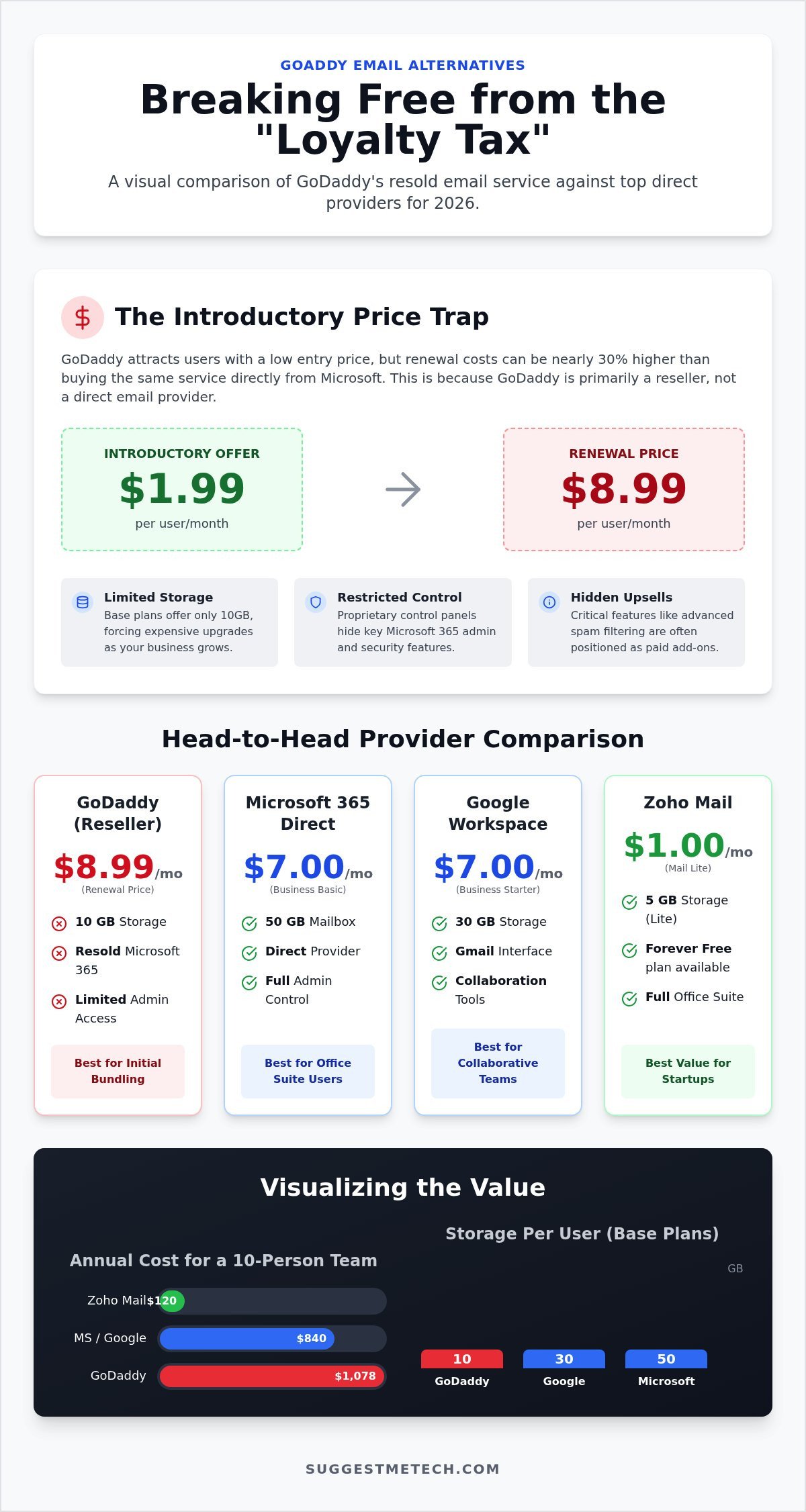
The “Introductory Price Trap” is a major reason why entrepreneurs seek godaddy email alternatives. You might see an enticing offer of $1.99 per user per month. This seems like a bargain until the first year ends. Upon renewal, that price often jumps to $8.99 per month. When you compare this to buying directly from Microsoft, the markup is clear. Microsoft 365 Business Basic costs $7.00 per user per month as of July 2026. By staying with the reseller, you’re paying nearly 30% more for the exact same software and server space.
The Problem with Proprietary Control Panels
GoDaddy hides standard Microsoft 365 admin features behind their own custom user interface. While they claim this simplifies the experience, it often creates technical roadblocks. If you want to configure advanced security settings like Multi-Factor Authentication (MFA) or conditional access, you’ll often find those options restricted or buried. This lack of transparency makes it difficult for growing teams to implement the robust security protocols that modern businesses require. You might also find that using GoDaddy nameservers leads to “locked” DNS settings. This makes it incredibly frustrating to verify your domain with third-party tools or migrate your data to a new provider later on.
Hidden Costs: Storage and Security Add-ons
The entry-level “Email Essentials” plan comes with significant limitations that can hinder a scaling business. In 2026, this plan only offers 10GB of email storage. Most modern godaddy email alternatives, like Google Workspace or direct Microsoft plans, provide at least 30GB at a similar price point. Once you hit that 10GB limit, you’re forced into another expensive upgrade. Security is another area where costs climb. Basic spam filtering is often insufficient, and GoDaddy frequently positions advanced filtering as a paid add-on. You’ll likely find that adding email aliases or managing multiple mailboxes becomes more expensive than it would be on a platform with more flexible, transparent pricing structures.
The Top 3 Professional Alternatives: Google, Microsoft, and Zoho
Finding the right fit from the sea of godaddy email alternatives depends on your existing workflow. If your team already relies on Google Drive and Meet, Google Workspace is the logical successor. For those who prefer the traditional Office suite but want to escape GoDaddy’s markup, moving “upstream” to Microsoft 365 Direct is a smart move. Zoho Mail remains the champion for budget-conscious startups, offering professional features for a fraction of the price of the big two.
When your business scales to a 10-person team, your requirements change. You need centralized management, robust security, and predictable costs. While GoDaddy makes management feel restricted, these direct providers offer full administrative control. Implementing cybersecurity tips for small businesses becomes much easier when you have direct access to your mail server’s security settings. For more in-depth comparisons, you can always check our latest technology reviews and guides.
Google Workspace vs. GoDaddy Microsoft 365
The user experience is the most immediate difference. Google Workspace uses the familiar Gmail interface, which many find faster and more intuitive than the Outlook Web Access provided through GoDaddy. Integrating your domain name is straightforward on both platforms, but Google’s setup wizard is famously user-friendly. For 2026, the Business Starter tier is priced at $7.00 per user per month with an annual commitment. This includes 30GB of pooled storage, which is three times what GoDaddy’s entry-level plan offers for a similar renewal price.
Zoho Mail: The $1 Powerhouse for Startups
Zoho Mail is the best choice for solo entrepreneurs and tiny teams. Their “Forever Free” plan supports up to five users, though it’s limited to web access and lacks IMAP support. If you need to use a mobile app or a desktop client, the Mail Lite plan is just $1.00 per user per month. This plan is part of the broader Zoho Workplace ecosystem, which includes its own versions of Docs, Sheets, and Chat. It’s a comprehensive alternative to both Office and Workspace that keeps your overhead incredibly low while you’re still finding your footing.
Privacy and Niche Alternatives: Proton and Namecheap
Not every business fits into the “Big Tech” ecosystem of Google or Microsoft. If you handle sensitive client data or just want a simple, affordable inbox without the fluff, niche godaddy email alternatives offer a more tailored experience. SuggestMeTech recommends looking at your specific security requirements and storage needs before committing to a platform. While GoDaddy pushes a one size fits all approach, these providers allow you to pay only for the features you actually use.
The trade-off between extreme security and ease of use is a critical factor for small business owners. High-security platforms often require more technical setup, while budget-friendly IMAP services might lack the integrated collaboration tools found in larger suites. Choosing the right path depends on whether your priority is protecting trade secrets or keeping your monthly overhead as low as possible.
Proton Mail for Business: Is it Overkill?
Proton Mail is the gold standard for privacy-conscious organizations. Based in Switzerland, it offers end-to-end encryption, meaning even the service provider can’t read your messages. This is vital for industries like law, finance, or healthcare where confidentiality is a legal requirement. Their Mail Essentials plan for business costs $6.99 per user per month as of August 2026. It’s more expensive than basic IMAP hosting, but you’re paying for a level of security that standard providers can’t match. The technical side is slightly heavier; you’ll need to manage your custom domain through the Proton DNS Bridge, which might be a hurdle if you aren’t comfortable with advanced DNS settings.
Namecheap and Rackspace: The “Budget Professional” Tier
Namecheap Private Email is a logical choice if your domain is already registered there. It’s one of the most affordable godaddy email alternatives available. The entry-level plan renews at $1.99 per month after the first year, which is significantly lower than GoDaddy’s $8.99 renewal rate. However, you must watch the storage limits. The basic plan only offers 5GB, while the Private Email Plus plan jumps to 50GB for a $4.99 renewal. Rackspace Email remains a reliable, no-frills option for established businesses that want a hosted inbox without the distractions of a full productivity suite. They’re known for solid uptime and 24/7 support, which is essential when things go wrong.
Regardless of which provider you choose, following FTC cybersecurity guidelines is non-negotiable for modern entrepreneurs. This includes setting up proper authentication like SPF and DKIM records to protect your brand from phishing attacks. Most niche providers offer better manual control over these settings than GoDaddy’s restricted interface allows.
Hosting-Integrated Email: Should You Use Your Web Host?
Many entrepreneurs overlook a solution they might already be paying for. If you have a website, your hosting provider likely offers built-in email functionality. For many small businesses, the email service bundled with their hosting is more than sufficient for professional use. It represents one of the most cost-effective godaddy email alternatives because it often carries no additional monthly fee.
Most best web hosting plans include unlimited email accounts and storage that shares your website’s disk space. You manage these through standard interfaces like cPanel, or other host-specific dashboards. In 2026, the performance of these integrated services has improved significantly. With the widespread adoption of NVMe storage and optimized IMAP protocols, hosting-based email is fast and reliable enough for standard business communication.
The Pros of All-in-One Management
There are trade-offs to consider with this model. The biggest risk is deliverability. Because you are often on a shared IP address, your emails could be flagged as spam if another user on the same server behaves poorly. High-volume senders or those running large marketing campaigns should still consider a dedicated provider to protect their sender reputation. Reliability is another factor. If your web server goes down, your email goes down with it. For businesses where every minute of communication is critical, separating these services provides an extra layer of redundancy.
To find the right balance for your specific setup, check out our latest web hosting comparisons.
Migration Guide: How to Move Away from GoDaddy Without Losing Data
Switching to one of the godaddy email alternatives doesn’t have to be a technical nightmare. If you follow a structured process, you can move years of archives without losing a single message. The key is preparation. You shouldn’t cancel your old subscription until every folder is verified on the new server. This ensures your business communication remains uninterrupted during the transition.
Follow these five essential steps for a clean break:
- Step 1: Backup your data. Export your existing mailboxes to a PST file through Outlook or use a local email client to sync all folders via IMAP.
- Step 2: Prepare the new provider. Create matching user accounts at your new host. Ensure the usernames and aliases exactly match your old setup to avoid delivery errors.
- Step 3: Perform the DNS switch. Update your MX records to point to the new server. You’ll also need to update SPF and DKIM records to ensure your outgoing mail isn’t flagged as spam.
- Step 4: Execute the migration. Use IMAP migration tools like MoveMyMail or the native migration wizards provided by Google, Microsoft, or Zoho to pull data from GoDaddy.
- Step 5: Verify and decommission. Check that all “Sent Items” and custom folders have moved. Once you’ve confirmed deliverability for 48 hours, you can safely cancel your GoDaddy email plan.
Understanding DNS TTL to Minimize Downtime
Downtime usually happens because of slow DNS propagation. To prevent this, lower your TTL (Time to Live) to 300 or 600 seconds at least 24 hours before you plan to move. This tells the internet to check for your new settings more frequently. Remember that MX records only control how you receive mail. Your SMTP settings, which handle how you send mail, must be updated in your email apps immediately after the switch. In 2026, most DNS changes propagate within four hours, but setting a low TTL provides an extra safety net.
Troubleshooting Common Migration Issues
Modern Authentication (OAuth2) is the most common hurdle in 2026. If your migration tool fails to connect, you might need to temporarily enable app-specific passwords or adjust security defaults in the GoDaddy admin center. Another frequent issue involves folder mapping. Sometimes “Sent Items” on GoDaddy might end up in a folder simply named “Sent” on the new provider. You can usually fix this by manually dragging messages or remapping folders in your IMAP settings. Finally, don’t forget your mobile devices. You’ll need to delete the old account and add the new one to ensure your phone uses the correct server addresses.
Reclaiming Control of Your Professional Communication
It’s clear that staying with a reseller isn’t your only option. By exploring godaddy email alternatives, you can escape the cycle of aggressive upselling and unpredictable renewal costs. Whether you choose the robust collaboration of Google Workspace, the extreme privacy of Proton, or the cost-effective integration of your existing web host, the right choice will future-proof your business as it scales. A successful move simply relies on lowering your DNS TTL early and following a structured backup process to protect your archives.
You don’t have to navigate these technical waters alone. SuggestMeTech offers expertly tested tech comparisons and simplified guides for non-technical users. Our independent reviews are never funded by providers, ensuring you get the most honest advice for your business infrastructure. Find the best hosting and email tools for your business on SuggestMeTech and start building a more reliable digital foundation today. Your professional identity is too important to leave in a locked ecosystem, so take the first step toward a better provider now.
Frequently Asked Questions
Will I lose my old emails if I cancel GoDaddy?
You won’t lose your emails if you migrate or back them up before canceling your service. GoDaddy deletes all data shortly after a subscription expires, so you must act quickly. We recommend using an IMAP migration tool or exporting your data to a local PST file first. Once your messages are safely on a new server, you can shut down the old account. Never cancel until you have verified that every single folder has synced.
Can I keep my GoDaddy domain but use Google for email?
Yes, you can keep your domain registration with GoDaddy while hosting your email with Google or another provider. You simply need to update the MX records in your GoDaddy DNS management panel. This tells the internet to send mail to Google’s servers instead of GoDaddy’s. It’s a very common setup that allows you to benefit from Google Workspace’s features without moving your domain. Many people choose this route when looking for godaddy email alternatives.
Is Zoho Mail actually free for small businesses?
Zoho Mail offers a “Forever Free” plan for up to five users with 5GB of storage each. This plan is excellent for startups, but it has limitations. It only allows web-based access, meaning you can’t use it with apps like Outlook or Apple Mail. If you need IMAP or POP access for mobile devices, you’ll need the Mail Lite plan. This currently costs $1.00 per user per month as of August 2026, which remains a top choice.
What are the MX records I need to change to leave GoDaddy?
The specific MX records depend entirely on the provider you choose. For Google Workspace, you’ll typically use aspmx.l.google.com. For Microsoft 365 direct, the record usually looks like yourdomain-com.mail.protection.outlook.com. You must delete the existing GoDaddy records and replace them with the ones provided in your new setup guide. Always double-check your host’s documentation to ensure you have the correct priority levels for each record to prevent delivery failures. This step is critical for a smooth transition.
Why is GoDaddy charging me more than Microsoft for the same plan?
GoDaddy adds a markup to Microsoft 365 plans to cover their custom interface and support services. As a reseller, GoDaddy bundles the software with their own billing system and proprietary control panel. While Microsoft 365 Business Basic costs $7.00 per user per month directly from Microsoft in 2026, GoDaddy’s renewal price often hits $8.99. Moving directly to Microsoft removes the middleman, giving you more administrative control and lower long-term costs without changing the actual software you use.
How long does it take for email to start working after a migration?
Most email migrations start working within a few minutes, but full DNS propagation can take up to 48 hours. If you lower your DNS TTL to 300 seconds a day before the move, the switch happens almost instantly. During the transition, some emails might still land in your old inbox while others arrive at the new one. This is why we recommend keeping both accounts active for at least two days to ensure no messages are missed during the move.
Can I use my GoDaddy email address with a free Gmail account?
You can use a free Gmail account to send and receive mail from your custom domain, but it isn’t a professional solution for most brands. You’ll need to configure Gmail’s “Send Mail As” feature using SMTP settings from your hosting provider. While this saves money, it lacks the security and storage of a dedicated business suite. For a more reliable setup, we suggest professional godaddy email alternatives that offer dedicated administrative tools and better deliverability for your brand.
What is the best budget alternative to GoDaddy for a solo freelancer?
Zoho Mail Lite or Namecheap Private Email are the best budget options for freelancers. Zoho Mail Lite costs $1.00 per user per month and provides a professional interface with mobile app support. Namecheap’s Private Email is also highly affordable, with renewal rates around $1.99 per month. Both options provide a custom domain address without the high renewal fees or aggressive upselling found with larger resellers. These plans are perfect for those who only need reliable email services.

