

What if the “Google” domain you’ve relied on for years is now actually a Squarespace site in disguise? Since the migration finalized on July 10, 2024, many of you are asking if a google domains review is even relevant anymore. It’s frustrating to find your technical home has moved without your permission. You’re likely worried about those old twelve dollar renewal rates jumping to twenty dollars or your DNS settings getting tangled in a complex website builder interface. We understand the confusion because we’ve been tracking these changes since the acquisition closing.
You deserve to know exactly what you’re paying for in 2026 and whether the Squarespace ecosystem still serves your professional needs. This guide will clarify the current pricing for .com and .net extensions, evaluate the current state of DNS management complexity, and help you decide if it’s time to stay or migrate. We’ll also look at modern alternatives like Cloudflare and Porkbun for those who prefer transparent, at-cost pricing over bundled marketing features. Let’s dive into the facts so you can manage your online presence with confidence and clarity.
Key Takeaways
- Understand the full impact of the 2024 transition and why your domains are now managed entirely within the Squarespace ecosystem.
- Evaluate the shift in renewal costs for .com and .net extensions now that legacy price honoring has officially ended.
- Read our comprehensive google domains review to see how the Squarespace management dashboard compares to the minimalist interface you used to love.
- Discover which high-performance alternatives, like Cloudflare or Namecheap, offer the best balance of speed and transparent pricing for your specific needs.
- Get a definitive verdict on whether to stay for the convenience of an all-in-one platform or migrate for better technical control and lower long-term costs.
The 2026 Reality: What Happened to Google Domains?
The era of managing your web addresses through a simple Google interface is officially over. It’s gone. If you’re looking for a modern google domains review, you won’t find it on a Google server or within your standard Workspace dashboard. The entire business was acquired by Squarespace in a deal that fundamentally changed how millions of people manage their digital real estate. While the transition felt gradual at first, the reality in 2026 is that the “Google” part of the name is purely historical. Understanding the history of Google Domains helps explain why this shift felt so jarring for long-time users who valued the platform’s utility over flashy features.
The Timeline of the Squarespace Acquisition
The transition didn’t happen overnight, but it moved quickly once the ink was dry. Here are the milestones that defined the move:
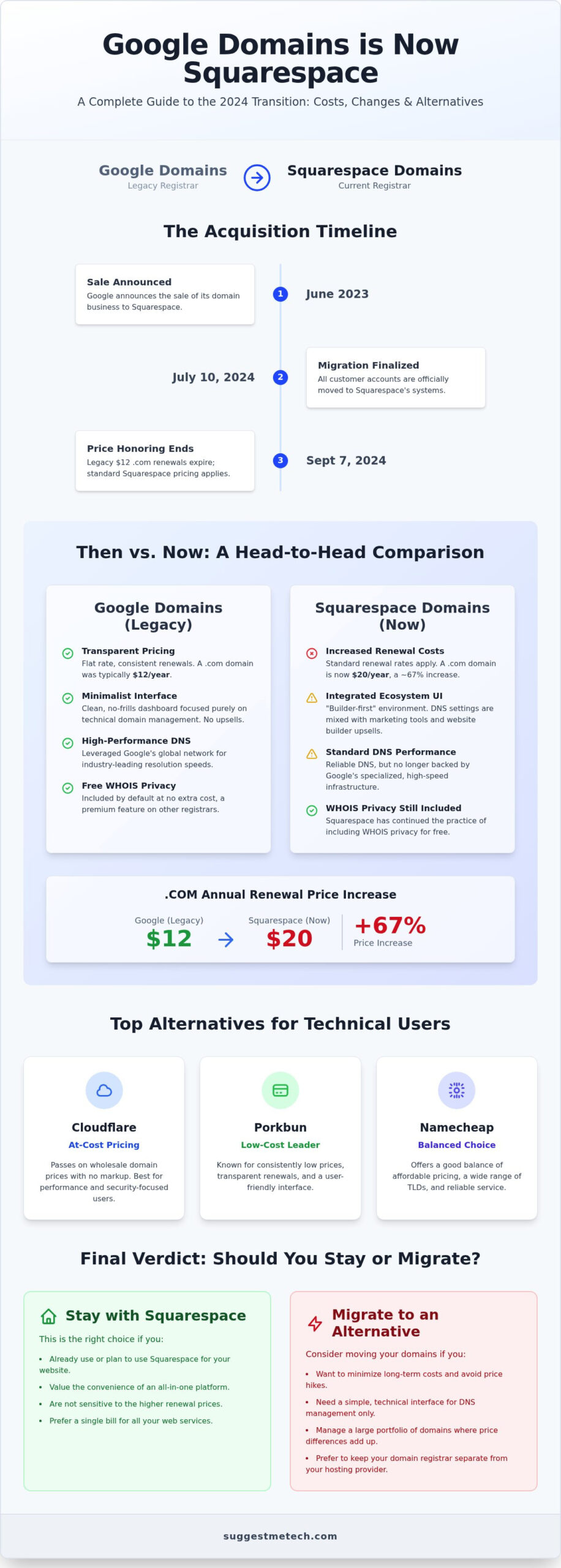
- June 2023: Google announced the sale of its domain business to Squarespace.
- July 10, 2024: This was the final migration deadline where all customer accounts were officially moved to Squarespace’s systems.
- September 7, 2024: The legacy price honoring period ended. After this date, the standard twelve-dollar .com renewals became a thing of the past for many.
For those managing bulk portfolios, the migration was handled in massive waves. ICANN, the global authority for domain names, played a critical role in overseeing the transfer of registrar credentials. They ensured that the “registrar of record” changed from Google to Squarespace without causing widespread DNS outages. Most users didn’t see their sites go down, but they certainly saw their management environment change.
Accessing Your Legacy Domains Today
You can’t manage your settings at the old domains.google URL anymore. Instead, all users must now navigate the Squarespace domains portal. When the migration occurred, your billing information and auto-renew settings moved automatically. This was convenient, but it also meant that many users didn’t realize their renewal prices had changed until the first bill hit after the September 2024 price-honoring cutoff. Squarespace is now the sole registrar of record and owner of all assets previously associated with the Google Domains service.
The management dashboard now reflects Squarespace’s design philosophy. It’s a “builder-first” environment. While Google focused on a minimalist, technical registrar experience, Squarespace surrounds your domain settings with invitations to build a site, start an email campaign, or buy a logo. The “clean” philosophy has been replaced by an integrated ecosystem. If you just want to point an A record to a dedicated server, you’ll find the process involves navigating through more marketing layers than before. This shift is the primary reason why a google domains review in 2026 looks so different from one written three years ago.
Legacy Review: Why Google Domains Was the Gold Standard
For years, Google Domains set the pace for the entire industry by offering a refreshingly simple service. Most registrars rely on “teaser” rates where the first year is cheap but renewals are expensive. Google didn’t do that. They offered flat, transparent pricing that stayed consistent year after year. They also included WHOIS privacy protection at no extra cost. While other companies were charging five to ten dollars for this basic privacy feature, Google made it the default. In any honest google domains review from that era, this lack of hidden fees was the primary reason users stayed loyal.
The Google DNS Infrastructure Advantage
Technical performance was another area where Google outperformed the competition. Their global network provided industry-leading DNS resolution speeds. This speed is critical because every millisecond spent resolving a domain name is a millisecond your user is waiting for a page to load. Fast DNS resolution improves the user experience and supports your SEO efforts by reducing total page load time. Google also made it incredibly easy to connect services. Setting up MX records for Google Workspace was often a one-click process that took seconds rather than minutes. They followed strict DNS deployment guidelines to ensure that every domain was secure and resilient against common attacks. Security was further bolstered by seamless integration with Google’s existing two-factor authentication (2FA) systems.
The ‘No-Frills’ Checkout Experience
The original management dashboard was a masterclass in minimalist design. It lacked the “dark patterns” common in the registrar industry. You didn’t have to decline five different upsell offers for hosting or website builders just to complete a purchase. If you’re new to this space, our guide on what a domain name is explains these fundamentals in plain English. For professional teams, the platform offered granular permissions. You could grant a developer access to DNS settings without giving them control over your billing or the ability to transfer the domain. This combination of security, speed, and simplicity created a standard that Squarespace now has to live up to. If you’re looking for similar efficiency today, you can browse our latest domain recommendations to find a modern equivalent.
The Squarespace Transition: A Hands-on Assessment
The transition from a Google-managed service to the Squarespace ecosystem is now complete. For many users, this shift feels like moving from a minimalist studio apartment into a sprawling, decorated house. While the core functionality remains, the environment is entirely different. Any modern google domains review must acknowledge that Squarespace is a website builder first and a registrar second. This design philosophy permeates the management experience, prioritizeing visual tools over the raw, technical data formerly found in the Google console. When Google Domains sells to Squarespace, the focus shifted toward a “one-stop-shop” model that benefits those using Squarespace hosting but adds steps for everyone else.
Managing DNS Records the ‘New’ Way
Adding A, CNAME, or TXT records now requires navigating through several layers of the Squarespace interface. You must first select your domain, then click into “Settings,” and finally locate the “DNS Settings” panel. It’s a more visual process than Google’s table-based layout. Fortunately, the popular one-click setups for Google Workspace are still available, which preserves the seamless connection for business email. However, advanced users who rely on custom API integrations for automated DNS management might find the current environment more restrictive. The interface is clearly optimized for manual entry within a web browser rather than developer-centric automation.
Support and Reliability Under New Management
Support quality has shifted from Google’s technical documentation to Squarespace’s broader knowledge base. While Google’s guides were often sparse but technically precise, Squarespace provides more context-heavy tutorials. In our real-world tests, unlocking a domain for transfer remains relatively quick, usually taking less than 24 hours to process. Reliability is still high, but the support experience feels more like traditional customer service than technical troubleshooting. If you’re just starting out and setting up your first digital project, our how to start a blog guide can help you navigate these initial configuration steps.
Pricing in 2026 has settled into Squarespace’s standard tiers. You can expect to pay between $10 and $20 per year for a .com renewal and $12 to $20 for a .net extension. These aren’t the highest prices in the industry, but they lack the flat-rate predictability of the old Google model. If you use a non-Squarespace hosting provider, the integration is still functional through standard nameserver changes, though you’ll be prompted to “Connect” to Squarespace services frequently. This assessment shows that while the foundation is solid, the user experience now caters to a different type of customer.
Best Alternatives to Google Domains in 2026
If your recent experience with the Squarespace migration has left you searching for a new registrar, you aren’t alone. Many users who valued the original Google service are now looking for that same combination of flat pricing and technical simplicity. While Squarespace offers a robust website builder, it doesn’t always satisfy the “purist” who just wants a reliable place to park a domain. This google domains review wouldn’t be complete without highlighting where the tech community is moving in 2026. Whether you prioritize the lowest possible renewal rates or a minimalist interface, several registrars have stepped up to fill the void left by Google’s exit.
Cloudflare: For the Tech-Savvy Purist
Cloudflare has quickly become the new gold standard for those who hate hidden fees. They offer “at-cost” pricing, which means they don’t add a markup to the wholesale prices set by registries like Verisign. In 2026, this makes them the most transparent option for .com and .net extensions. Beyond pricing, you get enterprise-grade security features like DNSSEC and a global proxy network for free. It’s an ideal choice if you already use their CDN services for performance. If you’re also looking for a place to house your site, you should check out our best web hosting services review to see which providers pair best with Cloudflare’s DNS.
Porkbun and Namecheap: The Reliability Kings
For a user experience that closely mirrors the old Google Domains, Porkbun is a top contender. They’ve earned a “cult favorite” status because of their quirky branding and incredibly clean checkout process. Like the original Google model, Porkbun includes WHOIS privacy and SSL certificates for free. This ensures your personal data stays off public databases without an extra line item on your bill. Their interface is streamlined, focusing on domain management rather than pushing aggressive website builder upsells. You can manage DNS records with the same speed and clarity you used to expect from Google.
Namecheap remains the best option for those managing large portfolios or small business projects. Their dashboard is built for efficiency. It allows you to update nameservers or renew dozens of domains in just a few clicks. While they often use introductory discounts, their renewal rates remain competitive and clearly labeled. Both Porkbun and Namecheap offer 24/7 support that is often more technically proficient than the general-purpose support found at larger platforms. If you’re ready to make a move, explore our registrar comparison tool to find the perfect fit for your next project. We’ve vetted these platforms for their transfer speed and reliability to ensure you don’t face unexpected downtime.
Final Verdict: Should You Stay or Should You Go?
Deciding the future of your digital assets requires weighing convenience against cost. For users already building their brand on Squarespace, staying is the logical choice. The integration between your domain and your website hosting is seamless. You won’t have to manage multiple logins or billing cycles. If you fear the technical downtime associated with a migration, the peace of mind is likely worth the standard renewal rates of ten to twenty dollars. However, this google domains review finds that for everyone else, the decision to leave is becoming more compelling.
Performance-focused users and developers should consider moving. If you manage a large portfolio, the lack of bulk management tools and the presence of builder-centric upsells can be an unnecessary distraction. The migration friction is a one-time hurdle. While it takes about thirty minutes of active work per domain, the long-term savings and access to advanced DNS controls at specialized providers make it a sound investment. We give the current Squarespace-led experience a 7 out of 10. It’s a reliable, professional service, but it lacks the minimalist efficiency that made Google the industry favorite.
How to Transfer Your Domain Out of Squarespace
If you’ve decided to move, follow this 3-step checklist to ensure a safe, zero-downtime transfer:
- Unlock and Prep: Log into your Squarespace domains panel, disable the “Transfer Lock,” and ensure your WHOIS contact email is current.
- Request the Auth Code: Generate the Transfer Authorization Code, also known as an EPP code, from your settings menu.
- Initiate at the New Registrar: Enter the code at your new provider and wait for the confirmation email to finalize the move.
Be careful of common pitfalls. ICANN regulations impose a 60-day lock on transfers after a new registration or a previous transfer. Also, if you use custom email records, double-check your MX settings at the new registrar before the move is complete to avoid a communication blackout. Bloggers might find the move simple, but enterprise users should schedule transfers during low-traffic periods to ensure everything remains stable.
Summary of the 2026 Domain Landscape
Securing Your Digital Future Beyond 2026
The transition from Google Domains to Squarespace is now a permanent part of the internet’s landscape. This google domains review confirms that while the minimalist utility of the past is gone, the current ecosystem offers a stable, builder-centric platform for those who want an all-in-one solution. You now face a clear choice between the integrated convenience of Squarespace and the transparent, at-cost pricing found with modern alternatives like Cloudflare or Porkbun. Understanding your specific needs as a creator or business owner is the first step toward making a confident decision.
Our team has conducted independent testing on DNS resolution speeds and tracked real-world migration case studies to provide these definitive answers. We maintain strict no-bias affiliate transparency to ensure our guides serve your interests first. If you’re still weighing your options for renewal prices or management tools, we’ve got you covered. Compare the Best Domain Registrars of 2026 to see our latest performance data and curated recommendations. You don’t have to navigate these technical shifts alone. Take control of your domain strategy today and keep your online presence thriving.
Frequently Asked Questions
Is Google Domains still owned by Google in 2026?
No, Google Domains is no longer a Google-owned service. Squarespace acquired the entire business and completed the customer migration on July 10, 2024. Your domains are now fully managed through the Squarespace portal. This transition changed the registrar of record for millions of accounts. While the Google brand remains on some legacy help documents, the technical infrastructure and billing are now handled entirely by Squarespace’s team.
What happened to my Google Domains email forwarding?
Yes, renewal prices are generally higher now that the legacy price-honoring period has ended. While Google typically charged twelve dollars for .com renewals, Squarespace standard rates in 2026 range from ten to twenty dollars depending on the extension. This shift is a frequent point of discussion in any current google domains review. Users who previously enjoyed flat, predictable pricing are now seeing costs align with Squarespace’s broader hosting and service tiers.
Can I still use Google DNS if my domain is at Squarespace?
You don’t use Google’s internal DNS by default anymore. When your domain moved to Squarespace, it transitioned to their nameservers. While you can manually point your nameservers to an external provider like Google Cloud DNS, this is now a separate configuration for advanced users. For most people, the Squarespace DNS infrastructure handles resolution. This change is why some users noticed slight differences in resolution speeds compared to the original Google global network.
How do I move my domains from Squarespace to Cloudflare?
Moving to Cloudflare is a straightforward three-step process. First, log into Squarespace to unlock your domain and request your Transfer Authorization Code. Next, start the transfer process within your Cloudflare dashboard and enter that code when prompted. Finally, confirm the transfer through the automated email you’ll receive. This move is popular for those seeking a more technical google domains review experience with at-cost pricing and advanced security features like DNSSEC.
Is WHOIS privacy still free with the Squarespace migration?
Yes, WHOIS privacy remains a free feature after the migration. Squarespace followed Google’s lead by including domain privacy in their standard registration and renewal packages. This service hides your personal contact information from the public registry to prevent spam and identity theft. You don’t need to pay an extra fee to keep your address and phone number private, which remains one of the better value propositions of the new management.
Do I need a Squarespace hosting plan to keep my domain?
You don’t need to purchase a Squarespace website hosting plan to keep your domain. Squarespace allows you to maintain a domains-only account where you only pay the annual renewal fee for your web address. While the dashboard will frequently encourage you to try their website builder or e-commerce tools, these are completely optional. You can continue pointing your domain to any external host or service without paying for a Squarespace subscription.
What is the best alternative to Google Domains for beginners?
Porkbun is widely considered the best alternative for beginners in 2026. Their interface is incredibly clean and lacks the aggressive upsells often found at larger registrars. Like the original Google service, they offer transparent pricing and free privacy protection. Namecheap is another strong contender if you prefer a more established brand with 24/7 support. Both options provide a user-friendly experience that focuses on simplicity rather than pushing complex website building software.

