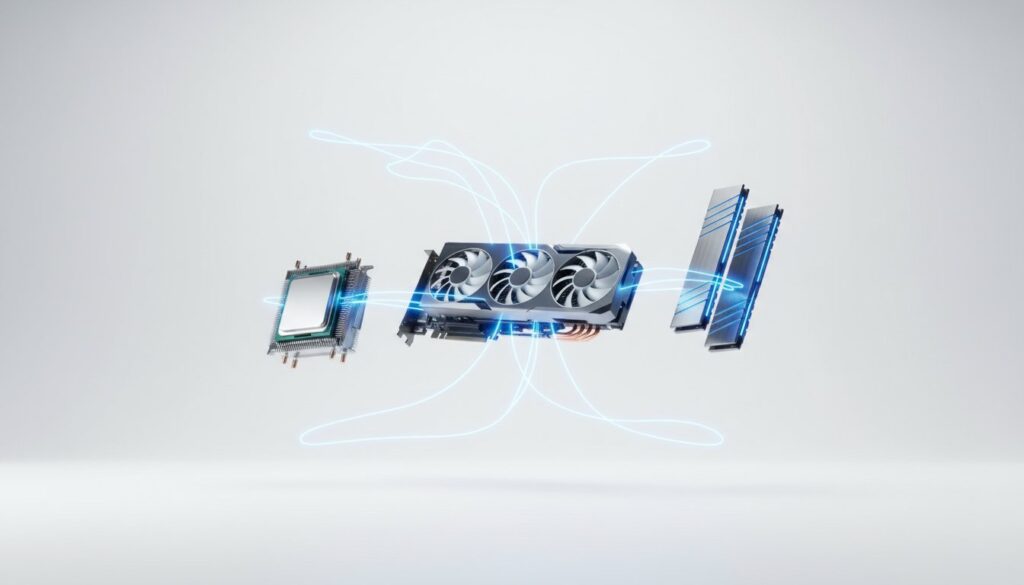
Your 2026 gaming PC shouldn’t be built around your budget; it should be built around your monitor’s pixel count. Most gamers start by picking a price point and immediately feel overwhelmed by technical jargon like PCIe 6.0 or the fear of bottlenecking their expensive GPU. It’s easy to feel like you’re one wrong click away from a system that won’t even boot. We know that choosing pc parts for a gaming build feels more complicated than ever, especially with hardware standards shifting every 18 months.
You deserve a rig that lasts. This guide introduces our resolution-first framework to help you master component selection without overspending on the wrong parts. We’ll show you how to build a balanced, future-proof rig that stays relevant for at least five years. We are going to break down three specific component lists based on 2026 performance benchmarks so you can shop with total confidence.
Key Takeaways
- Adopt a resolution-first strategy to ensure your hardware is perfectly optimized for your specific monitor and gaming goals.
- Learn how to balance the CPU and GPU to eliminate performance bottlenecks and get the most value out of your core components.
- Prepare for the future by understanding the transition to DDR6 and why memory capacity is becoming more critical than speed.
- Simplify the process of choosing pc parts for a gaming build by using expert tools to verify physical compatibility and power requirements.
- Avoid common assembly pitfalls by selecting high-quality power supplies and cooling solutions tailored to high-performance hardware.
The Resolution-First Strategy: Defining Your Gaming Goals
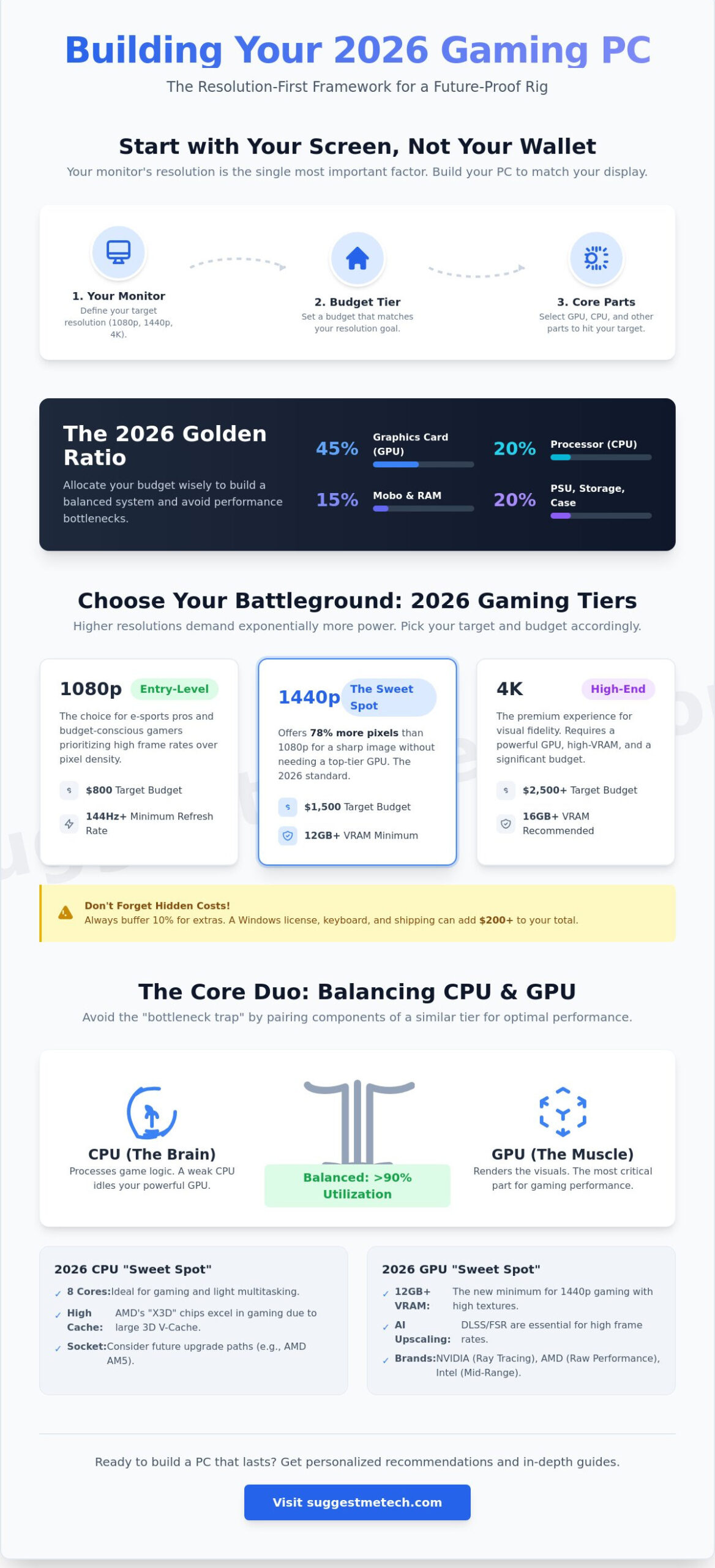
Before you pick a single component, look at your monitor. Your screen resolution is the most influential factor when choosing pc parts for a gaming build. It dictates the load on your graphics card and determines whether your gameplay feels fluid or stuttery. Building a custom-built or home-built computer allows you to tailor your hardware to your specific visual targets, avoiding the common mistake of overspending on a CPU while neglecting the GPU.
To get the most out of your money, follow the “Golden Ratio” of hardware spending. In 2026, you should allocate roughly 45% of your total budget to the graphics card. The remaining funds should be split: 20% for the processor, 15% for the motherboard and RAM, and 20% for the power supply, storage, and case. This distribution ensures your system is balanced and capable of hitting high frame rates without hitting bottlenecks.
1080p vs. 1440p vs. 4K: What’s Your Target?
In 2026, 1440p has officially become the sweet spot for the majority of gamers. It offers 78% more pixels than 1080p, providing a sharp image without requiring a $1,000 graphics card. While 1080p remains the choice for budget builds and professional esports players, 4K gaming stays a premium experience. The hidden costs of 4K are significant; you’ll need a GPU with at least 16GB of VRAM and a high-bandwidth monitor that often costs more than $500. Regardless of resolution, 144Hz is now the minimum standard. If your hardware can’t push at least 144 frames per second, you aren’t seeing the full potential of modern titles.
Budgeting for Your Build in 2026
Hardware prices have stabilized, but you still need a clear roadmap. When choosing pc parts for a gaming build, categorize your project into one of three tiers:
- Entry-level ($800): Perfect for 1080p gaming at high settings.
- Mid-range ($1,500): The ideal target for 1440p performance and high refresh rates.
- High-end ($2,500+): Reserved for 4K ultra settings and heavy ray tracing.
Don’t forget to account for costs that don’t show up in a benchmark. A retail Windows 11 or 12 license, a quality mechanical keyboard, and shipping fees can easily add $200 to your total. Always save 10% of your total budget as an emergency buffer. This covers unexpected price spikes or the need for an extra set of case fans to keep your new components cool.
The Core Performance Duo: Balancing CPU and GPU
When you’re choosing pc parts for a gaming build, the relationship between your processor and graphics card dictates your entire experience. Think of the GPU as the muscle and the CPU as the brain. If the brain can’t process instructions fast enough, the muscle sits idle. This is the bottleneck trap. To avoid wasting money, you must match your component tiers. Pairing an entry-level CPU with a top-tier GPU will result in stuttering and wasted frames. By 2026 standards, a balanced build ensures that both components reach at least 90% utilization during heavy gameplay.
Modern gaming in 2026 relies heavily on AI-upscaling and ray tracing. Technologies like DLSS 4.0 and FSR 4.0 are no longer optional extras; they’re requirements for hitting high refresh rates at 4K. This synergy is a critical step in choosing pc parts for a gaming build that lasts for the next five years. If you’re looking for a comprehensive, step-by-step guide on how these parts physically connect, Intel’s resources offer a great starting point for assembly.
Choosing the Right Graphics Card (GPU)
The GPU is the heart of your gaming performance. In 2026, 12GB of VRAM is the new minimum for 1440p gaming. Games now use high-resolution texture packs that easily spill over 8GB buffers, leading to massive frame drops. When comparing brands, NVIDIA generally leads in ray tracing efficiency and software features. AMD often provides better raw rasterization performance per dollar and more generous VRAM allotments. Intel has also solidified its place in the mid-range market with its Battlemage and Celestial architectures, offering a third viable path for budget-conscious builders.
- Ti and Super (NVIDIA): These usually represent mid-cycle refreshes that offer a 10% to 15% performance boost over base models.
- XT and XTX (AMD): These suffixes denote higher clock speeds and better power delivery for enthusiast-level performance.
Selecting a CPU that Keeps Up
While core counts used to be the main marketing focus, 2026 gaming performance depends more on architectural efficiency and cache size. An 8-core processor is currently the “sweet spot” for gaming and light multitasking. For those seeking the absolute best, AMD’s “X3D” chips remain the kings of gaming performance. Their 3D V-Cache technology significantly improves 1% low frame rates, which means fewer micro-stutters in dense open-world games.
You also need to consider the motherboard socket. AMD’s AM5 platform has shown great longevity, but we’re now seeing the transition toward AM6. On the Intel side, the LGA 1851 and projected LGA 2100 sockets support the latest DDR5 speeds and PCIe 6.0 lanes. If you feel overwhelmed by the technical specs, you can check our latest comparison reviews to see how these processors perform in actual game tests.
The Backbone: Motherboards, RAM, and Storage
While the GPU gets the glory, choosing pc parts for a gaming build requires a rock-solid foundation to ensure those expensive components actually perform at their peak. The motherboard, RAM, and storage act as the nervous system and memory of your machine. If you skimp here, you’ll face system crashes, slow boot times, and frustrating micro-stutters even if you have the fastest graphics card on the market.
Start by looking at the motherboard’s Voltage Regulator Modules (VRMs). In 2026, high-end CPUs frequently pull over 250 Watts during intensive gaming sessions. You need a board with at least a 14+2+1 phase power delivery system to keep voltages stable and prevent thermal throttling. A motherboard with poor cooling on its heatsinks will limit your CPU’s clock speed, effectively wasting the money you spent on a high-end processor.
Motherboard Features You Actually Need
Future-proofing your connectivity is a priority for any 2026 build. Wi-Fi 7 is now the standard, offering 46 Gbps theoretical speeds and significantly lower latency than previous generations. This is vital if you play competitive shooters over a wireless connection. Bluetooth 5.4 is also essential for maintaining a stable link with low-latency wireless controllers and headsets.
- ATX: The standard size with the most expansion slots and best cooling.
- Micro-ATX: A compact choice that often provides the best price-to-performance ratio for budget builders.
- Mini-ITX: Designed for small form factor builds; it’s sleek but requires careful cable management and usually costs more.
Understanding these technical foundations is vital for a successful project. Just as learning What is a Domain Name? is the first step in establishing an online presence, picking the right motherboard is the first step in ensuring hardware longevity.
RAM and Storage: Speed Meets Capacity
We’ve officially entered the era of DDR6. While the jump in frequency is impressive, capacity is what matters most when choosing pc parts for a gaming build today. 32GB of RAM is the new 16GB. Modern AAA titles and background applications like high-resolution recording software easily consume 20GB or more. Opting for 32GB ensures your OS doesn’t have to swap data to the drive, which keeps your 1% low framerates high and consistent.
Storage has also seen a massive shift thanks to DirectStorage 1.2. This technology allows the GPU to load game assets directly from the SSD without taxing the CPU. To take full advantage of this, you need a drive that can keep up with the massive data throughput requirements of 2026 titles.
NVMe Gen5 is the 2026 speed standard, delivering sequential read speeds of 14,000 MB/s that make traditional loading bars a thing of the past.
When selecting your SSD, look for drives with dedicated DRAM caches. These drives maintain high speeds even as they fill up, whereas DRAM-less drives can slow down to hard-drive speeds during long write operations. A 2TB Gen5 drive is currently the “sweet spot” for balancing a large library with top-tier performance.
The Essentials: Power Supply, Cooling, and the Case
Many builders focus entirely on the CPU and GPU, but the components that support them determine your system’s lifespan. If you pick a low-quality power supply or a case with poor airflow, you’ll face thermal throttling and potential hardware failure. Choosing pc parts for a gaming build requires a balance between raw power and stable infrastructure. You don’t want to spend $2,000 on internals only to have a $40 power supply fry the entire system during a summer heatwave.
Powering Your Rig Safely
Never buy a “no-name” power supply. A cheap PSU often lacks the over-voltage protection necessary to save your components during a power surge. When you calculate your wattage, apply the 20% overhead rule. If your estimated power draw is 500W, buy a 650W or 750W unit. This ensures the PSU operates in its peak efficiency curve and keeps the fan noise low. While 80 Plus Gold remains the industry standard, look for Cybenetics ratings for more accurate data on noise levels and efficiency. Fully modular power supplies are usually worth the investment; they allow you to plug in only the cables you need, which simplifies the building process.
Keeping It Cool and Quiet
High-TDP processors in 2026 generate significant heat. Air coolers are excellent for mid-range builds because they have fewer moving parts to fail. However, if you’re using a flagship i9 or Ryzen 9, a 360mm AIO liquid cooler is often necessary to prevent thermal throttling. Placement matters. Use static pressure fans for pushing air through radiators or drive cages, and use high-airflow fans for unrestricted exhaust. Most coolers include thermal paste, but keeping a separate tube of high-quality compound can reduce temperatures by 2 to 4 degrees Celsius. You can compare these desktop thermal solutions to the compact designs found in The Best Laptops of 2026.
Case Selection and Cable Management
Your case choice dictates your build’s airflow and component clearance. Always check the maximum GPU length and CPU cooler height before buying. Cases with mesh front panels typically offer 12% to 18% lower internal temperatures than those with solid glass fronts. For a clean look, prioritize cases with at least 25mm of space behind the motherboard tray for cable management. Use Velcro straps or zip ties to bundle cables together. This isn’t just about looks; organized cables ensure that air moves freely across your motherboard components. If you’re ready to start your project, check out our latest tech reviews and hardware recommendations to find the perfect match for your budget.
Final Compatibility Check and Assembly Prep
You’ve spent hours choosing pc parts for a gaming build. Before you click the checkout button, run your entire list through a logic tool like PCPartPicker. These databases catch 98% of basic errors, such as a power supply with insufficient wattage or a motherboard that requires a BIOS update for a 2026 CPU. Software checks are the first line of defense against costly returns.
Physical constraints require a manual look at the spec sheets. Modern components have grown significantly. High-end GPUs in 2026 often exceed 340mm in length, which can crowd out front-mounted radiators. Always cross-reference the “Max GPU Length” of your case with the specific card model you’ve selected. Total system success depends on these small measurements.
The ‘Will It Fit?’ Checklist
Check your CPU cooler height against the case width. Large air coolers often require 165mm of clearance or more. If you’re using “tall” RGB RAM, ensure the cooler fins won’t hit the sticks. Many builders document these small victories to help others. If you’re interested in sharing your build experience, learning how to start a blog is an excellent way to turn your hobby into a community resource.
- GPU Length: Verify the card fits with front fans installed.
- PSU Depth: Ensure there’s room for cable management in the basement.
- Header Compatibility: Match your case USB-C ports to the motherboard headers.
Preparing Your Workspace
Clear a large, flat table in a room without carpet if possible. Static electricity rarely kills modern components, but it’s still smart to touch the metal chassis periodically to ground yourself. Use a magnetic tray to organize screws. While your OS installation media is creating on a laptop, you might want to learn how to clear cache on iPhone to keep your mobile workspace just as fast as your new PC.
Your essential toolkit is surprisingly small. You’ll need a magnetic #2 Phillips head screwdriver, some small zip ties, and a 32GB USB drive for the operating system. If your cooler doesn’t come with pre-applied paste, keep a tube of high-quality thermal compound nearby. Organization prevents the “where did that screw go?” panic that ruins many first-time builds.
Once the hardware is in place, the final phase of choosing pc parts for a gaming build involves the software. Boot into the BIOS immediately to check temperatures. Install Windows, then head straight to the manufacturer websites for the latest chipset and GPU drivers. This ensures your 2026 hardware runs with the stability and speed you paid for.
Build Your 2026 Battle Station
Success in choosing pc parts for a gaming build starts with a clear resolution goal and a balanced core duo. Our 2026-ready hardware benchmarks show that a mismatched CPU and GPU can waste up to 30 percent of your potential frame rates in modern titles. Focus on the backbone components by selecting a motherboard with PCIe 5.0 support. It’s the best way to ensure your system stays relevant for at least 4 years of heavy use. Always leave a 20 percent power overhead on your PSU to keep your hardware safe during unexpected voltage spikes.
At SuggestMeTech, we simplify these complex decisions through our expert-curated Editor’s Picks. We prioritize community-driven review suggestions to determine which high-performance components we test in our labs. If you’re stuck between two specific motherboards or liquid coolers, we want to provide the data you need. Got a suggestion for a specific part review? Let us know! Your perfect gaming experience is just a few clicks and a screwdriver away. You’ve got this.
Frequently Asked Questions
What is the most important part of a gaming PC?
The Graphics Processing Unit (GPU) is the most critical component for gaming performance because it handles all visual rendering. In 2026, the GPU typically accounts for 40% to 50% of your total budget when choosing pc parts for a gaming build. While a fast CPU is necessary to prevent bottlenecks, the GPU determines your frame rates and resolution capabilities in titles like Cyberpunk 2077 or Starfield.
Is it cheaper to build a PC or buy a pre-built in 2026?
Building your own PC remains approximately 15% cheaper than purchasing a pre-built system with identical specifications. System integrators often add a $150 to $300 assembly fee and use proprietary motherboards that limit future upgrades. By selecting individual components, you avoid the pre-built tax and gain a 3 year minimum warranty on most individual parts rather than a 1 year standard system warranty.
How do I know if my PC parts are compatible?
You can verify compatibility by using digital tools like PCPartPicker or by cross-referencing the motherboard’s socket type with your CPU. For example, an AMD Ryzen 9000 series processor requires an AM5 socket motherboard. You must also check that your case supports the physical dimensions of your GPU, as high-end cards in 2026 often exceed 340mm in length and 3 slots in width.
Do I need an anti-static wrist strap to build a PC?
You don’t strictly need an anti-static wrist strap if you ground yourself by touching the metal PC case frame every 5 minutes. Modern components feature built-in ESD protection that withstands discharges up to 2,000 volts. However, if you’re working on carpet in a room with less than 30% humidity, a $10 strap provides cheap insurance against damaging sensitive circuitry during the assembly process.
Can I use an old power supply for a new gaming build?
You can reuse a power supply if it’s rated for the correct wattage and supports the ATX 3.1 standard required by 2026 hardware. Most high-end GPUs now require the 12V-2×6 connector to handle power spikes safely. If your PSU is older than 7 years or lacks an 80 Plus Gold efficiency rating, it’s safer to replace it to protect your new motherboard and CPU.
What happens if I pick a CPU that is too weak for my GPU?
Picking a weak CPU results in a bottleneck where your GPU sits idle while waiting for instructions. This often leads to stuttering and a 20% to 30% loss in potential frame rates at 1080p resolution. When choosing pc parts for a gaming build, balance is key. Pairing a budget 4-core CPU with a flagship GPU wastes the power of your most expensive component.
How much should I spend on a gaming PC for 1440p?
A reliable 1440p gaming experience in 2026 requires a budget between $1,200 and $1,600. This price range allows for a mid-range GPU and 32GB of DDR5 RAM, which is the standard for modern titles. Systems at this price point typically achieve over 100 frames per second in 85% of current AAA games when running at high or ultra settings.
Do I need a liquid cooler for a modern gaming CPU?
You only need a liquid cooler if you’re using a high-end processor like an Intel Core i9 or AMD Ryzen 9 that exceeds 200W of power draw. Mid-range CPUs with a TDP of 65W to 105W run perfectly fine on a $40 air cooler. Liquid cooling offers a 5 to 10 degree Celsius temperature advantage but introduces more points of failure like pump noise or liquid leaks.