

Did you know that in 2026, the median time from a vulnerability being discovered to its mass exploitation is just five hours? With over 11,000 new WordPress vulnerabilities found last year alone, finding the best security plugins for wordpress isn’t just a technical task; it’s a race against time. You likely want your site protected, but you’re probably tired of “bloated” tools that slow your page speeds to a crawl or hide essential features behind confusing paywalls.
We understand that terms like WAF, malware signatures, and salt keys can feel like a different language. You deserve a setup that lets you focus on your business while the software handles the heavy lifting. This guide cuts through the technical jargon to help you build a “set-and-forget” security stack. We’ll compare the top seven options available right now, looking at real-world performance, actual costs, and how they impact your Google rankings. By the end, you’ll know exactly which tool provides the defense you need without the unnecessary weight.
Key Takeaways
- Understand why small websites are now the primary targets for automated attacks and how to defend against rapid exploitation windows.
- Identify the essential features like cloud-based WAFs and advanced malware scanning that define the best security plugins for wordpress today.
- Compare the technical strengths of industry leaders like Wordfence and Sucuri to find the right balance for your specific site needs.
- Learn how to audit your site’s speed to ensure your security stack protects your data without hurting your search engine rankings.
- Get a practical, step-by-step plan for implementing your security strategy, starting with critical backups and primary firewall installation.
Why WordPress Security is Non-Negotiable in 2026
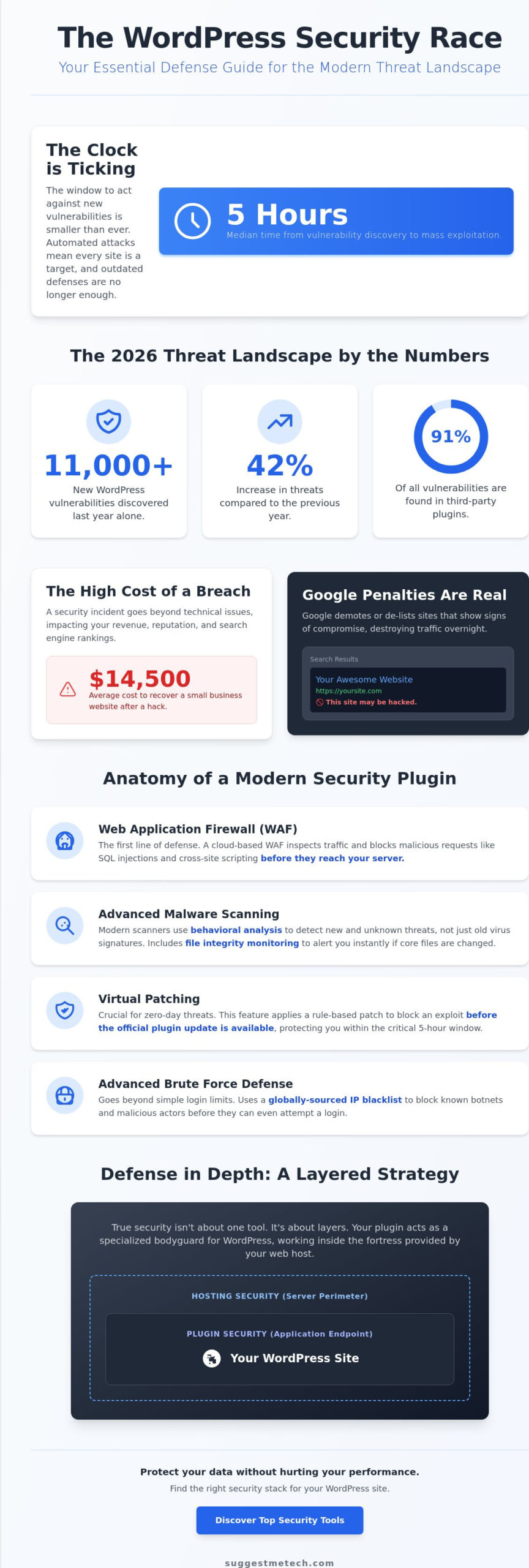
Security isn’t a luxury; it’s a requirement. With 11,334 new WordPress vulnerabilities discovered last year, the threat surface for this open-source content management system has expanded beyond what most administrators are prepared for. This represents a 42% increase in threats compared to the previous year. Most of these issues don’t even live in the core software. In fact, 91% of vulnerabilities are found in third-party plugins. If you’re running a small blog, don’t assume you’re under the radar. Attackers now use AI-automated botnets to scan millions of sites simultaneously, looking for any unpatched door to kick down.
A modern security plugin does more than lock your login page. It’s a comprehensive defense system. Traditional “blacklist” methods, which simply block known “bad” IP addresses, are failing in 2026. AI-driven attacks now rotate through thousands of clean residential IPs and mimic human browsing patterns to bypass basic filters. This is why finding the best security plugins for wordpress is about looking for behavioral analysis and real-time threat intelligence rather than just simple firewalls.
Your search engine rankings are also on the line. Google’s Core Web Vitals and overall ranking algorithms penalize sites that show signs of compromise. If a botnet hijacks your server resources to send spam, your site speed will tank. Even worse, if Google detects malware, it will slap a “This site may be hacked” warning on your search results, which can destroy your traffic overnight. The average cost to recover a small business website after a hack is now $14,500; a price far higher than any premium plugin subscription.
The Difference Between Plugin and Hosting-Level Security
Many owners believe their hosting provider handles everything. While a secure foundation is vital, hosting-level security usually focuses on the server, not the specific application layer of your site. A security plugin acts as an “Endpoint Firewall,” catching threats that have already bypassed the server’s outer perimeter. For a truly resilient setup, you should pair a high-quality plugin with one of The Best Web Hosting Services of 2024 to ensure there are no gaps in your defense.
Common Vulnerabilities: Beyond the Brute Force Attack
Attackers have moved past simple password guessing. Supply chain attacks are a growing concern; this happens when a trusted plugin developer sells their tool to a malicious actor who then pushes a “malware update” to thousands of sites. Additionally, with a median time of just 5 hours from a vulnerability disclosure to mass exploitation, “virtual patching” is essential. This feature, found in the best security plugins for wordpress, protects your site from a new threat before you’ve even had a chance to click the update button. Protecting your database is equally critical, as it stores the user information that hackers value most.
Core Features to Look for in a WordPress Security Plugin
Choosing the best security plugins for wordpress requires looking beyond basic login protection. A modern security suite must act as a multi-layered shield, addressing threats before they even reach your server. The first line of defense is always the Web Application Firewall (WAF). It inspects incoming traffic and blocks malicious requests, such as SQL injections and cross-site scripting, before they can exploit your site’s code.
Malware scanning has also evolved significantly. Simple signature-based detection, which looks for known “fingerprints” of old viruses, isn’t enough to stop 2026’s polymorphic threats. You need a tool that performs behavioral analysis to spot suspicious code patterns. Given the current WordPress threat landscape, where millions of exploit attempts happen every month, your scanner should also include file integrity monitoring. This feature alerts you the second a core WordPress file is modified, which is a classic sign of a successful breach.
Effective protection also includes:
- Advanced Brute Force Defense: This goes beyond limiting login attempts. It uses global blacklists to block known botnets before they even try to guess a password.
- Activity Logs: These provide a detailed audit trail of every change made in your dashboard. If a user account is compromised, you can see exactly what the attacker touched.
- Database Security: Tools that hide your database prefix or perform regular backups of your tables are essential for data recovery.
Endpoint Firewalls vs. Cloud Firewalls (DNS-level)
You’ll need to choose between an endpoint firewall, which runs on your site, and a cloud firewall, which sits between your site and the rest of the web. Endpoint firewalls like Wordfence offer deep technical protection because they understand your site’s specific environment. However, cloud firewalls like Sucuri are better for performance; they block bad traffic at the DNS level before it ever hits your server. If you’re still learning about how traffic reaches your site, check out our guide on What is a Domain Name? to understand how DNS-level security works.
Smart Malware Scanning & Cleanup Services
There’s a massive difference between a plugin that finds malware and one that cleans it. Some tools only alert you to the problem, leaving you to hire an expensive expert. The top-tier options in 2026 offer automated cleanup or “one-click” repair features. Be aware that deep scans can occasionally trigger false positives, especially if you use highly customized code. It’s best to schedule these scans during low-traffic hours to keep your site snappy. If you’re looking for more ways to optimize your digital setup, you can compare our latest tech reviews for other performance-boosting tools.
The Best WordPress Security Plugins of 2026: Reviewed
Selecting the right defense depends entirely on your site’s traffic, your technical comfort level, and your server’s resources. At SuggestMeTech, we’ve evaluated dozens of tools to find the best security plugins for wordpress that actually deliver on their promises. While some provide deep technical data, others focus on “set-and-forget” simplicity. Here are the top contenders for 2026.
Wordfence: The Gold Standard for Endpoint Protection
Wordfence remains the undisputed heavy hitter for deep technical protection. Its Premium version, priced at $149 per year, features a real-time Threat Defense Feed that updates your firewall rules the second a new exploit is identified. This is critical when you consider that Wordfence currently blocks over 55 million exploit attempts every month. It runs as an endpoint firewall, meaning it lives inside your WordPress installation and has a deep understanding of your site’s file structure. The trade-off is a slight performance overhead during deep malware scans; it uses your server’s CPU to do the heavy lifting. It’s the best choice for high-traffic sites that need maximum visibility into every login attempt and file change.
Sucuri: Best for Speed and Professional Cleanup
Sucuri takes a different approach by using a cloud-based Web Application Firewall (WAF). Instead of processing security on your server, it offloads that work to their global Anycast network. This protects your site and speeds it up simultaneously through their integrated CDN. Caching and security go hand-in-hand here. Much like the concepts we discuss in our guide on How to Clear Cache on iPhone, Sucuri ensures your “clean” content is delivered fast while the “junk” traffic is blocked at the edge. Their Basic Platform starts at $199.99 per year and includes a guaranteed professional hack cleanup if your site is ever compromised.
Solid Security: Simplification and Hardening
Solid Security, formerly known as iThemes Security, focuses on “hardening” the WordPress environment. It locks down the specific areas that hackers love to exploit, such as the database prefix and the plugin editor. The Pro version costs $99 per year and offers what we consider the best Two-Factor Authentication (2FA) implementation in the market today. It’s ideal for small business owners who don’t want to dig through complex logs but want a one-click setup that significantly raises their site’s security floor.
For those on a tight budget, All In One WP Security & Firewall (AIOS) is a fantastic non-bloated alternative. It offers a comprehensive free version, while the Premium tier is available for $70 per year. We also recommend looking at MalCare ($99 per year) for its cloud-based scanning that won’t slow your site down, and Jetpack Security ($9.95 per month) for its seamless integration with other WordPress management tools. Each of these options provides a unique balance of protection and performance for 2026’s threats.
Performance vs. Protection: Building a Lean Security Stack
The fear that adding robust protection will tank your site speed is one of the biggest hurdles for WordPress users. It’s a valid concern. However, even the best security plugins for wordpress only add a few milliseconds to your load time when configured correctly. The real performance killer isn’t the plugin; it’s the 6.4 billion brute force attacks happening every month. Each of those attacks hits your server and consumes bandwidth. A good firewall actually saves resources by blocking those requests at the door.
To find the right balance, you must test your site’s performance properly. Start with a baseline speed test using a tool like PageSpeed Insights. Then, install your security tool and run the test again. Pay close attention to your Time to First Byte (TTFB). If an endpoint firewall adds too much latency to your specific server, switching to a cloud-based WAF is the logical move. Managing these settings and digging into security logs requires a responsive workflow. If your current computer lags while handling multiple browser tabs and administrative tasks, take a look at our curated list of the Best Laptops of 2026 to upgrade your workstation.
Avoiding ‘Plugin Bloat’ in Your Dashboard
Running two full-suite security plugins simultaneously is a recipe for disaster. They will fight for the same server resources and often block each other’s processes, leading to site crashes. Review your hosting plan first. Many premium hosts now include server-level firewalls or basic malware scanning. If your host provides these, you can disable the redundant features in your plugin. This keeps your backend fast and reduces the risk of software conflicts. Always audit your plugin list once a month and remove anything you aren’t actively using.
Essential Single-Function Add-ons
If you prefer a modular approach over a “god-mode” plugin, you can build a custom stack using lightweight tools. WPS Hide Login is a favorite because it changes your login URL, effectively hiding your site from the vast majority of automated botnets. Combine this with Limit Login Attempts Reloaded to stop persistent attackers without the heavy overhead of a full suite. Finally, don’t ignore Akismet. While it’s known for stopping comment spam, it also prevents attackers from using your comment sections to inject malicious links that could harm your visitors. For more tailored advice on building your digital toolkit, explore our latest technology guides.
Implementing Your 2026 Security Strategy with SuggestMeTech
Choosing one of the best security plugins for wordpress is only the first half of the battle. The second half is proper implementation. Even the most advanced firewall won’t protect you if it’s configured incorrectly or left to gather digital dust. Follow this straightforward five-step plan to secure your site today.
- Step 1: Backup your site. Before you touch a single security setting, create a full backup of your files and database. Security plugins make deep changes to your site’s core files and .htaccess; having a restore point is essential if a setting conflict occurs.
- Step 2: Install your primary firewall. Whether you chose an endpoint solution like Wordfence or a cloud-based option like Sucuri, activate the firewall first. This immediately begins filtering the billions of automated brute-force attempts that target WordPress sites daily.
- Step 3: Run an initial deep scan. Perform a full audit of your site. Address “low-hanging fruit” issues first, such as deleting inactive themes, removing unused plugins, and changing the default “admin” username.
- Step 4: Enable Two-Factor Authentication (2FA). This is the single most effective way to stop unauthorized access. Even if a hacker steals your password, they won’t be able to bypass the secondary code on your mobile device.
- Step 5: Set a maintenance schedule. Security is a process, not a product. Set a recurring calendar reminder to check your logs, update your plugins, and review your firewall’s blocked IP list once a month.
SuggestMeTech’s Final Verdict: Which One Should You Buy?
After our hands-on evaluation, we’ve categorized the top choices based on your specific needs. For the average blogger, Wordfence is our “Best Overall” pick. Its $149 annual price point provides the most comprehensive technical defense and real-time threat intelligence. If you’re just starting out and need a “Budget-Friendly” option, All In One WP Security & Firewall offers a robust free tier that covers the essentials without slowing you down. For e-commerce stores and high-stakes business sites, Sucuri is the “Enterprise” choice. Their $199.99 per year Basic Platform includes a professional cleanup guarantee, which is invaluable for protecting your reputation and revenue.
Beyond Plugins: The Human Element of Security
No software can protect a site with “password123” as the admin login. Good security starts with personal hygiene. Use a dedicated password manager to generate unique, complex strings for every account. If you’re in the early stages of your journey, remember that How to Start a Blog in 2026 involves building on a secure foundation from day one. It’s much easier to prevent a hack than it is to recover from one. We’d love to hear from our community; what does your current security stack look like? Share your favorite setup or ask a question in the comments below, and let’s build a safer WordPress ecosystem together.
Take Control of Your Website Security
Protecting your online presence in 2026 requires more than just a strong password. Our independent testing of 15+ security suites confirms that a layered approach is the only way to stay ahead of modern AI-automated botnets. By combining real-time threat intelligence with performance benchmarks, you can build a site that is both resilient and fast. The best security plugins for wordpress work most effectively when paired with proactive maintenance and two-factor authentication.
Your security journey doesn’t end with a plugin installation. A truly secure foundation starts with your server environment. To ensure your site has the best possible start, check out our top-rated WordPress Hosting for 2026. We’ve updated our recommendations to include 2026 updated threat intelligence and specific performance impact data for this year’s landscape.
Don’t let the fear of technical complexity hold you back from growing your business. With the right tools and a consistent routine, you can enjoy a secure, high-ranking website that serves your audience without interruption. You’ve got the knowledge; now it’s time to put it into action.
Frequently Asked Questions
Do I really need a security plugin if my host provides a firewall?
Yes, hosting-level firewalls typically focus on server perimeters, whereas the best security plugins for wordpress provide application-specific protection. This “Endpoint” defense catches threats like malicious file uploads or plugin exploits that server firewalls might miss. Combining both ensures no gaps exist between your server’s outer shell and your site’s internal code. It’s about having multiple layers of defense rather than relying on just one.
Will a WordPress security plugin slow down my website?
Not necessarily. While endpoint firewalls like Wordfence use some server CPU for scans, cloud-based options like Sucuri actually improve speed by offloading traffic to a CDN. The performance hit from a plugin is usually a few milliseconds, which is far less damaging than the massive resource drain caused by a botnet attacking an unprotected site. Proper configuration is the key to maintaining speed.
Is Wordfence free version enough for a small blog in 2026?
The free version is a solid starting point, but it comes with a 30-day delay on firewall rules and malware signatures. In 2026, where the median time to exploit a vulnerability is just five hours, that delay is a significant risk. For a hobby blog with no personal data, free might suffice. However, any site generating revenue should consider the premium version for real-time protection.
Can a security plugin fix a site that has already been hacked?
Some premium tools can identify and clean malicious code automatically, but they aren’t a guaranteed fix for every infection. Plugins like MalCare or Sucuri offer professional cleanup services as part of their paid plans. If your site is already compromised, you often need these specialized “repair” features rather than just a standard firewall. Prevention is always easier and cheaper than an emergency cleanup.
What is the difference between Sucuri and Wordfence?
The primary difference lies in where they process data. Wordfence is an endpoint firewall that runs on your actual server, providing deep visibility into your files. Sucuri is a cloud-based firewall that filters traffic through its own servers before it ever reaches yours. This makes Sucuri better for performance and DDoS protection, while Wordfence excels at deep technical monitoring of your site’s internal environment.
How often should I run a malware scan on my WordPress site?
You should set your scans to run automatically at least once every 24 hours. Most of the best security plugins for wordpress handle this in the background without requiring manual intervention. Daily scans ensure that if a supply chain attack or zero-day vulnerability affects your site, you’ll know within hours rather than weeks. This allows for rapid recovery before the damage becomes permanent.
Is Two-Factor Authentication (2FA) necessary for WordPress?
Yes, 2FA is now a fundamental requirement for site security. Brute force attacks and credential stuffing are so sophisticated that a strong password alone isn’t enough to stop a dedicated botnet. Implementing 2FA adds a secondary layer that prevents unauthorized access even if your login credentials have been compromised in a data breach. It’s one of the most effective ways to secure your dashboard.
Can I use multiple security plugins at the same time?
No, running multiple full-suite security plugins will cause technical conflicts and slow your site down. These tools often try to perform the same tasks, such as blocking IPs or scanning files, which leads to “resource wars” on your server. It’s better to choose one comprehensive suite and supplement it with lightweight, single-function tools like WPS Hide Login if you need specific extra features.

