

Why are you paying for a 2TB family plan when your digital footprint is growing at less than 10GB a year? Most of us live in constant fear of the “Storage Full” notification, which often leads to overpaying for massive tiers we don’t actually use. You’re likely asking, “how much cloud storage do i need” to keep your photos safe without draining your wallet every month. With over 2.3 billion personal cloud users in 2026, the pressure to upgrade is constant. However, the right choice depends on your Digital Velocity, or the specific speed at which you create new files rather than just the size of your old archives.
It’s exhausting to manage shared quotas across Gmail and Photos or worry that a single phone backup will break your 15GB free limit. At SuggestMeTech, we’ve designed this guide to give you a clear, actionable number, whether that’s a $0.99 monthly 50GB plan or a lifetime 2TB archive. We’ll help you identify your specific storage persona and provide a future-proofing audit so you can stop paying for space you don’t need. You’ll walk away with a concrete plan to keep your data secure while saving money on your monthly subscriptions.
Key Takeaways
- Understand how the shift to 4K and 8K video standards has tripled the size of average photo and video files since 2020.
- Use our persona-based breakdown to answer exactly how much cloud storage do i need based on whether you are a casual browser or a high-volume memory keeper.
- Learn the three-step audit process to inventory your digital archives and calculate your monthly growth rate to avoid future “Storage Full” alerts.
- Discover “Storage First Aid Kit” techniques to prune your digital footprint and reduce costs before committing to an expensive monthly subscription.
- Visualize what 100GB or 2TB actually holds in 2026 terms to ensure you pick a plan that fits your current lifestyle and future needs.
The Digital Expansion: Why You Are Suddenly Running Out of Space
The 15GB free tier used to feel like an endless digital attic. In 2026, it’s more like a cramped glove box. As mobile devices shifted from 1080p to 4K and 8K as the baseline for video, our space vanished almost overnight. High-resolution sensors and “Live Photos” have essentially tripled standard image sizes compared to 2020. You aren’t just storing a flat image; you’re storing several seconds of high-definition movement and metadata. This shift makes the question of “how much cloud storage do i need” more urgent than ever. Beyond your personal media, modern operating systems carry a heavy burden of app data and cached files that silently eat into your quota. Even a simple messenger app can now hoard gigabytes of voice notes and video previews without you ever clicking “save.”
The era of the “Free 15GB” plan is officially over for the average user. Between high-fidelity backups and the sheer volume of data we generate daily, hitting that wall is a matter of when, not if. Before you reach for your credit card, you should understand what cloud storage is and why its architecture is struggling to keep up with our modern habits. The hidden weight of system logs, high-res app assets, and cross-device sync data means your “available” space is rarely as large as it appears on the dashboard.
The 2026 File Size Reality
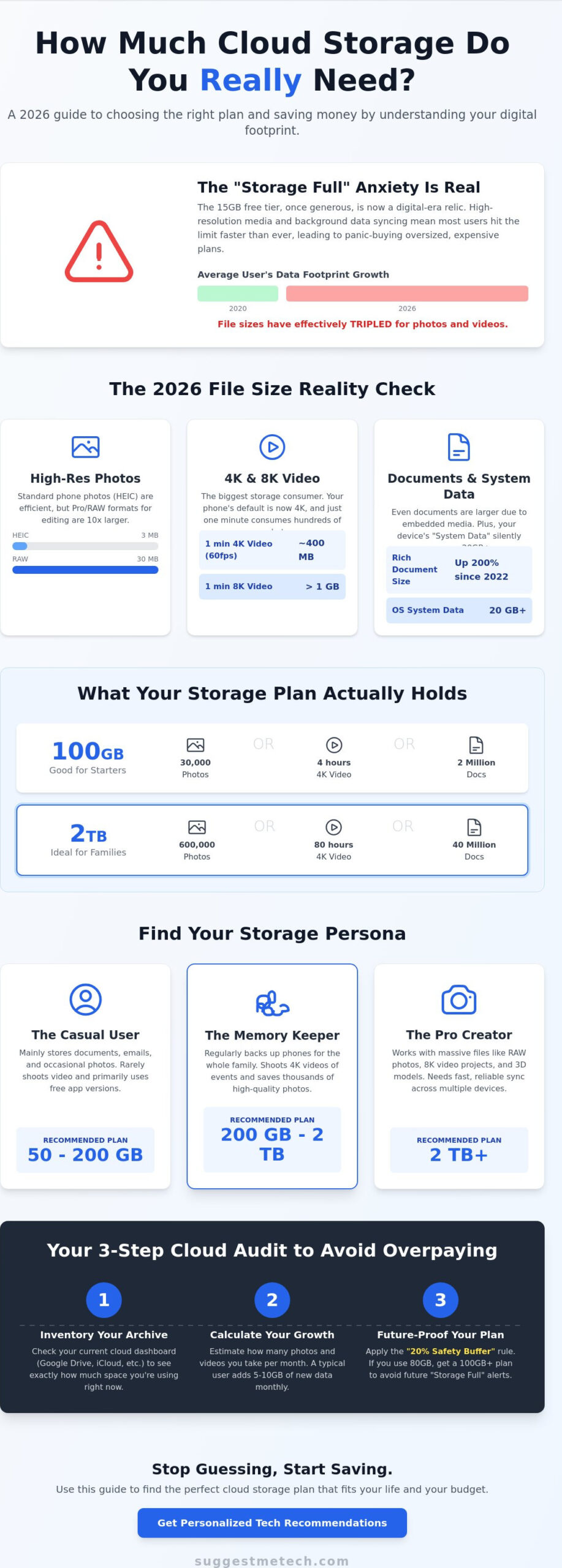
A single minute of 4K video at 60fps now averages 400MB. If you step up to 8K cinematic clips, you’re looking at over 1GB for every sixty seconds of footage. It’s not just your camera roll, either. Even “standard” documents have grown because they now feature high-fidelity textures and AI-generated assets embedded directly into the file. Standard document sizes have inflated by nearly 200% since 2022 due to these rich media integrations and complex metadata layers required for modern collaboration tools.
The Trap of Digital Hoarding
Running out of space creates a genuine psychological toll. Those “Storage Full” notifications trigger a sense of digital anxiety, often leading to panic-buying expensive tiers. Automatic cloud syncing frequently creates redundant data loops where the same file exists in three different places across your ecosystem. We often struggle to distinguish between “Active Files” you need today and “Digital Dust” like blurry screenshots, old app backups, or duplicate downloads. Identifying these redundant loops is the first step in figuring out how much cloud storage do i need without overspending on useless space.
Decoding the Megabytes: Real-World Storage Requirements
You’ve seen the technical jargon on every pricing page, but those numbers rarely translate to your daily habits. In 2026, we measure our digital lives in Gigabytes (GB) and Terabytes (TB). Think of a GB as a single digital box and a TB as a 1,000-box warehouse. When asking “how much cloud storage do i need”, it helps to visualize what 100GB actually holds. This common mid-tier amount typically stores about 30,000 high-efficiency (HEIC) photos, 250 minutes of 4K video, or roughly 2 million text-heavy spreadsheets. If you’re a heavy user, these numbers can dwindle surprisingly fast.
Don’t buy exactly what you need for today’s files. We recommend the “Safety Buffer” rule; always aim for 20% more space than your current total data footprint. If your archives currently sit at 80GB, you need at least a 100GB plan to avoid hitting a wall next month. A single terabyte represents the ideal 2026 sweet spot for modern families balancing high-res memories with multi-device backups. This buffer ensures your sync doesn’t fail the moment you record a long video at a birthday party or graduation.
Media Storage Breakdown
- Photo formats: Modern HEIC files are efficient, but switching to RAW format for better editing increases file size by 1,000%. A single RAW photo can take up 30MB compared to 3MB for a standard snap.
- The Video Gap: There is a massive divide between a 15MB social media clip and professional 8K footage. One hour of high-bitrate 8K video can easily consume 60GB of space.
- Audio Needs: While streaming is king, many users still keep 10GB to 20GB of local storage for high-fidelity podcasts and offline music for travel.
System and App Data
Your hardware itself is a silent storage thief. Both iPhone and Android devices now require 20GB or more for “System Data” by default. This includes the operating system, security patches, and essential system logs. Cloud storage plays a vital role here by offloading device-specific bloat, such as old messages and large attachments, to the server. Before you upgrade your plan, learning how to clear cache on iPhone is a critical first step to reclaim local space and potentially lower your cloud requirements. If you want to see how different platforms handle this data, our technology reviews offer deep dives into the most efficient providers on the market.
Finding Your Storage Persona: How Much is Enough for You?
Selecting a plan isn’t just about picking a number from a dropdown menu. It’s about matching your digital lifestyle to a specific storage persona. Most users fall into one of four categories, each with a distinct “Digital Velocity” that determines how fast they fill up their space. If you’re still wondering, “how much cloud storage do i need,” the answer usually lies in how you use your camera and your professional tools. By identifying with a persona below, you can avoid paying for a 2TB warehouse when a 200GB locker would suffice.
The Casual Browser represents about 35% of cloud users in 2026. These individuals primarily need a safe place for tax documents, PDFs, and a modest collection of mobile photos. They don’t record much video and rarely use high-resolution settings. For this group, the base paid tiers (typically 50GB to 100GB) provide years of breathing room without any stress. The Memory Keeper, however, is the standard profile for parents and travelers. They rely on multi-device syncing to ensure every family photo is backed up instantly. Because they often have thousands of high-efficiency images and short 4K clips, they usually require 200GB to 500GB to stay comfortable.
The Content Creator and The Small Business occupy the high-end spectrum. Creators deal with high-velocity data, generating gigabytes of 8K footage or high-fidelity audio assets every week. They shouldn’t look at anything less than 2TB. Small businesses focus more on archives and compliance. They need shared folders and client deliverable backups, which often requires a per-user storage model starting at 1TB per seat to ensure administrative files don’t choke the system.
Persona Comparison Table
| Persona | Recommended Tier | Key Activities |
|---|---|---|
| The Student / Casual | 50GB – 200GB | Notes, spreadsheets, light mobile photography. |
| The Memory Keeper | 200GB – 2TB | Family photo libraries, 4K videos, device backups. |
| The Power User / Creator | 2TB+ | Video editing, RAW photography, asset libraries. |
When to Scale Up
You’ll know you’ve outgrown your persona when you start receiving “Sync Paused” alerts more than once a month. This is the moment of “Tier Jumping.” Moving from a 200GB plan to a 2TB plan is a significant leap in both capacity and cost, but it’s often necessary if you start a new project like a YouTube channel or a high-res blog. Your storage trajectory changes the moment you move from consuming content to creating it. If you’re currently at 80% capacity, it’s time to re-evaluate how much cloud storage do i need before a critical backup fails during an update.
The 3-Step Cloud Audit: Calculating Your Future Needs
Stop guessing and start auditing. Most users fail to account for how fast they create data, which is why they hit storage walls every few months. To truly answer how much cloud storage do i need, you must look beyond your current folder sizes and analyze your habits over the last 12 months. This process involves identifying your “Islands of Data” and understanding your Digital Velocity, or the specific rate at which your digital footprint expands each month. Follow this three-step audit to find a number that actually lasts.
Inventorying Your Data
Begin by checking the local storage on your primary devices. A typical 256GB smartphone or 512GB laptop often hides significant amounts of data that hasn’t yet touched the cloud. You must also account for “Hidden Storage” that many people overlook. For instance, a single WhatsApp backup can easily exceed 5GB if you frequently share videos, and your email attachments across Gmail or Outlook can consume several gigabytes of your shared quota. Don’t forget to aggregate any existing free tiers you use, such as the 15GB on Google Drive or the 5GB on OneDrive, to see where your files are currently scattered.
Once you have a total for your current archives, it’s time to calculate your Digital Velocity. Look at your photo library from exactly one year ago and compare it to today’s size. If you added 60GB of media over the last 12 months, your velocity is 5GB per month. Finally, factor in your Retention Period. If you’re storing business tax records, those files must live for at least seven years. If you’re storing family memories, that period is indefinite. For long-term peace of mind, we recommend the “Multiply by Two” rule: take your current total and add enough space to cover your growth for the next 24 months.
Predicting Future Growth
Life changes significantly impact how much cloud storage do i need. A new baby, a shift into freelance photography, or starting a 4K video hobby can triple your Digital Velocity overnight. If you plan to start a new business or a high-res project in 2026, you should immediately jump to a higher tier to avoid sync interruptions. You can accurately estimate your three-year growth requirements by simply doubling your current annual data intake and adding it to your existing total. This buffer protects you from the frustration of “Storage Full” alerts during critical moments.
If you’re feeling overwhelmed by these numbers, our SuggestMeTech guides offer deep dives into which providers offer the most flexible scaling options for growing libraries. Taking ten minutes to run this audit today will save you hours of file management and potential data loss later this year.
Optimising Your Digital Footprint: Beyond Just Buying More Space
Buying more gigabytes is often a temporary fix for a permanent habit. Before you commit to a higher monthly bill, you should deploy a “Storage First Aid Kit” to trim your existing data. Many users discover that they can delay an upgrade for months by simply clearing out “Digital Dust.” This includes duplicate file versions, temporary system installers, and the thousands of screenshots that accumulate on mobile devices. By refining your current archives, the answer to “how much cloud storage do i need” might actually be less than your current “Storage Full” notification suggests.
Integrating your cloud storage with your broader tech ecosystem is the final step in digital maturity. In 2026, the most cost-effective long-term move for almost every persona is the 2TB tier. While 200GB plans are tempting, the price-per-gigabyte on 2TB plans is typically 40% lower. This tier also satisfies the “Multiply by Two” rule we discussed in the previous section, providing enough headroom to handle 8K video growth and AI-generated assets for the next three years without another thought.
Maintenance Strategies
You can automate your digital hygiene to keep your footprint lean. Set your mobile device to automatically move screenshots and blurred photos to a “Review” folder that clears every 30 days. Use “On-Demand” file settings on your desktop to keep your entire library visible without downloading every byte to your local drive. If you are creating high-resolution media because you’ve decided to learn how to start a blog, these pruning habits are essential to keep your production workflow from becoming a cluttered mess.
Choosing Your Provider
Your choice of provider should align with your identified persona. Ecosystem giants like Apple and Google offer the best convenience for mobile backups, but privacy-focused alternatives like NordLocker or Proton provide zero-knowledge encryption for sensitive professional files. If your storage needs are specifically for hosting a portfolio or a business site, you should also evaluate the best web hosting services to see which providers offer integrated cloud storage as part of their package. Choosing a provider that fits your specific workflow ensures you aren’t just buying space, but a tool that actually improves your productivity.
Ready to stay ahead of the next big shift in digital space? Join our newsletter for monthly tech optimization tips and exclusive reviews that help you make the smartest technology choices for your lifestyle.
Take Control of Your Digital Future Today
You now have the practical tools to stop the cycle of “Storage Full” alerts for good. By identifying your persona and applying the 3-step audit, you’ve moved past guessing and into a data-driven plan. You’ve learned that your decision should be based on your actual Digital Velocity rather than just your current archive size. You won’t have to ask how much cloud storage do i need every time you record a high-resolution video or start a new creative project.
Ready to pick your provider? Check out our Editor’s Pick for the best storage providers of 2026. These options have been expertly tested by our review team using persona-based evaluation criteria updated for 2026 hardware standards. Whether you’re a student or a content creator, we’ve found the most reliable services to protect your files and save you money.
Your data is your digital legacy. Securing it correctly today ensures your photos, videos, and professional documents stay safe and accessible for years to come. You’ve got this.
Frequently Asked Questions
Is 200GB enough for a family of four in 2026?
No, 200GB is usually insufficient for a modern family of four. Because 8K video and high-resolution “Live Photos” consume space rapidly, four active users will likely exhaust this limit in under six months. Each person would only have 50GB, which is barely enough for a single full device backup. We recommend starting with a 2TB family plan to ensure everyone has room for multi-device syncing without constant “Storage Full” alerts.
What happens to my files if I stop paying for cloud storage?
Your files remain accessible for a grace period, but you lose the ability to upload new data or sync across devices. Most providers will block your email and photo backups once you exceed the free tier limit. If you don’t resume payment or download your data within a specific timeframe, often between 180 and 365 days, the provider reserves the right to permanently delete your archives to reclaim server space. Always check your provider’s specific terms of service.
Can I combine multiple free cloud storage accounts to save money?
You can use third-party aggregator tools to link multiple free accounts, but it’s rarely a practical long-term strategy. Managing five different 15GB accounts creates a fragmented ecosystem where it’s easy to lose track of specific files. This fragmentation also makes it impossible to perform a single, unified device backup. For most users, the time spent managing these accounts is worth more than the small monthly fee for a consolidated, professional plan.
How much cloud storage does a professional photographer need?
A professional photographer should aim for at least 5TB of active cloud storage to handle high-velocity RAW files. Since a single RAW image can exceed 30MB, a single commercial shoot can generate 50GB of data. You’ll need this space not just for storage, but for client delivery and collaboration. When asking how much cloud storage do i need for a creative business, always factor in a 20% buffer for versioning and project exports.
Is it better to buy a larger phone or more cloud storage?
Buying more cloud storage is usually the smarter investment because it protects your data if your physical phone is lost, stolen, or broken. While a 512GB phone provides local speed, cloud storage offers a “universal” archive accessible from any device. Cloud plans also allow you to offload older media automatically, meaning a 128GB phone can feel bottomless. This approach typically costs less over a three-year upgrade cycle than paying the hardware premium.
Does cloud storage slow down my internet connection?
Cloud storage only impacts your internet speed during the initial upload of large files or high-resolution videos. Modern apps use “bandwidth throttling” to ensure your background sync doesn’t interrupt your streaming or gaming. If you notice a lag, you can schedule backups to occur at night when your network usage is low. For most 2026 home connections, the background sync of documents and photos is virtually unnoticeable to the average user.
What is the difference between cloud storage and cloud backup?
Cloud storage is designed for daily access and syncing files across your phone, tablet, and laptop. It’s a “live” environment where changes happen instantly. Cloud backup is a separate, automated process that creates a “snapshot” of your entire system for disaster recovery. While storage helps you share a photo, backup ensures you can restore your entire operating system if your hardware fails. Understanding this distinction helps you decide how much cloud storage do i need for daily productivity versus long-term security.

