

Starting in October 2026, Google Chrome 154 will automatically warn users before they enter any website that isn’t encrypted. If you’re still running on an older protocol, your visitors will see a “Not Secure” message that can instantly destroy your credibility. Understanding the core differences of http vs https for website security isn’t just a technical choice anymore; it’s a requirement for staying visible online.
We know that technical terms like TLS 1.3 or Port 443 can feel like a different language. It’s easy to feel overwhelmed by the fear of losing traffic or the uncertainty of what a security certificate should actually cost. You want a site that’s fast, safe, and favored by search engines without getting lost in the jargon. We’re here to help you make sense of these requirements with practical, reliable advice.
This article explains the critical differences between these protocols and how they impact your SEO and user trust. You’ll learn why the web has moved to a 200 day certificate cycle and how to choose the right validation level for your specific needs. We’ll provide a clear, actionable look at securing your site so you can focus on your content instead of security warnings.
Key Takeaways
- Understand why the “S” in HTTPS is no longer optional for protecting sensitive user information and maintaining professional credibility.
- Learn the specific technical differences of http vs https for website security to prevent common vulnerabilities like session hijacking and data theft.
- Discover how modern protocols act as a foundational Google ranking factor and how security icons directly influence your site’s conversion rates.
- Identify the shift from older SSL to modern TLS standards and what the browser “handshake” process means for your connection speed.
- Follow a clear, two step process to install a certificate through your hosting provider and ensure your site stays compliant with current web standards.
HTTP vs. HTTPS: Understanding the “S” in Your Address Bar
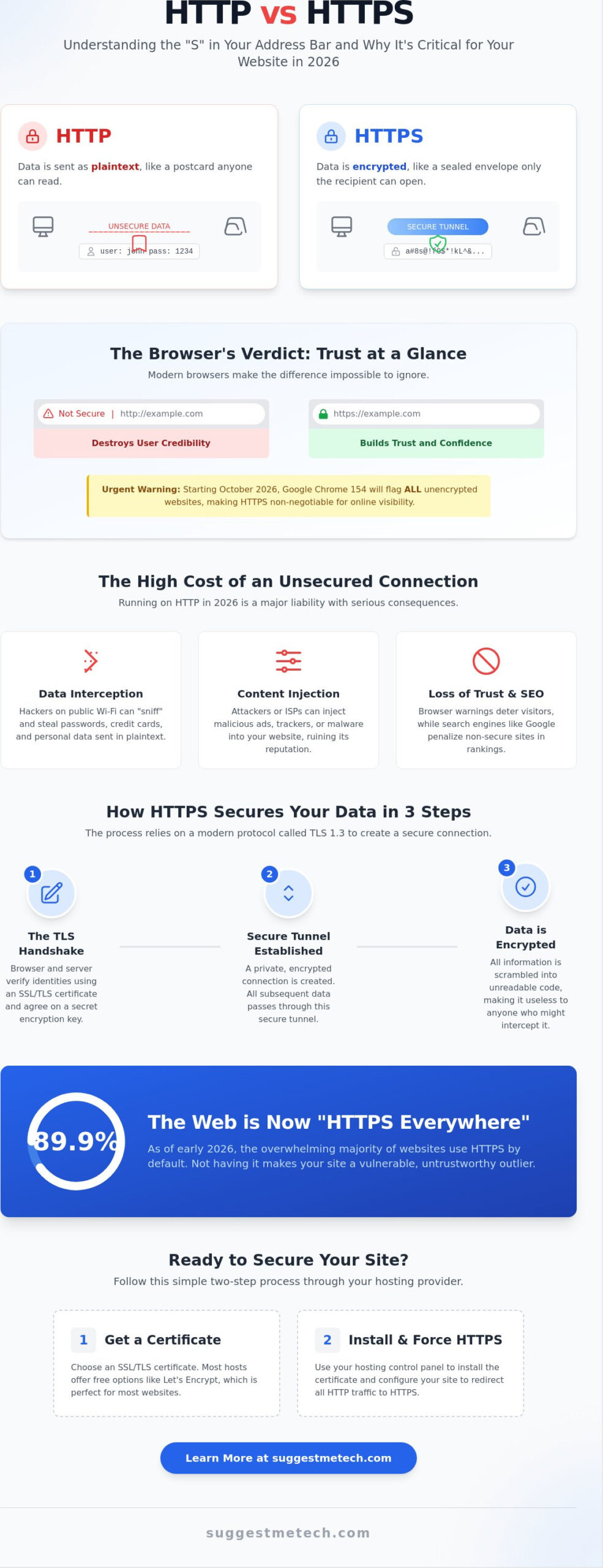
Most of us don’t think twice about the prefix in a browser address bar until a warning pops up. That single “S” at the end of HTTPS stands for “Secure,” and it represents the difference between a private conversation and one shouted across a crowded room. When evaluating http vs https for website security, the fundamental shift lies in how data travels from a visitor’s device to your server. Think of an HTTP connection as a postcard sent through the mail. Anyone who handles that postcard, from the local carrier to the sorting facility, can read every word you wrote. HTTPS, by contrast, is like a sealed, tamper-proof envelope. Only the intended recipient has the key to open it and read the contents.
Modern browsers make this distinction impossible to ignore. A secure site displays a familiar padlock icon, signaling to the user that their data is protected. Sites still using the older protocol are flagged with “Not Secure” warnings. These visual cues are more than just icons; they’re the first line of defense in building or breaking user trust. By 2026, these warnings have become even more aggressive, making the choice between the two protocols a matter of survival for any online presence.
What is HTTP and How Does it Work?
HTTP, or Hypertext Transfer Protocol, has been the foundation of web communication since the early 1990s. It operates on a simple request-response cycle. When you click a link, your browser sends a request to a server, and the server sends back the requested page. This happens in plaintext, meaning the data isn’t scrambled or hidden. While this worked for the early, informational web, it’s a massive liability today. Hackers can use “man-in-the-middle” attacks to intercept this plaintext data. If a visitor enters a password or contact information on an HTTP site, that data is visible to anyone on the same network, such as a public Wi-Fi hotspot. Today, HTTP is mostly found in legacy internal systems where external threats are strictly controlled.
The Evolution to HTTPS
The tech industry has effectively mandated Hypertext Transfer Protocol Secure (HTTPS) as the universal standard. As of early 2026, 89.9% of all websites use HTTPS by default. This protocol uses a sophisticated “handshake” process to establish a secure connection. During this handshake, the browser and server agree on a secret key using the modern TLS 1.3 protocol. Once established, this encryption scrambles data into unreadable code. Even if a hacker intercepts the transmission, they’ll only see a meaningless string of characters. This protection isn’t just for banks anymore. It’s a baseline requirement for every site. Understanding the core mechanics of http vs https for website security helps you see why the industry moved toward “HTTPS Everywhere.” It’s the only way to ensure that the data your visitors share stays between you and them.
Why HTTP is a Major Liability for Your Website in 2026
Running a website on HTTP in 2026 is like leaving your front door wide open in a busy city. It’s a massive security hole that invites trouble. Beyond just being an outdated technology, it creates a direct path for bad actors to exploit your visitors and your brand. When comparing http vs https for website security, the risks of staying on the old protocol go far beyond technical debt. You face real financial, legal, and reputational consequences that can be difficult to recover from.
Unsecured sites are vulnerable to content injection. This is where a hacker or even a shady Internet Service Provider (ISP) intercepts your traffic and inserts their own ads or malicious scripts into your pages. Your visitors see content you didn’t approve, which ruins your professional image and slows down your site. Additionally, modern regulatory frameworks like GDPR and CCPA require you to protect user data. If you collect even basic information via an HTTP connection, you’re likely in violation of these privacy laws. The cost of a compliance fine far outweighs the small investment in proper encryption.
The Danger of Data Interception
Public Wi-Fi networks are prime hunting grounds for “packet sniffing.” This is a technique where attackers capture the data flowing between a user’s device and an unencrypted server. If your site uses HTTP, every password, contact detail, and personal note entered into a form is sent as readable text. Even a simple blog needs protection because hackers use these small entries to launch larger Man-in-the-Middle (MitM) attacks. You can find more details on how HTTPS protects data by encrypting these streams, making them useless to prying eyes. Protecting your users isn’t just a courtesy; it’s a fundamental part of your service provision.
Phishing and Brand Damage
Trust is the currency of the modern web, and HTTP is a bankrupt protocol. These sites are far easier to spoof, allowing hackers to create fake versions of your pages to trick users into giving up their credentials. When Google Chrome flags your site as “Not Secure,” it sends a clear message to your audience: stay away. This badge of shame drives up bounce rates and kills your conversion potential instantly. People won’t buy from a site that looks like a security risk.
Session Hijacking is the unauthorized takeover of a user session. This occurs when an attacker steals a session cookie sent over an unencrypted connection, allowing them to impersonate your visitor. To stay ahead of these threats and keep your site compliant, check out our latest technology reviews and guides to ensure your setup is truly secure and efficient.
The Business Case: SEO, Speed, and User Trust
Choosing between http vs https for website security is no longer just a technical debate for IT departments. It’s a critical business decision that directly impacts your bottom line. In 2026, a secure connection is the baseline for any professional operation. If your site isn’t encrypted, you aren’t just risking a data breach; you’re actively pushing away customers and hiding your content from search engines. Transitioning to HTTPS provides a competitive edge by improving visibility and ensuring your site loads with the speed modern users expect.
Browser enforcement has reached a tipping point. Starting in October 2026 with the release of Chrome 154, Google will enable “Always Use Secure Connections” by default. This means every visitor to an HTTP site will face a full screen warning requiring manual confirmation to proceed. Most users won’t click through that warning. They’ll simply hit the back button and find a competitor who prioritizes their safety. Beyond security, Understanding HTTP vs. HTTPS helps you realize that the padlock icon is a powerful psychological trigger that boosts conversion rates and builds long term brand loyalty.
SEO and the Google Ranking Boost
Google confirmed HTTPS as a ranking signal years ago, but today it functions more like a prerequisite. You’ll find it nearly impossible to reach the first page of search results without a secure connection. Search engines prioritize user experience, and a “Not Secure” site is fundamentally a poor experience. If you’re looking to build a new site from scratch, check out our guide on How to Start a Blog in 2026 to ensure your SEO foundation is solid from day one. A secure site enjoys a lightweight ranking boost, but more importantly, it avoids the high bounce rates that can tank your authority over time.
Performance: HTTP/2 and HTTP/3
A common myth suggests that encryption slows down your website. In 2026, the opposite is true. Modern web protocols like HTTP/2 and HTTP/3 actually require HTTPS to function. These protocols use advanced techniques to deliver your content faster than ever before. As of April 2026, 51.33% of requests use HTTP/2 and 21.04% utilize HTTP/3. These protocols offer significant speed advantages:
- Multiplexing: Allows the browser to download multiple files simultaneously over a single connection.
- Header Compression: Reduces the amount of data sent between the server and the browser.
- Reduced Latency: HTTP/3 specifically improves connection times on unstable mobile networks.
By sticking with HTTP, you’re locked into the older HTTP/1.1 protocol. This forces browsers to load your site assets one by one, leading to sluggish performance and frustrated visitors. When you analyze http vs https for website security, remember that the “S” also stands for speed in the modern era.
How HTTPS Works: A Beginner-Friendly Look at SSL/TLS
While the visual difference between HTTP and HTTPS is just one letter, the underlying technology is a sophisticated system of digital handshakes and secret keys. To understand http vs https for website security, you need to look at how a browser and a server establish trust. When you visit a secure site, they perform a “handshake” to agree on how to scramble your data. This process ensures that even if someone intercepts the transmission, they can’t read the information without the specific digital key created for that session.
Most people still use the term “SSL” (Secure Sockets Layer), but that technology is actually the predecessor to the modern standard we use today: TLS (Transport Layer Security). As of 2026, TLS 1.3 is the gold standard, used by 68% of HTTPS connections. It’s faster and more secure than older versions. The system relies on two different keys to protect your data. The public key is available to everyone and is used to encrypt information. The private key is kept secret on the website’s server and is the only tool that can decrypt that information. It’s a one way street for data entry that only the rightful owner can unlock.
Understanding SSL Certificate Types
Not all certificates are the same. The type you choose depends on your site’s purpose and the level of identity verification you need. Here are the common options available in 2026:
- Domain Validation (DV): These are the most common and can be issued in minutes. They verify that you own the domain. These are perfect for blogs and small sites, with prices starting as low as $7.66 per year.
- Organization Validation (OV): These require the Certificate Authority to verify your business’s legal existence. It provides a higher level of trust for mid sized companies.
- Extended Validation (EV): These offer the highest level of vetting. While browsers no longer show the “Green Bar” in the address bar, users can still click the padlock to see your verified legal company name. These typically start around $75 per year.
- Wildcard Certificates: These are practical choices if you need to secure multiple subdomains (like blog.yoursite.com and shop.yoursite.com) under a single certificate.
What is a Certificate Authority?
A Certificate Authority (CA) acts as a digital notary. They are trusted third parties that verify a website’s identity before issuing a certificate. Without a CA, anyone could claim to be “google.com,” and your browser wouldn’t know the difference. Let’s Encrypt is a major player here, currently issuing 78% of all free certificates. They’ve made security accessible for everyone, though their certificates require renewal every 90 days. For more detailed comparisons on which security tools fit your budget, explore our latest technology reviews and guides to find the best fit for your project.
The role of the CA is becoming even more critical as certificate lifespans shrink. In 2026, the maximum lifetime for a certificate is 200 days, and this will drop to 100 days by early 2027. This frequent rotation ensures that if a key is ever compromised, it won’t be useful for long. This constant cycle of verification is why the modern web stays secure against evolving threats.
Getting Started: How to Secure Your Site with HTTPS
Securing your website is a straightforward technical process that pays dividends in user trust and search visibility. When you compare http vs https for website security, the actual migration is often the part that intimidates site owners most. However, modern hosting tools have simplified this into a few clicks. You don’t need to be a developer to make the switch. It’s a one-time setup that protects your site permanently as long as your certificates stay active and auto-renew correctly.
To secure your connection, follow these essential steps:
- Step 1: Select a hosting provider that offers integrated SSL support.
- Step 2: Generate and install your certificate through your hosting control panel.
- Step 3: Update your website’s general settings to use the HTTPS prefix for your URL.
- Step 4: Implement 301 redirects to automatically send visitors from the old HTTP pages to the secure versions.
- Step 5: Run your site through an online SSL checker to confirm the handshake is working correctly.
Choosing the Right Hosting Provider
Your choice of web host is the biggest factor in how easy this process becomes. You shouldn’t pay extra for a basic Domain Validation (DV) certificate. Most reputable providers include these for free through Let’s Encrypt. If you’re looking for a new home for your site, our guide on The Best Web Hosting Services of 2024 highlights platforms that make security a priority. Many modern hosts provide automated certificate management, which handles the heavy lifting of renewals for you. This ensures you stay compliant with current browser standards without unnecessary manual work or extra costs.
Fixing Mixed Content Errors
Even after installing a certificate, your site might still trigger “Not Secure” warnings. This happens when a secure page tries to load insecure images, scripts, or fonts from an old HTTP source. These are known as mixed content errors. They’re a common hurdle in the transition of http vs https for website security, but they’re easy to fix. You can use a search-and-replace plugin to update all internal links in your database from http:// to https:// instantly. This ensures every asset on your page is delivered through the encrypted tunnel.
Once your links are updated, double-check your sitemap. You’ll need to update your Sitemap URL and notify Google Search Console of the change to help search engines index your secure pages faster. Setting up a new property for the HTTPS version of your site helps you track your performance and ensures Google recognizes your security upgrade. If you’ve found a specific tool or plugin that made your migration easier, we’d love to hear about it. Join our community discussion below to share your tips and help others secure their sites with confidence.
Protect Your Digital Presence with Modern Encryption
The move toward a fully encrypted web is no longer a future goal; it’s a present reality. By now, you understand that the choice between http vs https for website security isn’t just about a padlock icon. It’s about ensuring your site remains accessible as browsers like Chrome begin blocking unencrypted connections by default later this year. You’ve seen how modern standards like TLS 1.3 and HTTP/3 turn security into a performance advantage, making your site faster and more reliable for every visitor.
Selecting a foundation that simplifies this technical migration is your next logical step. We’ve curated a comprehensive list of top-rated hosting providers that include free SSL by default to save you time and money. You can find the best secure web hosting for your new site through our expert security comparisons and step-by-step guides. These resources are designed to help you navigate the technical landscape with confidence.
Taking these practical steps today protects your brand and your audience for the long term. You’ve got the knowledge to succeed; now it’s time to build a safer and faster web experience for everyone.
Frequently Asked Questions
Do I really need HTTPS if I don’t sell anything on my website?
Yes, you absolutely need it. Even if you don’t process payments, HTTPS protects your visitors’ privacy and prevents ISPs from injecting unwanted ads into your content. Most importantly, browsers like Chrome will flag your site as “Not Secure” starting in late 2026, which can scare away visitors and damage your brand’s reputation regardless of what you sell.
Is an SSL certificate expensive to maintain in 2026?
Maintaining security is more affordable than ever. Many website owners pay nothing at all by using free Domain Validation (DV) certificates from providers like Let’s Encrypt. For those who need higher validation levels, basic paid options start as low as $7.66 per year. The real cost is in the loss of traffic if you choose to remain on an insecure connection.
Does HTTPS make my website load slower?
No, HTTPS actually makes your website faster in 2026. Modern protocols like HTTP/2 and HTTP/3 require encryption to function. These protocols allow your browser to download multiple files at once, which significantly reduces load times compared to the older HTTP/1.1 standard. The “S” in HTTPS now stands for speed as much as it does for security.
What is the difference between SSL and TLS?
TLS is the modern and more secure successor to SSL. While many people still use the term “SSL certificate,” the technology actually running in the background is Transport Layer Security (TLS). As of May 2026, TLS 1.3 is the industry standard. It offers better performance and stronger encryption than the older, now-deprecated SSL versions.
How do I know if my website is using HTTPS?
You can check your address bar for a padlock icon next to your domain name. If you click that icon, your browser will show details about the certificate and the connection status. When comparing http vs https for website security, the most obvious sign of an insecure site is the “Not Secure” warning that browsers display prominently next to the URL.
Can I get a free SSL certificate for my blog?
Yes, free certificates are widely available and highly reliable. Let’s Encrypt currently issues 78% of these free certificates, and most reputable hosting providers include them as a standard feature. These are perfect for blogs and personal sites, though they typically require automated renewal every 90 to 200 days to stay valid under current security regulations.
What happens if my SSL certificate expires?
If your certificate expires, visitors will see a full-screen security warning before they can enter your site. This usually causes an immediate and massive drop in traffic. Because the maximum certificate lifetime is now 200 days, it’s vital to use a hosting provider that offers automated renewal to prevent your site from suddenly going dark and losing user trust.
Does HTTPS protect my website from being hacked?
HTTPS only protects data while it travels between the browser and the server. It prevents “man-in-the-middle” attacks and data sniffing on public networks. However, it does not protect your server from other threats like malware, weak passwords, or unpatched software. You still need a comprehensive security strategy to keep your backend files and database safe from direct attacks.

