

What if your next viral marketing campaign was actually the worst thing that could happen to your business? It sounds like a joke, but for many entrepreneurs, a sudden surge in traffic leads to crashed servers and thousands in lost revenue. You want growth, but you probably dread the technical nightmare of finding scalable web hosting for growing business that actually works when you need it most. It’s frustrating to watch potential customers bounce because your page load speeds are crawling during a big promotion.
We agree that your infrastructure should be the engine of your growth, not the emergency brake. This guide will show you how to choose a provider that prevents downtime and adjusts resources automatically. You’ll learn how to move toward a “set it and forget it” setup that keeps your site fast, no matter how many visitors arrive at once. We’ll break down the best providers for 2026 based on our latest reviews, compare predictable pricing models, and explain how to avoid complex migrations as you scale.
Key Takeaways
- Understand why resource elasticity is more important than high storage limits for maintaining site stability during traffic spikes.
- Learn how to implement scalable web hosting for growing business by choosing the right balance between vertical and horizontal scaling strategies.
- Evaluate the “time vs. money” trade-off between managed and unmanaged hosting to find the best fit for your team’s technical skills.
- Identify the specific performance bottlenecks that signal it’s time to migrate using our 5-step infrastructure checklist.
- Explore SuggestMeTech’s curated list of top-performing providers for 2026, specifically tested for e-commerce and SaaS requirements.
What is Scalable Web Hosting and Why Your Business Needs It Now
Scalability isn’t just about buying a bigger plan every six months. True scalable web hosting for growing business is about resource elasticity. It means your server breathes. When 10,000 people hit your site during a flash sale, the infrastructure expands instantly to handle the load. When the rush ends, it shrinks back down. This prevents you from paying for power you don’t use while ensuring you’re never caught off guard by success.
To understand why this matters, we first have to look at the basics of What is Web Hosting and how traditional setups differ from modern, clustered solutions. Most entry-level options provide a fixed slice of a server. If your traffic exceeds that slice, your site stops working. This creates a “performance ceiling” that can trap a growing company before it even gets off the ground.
Downtime has a massive financial impact. It isn’t just about the immediate sales you lose during a crash. It’s the long-term erosion of brand trust. A customer who sees a “504 Gateway Timeout” error today might never return. Investing in growth-ready infrastructure isn’t just a technical choice; it’s a competitive advantage that ensures your marketing budget isn’t wasted on a site that can’t stay online.
The Difference Between Static and Scalable Hosting
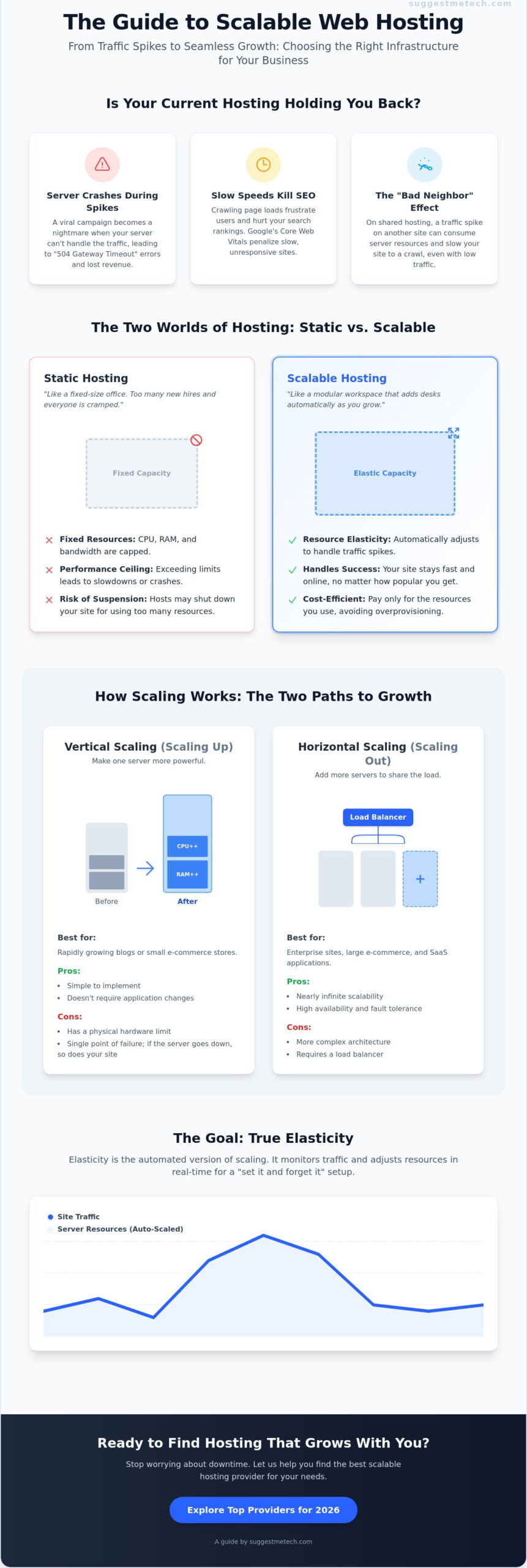
Static hosting is like a fixed-size office. If you hire five more people, everyone is cramped. If you hire fifty, the building literally can’t hold them. Scalable hosting is more like a modular workspace that adds desks and floor space automatically. You get real-time adjustments for RAM, CPU, and bandwidth. Beware of “unlimited” plans. They’re often a myth that hurts businesses because they rely on hidden “fair use” clauses. When you actually start to grow, those hard limits will trigger a suspension right when you need the uptime most.
Why Your Current Hosting is Choking Your Growth
If you’re still on a shared plan, you’re likely suffering from the “Bad Neighbor” effect. Since you share a server with hundreds of other sites, a spike in their traffic can slow your site to a crawl. This lag kills your SEO. Google’s Core Web Vitals prioritize fast response times, and a sluggish server can drop you from the first page of search results. Beyond speed, there’s the risk of account suspension. Many traditional hosts will shut down your site if a viral post causes a sudden traffic spike, effectively punishing you for being successful.
The Mechanics of Scaling: Vertical vs. Horizontal Elasticity
Choosing the right scalable web hosting for growing business requires a clear understanding of how your server actually grows. Scaling isn’t a one size fits all process. It happens in two distinct directions. You either make your existing machine stronger, or you bring in more machines to share the load. Understanding these mechanics is the first step toward mastering cloud scalability and ensuring your site stays online during critical growth phases.
The modern standard for high performance is “Elasticity.” This is the automated version of scaling. Instead of a technician manually adding more resources, an elastic system monitors your traffic in real time. If it detects a surge, it triggers the scaling mechanics automatically. This “set it and forget it” approach is what separates professional infrastructure from basic hosting plans. If you’re trying to determine which model suits your current stage, our technology reviews and guides offer deep dives into how different providers handle these automated shifts.
Vertical Scaling: The Quick Power Boost
Vertical scaling, or “scaling up,” is the most straightforward method. It’s like taking your existing server and swapping out the engine for something with more horsepower. You add more RAM, extra CPU cores, or faster SSD storage to a single machine. It’s an excellent choice for rapidly growing blogs or small e-commerce stores because it doesn’t require you to change how your website is built. However, vertical scaling has a physical limit. Eventually, you hit a “hardware ceiling” where no single machine can get any bigger, forcing you to look at other options.
Horizontal Scaling: The Enterprise Standard
Horizontal scaling, or “scaling out,” is what the world’s biggest websites use. Instead of making one server bigger, you add more servers to a cluster. A load balancer sits in front of these servers and distributes incoming traffic evenly among them. This approach offers nearly infinite growth potential and built-in redundancy. If one server in the cluster fails, the others pick up the slack, which provides much higher reliability. The trade-off is complexity. Horizontal scaling often requires specialized configuration and can lead to higher management costs, making it the preferred choice for large-scale SaaS platforms and global e-commerce brands.
When comparing the two, vertical scaling is usually more cost-effective for mid-range growth because it’s simpler to manage. Horizontal scaling is a larger investment but protects you from the total system failures that can happen when you rely on a single machine. Most businesses start with vertical scaling and transition to horizontal clusters once their traffic becomes consistently high and global.
Top Scalable Hosting Architectures: Cloud vs. VPS vs. Managed
Choosing the right architecture is a balance between control and convenience. While Virtual Private Servers (VPS) offer a solid middle ground with predictable resource limits, they often lack the instant elasticity of a true cloud environment. For scalable web hosting for growing business, cloud hosting is the gold standard. It pools resources from a network of physical machines, ensuring that if one node fails, your site stays live. This architecture supports both the vertical and horizontal scaling we discussed earlier, making it the most resilient choice for high-traffic sites.
You also need to consider how to offload the heavy lifting. Content Delivery Networks (CDNs) and edge caching play a vital role here. By storing copies of your site on servers closer to your users, you can reduce the load on your primary server by up to 80%. This effectively stretches your existing resources further before you ever need to trigger a scaling event. If you’re still weighing your options, check out our guide on The Best Web Hosting Services of 2024: Tested and Reviewed for a breakdown of how different architectures performed in our speed tests.
Managed Cloud Hosting: The Hands-Off Choice
Providers like SiteGround and Kinsta are built for business owners who don’t want to be sysadmins. They handle the technical aspects of scaling, such as server monitoring and resource allocation, so you don’t have to. The primary benefit is peace of mind. You can focus on your marketing and sales while the host manages unexpected traffic spikes. It’s a “pay for convenience” model that often pays for itself by preventing human error during critical growth phases.
Unmanaged Public Cloud: For Tech-Savvy Teams
If you have an in-house DevOps team, unmanaged public clouds like AWS, Google Cloud, or DigitalOcean offer maximum control. You get direct access to the infrastructure and the lowest raw resource costs. DigitalOcean, for instance, offers entry-level droplets starting at $4 per month as of May 2026. However, beware of hidden labor costs. If your lead developer spends hours every week configuring load balancers instead of building your product, the “cheap” hosting plan is actually costing you a fortune in lost productivity.
Managed WordPress Scaling
WordPress powers over 43% of the web, and it has specific needs like PHP worker optimization and object caching. Managed WordPress hosting is often more efficient than generic cloud hosting because the entire stack is tuned for one application. This specialized architecture allows you to handle more concurrent visitors on the same hardware. If you’re just starting out, our guide on How to Start a Blog in 2026: A Step-by-Step Guide for Beginners explains how to set up a foundation that’s ready for this kind of advanced scaling from day one.
When to Switch: A Strategic Roadmap for Scaling Your Infrastructure
Pulling the trigger on a migration is a high-stakes decision. Most owners wait until a total server crash before they act, but that’s a reactive strategy that kills revenue. You need to be proactive. If you’re looking for scalable web hosting for growing business, you should start the transition before your current server hits 80% capacity. This ensures you have a buffer for unexpected spikes while you handle the technical move.
We’ve developed a 5-step checklist to help you decide if it’s time to move. If you check three or more of these boxes, your current setup is likely a bottleneck:
- Your site crashes or slows to a crawl during every email blast or social promotion.
- Support tickets about “slow loading” have increased by more than 15% in the last quarter.
- You are unable to install modern performance tools like Redis or Object Cache Pro.
- Your hosting dashboard shows consistent CPU or RAM usage above 70% during off-peak hours.
- Your Time to First Byte (TTFB) is consistently higher than 500ms.
Identifying Performance Bottlenecks
Before you blame the server, check your application. Tools like New Relic or the Query Monitor plugin for WordPress can show you if a “slow site” is actually caused by database bloat or a poorly coded plugin. These tools find the specific line of code that’s dragging your performance down. If your code is clean but your TTFB remains high during peak hours, it’s a clear sign that your hardware can’t keep up with your traffic volume.
The Financial Side of Scaling
Don’t look at a $100 monthly hosting bill as an expense. Look at it as insurance. If a $20 plan causes a crash that costs you $1,000 in lost sales during a promotion, the cheaper plan is actually the most expensive option. When budgeting, consider “bursting” costs. Some providers offer pay-as-you-go scaling, while others use fixed tiers. If you’re just starting to organize your online presence, it helps to understand the basics like What is a Domain Name? A Simple Guide for Beginners before you dive into high-level infrastructure costs.
Migration doesn’t have to be a nightmare. Use a staging environment to test your site on the new server before you flip the DNS switch. This prevents data loss and ensures your SEO rankings stay intact. If you aren’t sure which provider offers the smoothest migration tools, our latest technology reviews and guides compare the top contenders for 2026 to help you make an informed choice.
The Best Scalable Web Hosting Providers for 2026
Finding the right scalable web hosting for growing business needs isn’t just about looking at a price tag. It’s about evaluating how these platforms performed under real-world stress tests. At SuggestMeTech, our 2026 testing focused on how quickly these hosts respond to traffic surges and how much manual work they require from you. We’ve categorized our top picks to help you match your infrastructure to your specific business model, whether you’re running a lean SaaS startup or a global e-commerce powerhouse.
The hosting landscape has shifted toward “edge-first” architectures. This means the best providers aren’t just giving you a server; they’re giving you a distributed network. As of May 2026, we’ve seen a massive push toward AI integration for resource optimization. This technology helps prevent the “performance ceiling” mentioned earlier by predicting traffic flows before they peak. If you’re looking for the most reliable recommendations, our full technology reviews and guides provide deeper technical data on each of these contenders.
Best for Rapid Growth: Cloudways and Kinsta
Cloudways: This platform is ideal for SaaS founders and developers who want the raw power of AWS, Google Cloud, or DigitalOcean without the headache of command-line management. DigitalOcean droplets, which start at $4 per month, can be deployed through the Cloudways interface with added security and support layers. Their “pay-as-you-go” model is perfect for businesses with unpredictable traffic patterns.
SuggestMeTech Verdict: The best balance of power and ease-of-use for tech-adjacent teams who need to scale horizontally across multiple cloud providers.
Kinsta: If you run a high-traffic WordPress blog or an e-commerce store, Kinsta is the gold standard. In 2026, their AI-driven predictive autoscaling has become a game-changer. It analyzes your traffic history to prepare server resources before a spike even happens. By utilizing Google Cloud’s highest-tier infrastructure, they ensure that your site stays fast even when concurrent visitor counts explode.
SuggestMeTech Verdict: The top choice for managed WordPress scaling where zero downtime is a non-negotiable requirement.
Best for Enterprise Stability: SiteGround and InMotion
SiteGround: Their Cloud VPS plans are built for businesses that need a middle ground between shared hosting and a dedicated fleet. You can upgrade your RAM and CPU with a single click, or set it to autoscale within a specific daily budget to avoid cost overruns. This flexibility makes it a favorite for agencies managing multiple client sites.
SuggestMeTech Verdict: Best for small to mid-sized businesses that need a reliable, user-friendly interface with one-click resource boosts.
InMotion Hosting: For global businesses requiring private cloud setups or dedicated server fleets, InMotion remains a powerhouse. Their focus on localized data centers ensures that as you scale globally, your latency stays low for users in every region. They offer robust redundancy features that are essential for enterprise-level stability.
SuggestMeTech Verdict: The most stable option for large-scale operations with complex infrastructure and high-concurrency needs.
Your choice should ultimately depend on your team’s technical depth. If you have developers on staff, the raw flexibility of an unmanaged setup might save you money. If you’re a solo founder or a marketing-heavy team, the managed peace of mind offered by Kinsta or SiteGround is worth the investment. We invite you to share your experiences with these providers in our community forums; your input helps us keep our evaluations accurate and user-focused.
Ready to Future-Proof Your Infrastructure?
Your business deserves a foundation that supports your ambition instead of limiting it. We’ve explored how transitioning from static limits to elastic resources protects your revenue during traffic surges. Whether you choose the hands-off convenience of managed cloud hosting or the granular control of unmanaged clusters, the goal remains the same: zero downtime and predictable growth. Identifying your performance bottlenecks early ensures you never lose a customer to a slow-loading page or a server crash.
Finding the right scalable web hosting for growing business is the most important technical decision you’ll make this year. It’s about moving from a reactive “hope it stays up” mindset to a proactive strategy. If you’re still weighing your options, we’re here to help. At SuggestMeTech, we provide expertly tested hosting performance data and no-jargon technical guides to simplify your choice. Our community-driven tech recommendations are designed to help you scale with confidence.
Find the perfect scalable host for your business on SuggestMeTech and start building for infinite growth today. You’ve got the vision; now make sure your server can keep up with it.
Frequently Asked Questions
Is scalable web hosting more expensive than regular hosting?
Yes, scalable plans usually carry a higher base price than entry-level shared hosting. However, the true cost of “cheap” hosting includes lost sales during crashes. When you invest in scalable web hosting for growing business, you’re paying for the ability to handle spikes without a total site failure. It’s more helpful to view this as an insurance policy for your revenue rather than a simple monthly expense.
What is the difference between autoscaling and manual scaling?
Autoscaling uses software to monitor your site and add resources instantly when traffic hits a certain threshold. Manual scaling requires you to log into your dashboard and click a button to upgrade your RAM or CPU cores. While manual scaling is often cheaper and gives you more control over your budget, it leaves you vulnerable to unexpected viral spikes that happen while you’re away from your computer.
Can I scale my hosting down during slow seasons to save money?
You absolutely can scale down to save money during quieter periods. This is a core benefit of elastic cloud infrastructure. Many providers allow you to reduce your resource allocation once a promotion ends or a seasonal rush passes. This ensures you only pay for the high-performance power you actually need, making it a much more efficient financial model than paying for a massive dedicated server year-round.
Do I need a developer to manage a scalable hosting plan?
You don’t need a developer if you choose a managed hosting provider. Platforms like Kinsta or SiteGround handle the technical infrastructure, security patches, and resource allocation through a user-friendly interface. If you opt for unmanaged public clouds like AWS or Google Cloud, you will likely need a DevOps professional to configure the load balancers and scaling triggers correctly to avoid performance issues or unexpected bills.
Will scaling my hosting affect my website’s SEO?
Scaling your hosting helps your SEO by ensuring your site remains fast and accessible. Google’s Core Web Vitals prioritize page speed and stability. If your server struggles under load, your Time to First Byte (TTFB) will increase, which can negatively impact your search rankings. Maintaining a scalable web hosting for growing business setup ensures that search engine crawlers always find a responsive, high-performing site, even during your busiest traffic days.
What are “PHP Workers” and why do they matter for scaling?
PHP workers determine how many simultaneous requests your website can handle at once. Every time a visitor clicks a button or loads a page, a PHP worker processes that task. If you run out of workers, visitors will see “502 Bad Gateway” or “504 Gateway Timeout” errors. Scaling your plan often involves increasing your worker count to ensure your site can process multiple checkouts and dynamic interactions simultaneously.
Is Cloud hosting always scalable?
No, cloud hosting is not always scalable by default. Some providers use the “cloud” label for marketing but still place your site on a virtual machine with fixed, static limits. True scalable cloud hosting allows for on-demand resource expansion across a cluster of servers. Always check if a provider offers “vertical” or “horizontal” scaling features before assuming their cloud plan can grow with your traffic spikes.
How do I know if my website is currently hitting its resource limits?
Look for specific warning signs in your hosting dashboard and performance logs. Frequent “503 Service Unavailable” errors are a primary indicator that your server is hitting its concurrent connection limits. You should also monitor your Time to First Byte (TTFB) using tools like PageSpeed Insights. If your TTFB increases significantly during peak hours while your code remains unchanged, your hardware is likely struggling to keep up with the demand.

