

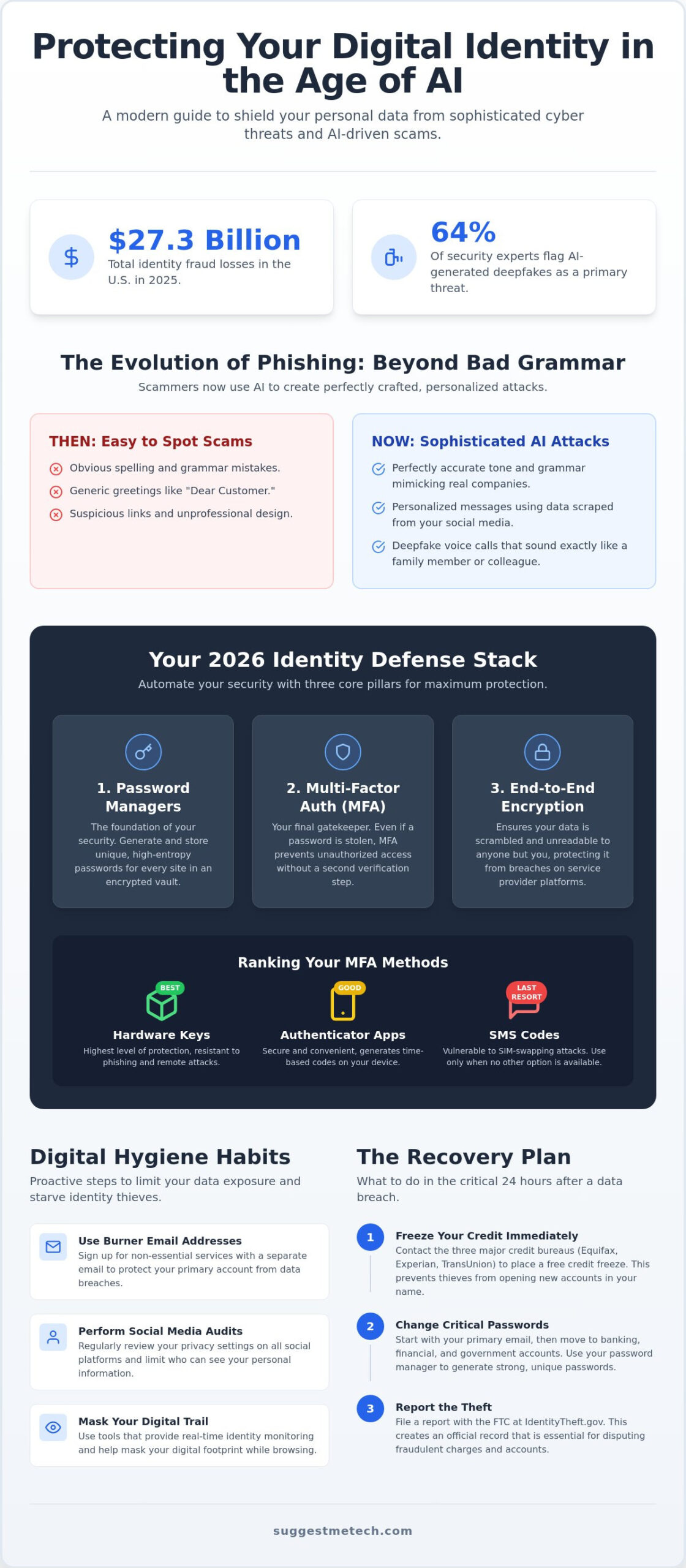
Did you know that identity fraud losses in the U.S. reached $27.3 billion in 2025? Since 64% of security experts now flag AI-generated deepfakes as a primary threat, the old advice of just “using a strong password” isn’t enough anymore. It’s completely normal to feel overwhelmed by technical jargon or anxious about how to protect yourself from identity theft online when the risks seem to evolve every week. You want to browse the web without a constant sense of dread, and you deserve a security plan that doesn’t require a computer science degree to manage.
We’re here to help you move from anxiety to action. This guide promises to simplify your digital life by helping you master the essential tools and habits needed to shield your personal data from modern cyber threats and AI-driven scams. We’ll walk you through building a “set-and-forget” security stack, explain how to spot sophisticated phishing before it strikes, and provide a clear, step-by-step plan to follow if your information is ever compromised. It’s time to reclaim your peace of mind and take control of your digital footprint with confidence.
Key Takeaways
- Learn how to identify the latest generation of AI-driven phishing and deepfake scams that bypass traditional security filters.
- Discover how to protect yourself from identity theft online by building an automated defense stack using password managers, MFA, and encryption.
- Master practical digital hygiene habits, such as using burner email addresses and performing social media privacy audits, to limit your public data exposure.
- Identify the essential software tools needed for real-time identity monitoring and masking your digital trail while browsing.
- Gain a clear step-by-step recovery plan for the critical 24-hour window following a data breach, including how to freeze your credit for free.
Understanding Identity Theft in the Age of AI
Online identity theft is the unauthorized collection and use of your Personally Identifiable Information (PII). This sensitive data includes your name, address, and high-value targets like Social Security numbers, banking credentials, and biometric data. Effectively understanding the types of identity theft is the first step in learning how to protect yourself from identity theft online. 2026 is a definitive turning point because criminals now use generative AI to automate the entire lifecycle of a scam. With total identity fraud losses in the U.S. reaching $27.3 billion in 2025, the scale of the problem has never been larger.
Your digital footprint is the cumulative record of your online activity. Scammers look for small leaks across multiple platforms. A minor data breach at a retail site might only reveal your email, but when combined with a leak from a health app, it gives a thief enough context to bypass security questions. These small breadcrumbs eventually lead to a full identity takeover. Thieves don’t need a single massive haul; they just need enough pieces to solve the puzzle of your life.
The Evolution of Phishing: Beyond Bad Grammar
The days of spotting a scam by its broken English are over. Scammers now use AI to mimic the professional tone of your bank, doctor, or employer with perfect accuracy. They can even scrape your social media to personalize the message, making it nearly impossible to distinguish from a legitimate email. Deepfake voice calls are another growing concern. You might receive a call that sounds exactly like a family member or a colleague requesting an urgent financial transfer. You can no longer rely on the “lock icon” in your browser as a sign of safety. Most malicious sites now use encryption to appear legitimate while they steal your credentials.
Why Your Web Hosting and Online Accounts Matter
Security starts at the infrastructure level. When a service provider suffers a breach, your data is exposed regardless of how strong your individual password is. It’s essential to use platforms that invest in robust web hosting security to ensure your data stays encrypted and inaccessible to intruders. These breaches often lead to credential stuffing. Credential stuffing is a type of cyberattack where hackers use lists of compromised user credentials to break into accounts on completely different websites. If you’ve wondered how to protect yourself from identity theft online, the answer begins with understanding that your data is only as safe as the weakest link in your digital chain.
Building Your 2026 Identity Defense Stack
Relying on your brain to remember complex passwords is a significant security vulnerability. Human-memorized passwords are usually predictable, reused, or too short to resist modern brute-force attacks. To truly master how to protect yourself from identity theft online, you need a defense stack built on three core pillars: password management, Multi-Factor Authentication (MFA), and end-to-end encryption. This automated approach ensures your data stays safe even when you aren’t actively monitoring your accounts.
MFA acts as your final gatekeeper. Even if a hacker manages to steal your login credentials through a data breach or a phishing attempt, they can’t access your account without that second layer of verification. However, not all MFA is created equal. The industry has shifted away from SMS-based codes, which are vulnerable to SIM-swapping attacks, toward more secure hardware security keys and authenticator apps. Integrating these tools into your daily routine provides a level of protection that simple passwords can’t match.
Password Managers: The Foundation of Security
A password manager is no longer optional; it’s the foundation of digital safety. These tools generate high-entropy, unique keys for every site you visit, storing them in an encrypted vault. Look for features like dark web monitoring, which alerts you if your data appears in a known leak, and emergency access for trusted contacts. You can improve your security profile in under 10 minutes by performing a password audit. Simply open your manager’s security dashboard, identify reused or weak passwords, and use the “auto-change” feature to update them instantly.
Implementing Multi-Factor Authentication Correctly
To maximize your safety, you should rank your MFA methods. Hardware keys offer the highest protection, followed by authenticator apps. SMS should be your last resort. Always enable MFA on your primary email account first, as it’s the master key for resetting passwords on all other services. Don’t forget to save your recovery codes in a physical location or an encrypted file. If you lose your phone or key, these codes are the only way to regain access without a lengthy identity verification process. For more detailed guidance on staying safe, you can consult official FTC identity theft advice to stay ahead of emerging threats.
Building this stack doesn’t have to be a chore. Once these tools are in place, they work in the background to simplify your digital life. If you’re looking for the right software to get started, our latest tech reviews can help you find the best tools for your specific needs. Learning how to protect yourself from identity theft online is about building habits that last, and these automated systems make those habits effortless.
Essential Software Tools for Proactive Protection
Your defense stack provides the foundation, but proactive software acts as your active digital sentry. Modern security suites have evolved significantly. They no longer just scan files for viruses; they monitor the web for your leaked credentials in real time. Understanding how to protect yourself from identity theft online requires moving beyond basic firewalls to a comprehensive toolset that automates your safety. For business environments requiring advanced protection, you can check out Cloud Choice Technologies to discover managed IT and cybersecurity services that include real-time monitoring, encrypted connections, and browser-level shields that stop data harvesting before it begins.
Choosing the Right Antivirus for Identity Monitoring
When selecting a suite, look for identity-specific features that actively patrol the dark web. Bitdefender Antivirus is a standout choice for this. It offers a dedicated Digital Identity Protection module that maps your online footprint and alerts you to data breaches instantly. In contrast, Avira Antivirus provides a more streamlined, user-friendly experience with excellent real-time protection and a built-in VPN. Many premium suites now bundle identity theft insurance, which can provide financial reimbursement for legal fees or lost wages if a breach occurs. This financial safety net is a critical component of a modern security plan.
VPNs: Securing Your Connection on the Go
A Virtual Private Network (VPN) is essential for masking your digital trail, especially when using public networks. Public Wi-Fi is a playground for “Man-in-the-Middle” attacks, where hackers intercept data moving between your device and the router. A VPN encrypts this traffic, making it unreadable to outsiders. When choosing a provider, always prioritize a “No-Logs” policy. This ensures the VPN company doesn’t store your browsing history, adding an extra layer of privacy. Mobile users need this protection just as much as desktop users; your smartphone often carries more sensitive PII than your laptop. For a broader look at best practices, consult the government guide to preventing identity theft.
Browser extensions and system hygiene complete your proactive defense. Extensions like uBlock Origin or Privacy Badger block malicious scripts and trackers that profile your behavior. Pair these with a strict update schedule. Hackers often exploit known vulnerabilities in outdated software. By keeping your operating system and applications current, you close the doors that thieves use to enter. Learning how to protect yourself from identity theft online is a continuous process of maintaining these tools to stay one step ahead of evolving threats.
Digital Hygiene: Habits to Starve Identity Thieves
Software is your shield, but your daily habits determine how much data is available for thieves to steal. Digital hygiene is the practice of minimizing your online presence to starve the AI-driven scams we discussed earlier. If you want to know how to protect yourself from identity theft online, you must stop treating your personal information as public currency. Every detail you share can be used to build a profile that mimics your identity with frightening accuracy. By reducing your attack surface, you make it significantly harder for criminals to target you specifically.
Social Media: The Identity Thief’s Goldmine
Social media is often where the most damaging leaks occur. Many users don’t realize that common security question answers, like their mother’s maiden name or their first pet, are often buried in their public posts or “About Me” sections. Real-time location tagging is another risk; it tells criminals exactly when you are away from home. You should also avoid those viral personality quizzes or survey apps on Facebook. These are frequently designed as data-harvesting tools to collect PII and gain access to your friend lists. Auditing your privacy settings to limit who can see your historical posts is a vital step in reducing your risk.
Maintaining Your Devices
Your hardware needs regular maintenance to stay secure. A simple but effective habit is to clear your device cache, which removes sensitive session data that could be exploited by malicious scripts. If you are an Apple user, follow this guide on how to clear cache on iPhone to keep your local data protected. Avoid using public USB charging stations at airports or cafes, a practice known as “Juice Jacking,” as these ports can be modified to install malware. A Kill Switch is a security feature that allows you to remotely disable your smartphone and wipe its data, rendering the device useless to a thief.
Beyond hardware, your behavior during digital interactions must change. Implement these five steps to strengthen your daily routine:
- Use “Burner” emails: Use secondary email addresses for one-time signups or retail accounts to keep your primary inbox clean and safe.
- Practice “Pause and Verify”: If you receive an urgent request for money or data, stop. Call the person or company back using a verified number before taking action.
- Secure hardware with biometrics: Use FaceID or fingerprint sensors as your primary unlock method to prevent shoulder-surfing.
- Audit social settings: Set all profiles to private and remove strangers from your follower lists.
- Remote-wipe readiness: Ensure your “Find My” services are active so you can trigger a wipe instantly if your phone disappears.
Mastering these habits is a core part of learning how to protect yourself from identity theft online. It creates a friction-filled environment for hackers, making you a much harder target than the average user. For more expert advice on the latest security hardware and software, check out our comprehensive tech guides to stay informed and keep your data private.
The Recovery Plan: What to Do if You are Compromised
Even with a perfect defense stack, a massive third-party data breach can leave you exposed. The first 24 hours after discovering a compromise are critical. Speed is your best ally in limiting financial damage and stopping a thief from opening new accounts in your name. If you’ve been searching for how to protect yourself from identity theft online, you must understand that recovery is an active process that requires immediate, documented action. Acting quickly can mean the difference between a minor inconvenience and a years-long legal headache.
Your first move should be to secure your existing accounts. Change the passwords for your primary email and banking apps immediately. Since we’ve already established the importance of password managers, use yours to generate new, high-entropy keys for any compromised services. Next, contact your financial institutions to dispute any fraudulent charges and request new card numbers. This stops the immediate bleeding while you move on to broader protections like credit freezes and official reporting.
Credit Freeze vs. Fraud Alert: Which Do You Need?
A Security Freeze is the gold standard for protection. It locks your credit file so no one, including you, can open a new line of credit until you “thaw” it with a PIN or password. Under federal law, freezes are free at all three major bureaus. A Fraud Alert is less restrictive; it stays on your report for one year and requires lenders to verify your identity before granting credit. If you are planning to buy a new laptop on a payment plan, you can temporarily lift a freeze for a specific window of time to allow the credit check to proceed.
Documenting the Incident
Keeping an Identity Theft Log is essential for clearing your name. Record the date, the name of the person you spoke with, and a summary of every conversation with creditors or agencies. You will also need to file a report at IdentityTheft.gov to receive an FTC Identity Theft Affidavit. This official document is your primary tool for proving to businesses that your information was stolen. In some cases, a police report may also be necessary to provide an extra layer of legal documentation, especially if you know the identity of the thief.
Long-term recovery involves monitoring for “ghost” accounts. These are fraudulent accounts that may not appear on your credit report for months. Regularly review your credit statements and use the identity monitoring features in your security software to catch these early. Identity protection isn’t a one-time task; it’s a continuous journey. By following these steps, you take the power back from the scammers and ensure your digital life remains secure. Learning how to protect yourself from identity theft online means being as prepared for the recovery as you are for the prevention.
Secure Your Digital Future Today
Securing your digital life in 2026 requires more than just caution; it demands a proactive, automated defense. You’ve learned that a strong security stack involving password managers and hardware-based MFA is your best shield against AI-driven phishing. By combining these tools with consistent digital hygiene habits and a clear recovery plan, you significantly reduce your vulnerability to sophisticated scams. Mastering how to protect yourself from identity theft online isn’t about being a tech expert. It’s about choosing the right systems to work for you while you sleep.
We’ve done the hard work of vetting the best tools for the job. Our 2026 updated testing for Bitdefender and Avira ensures you get the most reliable real-time monitoring available. Whether you need expert guides on MFA and hardware security or practical tech advice for non-tech users, we provide the comparisons you need to make confident choices. Check out our top-rated Security Stack reviews to automate your protection today! You now have the plan and the tools to stay safe. Take that first step toward total peace of mind and browse with confidence.
Frequently Asked Questions
How do I know if my identity has already been stolen online?
You can tell if your identity is stolen by checking for unauthorized bank transactions, unexpected credit inquiries, or bills for services you never signed up for. Receiving “password reset” emails you didn’t request is another major red flag. If you suspect a problem, review your credit reports at AnnualCreditReport.com to look for new accounts or addresses you don’t recognize.
Is it worth paying for identity theft protection services in 2026?
Paying for protection is worth it if you want professional restoration experts and financial insurance that free tools don’t provide. In 2026, premium plans often start between $8.99 and $12.00 per month and include AI-driven monitoring that blocks sophisticated deepfake threats. These services provide peace of mind by automating much of the work involved in how to protect yourself from identity theft online.
Can someone steal my identity just from my email address?
A thief cannot steal your full identity with just an email address, but they can use it to launch targeted phishing attacks. Your email is the primary key for most of your digital life. If a hacker gains access to it, they can reset passwords for your bank, social media, and retail accounts in just a few minutes.
What is a security freeze, and does it hurt my credit score?
A security freeze is a free tool that prevents lenders from accessing your credit report, which stops identity thieves from opening new accounts in your name. It has no impact on your credit score. You can easily “thaw” the freeze temporarily through the credit bureau’s website when you need to apply for a legitimate loan or credit card.
How often should I change my passwords to stay safe?
You only need to change your passwords if a specific account is compromised or if you’ve been notified of a data breach. Modern security advice has moved away from frequent, scheduled changes because they often lead to weaker, predictable patterns. Focus on using a unique, long passphrase for every site and enabling multi-factor authentication instead.
What should I do if my Social Security number is leaked in a data breach?
If your Social Security number is leaked, your first priority is to place a credit freeze with Equifax, Experian, and TransUnion. This prevents criminals from using your SSN to open fraudulent lines of credit. You should also file an official report at IdentityTheft.gov to document the incident and receive a personalized recovery plan.
Are password managers actually safe from hackers?
Password managers are extremely safe because they use zero-knowledge encryption, ensuring that only you hold the master key to your data. Even if the manager’s servers are breached, your vault remains an unreadable scramble of characters to the attacker. Using one is a foundational step in learning how to protect yourself from identity theft online effectively.
How can I tell the difference between a real bank email and a phishing scam?
You can spot a phishing scam by checking for generic greetings, urgent threats of account closure, and sender addresses that don’t exactly match the bank’s official domain. Real banks will never ask you to provide your password or full SSN through an emailed link. When you’re in doubt, log in directly through the bank’s official app or website to check your messages.

