

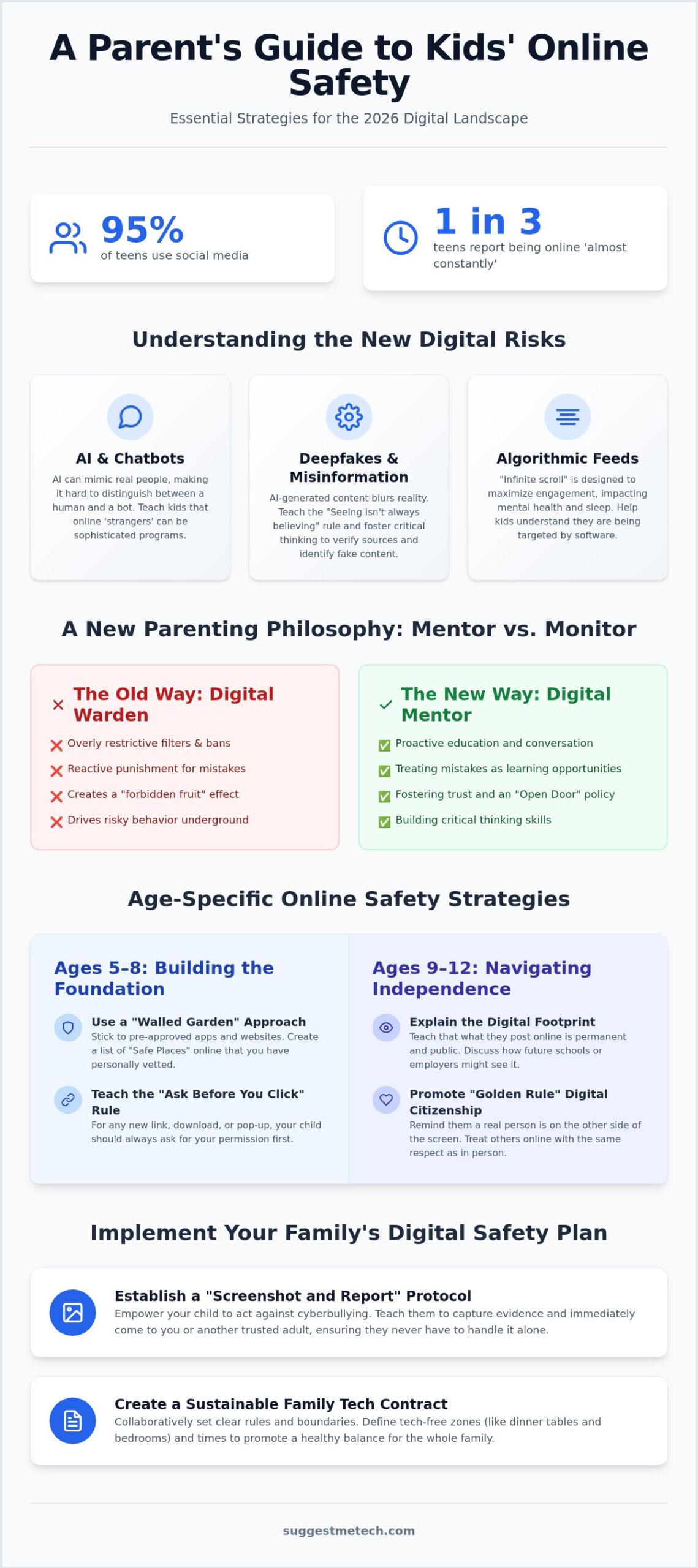
Did you know that 95% of teens use social media, with one-third reporting they’re online almost constantly? In 2026, the digital world is more complex than ever, especially with the rise of AI chatbots and new regulations like the KIDS Act. You’re likely struggling to balance screen time with real-world activities while worrying about cyberbullying or accidental exposure to inappropriate content. It’s a heavy burden, and it’s okay to feel overwhelmed. Learning how to teach kids about online safety is no longer just about setting a password; it’s about fostering digital literacy and trust.
We’ll help you master the essential strategies and tech tools needed to protect your children while building a relationship where they feel safe coming to you. This guide provides a clear roadmap for age-appropriate talks and practical advice on using software like Bark or Qustodio. You’ll gain the confidence to manage digital risks and ensure your child knows exactly how to handle online issues when they arise. By the end of this article, you’ll have a functional plan to turn digital anxiety into a collaborative defense for your family.
Key Takeaways
- Learn to navigate the 2026 digital landscape by combining technical security with emotional intelligence to protect kids in immersive, AI-driven spaces.
- Master how to teach kids about online safety through age-appropriate conversations that emphasize digital citizenship and the “Golden Rule” of the internet.
- Compare built-in OS controls against third-party monitoring suites and learn how to secure your home network at the router level for comprehensive protection.
- Implement a “Screenshot and Report” protocol to empower your children against cyberbullying while learning to spot the subtle behavioral signs of digital distress.
- Create a sustainable Family Tech Contract that establishes tech-free zones and sets healthy boundaries for both parents and children.
Understanding the 2026 Digital Landscape for Children
In 2026, the internet isn’t a place your child visits; it’s an environment they live in. Online safety is no longer just about strong passwords or avoiding suspicious links. It has evolved into the critical intersection of technical security and emotional intelligence. To understand how to teach kids about online safety, we must first recognize that the digital world has shifted from static websites to immersive, AI-integrated social ecosystems. This new reality requires a move away from reactive punishment and toward proactive education.
Old lessons like “don’t talk to strangers” are insufficient. Today, a stranger could be a highly realistic AI chatbot or a malicious actor using a deepfake to impersonate a peer. Safety now requires information literacy; the ability to verify sources and understand how algorithms manipulate what we see. This shift is reflected in how we view regulations like the Children’s Online Privacy Protection Act (COPPA), which provides a legal baseline for data collection but cannot replace a child’s own critical thinking skills. We have to prepare the child for the road, not just the road for the child.
The New Risks: AI, Deepfakes, and Algorithmic Feeds
AI-generated content blurs the line between reality and fiction. Children often lack the cognitive development to distinguish a deepfake video from a real person. Personalized algorithms create “infinite scroll” loops designed to maximize engagement, often at the expense of mental health and sleep. Deepfake awareness is now a core safety skill. You need to explain that seeing isn’t always believing. Discussing these algorithmic patterns helps kids understand they are being targeted by software designed to keep them clicking, rather than being “lucky” to find endless content. To help them identify the difference between editorial recommendations and paid partnerships, you can explore Advertising and Sponsored Content on trusted family guides as a practical teaching example.
Why Traditional Gatekeeping No Longer Works
Traditional gatekeeping is failing. Kids are tech-savvy; they frequently use VPNs to bypass filters or hide activity on secondary devices. Overly restrictive policies often create a “forbidden fruit” effect, which drives risky behavior underground. Instead of acting as a digital warden, adopt a “Mentor vs. Monitor” philosophy. Focus on proactive education rather than reactive punishment. When a child understands the specific reasons behind a rule, they’re more likely to follow it even when you aren’t watching. This collaborative approach is the most effective way for how to teach kids about online safety in a world where technology changes daily.
Age-Specific Strategies for Online Safety Conversations
Mastering how to teach kids about online safety starts with recognizing that a one-size-fits-all approach fails. You must tailor your guidance to your child’s cognitive development. Think of digital safety like wearing a helmet. We don’t wear it because we expect to crash; we wear it so we stay safe while exploring. Building this mindset early creates a foundation of trust. Establish an “Open Door” policy where mistakes are treated as learning opportunities. If your child accidentally sees something inappropriate, your reaction determines if they’ll tell you next time. Staying calm is your best defense.
Focus on “Golden Rule” digital citizenship from day one. Remind your children that there is a real person on the other side of every screen. Treating others online with the same respect they would show in person prevents many of the social frictions that lead to cyberbullying. For more specific advice on setting these family standards, the FTC online safety guide provides comprehensive resources for parents. If you are looking for the right hardware to support these boundaries, our latest technology reviews and guides can help you choose devices with the best built-in protections.
Ages 5–8: Building the Foundation
Young children need a “walled garden” approach. Focus on “Safe Places” online, which means staying within apps you have personally vetted and approved. Teach the “Ask Before You Click” rule for every new link, download, or pop-up. At this age, kids struggle to understand that the friendly cartoon avatar they see might not be who they say they are. Keep these conversations simple and frequent to make safety a natural part of their tech use.
Ages 9–12: Navigating Independence
This is the stage where kids begin seeking more digital autonomy. It’s the perfect time to explain the permanence of a digital footprint. Help them understand that a photo or comment shared today can stay searchable for years. Data privacy becomes a central part of how to teach kids about online safety here. Teach them never to share their school name, home address, or full name. Set clear boundaries for social media and gaming interactions, ensuring they know how to mute or block players who make them uncomfortable.
Ages 13+: Critical Thinking and Ethics
Teens face complex challenges like misinformation and “rage-bait” designed to trigger emotional responses. Move from a monitoring role to a mentoring role. Discuss the ethics of sharing content and the importance of respecting others’ privacy. Instead of just setting limits for them, help them set their own screen-time goals. This transition to self-monitoring builds the self-regulation skills they will need as adults in a digital world.
Essential Tech Tools: Parental Controls and Privacy Settings
While open communication is the heart of digital parenting, tech tools serve as the necessary armor. Effective strategies for how to teach kids about online safety involve a layered approach. You can start by differentiating between built-in operating system (OS) controls and third-party monitoring suites. Tools like Apple’s Screen Time or Google Family Link are excellent for setting basic time limits and app restrictions. However, third-party software often provides deeper insights, such as scanning text messages for signs of bullying or self-harm, which built-in tools typically lack.
Security should also happen at the source. Securing your home network at the router level allows you to filter content for every device in the house, from smart TVs to guest phones. Beyond filtering, teach your teens the importance of Two-Factor Authentication (2FA). It’s a non-negotiable step for protecting their social media and gaming accounts from unauthorized access. Remind them that device maintenance is a security feature; keeping software updated ensures they have the latest patches against emerging threats. Knowing how to talk about online safety ensures these technical rules feel like a shared project rather than a set of restrictions.
Setting Up Your Hardware for Success
Properly configuring your devices is the first step in creating a safe environment. On the best laptops of 2026, you can easily enable Family Sharing to manage purchases and monitor screen time across the entire household. Don’t forget your gaming consoles and smart TVs; most have hidden privacy menus that allow you to disable voice chat with strangers or restrict mature content. Linking digital hygiene to device performance is a great way to get kids interested. For instance, show them how to clear cache on iPhone to boost speed, then use that moment to check their privacy settings together.
Top Parental Control Software for 2026
Modern software offers a range of features from geofencing, which alerts you when a child arrives at school, to detailed activity reporting. When choosing a tool, decide if you prefer “soft monitoring,” which provides high-level summaries of activity, or “hard blocking,” which strictly prevents access to specific categories. A Privacy-First tool is one that encrypts data so even the provider can’t see it. These options give you the flexibility to adjust your level of involvement as you master how to teach kids about online safety and as your child earns more digital independence.
Managing Real-World Risks: Cyberbullying and Digital Footprints
Understanding how to teach kids about online safety requires looking beyond the screen and focusing on your child’s behavior. Digital risks often manifest as real-world emotional shifts. You should watch for subtle signs of cyberbullying, such as sudden withdrawal from family activities, visible anxiety when receiving notifications, or unexplained mood shifts after device use. If your child suddenly stops using a favorite app or becomes secretive about their screen, it’s time for a check-in. Don’t wait for them to come to you; be proactive in observing their digital well-being.
A fundamental part of how to teach kids about online safety is establishing a “Screenshot and Report” protocol. Teach your children that if they encounter harassment or inappropriate content, they should immediately take a screenshot and show it to you. This preserves evidence without escalating the situation through a direct reply. For younger children, keep device usage in open, shared rooms. While older kids may want high-quality headphones for gaming or schoolwork, private browsing behind closed doors increases the risk of unmonitored exposure. Balance their need for privacy with the necessity of a safe environment.
Explain the concept of “Digital Permanence” using the 10-year test. Ask your child: “Will you be comfortable with a future employer or college recruiter seeing this post in ten years?” This simple question helps them grasp that the internet never truly forgets. Every photo, comment, and “like” contributes to a permanent digital footprint that can impact their future opportunities. If you need more help choosing the right tools to monitor these footprints, check out our latest technology reviews and guides for expert recommendations.
The Cyberbullying Action Plan
When an incident occurs, document everything. Save screenshots of messages, comments, and profiles. Do not engage with the bully, as this often fuels the behavior. If the harassment involves classmates, involve the school administration immediately. For serious threats or the distribution of explicit AI-generated content, contact local law enforcement. Focus on your child’s mental health throughout the process. Reassure them that the bullying isn’t their fault and that their safety is your primary concern.
Curating a Positive Digital Footprint
Shift the conversation from what kids shouldn’t do to what they can create. Encourage them to use the internet for portfolio building, such as sharing art, coding projects, or writing. For older teens interested in the professional side of digital marketing and audience growth, you can check out Better Social SMM PANEL to help them understand how social media engagement tools work. Conduct regular “Privacy Audits” together to check what information is public on their profiles. Teach them to manage “Tagging” settings so that photos others post don’t automatically appear on their timeline. Reviewing third-party app permissions ensures that games and quizzes aren’t harvesting their personal data unnecessarily.
Creating a Sustainable Family Media Plan
Mastering how to teach kids about online safety requires more than a single conversation; it demands a consistent family culture. A sustainable media plan moves your household from reactive rule-following to a proactive digital lifestyle. Start by drafting a Family Tech Contract. This document shouldn’t just apply to your children. It needs to hold parents accountable too. If you’re scrolling at the dinner table while telling your teen to put their phone away, the message is lost. Kids mimic your habits, so modeling healthy boundaries is your most powerful teaching tool.
Designate specific Tech-Free Zones and times to ensure digital balance. Common examples include the dining table and at least one hour before bed. These gaps in connectivity allow for real-world interaction and better sleep hygiene. Schedule regular Tech Check-ins once a month. Use this time to sit together and review new apps, update privacy settings, and discuss any interesting or strange things they’ve seen online. This keeps the lines of communication open and ensures safety remains a collaborative effort rather than a top-down mandate.
The Family Tech Contract Template
A strong contract includes specific clauses that evolve as your child matures. Include the following elements for a comprehensive agreement:
- Transparency: Establish rules for password sharing or shared recovery emails.
- The “No-Judgment” Clause: Promise that reporting “weird” or uncomfortable interactions will not result in immediate device confiscation.
- Logical Consequences: Define penalties that match the infraction. For example, losing access to a specific social app is more effective than losing the phone entirely.
Update the contract annually. As your child grows, their digital responsibilities should expand alongside their privileges. This process is a vital part of how to teach kids about online safety while respecting their developing autonomy.
Future-Proofing Your Home
Technology moves fast, and staying informed is part of the job. Subscribe to tech newsletters to learn about emerging platforms or AI trends before your kids do. You can even integrate safety lessons into creative projects. For example, if your child is interested in starting a blog, use that as an opportunity to discuss public versus private information and comment moderation. Safety becomes much more engaging when it’s tied to a project they love. Join our community at SuggestMeTech to share your family safety tips and get the latest reviews on the tools that keep your home secure.
Empowering Your Digital Household
Protecting your children in 2026 requires more than just blocking apps; it demands a collaborative approach. You’ve discovered that how to teach kids about online safety is most effective when technical tools like router-level filtering meet open, age-appropriate dialogue. By establishing a Family Tech Contract and modeling healthy habits, you create a sustainable environment where your child feels safe reporting issues. This proactive strategy builds the digital literacy they need to navigate immersive and AI-driven spaces with confidence.
We’re here to help you stay ahead of shifting trends with expert analysis and practical, field-tested family safety frameworks. You can make informed decisions that protect your family’s privacy and well-being without feeling overwhelmed. To continue your journey and find the best tools for your needs, Explore more tech guides and expert reviews at SuggestMeTech. You’re now equipped to turn digital challenges into valuable teaching moments. Keep leading with trust and curiosity.
Frequently Asked Questions
At what age should I start teaching my child about online safety?
You should start discussing digital safety as soon as your child begins using any internet connected device. Early conversations about “safe places” online build a foundation of trust before they reach more independent ages. By introducing basic concepts like asking before clicking a link at age five, you ensure that safety is a natural part of their relationship with technology.
Is it okay to track my child’s location using their phone?
Tracking your child’s location is a common safety measure, with a 2026 survey showing that 86% of parents check their children’s location. It is most effective when done transparently rather than in secret. Use this as an opportunity to discuss physical safety and why knowing their whereabouts provides peace of mind for the whole family while they explore the world.
How do I know if a website or app is safe for my child?
Check age ratings in the app store and read the privacy policy to see how the platform handles data. Safe apps for kids should comply with regulations like COPPA and avoid features like unmoderated chat or aggressive data collection. You can also use third party review sites that specifically evaluate the educational value and safety protocols of new platforms before allowing a download.
What should I do if my child sees something inappropriate online?
Stay calm and follow the “Screenshot and Report” protocol mentioned earlier in this guide. If your child sees something upsetting, your reaction determines if they will come to you again. Use the moment as a teaching opportunity to explain why that content appeared. Show them how to block or report the material to prevent it from showing up in their feed again.
Should I have my child’s passwords for their social media accounts?
Maintaining access to your child’s passwords is a practical way to ensure their safety, particularly for those under 16. This should be a clear part of your Family Tech Contract. Explain that you aren’t there to read every private message; you simply need a way to help them if their account is hacked or if they encounter a dangerous situation they can’t handle alone.
How can I stop my child from bypassing parental controls?
Combine technical restrictions with open communication. While kids may try to use VPNs to bypass app level filters, securing your home network at the router level is much harder to circumvent. Ultimately, learning how to teach kids about online safety involves explaining the logic behind the rules. When they understand the specific risks, they are less likely to seek workarounds that leave them vulnerable.
What are the best free parental control tools available in 2026?
Google Family Link and Apple’s Screen Time remain the best free built-in tools for 2026. These platforms allow you to set daily limits, approve app downloads, and track locations without a monthly subscription. While they lack the deep content monitoring of paid suites like Bark, they provide a strong baseline for managing digital habits and protecting younger children from accidental exposure.
How do I talk to my teen about the dangers of “sexting” and private photos?
Focus on the concept of digital permanence and the potential legal risks involved. Explain that once a photo is sent, they lose all control over where it goes or who eventually sees it. Approach the topic with empathy rather than shame. Make sure they know they can come to you if they are ever pressured or if a photo is shared without their consent.

