

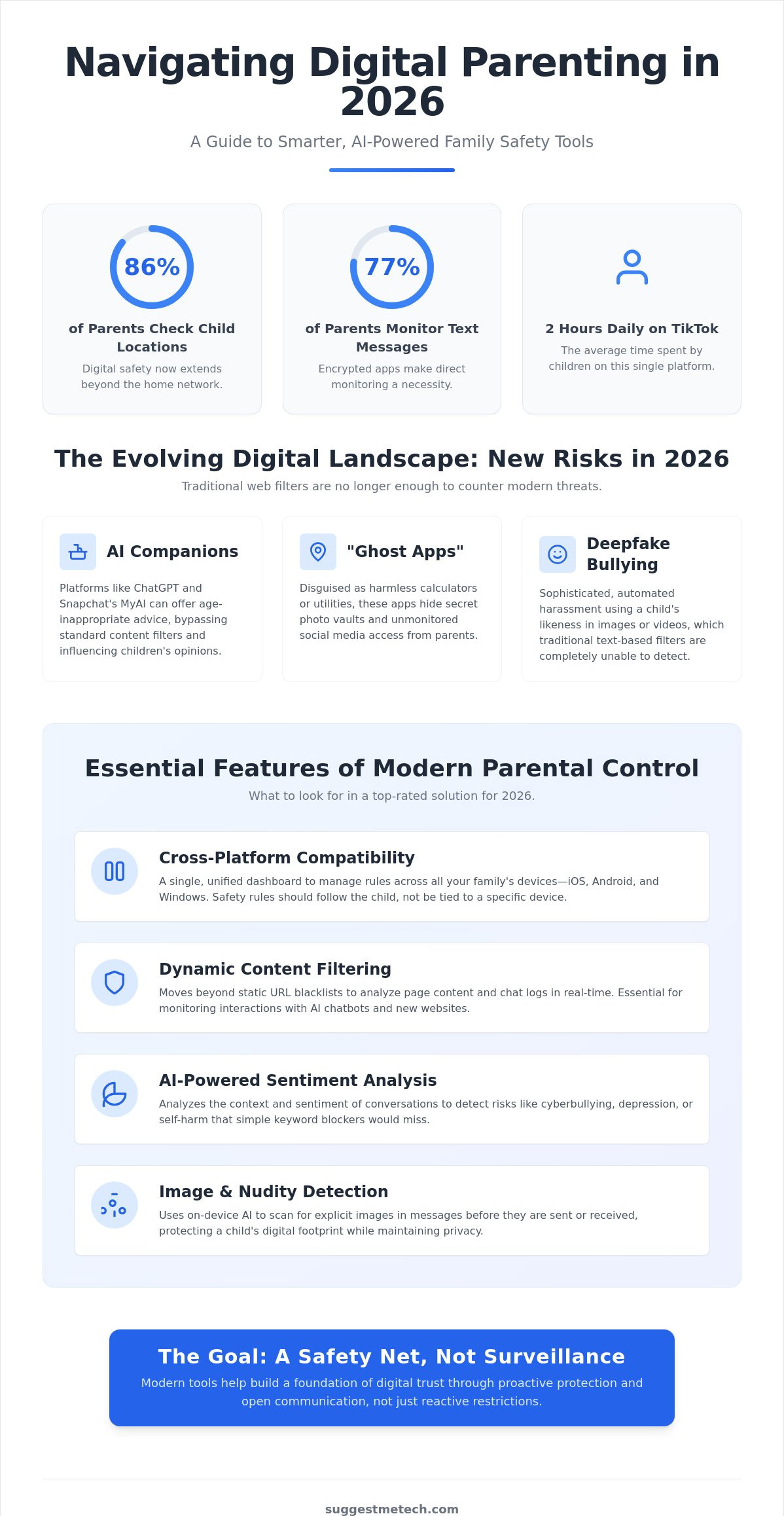
With 86% of parents now checking their children’s locations and 77% monitoring text messages, the digital safety landscape has moved far beyond simple website blocking. You’ve likely dealt with the headache of kids bypassing filters using VPNs or apps that turn a fast smartphone into a laggy, battery-draining brick. It’s a constant battle to keep up with dozens of social media platforms, especially when children spend an average of two hours every day on TikTok alone. Finding the best parental control software in 2026 requires a shift from basic filtering to smarter, AI-driven sentiment analysis that identifies risks before they turn into crises.
We understand that you want a solution that works across both iOS and Android without constant troubleshooting. This guide promises to help you discover top-rated tools that protect your children from online risks while building a foundation of digital trust. We’ll preview the most effective set-and-forget filtering options, explore real-time alerts for dangerous interactions, and break down the impact of the 2026 KIDS Act. You’ll get clear, practical comparisons of software that provides easy-to-read screen time reports; ensuring your family stays safe and your devices stay fast.
Key Takeaways
- Understand why modern digital parenting requires a safety net rather than a surveillance tool to navigate the risks of AI companions and encrypted messaging.
- Identify the essential features of the best parental control software, including real-time content analysis and seamless cross-platform compatibility for all your family’s devices.
- Compare our top five curated recommendations for 2026, from Qustodio’s all-round protection to Bark’s industry-leading sentiment monitoring.
- Master our “Transparency First” implementation strategy to protect your children while maintaining a healthy foundation of digital trust.
- Discover how your choice of hardware, from smartphones to the latest laptops, directly impacts the performance and battery life of your safety tools.
The State of Digital Parenting: Why You Need Parental Control in 2026
Digital parenting in 2026 has evolved from simple monitoring into a complex role as a digital mentor. You aren’t just looking for a “spy” tool; you’re building a safety net. For parents seeking to ground their family’s digital habits in moral and theological reflection, resources like Nuntiatoria provide helpful commentary on authority and ethical living. The internet your child accesses today is fragmented across decentralized social networks, encrypted messaging apps, and persistent AI companions. This makes traditional web filters almost useless. The best parental control software now focuses on behavioral sentiment analysis rather than just blocking bad words. It looks for patterns of distress, bullying, or predatory language in real-time to give you a head start on difficult conversations.
Many parents start with built-in tools like Apple’s Screen Time or Google Family Link. While these are helpful for basic time limits, they often fall short in a multi-device household. Kids are tech-savvy; they frequently use VPNs to bypass filters or switch to incognito mode to hide their browsing history. These OS-level tools also struggle to communicate with each other. If your child has an iPhone but uses a Windows laptop for school, you lose that “single pane of glass” view. Third-party software bridges these gaps, ensuring your safety rules follow the child, not just the individual device.
New Risks in 2026: Beyond Standard Web Filtering
The rise of AI companions has introduced unprecedented challenges for families. Platforms like ChatGPT and Snapchat MyAI provide children with 24/7 conversational partners that can sometimes bypass standard content filters. You need oversight to ensure these bots aren’t encouraging self-harm or sharing age-inappropriate advice. Additionally, the “Ghost App” phenomenon is peaking. These are applications disguised as harmless calculators or utility tools that actually hide secret vaults for photos and unmonitored social media access. Finally, cyberbullying has become more sophisticated with deepfake technology, where automated harassment can target a child’s likeness in ways that traditional text filters completely miss.
The ROI of Digital Safety
Investing in safety tools provides a high return on your child’s long-term well-being. By setting healthy boundaries early, you help prevent the neurological patterns of screen addiction before they take root. Beyond mental health, these tools protect your family’s data privacy. Many popular apps are designed to be data-hungry; they track location and harvest personal info from minors to sell to third-party advertisers. Perhaps most importantly, robust monitoring reduces the risk of grooming in gaming lobbies. Predators often use these unmoderated spaces to move children toward encrypted platforms, making early detection via sentiment alerts a critical priority for modern parents.
Core Features to Look for in Parental Control Software
Choosing the best parental control software isn’t about finding the longest list of features. It’s about finding tools that actually adapt to how kids use technology today. Cross-platform compatibility is your baseline requirement. If your rules don’t apply equally to an Android phone, an iPad, and a Windows PC, your child will simply migrate to the least-restricted device. Modern software provides a unified parent dashboard where you can adjust settings for all family devices simultaneously, ensuring a consistent safety net regardless of the hardware in use.
Dynamic content filtering has replaced the old, static “blacklists” that kids easily bypassed. Instead of just blocking specific URLs, advanced software analyzes page content in real-time. This is especially critical for AI-driven interactions. With children frequently using ChatGPT for homework or Snapchat’s MyAI for conversation, you need a tool that monitors these chat logs for inappropriate advice or dangerous topics. Unlike standard web filters, these tools look at the intent of the conversation to identify risks that a simple keyword block would miss.
Advanced Monitoring: Sentiment and Image Analysis
AI now goes deeper than basic alerts. In 2026, context is king. If a child types “I’m tired,” a basic tool might ignore it. However, sentiment analysis recognizes if that phrase is part of a larger pattern suggesting depression or self-harm. Nudity detection is another vital layer. It uses on-device AI to scan for explicit images in messages before they’re even sent or opened. This protects your child’s digital footprint while maintaining their privacy, as the software only alerts you when a genuine risk is detected.
Screen Time Management and Scheduling
Effective management requires more than a simple “off” switch. Look for granular scheduling that lets you differentiate between “Schoolwork” time, where educational apps remain accessible, and “Entertainment” time. The best tools include an “Emergency Pause” button for instant device locking during dinner or family outings. You can also turn safety into a positive experience by using a rewards system. Some apps allow you to grant “bonus” minutes automatically once a child completes their chores or finishes a learning module.
Geofencing has evolved beyond seeing a dot on a map. You can now set virtual perimeters around school or home and receive alerts when your child arrives or leaves. This location history provides peace of mind without requiring you to check the app every five minutes. To find the right balance between hardware performance and safety, you can check out our latest tech reviews and guides for more tailored recommendations. These features work together to create a managed environment that encourages responsible habits rather than just enforcing restrictions.
Best Parental Control Software of 2026: Top 5 Comparisons
Selecting the best parental control software involves matching specific tools to your family’s unique digital habits. After hands-on testing in 2026, we’ve identified five leaders that stand out for their reliability and specialized features. Qustodio remains the premier all-rounder for cross-platform families. Its Complete Plan, priced at $109.95 per year, offers unlimited device coverage; making it ideal for households where kids jump between phones, tablets, and gaming consoles. It provides the most consistent experience across both iOS and Android, solving the common headache of mismatched rules on different operating systems.
Bark takes a different approach by prioritizing trust and privacy for older children. Instead of showing you every search, Bark Premium ($99 per year) uses AI to monitor social media and text messages for specific risks like cyberbullying or depression. For families already using Norton for antivirus, Norton Family is a logical and cost-effective addition. At $49.99 per year for a standalone plan with unlimited devices, it’s one of the best values on the market. If you need a broader security net, Aura’s Family Plan ($32 per month billed annually) bundles parental controls with identity theft protection. Finally, Net Nanny remains the gold standard for younger children, offering superior web filtering for $54.99 per year on up to five devices.
Performance Comparison: Battery Life and System Lag
Software efficiency is critical to ensure your kids don’t simply “lose” their phones to dead batteries. Qustodio and Norton Family have the smallest footprints, rarely causing noticeable lag even on older laptops or budget tablets. Some users report that older versions of Net Nanny occasionally caused “ghost touches” or connectivity issues on specific Android builds, but the 2026 updates have largely resolved these bugs. Norton Family is frequently ranked as the easiest to install, often requiring less than five minutes to set up a child profile across multiple devices.
Pricing Models: Subscriptions vs. Lifetime Licenses
Implementation Guide: From Installation to Digital Trust
Successful implementation starts with a conversation. You shouldn’t hide the fact that you’re using the best parental control software on your child’s devices. Secret surveillance often backfires when tech-savvy kids inevitably discover the app. Instead, frame it as a safety tool, similar to a bike helmet or a seatbelt. This “Transparency First” approach fosters digital trust and reduces the urge for children to find creative workarounds to bypass your rules.
When you begin the installation, always set up the Parent profile on your own device first. This acts as your remote control. For the child’s device, you’ll need to grant specific permissions, such as “Device Administrator” on Android or “MDM Profiles” on iOS. These settings allow the software to prevent app deletion or enforce screen time limits effectively. Once installed, configure your “Exceptions” immediately. You don’t want to block access to educational resources or school portals during homework hours. Check your dashboard reports weekly rather than daily; this allows you to spot long-term habits without micromanaging every single click.
Preventing Workarounds and Bypasses
Tech-savvy kids often try to bypass restrictions by using guest profiles or third-party VPNs. To harden a device, you must disable the ability to add new user profiles in the system settings. Many children also attempt to use “vault” apps or simply delete the monitoring software. The most robust tools prevent this by requiring a parent password for any uninstallation. For total coverage, combine device-level software with router-level controls. While device apps track mobile data, a protected router ensures that every guest device or smart TV in your home follows the same basic safety rules.
Adapting Controls as Your Child Grows
Your strategy must evolve as your child matures. For ages 5 to 10, focus on strict filtering and heavy screen time limits to prevent early addiction. As they move into the 11 to 14 age bracket, shift your focus toward social media monitoring and location safety. This is the stage where sentiment analysis becomes most valuable. For teens aged 15 and older, consider moving toward “Accountability” mode. Instead of blocking sites, use the software to generate weekly reports that you review together. Choosing the best parental control software for each stage of development ensures they learn to manage their own digital footprint before they leave home. For more hands-on advice, you can explore our technology reviews and guides to find the perfect fit for your family’s needs.
Final Verdict: Which Parental Control Software Is Right for You?
Choosing the best parental control software comes down to your family’s specific device mix and the age of your children. Based on SuggestMeTech’s 2026 testing, we’ve categorized the top performers to help you make a definitive choice. If you have a large family with a mix of iPhones, Androids, and Windows PCs, Qustodio is your best all-around solution. For those raising tech-savvy teens who spend most of their time on social media, Bark’s non-invasive sentiment monitoring is the superior choice. If you’re already paying for a security suite, Norton Family offers the best integrated value.
It’s important to remember that software performance is often tied to the quality of your hardware. Running advanced AI monitoring on a budget tablet can lead to lag or frequent app crashes. In contrast, using the software on the best laptops of 2026 ensures that background processes don’t interfere with schoolwork or gaming. Before you hit the “Subscribe” button, go through this final checklist:
- Device Limits: Does the plan cover every phone, tablet, and computer in your house?
- AI Capabilities: Does it monitor the specific AI chatbots or encrypted apps your child uses?
- Ease of Use: Is the parent dashboard intuitive enough for you to use on the fly?
- Operating System Support: Does it offer the same features on iOS as it does on Android?
Our Top Recommendation for 2026
Qustodio is our winner for overall value and ease of use in 2026. It strikes the perfect balance between strict filtering for younger kids and flexible management for older ones. Bark remains our runner-up, specifically for parents who want to respect their teen’s privacy while still receiving alerts for dangerous interactions. Occasionally, you might encounter glitches where the monitoring app stops reporting data. If this happens on an Apple device, clearing your iPhone cache is a quick troubleshooting step that often fixes synchronization issues without needing a full reinstallation.
Next Steps for a Safer Home
Software is only one part of the equation. We recommend drafting a “Family Digital Contract” that outlines when and where devices can be used. This ensures the software acts as a safety net rather than a source of conflict. You should also consider your overall network security. For parents running home servers or specialized setups, integrating these tools with the best web hosting services of 2024 tested and reviewed can provide an extra layer of DNS-level protection for every device on your Wi-Fi.
We want to hear from you. Have you tried any of these apps, or did your child find a workaround we didn’t mention? Share your experiences and tips in the comments below to help other parents stay ahead of the curve.
Securing Your Family’s Digital Future
Protecting your family’s digital world doesn’t have to be an uphill battle. By choosing the best parental control software, you’re doing more than just blocking websites; you’re creating a managed environment where your children can learn to explore the internet responsibly. We’ve established that the most effective tools in 2026 focus on AI-driven sentiment analysis and cross-platform consistency. This ensures your safety rules follow your child seamlessly from their smartphone to their school laptop without constant manual updates.
At SuggestMeTech, we take this responsibility seriously. Our recommendations are based on tools independently tested on 25+ devices and updated for 2026 AI safety standards. We’ve already helped 10,000+ parents this year find the right balance between rigorous protection and individual privacy. Implementing these tools is a proactive step toward building lasting digital trust within your home while mitigating the risks of modern social media.
Ready to make a final decision for your household? Check out our full comparison of the top 10 parental control services on SuggestMeTech to find the perfect fit for your unique needs. You’ve got the tools to succeed, and we’re here to support your parenting journey every step of the way.
Frequently Asked Questions
Can my child delete the parental control app from their phone?
No, your child cannot uninstall the software if you configure the administrative permissions correctly during setup. On Android devices, you must enable “Device Admin” rights; while on iOS, you use “MDM Profiles” to lock the application. Most top-tier providers require a unique parent password to authorize any uninstallation. This ensures the safety net remains active even if your child tries to remove it to bypass your established rules.
Does parental control software work on YouTube and TikTok?
Yes, most modern tools provide specific monitoring for major platforms like YouTube and TikTok. These apps can track watch history, block specific content categories, and enforce strict time limits. Children spend an average of two hours per day on TikTok; so the best parental control software uses AI to scan video titles and comments for potential risks. This gives you oversight into the specific algorithms influencing your child’s feed.
Is it legal to monitor my child’s text messages without them knowing?
In most jurisdictions, parents have the legal right to monitor the communications of their minor children for safety purposes. While it’s legally permissible, we recommend a transparency-first approach to build digital trust. The 2026 KIDS Act also pushes online platforms to default to the most protective settings for minors. Monitoring is a safety tool; but open communication ensures your child understands why these boundaries exist in the first place.
Will these apps slow down my child’s gaming laptop or phone?
High-quality software is designed to have a minimal system footprint, though poorly optimized apps can occasionally cause lag. Leading options like Qustodio and Norton Family are known for their efficiency and rarely interfere with gaming performance. If you notice connectivity issues or “ghost touches,” it’s often a sign of a software conflict. Regularly updating the app and clearing the device cache can help maintain peak hardware speeds while keeping safety active.
Can parental control software block VPNs and Incognito mode?
Yes, the best parental control software can identify and block the use of third-party VPNs and prevent private browsing. If a child attempts to open an Incognito window, the software can either block the browser entirely or continue logging activity depending on the OS permissions. This prevents kids from using common workarounds to access restricted content. It’s a critical feature for maintaining a consistent safety net across all home and mobile networks.
How much should I expect to pay for a good parental control subscription in 2026?
Prices in 2026 typically range from $49 to $110 per year based on features and device limits. For example, Norton Family offers a standalone plan for $49.99 per year for unlimited devices. Qustodio’s Complete Product is priced at $109.95 per year for full coverage; while Bark Premium costs $99 annually. These subscriptions fund the advanced AI and sentiment analysis required to stay ahead of new digital risks and platform changes.
Do I need separate software for every device in my house?
No, you don’t need separate subscriptions for each device because most premium plans cover your entire household. Plans like Qustodio Complete or Norton Family allow for unlimited device installations under one parent account. You can manage your child’s smartphone, tablet, and laptop from a single unified dashboard. This makes it easy to apply consistent rules across different operating systems without paying multiple monthly fees for each individual piece of hardware.
What happens to the data collected by these parental control companies?
Reputable companies encrypt your data and use it strictly for safety monitoring and generating your parent reports. Many providers are now moving toward on-device AI processing to enhance family privacy by analyzing content locally. You should always check the privacy policy to ensure the company doesn’t sell data to third-party advertisers. In 2026, industry leaders prioritize data security to comply with stricter digital privacy regulations for minors.

