

What if you could stop paying for your office subscription today without your document formatting breaking the moment you hit “send”? With Microsoft 365 and Google Workspace commercial prices climbing to $7 per user every month in 2026, finding the best free office software isn’t just a way to save money; it’s a necessity for your bottom line. You want tools that feel familiar and work everywhere, but the fear of losing your hard work to a “compatibility error” often keeps you locked into expensive contracts.
We understand that switching your entire workflow is stressful, especially when you’re worried about data privacy or a steep learning curve. You need a suite that handles complex spreadsheets and professional presentations just as well as the paid giants do. This guide will show you exactly how to transition to a free alternative that maintains your professional standards. We’ll compare the top contenders for 2026, including the latest LibreOffice 26.2.4 and the feature-rich WPS Office, to help you find the perfect balance between offline power and cloud flexibility. We’ve evaluated these tools based on real-world use cases so you can make an informed choice for your home or business.
Key Takeaways
- Understand how modern suites have evolved into powerhouse tools that rival paid subscriptions in functionality, security, and AI integration.
- Learn why open-source options are the top choice for users prioritizing data privacy and powerful offline document editing without recurring fees.
- Discover the best free office software for maintaining perfect formatting when sharing complex files with colleagues who still use Microsoft Word or Excel.
- Compare leading cloud-based platforms to determine whether a browser-first approach or a desktop-heavy workflow fits your specific collaboration style.
- Follow a simple two-step framework to identify the right software based on your hardware constraints and whether you work primarily online or offline.
Why 2026 is the Best Time to Ditch Paid Office Subscriptions
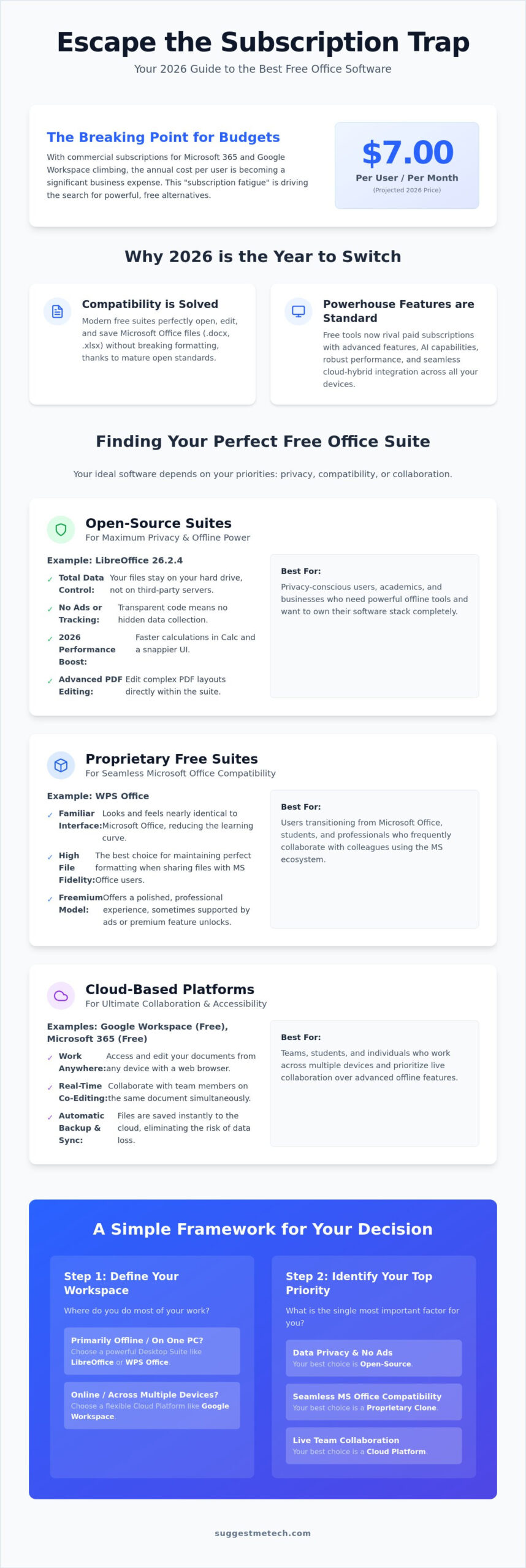
Recurring monthly bills have reached a breaking point for many users. With Microsoft 365 Business Basic and Google Workspace Business Starter plans now costing $7.00 per user every month, the annual drain on your budget is significant. This “subscription fatigue” has pushed many to seek out the best free office software, and the timing couldn’t be better. In 2026, free office suites have evolved from basic clones into sophisticated powerhouse suites that rival their paid counterparts in speed, AI capabilities, and cross-platform performance.
Compatibility issues, once the primary barrier to switching, are largely a thing of the past. Modern web standards and the maturation of the Open Office XML format mean that a document created in Word opens perfectly in a free alternative without losing its layout. You don’t have to worry about broken tables or missing fonts when sending files to clients. This technical parity allows you to focus on productivity rather than troubleshooting formatting errors.
Open Source vs. Proprietary Free Software
Understanding the difference between software types is vital for your data security. Open-source tools like LibreOffice, which released its stable 26.2.4 version in June 2026, are built by a global community. Their code is transparent, making them the preferred choice for those who value privacy and want to avoid hidden tracking. If you’re looking for a deeper dive into specific feature sets, you can consult this comprehensive comparison of office suites to see how they stack up.
Proprietary free tools, such as WPS Office, offer a different trade-off. These are often “freemium” or ad-supported, meaning you get a polished, professional interface that looks identical to Microsoft Office in exchange for seeing occasional promotions. To identify safe software in this crowded market, you should stick to established names with millions of active users and regular security updates. Choosing the best free office software often comes down to whether you prefer a community-driven tool or a corporate product with a more modern aesthetic.
The Role of Cloud Integration in 2026
Local-only software has become a rarity because our work lives happen across multiple devices. You expect to start a memo on your desktop and finish it on your phone during a commute. Free suites now offer robust cross-device syncing through integrated cloud storage, often providing several gigabytes for free. This ensures your files are always backed up and accessible without the need for a monthly subscription fee. Cloud-Hybrid Office Suites are the 2026 industry standard, blending local processing power with instantaneous web-based synchronization.
The Best Open-Source Alternatives for Privacy and Power
Open-source software offers a level of transparency that proprietary tools simply can’t match. For privacy-conscious users, choosing a local-first installation ensures your sensitive data stays on your hard drive rather than sitting on a third-party server. This approach aligns with the practical guide to adopting open source software, which highlights how community-driven tools provide long-term digital sovereignty. In 2026, the best free office software isn’t just about saving money; it’s about owning your tools and protecting your intellectual property from AI training models that often scrape cloud-based documents.
LibreOffice: A Deep Dive into the 2026 Edition
LibreOffice remains the gold standard for offline productivity. The latest stable release, version 26.2.4, has seen significant performance boosts across Writer, Calc, and Impress. Calculations in Calc now process significantly faster than previous iterations, making it a viable tool for heavy data analysis and complex financial modeling. If you’re working on the best laptops of 2026, you’ll notice the interface feels snappier and more responsive on high-resolution displays.
The 2026 update introduced a refined dark mode that automatically matches your system settings to reduce eye strain during long writing sessions. PDF handling is also much smoother now. You can edit complex layouts directly within the suite without needing a dedicated PDF editor. Selecting the best free office software requires looking beyond the price tag and evaluating the development cycle, and LibreOffice continues to lead with its frequent security patches and community support.
OnlyOffice: The Modern Open-Source Contender
While LibreOffice sticks to a traditional look, OnlyOffice targets users who prefer the modern “ribbon” interface. Its “Core” engine is specifically designed for high .docx accuracy. This means your document looks the same whether you open it in OnlyOffice or Microsoft Word. It uses a single engine for all versions, whether you’re on the web or desktop, which prevents the formatting shifts that plague other suites. It’s particularly effective for students who must submit papers in strict APA or MLA styles.
OnlyOffice also offers collaborative features that rival Google Docs. You can co-author documents in real-time within an open-source framework, making it the best choice for small teams who want to avoid vendor lock-in. If you need help deciding which specific tool fits your hardware, you can check out more of our tech reviews and guides to see comparative benchmarks.
Is Apache OpenOffice Still Relevant?
You might still see Apache OpenOffice mentioned in older software guides. However, in 2026, it’s difficult to recommend for a professional workflow. It hasn’t kept pace with the security updates or feature sets offered by newer projects. Security vulnerabilities and poor compatibility with modern file formats make it a risky choice compared to the active development of LibreOffice. For a modern, secure experience, stick to tools that receive regular updates and have an active developer base.
Cloud-Based Collaboration: Google Workspace vs. Microsoft 365 Free
While local-first tools offer unmatched privacy, cloud suites have become the backbone of modern teamwork. In 2026, the race to be the best free office software in the browser has intensified. Google and Microsoft both offer powerful web-based tools for $0, but they approach collaboration and storage in very different ways. Choosing between them often depends on whether you value a simple, web-native experience or need the familiar structure of traditional desktop apps.
The “storage wars” remain a deciding factor for many. Google currently provides 15GB of shared storage across Drive, Gmail, and Photos. In contrast, Microsoft’s free tier provides only 5GB of OneDrive space. This 10GB gap is significant if you work with high-resolution images or large spreadsheets. If these cloud limits feel too restrictive, you might prefer exploring free open source alternatives to Microsoft Office that allow you to keep your data on your own hardware without any caps.
Working without an internet connection is a common concern for cloud users. Both platforms now offer “offline modes” via browser extensions, allowing you to edit files that sync once you reconnect. It works well for a commute or a flight, but it’s not a total replacement for a dedicated desktop installation. These tools are built for the web first, so their offline capabilities are essentially a safety net rather than a primary feature.
Google Docs, Sheets, and Slides in 2026
Google remains the leader for quick, real-time sharing. In 2026, the free tier includes basic Gemini AI features that help you summarize documents or generate simple drafts. It’s the most intuitive platform for non-technical users. If you’re currently learning how to start a blog, Google Docs is an excellent place to draft your content and collaborate with guest writers for free. The interface is clean, stays out of your way, and saves every keystroke instantly.
Microsoft 365 Online: The ‘Free’ Version of the Industry Standard
Microsoft 365 Online is your best bet for 100% formatting accuracy. It uses the same engine as the paid desktop apps, ensuring your document looks identical to what your colleagues see. You don’t get the advanced macros or heavy-duty data tools found in the paid version, but for 90% of daily tasks, it’s more than enough. To access it without being upsold, simply log in at Office.com with a personal account. It’s the best free office software for anyone who needs to move between free tools and a corporate Microsoft environment without any glitches.
The Best Microsoft Office Clones for Seamless Compatibility
Transitioning away from a paid subscription doesn’t mean you have to relearn everything you know about word processing. If you want a tool that looks, feels, and acts exactly like the software you’re used to, proprietary clones are your best bet. These applications prioritize visual similarity and file-type fidelity above all else. Finding the best free office software in this category often means deciding how much “freemium” friction you’re willing to tolerate in exchange for a familiar ribbon interface.
One persistent myth is that free tools will inevitably break your complex Excel files. While it’s true that highly advanced VBA macros still pose a challenge for most free suites, standard formulas and pivot tables now translate with nearly 100% accuracy. If your workflow relies on basic to intermediate data analysis, you won’t notice a difference. The migration process is simpler than it used to be. You just need to verify your most complex templates before committing to a full switch.
WPS Office: Features vs. Privacy Trade-offs
With over 1.2 billion installations as of 2026, WPS Office is the undisputed leader in the “clone” space. Users love its unique tabbed interface, which lets you manage documents, spreadsheets, and presentations in a single window. It’s an “All-in-One” solution that keeps your taskbar clean. However, there’s a trade-off. The free version is ad-supported. You might see a promotion when you launch the app or use specific features. On the plus side, it includes robust PDF editing tools, such as text reflow and page merging, that usually require a separate paid subscription elsewhere.
FreeOffice: The German Engineering of Office Suites
German developer SoftMaker offers FreeOffice as a lightweight, high-performance alternative. It’s often faster than LibreOffice on budget laptops because it’s built with efficiency in mind. One of its standout features is the “seamless” file experience. It saves in Microsoft’s native formats, including .docx and .xlsx, by default. This eliminates the “Save As” headaches that occur when you accidentally share an incompatible file with a colleague. FreeOffice is the best choice for users with limited system resources who still need professional-grade compatibility.
To make your migration successful, start by opening your three most complex files in your chosen alternative. Check the margins, font rendering, and formula results. If they look right, you’re ready to switch. For more advice on optimizing your digital setup, check out our latest technology reviews and guides to ensure your hardware is ready for the transition.
How to Choose the Right Free Office Suite for Your Needs
Selecting the best free office software isn’t about finding the tool with the most buttons. It’s about finding the one that fits your specific daily habits. To make the right choice, you need to look past the marketing and evaluate how a suite handles your specific hardware and file types. By following a structured decision process, you’ll avoid the frustration of a tool that lags on your laptop or breaks your document formatting.
Start by identifying your primary work environment. If you’re always connected to high-speed internet, a web-based suite like Google Workspace offers unmatched convenience. However, if you travel frequently or work from areas with spotty connections, a desktop-first installation like LibreOffice is mandatory. You should also assess your collaboration needs. Real-time co-authoring is a specialty of cloud tools, whereas solo power users often prefer the deep feature sets of offline applications.
In 2026, your AI requirements are a new but vital consideration. Most free suites now offer some level of AI assistance, but the delivery varies. Google integrates Gemini directly into the browser, which is perfect for quick drafts. Open-source projects are increasingly supporting local AI models that run on your own processor, providing a privacy-first way to summarize text or generate formulas. Check if your chosen suite has usage caps or requires a specific hardware “NPU” to run these features effectively.
The 2026 Decision Matrix: If/Then Scenarios
- If you need 100% privacy: Choose LibreOffice. It keeps your data local and doesn’t track your usage patterns.
- If you work on multiple devices: Choose Google Workspace. It’s the most reliable way to jump between a tablet, phone, and desktop.
- If you need the Microsoft ‘Feel’: Choose OnlyOffice or WPS Office. These provide the most familiar ribbon interface and high .docx fidelity.
Final Setup Tips for a Smooth Transition
Once you’ve made your choice, take five minutes to configure your system. Set your new software as the default application for all .docx, .xlsx, and .pptx files so they don’t accidentally open in a “trial” version of another program. You should also install common fonts like Calibri, Cambria, and Arial. Many open-source suites use metrically compatible substitutes, but having the actual fonts installed ensures your document’s line endings and page breaks stay perfect when shared with others.
If you’re switching suites to save storage space or improve performance, don’t stop at your software. A cluttered system can slow down even the most efficient office tools. While you’re optimizing your workflow, you might also want to check our guide on how to clear cache on iPhone to keep all your devices running at peak speed. Finally, test your transition by opening your three most complex existing files. If the formulas and layouts hold up, you’ve successfully found the best free office software for your needs.
Take Control of Your Digital Workspace
You don’t need a monthly subscription to produce professional-grade work. In 2026, the technical gap between paid giants and free alternatives has narrowed so significantly that your choice now depends on your specific privacy needs and collaboration style. Whether you prefer the local security of an open-source suite or the instant access of a cloud-based platform, the tools are ready to handle your most demanding tasks.
Finding the best free office software is an investment in your own digital sovereignty. We’ve shown that compatibility is no longer a barrier to entry, and modern web standards ensure your documents look perfect across all devices. Don’t let recurring fees dictate how you work when powerful, free solutions are just a few clicks away.
Our experts have completed hands-on testing of over 15 office suites, focusing on real-world 2026 compatibility to give you no-nonsense, ad-free advice. We value your input and want to help you solve your specific tech challenges. Visit SuggestMeTech for more unbiased software reviews and tech guides. You’re now equipped to make a seamless transition and boost your productivity without breaking the bank.
Frequently Asked Questions
Is free office software safe to download and use?
Yes, free office software is safe as long as you download it from official developer websites or verified app stores. Open-source tools like LibreOffice are particularly secure because their code is public and regularly audited by a global community of developers. If you choose a proprietary clone, ensure the installer has a valid digital signature to protect your system from malware or unauthorized changes.
Can I open Microsoft Word (.docx) files in these free programs?
Yes, all modern free office suites are fully compatible with .docx files and other standard Microsoft formats. You can open, edit, and save these documents without losing your text or basic formatting. For the most precise layout matching, tools like OnlyOffice and WPS Office use engines specifically designed to replicate the way Microsoft Word renders complex elements like tables and headers.
Does LibreOffice have an equivalent to Microsoft Excel?
LibreOffice Calc is the direct equivalent to Microsoft Excel and is capable of handling professional-grade data analysis. It supports a vast library of formulas, pivot tables, and advanced charting tools required for business reporting. While the interface feels more traditional than the modern Excel ribbon, it remains one of the best free office software options for power users who need deep spreadsheet functionality offline.
Do I need an internet connection to use free office software?
You don’t need an internet connection if you use desktop-based suites like LibreOffice, FreeOffice, or the desktop version of WPS Office. These programs live on your hard drive and work perfectly in offline environments. Cloud-native tools like Google Workspace do require a connection to save changes in real-time, though they offer browser extensions that allow for limited offline editing when you’re away from Wi-Fi.
Are there free office suites that include AI writing features in 2026?
Yes, artificial intelligence has become a standard feature in most free office suites by 2026. Google Workspace integrates Gemini for drafting emails and summarizing long reports, while WPS Office includes AI tools for PDF manipulation and text generation. Many open-source alternatives also allow you to connect local AI models, giving you smart assistance without compromising your document privacy or requiring a paid subscription.
What is the best free office software for a small business?
Google Workspace is frequently the best free office software for small businesses because it simplifies real-time collaboration and includes 15GB of free cloud storage. It eliminates the need for internal file servers and allows teams to co-author documents simultaneously. If your business handles sensitive data that cannot stay in the cloud, a local installation of OnlyOffice provides a professional, secure environment with excellent file compatibility. To ensure your broader digital infrastructure remains just as robust, you can explore Managed IT Services and IT Consulting for expert guidance tailored to your needs.
Can I use these free alternatives on my Mac or Linux computer?
Yes, almost all major free office suites offer native versions for macOS and Linux alongside Windows. LibreOffice and OnlyOffice are particularly well-known for their cross-platform support, ensuring a consistent experience regardless of your hardware. This flexibility is ideal for mixed-OS environments where you need to share files with colleagues using different systems without worrying about software lock-in or licensing fees.
Will my PowerPoint animations work in free presentation software?
Most standard PowerPoint animations and transitions will play back correctly in free tools like LibreOffice Impress or WPS Presentation. These programs are designed to recognize the most common motion paths and visual effects used in professional decks. However, if your presentation relies on highly complex 3D transitions or proprietary Microsoft effects, it’s wise to do a quick test run to ensure every slide behaves exactly as intended.

