

What if the reason your blog isn’t growing has nothing to do with your writing skills and everything to do with your lack of a map? Most creators spend hours staring at a blank cursor, wondering what to publish next while their traffic remains stagnant. Learning how to create a content calendar for your blog is the single most effective way to move from a hobbyist to a professional creator. It transforms your daily workflow from a series of stressful guesses into a streamlined, high-growth engine.
We know how exhausting it is to manage multiple drafts and inconsistent schedules. You want to see your hard work reflected in search rankings, but without a plan, your SEO efforts often fall flat. That’s why we’ve designed this guide to help you take control of your editorial process. You’ll learn how to build a strategic roadmap that eliminates writer’s block, boosts your SEO, and keeps your blog growing consistently through every season of 2026.
We’ll provide a reusable planning template and show you how to map out a full 90-day content roadmap. By the end of this article, you’ll know how to use strategic topic clustering to dominate search results and keep your drafts organized using the best productivity tools available today.
Key Takeaways
- Eliminate decision fatigue and writer’s block by transforming your blog into a strategic, managed editorial pipeline.
- Discover exactly how to create a content calendar for your blog that balances your niche expertise with high-value search intent.
- Evaluate the best productivity tools, including Notion and Google Sheets, to build a tech stack that fits your specific workflow.
- Follow a practical 90-day roadmap designed to boost your search rankings through consistent publishing and topic clustering.
- Learn to scale your reach by repurposing single blog posts into multiple social media updates for maximum efficiency.
Why a Content Calendar is the Backbone of a Successful Blog
A blog content calendar is a living document used to plan, track, and manage your editorial pipeline. It functions as an editorial calendar that keeps your strategy aligned with your long-term business goals. Learning how to create a content calendar for your blog is the first step toward professionalizing your creative output. By mapping your ideas in advance, you eliminate the “decision fatigue” that often leads to creator burnout. Instead of waking up and wondering what to write, you follow a pre-built roadmap that protects your mental energy. When you master how to create a content calendar for your blog, you stop reacting to the market and start leading it.
Search engines prioritize sites that demonstrate active authority and topical depth. Regular publishing signals to crawlers that your domain is relevant, updated, and worth ranking. This structured approach serves as the vital bridge between starting a blog in 2026 and reaching a stage of consistent monetization. Without this structure, your traffic growth remains accidental rather than intentional. A calendar ensures you cover every angle of a topic, which helps you build the “topical clusters” that modern SEO requires.
Moving from Reactive to Proactive Blogging
This strategic planning is vital for niche sites like The Late Desk that examine the evolution of late-night television, as it allows them to coordinate deep-dive retrospectives with current industry trends.
The Relationship Between Frequency and Growth
Many creators hide behind the phrase “quality over quantity” to justify an inconsistent schedule. In reality, quality is a myth if your audience never sees your work because you rarely publish. You need a predictable cadence to build trust with both human readers and search algorithms. Your publishing frequency should depend entirely on your available time and the productivity tech you use to streamline your workflow. Minimum Viable Consistency for a new blog in 2026 is the highest frequency of high-quality posts you can maintain without missing a single deadline for six consecutive months.
The Essential Elements of a Strategic Blog Calendar
A common mistake is treating your schedule like a simple to-do list. When you’re learning how to create a content calendar for your blog, you need to view it as a strategic database instead. Each entry should contain specific metadata that guides the post from a rough idea to a high-ranking asset. This structure prevents you from publishing content that doesn’t have a clear purpose or target audience. It also ensures that every hour you spend writing contributes to your overall growth.
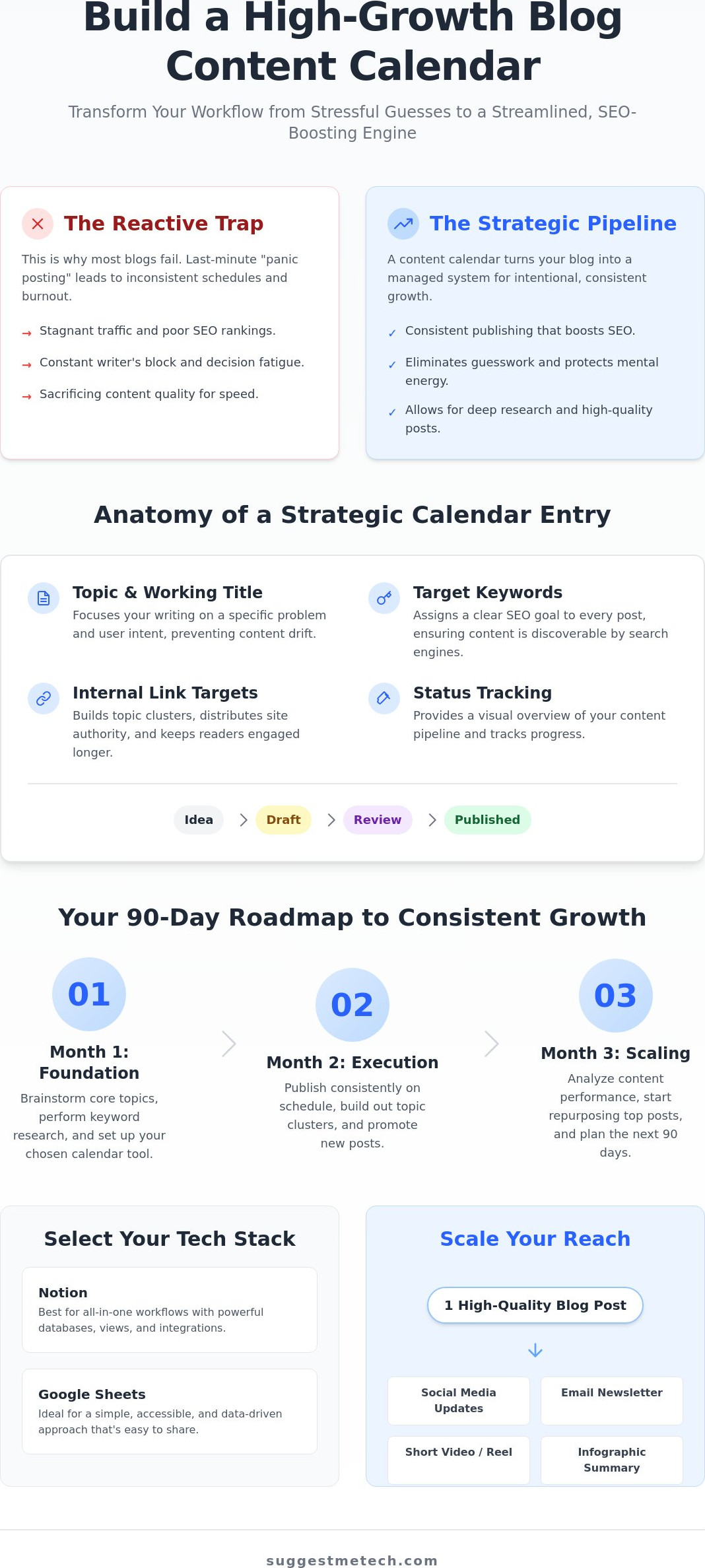
- Topic and Working Title: Focus on the specific problem you’re solving. A working title keeps your writing aligned with user intent so you don’t drift off-topic during the drafting process.
- Target Keywords: Every post needs a clear SEO goal. Identify your primary keyword and a handful of secondary terms before you start writing to ensure the content is discoverable by search engines.
- Status Tracking: Moving from “Idea” to “Draft”, “Review”, and finally “Published” provides a visual sense of progress. This is especially helpful when you’re tracking multiple drafts across different stages.
- Internal Link Targets: Plan your content clusters by identifying which existing posts this new piece will support. Strategic internal linking distributes authority across your site and keeps readers engaged longer.
If you’re looking for the right tools to manage these data points, our tech reviews can help you find the perfect productivity software for your specific workflow.
Mapping Content to the Marketing Funnel
You need a healthy mix of content to sustain long-term growth. Top of Funnel (TOFU) posts are broad, educational guides designed to attract new readers who are just starting their journey. Middle and Bottom of Funnel (MOFU/BOFU) posts are where your monetization happens. These include deep-dive product reviews and head-to-head comparisons that drive affiliate revenue. By tagging every post in your calendar by its funnel stage, you can ensure a balanced mix that feeds both your traffic and your bank account.
Editorial Metadata You Shouldn’t Ignore
Managing the “behind the scenes” details is what separates hobbyists from professionals. For multi-contributor blogs, author assignments are essential for accountability. Solo bloggers should focus on a distribution checklist that covers social media, newsletters, and community forums. Visual assets also require dedicated planning. Your calendar should track whether you need custom graphics, specific screenshots, or high-quality photos. For example, if you’re comparing hardware, you might need to plan for specific digital camera shots or performance benchmarks to make your review stand out from the competition.
Selecting Your Tech Stack: Best Tools for Content Planning
Choosing the right software is just as important as the editorial strategy itself. Your choice of tools determines how easily you can maintain your schedule over time without feeling overwhelmed. When you’re figuring out how to create a content calendar for your blog, you need a tech stack that matches your technical comfort level and your specific growth goals. The following tools represent the best options for bloggers in 2026, ranging from simple spreadsheets to complex project management suites.
- Google Sheets: This is the best free option for bloggers who love data. It is highly customizable and allows you to track keyword rankings, search volumes, and internal links in a single, filterable view.
- Notion: Notion has become the ultimate all-in-one workspace. It excels at visual planning and allows you to move seamlessly from a high-level editorial overview to a full drafting environment with embedded research notes.
- Trello: If you prefer a Kanban-style workflow, Trello is ideal. You can drag and drop cards between columns like “To Do”, “In Progress”, and “Done”, which provides a clear visual of your production pipeline.
- WordPress Plugins: Managing your calendar directly inside your CMS allows you to schedule posts without leaving your site. This is a great solution for creators who want to minimize the number of external tools they use daily.
Google Sheets vs. Notion: Which Should You Choose?
Google Sheets is superior for SEO tracking and keyword data management because of its powerful formula capabilities. You can easily calculate content gaps or track month-over-month traffic growth using simple scripts. On the other hand, Notion is better for collaborative writing and asset storage. It lets you store images, videos, and social media captions directly within the calendar entry. If you are a solo, data-driven blogger, start with Sheets. If you manage a small team or prioritize a clean visual interface, Notion is the more professional recommendation for your workflow.
Integrating Your Calendar with Your Hosting and CMS
Automation tools like Zapier or Make can sync your planning calendar with WordPress automatically. For example, moving a card to the “Published” column in Trello can trigger a draft creation in your CMS, saving you manual entry time. However, these automations and planning plugins add extra weight to your site’s back-end. You must ensure your web hosting service is powerful enough to handle these background tasks without slowing down your site. A fast host is crucial because a sluggish back-end discourages you from using your planning tools effectively. Mastering how to create a content calendar for your blog requires a balance between great software and the hardware that supports it.
Step-by-Step: Creating Your 90-Day Blog Content Plan
A 90-day window is the sweet spot for sustainable blog growth. It provides enough lead time for search engines to index your posts while remaining flexible enough to pivot if tech trends change. If you only plan a month ahead, you’re constantly chasing deadlines rather than building authority. Mastering how to create a content calendar for your blog requires a shift from daily guessing to quarterly strategy. This long-term view ensures your content clusters are complete and your SEO efforts have time to compound.
- Step 1: Brainstorming: Start with your niche and your audience’s specific pain points. List the technical hurdles they face and the software solutions they need to understand.
- Step 2: Keyword Research: Validate your brainstormed ideas with data. Ensure there is sufficient search volume to justify the time you’ll spend writing each piece.
- Step 3: Content Auditing: Look at your existing posts to find gaps. Identify older articles that need updates or “support” posts that could strengthen your current “pillar” content.
- Step 4: Mapping: Assign your validated ideas to specific dates in your chosen tool. Be realistic about your capacity and leave empty slots for breaking tech news.
- Step 5: Batching: Group similar tasks together. Research all your keywords on Monday, outline on Tuesday, and save your creative writing energy for dedicated “sprint” days.
If you’re still choosing the right platform to host your content, visit SuggestMeTech for our latest evaluations of the most reliable hosting providers and blogging tools.
The Keyword-First Planning Workflow
Don’t just write what you feel like; write what the data demands. Use SEO tools to find “low-hanging fruit” keywords with low competition but high intent. Organize your calendar around “Pillar” articles that cover broad topics and “Support” articles that dive into specific details. Your domain authority will dictate which topics you should tackle first. If your site is new, focus on long-tail keywords to build initial traction before trying to rank for highly competitive industry terms.
Batching Content for Maximum Efficiency
Context switching is the enemy of productivity. You should separate your “Planning Day” from your “Writing Day” to keep your brain in the right zone. Use dedicated sprints to draft 3 to 4 posts at once while your research is fresh. This method allows you to stay weeks ahead of your calendar, which removes the stress of last-minute publishing. Set “Internal Deadlines” for yourself that are at least three days before the actual publish date. This buffer gives you time for final editing, SEO optimization, and creating the visual assets discussed in previous sections. Knowing how to create a content calendar for your blog is only half the battle; batching is how you actually execute it without burning out.
Maintaining Your Calendar and Scaling Your Blog
Setting up your system is only half the battle. The real growth happens during the maintenance phase, where you turn your plan into a consistent habit. A weekly review is essential for this process. Take 15 minutes every Friday to assess what you published and what needs to move to the following week. This prevents small delays from snowballing into a total collapse of your schedule. Use this time to look for repurposing opportunities as well. One deep-dive guide can easily be broken down into five social media updates, a newsletter spotlight, or a quick video script.
Flexibility is your greatest asset in the fast-moving tech world. When Google drops a core algorithm update or a new software tool disrupts your niche, you must be ready to pivot. Your calendar should never be so rigid that you can’t swap a planned post for a timely reaction piece. This proactive approach is vital when you’re planning for hardware release cycles. You can pre-schedule the research and testing phases for the latest laptop reviews months before the holiday rush, ensuring you have the authority and data ready when search interest peaks.
What to Do When You Fall Behind
Don’t panic if you miss a deadline or two. Most creators struggle with consistency at some point, but the “Buffer Strategy” can save your rankings. Keep 2 to 3 evergreen posts fully drafted and ready to publish at a moment’s notice. These act as emergency backups for when life gets in the way. If you find yourself falling behind every month, it’s time to re-evaluate your cadence. It’s much better to publish one high-quality post per week than to aim for three and fail. Adjust your calendar to account for seasonal tech launches in Q4 by front-loading your evergreen work during slower months.
Scaling to a Multi-Author Team
As your traffic grows, you’ll eventually need to transition from a simple spreadsheet to a more robust project management tool. This move allows you to set up a formal editorial approval workflow. Assign specific team members to handle the drafting, technical testing, and final SEO optimization. Understanding how to create a content calendar for your blog provides the structure needed to manage these moving parts without losing your mind. Clear roles and a centralized calendar ensure that your brand voice remains consistent even as you increase your output. Start planning your 2026 roadmap today to establish yourself as the go-to authority in your niche.
Build Your Roadmap to Blogging Success
Building a successful blog in 2026 requires more than just great writing; it demands a repeatable system. By moving from reactive “panic posting” to a proactive 90-day roadmap, you protect your creative energy and ensure every post serves a specific SEO purpose. You now have the framework to select the right tech stack, map out your content clusters, and maintain a schedule that search engines will reward with higher rankings.
Mastering how to create a content calendar for your blog is a major milestone in your journey as a creator. It turns your site into a professional asset that grows even when you’re away from your desk. If you need help finding the right software or hosting to support your new workflow, we’ve got you covered. Check out our top-rated tech tools to help you manage your blog for expert tech reviews, practical guides for beginners, and user-first recommendations.
The best time to start planning was yesterday, but the second best time is right now. We’re excited to see your blog thrive as you build your editorial roadmap with confidence.
Frequently Asked Questions
How far in advance should I plan my blog content?
You should aim to plan your content at least 90 days in advance. This quarterly approach allows enough time for SEO efforts to take root while keeping your strategy flexible. Planning too far out, such as a full year, can make it difficult to adapt to rapid changes in tech or search engine algorithms. A 90-day window provides the perfect balance of stability and agility.
Is a free Google Sheets template enough for a professional blog?
Yes, a free Google Sheets template is often more than enough for professional bloggers who prioritize data and customization. Sheets allows you to build a system that tracks exactly what you need without the bloat of paid software. Many high-traffic sites continue to use spreadsheets because they’re easy to share with guest authors and simple to automate with third-party tools.
How often should I update my content calendar?
You should perform a quick status check daily and a deep-dive review once per week. The daily check ensures you’re hitting your immediate deadlines, while the weekly review allows you to move drafts around and re-evaluate your priorities. This consistent maintenance prevents your editorial roadmap from becoming outdated or irrelevant as your blog grows. It also helps you catch potential bottlenecks before they cause delays.
What is the best content calendar tool for a solo blogger in 2026?
Notion is currently the best tool for solo bloggers due to its all-in-one nature. It combines a visual calendar with a powerful database and a clean writing environment. When you’re learning how to create a content calendar for your blog, Notion’s ability to store research, images, and drafts in one place saves a significant amount of administrative time.
Should I include social media posts in my blog content calendar?
You should include social media distribution in your calendar, but keep the actual post copy separate to avoid clutter. Your blog calendar should track the distribution status of each article to ensure you’ve promoted it across all your channels. Using a dedicated column for social media checkboxes is a practical way to manage this without overwhelming your primary editorial view or draft tracking system.
How do I handle breaking news if my calendar is already full?
You should treat your calendar as a flexible guide rather than a rigid rule. If major news breaks, don’t be afraid to bump a non-urgent evergreen post to the following week. Keeping a few flex slots or using the buffer strategy mentioned earlier in this guide makes it much easier to stay relevant without feeling like you’ve failed your schedule or missed your goals.
Can I create a content calendar without using SEO tools?
You can create a calendar without paid tools, but you should at least use free resources like Google Trends or search suggestions. Without some form of data validation, you risk spending hours writing content that nobody is searching for. Understanding how to create a content calendar for your blog involves making informed decisions that maximize your potential for organic traffic.
What is the difference between an editorial calendar and a content calendar?
An editorial calendar focuses on high-level strategy and the specific themes you’re covering, while a content calendar manages the daily production logistics. For most bloggers, these systems eventually merge into a single document. The editorial side ensures your topics align with your brand, while the content side tracks deadlines, assets, and the status of various drafts.

