

Did you know that for a business with significant digital operations, a single minute of website downtime can cost between $5,600 and $15,000? It’s a staggering figure that turns a viral moment from a dream into a potential financial nightmare. You’ve worked hard to build your audience, but you’re likely wondering what happens when your website gets too much traffic at the exact moment you need it to perform. Whether it’s a 502 Bad Gateway error or a total site blackout, the technical strain of a sudden surge often feels like a mystery.
At SuggestMeTech, we understand the anxiety of watching your real-time analytics climb while your site speed begins to crawl. It’s frustrating to face technical error messages when you should be celebrating growth. This 2026 guide will demystify those warning signs and show you exactly how to keep your site online during high-pressure spikes. We’ll explore the real-world consequences of server bottlenecks and help you identify the right hosting tier to support your current growth without breaking the bank.
Key Takeaways
- Learn exactly what happens when your website gets too much traffic, from frustrating latency issues to those dreaded connection timeout errors that drive visitors away.
- Understand why a traffic surge is a double-edged sword that can lead to immediate revenue loss and lasting damage to your professional reputation.
- Identify the specific hardware bottlenecks, like CPU exhaustion and RAM shortages, that cause servers to buckle under pressure.
- Discover how to shield your site using aggressive caching and Content Delivery Networks to serve content faster without taxing your main server.
- Evaluate the best hosting paths for long-term growth, including the transition to VPS or cloud hosting solutions that offer auto-scaling capabilities.
The Immediate Symptoms of a Website Traffic Surge
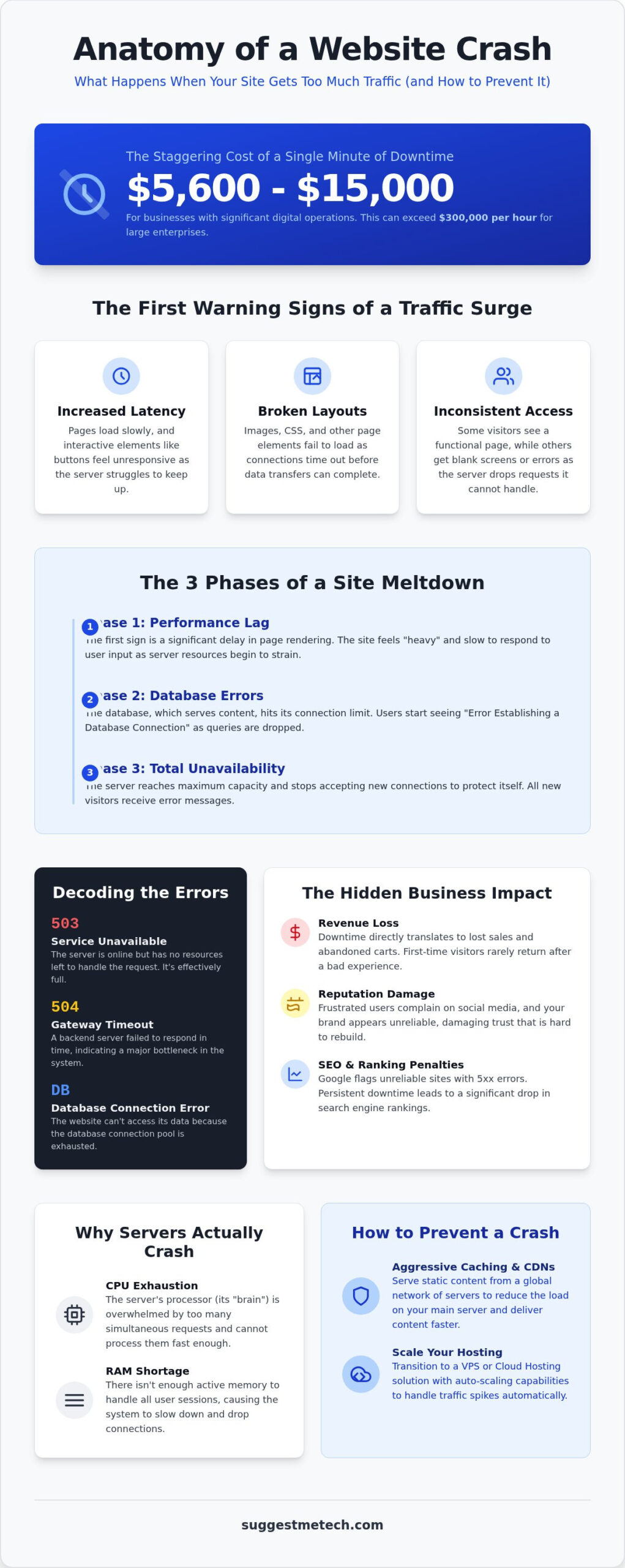
A sudden influx of visitors should be a reason to celebrate. However, if your infrastructure isn’t prepared, that success quickly turns into a technical bottleneck. Understanding what happens when your website gets too much traffic starts with recognizing the subtle shifts in performance before your homepage disappears entirely. The first symptom is almost always latency. As your server’s processor works harder to manage hundreds of simultaneous requests, the time it takes to deliver data to each user increases. This delay doesn’t just annoy visitors; it can lead to broken layouts where images or CSS files fail to load because the connection timed out before the transfer finished.
When your site begins to buckle, the experience becomes inconsistent. Some users might see a perfectly functional page while others are met with blank screens or “connection timed out” messages. This happens because the server is selectively dropping requests it cannot handle. Keep in mind that these symptoms are identical to what you would see during a denial-of-service attack. Whether the traffic is from a viral social media post or a malicious source, the result is the same: your server’s resources are completely exhausted.
The Progression of a Site Slowdown
A site crash rarely happens instantly. It’s usually a three-stage decline that follows a predictable pattern. In Phase 1, you’ll notice a significant lag in page rendering. Buttons might not respond immediately, and interactive elements feel heavy. By Phase 2, database connection errors start to appear. Most modern sites rely on a database to serve content; when too many people ask for information at once, the database hits its limit and starts dropping queries. Finally, in Phase 3, the server reaches its maximum capacity. At this point, it simply stops accepting new incoming traffic to protect its hardware from a total failure.
Common Error Codes to Watch For
When the system finally reaches its breaking point, it will display specific status codes. Knowing these helps you diagnose the problem quickly and communicate with your hosting provider. The 503 Service Unavailable code means the server is effectively full. It’s still running, but it has no more resources to give to new visitors. A 504 Gateway Timeout occurs when one server in the chain waited too long for a response from another server. This is a clear sign of a massive bottleneck in your backend. If you use WordPress or another CMS, you might see “Error Establishing a Database Connection.” This is a critical warning that your site can’t talk to its memory bank because the connection pool is exhausted.
The Hidden Business Impact of Too Much Traffic
Understanding what happens when your website gets too much traffic requires looking beyond the server logs and into your bank account. While a surge in visitors is usually the goal of any marketing campaign, the financial reality of an unprepared site is stark. Research from 2026 indicates that the average cost of IT downtime for businesses with significant digital operations ranges from $5,600 to $15,000 per minute. For large enterprises, that figure frequently exceeds $300,000 per hour. When your server fails to respond, you aren’t just losing a few clicks; you’re actively hemorrhaging revenue that might never return.
Beyond the immediate loss of sales, a crashed site creates a ripple effect across your entire brand. First-time visitors who encounter a “Service Unavailable” screen rarely give a second chance. Instead, they head straight to a competitor. This frustration often spills over into social media and customer support channels. Your team, already stressed by technical issues, must now manage a wave of complaints and support tickets. This damage to your professional reputation is harder to quantify than a lost sale, but it’s far more difficult to repair. Finding a provider that handles these spikes is crucial, so check out our latest web hosting reviews to see which services offer the best stability.
SEO and Ranking Consequences
Google prioritizes user experience above almost everything else. If Googlebot attempts to crawl your site and repeatedly encounters 5xx status errors, it flags your domain as unreliable. Persistent downtime can lead to a significant drop in search rankings as the algorithm shifts traffic toward more stable alternatives. Additionally, the users who do manage to reach your site during a lag will likely abandon it quickly. High bounce rates are a major red flag for search engines. In the context of Core Web Vitals, a downtime penalty is the degradation of a site’s search authority triggered when persistent server unavailability prevents the successful measurement of performance metrics.
The Cost of “Bad” Viral Moments
A viral social media mention is a double-edged sword. If your infrastructure cannot scale, that massive influx of potential customers becomes a liability. Statistics show that 53% of mobile users will abandon a website if it takes longer than 3 seconds to load. Even a minor 1-second delay in mobile load times can reduce your conversion rates by up to 20%. When you calculate what happens when your website gets too much traffic without a plan, you must factor in these missed opportunities. A viral moment that should have generated thousands of dollars in profit can easily end up costing you more in lost leads and recovery efforts than the traffic was worth.
Technical Bottlenecks: Why Servers Actually Crash
A server is essentially a specialized computer. Like any computer, it has physical hardware limits. When you analyze what happens when your website gets too much traffic, you’re really observing a race for limited resources. If the demand for these resources exceeds the supply, the entire system fails. This isn’t just about the server “getting hot.” It’s about specific components reaching a ceiling where they can no longer process new information.
CPU exhaustion is the most common culprit in a crash. Think of the CPU as the server’s brain. For every visitor, the CPU must calculate code, process database requests, and generate the page. When thousands of people arrive at once, the CPU hits 100% usage. New requests get stuck in a long queue, leading to the extreme lag and timeouts we discussed earlier. If the queue gets too long, the server simply stops accepting new tasks to prevent a hardware meltdown.
RAM shortage is equally critical. RAM serves as the temporary memory for active user sessions. Each person browsing your site takes up a small slice of this memory. If your server runs out of RAM, it may attempt to use the hard drive as temporary storage. This process, known as swapping, is incredibly slow. It usually results in a total system freeze because the hard drive cannot keep up with the speed requirements of active web traffic.
- Bandwidth Throttling: Your hosting provider might physically limit the data flow. Once you hit that cap, the “pipe” is closed to new visitors.
- I/O Limits: This refers to how fast the server reads or writes to its storage. Heavy traffic creates a massive amount of log writing and file reading, which bottlenecks older or cheaper hardware.
Shared Hosting vs. Dedicated Resources
Most beginners start with shared hosting because it’s budget-friendly. However, this environment creates a “bad neighbor” effect. You share a single server’s resources with hundreds of other websites. If another site on your server gets a massive traffic spike, your site might crash even if you have no visitors. Fixed resource limits are the primary reason sites fail during growth. If you’re still confused about how these environments differ, our guide on what is web hosting breaks down the technical details of shared, VPS, and dedicated setups.
Database Queries and Heavy Plugins
WordPress and other popular CMS platforms are dynamic. They build the page from scratch every time someone visits. This requires PHP processing and multiple database queries. Unoptimized plugins multiply this load significantly. A single poorly coded plugin can turn a moderate traffic day into a total blackout. Static pages, which are pre-built and ready to serve, handle traffic much better. They don’t require the server to “think” for every new visitor, which preserves your CPU and RAM for more important tasks.
How to Prevent a Crash During High Traffic
Beyond caching, you should focus on reducing the overall payload of your site. Large images and unminified code act like lead weights on your server’s bandwidth. Use modern formats like WebP for images and tools to minify your CSS and JavaScript files. Monitoring your traffic in real-time using tools like Google Analytics or server-side logs allows you to see a spike as it begins. This early warning gives you a chance to scale resources or enable emergency caching rules before the server reaches a breaking point. Read our comprehensive hosting reviews to find a provider that includes these optimization features by default.
The Power of Caching and CDNs
A Content Delivery Network (CDN) like Cloudflare acts as a shield for your origin server. It distributes copies of your site across hundreds of global data centers. When a visitor arrives, the CDN serves the content from the location closest to them. A CDN reduces Round Trip Time (RTT) for global users by serving data from the server physically closest to them, rather than forcing every request to travel to your main origin server. There is a key difference between browser caching, which stores files on the visitor’s device, and server-side caching, which stores pre-processed data on your own hardware. Using both ensures that your server only works when absolutely necessary.
Preparing for a Planned Spike
If you know a major ad campaign or newsletter is about to launch, take manual steps to prepare. Temporarily disabling non-essential plugins, such as heavy social media feeds or complex analytics trackers, can free up vital CPU and RAM. These plugins often run background processes that conflict with high visitor counts. It’s also wise to communicate with your host’s support team in advance. Many premium hosts can temporarily “burst” your resource limits or move you to a more robust environment to ensure your site stays online during the event. Taking these steps prevents the common technical bottlenecks that lead to 503 and 504 errors.
Scaling Up: Choosing Hosting That Grows With You
Moving beyond a starter plan is a necessity for growing brands. Transitioning to a Virtual Private Server (VPS) means you no longer fight for resources. On a VPS, your slice of the server is reserved solely for your site. This isolation is the most effective way to address the instability of what happens when your website gets too much traffic. It ensures that your CPU and RAM aren’t being siphoned off by other users on the same machine.
Cloud hosting offers even more flexibility through auto-scaling. Rather than relying on one physical box, your data is spread across a cluster of interconnected servers. When traffic spikes, the cluster allocates more power instantly to meet the demand. Look for providers offering a 99.9% uptime guarantee to ensure your site stays accessible during these critical moments. This level of redundancy is what separates professional infrastructure from budget setups.
Managed hosting is often the best choice for those who aren’t server experts. The provider’s team handles the technical heavy lifting, like security patches and server tuning. While unmanaged plans are cheaper, they require you to be the one fixing things if the system buckles under pressure. For most business owners, the peace of mind that comes with expert management is worth the investment.
When is it Time to Upgrade?
Watch for a sluggish admin dashboard or frequent resource limit warnings. These are early indicators that you’ve outgrown your current environment. If your analytics show a steady upward trend, start planning your move before you hit a breaking point. Whether you’re checking logs at your desk or using one of the best laptops of 2026 on the go, being proactive prevents unexpected downtime.
SuggestMeTech Top Recommendations
Our testing reveals that the best scalable providers prioritize “burst” capacity. This feature allows your site to temporarily exceed its limits to handle what happens when your website gets too much traffic without an immediate crash. We also recommend choosing a host with 24/7 expert support. Having a knowledgeable partner to guide you through a technical crisis is the best way to protect your brand reputation. Read our full web hosting reviews to find the right infrastructure for your growth.
Prepare Your Website for Future Growth
Success shouldn’t lead to a technical disaster. We’ve explored how hardware limits like CPU and RAM exhaustion create the bottlenecks that bring sites down. You now understand that what happens when your website gets too much traffic is a manageable challenge if you use the right combination of aggressive caching and scalable infrastructure. Preventing a crash is about reducing the load on your server before the spike arrives.
SuggestMeTech is here to help you navigate these complex choices. We’ve tested over 50 hosting services for uptime and speed to ensure you find a partner that won’t buckle under pressure. Our guides are designed for beginners and pros alike, demystifying server specs so you can focus on your content. Find a hosting provider that can handle your growth in our 2026 reviews. Viral moments are exciting opportunities for your brand to shine; with the right hosting strategy, you’ll be ready for every new visitor.
Frequently Asked Questions
Can too much traffic actually break my physical server?
No, a traffic surge won’t physically break the hardware in a modern data center. Instead, you’ll experience software-level exhaustion where the CPU and RAM reach their maximum capacity. When this happens, the server selectively stops processing new requests to prevent system instability. While you’ll see error screens, the physical machine remains safe and will resume normal operation once the load decreases or resources are scaled.
How do I know if my website is currently crashing?
Does WordPress handle high traffic better than other platforms?
WordPress is a dynamic platform that requires significant server work, so it doesn’t naturally handle traffic better than static alternatives. Every visitor triggers PHP processes and database queries, which can quickly lead to a bottleneck. To survive a surge, a WordPress site must use high-performance caching. While it’s highly flexible, its reliance on a database makes it more vulnerable to crashes than a pre-built static site if not properly optimized.
What is the “Slashdot effect” or a “viral hug of death”?
These terms describe a massive, sudden influx of visitors arriving from a single social media post or news feature. A “viral hug of death” occurs when a popular link sends thousands of users to a small site simultaneously. If your infrastructure isn’t built for auto-scaling, the sheer volume of concurrent requests exhausts your server resources in seconds, taking the site offline until the traffic subsides or you upgrade your plan.
Will my hosting provider charge me extra for a traffic spike?
Charges for traffic spikes depend on your specific hosting agreement and whether you’re on a fixed or cloud-based plan. Many shared or managed hosts have strict bandwidth limits and may apply overage fees if you exceed your monthly quota. Cloud providers typically use a pay-as-you-go model, meaning your bill will increase proportionally to the resources consumed. Always check your provider’s policy on “burst” capacity to avoid unexpected financial surprises.
How much traffic is “too much” for a standard shared hosting plan?
Most standard shared hosting plans begin to struggle when you exceed 50 to 100 concurrent users. Since you share a server with hundreds of other sites, your provider may throttle your performance to protect their other customers. If your site consumes too many resources, your host might suspend your account temporarily, which is a common result of what happens when your website gets too much traffic on an entry-level plan.
Can a CDN completely prevent my website from going down?
A CDN is a powerful shield, but it cannot guarantee your site will never go down. While it offloads static assets like images and code to global edge servers, your main origin server still has to process dynamic requests and database queries. If the backend of your site is unoptimized, the server can still buckle under the pressure of the remaining traffic. A CDN is a vital tool, but it works best when paired with a stable hosting environment.

