

Your “cheap” $3.99 monthly hosting plan might actually be costing you thousands in lost sales and plummeting SEO rankings. While shared plans are great for beginners, knowing exactly when to upgrade from shared hosting is the difference between scaling your brand and watching your traffic bounce to a competitor. You’ve likely felt the frustration of watching a spinning loading icon or seeing that dreaded “Internal Server Error” right when a post goes viral. We know the fear of high costs and complex migrations often keeps site owners stuck in the slow lane longer than they should be.
If you’re tired of slow page load times hurting your search visibility, it’s time to evaluate your infrastructure. This guide identifies the five critical technical and business triggers that signal you’ve outgrown your current plan. We’ll also compare your options for VPS and Cloud platforms to ensure you find a reliable, high-performance home that handles traffic spikes without crashing. By the end, you’ll have a clear roadmap for moving to a platform that supports your growth rather than holding it back.
Key Takeaways
- Learn how to spot the “Performance Ceiling” and identify exactly when to upgrade from shared hosting before slow speeds drive your visitors away.
- Discover how to interpret your hosting dashboard to distinguish between simple storage limits and critical shortages in CPU and RAM processing power.
- Understand the hidden security risks of “communal living” and how a single bad neighbor on a shared server can get your business IP blacklisted.
- Compare the “townhouse” stability of a Virtual Private Server (VPS) against the “scalable utility” model of Cloud hosting to find your ideal growth path.
- Follow a risk-free migration roadmap that uses staging environments and “backup first” protocols to ensure your site stays online throughout the transition.
5 Red Flags You’ve Outgrown Shared Hosting
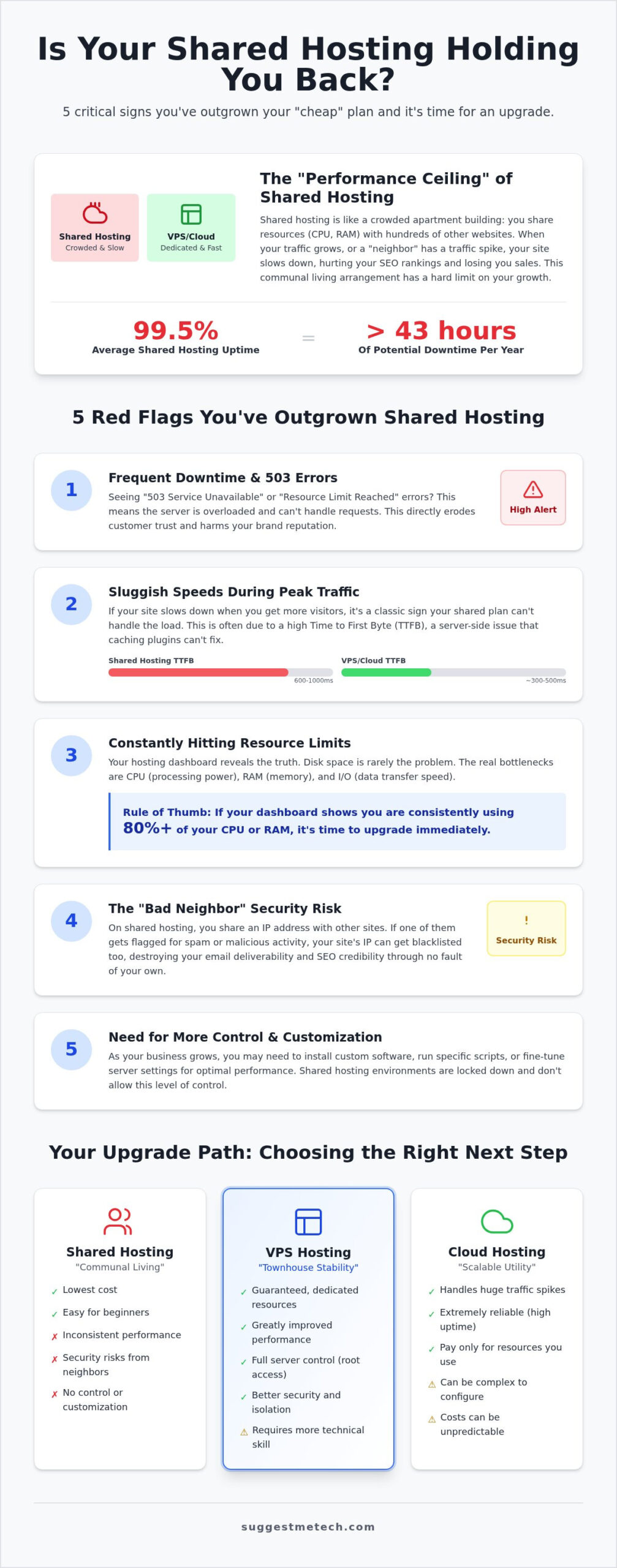
Shared hosting is essentially a communal living arrangement for your website. You share a single server’s resources, including CPU, RAM, and disk space, with hundreds or even thousands of other users. It works well when you first learn how to start a blog, but eventually, your success becomes your biggest bottleneck. Because everyone draws from the same pool of resources, your site’s stability is often at the mercy of your neighbors’ traffic spikes.
Frequent Downtime and 503 Service Unavailable Errors
Seeing a 503 Service Unavailable error is a clear signal that the server is currently unable to handle the request. In a shared environment, this usually happens because the server is overloaded or you’ve hit your specific resource allocation. If you check your cPanel and see a “Resource Limit Reached” notification, it’s a definitive sign of when to upgrade from shared hosting. Research shows that shared hosting averages around 99.5% uptime, which sounds high but can result in over 43 hours of downtime per year. This frequent unavailability erodes customer trust and destroys your brand authority before you even get a chance to make a sale.
Sluggish Loading Speeds During Peak Traffic
Performance isn’t just about whether the site is “up” or “down.” “Hang time” during peak hours is just as dangerous for your bottom line. This is often caused by a high Time to First Byte (TTFB), a metric that measures how long the server takes to respond to a user’s request. While a typical shared hosting WordPress site might load in 600 to 1000ms, a dedicated environment like a VPS can cut that in half. If your site feels sluggish exactly when your traffic starts to climb, your shared environment is struggling to process simultaneous requests. You cannot fix a high TTFB with a simple caching plugin; it is a hosting-bound limitation that requires more dedicated processing power.
- CPU Throttling: Your host limits how much processing power you can use during traffic surges.
- RAM Exhaustion: Complex scripts or high visitor counts can cause your site to crash if the memory pool is shared.
- I/O Limits: Slow data transfer between the disk and the server slows down every database query.
Performance Metrics: The Data Behind the Decision
Deciding when to upgrade from shared hosting shouldn’t be based on a hunch. Most website owners focus on disk space because that’s what hosting companies highlight in their marketing. In reality, you’ll almost never run out of storage before you run out of processing power. To see what’s actually happening under the hood, log into your hosting control panel and look for the “Resource Usage” or “Stats” section in the sidebar. This area tracks how much of the server’s brainpower you’re consuming in real-time.
Disk space is simply your digital closet; it’s where your files sit. CPU and RAM are the muscles that do the work. Every time a visitor clicks a link, your server has to run PHP scripts and query a database. If your site is database-heavy or runs complex plugins, your “I/O Usage” becomes a critical bottleneck. I/O limits represent the speed of data transfer between the disk and the RAM. When you hit this limit, your site won’t necessarily crash, but it will feel like it’s stuck in thick molasses while the server waits for data to move.
Monitoring CPU and RAM Usage Thresholds
CPU Throttling is the most common silent killer of site performance. When your site hits 100% of its allocated CPU limit, the host doesn’t always shut you down. Instead, they “throttle” your speed, making every request take five to ten times longer to process. For WordPress users, 1GB of RAM is often the breaking point. Once your site requires more memory than that to execute its background tasks and serve pages, you’ll see a sharp spike in errors. If your dashboard shows you’re consistently hitting 80% or more of your RAM or CPU allocation during normal hours, you’ve reached the limit of your current plan.
Traffic Spikes and Concurrent Connection Limits
There’s a massive difference between getting 1,000 hits a day and having 50 people on your site at the exact same second. Shared hosts limit “concurrent connections,” which are the number of simultaneous processes your account can handle. A successful marketing campaign or a social media shoutout can easily push you past these limits, causing the server to reject new visitors. Use the Real-Time report in Google Analytics to monitor your peak user counts. As a general rule of thumb, most entry-level shared plans begin to struggle once you exceed 25 to 30 concurrent users. If your growth strategy involves frequent promotions, you can compare high-performance hosting reviews to find a plan that handles surges without breaking.
- Entry-level Shared: Typically handles 10-20 simultaneous users comfortably.
- Premium Shared: May push that limit to 30-50 users.
- Cloud/VPS: Can be scaled to handle hundreds or thousands of concurrent connections.
Security and Control: The Hidden Reasons to Upgrade
Performance metrics tell you how your site is running, but security and control issues tell you when your business is at risk. While speed is easy to measure, the invisible vulnerabilities of a shared environment often dictate when to upgrade from shared hosting. In these communal setups, you aren’t just sharing hardware; you’re sharing a digital identity. This lack of isolation creates risks that even the best security plugins cannot fully mitigate.
The shared nature of these plans means your site’s security is only as strong as the weakest site on the server. If a neighbor fails to update their software and gets compromised, the entire server could be flagged by search engines or security filters. This “bad neighbor” effect extends to your administrative freedom. Shared hosts must lock down their environments to prevent one user from accidentally crashing the entire machine. For growing businesses, these restrictions eventually become a cage that prevents necessary technical evolution.
The Noisy Neighbor Effect on IP Reputation
On a shared server, hundreds of websites often share a single IP address. If one of those sites engages in malicious activity or sends mass spam, major email providers like Gmail or Outlook may blacklist that IP. Suddenly, your legitimate business emails end up in your customers’ junk folders through no fault of your own. Beyond email, there’s the risk of collateral damage from DDoS attacks. If a neighbor is targeted by a massive surge of malicious traffic, the entire server’s network capacity can be overwhelmed, taking your site offline in the process. Upgrading typically provides a dedicated IP address, which isolates your reputation and ensures your traffic remains unaffected by others’ mistakes.
Need for Custom Software and Root Access
Shared hosting providers often limit you to specific versions of PHP or MySQL to ensure compatibility across the server. If your application requires a modern release like PHP 8.5 or a specific server-side module for better encryption, you’ll likely find those options blocked. Root access, which is standard with VPS and Cloud plans, gives you full administrative control over the operating system. This freedom allows you to install custom firewalls, optimize your database configurations, or run specialized software that shared environments don’t support. If you’ve reached the point where your host’s default settings are breaking your site’s functionality, it’s time to explore the best web hosting options that offer the control you need to scale.
Choosing Your Next Tier: VPS vs. Cloud vs. Managed Hosting
Once you’ve identified when to upgrade from shared hosting, the next challenge is selecting the right environment for your site’s specific needs. Moving away from shared resources isn’t just about getting more power; it’s about choosing a management style that fits your team’s technical skills and budget. The market generally splits into three main categories: Virtual Private Servers (VPS), Cloud Hosting, and Managed WordPress services.
A VPS is often described as the “townhouse” of web hosting. You still share a physical server with others, but your resources are strictly partitioned using virtualization software. Unlike shared hosting, where a neighbor can “borrow” your RAM, a VPS guarantees you have exactly what you pay for. This makes it an excellent choice for businesses that need predictable costs and administrative control without the high price tag of a dedicated server.
When considering this transition, providers like Snel.com offer a variety of managed and unmanaged VPS solutions that provide the dedicated resources and stability necessary for scaling your online presence.
VPS vs. Cloud Hosting: Which is Better for Scaling?
Cloud hosting operates on a “scalable utility” model. Instead of living on one physical machine, your site exists on a network of virtual servers for redundancy. If one server in the cluster goes offline, your site remains active on another node. While a VPS provides fixed resources, Cloud hosting is elastic. You can add more CPU or RAM instantly to handle a viral traffic spike. This flexibility often comes with pay-as-you-go pricing, which can be less predictable than the flat monthly fees of a VPS. If your traffic fluctuates wildly, the Cloud is your best bet. If your growth is steady and linear, a VPS offers better budget control.
Managed WordPress Hosting: The Hands-Off Alternative
For many business owners, the goal is to sell products or write content, not manage a server. Managed WordPress hosting acts as a concierge service. These providers handle the technical heavy lifting, including automatic core updates, daily backups, and server-level security patches. While you’ll pay a premium compared to an unmanaged VPS, the speed is often pre-optimized for WordPress right out of the box. This is the ideal choice for non-technical users who want the performance of a high-tier server without the complexity of root access. To see which providers currently lead the market, you can read our expert hosting reviews to find a plan that matches your technical comfort level.
To simplify your decision, follow this logic flow:
- Choose VPS: If you need root access, custom software configurations, and fixed monthly costs.
- Choose Cloud: If you have unpredictable traffic and need 100% uptime through server redundancy.
- Choose Managed: If you want high performance and expert support but don’t want to touch a single server setting.
The Migration Roadmap: How to Upgrade Without Downtime
Moving your website to a more powerful server can feel like performing open-heart surgery on your business. It’s the primary reason many owners hesitate, even after they’ve clearly identified when to upgrade from shared hosting. However, a structured approach eliminates the risk of data loss and keeps your site online throughout the transition. Knowing when to upgrade from shared hosting is only the first step; the golden rule of the actual move is simple: backup everything first. You need a complete copy of your site files and your SQL databases stored safely off-site before you initiate any server-side changes.
Many premium providers offer professional migration services for free. If you’re moving to a managed VPS or high-end cloud plan, take advantage of this. Their technicians perform these moves daily and can handle the nuances of server configurations far more efficiently than a solo site owner. If you’re doing it yourself, always utilize a staging environment. This temporary space lets you verify that your site functions correctly on the new architecture before you point your domain to the new IP.
Step-by-Step Migration Checklist
A successful move requires a logical sequence of actions to ensure no data falls through the cracks. Follow this checklist to stay organized:
- Full Site Backup: Export your home directory and all databases. Verify the integrity of the backup file before proceeding.
- Environment Setup: Configure your new server to match your site’s requirements. As of July 2026, ensure your environment supports PHP 8.5.8 and MySQL 8.4 for optimal performance and security.
- SSL Configuration: Install your SSL certificate on the new server before the DNS switch. This prevents “Not Secure” warnings when the site goes live on the new hardware.
- A Record Update: Once testing is complete, update your DNS A Record or Nameservers to point to the new hosting provider.
Managing DNS and Minimizing Downtime
The DNS propagation phase is the window where the world’s servers learn your website has moved. This can cause temporary confusion where some visitors see the old site while others see the new one. To minimize this, lower your TTL (Time to Live) values to 300 seconds at least 24 hours before the move. This tells the internet to check for updates every five minutes rather than every few hours. Always schedule your migration during your lowest traffic hours, typically in the early morning, to ensure the fewest number of users are affected by the switch. Once the move is complete, you’ll finally have the speed and reliability your growing audience deserves. To ensure your own hardware can keep up with your high-speed new host, check our Best Laptops guide for our top hardware picks.
Take the Next Step for Your Site’s Growth
Staying on a shared plan too long is a gamble that risks your SEO rankings and user trust. Recognizing when to upgrade from shared hosting is about more than just avoiding 503 errors; it’s about giving your business the dedicated processing power and security isolation it needs to thrive. Whether you prefer the predictable costs of a VPS or the elastic redundancy of Cloud hosting, moving to a higher tier ensures your site remains responsive during critical traffic spikes. Our guides are tailored to help both beginners and scaling businesses navigate these technical jumps with confidence.
Don’t let the fear of migration hold your brand back. We provide independent testing of top providers based on real-world performance metrics so you can skip the marketing jargon and get straight to the results. Find the perfect high-performance host in our expert reviews and build a more reliable foundation for your content. You’ve worked hard to grow your traffic; now it’s time to give those visitors the professional experience they deserve.
Frequently Asked Questions
What is the main difference between shared hosting and VPS?
The primary difference lies in resource isolation and allocation. In a shared environment, you compete with thousands of other sites for the same CPU and RAM; a VPS uses virtualization to give you a dedicated slice of those resources. This means your site performance remains stable regardless of what your neighbors are doing. It’s the difference between sharing a large dorm room and having your own private apartment.
How many visitors can shared hosting handle before it crashes?
Most entry-level shared plans begin to struggle once you exceed 20 to 30 concurrent users. While your host might brag about total monthly hits, it’s the simultaneous connections that actually crash a server. If your real-time analytics show consistent peaks above this threshold, you’ve reached the technical limit. This is usually the first sign of when to upgrade from shared hosting to maintain a reliable user experience.
Is VPS hosting much more expensive than shared hosting?
Unmanaged VPS plans can start as low as $3 to $6 per month, which is often cheaper than the renewal price of a shared plan. However, managed VPS services usually cost between $15 and $80 per month depending on your needs. While the monthly fee is higher, the “true cost” of shared hosting includes lost sales from slow speeds and downtime. The extra investment buys you professional-grade speed and stability.
Can I upgrade my hosting plan without losing my website data?
You can absolutely upgrade without losing data, provided you follow a proper migration path. Most hosting companies offer internal tools that move your files and databases to a more powerful plan with a few clicks. If you’re switching to a new provider, they often provide professional migration services for free. Always perform a full manual backup before you start the process to ensure you have a safe recovery point.
What happens to my email accounts when I upgrade from shared hosting?
Your email accounts and existing messages must be migrated to the new server along with your website files. If you stay with the same host, this transition is usually handled automatically. If you move to an unmanaged VPS, you’ll need to configure a new mail server or consider switching to a dedicated service like Google Workspace. Keeping your email separate from your web host is often a smart move for long-term reliability.
Do I need technical skills to manage a VPS or Cloud server?
You don’t need advanced technical skills if you choose a “managed” hosting plan. Managed providers include a user-friendly control panel like cPanel or Plesk, which handles the complex server-side tasks for you. You only need command-line knowledge if you opt for an unmanaged plan where you’re responsible for the operating system and security patches. For most business owners, the managed route is the most practical choice.
How long does it take for a hosting upgrade to become active?
The server upgrade itself often happens in under an hour, but the full transition can take up to 48 hours. This delay is due to DNS propagation, which is the time it takes for internet service providers globally to update their records with your new server’s location. You can minimize this window by lowering your DNS “Time to Live” (TTL) settings a day before you initiate the move.
Will upgrading my hosting improve my Google search rankings?
Upgrading can indirectly boost your rankings by improving your Core Web Vitals scores. Google uses page speed and server responsiveness as key ranking factors; a faster host reduces your Time to First Byte (TTFB) and Largest Contentful Paint (LCP). When you decide when to upgrade from shared hosting, you’re investing in a faster user experience. This makes your site more competitive and easier for search engines to crawl and index.

