

What if the “free” website plan you just signed up for actually ends up costing you more in hidden fees than a professional subscription? It’s a common trap in 2026, where low entry prices often mask the true cost of essential tools like booking systems or custom domains. Finding the best website builder for small business shouldn’t feel like a gamble with your digital ownership or your budget.
We understand the technical overwhelm that comes with launching a professional presence. It’s frustrating to feel stuck between a platform that’s too simple to grow with and one that’s so complex it requires a developer for every minor update. You need a site that’s fast, mobile-responsive, and easy to manage so you can focus on your customers instead of your code.
Our expert comparison will help you discover the perfect platform to build your professional presence with confidence. We’re breaking down the year’s top-rated builders, from Squarespace’s $23 Core plan to Webflow’s new AI-integrated workspace, to help you pick a solution that scales with your ambition without breaking the bank.
Key Takeaways
- Learn how to identify the best website builder for small business by evaluating the shift from basic templates to modern, AI-driven site generation.
- Discover which platforms lead the market for specific niches, including the top choices for retail inventory management and professional service bookings.
- Uncover the “renewal pricing trap” to calculate your true long-term costs beyond the initial introductory offer.
- Understand how to connect your new site to your broader tech stack, from Google Business Profile to high-performance hosting, for maximum search visibility.
Why Your Choice of Website Builder Matters More in 2026
Choosing the best website builder for small business in 2026 isn’t just about picking a pretty template. A website builder is essentially a managed Content Management System (CMS) designed for professionals who want a powerful site without touching a single line of code. It handles the backend technical work, like security patches and server updates, so you can focus on your actual work. While older platforms relied on rigid, static layouts, today’s market has shifted toward dynamic, AI-driven site generation that adapts to your specific industry needs in real time.
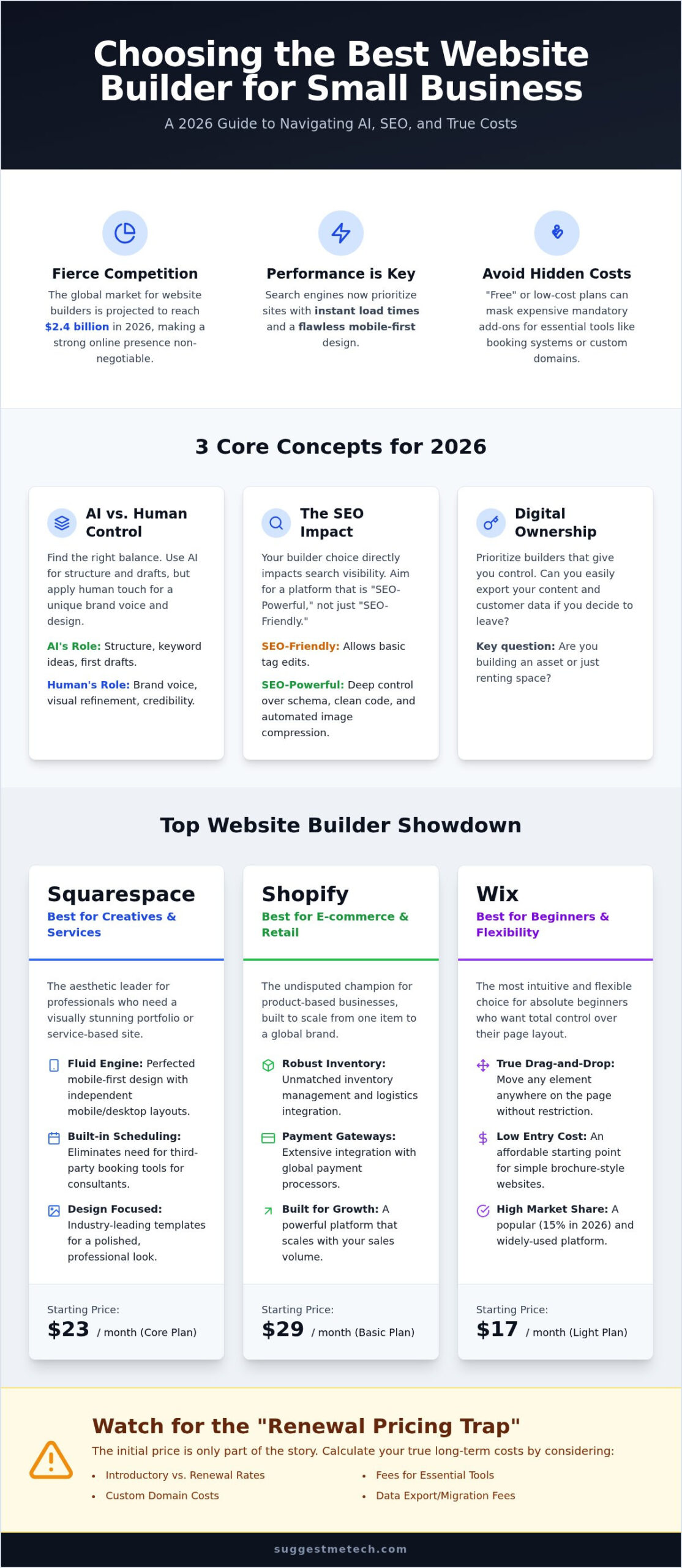
Site speed and mobile-first design are now non-negotiable. With the global website builders market projected to reach $2.4 billion in 2026, the competition for attention is fierce. Search engines now prioritize platforms that offer instant load times and seamless transitions between devices. Beyond the technical specs, you must consider platform stability. Small businesses need a builder with a proven track record of uptime and consistent feature updates to ensure their digital presence doesn’t vanish overnight due to a platform pivot or service outage.
AI vs. Human Control: Finding the Balance
AI can now build a functional layout in seconds based on a simple text prompt. It’s an excellent tool for drafting keyword-optimized content and suggesting color palettes that match your brand’s psychology. However, relying entirely on AI often results in a generic, “cookie-cutter” aesthetic. This “uncanny valley” of web design can actually hurt your credibility. Use AI to handle the heavy lifting of structure and initial drafts, but always manually refine your visual elements and brand voice to ensure you don’t look like every other competitor on the block.
The Hidden Impact of Builder Choice on SEO
When searching for the best website builder for small business, you’ll find that your choice directly affects your visibility in search results. Some platforms are merely “SEO-friendly,” meaning they allow you to edit basic title tags and descriptions. Others are “SEO-powerful,” providing deep control over schema markup, automated image compression, and clean code structures that Google’s crawlers prefer. SuggestMeTech’s evaluation process focuses on these technical nuances that often go unnoticed during a free trial but matter immensely for long-term growth.
Digital Ownership is the ability to control your site’s data and hosting. If a platform makes it impossible to export your customer data or move your content to a new provider, you’re essentially renting your business’s future. Always prioritize builders that offer clear data portability and transparent ownership terms.
The 5 Best Website Builders for Small Businesses (2026 Comparison)
Identifying the best website builder for small business requires balancing immediate ease of use with your long-term technical needs. In 2026, the market is more specialized than ever. These five platforms stand out because they solve specific business problems rather than trying to be a one-size-fits-all solution. Whether you’re selling physical goods or booking consulting clients, your choice will dictate how much time you spend on maintenance versus growing your revenue.
Best for Creatives and Services: Squarespace
Squarespace remains the aesthetic leader for service-based professionals. Its 2026 Fluid Engine updates have perfected mobile-first design, allowing you to customize your mobile layout independently of the desktop version. This ensures your portfolio or service page looks intentional on every screen size. For consultants, the built-in scheduling tools eliminate the need for expensive third-party subscriptions. The platform also simplifies the initial setup by letting you handle choosing and registering a domain name directly within your dashboard. At $23 per month for the Core plan, it’s a streamlined path to a professional presence.
Shopify is the undisputed choice for product-based e-commerce. With its $29 per month Basic plan, it offers the most robust inventory management and payment gateway integration in the industry. While it has a steeper learning curve than a basic drag-and-drop tool, its ability to scale from a single product to a global brand is unmatched. It’s the platform of choice for businesses that prioritize sales data and shipping logistics over pure design flexibility.
Wix holds a 15% market share in 2026, largely due to its extreme flexibility for absolute beginners. The “Light” plan starts at $17 per month, providing a low-cost entry point for simple brochure-style sites. It’s the most intuitive tool for those who want to drag any element anywhere on the page without restriction. If you need a site online in a single afternoon, the Wix AI generator is currently the most reliable for producing unique, industry-specific layouts.
Best for Growth and SEO: WordPress with Managed Hosting
Many serious businesses eventually migrate to WordPress to achieve total “Digital Ownership.” While the learning curve was once high, the modern Block Editor has simplified site building for non-developers. To maximize your results, we recommend pairing the software with the best web hosting services to ensure your site remains fast and secure. This combination offers the highest SEO ceiling for businesses aiming to dominate local search rankings. It’s a “build it once, own it forever” approach that avoids the limitations of closed-ecosystem builders.
For micro-businesses on a tight budget, all-in-one website builders offer a practical, no-frills solution. Many providers offer introductory rates as low as a few dollars per month for long-term commitments, making it feasible to get a professional site online quickly without a heavy financial burden. These platforms typically combine hosting, a drag-and-drop editor, and basic e-commerce features into one affordable package. If you’re still weighing your options, you can find more tailored reviews at SuggestMeTech to help you decide which platform fits your specific tech stack.
Comparing the Real Costs: Subscription Fees vs. Long-term Scalability
Many entrepreneurs pick a platform based on the lowest advertised price, only to find their monthly bill tripled by the second year. The best website builder for small business isn’t always the one with the flashiest introductory offer. For example, Hostinger offers a compelling $2.99 per month rate, but this requires a 48-month commitment and eventually renews at $10.99 per month. Understanding these renewal jumps is vital for maintaining a predictable long-term budget as your business grows.
Essential add-ons also inflate the “real” cost of your digital presence. While SSL certificates are now standard across most providers, professional email hosting through Google Workspace or Microsoft 365 usually adds $6 to $15 per user monthly. Transaction fees represent another significant variable. Shopify’s $29 Basic plan is powerful, but you’ll pay additional fees per sale if you don’t use their proprietary payment processor. In contrast, Squarespace’s $23 Core plan offers 0% transaction fees, which can save a high-volume service business hundreds of dollars every year.
The Hidden Cost of AI Features
AI is no longer a free bonus in the web design world. As of June 2026, platforms like Webflow have begun enforcing limits on AI credits, requiring Premium Site Plans for heavy use. Some builders now market “AI SEO agents” as standard features, but these are often locked behind higher-tier business plans. You can frequently save money by using external tools for your copywriting and image generation, then manually uploading the results into a more affordable “Basic” plan. This hands-on approach keeps your monthly overhead low while still leveraging modern technology.
Platform Lock-in: The Cost of Switching
Starting on a closed-ecosystem platform like Wix or Squarespace often leads to “platform lock-in.” Because these builders use proprietary code, you cannot simply export your entire site to WordPress or another provider later. If you outgrow the platform, you’ll likely have to rebuild from scratch. This is a costly mistake. Industry reports suggest that 40% of small businesses switch platforms within their first three years. Choosing the best website builder for small business with scalability in mind today prevents a multi-thousand dollar migration headache down the road.
How to Choose the Right Platform for Your Specific Industry
A generic template is just a digital coat of paint. To find the best website builder for small business, you need features that solve your industry’s specific friction points. If you’re in retail, your priority is inventory management and reliable payment gateways. Shopify excels here because it manages stock levels across multiple sales channels automatically. Professional service providers, like consultants or photographers, should prioritize lead capture forms and integrated appointment booking. Squarespace’s modern interface makes these functional elements look premium without requiring a developer.
The Small Business Checklist for 2026
Before you swipe your card, verify these three essentials to ensure your site remains functional and secure:
- Free SSL Certificate: Security is a baseline requirement for customer trust and search engine rankings.
- 24/7 Human Support: Technical emergencies don’t wait for business hours. Avoid platforms that only offer bot-based chat.
- Email Integration: You must be able to integrate your professional email setup easily. Your brand needs a custom address to maintain credibility.
Evaluating Mobile Performance
Your mobile site speed is more important than your desktop design. Google’s mobile-first indexing means the search engine primarily looks at the mobile version of your content for ranking. If your phone-based experience is slow or broken, your visibility will suffer. Before you commit to a builder, test its responsiveness. Open their demo sites on your smartphone. If the images take more than two seconds to load or buttons are too small to tap, move on. A beautiful desktop site won’t help if your mobile visitors bounce before the page loads. For a deeper look at which tools pass these performance tests, check out the latest data at SuggestMeTech.
Beyond the Builder: Integrating Your Site with Your Tech Stack
Finding the best website builder for small business is a significant milestone, but your site shouldn’t exist in a vacuum. To turn a digital brochure into a revenue-generating tool, you must connect it to the rest of your business ecosystem. One of the most overlooked steps is the integration with your Google Business Profile. By linking your site and verifying your local data, you create a technical bridge that helps you dominate local map results. Search engines look for consistent Name, Address, and Phone (NAP) data across your site and your map listing to confirm your legitimacy.
You should also treat your website as the central hub for your marketing efforts. Instead of just posting on social media, use those platforms to drive traffic back to your site where you own the customer experience. Set up Google Search Console immediately after launching. This free tool allows you to track your “real” traffic, identify which keywords are driving clicks, and fix indexing errors that might hide your pages from potential customers. It provides a much clearer picture of your performance than the basic vanity metrics found in most builder dashboards.
Why Web Hosting and Domains Still Matter
Most builders offer “all-in-one” managed hosting, which is convenient for beginners. However, as your traffic grows, you may find these shared environments limiting. High-traffic sites often require the speed and security of a dedicated environment to maintain their search rankings. If you find your site slowing down as you scale, refer to our guide on the best web hosting of 2026 to explore more robust options. Additionally, ensure your domain name is professional and easy to share. A short, memorable URL that reflects your brand is much more effective than a long, hyphenated address that customers will struggle to type on a mobile device.
Next Steps: Launching and Scaling
Once your technical foundation is set, focus on building long-term authority. A blog is one of the most effective ways to rank for industry-specific questions and prove your expertise to new visitors. If you’re ready to start producing content, check our How to Start a Blog guide for a step-by-step roadmap. Don’t forget to implement basic analytics to see exactly where your visitors are coming from and which pages they stay on the longest. This data-driven approach allows you to make site improvements based on actual user behavior rather than guesswork. Which builder are you considering? Tell us in the comments!
Build Your Future-Proof Digital Presence Today
Selecting the best website builder for small business is a strategic decision that impacts your growth long after the initial launch. We’ve explored how to navigate the shift toward AI-driven design while maintaining human control over your brand’s unique identity. By understanding the transparent cost analysis of subscription fees and transaction rates, you can avoid the common financial pitfalls that catch many entrepreneurs off guard in their second or third year of operation.
Your website is the foundation of your digital ecosystem. It’s vital to pair your chosen builder with tools that ensure long-term visibility, such as local SEO integrations and reliable backend performance. SuggestMeTech provides expertly vetted tech recommendations and 2026-ready scalability advice to help you make these complex choices with clarity. If you’re ready to take the next step, find the best web hosting to power your new business site and secure your search engine rankings.
The digital landscape moves quickly, but with the right platform, your business is ready to move even faster. We’re here to help you navigate every technical hurdle. You’ve got the vision; now it’s time to build the site that brings it to life.
Frequently Asked Questions
Can I build a small business website for free in 2026?
You can start for free, but it isn’t recommended for a professional presence. Free plans typically force you to use a subdomain like “yourbusiness.wix.com” and display the builder’s ads on every page. To find the best website builder for small business, you should budget for a paid plan that allows for a custom domain and removes third-party branding to build customer trust.
Do I need to buy web hosting separately from my website builder?
It depends on the platform you choose. All-in-one builders like Wix, Squarespace, and Shopify include hosting in their monthly subscription fees. If you opt for WordPress, you’ll need to purchase managed hosting separately to keep your site online. This extra step provides more control over your site’s performance and security.
Which website builder is best for SEO in 2026?
WordPress remains the top choice for businesses that prioritize organic search rankings because it offers deep technical control over your site’s code. While Squarespace and Wix are now “SEO-friendly” with built-in tools for beginners, WordPress is often considered the best website builder for small business owners who want to optimize every detail. It allows for advanced schema markup and custom metadata that closed platforms sometimes restrict.
Can I change my website builder later without losing my content?
You can move your content, but the process is usually manual and time-consuming. Most builders use proprietary code, which means you can’t simply click a button to “export” your design from Squarespace to Shopify. You’ll likely need to rebuild your layout and copy your text and images over to the new platform. Choosing the right builder now saves you from an expensive migration later.
Is WordPress or Squarespace better for a beginner?
Squarespace is generally better for beginners who want a beautiful site without a steep learning curve. Its visual drag-and-drop editor is intuitive and prevents you from “breaking” the site’s code. WordPress offers more long-term flexibility but requires more time to learn the interface and manage regular plugin updates.
How much does it actually cost to run a business website per year?
Expect to spend between $350 and $500 per year for a standard professional site. This total includes a mid-tier subscription like the Squarespace Core plan at $23 per month, your annual domain renewal, and professional email hosting. E-commerce sites will have higher annual costs due to specialized app subscriptions and transaction processing fees.
Do I need an AI website builder for my small business?
AI isn’t mandatory, but it’s a powerful tool for launching your site faster. Modern builders use AI to generate initial layouts, write product descriptions, and even suggest SEO keywords. While these features save hours of work, you should still manually review all content to ensure it doesn’t look generic or misrepresent your brand voice.
How do I make my website show up on Google Maps?
You must link your website to a verified Google Business Profile to appear in local map results. Once your profile is active, ensure your Name, Address, and Phone number (NAP) are identical on both your website and your Google listing. This consistency tells search engines that your business is legitimate and helps you rank higher in “near me” searches.

