

The best cdn providers for wordpress are not necessarily the biggest or best-known. The right fit depends on where your visitors are, how your site is configured, which security features you need, and how you want to pay for bandwidth. If slow pages are driving visitors away, a CDN may help deliver content faster without adding unnecessary complexity.
This guide compares leading options for 2026 and explains how to assess WordPress integration, performance features, and costs. You’ll also learn how to choose a CDN for your site and roll it out carefully alongside your hosting.
Cloudflare offers a free starting point with CDN and security features, while Bunny.net uses usage-based pricing. Compare caching, image optimization, WordPress integration, and bandwidth charges. After setup, test key pages from the locations that matter to your audience.
Key Takeaways
- Compare the best cdn providers for wordpress by WordPress integration, security, regional reach, and billing model, not network size alone.
- Check whether edge features such as full-page caching and image optimization match your site’s performance needs.
- Use traffic volume, audience locations, and your technical experience to narrow down which CDN plan is practical.
- Review bandwidth pricing and plan limits before choosing, so you can anticipate costs as traffic grows.
- Deploy in stages and test key performance metrics to catch caching or compatibility issues before they affect visitors.
Understanding WordPress CDNs and Why They Are Essential in 2026
The best cdn providers for wordpress can deliver cached site content quickly and reliably, but a CDN does not guarantee strong Core Web Vitals and is not required for compliance. It distributes cached files across servers closer to visitors, which can reduce delivery delays and requests to your hosting server. Whether that helps depends on your audience, site setup, and performance needs.
A CDN complements efficient hosting, optimized images, and well-configured WordPress caching. The CDN can shorten the trip for cached content, while your host and site still determine how quickly uncached pages are generated.
What Is a CDN for WordPress?
A Content Delivery Network, or CDN, is a distributed group of servers that delivers copies of website content from locations closer to visitors. For a foundational explanation of the technology, see this Content Delivery Network overview. CDN locations are called Points of Presence (PoPs).
For example, a visitor far from your WordPress host may receive images and scripts from a nearby PoP instead of fetching every file from the origin server. This can reduce latency, which is partly caused by the distance data must travel, and may lower bandwidth use and request load at your host. Traditional caching stores reusable content. Modern edge computing can also run selected tasks near visitors.
The Core Benefits: Speed, SEO, and Security
A CDN can support faster delivery, but its impact depends on what it caches and where visitors are located. Time to First Byte (TTFB) measures how long it takes for a browser to receive the first byte of a response. It is a useful diagnostic, not a standalone Core Web Vitals metric or a guaranteed ranking boost. A faster response can help a page begin rendering sooner, including its Largest Contentful Paint (LCP) element.
- Speed and user experience: Serving cached assets from nearby PoPs can reduce waiting, especially for international visitors.
- Lower server load: Requests for cached files do not need to reach your WordPress host. This can help busy blogs manage traffic and bandwidth use.
- Security support: Providers with DDoS protection can filter or absorb malicious traffic at the network edge before it reaches your host. Coverage depends on the provider and plan, so check which protections are included.
Modern CDNs may also cache full pages or process selected requests at the edge, rather than only mirroring static files. This can reduce delays for some dynamic content, but it requires careful configuration so visitors still see current, personalized information. A CDN is one part of a performance strategy, not an automatic path to Core Web Vitals compliance.
Critical Features to Evaluate in a 2026 Content Delivery Network
Modern CDNs can do more than copy images and scripts to nearby servers. Edge features may cache eligible pages, optimize delivery, and route requests across a distributed network. Their value depends on whether your WordPress pages are static, personalized, or frequently updated.
Compare features against your site’s needs rather than treating any protocol or edge function as a guarantee of better Core Web Vitals. For an example of how large-scale delivery infrastructure is designed, see Wikimedia’s CDN architecture.
Intelligent Caching, ESI, and Fresh Content
Edge Side Includes (ESI) let a system assemble a page from separate pieces. Cacheable sections can be reused while personalized sections are fetched separately. On an online store, product descriptions might be cached at the edge while a customer’s cart total remains specific to that user. ESI support and WordPress compatibility vary, so confirm that your CDN and caching setup support the features your site needs.
Another useful option is stale-while-revalidate. It lets a CDN serve a recently cached copy while checking for an updated version in the background. This can keep visitors from waiting for a cache refresh, but frequently changing content still needs suitable expiry rules and purge behavior.
HTTP/3, QUIC, and WordPress Integration
HTTP/3 uses QUIC, a transport protocol designed to help browsers and servers exchange data efficiently. Support may help visitors on mobile or less reliable connections, but results depend on the network, browser, and site. Check that the CDN supports HTTP/3 and that it is enabled for your domain.
A WordPress plugin or API integration can simplify routine tasks, especially cache purging after you publish or update a page. Look for controls that fit your workflow and test purging carefully. Clearing too much can send unnecessary requests back to your host, while failing to clear updated content can leave visitors seeing an old version.
Image Optimization and Traffic Resilience
Some CDNs resize images on request and convert them to formats such as WebP or AVIF when a visitor’s browser supports them. This can reduce the size of images delivered to mobile screens. Unlike a plugin that processes images within WordPress, edge optimization can avoid storing every resized version on your host, though availability and storage effects depend on the provider’s implementation.
Global load balancing distributes requests across available servers or routes traffic around disruptions. It can improve resilience, but no CDN feature guarantees 100% uptime. If uptime matters to your site, review the provider’s failover design, monitoring, and service terms. To compare providers against these practical criteria, explore SuggestMeTech’s technology reviews and guides.
The best cdn providers for wordpress: Top Solutions Reviewed
The best cdn providers for wordpress balance delivery performance, security, setup effort, and predictable billing. This comparison focuses on providers with useful WordPress options and clear pricing models. Your best fit depends on audience locations, bandwidth use, and how much CDN configuration you are comfortable managing.
A self-configured CDN is a separate service you connect to WordPress and manage through its dashboard, DNS, or a plugin. A managed setup is configured or bundled by a hosting provider, which can reduce hands-on work. Before deciding, check exactly what caching, security, support, and usage limits are included.
| Provider | Standout value | Pricing basis | Best for |
|---|---|---|---|
| Cloudflare | CDN, DDoS protection, shared SSL, with paid-plan WAF and image optimization | Free plan; Pro starts at approximately $20 to $25 monthly. APO is $5 monthly on the free plan and included with paid plans. | Beginners and sites prioritizing accessible security features |
| Bunny.net | WordPress plugin, 119 Points of Presence, optional image optimization | Standard rates start at $0.01/GB in Europe and North America; rates vary by region. | Budget-conscious blogs and sites with variable bandwidth needs |
| KeyCDN | Pay-as-you-go delivery and a dedicated CDN Enabler WordPress plugin | Starts at $0.04/GB for the first 10 TB. | Site owners who prefer usage-based billing and plugin integration |
Cloudflare: Flexible Setup and Security
Cloudflare’s free plan includes CDN delivery, DDoS protection, and shared SSL. Pro adds a Web Application Firewall (WAF), image optimization, and enhanced support. Its Automatic Platform Optimization (APO) can cache WordPress pages at the edge. Setup involves managing DNS records and enabling the proxy, commonly shown as the “orange cloud” in Cloudflare’s DNS dashboard. Choose it if you want a broad set of features, but review cache settings to avoid incorrectly serving stale or personalized pages.
Bunny.net and KeyCDN: Usage-Based Alternatives
Bunny.net charges by data delivered, so audience geography affects the bill. Its optional Bunny Optimizer handles on-the-fly image optimization. KeyCDN also uses pay-as-you-go pricing and offers the CDN Enabler plugin. These options suit site owners who want to track usage rather than start with a broad, all-in-one security plan. Check current rates, add-on charges, and cache purge steps before committing.
Managed Integration Versus a Separate CDN
Managed integration can simplify setup by bringing CDN delivery into a hosting platform’s workflow. A standalone service gives you more direct control, but you may need to configure DNS, caching, and purges yourself. Choose based on your comfort with those tasks and confirm what the plan includes. RocketCDN is a distinct service from Rocket.net. Available research describes RocketCDN as using StackPath infrastructure, while StackPath CDN availability for new customers is questionable. Verify current service status before considering it.
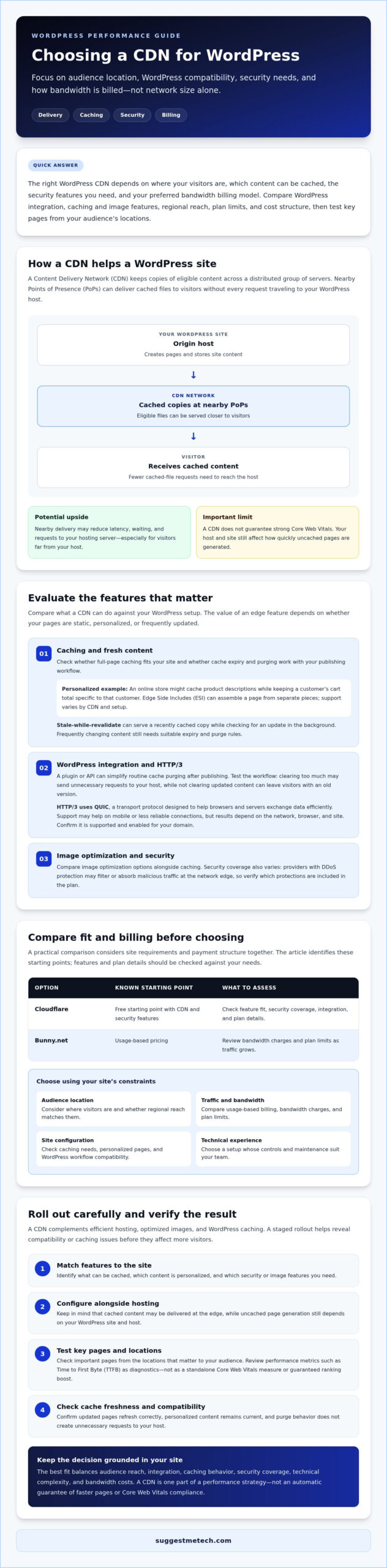
How to Choose the Right CDN Based on Your Website’s Needs
The right CDN depends less on network size than on what your site delivers, where visitors are, and how much configuration you can manage. Start with traffic patterns and budget, then compare the features and support you will actually use.
A small blog with mostly static posts has different needs from a global store serving logged-in customers or a portfolio with large image files. Use the criteria below to shortlist the best cdn providers for wordpress for your setup.
Match CDN Features to Traffic and Content
Estimate your monthly bandwidth, identify your busiest pages, and consider where your audience lives. A low-traffic blog can often begin with a free plan or a pay-as-you-go service, provided its caching and security features meet your needs. Review billing thresholds and overage rules so a sudden traffic spike does not create an unwelcome surprise.
For an international store, prioritize reliable page delivery alongside a strong cache hit ratio, which measures how often requests are served from the CDN instead of your host. Look for support for personalized content handling, such as ESI, and a Web Application Firewall (WAF). A media-heavy portfolio may benefit more from on-the-fly image resizing and modern image formats. For video, check whether the service supports your delivery needs and how usage is billed.
Choose a Setup You Can Maintain
A WordPress plugin can simplify connecting a CDN and clearing cached content after site updates. DNS-level setup can offer broader control, but it requires careful changes to your domain configuration. Before switching, check the provider’s WordPress instructions, compatibility notes, and rollback guidance. Clear support channels matter too, especially if a cache rule affects checkout or account pages.
Advanced tools such as Workers or Edge Rules can customize how requests are handled, but they add configuration and troubleshooting work. If you do not need custom logic, a simpler integration may be more dependable. Readers still planning their site can start with this guide to how to start a blog.
Compare Free Plans, Paid Features, and Hosting Bundles
Free tiers can be a sensible starting point for a small site, but check which security, support, and caching features are included. Higher-tier or enterprise plans may add more control and assistance, but those capabilities make sense only if your traffic, risk profile, or operational requirements justify them. Do not pay for features you will not configure or use.
A host-provided CDN is often convenient if it integrates with your hosting dashboard and WordPress workflow. Consider a third-party specialist if you need more control over regions, image handling, security, or usage-based billing. Compare the combined cost and support responsibilities, then measure page performance before and after setup. For more practical technology comparisons, explore SuggestMeTech’s guides.
Implementation Strategy and Hosting Synergy for Maximum Speed
A CDN works alongside your WordPress host, not instead of it. The host generates pages and runs the database; the CDN can deliver cached content closer to visitors and reduce repeated requests to the origin. Compare CDN options with your hosting setup, including the best web hosting services, because cache controls and support differ between providers.
Plan the rollout carefully. Incorrect cache rules can show outdated pages, while mismatched SSL/TLS settings can cause connection errors. Use this five-step checklist to reduce risk on an existing site.
- Record a baseline: Test key pages before making changes and note TTFB, Largest Contentful Paint, and page loading behavior.
- Check host compatibility: Review your host’s CDN instructions, origin requirements, and cache settings before changing DNS or plugins.
- Align SSL/TLS: Confirm that HTTPS certificates and encryption settings work between visitors, the CDN, and your origin server.
- Configure and test caching: Use origin headers, such as cache-control directives, to guide what can be stored. Exclude admin, cart, checkout, and personalized pages where appropriate.
- Purge and verify: Clear both host and CDN caches after updates, then test pages and forms on desktop and mobile.
Prevent Double Caching and Protect WordPress Tasks
Double caching happens when your host and CDN each store a page using different expiry or purge rules. A product update might appear at the origin but remain stale in one cache. Coordinate cache lifetimes and purge controls, then test important page types after changes. WordPress cron jobs and background tasks run at the origin, not through ordinary CDN page delivery. Ensure the CDN does not cache admin or task endpoints, and confirm scheduled jobs still run as expected.
Measure Results After Deployment
Use PageSpeed Insights and GTmetrix to compare representative pages before and after rollout. Check CDN analytics for cache hit ratio, which shows how often requests are served from cache, and track TTFB alongside user-facing metrics. Results can vary by location and page type, so test more than your homepage. To check a mobile browsing experience, you can also clear cache on an iPhone and revisit pages. This clears local browser data, not the CDN cache.
Which CDN are you using? Share your performance results below. Comparing real-world outcomes can help other WordPress site owners choose the best cdn providers for wordpress for their own needs. For more practical comparisons, explore SuggestMeTech’s technology guides.
Choose a CDN You Can Grow With
The best cdn providers for wordpress are not simply the ones with the largest networks. Choose based on your visitors’ locations, the content your site serves, your budget, and the level of setup you are ready to manage. A CDN can support faster delivery and reduce load on your host, but caching rules and hosting compatibility matter just as much as provider features.
Start with the essentials: compare cache behavior, security, WordPress integration, and billing. Then test performance after deployment, paying attention to both TTFB and the visitor experience. As traffic grows, revisit whether your current plan still fits rather than paying upfront for features you may not need.
SuggestMeTech’s editorial reviews and decision-focused guidance can help you compare hosting partners alongside CDN options, with attention to budget and scalability. Explore our web hosting guidance to find a hosting setup that fits your CDN strategy.
With a measured choice and careful testing, you can build a faster, more resilient WordPress experience and adapt it as your audience grows.
Frequently Asked Questions
These answers cover practical questions that can come up while selecting, setting up, and evaluating a CDN for a WordPress site.
Do I really need a CDN if my WordPress hosting is already fast?
No, a CDN is not essential for every fast WordPress site. If most visitors are near your host and your pages already load well, adding one may bring limited gains. A CDN can be more useful when your audience is spread across regions, your site serves many static files, or traffic increases server load. Test key pages first, then compare performance from the locations that matter to your visitors.
Will a CDN improve my WordPress site’s SEO rankings?
A CDN may support SEO indirectly by helping pages load faster for some visitors, but it will not guarantee higher rankings. Search engines consider multiple signals, and a CDN cannot fix slow page generation, oversized images, or poor site structure on its own. Measure Core Web Vitals and user experience before and after setup. Treat any improvement as part of a broader performance effort, not a direct ranking promise.
What is the difference between a WordPress caching plugin and a CDN?
A WordPress caching plugin creates reusable versions of site content or optimizes how WordPress generates pages. A CDN distributes eligible cached content across servers closer to visitors. They can work together: the plugin may reduce work on your origin server, while the CDN delivers files from its network. Their cache rules can conflict, so coordinate expiry and purge settings to avoid showing visitors outdated pages.
Are free CDNs like Cloudflare’s free plan safe for business use?
Cloudflare’s free plan includes CDN delivery, DDoS protection, and a shared SSL certificate, so it can be a reasonable starting point for some business sites. Whether it is suitable depends on your security, support, and operational requirements. Review the plan details, SSL configuration, and protections your business needs. Sites with stricter requirements may need paid features or a separate security review before choosing a plan.
How do I know if my CDN is actually working on my WordPress site?
Check your CDN dashboard or analytics for requests served from cache, then compare page performance before and after activation using PageSpeed Insights or GTmetrix. Test more than one page, including an image-heavy page and an important landing page. Results can vary by location and cache state. Also confirm that updates appear after you publish and purge the cache, rather than leaving visitors with an older version.
Can a CDN help protect my WordPress site from hackers and DDoS attacks?
A CDN can help reduce exposure to some attacks when the plan includes protections such as DDoS mitigation or a Web Application Firewall. DDoS protection filters or absorbs abusive traffic before it reaches your hosting server. These features do not prevent every hack or replace secure passwords, updates, backups, and WordPress security practices. Check which protections are included and configure your origin server so attackers cannot simply bypass the CDN.
Will using a CDN increase my monthly website costs significantly?
Not necessarily. Some providers offer a free tier, while others charge based on data delivered, features, or plan level. Your total depends on traffic volume, visitor locations, image optimization add-ons, and any bandwidth limits or overage charges. Estimate usage from your hosting or analytics reports, then review how the provider bills for each region. A CDN may also reduce origin bandwidth use, but savings depend on your hosting arrangement.

