

What if a simpler tech setup came from choosing better, not just owning less? When devices overlap and notifications compete for your attention, it’s easy to wonder what to keep, replace, or stop buying. Tech for a minimalist lifestyle isn’t about giving up useful tools. It’s about making sure each device, app, and service serves a purpose in your everyday life.
This guide will help you assess what you actually use, identify redundant tools, and decide whether a new one solves a real problem. You’ll also find practical ways to simplify devices and apps, reduce digital distractions, and maintain a setup that stays useful over time. The goal is a calmer routine built around your needs, not a perfect-looking desk or a strict limit on how much technology you can own.
Key Takeaways
- Build tech for a minimalist lifestyle around the roles your devices need to serve, such as work, communication, or navigation.
- Compare multifunction and dedicated devices by how well each fits your routines, rather than assuming fewer devices are always better.
- Use a simple inventory and review process to identify redundant tools and test changes before committing to them.
- Consider convenience, cost, accessibility, privacy, and maintenance when refining your digital setup.
Quick Answer
Tech for a minimalist lifestyle means choosing devices, apps, and digital services for their purpose, usefulness, and fit with your daily needs. It doesn’t mean rejecting technology. Keep tools that support your routines, reduce unnecessary overlap, and simplify what you use. Let go of digital clutter that adds little value.
What minimalist technology means in everyday life
Minimalist technology is about using tools intentionally, not reaching for the newest device or deleting everything. The idea draws on a broader minimalist philosophy: focus on what matters and remove what doesn’t serve a clear purpose.
For example, a smartphone might handle calls, directions, reading, and photos. If those functions work well for you, a separate device for each task may be unnecessary. But a dedicated e-reader or camera could still make sense if it supports a regular activity better or more comfortably.
The aim is to reduce redundancy, not avoid useful technology. Digital clutter can include unused apps, accounts you no longer need, and notifications that interrupt without helping. Clearing those extras can make a setup easier to manage without sacrificing tools you rely on.
Start with the need, not the device
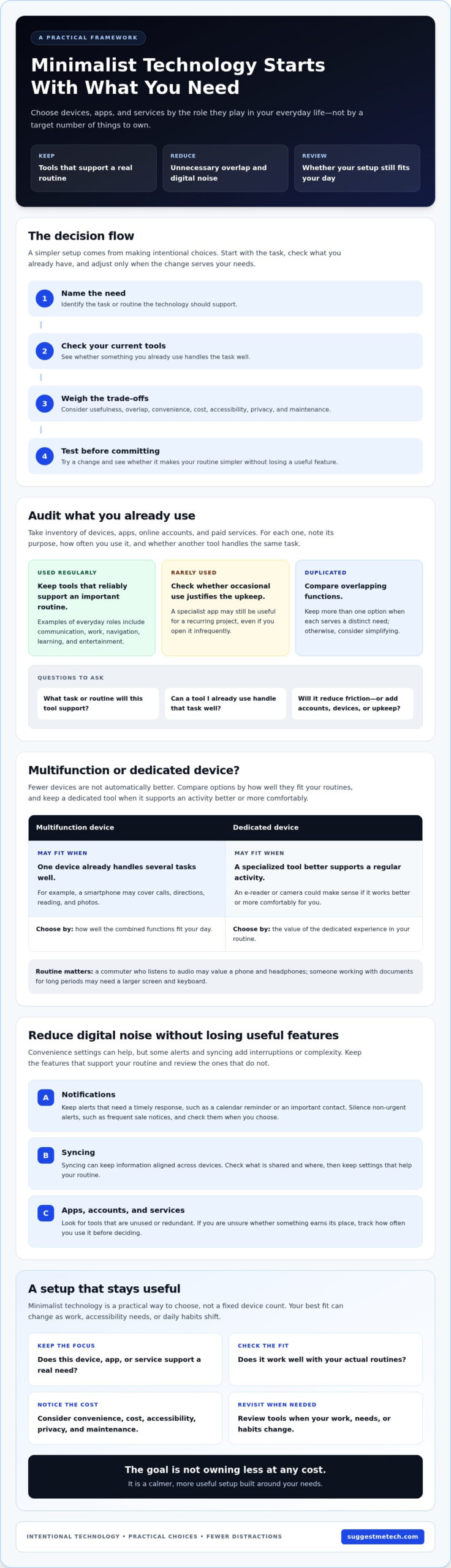
Before keeping, replacing, or buying a tool, name the task it needs to support. “I need a reliable way to join work calls” is a clearer starting point than “I need a new tablet.” Then consider how often that task comes up and what your current setup already handles.
Your routines determine what earns a place. Someone who commutes and listens to audio may value a phone and headphones; someone who works with documents for long periods may need a larger screen and keyboard. Neither setup is automatically more minimalist. The better fit is the one that supports your actual day without adding avoidable complexity.
Ask these questions before making a change:
- What specific task or routine will this tool support?
- Can something I already use handle that task well?
- Will the new option reduce friction, or add another account, device, or maintenance task?
These questions make minimalism a practical way to choose, rather than a target number of devices. The right setup can differ from person to person and change as work, accessibility needs, or daily habits shift.
Why a Minimalist Technology Setup Starts With Your Habits
A useful setup starts with the tasks technology supports, not a target number of devices. Your routine reveals where tools are essential, where features overlap, and which services add steps without enough benefit.
Intentional technology use means choosing and maintaining tools because they support a real need, while limiting distractions and unnecessary duplication. This habit-led approach keeps minimalism practical: a tool can earn its place even if it adds another device or service.
Audit your devices, apps, and subscriptions
Make a simple inventory of what you use and what you’ve accumulated. Include devices, apps, online accounts, and paid services. For each one, note its purpose, how often you use it, and whether another tool already handles the same task.
Consider your everyday roles: communicating with family or colleagues, work, navigation, learning, and entertainment. A work laptop may be essential, while a second note-taking app may duplicate a feature you already use. This is where intentional technology use becomes concrete: assess each tool by its role in your life, rather than keeping it by default.
- Used regularly: Keep tools that reliably support an important routine.
- Rarely used: Check whether occasional use justifies the space, cost, or upkeep.
- Duplicated: Compare overlapping functions and decide whether both options serve distinct needs.
Removing or pausing a service can help, but it isn’t a universal rule. A specialist app used only during a recurring project may still be worth keeping. If you’re unsure, track how often you use it before deciding.
Separate useful convenience from digital noise
Convenience features can save effort, but their settings may also generate interruptions. Notifications draw attention to updates, syncing keeps information aligned across devices, and alerts surface changes as they happen. Each feature has a purpose, but not every app needs permission to interrupt you.
Review notification permissions and keep alerts that need a timely response, such as a calendar reminder or a message from an important contact. If a shopping app sends frequent sale notices, silence its non-urgent alerts and open the app when you choose to browse. You stay able to use it without letting promotions direct your attention.
Syncing can help when you move between devices, but check which information is shared and where. Keep settings that support your routine, and turn off those that add noise or complexity without a clear benefit. For a more focused purchase decision, compare technology reviews and comparisons against the needs you identified.
Choosing Devices That Do More Without Creating Clutter
A device earns its place by how well it supports your everyday tasks, not by how many functions its product description lists. A multifunction device can reduce overlap, while a dedicated tool may be more comfortable or capable for a specific activity.
Use this comparison as a starting point. Then check compatibility with your other tools, accessibility needs, upkeep, and the tasks you actually perform. Fewer devices help only when your essential needs remain covered without adding friction to work, communication, or daily routines.
| Device category | Common use | May suit you if |
|---|---|---|
| Smartphone | Communication, browsing, navigation, and media | You value portability and mostly handle brief tasks |
| Tablet | Reading, video, browsing, and light work | You want a larger screen without needing a full desktop setup |
| Laptop | Long-form writing, work, and multitasking | Your tasks need a keyboard, desktop-style applications, or a larger workspace |
| Dedicated camera or audio device | Photography, recording, or focused listening | You regularly need more control or a better fit for a specific activity |
When one multifunction device is enough
A phone or tablet may cover communication, browsing, media, and light tasks if you work mainly online, read on the go, or only occasionally edit documents. Fewer devices can mean fewer chargers, updates, and settings to manage. Before relying on one tool, try it during a typical day. A small screen, awkward posture, or limited input options can make longer sessions uncomfortable.
Compatibility matters, too. Check that essential files, accessories, and services work with the device you plan to use. For purchase research, compare options against your task list and consult a reliable device comparison reference as one point of reference.
When dedicated technology still makes sense
A separate laptop can be more suitable for frequent writing or work that requires several windows. A dedicated camera may suit someone who regularly takes photos for a specific purpose, while an audio device can work well for focused listening or recording. These tools add maintenance and storage needs, so consider one when it solves a recurring limitation, not just a hypothetical one. Review technology guides and comparisons to assess fit before buying.
How to Build a Simpler Digital Setup Without Losing Useful Features
Simplify in stages rather than deleting tools all at once. This five-step process helps reduce overlap, preserve access to important information, and check that changes work before making them permanent.
- Inventory: List your devices, apps, accounts, and subscriptions. Note what each one does and whether you use it regularly.
- Prioritize: Mark the tools that support essential routines, such as work calls or managing household documents. Keep accessibility needs and work requirements in view.
- Simplify: Choose one tool for a repeated task where practical. For example, remove a duplicate note-taking app only after checking that needed notes are saved elsewhere.
- Test: Try the simpler arrangement before closing accounts or removing access. You might hide a rarely used app for a while to see whether you miss it.
- Review: Revisit the setup after using it in your normal routine. Restore a tool if simplifying created a real problem.
Reduce app, account, and notification overload
Group the apps you keep by purpose, such as communication, work, and travel, instead of adding another tool whenever a small need appears. Remove unused apps or consolidate duplicate services if doing so won’t disrupt a routine. Before cancelling an account or service, save important files and confirm you can still access them. As you make changes, check connected account access and privacy settings, including which apps can use your data.
Cloud storage keeps files on remote servers so you can access them across devices. A backup is a separate copy of important information that can help you recover it if a device or file is lost or damaged. Syncing files between devices can be convenient, but it isn’t always the same as keeping a separate backup. Before consolidating storage services, check where your files are saved and how you’ll retrieve them.
Make a streamlined setup reliable
Keep a backup of information you can’t easily replace, such as personal documents or work files, and check that you can open it. Before relying on fewer devices or services, confirm they work with your essential files, accessories, and other tools. Review account access and privacy settings as part of that check. A simpler setup still needs settings that suit your comfort and needs.
Maintenance can also support a tidier routine. For device-specific upkeep, consult the existing guide to clearing an iPhone’s cache. When considering tech for a minimalist lifestyle, compare technology guides and reviews against your actual requirements before adding or replacing a tool. Explore technology reviews and guides to assess options by fit, not by feature count.
How to Keep a Minimalist Technology Lifestyle Practical Over Time
A minimalist technology setup should adapt as your routines change. Review what you use, what it takes to maintain, and whether it still meets your needs. The goal isn’t to keep as little as possible, but to balance convenience, cost, accessibility, privacy, and upkeep in a way that works for you.
Review what earns a place in your setup
Reassess your devices, apps, and services when a routine changes or a tool starts creating friction. A specialized device can still be a sensible choice if it regularly supports work, accessibility, or a valued hobby. Keeping it isn’t a failure of minimalism; consider whether its ongoing effort and expense make sense for you.
Use this checklist to guide a review:
- Purpose: Does this tool still support a meaningful task?
- Use: Do you reach for it often enough to justify keeping it?
- Effort: Does it require setup, updates, or account management that feels worthwhile?
- Cost: Are recurring payments still justified by what you use?
- Fit: Does it work with your other devices and meet your accessibility needs?
- Privacy: Are its permissions and data settings still appropriate for you?
Convenience has value, too. A service that keeps essential files available across devices may be worth maintaining, while a rarely used subscription may deserve another look. Avoid making changes based only on the number of items you own. Weigh the benefits and trade-offs in your daily routine.
Make the next technology decision deliberately
Before browsing, describe the problem you need to solve. Then compare options using the same criteria, such as task fit, compatibility, accessibility, setup effort, ongoing cost, and privacy settings. If you’re considering a laptop, start with the work you need it to handle and consult a laptop buying guide to compare suitable categories before focusing on features.
Give yourself room to decide. If your current device still works for the task, you may not need to replace it. If a change is necessary, check how the option will fit with your files, accessories, and existing services. This keeps product research focused on suitability rather than adding features for their own sake.
Your needs may shift over time, so there’s no single setup to maintain. Explore SuggestMeTech’s technology guides and comparisons when you want a clearer view of your options, then choose what fits your life.
Make Your Technology Work for You
A practical tech setup starts with your habits, not a target number of devices. Choose tools that support meaningful tasks, and compare multifunction options with dedicated devices based on comfort, compatibility, and how you’ll use them. An occasional review of apps, accounts, notifications, and recurring commitments can help keep your setup useful as your routines change.
Tech for a minimalist lifestyle doesn’t mean rejecting technology you rely on. It means making deliberate choices, keeping essential features accessible, and reducing tools that add more upkeep than value. Your setup can be simple and still include a specialized device when it genuinely serves your needs.
For help comparing options before your next technology decision, explore SuggestMeTech’s reviews and comparisons. Explore practical technology guides to find information relevant to your next choice.
Start with one small adjustment, then build a setup that feels right for you.
Frequently Asked Questions
What is tech for a minimalist lifestyle?
Tech for a minimalist lifestyle means choosing and using technology according to genuine needs, not following a target number of devices. It can include keeping a specialized tool if it supports an important task. Intentional use isn’t the same as avoiding technology. For example, you might use one calendar app across your devices instead of maintaining separate calendars that duplicate events and require extra upkeep.
How do I start simplifying my technology?
Start by listing your devices, apps, and subscriptions, then note each tool’s purpose and how often you use it. Look for duplicated functions and distractions, such as two apps doing the same job or alerts that rarely matter. Make one reversible change at a time, like hiding an app before removing it. Before making bigger changes, confirm that essential files, communication, and accessibility needs remain covered.
Can one device replace a laptop, tablet, and phone?
One multifunction device can handle several everyday tasks, but it won’t suit every person or workload. The right setup depends on your work requirements, screen comfort, software compatibility, and accessibility needs. A phone may be fine for messages and browsing but uncomfortable for extended writing. Test the tasks you rely on before replacing equipment, and keep a dedicated device if it provides a clear practical benefit.
What technology should I keep for a minimalist lifestyle?
Keep tools that reliably support important tasks, fit your routines, and remain manageable to maintain. The right setup varies because work, communication, learning, health, and accessibility needs differ from person to person. Review how you actually use each device or service before deciding. A specialized tool can still earn its place if it serves a meaningful purpose, even if another person wouldn’t need it.
How can I reduce digital clutter without deleting important data?
Identify the files and accounts connected to a service before changing or closing it. A backup is a separate copy of information that can help preserve important files if the originals are lost or damaged. Confirm that essential files are backed up and accessible before deleting anything. Remove unused apps gradually, and check account recovery options before consolidating services so you can retain access if a sign-in problem occurs.
Is a minimalist technology lifestyle cheaper?
Simplifying your setup may reduce unnecessary purchases or recurring services, but savings aren’t guaranteed. Existing devices, replacement needs, accessibility tools, and subscription terms all affect the outcome. Compare the ongoing costs and practical value of your current setup with the alternatives you’re considering. A multifunction device isn’t automatically less expensive if it doesn’t meet your needs or leads you to keep other tools as well.
How often should I review my devices and apps?
Review your setup when your routines, work, or technology needs change rather than following a schedule that may not fit your life. Check for unused tools, duplicate functions, distracting notifications, and services that have become difficult to maintain. Before removing or replacing anything important, confirm that your backups are usable and that you can access relevant accounts and files. Keep what still serves you, and adjust what doesn’t.

