

Did you know that shared hosting still powers over 37% of the web in 2026, yet many users end up paying five times their initial rate just to keep their sites online? It’s frustrating to find a great deal only to be hit with hidden fees for SSL certificates or websites that crash the moment you get a little bit of traffic. You want the best cheap web hosting that actually works, stays affordable for years, and doesn’t require a degree in server administration to manage.
This guide identifies the top affordable providers that offer a true value floor, combining high-performance NVMe storage and essential security without the typical bait-and-switch pricing. We’ll compare services based on long-term costs, one-click installations, and the quality of their human support to help you make a confident choice.
Quick Answer
The best cheap web hosting in 2026 balances low introductory rates with transparent renewal costs and essential features like free SSL and NVMe storage. Top-rated providers offer the strongest mix of speed and long-term affordability, ensuring your site stays fast and secure without the unexpected budget spikes often found in budget-tier services.
Key Takeaways
- Identify the “Value Floor” for 2026 to ensure your affordable plan includes essential NVMe storage and SSL security without extra costs.
- Compare the industry’s top providers to find the best cheap web hosting that balances introductory discounts with sustainable renewal rates.
- Calculate the Total Cost of Ownership (TCO) over a three-year period to avoid common hidden fees for domain privacy and email.
- Evaluate specific performance features that prevent website crashes during traffic spikes, even on entry-level shared hosting plans.
- Follow a practical two-step roadmap to select a scalable hosting plan and register your domain for long-term project success.
The Reality of Cheap Web Hosting in 2026: Value vs. Price
Cheap web hosting refers to affordable shared or entry-level cloud plans designed for individuals and small businesses. In 2026, the definition of “cheap” has shifted. It no longer means accepting slow speeds or frequent downtime. Instead, it describes a web hosting service that leverages modern server efficiency to provide reliable performance at a low monthly cost. Finding the best cheap web hosting requires looking past the price tag to find the “Value Floor.”
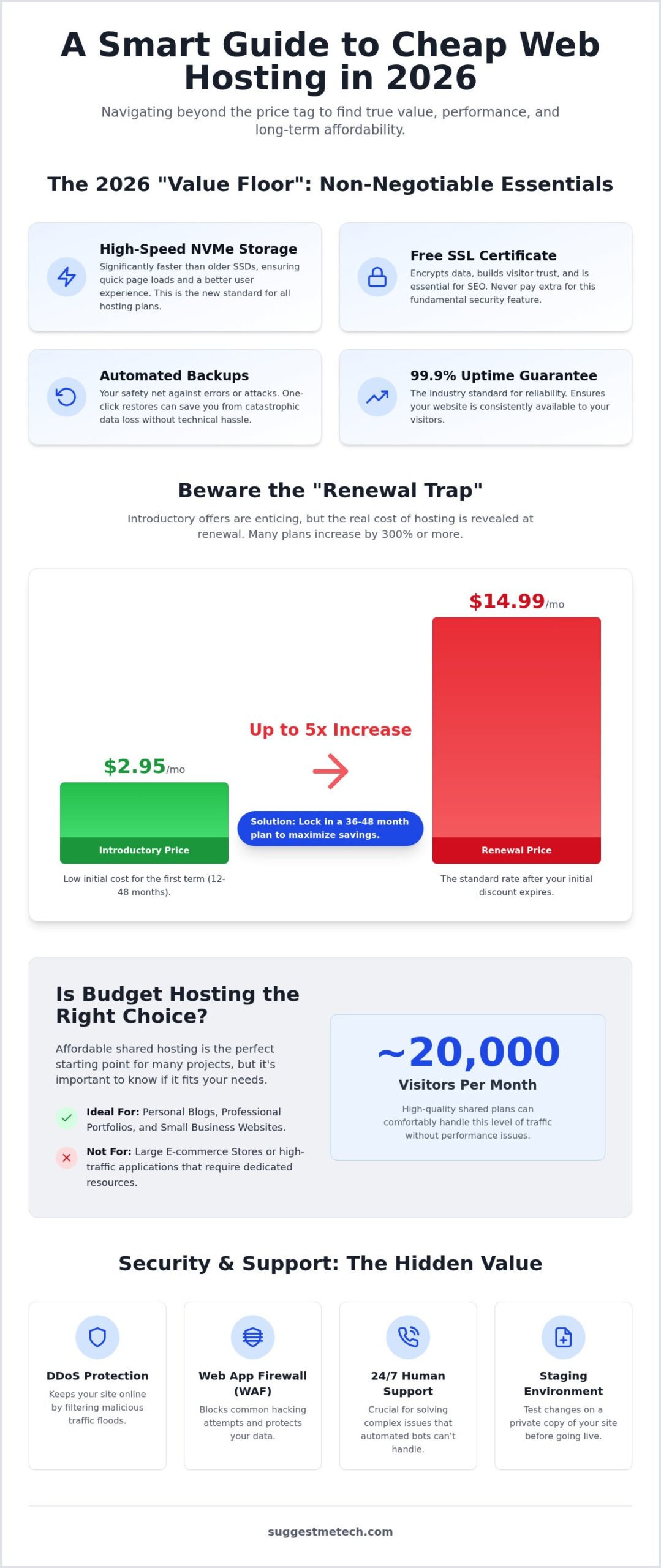
The Value Floor is the absolute minimum set of features you should expect in 2026, regardless of how little you pay. This includes NVMe storage, which is significantly faster than traditional SSDs, along with automated backups and a free SSL certificate. Technology has advanced to the point where these features are baseline requirements. If a provider charges extra for these essentials, they aren’t offering a budget deal; they’re a low-value provider disguised as a cheap one.
When Budget Hosting is the Right Move
Affordable shared hosting is the ideal starting point for projects that don’t yet require massive resources. It’s perfectly suited for personal blogs, professional portfolios, and small business landing pages. If your site receives fewer than 20,000 visitors per month, a high-quality shared plan will offer snappy load times without the complexity of a private server. For those just getting their first project off the ground, learning how to start a blog in 2026: a step-by-step guide for beginners will show you how to maximize these budget tools for long-term growth.
The “Renewal Trap” and How to Avoid It
The biggest challenge in the budget hosting market is the gap between introductory prices and renewal rates. Most companies offer a steep discount for your first term to get you in the door. Once that term ends, the price often jumps by 300% or more. To avoid this trap, you should look for renewal transparency on the checkout page. The smartest strategy is to lock in your savings by signing up for a 36 or 48-month plan. This keeps your costs predictable for several years and gives your website time to become profitable before you have to worry about higher fees. Trustworthy hosts are always upfront about what you’ll pay in year two and beyond.
Essential Features: What Your Budget Host Must Include
Finding the best cheap web hosting in 2026 isn’t just about the lowest price. It’s about securing a suite of tools that keep your site fast and safe. Basic plans used to be bare-bones. Modern standards now require high-speed hardware and automated safety nets to meet the “Value Floor” discussed earlier. Understanding these technical baselines helps you avoid low-value traps. You can find more detailed technical breakdowns in IBM’s explanation of web hosting.
NVMe (Non-Volatile Memory Express) is the 2026 standard for storage. It’s much faster than traditional SATA SSDs because it talks directly to the server’s processor. This speed matters because it reduces the time it takes for your server to fetch data, keeping your visitors from leaving. Free SSL certificates are also mandatory. They encrypt data between the user and the server, which is a key ranking factor for search engines. Automated backups act as an insurance policy. If a plugin update breaks your site, a one-click restore saves hours of work. Most budget hosts also include one-click installers for WordPress, making the technical setup nearly instantaneous.
Performance Metrics That Actually Matter
Uptime is the percentage of time your site stays accessible. A 99.9% guarantee is the industry standard; anything less is unacceptable for a professional project. Time to First Byte (TTFB) measures how quickly the server responds to a request. This metric is crucial for Core Web Vitals and overall user experience. To ensure you’re getting the best cheap web hosting for your specific needs, look for providers with global data centers located near your target audience to minimize latency.
Security and Support: The Non-Negotiables
Security shouldn’t be an expensive add-on. Mandatory features include DDoS protection to stop malicious traffic and a Web Application Firewall (WAF) to block hacking attempts. While many hosts use AI chatbots, 24/7 human support is vital when you hit a complex technical wall. Finally, look for a staging environment. This tool lets you test changes on a private copy of your site before pushing them live, preventing public-facing errors. If you’re still weighing your options, check out our latest reviews at SuggestMeTech to see which providers currently lead the market.
Best Cheap Web Hosting Providers of 2026: Top Picks
Selecting the best cheap web hosting involves matching your specific project needs with a provider’s unique strengths. Our longitudinal testing, which we detailed in The Best Web Hosting Services of 2024: Tested and Reviewed, shows that these companies have consistently improved their performance metrics while keeping entry costs low. In 2026, they remain the most reliable choices for users who need a professional foundation without a massive upfront investment.
These top picks all meet the “Value Floor” criteria established earlier, including NVMe storage and free SSL security. However, they differ in how they handle user experience and contract flexibility. Whether you are a student launching a portfolio or a small business owner building an online storefront, one of these options will likely be your best fit.
IONOS: The Best Introductory Value for 2026
IONOS stands out as a premier choice for those seeking the lowest possible entry point for a professional project. Their “Business” plan offers an industry-leading introductory rate that allows beginners to launch a site with minimal upfront capital. They provide a free domain for the first year and include professional email, creating a complete package for new entrepreneurs. Performance is sustained through their scalable infrastructure, ensuring your site remains responsive as you add content. Their renewal transparency is a hallmark of a trustworthy budget host, making them a top contender for anyone watching their bottom line.
DreamHost and Namecheap: Reliable Entry-Level Giants
DreamHost and Namecheap offer distinct advantages for specific user types. DreamHost is the hero for transparency and flexibility. They offer a 100% uptime guarantee and a generous 97-day money-back guarantee. Unlike many competitors, DreamHost provides genuine monthly payment options, which is ideal if you want to avoid locking yourself into a multi-year contract immediately. Their “Shared Starter” plan supports up to 25 websites, offering incredible value for those managing multiple small projects.
Namecheap is the optimal choice for users focused on long-term renewal affordability. While many hosts significantly increase their prices after the first year, Namecheap maintains one of the lowest renewal rates in the industry. This makes their “Stellar” plan a favorite for students and hobbyists who need a consistent, low-cost home for their websites. In our hands-on testing, DreamHost’s technical staff provided more in-depth answers for complex troubleshooting, while Namecheap’s interface was praised for its simplicity and ease of use.
Total Cost of Ownership: Planning for the Long Term
Total Cost of Ownership (TCO) represents the complete financial commitment of maintaining a website over a standard three-year period. While the best cheap web hosting plans often advertise a low monthly rate, that figure is only one piece of the puzzle. To find the true value, you must account for renewal prices, essential security add-ons, and administrative costs. Thinking in terms of TCO helps you avoid the shock of a massive bill in year two.
Many providers offer a free domain for the first year, but you should watch for secondary expenses. These “hidden” add-ons can quickly inflate your bill if they aren’t included in your base plan. Free migration services are another major cost-saver. Moving a website manually is time-consuming and technically risky. If a host handles this for you, it eliminates the need to hire a developer, saving you significant money during the transition. Look for these baseline inclusions:
- Domain Privacy: Keeps your personal contact information off public databases.
- Professional Email: Often charged per mailbox after a trial period.
- Automated Backups: Sometimes restricted to higher-tier plans.
- Malware Removal: Can be a costly one-time service if not included.
Calculating Your 3-Year Hosting Budget
Let’s look at the math of a typical hosting contract. If you sign up for the best cheap web hosting at an introductory rate of $2.99 per month for one year, your initial cost is roughly $36. If that plan renews at $9.99 per month for the next two years, you’ll pay an additional $240. Your three-year TCO is $276. This is a significant jump from the “cheap” price you initially saw.
By contrast, locking in a 48-month plan at the $2.99 rate brings your total for the first three years down to just $108. This strategy effectively cuts your hosting bill by more than half. A price-lock guarantee is a premium budget feature where the provider promises that your renewal rate will never exceed your initial sign-up price, providing ultimate budget stability.
When to Upgrade: Scaling Beyond Shared Hosting
Shared hosting is a fantastic starting point, but it has its limits. You’ll know it’s time to move on when you see frequent 503 “Service Unavailable” errors. This usually means your site is exhausting the server’s shared resources because your traffic has increased. At this point, you should consider a Virtual Private Server (VPS) or a Managed WordPress environment. These options offer dedicated resources and better performance for high-traffic sites.
As your online presence grows, you may also need better hardware to manage your workflows and site maintenance. Check out The Best Laptops of 2026: Our Top Picks for Every Need and Budget to ensure your local setup can keep up with your expanding digital empire. For more help navigating these choices, explore our latest tech recommendations to find the right tools for your next stage of growth.
Launching Your Site: How to Get Started with Budget Hosting
Once you’ve identified the best cheap web hosting for your needs, the focus shifts from evaluation to execution. A successful launch requires a structured approach to ensure your site is secure, fast, and scalable from day one. To further enhance your launch strategy, you might want to check out BrandLume for expert guidance on dominating local search results. You’ve already done the hard work of calculating long-term costs; now it’s time to build your digital foundation using a few simple steps.
The setup process generally follows a four-step roadmap. First, select your plan based on your anticipated three-year growth to maximize savings. Second, register your domain or link an existing one. Third, use your host’s one-click installer to deploy your Content Management System (CMS), such as WordPress. Finally, configure your baseline security and caching settings. This proactive approach prevents technical debt and ensures your affordable plan performs like a premium service.
- Growth Planning: Choose a tier that allows for traffic increases without immediate forced upgrades.
- Domain Integration: Secure your address and point it to your new server.
- CMS Deployment: Use automated tools to install your site software in seconds.
- Optimization: Set up basic plugins to handle image compression and site speed.
Connecting Your Domain and Hosting
Connecting your domain to your host is often the most intimidating step for beginners, but it’s simpler than it looks. Think of your domain as your mailing address and your hosting as the physical house. To link them, you’ll need to update your “Nameservers.” These act like digital signposts, telling the global internet exactly which server holds your website’s files. You’ll simply copy two lines of text from your hosting dashboard and paste them into your domain registrar’s settings.
If you’re still unclear on the basics, our guide on What is a Domain Name? A Simple Guide for Beginners provides a deeper dive. While you can keep these services separate, keeping your domain and hosting with the same provider simplifies your life. It allows for automatic DNS configuration and unified billing, reducing the risk of a service interruption because you missed a renewal email from a secondary company.
The Post-Launch Performance Audit
After your site is live, you must verify that you’re getting the speeds your provider promised. Use free tools like GTmetrix or Google PageSpeed Insights to run a performance audit. These tools provide a clear grade and identify bottlenecks, such as oversized images or slow server response times. If your load times are lagging, activating a Content Delivery Network (CDN) like Cloudflare is a highly effective fix. A CDN is a network of global servers that stores copies of your site closer to your visitors, significantly reducing latency.
Most budget-friendly providers offer a basic CDN integration for free. Activating this, along with a simple caching plugin, ensures your site remains snappy even during traffic spikes. Your journey to finding the best cheap web hosting doesn’t end at the checkout page; it ends with a site that works perfectly for your audience. What host did you choose? Join our community discussion below!
Start Your 2026 Web Project with Confidence
Finding the best cheap web hosting in 2026 doesn’t mean you have to settle for subpar performance. By focusing on the “Value Floor” of NVMe storage and essential security, you can build a site that remains fast and reliable for years. It’s vital to look past the introductory rates and calculate your total cost of ownership over a three-year period to avoid the common renewal trap. This proactive planning ensures your budget stays predictable as your traffic grows.
Whether you’re seeking high-performance server technology or a user-friendly WordPress setup, powerful tools are now more affordable and accessible than ever. We’ve demystified the complex technical requirements so you can focus on what matters most: growing your online presence. If you’re still weighing your options, find your perfect host with our tailored recommendations at SuggestMeTech. Our expertly curated reviews are based on current 2026 performance standards to ensure you get value-driven advice for your specific budget. Your digital empire starts with a single click; take that first step and get your site online today.
Frequently Asked Questions
Is shared hosting good enough for a small business website in 2026?
Shared hosting is usually sufficient for small business websites in 2026, especially those receiving fewer than 20,000 monthly visitors. Modern shared servers now use NVMe storage and LiteSpeed technology, which provide the speed needed for professional landing pages and portfolios. If your business doesn’t require complex database processing or massive e-commerce catalogues, a budget shared plan offers the best performance for your money without the high costs of a dedicated server.
How much should I expect to pay for cheap web hosting per month?
Introductory rates for the best cheap web hosting typically range between $1.00 and $3.00 per month when you commit to a multi-year term. However, you must account for renewal fees, which often increase to $9.00 or $16.00 per month. A sustainable budget for a new site is roughly $100 to $150 for the first three years. This estimate includes your hosting plan, a domain name, and essential security features like SSL.
Can I move my website to a different host if the renewal price is too high?
You can definitely move your website to a different provider if your current renewal price becomes too expensive. Most top-tier budget hosts offer free migration tools or white-glove migration services to help you switch without downtime. It’s a common strategy to move sites every few years to capitalize on new introductory discounts. Just ensure your new host provides the same “Value Floor” features like NVMe storage to maintain your site’s performance.
Do I really need a paid SSL certificate with budget hosting?
You don’t need a paid SSL certificate for most websites. Free SSL certificates, such as Let’s Encrypt, provide the same level of encryption as paid versions and are now standard with reputable budget hosting plans. Search engines like Google require SSL for ranking, but the free version is perfectly adequate for blogs, portfolios, and small business sites. Only consider a paid SSL if you need a high-value insurance warranty for a large e-commerce store.
What is the difference between web hosting and a domain name?
A domain name is your website’s digital address, while web hosting is the physical storage space for your files. Think of the domain as your mailing address and the hosting as the house where your content lives. You need both to make your site accessible. Many people don’t buy them from different companies; they get their best cheap web hosting and domain from one provider to simplify technical setup and billing.
Is a free domain name always a good deal?
A free domain is a great way to save money upfront, but you should always check the renewal rate. Most hosts provide a free domain for the first year, then charge standard market rates for subsequent years. Also, verify if the host includes free domain privacy protection. Without it, your personal contact information becomes public on the WHOIS database, which can lead to unwanted spam calls and marketing emails from third parties.
What happens if my website exceeds its traffic limit on a cheap plan?
If your website exceeds the traffic limits of a cheap plan, the host may temporarily slow down your site or display a 503 error. While many plans advertise “unlimited” bandwidth, they are subject to fair use policies. If your site consistently draws high traffic, the host will usually send a notification suggesting a VPS upgrade. You’ll need to monitor your traffic and upgrade before performance issues impact your visitors.
How much storage space does a new WordPress blog actually need?
Most new WordPress blogs require very little storage, typically less than 1 GB for the core software and initial posts. Even with high-quality images and plugins, a basic 10 GB or 20 GB plan will easily last for several years. You don’t need to pay for “unlimited” storage when starting out. Focus instead on storage quality, as NVMe drives make your site much faster than traditional HDD or SATA SSDs.

