

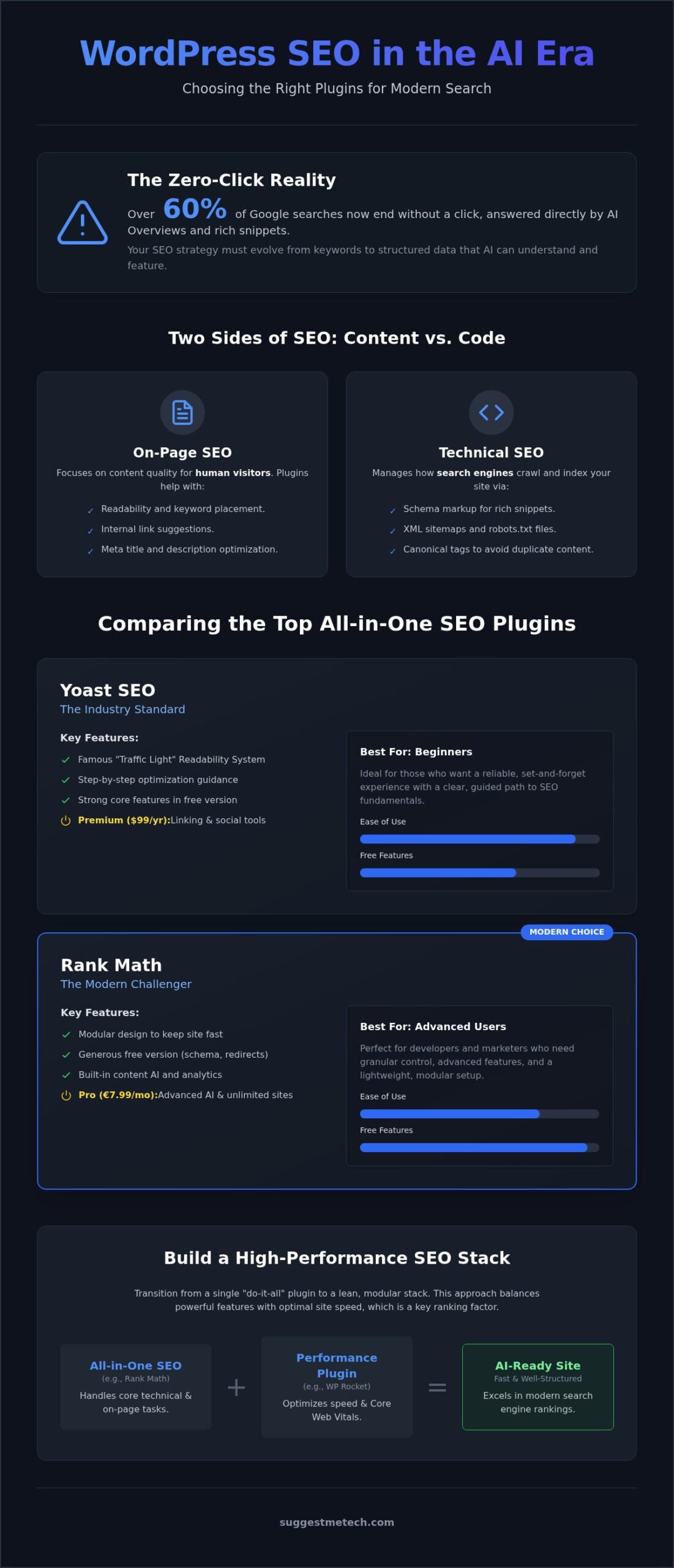
Over 60% of Google searches now end without a single click, as AI Overviews and rich snippets answer user queries directly on the search results page. You likely feel the pressure to adapt your site for this new era without bloating your dashboard with heavy, outdated tools. Finding the best wordpress plugins for seo isn’t just about keywords anymore; it’s about structuring your data so AI agents can actually find and feature your content.
We understand the fear of site slowdown and the confusion surrounding technical terms like Schema or XML sitemaps. This guide simplifies your decision by providing a vetted list of tools that balance high performance with modern search requirements. You’ll learn which plugins fit your specific budget and how to build a search-friendly website that excels in the 2026 digital landscape.
Quick Answer
The best wordpress plugins for seo in 2026 require a modular approach. Rank Math and Yoast SEO remain the top all-in-one choices for managing schema and technical metadata. For optimal rankings, pair these with WP Rocket for performance. This combination ensures your site is fast, structured for AI search, and easy to navigate.
Key Takeaways
- Transition from a single “do-it-all” plugin to a modular stack to ensure your site remains fast while meeting modern AI search requirements.
- Compare the top all-in-one solutions to identify the best wordpress plugins for seo that fit your specific technical skill level and business goals.
- Learn how specialized tools for Schema markup and automated internal linking provide a competitive edge in zero-click search results.
- Build a high-performance SEO stack that balances powerful automation with site speed to avoid common performance pitfalls.
What are WordPress SEO Plugins and Why Do You Need Them?
WordPress SEO plugins are software extensions that bridge the gap between your content and the complex requirements of search engines. These tools automate essential technical tasks like generating XML sitemaps, managing metadata, and controlling indexing. In 2026, they are critical for preparing your site for AI crawlers and generative search results.
The WordPress content management system powers a massive portion of the internet; however, it requires additional configuration to reach its full search potential. Even if you invest in the best web hosting, you still need a layer of software to handle page-specific SEO logic. Modern SEO isn’t just about repeating keywords; in 2026, the best wordpress plugins for seo focus on AI-readiness and user intent.
The Difference Between On-Page and Technical SEO Plugins
On-page SEO tools focus on the content your visitors actually see. They provide feedback on keyword placement, internal link suggestions, and overall readability. These tools ensure your articles are helpful and easy for humans to digest. They act as a real-time editor, guiding you to improve the quality of your writing as you create it.
Technical SEO tools work behind the scenes to manage how search engines interact with your entire site. You need a combination of both to rank well in modern search. Technical tools ensure search engines can find and understand your site, while on-page tools ensure your content provides high value. Key technical elements include:
- Schema markup for rich snippets and AI answers.
- Robots.txt file management to guide crawlers.
- Canonical tags to prevent duplicate content issues.
- XML sitemaps for faster indexing of new pages.
How SEO Plugins Impact Site Performance
A common myth is that adding several plugins will inevitably slow down your website. While poorly coded tools can cause bloat, the best wordpress plugins for seo are designed for efficiency. Performance is vital because search engines use Core Web Vitals as a ranking signal. The key is to choose lightweight options that only execute code when necessary.
If a bloated plugin increases your Time to First Byte (TTFB), your rankings can suffer regardless of how good your content is. For example, a heavy plugin might load massive JavaScript files on every page, even where they aren’t used. This delay frustrates users and impacts your load speeds. We recommend choosing modular plugins where you can toggle off features you don’t need to keep your site lean and fast.
The Big Three: Comparing the Best All-in-One SEO Plugins
Choosing the right foundation is the first step in any optimization strategy. While the official WordPress SEO documentation provides the basics, most site owners rely on all-in-one solutions to handle the heavy lifting. These “Big Three” options dominate the market by offering comprehensive suites that cover everything from meta tags to AI-driven content suggestions.
When evaluating the best wordpress plugins for seo, you must weigh user interface simplicity against technical depth. Beginners often prioritize ease of use, while professionals require granular control over schema and indexing. Your choice should align with your specific blogging goals and technical comfort level.
Yoast SEO: The Industry Standard
Yoast is the veteran of the group. Its famous “traffic light” system tells you exactly how to improve your content’s readability and keyword usage. This immediate feedback helps writers maintain high standards without needing deep SEO knowledge. It’s incredibly reliable, making it the top choice for those who want a guided, set-and-forget experience.
However, Yoast can feel restrictive for advanced users. Many powerful features, such as internal link suggestions and social media previews, are locked behind the $99 per year Premium version. If you are a beginner looking for a proven path, Yoast offers the most stable environment for growth.
Rank Math: The Modern Challenger
Rank Math has quickly gained a massive following by offering a highly modular design. You can toggle specific features on or off, ensuring your site remains fast and uncluttered. The free version is exceptionally generous, providing features like redirection management and basic schema that competitors often charge for.
For those ready to invest, Rank Math Pro costs €7.99 per month and includes advanced AI tools and support for unlimited personal sites. The sheer number of options can be overwhelming for absolute novices, but it’s the best option for power users who want maximum control for a lower price. For more hands-on evaluations of the latest marketing tools, you can explore our full library at SuggestMeTech.
All in One SEO (AIOSEO): Practical and Powerful
All in One SEO focuses on practicality and speed. It includes a smart setup wizard that configures your site’s essential settings in minutes. Business owners often prefer this option because of its robust local SEO modules and deep integration with WooCommerce, which helps products rank better in search results.
The Basic plan starts at $49.60 per year for a single site, while the Pro plan for ten sites costs $199.50 per year. Some users find the interface a bit cluttered with upsells in the free version, but the premium features are powerful. It’s the ideal choice for small business owners who need technical results without a steep learning curve.
Specialized Tools for Technical SEO and Performance
While all-in-one solutions provide a strong foundation, they often lack the granular control required for highly competitive niches. Relying solely on a single tool can leave gaps in your technical strategy, especially regarding advanced data structures or server-level performance. The best wordpress plugins for seo often work best as part of a modular stack where specialized tools handle specific, high-impact tasks like redirections or deep image compression.
Using dedicated plugins for Schema or performance optimization allows you to fine-tune your site’s interaction with search engines without bloating your content editor. This approach follows the principles found in the definitive guide to WordPress SEO, which highlights that technical excellence is a prerequisite for content visibility. By separating these concerns, you ensure that each part of your SEO strategy is handled by a tool specifically built for that purpose.
Schema and Rich Snippets Plugins
Schema markup is a standardized code that helps search engines understand the context of your content, enabling rich snippets like star ratings and price displays in 2026 search results. While basic plugins offer generic schema, dedicated tools like Schema Pro, which costs $69 per year, provide more than 20 different schema types. This level of detail is essential for winning featured snippets and outshining competitors who rely on basic settings.
Rich snippets directly improve your Click-Through Rate (CTR) by providing visual cues that build trust with users before they even click. When you choose a specialized schema tool, you should consider your content type. A review site needs specific markup for pros and cons, while a local business requires geographic and contact data. Dedicated blocks and plugins ensure this code is valid and stays up to date with the latest search engine requirements.
Speed and Image Optimization
Site speed is a confirmed ranking factor, and performance plugins are the most effective way to address it. Tools like WP Rocket handle complex tasks like file minification and database cleanup, which are often too advanced for standard SEO plugins. These optimizations are critical for passing Google’s Core Web Vitals, a set of metrics that measure the real-world user experience on your site.
Image optimization is another vital component of a fast website. Using tools like Imagify to convert images to the WebP format and enabling lazy loading can drastically reduce page weight. Lazy loading ensures that images only load as they enter the visitor’s viewport, which is especially important for mobile users on slower connections. These technical improvements keep your site lean and ensure that your SEO efforts aren’t undermined by poor performance.
The AI Revolution: Content Assistants and Link Automation
AI has moved from a novelty to a core requirement for high-volume publishers. In 2026, it is standard for the best wordpress plugins for seo to offer integrated assistants that analyze semantic search intent. These tools help you draft outlines and identify specific questions users are asking in community discussions and niche forums. This ensures your content is relevant before you begin the drafting process.
While automation saves hours of manual research, you must maintain a human editorial voice to build trust. AI serves as an efficient research partner but cannot replace your unique expertise. This balance ensures your content stays authoritative while benefiting from machine-driven data analysis. Using AI for repetitive tasks allows you to focus on the creative strategy that drives conversions.
AI Content Optimization Tools
Selecting the best wordpress plugins for seo now depends heavily on their AI integration. Modern assistants provide keyword suggestions based on what is currently ranking in generative search results. They offer real-time scoring to help you hit the right balance of topics and entities. You can choose between built-in options like Rank Math’s Content AI or connect your site to external platforms like SurferSEO and Frase.
- Semantic keyword suggestions based on real-time intent.
- Real-time SEO scoring to track topic depth.
- Competitor analysis to find missing subtopics.
- Automated meta description generation for efficiency.
External tools often provide deeper competitive data but require a separate subscription. Built-in plugin AI is more convenient for quick edits directly in the WordPress editor. Both approaches help you structure your data for better performance in the new search landscape where AI agents prioritize comprehensive, well-structured information.
Automating Internal Links
Internal linking is a powerful tactic for passing authority between your pages. In 2026, tools like Link Whisper use machine learning to suggest relevant internal links as you write. This automation ensures your new articles are instantly connected to your existing content library, aiding both user navigation and search discovery. It eliminates the manual labor of searching for old posts to link to your new content.
- Automated anchor text discovery based on site context.
- Bulk link editing to fix orphan pages.
- Click-through tracking for user navigation paths.
These plugins find anchor text by scanning your site for related phrases. To keep your links natural, you should always review automated suggestions before applying them. This human-in-the-loop approach prevents awkward phrasing and ensures a better experience for your readers. For more deep dives into the latest search technology and expert reviews, check out our full guides at SuggestMeTech.
Building Your SEO Stack: How to Choose the Right Combination
Building the best wordpress plugins for seo stack involves selecting tools that complement each other rather than fighting for resources. A common mistake is installing multiple all-in-one plugins, which leads to code conflicts and redundant features. Instead, you should adopt a modular approach where each tool handles a distinct task like metadata, caching, or schema.
You must also consider the “less is more” rule for both security and speed. Every plugin you install is a potential entry point for vulnerabilities. By keeping your plugin count low, you reduce the surface area for attacks and ensure your server doesn’t have to process unnecessary scripts. This lean approach directly supports your performance goals and keeps your site responsive for mobile users.
Start by auditing your current setup to remove overlaps. If you notice that your primary SEO plugin and a separate performance tool are both trying to minify CSS, choose the one that does it better and disable the feature in the other. This prevents “bloat” and ensures your site stays within the healthy range for Google’s Core Web Vitals. Regular audits help you maintain a clean database and a faster user experience.
Recommended Stack for Bloggers
Individual creators should focus on a balance between ease of use and growth features. Rank Math (Free) or Yoast SEO provide excellent on-page guidance for drafting content and managing basic technical settings. These tools offer the best wordpress plugins for seo experience for those who need high-quality results without a massive budget.
For speed, LiteSpeed Cache is a top-tier free choice if your host supports it, while WP Rocket is the premium standard for those who want a simpler setup. Adding a tool like Link Whisper will automate your internal linking process. This is vital for helping search engines index your new posts quickly and keeping readers on your site longer.
Recommended Stack for Small Businesses
Small businesses require specialized features to capture local traffic and ensure high conversion rates. AIOSEO (Pro) is highly recommended for its advanced Local SEO modules, which help you appear in map packs and local directories. For performance, NitroPack offers an all-in-one speed solution that handles everything from CDN delivery to image optimization in a single package.
While you focus on website security, don’t ignore the safety of your local work environment. A reliable antivirus like Bitdefender is a necessary investment for any business owner to protect sensitive data. Securing your digital workspace is just as critical as choosing the right hardware, which you can explore in our guide to the best laptops of 2026.
Future-Proof Your Search Strategy
Success in 2026 requires moving beyond basic keyword stuffing toward a modular, performance-first approach. You now have the framework to choose between the reliability of Yoast, the flexibility of Rank Math, or the business focus of AIOSEO. By pairing these with specialized tools for AI content and site speed, you create a website that search engines can easily understand and trust.
Finding the best wordpress plugins for seo is only the first step. The real growth happens when you apply these tools to a consistent content plan. SuggestMeTech is trusted by tech enthusiasts because we prioritize practical, real-world testing and unbiased editorial standards. We’re here to ensure you always have the right tools for your specific needs and technical goals.
Ready to see these recommendations in action? Check out our guide on how to start a blog to put these SEO tools into practice! We’re excited to see your site climb the rankings and reach its full potential in the coming year.
Frequently Asked Questions
What is the best free SEO plugin for WordPress in 2026?
Rank Math is widely considered the best free option in 2026 due to its generous feature set. It includes schema markup and redirection management that competitors often charge for. While Yoast SEO is a solid contender, many of its advanced optimization tools are locked behind a paywall. Rank Math’s modular design allows you to enable only the features you need, keeping your site fast and efficient.
Can I use two SEO plugins at the same time?
You should never use two all-in-one SEO plugins simultaneously as they will conflict with each other. This leads to duplicate meta tags and sitemaps, which confuses search engines and slows down your site. However, you can combine a core SEO plugin with specialized tools for image optimization or caching. Always ensure your primary plugin’s overlapping features are disabled to maintain a clean and effective SEO stack.
Do SEO plugins actually help you rank higher?
SEO plugins don’t automatically grant higher rankings, but they provide the technical infrastructure and guidance needed to succeed. They help you optimize metadata, generate sitemaps, and structure data for AI search results. Without these tools, search engines may struggle to crawl and understand your content. The best wordpress plugins for seo act as a roadmap, ensuring your high-quality content is technically ready to compete in 2026.
What is the difference between Yoast and Rank Math?
The primary difference lies in the user interface and feature distribution. Yoast SEO uses a simple traffic-light system that is ideal for beginners who want guided content optimization. Rank Math offers a more modular, data-heavy interface with more features available in its free version, such as built-in AI tools. Yoast focuses on reliability and simplicity, while Rank Math targets power users who want granular control over their technical SEO.
Do I need an SEO plugin if I have good web hosting?
Yes, because hosting and SEO plugins serve different purposes. Good web hosting provides the server-side speed and security your site needs to function. An SEO plugin handles the content-specific data that search engines require, such as meta descriptions and schema markup. Even the fastest server won’t help you rank if your pages lack the proper technical structure that a plugin provides for modern search discovery.
How many plugins are too many for WordPress SEO?
There isn’t a hard number, but you should aim for a “less is more” approach to avoid site bloat. Generally, one all-in-one SEO plugin paired with two or three specialized tools for performance and schema is sufficient. Having too many plugins increases the risk of code conflicts and security vulnerabilities. Focus on quality over quantity by choosing lightweight, well-coded tools that offer multiple functionalities in a single package.
Does WordPress have built-in SEO features?
WordPress has basic SEO foundations, such as customizable permalinks and the ability to set alt text for images, but it lacks advanced technical tools. It does not natively generate XML sitemaps or allow for granular control over social media previews and schema markup. To compete for visibility in 2026, you must extend the core WordPress functionality with specialized plugins that handle these complex search engine requirements.
Is Yoast Premium worth the money?
Yoast Premium is worth the investment if you manage a content-heavy site and need advanced internal linking suggestions or redirection management. It also includes 24/7 support and the ability to optimize for multiple keywords per page. For small personal blogs, the free version is usually enough. However, businesses looking for a guided experience with comprehensive technical support will find the $99 annual fee provides significant value.

