
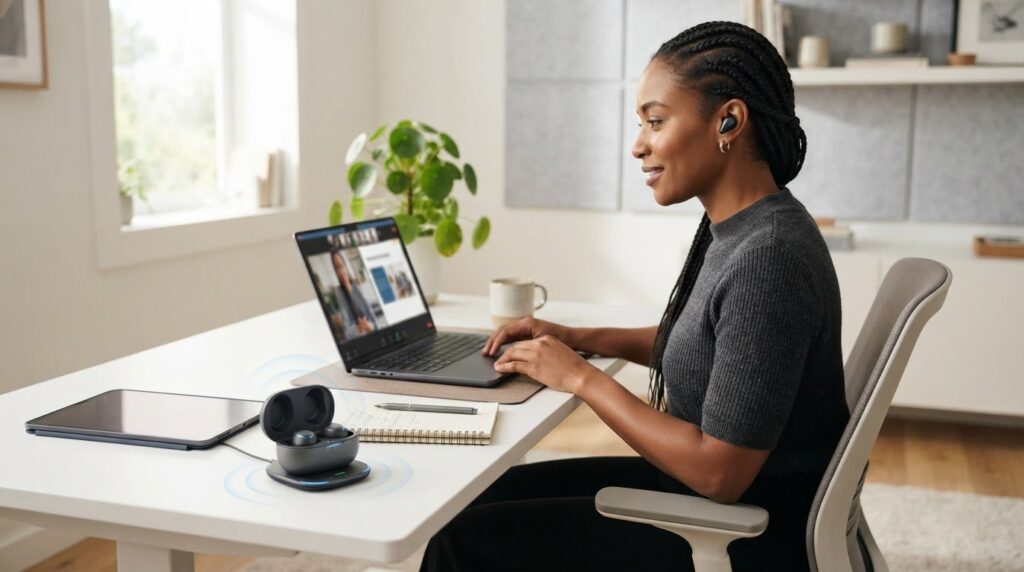
The earbuds that block the most noise may not be the best wireless earbuds for working from home. Noise cancellation can make it easier to focus, but it doesn’t necessarily make your voice clearer on a call or keep earbuds comfortable through a long workday. The right choice depends on your meetings, your room, and how you like to listen.
Clear calls, fewer distractions, and a comfortable fit matter as much as music quality. This guide compares practical workday features, including microphone performance, noise cancellation, open-ear designs, battery life, and device switching. Use the criteria and examples to narrow your options based on how you work, rather than relying on feature labels alone.
Quick Answer
The best wireless earbuds for working from home balance clear call audio, a comfortable fit, and features suited to your room and devices. Prioritize microphone performance if you speak in meetings, noise control if background sounds distract you, and fit and battery life if you wear earbuds for long stretches. No single pair suits every workday.
Key Takeaways
Use these points to focus your comparison on the parts of the workday that matter most.
- Match earbuds to your routine: frequent meetings call for clear microphone pickup, while noisy surroundings may make noise cancellation a priority.
- Noise cancellation helps reduce what you hear; it doesn’t necessarily make your voice clearer to people on calls.
- Compare options by work scenario, trade-offs, and comfort needs instead of looking for one universal winner.
- Consider your room noise, meeting frequency, connected devices, and typical wear time before choosing a pair.
- Separate verified specifications from editorial assessments, and choose features you expect to use.
What makes wireless earbuds suitable for working from home?
Wireless earbuds suit home-office work when they support clear calls, help manage distractions, stay comfortable during regular wear, and make it easy to listen between tasks. The best wireless earbuds for working from home balance these needs with your room, devices, and routine rather than relying on one standout feature.
Think of earbuds as both a work tool and a way to listen. Microphone pickup affects how clearly colleagues hear you; noise isolation and active noise cancellation affect what you hear. Fit matters during longer sessions, while accessible controls can help you pause a meeting or switch to audio during a break.
Clear calls, suitable focus, lasting comfort, and convenient listening breaks are the four core criteria for choosing work-from-home earbuds.
Earbuds or over-ear headphones for a home office?
Earbuds sit in or just outside the ear, while over-ear headphones cover the ears with larger cushions. That difference affects portability and how each style feels over time, but neither is automatically better. For background on headset designs and components, see Understanding Headsets and Their Evolution.
Compact earbuds are easy to store and can suit a small desk setup or calls taken between rooms. Over-ear headphones take up more space but may feel more substantial. Comfort varies: some people dislike pressure in the ear canal, while others find a headband or ear cushions tiring. A dedicated guide to over-ear headphones can help you compare the two styles.
Which work tasks should guide your choice?
Start with the tasks that take up most of your day. If you speak in meetings often, reliable microphone performance may matter more than extra music features. If calls are occasional, comfort and easy-to-use controls may be more useful.
- Frequent video meetings: Prioritize microphone clarity and a stable connection, especially if you speak often.
- Deep-focus sessions: Consider how well the earbuds reduce distractions for you. Noise cancellation can help with steady background sounds, but nearby voices may remain noticeable.
- Casual listening: Look for a comfortable fit and controls that make it easy to move between work audio and a listening break.
Your room changes the trade-offs. In a shared living space, nearby voices and household activity can make call clarity and distraction management especially important. In a quiet private room, you may need less isolation and can put more weight on long-session comfort. Use these differences to turn a long feature list into a shortlist that fits your workday.
Which earbud features matter most for calls and concentration?
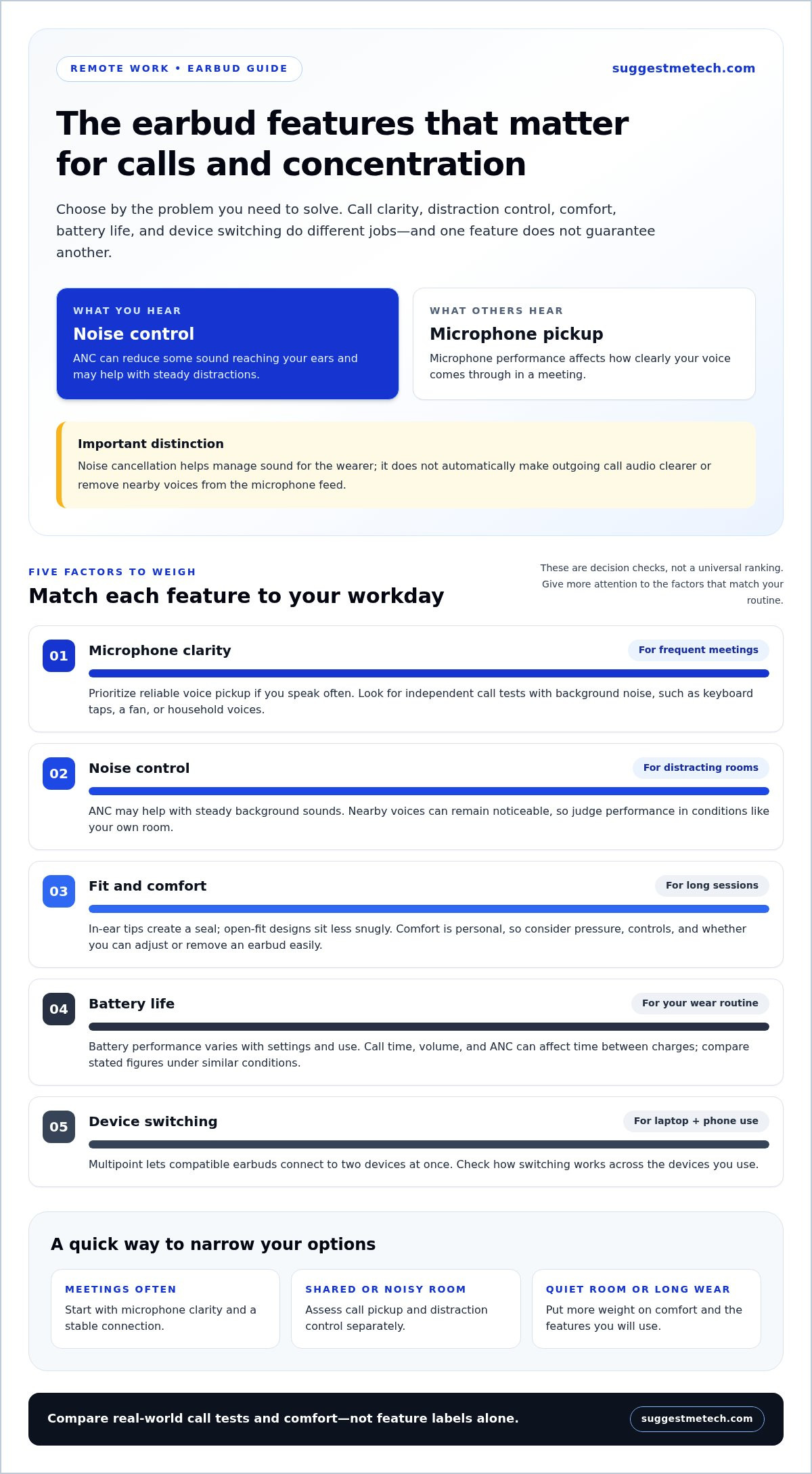
The most useful earbud features for home-office work solve a specific problem: microphone pickup for calls, noise control for concentration, a comfortable fit for long sessions, enough battery for your routine, and convenient device switching. Feature labels alone don’t show how well a pair will work in your room.
Separate what the earbuds do for you from what they do for people listening to you. Noise cancellation affects sound reaching your ears; microphone processing affects how your voice and nearby sounds are transmitted on a call. These functions can work independently.
- Microphone pickup: Affects how clearly your voice comes through to meeting participants.
- Active noise cancellation: Reduces some sound reaching your ears, which may help with steady distractions.
- Transparency mode: Uses microphones to let more surrounding sound through, useful when you need to hear someone nearby.
- Multipoint connection: Allows compatible earbuds to connect to two devices, such as a laptop and phone, at the same time.
Microphone quality, noise cancellation, and transparency modes
For calls, microphone clarity matters more than a long list of audio enhancements. A quiet room may be forgiving, but keyboard taps, a running fan, or household voices can compete with speech. Independent call tests that include background noise are more informative than a feature name such as “AI noise reduction.”
Active noise cancellation, or ANC, targets sound the wearer hears. It doesn’t automatically improve outgoing microphone audio. ANC can reduce distractions for you, but it doesn’t guarantee nearby voices will disappear from your microphone feed. Look for independent call samples or tests showing how a model handles voices and everyday household noise.
Comfort, battery life, and device switching
Fit is personal. In-ear tips create a seal inside the ear canal, while open-fit designs sit less snugly. Either may feel better depending on your ears and sensitivity to pressure. For repeated meetings, consider whether the controls are easy to use and whether you can adjust or remove one earbud comfortably during a break.
Battery life depends on settings and use. Noise cancellation, call time, and volume can affect how long earbuds last between charges, so compare stated figures under similar conditions rather than assuming a headline estimate will cover a full workday. Multipoint, where supported, can make it easier to move between a laptop meeting and a phone call. Check how the feature handles switching across your devices.
Use these practical checks to assess product specifications. Explore more technology reviews and comparison guides to build a shortlist around features that matter in everyday use.
How do the main wireless earbud options compare for remote work?
Wireless earbuds for remote work are easier to compare by use case than by feature count. Call-focused, noise-control-focused, comfort-focused, and budget-conscious options each involve trade-offs. The right balance depends on your meeting schedule, room, fit preferences, and connected devices.
| Work scenario | Strengths to prioritize | Trade-offs | Best-fit user |
|---|---|---|---|
| Frequent meetings | Clear microphone pickup supported by independent call assessments | Call performance can vary with background noise and the meeting device | Someone who spends much of the workday speaking on video calls |
| Noisy surroundings | Effective noise control for the wearer, with adjustable listening modes | ANC may not remove nearby voices or improve outgoing call audio | Someone working near household activity or steady background sounds |
| Long listening sessions | Comfortable fit options, manageable controls, and practical battery performance | Fit is personal, and battery life changes with settings and use | Someone who wears earbuds across work blocks and listening breaks |
| Budget-conscious use | Core call, connection, and comfort features without paying for extras you won’t use | May involve fewer convenience features or less detailed independent testing | Someone with occasional calls and straightforward work needs |
Which earbud category suits your workday?
For frequent meetings, prioritize models with credible microphone assessments, ideally tests that include speech with background sound. A manufacturer’s noise-reduction label isn’t proof that colleagues will hear you clearly. If concentration is your main challenge, compare how well the earbuds reduce sounds reaching your ears, while keeping ANC’s limits around voices in mind.
For long listening sessions, look for documented fit choices and comfort observations rather than assuming a small design will suit everyone. A call-heavy worker may prefer dependable voice pickup over extra listening features; someone with fewer meetings may value fit and simple controls more.
When should you consider over-ear headphones instead?
Some workers prefer over-ear headphones for extended desk sessions because the earcups cover the ears and can feel more substantial than earbuds. That style may suit a fixed workspace, while compact earbuds are easier to carry between rooms. Comfort and isolation depend on the person, room, and headphone design, so compare them with your own wearing preferences in mind.
For broader form-factor recommendations, the site’s headphones guide can help you weigh over-ear designs against compact earbuds. Treat model-specific strengths as editorial assessments, not guarantees. Product specifications and independent call evidence provide useful context, but results can vary with devices and conditions.
How can you choose earbuds for your room, routine, and devices?
Choose work-from-home earbuds by starting with your actual routine, not a feature list. Note your room noise, meeting frequency, devices, and typical wear time, then use those details to set priorities. This makes it easier to compare relevant options and set aside features that won’t improve your workday.
A practical checklist before comparing models
Before browsing models, make a quick record of a typical workday. Note whether you share your workspace, how often you take calls, and whether you need to hear people or household sounds around you. Set your comfort priorities before optional listening features sway the decision.
- Map your work pattern: Note how often you join meetings and whether you speak throughout them or mostly listen.
- Check your devices: List the laptop, phone, or other devices you use, and whether you need earbuds to connect to more than one.
- Describe the room: Identify steady sounds, nearby conversations, shared-room use, and whether you need to hear someone calling your name.
- Set fit priorities: Decide whether you prefer a snug in-ear seal or a less enclosed feel, and how long you usually wear earbuds between breaks.
- Rank the essentials: Choose the two or three factors that matter most, such as call clarity, focus, comfort, or easy device switching.
The same features won’t suit every workspace. Someone taking frequent calls from a shared kitchen may prioritize dependable voice pickup and a way to stay aware of nearby activity. A worker in a quiet, private room who mostly listens to recorded material may care more about long-session comfort and straightforward controls.
How to assess reviews and product claims
Use reviews to see whether a feature translates into a useful work experience. For microphone performance, prioritize independent call assessments that describe the conditions, such as whether speech was recorded in a quiet room or with background noise. A label like “AI noise reduction” describes a claimed feature, but doesn’t show by itself how voices sound to meeting participants.
Keep manufacturer specifications separate from reviewer observations. Specifications tell you what the maker states about connectivity or supported modes; reviewers describe what they heard or experienced in particular conditions. Comfort is especially personal, so treat someone else’s fit impression as context, not a promise that the earbuds will feel the same to you.
Compare only models that meet your essential needs, then weigh their documented trade-offs against your checklist. Explore additional technology guides for more practical product comparisons.
How to make a confident final choice for working from home
A confident choice balances call clarity, comfort, room conditions, and compatibility with your work devices. Start with the issue that most affects your day, then compare models that address it. The best wireless earbuds for working from home depend on your routine, and no single feature or model suits every home office.
Match the final pick to your work style
Choose by priority, not by the longest feature list. Independent call tests can support a call-focused pick, while documented fit observations can help identify comfort-led options. If testing isn’t available, treat advertised features as specifications, not proof of performance.
- Meeting-heavy schedule: Favor options with independent microphone assessments in conditions similar to your room and calls. Check what was tested, since quiet-room results may not predict performance around household noise.
- Long listening sessions: Look for documented fit options and reviewer observations about extended wear. Use them to guide a shortlist, since comfort is personal.
- Distracting environment: Consider noise-control features if reducing sound reaching your ears is a priority. They may support concentration, but don’t guarantee nearby voices will be removed from your microphone audio.
For someone who takes meetings between household tasks, call performance and device compatibility may matter more than extra listening modes. A worker in a quiet room who mostly listens may reasonably put comfort first. These are conditional priorities, not universal rankings.
What to check before buying
Once you have a shortlist, compare current product details with your checklist. Specifications describe stated capabilities; editorial observations describe how a reviewer experienced a model in particular conditions. Neither guarantees that it will perform or fit the same way for you.
- Confirm current specifications and device compatibility on the seller’s listing.
- Review the seller’s return terms before purchase, particularly if fit is a concern.
- Check which fit options and controls are included, and whether they suit your ears and routine.
- Look for independent call tests with clearly described conditions, and note any limits in the testing.
Compare your final options against the same priorities rather than switching criteria for each model. If two pairs meet your essential needs, comfort, controls, and device use may be more useful tie-breakers than features you’re unlikely to use.
Explore SuggestMeTech’s practical technology guides as you compare options. If you’ve used earbuds for home-office calls, share which features mattered most in your workday; reader experiences can add useful context to future comparisons.
Make your next choice work for your workday
Before choosing, write down what you want to improve most about your current setup. Use that priority to judge the options instead of letting a long feature list make the decision for you. The best wireless earbuds for working from home fit your routine, not simply the ones with the most advertised capabilities.
After choosing a pair, notice how it performs during the situations that matter to you: meetings, focused work, and breaks. That experience can help you decide whether the fit and features suit your needs, and give other readers useful perspective.
SuggestMeTech’s editorial comparisons help readers assess technology choices against everyday needs. Explore practical technology guides from SuggestMeTech to compare your options.
Frequently Asked Questions
These answers address common setup questions that come up when narrowing down earbuds for remote work. Connection behavior and everyday results can vary by model and device.
Can wireless earbuds connect to a laptop and phone at the same time?
Some wireless earbuds can connect to a laptop and phone simultaneously, but only if the model supports multipoint. Being paired with several devices means the earbuds remember them; it doesn’t necessarily mean they maintain two active connections at once. Check the documented connection behavior, including how calls and audio switching work. Your laptop, phone, and operating system can affect the experience.
Is active noise cancellation useful when working from home?
Active noise cancellation can reduce some sounds reaching your ears, which may help with steady noise such as a fan or appliance. Its effectiveness depends on the sound, fit, and earbud model; household speech can be harder to reduce. ANC also doesn’t necessarily remove voices from the microphone feed. Consider whether blocking sound would make it harder to notice family members or deliveries.
How can I make my voice clearer on calls with wireless earbuds?
Check independent microphone tests, wear the earbuds as intended, and choose a quieter spot if one is available. Before an important meeting, record a short test in the meeting software you use, then listen for muffling or competing room noise. Microphone processing, fit, and room acoustics all affect the result, so a feature label alone doesn’t establish call quality. The best wireless earbuds for working from home can still sound different across devices.
What happens if wireless earbuds run out of battery during a meeting?
A depleted battery can cut off earbud audio, and whether the earbuds can be used while charging depends on the model. Check the manufacturer’s battery and charging-case details rather than relying on a general estimate, since settings and usage affect runtime. For an important call, keep a fallback ready, such as switching to your computer’s audio, and build charging into your routine between meetings.
Can wireless earbuds cause ear fatigue during a full workday?
They can feel tiring for some listeners, but comfort depends on fit, ear shape, tip material, and how long you wear them. If pressure builds, take the earbuds out for a break or adjust the fit; stop using them if discomfort continues. Someone who finds in-ear designs uncomfortable may prefer over-ear headphones. A short wear test during ordinary tasks can help reveal fit issues before a long meeting.
Why do wireless earbuds sometimes lag during video calls?
Bluetooth audio delay can vary with the earbuds, computer, operating system, and meeting app. A small delay may make speech seem slightly out of sync with a person’s image, while dropouts mean audio cuts out or disconnects. These are different problems and may need different troubleshooting. Test a real call on your work devices before relying on earbuds for frequent meetings, since results can vary between setups.

