
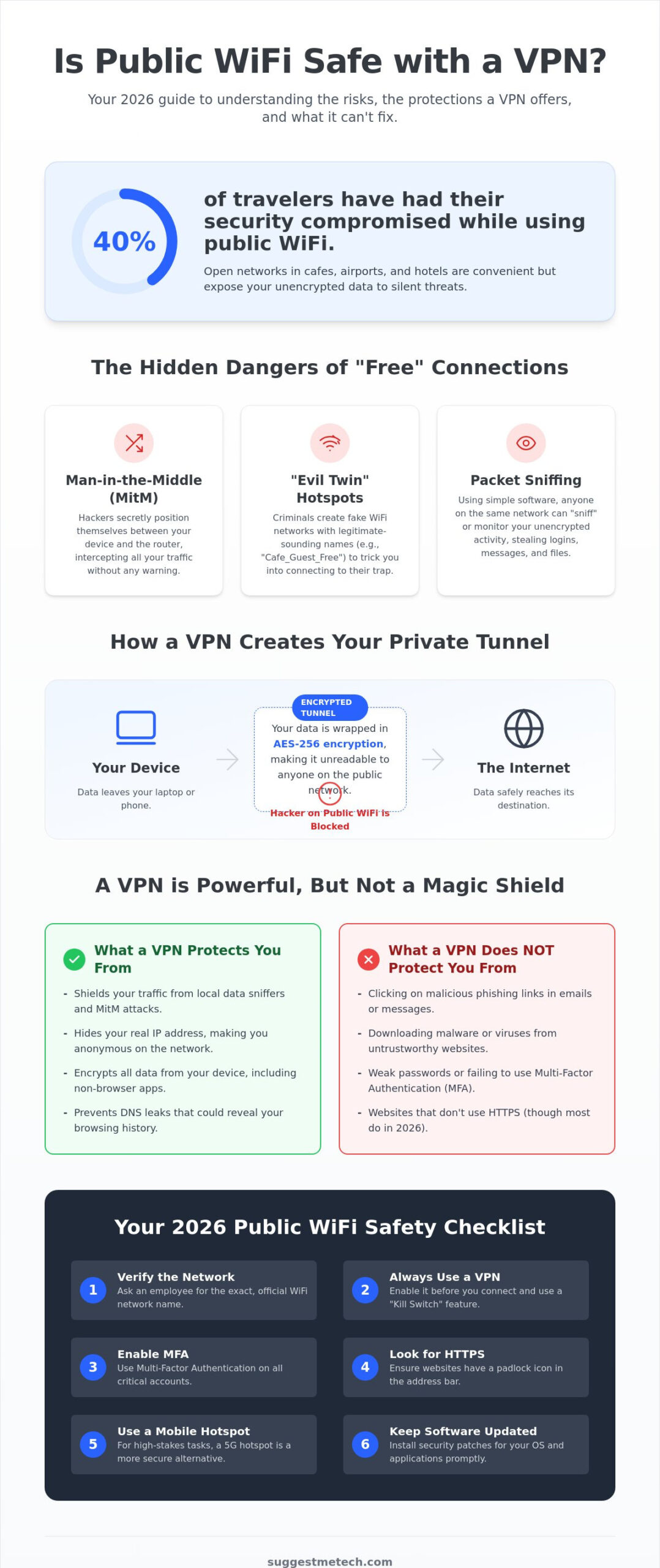
Did you know that 40% of travelers have had their security compromised while using public WiFi? It’s a stressful reality for anyone trying to stay productive on the move. We’ve all been there, sitting in a crowded terminal or coffee shop, wondering if that “Free_Guest_WiFi” is actually a trap. You’ve likely asked yourself: is public wifi safe with a vpn in 2026? While a VPN is a powerful tool, it isn’t a magic shield against every digital threat.
We’ll show you exactly how a VPN protects your data and highlight the critical security gaps it can’t fill. You’ll learn why WPA3 adoption remains low at only 10% and how to spot “evil twin” networks before they spot you. We’re providing a clear, actionable roadmap so you can connect with total confidence, regardless of where you’re working. By understanding the balance between encryption and user habits, you can stop worrying about hackers and focus on your tasks, such as using a Free Notes App to conveniently convert spoken words into text while working remotely.
Key Takeaways
- Learn how to create a secure, encrypted tunnel using AES-256 standards to shield your traffic from local data sniffers.
- Understand exactly why a VPN is not a total solution for phishing links or malicious software downloads.
- Find out if is public wifi safe with a vpn for high-stakes tasks like online banking and professional file sharing.
- Evaluate the security advantages of using a dedicated 5G mobile hotspot over a standard public network connection.
- Master a simple safety checklist to verify network authenticity and use Multi-Factor Authentication effectively.
Understanding the Risks: Why Public WiFi is Dangerous
Public WiFi is everywhere. By the end of 2022, there were 549 million hotspots globally, and that number has only climbed. While these networks offer convenience for remote work, they are often open playgrounds for cybercriminals. Most public connections lack encryption between your device and the router. This allows anyone with basic technical knowledge to “sniff” the data moving through the air. It’s a silent threat that most users don’t notice until it’s too late.
One of the most common threats is the Man-in-the-Middle (MitM) attack. A hacker positions themselves between your device and the network connection. They act as a silent relay, reading your traffic before passing it along. You won’t see a warning, but they’ll see every site you visit. Then there’s the “Evil Twin” attack. A hacker sets up a fake hotspot with a name like “Cafe_Guest_Free” to trick you into connecting. Once you’re in, they control the entire gateway. They can see your keystrokes and redirect you to fake login pages.
Many people ask, is public wifi safe with a vpn? While we’ll explore the technical protections later, understanding the depth of these risks is the first step toward security. For example, session hijacking allows attackers to steal your browser cookies. These small files contain your login status. If a hacker grabs them, they can access your accounts without ever needing your password or two-factor code.
The Myth of the “Secure” Public Network
Don’t let a password prompt fool you. Even if a hotel or cafe provides a login code, the network is still functionally public. Everyone else at that location has the same password. This means your device is visible to others on the same local network. Amateur hackers now use free, accessible packet sniffing software to monitor shared traffic. If your device isn’t properly shielded, you’re broadcasting your activity to the entire room. Shared network visibility is a massive vulnerability that most people ignore.
Data at Risk: What Can Hackers Actually See?
If you aren’t using a How a VPN Protects Your Data, your digital life is an open book. Hackers can intercept unencrypted login credentials, personal emails, and private messages. They can also track your browsing history to build a profile for future social engineering attacks. The stakes are even higher for professionals. Accessing sensitive business documents on an unsecured laptop can lead to corporate data breaches. When you consider that 40% of travelers have already faced security compromises on these networks, the danger is a daily reality for anyone working remotely.
How a VPN Protects Your Data on Open Networks
If you’re asking is public wifi safe with a vpn, you need to understand how the “tunnel” actually works. A Virtual Private Network takes your data and wraps it in a layer of strong encryption before it ever touches the public airwaves. In 2026, the gold standard remains AES-256 encryption. It’s the same level of security used by government agencies to protect classified information. By the time a “sniffer” on the network catches your data, it looks like gibberish that would take billions of years to decode.
Your VPN also performs a clever trick called IP masking. Normally, the public router sees your device’s unique identifier and physical location. When you use a VPN, the router only sees the IP address of the VPN server. This makes you effectively invisible to anyone trying to map the devices on a local network. The VPN server acts as a trusted middleman. It receives your requests and sends them out to the wider internet only after they’ve left the risky public environment. Most experts agree that is public wifi safe with a vpn depends on the strength of your server connection and masking capabilities.
The Anatomy of a Secure VPN Tunnel
Encryption is just one part of the puzzle. Encapsulation is what really keeps you hidden. It wraps your data packets so the router can’t even see the destination URL you’re visiting. For those working in cafes or airports, a “Kill Switch” is a non-negotiable feature. If your public WiFi connection flickers, the Kill Switch immediately cuts your internet access. This prevents your device from defaulting back to an unencrypted connection and leaking data. In 2026, we recommend using the WireGuard protocol for its incredible speed and efficiency during remote work.
Encryption vs. HTTPS: Do You Need Both?
You might think HTTPS is enough. While HTTPS secures the specific website you’re visiting, it doesn’t protect your entire device. Many background apps, email clients, and system updates don’t always use standard web encryption. A VPN fills this gap by securing every single bit of data leaving your machine. It also prevents “DNS leaks,” where your browser accidentally asks the public router for a website’s location instead of the VPN. This keeps your browsing history private from the network owner. To make sure you’re using the best tools for the job, consider browsing our latest tech guides to find a provider that fits your specific workflow.
The False Sense of Security: What a VPN Cannot Fix
Encryption is a vital layer of defense, but it isn’t a silver bullet. If you’re wondering, “is public wifi safe with a vpn?” the answer is a qualified yes. It protects your data while it travels from your device to the server. However, it can’t protect you from your own actions or the websites you choose to visit. Think of a VPN as a high-security armored truck. It gets your valuables from point A to point B safely. But if you open the armored door and hand your wallet to a stranger at the destination, the armor didn’t matter.
One major gap involves tracking by services where you’re already logged in. If you’re signed into Google, Facebook, or Amazon, they still know exactly who you are. They don’t need your IP address to track your activity because your account ID and browser cookies do the work for them. Additionally, a VPN won’t hide your activity from the websites you visit; it only hides it from the network provider and local “sniffers” in the cafe or airport. You are still visible to the end destination.
Phishing and Social Engineering
Phishing remains the most effective way for hackers to steal credentials in 2026. An encrypted tunnel won’t save you from a fake “Microsoft Support” pop-up or a sophisticated email scam. If a site looks like your bank but has a slightly misspelled URL, entering your password there sends it directly to a criminal. The VPN simply encrypts that password as it travels to the thief’s server. You need to verify every login page manually. Look for the padlock icon, check the domain name carefully, and never click links in unexpected emails. Social engineering is often more dangerous than technical hacking because it exploits human trust rather than software flaws.
Malware and Device Security
A common mistake is assuming that an encrypted connection filters out viruses. It doesn’t. You can still download malware through a secure VPN connection. The encryption just ensures no one else on the public WiFi sees you downloading it. This is why you still need active antivirus software on your machine. Keeping your operating system and browser updated is equally vital. These updates patch local vulnerabilities that a VPN cannot reach. When people ask is public wifi safe with a vpn, they must realize that security is a stack of tools, not a single app. Local device firewalls must remain active even with a VPN to block unauthorized incoming traffic from other users on the same public network.
VPN vs. Mobile Hotspot: Which is Safer for Remote Work?
While we’ve established that a VPN creates a secure tunnel, it still operates on a shared public network. Mobile hotspots offer a different approach by creating a point-to-point connection directly between your device and a cellular tower. This bypasses the local router entirely. It eliminates the risk of “sniffing” or “Man-in-the-Middle” attacks from someone sitting at the next table. If you’re asking is public wifi safe with a vpn, the answer is usually yes for general tasks, but a hotspot is often the superior choice for high-stakes data. It’s the difference between driving an armored car on a highway versus having your own private road.
Cost is a major factor in this decision. A two-year VPN plan can cost as little as $2.49 or $3.09 per month. In contrast, dedicated mobile hotspot plans are significantly more expensive. For example, T-Mobile Away Unlimited costs $160 per month, while Visible+ Pro offers a more affordable $45 per month option. You also have to consider data caps. Many hotspot plans throttle your speed after a certain limit, whereas most premium VPNs offer unlimited data usage on public networks. If you’re planning a long work session, the cost-benefit ratio usually favors the VPN.
Speed and reliability also vary. A weak 5G signal indoors can be frustratingly slow, especially in older buildings with thick walls. In these scenarios, using a fast cafe WiFi network paired with a VPN is often more productive. You get the speed of the local fiber connection with the security of an encrypted tunnel. However, keep an eye on your battery. Running a hotspot drains your smartphone quickly. Conversely, a VPN app requires extra processing power for encryption, which can reduce your laptop’s battery life over several hours. To find the right balance for your setup, explore our comprehensive tech guides for more hardware recommendations.
When to Use a Mobile Hotspot
A mobile hotspot is your best bet for high-stakes transactions. If you’re filing taxes, accessing medical records, or managing large bank transfers, the point-to-point security of a cellular connection is worth the extra cost. It’s also ideal for areas with highly congested public WiFi, like airports or tech conferences, where the network might be too slow to maintain a stable VPN connection. Put on your perfect pair of headphones and use your own data to create a truly private mobile office in a crowded space.
When a VPN is the Better Choice
A VPN is the primary tool for long-term travelers and digital nomads. It’s essential for accessing geo-blocked content or logging into corporate Intranets that require a specific IP region. If you’re starting a blog while traveling, a VPN allows you to upload large media files over fast public WiFi without worrying about expensive cellular data overages. It provides a consistent layer of protection across all the different networks you encounter daily. For most remote workers, the question isn’t just “is public wifi safe with a vpn,” but rather how to use both tools strategically to stay productive and secure.
The 2026 Public WiFi Safety Checklist
Security isn’t a one-time setup; it’s a series of consistent habits. Even if you’ve decided that is public wifi safe with a vpn for your specific needs, you shouldn’t rely on the software alone. A layered defense strategy is the only way to stay ahead of modern threats. Use this checklist every time you open your laptop in a public space to ensure your data remains your own.
- Verify the Network: Never trust the SSID name blindly. Ask a staff member for the exact name of the official guest network to avoid “Evil Twin” hotspots.
- Enable Multi-Factor Authentication (MFA): Use hardware keys or authenticator apps for every sensitive account. This ensures that even if your password is intercepted, a hacker can’t get in.
- Kill the “Auto-Connect”: Disable the setting that allows your phone or laptop to join known networks automatically. This prevents your device from being lured into “honeypot” networks designed to mimic familiar locations.
- Lock Down Sharing: Turn off AirDrop, Nearby Share, and general file sharing. These features can leave your folders visible to everyone else on the local router.
- Check the Logs: Only use a VPN provider with a verified “No-Logs” policy. This ensures that even if the provider is subpoenaed, there is no record of your browsing history to hand over.
Software Settings to Check Now
Your operating system has built-in tools that complement your VPN. Always set your system firewall to “Public” mode when connecting to a new network. This configuration is essential because it proactively blocks unsolicited incoming connection requests from other devices sharing the same local network. You should also learn how to clear cache on iPhone to purge old session tokens that could be exploited if your device was previously exposed. Finally, use a dedicated password manager to ensure every site you visit has a unique, complex password, preventing a single breach from cascading across your digital life.
Physical Security in Public
Digital encryption can’t stop someone from looking over your shoulder. “Shoulder surfing” is a low-tech but highly effective way for criminals to grab PINs, passwords, and private messages. Consider using a physical privacy screen for your laptop; these filters make the screen appear black to anyone not sitting directly in front of it. Most importantly, never leave your devices unattended. It takes less than sixty seconds for a thief to plug in a malicious USB drive or simply walk away with your hardware. When people ask if is public wifi safe with a vpn, they often forget that physical access is the ultimate shortcut for any attacker.
Secure Your Digital Future on Any Network
Staying protected in 2026 requires more than just a single app. While we’ve answered the core question, is public wifi safe with a vpn, the real safety comes from your daily habits and a layered defense. Remember that encryption shields your data from local sniffers; however, it won’t stop a sophisticated phishing site from taking your credentials. Always pair your VPN with a strict safety checklist, including multi-factor authentication and active device firewalls. For those high-stakes moments like banking or tax filings, switching to a mobile hotspot remains a smart, point-to-point alternative.
We’re here to help you navigate these technical choices with confidence. Our team provides independent, hands-on testing of over 50 VPN services, all updated for 2026 security standards. Whether you’re a digital nomad or a remote worker, you deserve expert advice that puts your privacy first. Check out our top-rated security tools and tech reviews to stay safe online. You now have the knowledge and tools to work from anywhere without fear. Stay alert, stay encrypted, and enjoy the freedom of a truly mobile office.
Frequently Asked Questions
Is it safe to do online banking on public WiFi with a VPN?
Yes, it is generally safe to do online banking on public WiFi with a VPN, provided you also use multi-factor authentication. The VPN encrypts your traffic with AES-256 standards, making it unreadable to anyone on the local network. However, always ensure your bank’s official app or website is genuine. A VPN secures the path, but it doesn’t verify the destination.
Can a hacker see my screen if I use a VPN on public WiFi?
A hacker cannot see your screen through the WiFi network if your VPN is active. The encrypted tunnel prevents them from intercepting your visual data or remote-controlling your device via the network. However, a VPN cannot stop “shoulder surfing” in a crowded cafe. You should still use a physical privacy screen to keep your data hidden from people sitting nearby.
Does a free VPN provide enough security for public networks?
Free VPNs rarely provide enough security for public networks and often come with hidden risks. Many free services sustain themselves by logging your browsing habits and selling that data to advertisers. They also frequently lack advanced features like a Kill Switch or the WireGuard protocol. For reliable protection, it’s better to use a paid service with a verified no-logs policy.
What happens if my VPN connection drops while I am on public WiFi?
If your connection drops, your device might immediately revert to the unencrypted public WiFi, exposing your data. This is why you must choose a provider with an automatic Kill Switch. This feature cuts your internet access the moment the VPN fails, preventing any accidental data leaks. In 2026, many people still ask, is public wifi safe with a vpn without a Kill Switch, and the answer is usually no.
Is a mobile hotspot safer than a VPN on public WiFi?
A mobile hotspot is inherently safer than a VPN on public WiFi because it creates a private, point-to-point connection. It bypasses the shared public router entirely, eliminating the risk of local attacks. While a VPN is a great secondary defense, using your own 5G data is the gold standard for security. It’s especially useful for high-stakes tasks like professional file transfers or managing sensitive documents.
Does a VPN protect me from phishing emails on public WiFi?
No, a VPN does not protect you from phishing emails or social engineering attacks. It only secures the connection between your laptop and the VPN server. If you click a malicious link in an email and enter your credentials on a fake site, the VPN will simply encrypt that data as it travels to the hacker. You still need to stay vigilant and verify every login page manually.
Can a public WiFi provider see what I am doing if I use a VPN?
A public WiFi provider cannot see your specific activities, such as the websites you visit or the messages you send. They can only see that your device is connected to the network and that you are using an encrypted VPN tunnel. Your browsing history, app data, and personal information remain hidden from the cafe or airport network owner. This privacy is a major reason why is public wifi safe with a vpn for remote work.
Do I need a VPN if I only visit HTTPS websites?
You still need a VPN even if you only visit HTTPS websites. While HTTPS secures the content of your communication with a specific site, it doesn’t hide your metadata. The network provider can still see which domains you are visiting through DNS requests. A VPN hides this information and also protects background system traffic and apps that might not use HTTPS encryption by default.

