

The plan with the lower-looking starting price isn’t automatically the better fit. When evaluating GoDaddy for WordPress, the right choice depends on the full cost over time, setup tools, support, and the performance your site needs. Here at SuggestMeTech, we help you compare the complete package, not just the price shown upfront.
Cost matters when you’re starting a site, but so do setup, support, uptime, and speed. This guide compares those factors to help you choose a host that fits your budget and priorities.
Quick Answer
Neither GoDaddy nor Bluehost suits every WordPress budget. Compare each plan’s renewal terms, included features, support, setup tools, uptime terms, and performance. GoDaddy may fit if its plan and workflow meet your needs; Bluehost may fit better if its features and workflow align with your priorities.
Key Takeaways
- Compare the full shared-hosting plan, not just its entry price, to understand which option better fits your budget.
- Consider how much guidance you want during setup and what kind of customer support will matter when you need help.
- Look at uptime alongside the terms of any guarantee to assess how each host addresses site availability.
- Evaluate site-launch tools based on how much control and hands-on setup your WordPress site requires.
- Use speed and performance needs to help decide whether either host suits your site and its visitors.
Ease of use and customer support
In this GoDaddy and Bluehost comparison, separate the signup experience from the help available after launch. More than 5,000 web hosting providers operate in the United States, so compare practical support details rather than relying on a familiar name alone.
Customer Service and Reputation
Customer service is the help a host provides; reputation reflects how customers assess that experience. When comparing GoDaddy and Bluehost, weigh support experiences against the help you’re likely to need, such as resolving a domain connection or WordPress login issue. A review about billing may not show how effectively a host handles a technical problem.
Use the same criteria for each account: look for a clear description of the issue, the support channel used, and whether the customer reached a useful resolution. Give more weight to patterns across similar experiences than to one unusually positive or negative account. This helps beginners who need setup guidance and site owners who can handle routine tasks themselves.
Customer Support Channels
Support channels affect how you explain a problem and get guidance. For GoDaddy and Bluehost, identify the contact methods available in your hosting account, then consider which suits the issue. Written support can help you keep troubleshooting steps on hand; a live conversation may feel more direct when a WordPress site won’t load.
Check whether each provider’s help resources take you from a common problem to a practical next step. For example, a clear guide to connecting a domain can help you handle a routine setup task yourself. If you prefer guided help, prioritize the support route that suits your communication style and the issues you expect.
| Option | Ease-of-use comparison | Customer-support comparison | Best fit |
|---|---|---|---|
| GoDaddy | Assess the account dashboard and WordPress setup steps. | Compare available contact routes and relevant help articles. | Users who prefer its workflow and find the support format practical. |
| Bluehost | Assess the account dashboard and WordPress setup steps. | Compare available contact routes and relevant help articles. | Users who prefer its workflow and find the support format practical. |
Choose the host with the clearer account workflow and a support route that fits your needs. Picture a real task, such as connecting a domain, setting up WordPress, or resolving a login problem. This makes the comparison more useful than judging either provider by reputation alone.
Keep support promises separate from uptime figures. If a plan displays “99,9%,” treat that as an availability figure to assess in the uptime comparison, not proof that customer service will resolve a particular problem. For a new site owner, the best fit is the provider whose instructions and help channels make the next step easiest to identify.
Entry-level shared hosting prices and features
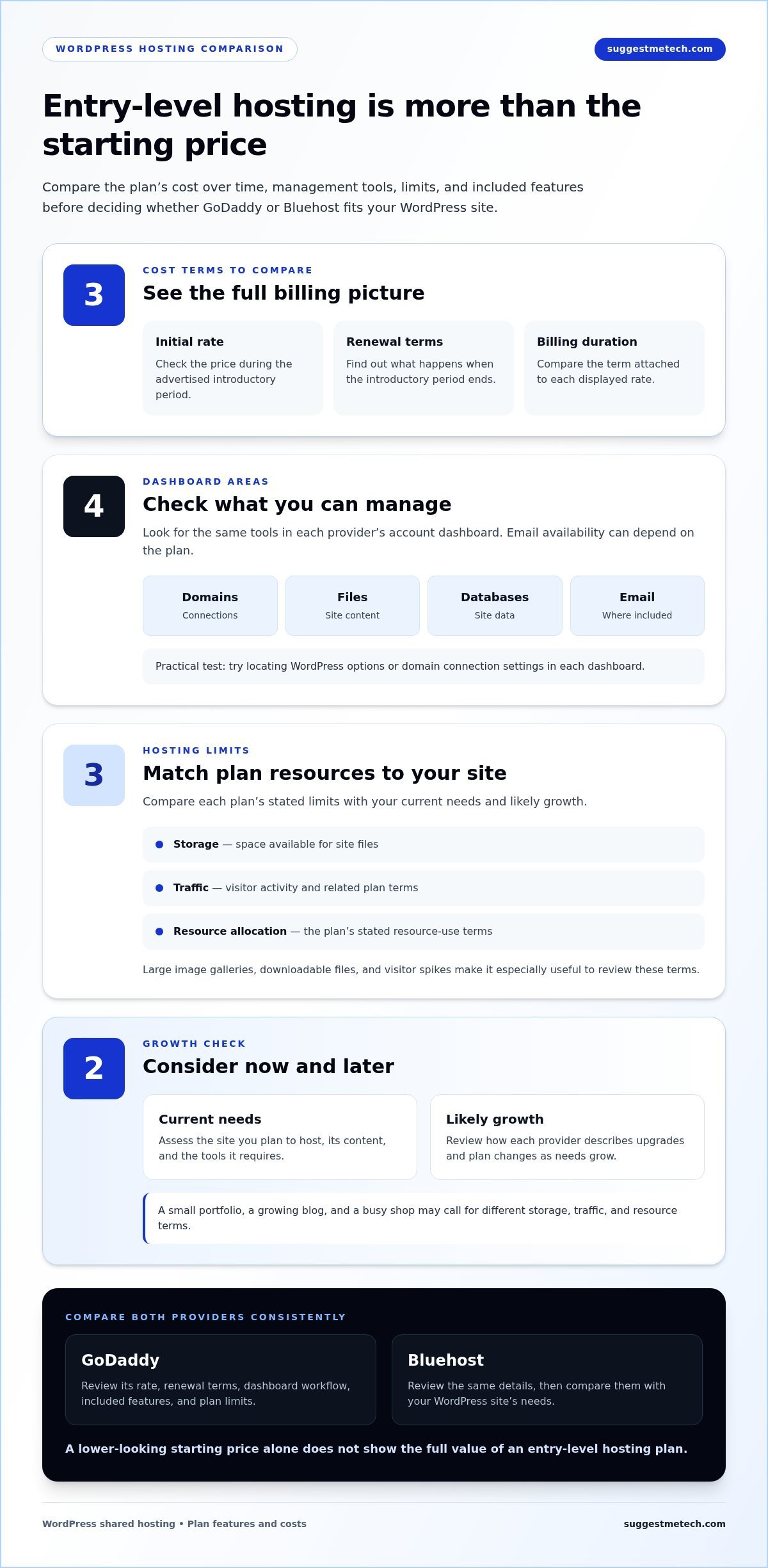
When comparing GoDaddy and Bluehost for WordPress, assess the full shared hosting plan, not just its advertised starting price. Renewal terms, included tools, storage limits, and optional add-ons all affect the value of web hosting.
Hosting limits depend on a plan’s storage, traffic policies, and resource allocation. Compare those terms with your WordPress site’s current needs and likely growth before choosing an entry-level plan.
Shared Hosting Features and Control Panels
Shared hosting puts multiple websites on one server, while a control panel organizes account and site-management tools. Compare GoDaddy and Bluehost by what you can manage in each entry-level dashboard, including domains, files, databases, and email where included.
Try finding the same setting in each dashboard, such as WordPress options or domain connections. In a GoDaddy vs. Bluehost comparison for WordPress, this hands-on check can show which interface is easier for you. GoDaddy may suit users who prefer its workflow; Bluehost may suit those who find its dashboard clearer.
WordPress Hosting Suitability
WordPress can run on shared hosting, but a plan labeled for WordPress may organize setup and site tools around the platform. Compare GoDaddy and Bluehost on installation steps, management options, and whether each plan’s listed features match your site’s needs.
For a simple portfolio with a few pages, easy WordPress setup may matter most. A site with frequent publishing or multiple plugins may need more control over backups, updates, and resources. Review each plan’s features rather than assuming every WordPress package includes the same tools.
Hosting Limits and Scalability
Storage is the space available for site files; traffic describes visitor activity. GoDaddy and Bluehost plans may have different limits or resource-use terms, so compare them before hosting large image galleries, downloadable files, or a growing blog.
Scalability means moving to a plan with more resources as your site grows. Check how each provider describes upgrades and plan changes. A small business site with modest content has different needs from a busy shop with large product images and regular visitor spikes.
Compare Total Plan Cost
Entry-level prices may depend on the billing term and promotional period. Compare each provider’s initial rate, renewal terms, billing duration, and what happens when the introductory period ends.
Next, list essential features alongside optional extras. A free domain can simplify setup, but compare its eligibility and renewal terms with the hosting plan. Add a paid builder, backup, or security option only when it meets a specific need.
Security Features and Paid Add-ons
Security features help protect site access and data; paid add-ons may expand the tools included with hosting. Compare plan descriptions for included security and backup features, as well as the separate terms for optional services.
A personal blog, for example, may need a different setup from a store that handles customer accounts. Identify the protection and backup features you need, then separate what each plan includes from what it offers as an extra. This keeps the comparison focused on equivalent hosting packages.
Measured uptime and uptime guarantees
Compare GoDaddy and Bluehost using the same WordPress setup and measurement period. Uptime tracks whether a site responds; a guarantee is a provider’s stated commitment, not a test result.
Uptime guarantees and observed uptime
A guarantee and measured uptime answer different questions. A guarantee describes the provider’s commitment and any stated remedy. Observed uptime records whether a specific site was reachable during a test. Don’t treat one as proof of the other.
For a fair comparison, monitor similar WordPress sites over the same period. Record outages, how long they last, and whether the site is reachable from more than one location. A failure lasting a minute during a short test needs context; repeated failures over a longer observation are more telling.
Read each plan’s guarantee terms, including the measurement method, exclusions, and remedy. These details determine what the commitment means in practice. A hosting guarantee doesn’t necessarily mean compensation for every interruption, so compare the wording rather than relying on a headline percentage.
Uptime and server response time
Uptime measures availability; server response time measures how quickly a server begins responding. A WordPress site can be available but slow to start loading. Conversely, a fast response in one test doesn’t show how often the site becomes unreachable.
Compare the providers using the same test page, WordPress configuration, and monitoring location. Track availability separately from response time. A text-only page and one filled with large images, for instance, can load differently on the same hosting account.
WordPress speed and uptime test results
There isn’t one reliable GoDaddy-versus-Bluehost test result that applies to every WordPress site. Results vary with the site’s theme, plugins, content, test location, and measurement period. Compare matching setups instead of treating one review’s result as universal.
A useful test records three things: whether the page responds, how long the server takes to respond, and how long the page takes to load. Keep these measures separate. If a small business homepage loads slowly, check image sizes and plugins before blaming the host alone.
Website performance also depends on how the site is built. Caching stores ready-to-serve page versions, reducing repeated work for the server. A well-configured WordPress site can therefore perform differently from an unoptimized site on the same plan.
Cancellation policy and money-back guarantee
Cancellation ends or stops a hosting subscription; a money-back guarantee concerns refund eligibility. For GoDaddy and Bluehost, compare refund conditions, exclusions, and cancellation steps separately. Stopping renewal and receiving a refund are different outcomes.
Before choosing, find the cancellation instructions and note which hosting charges or add-ons the refund terms cover. Domain registration, for example, may have separate terms from hosting. Treat dedicated hosting as a different service category, not a direct substitute for an entry-level shared plan.
Ease of use and site launch tools
Both GoDaddy and Bluehost offer a path from hosting signup to a live WordPress site. For a beginner, the key comparison is how clearly each step explains what to do next.
Compare the first steps
Picture the process you’ll follow: select a hosting plan, connect a domain, install WordPress, and open the site dashboard. Compare the labels and instructions GoDaddy and Bluehost provide along the way. Clear prompts can help a budget-conscious beginner avoid confusion without advanced technical knowledge.
Then consider what happens after installation. WordPress opens to a dashboard for creating pages, choosing a theme, and managing content. A local café launching a menu site, for example, needs to find page editing quickly, while a photographer may prioritize uploading and organizing images.
A website builder is a visual tool for arranging page content. It can help you create a layout without editing code, but the key question is whether it fits your WordPress workflow. Compare how GoDaddy and Bluehost present any builder or setup tools, and whether you can continue managing the site through WordPress.
Assess guidance and control
Guided setup can simplify launch decisions, while direct WordPress access may suit users who want more control. Compare GoDaddy and Bluehost based on the choices they present, rather than assuming one workflow suits every beginner. A first-time blogger may value clear prompts; an experienced WordPress user may prefer fewer guided steps.
Use a simple launch task to judge the experience. Imagine creating a homepage, adding a contact page, and changing the site title. Notice how easily you can move between hosting account settings and WordPress. Domain and hosting controls may sit outside the content dashboard, so this distinction matters.
Make the tool fit the budget
Affordable pricing is useful only when the included launch tools match your needs. Compare each plan’s onboarding, WordPress access, and builder features alongside its renewal terms. Don’t value a feature just because it appears in a plan description; connect it to a task you’ll actually perform.
For a budget-conscious site, a basic WordPress theme and a few pages may be enough. A small retailer with product pages may need more layout flexibility and ongoing content management. Decide what your site must do at launch, then assess whether GoDaddy’s or Bluehost’s workflow makes those tasks straightforward.
Choose by your working style
Hosting providers arrange account tools and site setup differently. Compare GoDaddy and Bluehost by following the same launch scenario: connect a domain, open WordPress, select a theme, and publish a sample page. This practical exercise makes the comparison relevant to your skills.
Choose GoDaddy if its setup sequence and account controls feel easier for your routine. Choose Bluehost if its workflow better suits how you want to manage WordPress. Either way, the better fit supports your actual launch tasks without making an affordable plan harder to use.
Website speed and performance
For US visitors, WordPress speed depends on more than the hosting brand. Network distance, page design, and the devices people use all affect how quickly a site feels.
GoDaddy and Bluehost serve sites through different hosting setups, but neither is a universal speed winner for every US audience. The better fit depends on where your visitors are and what your pages require.
How visitors experience speed
A page can feel slow even when its text appears quickly. Menus that respond late, images that shift as they load, or buttons that don’t respond promptly can frustrate visitors. These details matter on a restaurant site when someone is trying to find the menu or opening hours.
Google’s Core Web Vitals describe aspects of page experience, including loading, interactivity, and visual stability. They help site owners assess what visitors experience, not just how long a page takes to appear. Use them to see whether a WordPress page feels responsive on desktop and mobile.
Factors beyond the hosting plan
The distance between a visitor and a site’s server can affect the route data travels. A US-based audience may experience different network conditions from visitors connecting across the world. A content delivery network, or CDN, stores copies of site files on servers in multiple locations, bringing some content closer to visitors.
Page design also affects how much work a browser must do. Heavy animation, third-party advertising scripts, and complex layouts can delay interaction. A portfolio with several animation effects, for example, may feel less responsive than a simpler gallery, even on the same host.
Mobile matters. 53% of mobile users leave sites that take longer than 3 seconds to load. Prioritize a clear mobile layout, readable text, and controls that respond promptly, especially if visitors often browse on phones.
Choose a performance winner for your audience
Choose GoDaddy or Bluehost based on the experience your audience needs, not on a blanket claim that one is always faster. A US-focused service business may prioritize quick access to contact details; a media-heavy portfolio may need careful attention to page size and content delivery.
Consider your visitors’ locations, page features, and typical devices together. A site serving customers across the United States may benefit from delivery infrastructure that shortens the distance content travels. A site with a simple layout may place greater emphasis on clean, responsive design.
Use WordPress hosting comparisons to explore related technology guidance, then decide which provider best supports the experience you want visitors to have.
SuggestMeTech: Technology Reviews and Guides
SuggestMeTech publishes Technology Reviews and Guides to help readers compare tech options and make informed decisions. If you’re weighing hosting plans, use the criteria in this article to identify what matters most for your WordPress site, such as renewal terms, setup tools, support, or performance.
Turn to SuggestMeTech for a practical guide to another technology decision, or to reassess your hosting choice as your site’s needs change. Its reviews and comparisons help you evaluate options without assuming one provider suits everyone.
Visit SuggestMeTech for more technology reviews and guides.
Choose a host with your next stage in mind
Your GoDaddy vs. Bluehost decision for WordPress doesn’t have to be permanent. As your site develops, note what becomes easier or harder to manage, which features you actually use, and how your priorities change. That experience can guide a future hosting decision more effectively than assumptions about what you might need.
Set a point to review your setup after your site has been running for a while. Ask whether it still supports your goals, whether managing it fits your workflow, and what you’d change if starting again. A measured reassessment helps base your next decision on your own site, not a generic idea of the ideal host.
If you’d like another perspective as you consider your options, explore SuggestMeTech’s technology coverage. Keep your priorities clear, learn from how your site performs in practice, and move forward with confidence.

