

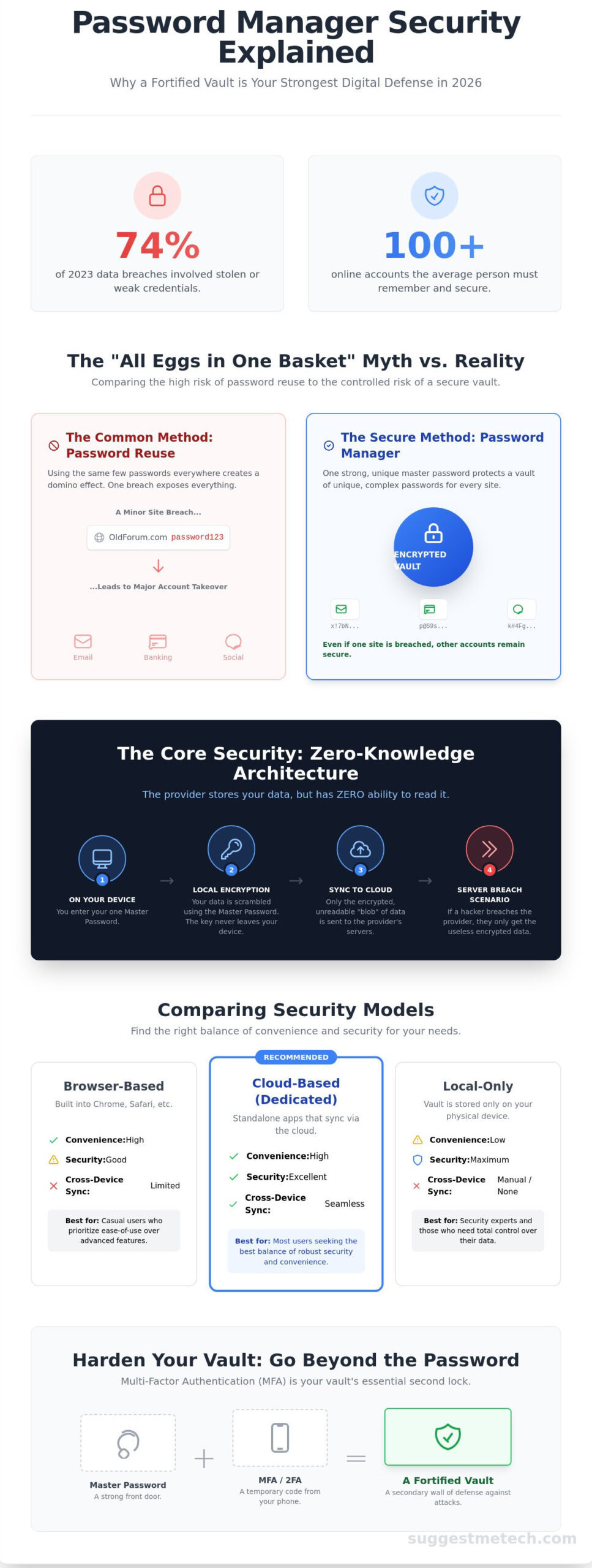
Did you know that 74% of all data breaches in 2023 involved the use of stolen credentials? It’s a staggering number that highlights the need for clear password manager security explained to the average user. Most of us are juggling over 100 different online accounts; trying to remember unique, complex passwords for every single one feels like a losing battle that leaves our most sensitive data vulnerable to hackers.
If you’re tired of the “reset password” loop and the anxiety of constant breach notifications, you aren’t alone. This guide provides a deep dive into the mechanics of these tools so you can finally see through the marketing noise. You’ll discover the secrets of zero-knowledge encryption and learn why these vaults are the single most effective way to secure your digital life in 2026. We’ll break down the critical differences between browser based tools and dedicated managers; plus, we’ll give you a clear setup strategy to gain total peace of mind today.
Key Takeaways
- Debunk the “all eggs in one basket” myth by comparing the controlled risk of a vault against the high danger of password reuse.
- Get password manager security explained by learning how zero-knowledge architecture keeps your master key off the provider’s servers.
- Evaluate the differences between browser, cloud, and local vaults to choose the storage model that best balances convenience and safety.
- Discover how to move beyond the master password by using Multi-Factor Authentication (MFA) to create a secondary wall of defense.
- Identify the essential trust markers to look for in a provider, including third-party security audits and the value of open-source transparency.
The “All Your Eggs in One Basket” Myth vs. Reality
It’s a natural fear to have. You’re told that putting all your digital keys in one place is a recipe for disaster. If a hacker gets into that one vault, they have everything. While this “single point of failure” anxiety is logical, it doesn’t reflect how What is a password manager? actually functions in a modern security environment. A password manager isn’t just a digital list of passwords; it’s a fortified vault that uses zero-knowledge encryption. This means the provider doesn’t have your master key. Only you do. Without that Master Password, the “basket” is just a pile of unreadable, scrambled code. This foundation is essential for password manager security explained because it shifts the risk from “many weak points” to “one nearly impenetrable point.”
Why Password Reuse is Your Real Enemy
Most people use the same three or four passwords for every account they own. This habit creates a massive vulnerability called credential stuffing. In 2026, automated bots are more efficient than ever, testing millions of leaked login pairs against popular sites in seconds. If a minor forum you joined in 2022 gets hacked, attackers will immediately try those same credentials on your banking and email apps. The 2024 “Mother of all Breaches” leaked 26 billion records, proving that no platform is perfectly safe. A password manager solves this by facilitating unique, 20+ character strings for every account.
- Credential Stuffing: Bots use leaked data from one site to “stuff” login fields on hundreds of others.
- Lateral Movement: One minor breach allows hackers to move from a low-value account to your primary financial data.
- Human Limitation: Research from 2023 showed that 53% of people reuse passwords because they can’t memorize complex strings.
The Security Trade-off: Convenience vs. Fortress
High security often feels like a chore. Remembering 50 different complex passwords is humanly impossible for most. This psychological barrier is why “123456” remained the most common password through 2024. Password managers bridge the gap between being “hard to hack” and “easy to use.” They offer a fortress-level defense with the convenience of a single click. Whether you’re learning how to start a blog or managing sensitive corporate data, your security starts at the login screen. By centralizing your data into an encrypted vault, you trade the high risk of human error for the controlled, manageable risk of a single, heavily guarded entry point. This shift is the most practical way to handle password manager security explained for the average user.
The Engine Under the Hood: Zero-Knowledge Architecture Explained
Zero-knowledge means the company hosting your vault has zero access to your actual passwords. They store a blob of encrypted data, but they don’t have the key to unlock it. This setup is the foundation of modern best practices for password manager security because it removes the service provider as a point of failure. If a hacker breaches the provider’s servers, they only find unreadable code that’s useless without your specific key.
Every bit of encryption happens locally on your phone or laptop. Your master password never travels over the internet to the provider’s server. Instead, your device uses that password to generate a unique encryption key. This key stays on your hardware. By the time your data reaches the cloud, it’s already locked tight. This “local-side” rule ensures that your sensitive information is never exposed during transit or while sitting on a remote server.
Your master password is the only way to generate that specific decryption key. This is why true secure managers don’t offer an “I forgot my password” link. Since the provider doesn’t hold your key, they can’t reset it for you. If you lose that master password, your data is gone forever. It’s a trade-off; total privacy requires total responsibility. Understanding how password manager security explained works helps you realize why keeping that master password safe is your most critical task.
AES-256: The Gold Standard of Encryption
AES-256 uses a 256-bit key to scramble your data. To put this in perspective, a supercomputer trying to brute-force a 256-bit key would take billions of years to exhaust all 1.1 x 10^77 possible combinations. This level of protection is why the U.S. National Security Agency (NSA) approved AES-256 for Top Secret information in 2003. AES-256 is the current unbreakable standard for consumer data.
Salting and Hashing: Making Your Key Unique
Before your password is used, it undergoes salting and hashing. Salting involves adding a unique string of random data to your password. This ensures that even if two users have the same password, their final keys look completely different. This prevents “rainbow table” attacks where hackers use pre-calculated lists of common passwords. Hashing is a one-way function that turns your password into a fixed-length string of characters to verify your identity without actually storing the password itself.
Advanced managers use algorithms like PBKDF2 or Argon2 to slow down the hashing process. By forcing a computer to perform 100,000 or more iterations, these tools make it too slow and expensive for hackers to guess passwords effectively. If you’re looking for a tool that uses these high-end standards, you can compare the top-rated managers to see which fits your workflow. These layers of password manager security explained above show why a vault is significantly safer than a spreadsheet or a browser’s basic save feature.
Comparing Security Models: Browser, Cloud, and Local Vaults
Choosing where to store your digital keys is the most critical decision you’ll make for your online safety. To get password manager security explained simply, you have to look at where the data actually lives. Each model offers a different balance between ease of use and protection against hackers. Most modern users gravitate toward convenience, but understanding the trade-offs helps you pick the right tool for your specific threat model.
Dedicated Cloud Managers (LastPass, 1Password, Bitwarden)
Cloud-based managers are the industry standard because they sync your data across every device you own. This multi-device availability is a massive productivity boost, but it does change your security profile. Your encrypted vault is stored on the provider’s servers, which means you’re trusting their infrastructure. However, reputable services use zero-knowledge architecture. This means they don’t have your master password and cannot see your data. For a deeper look at these basics, this National Cybersecurity Alliance guide to password managers provides an excellent foundation.
Even if you’re working on one of the best laptops from our 2026 list, a dedicated cloud app is generally safer than a browser extension. Dedicated apps run in their own memory space, making it harder for other software to “peek” at your decrypted passwords.
- Pros: Effortless syncing, automatic backups, and advanced features like secure file storage.
- Cons: Potential for server-side breaches, though your data remains encrypted.
Browser-Based Managers: Convenience at a Cost?
Browsers like Chrome, Safari, and Edge offer built-in password management for free. While the password manager security explained by browser developers focuses on encryption, the primary risk is physical access. If you leave your computer unlocked, anyone can often view your entire password list in plain text through the browser settings. Additionally, browsers are the primary target for info-stealing malware. Since your browser is always open and connected to the internet, it’s a high-value target for hackers. To secure this route, you must enable a “Primary Password” or biometric lock within the browser settings to prevent unauthorized viewing.
Local-Only Vaults: The “Air-Gapped” Approach
Tools like KeePass represent the high-security, local-only model. Here, you manage the database file yourself. There’s no company server and no cloud sync unless you manually move the file. This eliminates the risk of a remote server breach entirely. The trade-off is a total lack of convenience. If your hard drive fails and you don’t have a backup, you’ll lose every account you own. In 2026, this model is mostly for IT professionals or users with extreme privacy needs who don’t mind the manual work involved in syncing files via USB or private servers.
Hardening Your Vault: Advanced Security Features You Must Enable
A strong master password is your first line of defense, but it shouldn’t be your only one. Even the most complex phrases can be compromised through keyloggers or sophisticated phishing attacks. To truly protect your digital identity, you must layer your defenses. When password manager security explained in its simplest form, it focuses on the vault itself; however, the features you enable on top of that vault determine your actual safety level.
Microsoft researchers found that Multi-Factor Authentication (MFA) blocks 99.9 percent of automated account takeover attacks. To ensure these protocols are properly managed within a business environment, Mytech Partners provides specialized IT consulting. By requiring a second form of verification, you ensure that a stolen master password is useless on its own, effectively building a second wall that keeps hackers out even if they find your front door key.
Moving Beyond SMS: 2FA Best Practices
Don’t rely on SMS for two-factor authentication. The FBI reported that SIM-swapping attacks resulted in over 72 million dollars in losses in 2022. Hackers can trick mobile carriers into porting your phone number to their device, giving them instant access to your text messages. Instead, use Time-based One-Time Passwords (TOTP) through apps like Authy or Google Authenticator. For the highest security tier, hardware keys like a YubiKey provide physical proof of identity that remote attackers cannot replicate. Most top-tier managers allow you to register multiple keys as backups.
Biometrics and the Secure Enclave
Modern smartphones and laptops use a dedicated hardware component known as a Secure Enclave to handle sensitive data. When you use FaceID or TouchID to access your vault, the software never actually “sees” your biometric data. Instead, the hardware verifies your identity and sends a digital “thumbs up” to the app. This creates a convenient way to unlock your vault without typing your master password every five minutes.
This technology is expanding into wearable tech as well. You can now find the latest headphones that support smart-lock features, allowing your device to remain unlocked as long as it stays in contact with your body. It’s a balance of speed and safety. Just remember that biometrics usually “unlock” the vault by storing the encryption key in the device’s secure memory; they don’t replace the need to know your master password after a reboot.
Finally, prepare for the worst. Because of how password manager security explained its zero-knowledge architecture, the company cannot reset your password if you forget it. You must generate a recovery kit or set up emergency access for a trusted contact. A 2023 industry report suggested that 30 percent of users risk losing their data because they haven’t documented their recovery codes. Print your recovery key and store it in a physical safe.
Ready to upgrade your personal security setup? Explore our latest tech reviews to find the best hardware for your home office.
Choosing Your Guardian: How to Evaluate a Password Manager
Selecting a vault for your digital life is a high-stakes decision that requires looking past flashy marketing. To have password manager security explained in a way that actually protects you, you have to prioritize evidence over promises. You need a provider that proves its claims through rigorous, independent testing rather than asking for blind faith.
The Audit Trail: Why Transparency Matters
Look for a company that publishes its SOC 2 Type 2 reports or ISO 27001 certifications annually. These documents provide proof that external experts have tested their internal controls and data handling. Bug Bounty programs are another vital sign of health. When a company like 1Password or Bitwarden pays independent researchers to find flaws, they’re showing a proactive commitment to safety. A security audit is a third-party verification of a company’s “zero-knowledge” claims.
The transparency debate often centers on whether a provider uses open-source or proprietary code. Open-source managers allow the global developer community to inspect the source code for backdoors or vulnerabilities. Proprietary software keeps its code private, which some argue prevents hackers from finding easy targets. However, the most secure proprietary providers compensate for this by inviting more frequent external audits to maintain trust.
No system is 100 percent unhackable, so the history of breaches is a critical metric. What matters most is how the company responded. For example, a 2022 breach at LastPass revealed that unencrypted metadata was stolen, leading to heavy criticism because the company was slow to disclose the full extent of the risk. Contrast this with providers that disclose vulnerabilities within 24 hours and provide clear, actionable steps for their users. A fast, honest response is a sign of a mature security culture.
Beyond technical safeguards, staying informed through reputable international news organizations like The Rio Times is a proactive way to monitor regional events and potential security risks that could impact your digital life.
Our team at SuggestMeTech evaluates providers based on three non-negotiable pillars. First, they must use zero-knowledge architecture so even the provider can’t see your data. Second, they need robust encryption standards like AES-256 or XChaCha20. Third, they must offer hardware security key support. This ensures the password manager security explained in our reviews meets professional-grade standards.
Setting Up Your Security Routine
Effective security isn’t a one-time setup; it’s a habit. Once you’ve chosen a provider, follow these steps to harden your vault:
- Step 1: The Master Password audit. Create a phrase that’s at least 16 characters long. It shouldn’t contain personal details and must be unique to your vault.
- Step 2: The MFA rollout. Enable multi-factor authentication immediately. Use an authenticator app or a physical security key like a YubiKey rather than SMS codes, which are vulnerable to SIM swapping.
- Step 3: Periodic vault health checks. Every six months, go through your list and delete accounts you no longer use. Cleaning up an old login for a domain you haven’t visited in years reduces your overall attack surface.
By following these criteria, you move from being a passive user to an active guardian of your own data. Security is about layers, and choosing the right manager is your strongest first line of defense.
Secure Your Digital Future Now
Understanding password manager security explained in this guide shows that your data is only as safe as the architecture protecting it. Zero-knowledge protocols ensure that even if a provider’s server is breached, your master password never leaves your device. We’ve highlighted how shifting from browser-based storage to dedicated local or cloud vaults can reduce your attack surface significantly. Don’t forget that hardening your vault with multi-factor authentication is the single most effective way to block 99.9% of automated account takeover attacks according to Microsoft security research. When you’re ready to choose a provider, look for those that undergo annual independent security audits like SOC 2 Type II reports. These top-tier services are zero-knowledge verified and often include 24/7 dark web monitoring to alert you if your credentials appear in known leaks. Taking these proactive steps moves you from being a potential target to being a digital fortress. You’ve got the tools to stay safe; now it’s time to put them to work.
Check out our Editor’s Picks for the Best Security Software of 2026
Your digital safety starts with one smart choice, and you’re already on the right track to protecting what matters most.
Frequently Asked Questions
Is it safe to store bank passwords in a password manager?
Yes, it’s safe to store banking credentials because reputable providers use zero-knowledge architecture. This means the company cannot see or access your data under any circumstances. Having password manager security explained helps you understand that 256-bit AES encryption keeps your bank logins unreadable to hackers. It’s a much more secure method than reusing the same password across multiple financial sites.
What happens if the password manager company goes out of business?
You won’t lose your data immediately because most services keep an encrypted local copy on your device. You can still log in to the app and export your vault as a .csv file to move it elsewhere. Companies like LastPass and 1Password have been operating for over 14 years, which shows the long-term stability of the major players in this industry.
Can a password manager protect me from phishing scams?
Password managers are highly effective against phishing because they only autofill credentials on recognized URLs. If you land on a fake site that looks like your bank, the manager won’t recognize the domain and will refuse to enter your details. Since phishing accounted for 36 percent of data breaches in the 2023 Verizon Data Breach Investigations Report, this protection is a vital safety feature.
Should I use the password manager built into my iPhone or Android?
Built-in tools like iCloud Keychain or Google Password Manager are excellent for users who stay within one ecosystem. They’re convenient and free for billions of users worldwide. However, a dedicated manager is better if you regularly switch between a Windows PC and an iPhone. Dedicated apps offer extra features like secure note sharing and emergency access that standard browser tools often lack.
How do I create a master password that I won’t forget but can’t be guessed?
The best method is using a passphrase consisting of four or five random words. Avoid using birthdays, pet names, or common dictionary words. A 15-character passphrase is significantly harder for computers to brute-force than a short password with symbols. You should write it down and hide it in a safe physical location until you’ve fully memorized it.
What is the difference between a password manager and a passkey?
A password manager stores your traditional logins, whereas a passkey is a newer technology that replaces passwords entirely. Passkeys use your device’s biometrics, like FaceID or a fingerprint, to verify your identity locally. The FIDO Alliance introduced this standard in 2022 to make logins faster and more secure against remote hacking attempts.
Can a password manager be used on multiple devices at the same time?
You can use your vault on as many devices as you need. Most services sync your data through the cloud in seconds so your information is always current. This ensures that if you update a password on your laptop, it’s ready to use on your phone immediately. Statistics show that 80 percent of users now access their vaults across at least two different platforms.
Is it better to pay for a password manager or use a free version?
Free versions work well for basic needs, but paid plans provide essential security extras. Premium tiers often include dark web monitoring, which alerts you if your email appears in a known data breach. You also get advanced two-factor authentication options, such as support for YubiKey hardware, which provides a much higher level of protection for your sensitive data.

