

The best way to replace Google isn’t to switch everything at once. If you’re looking for privacy focused alternatives to google products, start by identifying which data practices concern you and which tools you rely on every day. Search may be a straightforward first change, while moving email, photos, shared files, or calendars calls for more planning.
This guide compares alternatives across search, email, maps, cloud storage, browsers, and productivity tools. It also explains practical trade-offs in privacy, usability, and compatibility, so you can judge options against your needs rather than rely on broad claims.
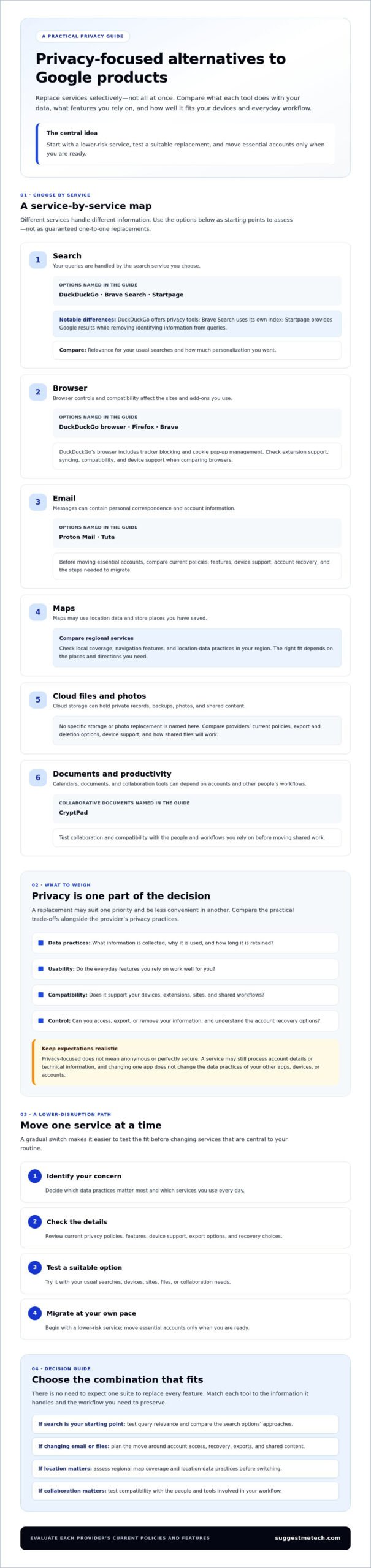
Options to explore include DuckDuckGo or Brave Search for searching, Proton Mail or Tuta for email, and CryptPad for collaborative documents. Compare each provider’s current policies, features, and device support. Then test a suitable option and migrate one service at a time to reduce disruption.
Key Takeaways
- Match each Google service with alternatives that suit your privacy priorities, devices, and everyday workflow.
- Compare privacy protections alongside practical trade-offs such as collaboration, compatibility, and account recovery.
- Use this guide to assess privacy focused alternatives to google products across the services you rely on most.
- Start with a lower-risk service, test its replacement, and move essential accounts only when you’re ready.
- Choose a combination of tools that meets your needs rather than expecting one suite to replace every Google feature.
Why look for privacy-focused alternatives to Google products?
Privacy-focused alternatives to Google products are services designed to limit or clarify how personal data is collected, used, and retained compared with the service they replace. They may reduce particular forms of data exposure, but they don’t guarantee anonymity, perfect security, or complete privacy across your other apps, devices, and accounts.
Each service handles different information. A search engine may process queries, a maps app may use location data, and cloud storage holds the files you upload. If you’re considering privacy focused alternatives to google products, you can explore the history of privacy concerns with Google, then assess the specific data practices that matter to you.
What does privacy-focused mean in everyday software?
One useful measure is data minimization: collecting only the information needed to provide a stated function. A service that needs your location to give turn-by-turn directions may still offer controls for location access, but the details depend on its design and settings.
Data control means having clearer choices about what information you provide, how it’s used, and whether you can access or remove it. That isn’t the same as total privacy. A service may still process account details or technical information, and encryption or privacy settings don’t make every risk disappear.
Before switching, check the provider’s current privacy policy and account settings. Look for what data is collected, why it’s used, how long it’s retained, and what options you have to export or delete it. Treat privacy claims as a starting point for comparison, not a guarantee.
Which Google services might someone want to replace?
Start with the services where data use or account dependence concerns you most. Google products often connect through a shared account, devices, and collaborative workflows, so a change in one area may affect another. You don’t have to replace everything.
- Search and browser: Search queries and browsing activity may be handled by separate tools, even when you use them together.
- Email and maps: Messages contain personal correspondence, while maps may involve location access and saved places.
- Files and photos: Cloud documents, backups, and photo libraries can contain private records as well as shared content.
- Productivity: Calendars, documents, and collaboration tools can depend on account access and other people’s workflows.
For example, changing your search engine doesn’t automatically change the account that holds your email or cloud storage. Choose replacements by category, based on the data involved, the features you rely on, and how much disruption you’re prepared to manage.
Which privacy-focused alternatives can replace common Google products?
Privacy focused alternatives to google products vary by category: a search engine handles queries, while email and cloud storage manage messages and files. The options below are starting points to evaluate, not endorsements or guaranteed equivalents. Before committing, check current policies, supported devices, features, and migration steps. Digital.gov’s introduction to digital privacy offers context for comparing how services handle personal information.
Search, browser, and maps alternatives
Search results differ in relevance, personalization, and reliance on a service’s own index or other providers. Browsers also vary in compatibility, extensions, syncing, and privacy controls. Test the sites and add-ons you use regularly. For maps, compare local coverage, navigation features, and data practices in your region before switching.
| Google category | Alternatives | Strengths | Trade-offs | Best-fit user |
|---|---|---|---|---|
| Search | DuckDuckGo, Brave Search, Startpage | DuckDuckGo offers privacy tools; Brave Search uses its own index; Startpage provides Google results while removing identifying information from queries. | Results and personalization differ; test relevance for your usual searches. | People seeking less tracking, Google-like results, or an independent index. |
| Browser | DuckDuckGo browser, Firefox, Brave | DuckDuckGo’s browser includes tracker blocking and cookie pop-up management. | Check extension support, syncing, compatibility, and device support. | Users who want browser controls suited to their everyday sites and devices. |
| Maps | Compare available regional services | A suitable option may provide the local places and navigation you need. | Coverage and features vary by region; review location-data practices. | People willing to test routes and saved places before switching. |
Email, storage, documents, and analytics alternatives
Email and file services need closer migration checks. Before moving essential data, confirm import options, sharing permissions, and account recovery. CryptPad offers encrypted collaborative apps, but test file compatibility and team workflows. Analytics options also differ: Matomo offers a self-hosted option, which requires managing setup, and a hosted option for those who prefer a provider-managed service.
| Google category | Alternatives | Strengths | Trade-offs | Best-fit user |
|---|---|---|---|---|
| Proton Mail, Tuta | Privacy-oriented email services to compare. | Check migration, contacts, recovery, and recipient compatibility. | Users prepared to review account and email workflows. | |
| Cloud storage | Proton Drive, Nextcloud | Options to assess for hosted storage or a setup you manage. | Compare sharing, migration, and setup responsibilities. | People prioritizing convenience or more direct control. |
| Documents and photos | CryptPad; compare photo-storage services | CryptPad supports collaborative document types; photo options depend on backup and sharing needs. | Check file compatibility, collaboration, and photo organization. | Individuals or teams testing a specific workflow. |
| Analytics | Matomo | Available as hosted or self-hosted analytics. | Self-hosting requires setup and ongoing management. | Site owners choosing between provider-managed and self-managed tools. |
For more practical technology comparisons, explore SuggestMeTech’s technology guides.
What trade-offs should you expect when leaving Google services?
Switching services can give you different choices about data collection and control, but it may also add friction. Privacy-focused alternatives can vary in convenience, interoperability, feature depth, recovery options, and data portability. The impact depends on the tools you choose, your settings, and the people or devices you work with.
Privacy tools involve different balances of control and convenience, so the best fit is the one whose trade-offs you understand and can manage.
Where privacy alternatives may feel less convenient
Google services can connect through shared accounts and familiar workflows. Moving files, calendars, or contacts elsewhere may change how you share them or sync them across devices. A colleague might not be able to edit a document in the same way, or a family member may need a new account to access a shared folder. For one-off transfers where you prefer to send files without an account, ad-hoc transfer tools can eliminate that requirement altogether.
Feature depth matters, too. An alternative may support the task you need but handle collaboration or integrations differently. Before moving essential data, check recovery and portability: find out how to regain access if you lose your sign-in method and whether you can export information in a format another service can use.
Test the workflows that would be hardest to interrupt. Try editing a shared file, syncing contacts between devices, or restoring a calendar before making the new service your only copy. This can reveal compatibility issues in your setup before you commit.
How to assess privacy claims without assuming too much
Review each provider’s current privacy policy, business model, and account settings. Ask what information the service collects, what it uses that information for, how long it retains it, and what choices you have. Policies and controls can change, so assess the current version rather than relying only on a general reputation.
Some features may offer meaningful protections, but no single label tells the whole story. Encryption describes how information is protected from certain kinds of access; it doesn’t by itself explain every data practice. Open-source software makes code available for inspection, but that alone doesn’t establish how a hosted service operates. A paid plan also isn’t proof of complete privacy.
- Convenience: Check whether the service works smoothly across your devices.
- Interoperability: Confirm that file formats, sharing, and integrations suit your routine.
- Recovery and portability: Find out how account access is restored and data is exported.
- Privacy claims: Verify current policies, settings, and product-specific security details before switching.
These checks help distinguish documented product limitations from trade-offs that depend on your setup or habits. The right choice may preserve the features you use most while changing only the data practices you’re uncomfortable with.
How can you switch away from Google one service at a time?
A gradual move starts with an inventory of the Google services you use, then prioritizes one lower-risk area to test. Check export and import support before moving data, protect account recovery options, and switch only after routine tasks work in the alternative. Keep the original account available until you’ve confirmed that essential information and shared workflows are working.
Plan the move and protect access to important accounts
First, list the services you use personally, at work, and with family or collaborators. Note which accounts depend on your Google sign-in, recovery email, or two-factor authentication, a second step used to confirm your identity. Changing an account before updating those dependencies could make other services harder to access.
Choose a lower-risk starting point, such as a search tool or browser, before moving an essential inbox or shared workspace. Then follow this order:
- Inventory services: Record the accounts, devices, and workflows connected to each service.
- Choose priorities: Start with the service that matters most to your privacy and is least disruptive to change.
- Test alternatives: Use the new option for regular tasks before making it your default.
- Export data: Confirm available formats and whether the new service can import them.
- Switch and review: Check access, sharing, and recovery before moving to another service.
Back up important information before transferring it. Open exported files to make sure they’re readable, and check whether contacts, bookmarks, or calendar details retain the information you need. Review the replacement service’s recovery methods and deletion options before relying on it.
Test, migrate, and review one service at a time
Run the alternative alongside your current setup for a short trial. For example, test opening and editing a shared file on each device you use, or confirm that a new email account can receive important messages. Ask collaborators to check their access before changing a shared workflow.
Move only the data supported by the services’ export and import tools. Don’t assume every format transfers cleanly or that an export includes all settings and history. Keep your former account available while you confirm that essential messages, files, and routines work in the new setup.
Safest switching checklist: inventory accounts, choose a low-risk priority, test the replacement, verify and export data, switch, then confirm recovery and workflows before repeating.
For more practical guidance as you plan a change, explore SuggestMeTech’s technology guides.
How do you choose the right Google alternatives for your needs?
The right privacy focused alternatives to google products depend on what you want to protect and what you need a replacement to do. Weigh data sensitivity, convenience, collaboration, device support, and budget, then choose tools by category. A personal email setup, a team workspace, and a private file archive may each call for different services.
Build a privacy toolkit around your own priorities
Start with the information you consider most sensitive, then decide how much setup or workflow change you’ll accept. If you mainly want less search tracking, replacing search may be enough for now. If you store confidential files, focus first on storage protections, access controls, recovery, and whether local or cloud-based files suit your routine.
- Convenience-first users: Prioritize reliable performance across your devices and simple sharing. Test everyday tasks before moving accounts or files.
- Privacy-conscious individuals: Give more weight to data policies, available controls, and how sensitive information is stored. A private email option may matter more than changing every productivity tool.
- Collaborative teams: Check shared editing, file compatibility, permissions, and whether colleagues can join without disrupting established workflows. Test with a small project before moving team documents.
Choose one category at a time rather than searching for a single suite that replaces everything. Before deciding, verify current features, device support, service availability, and costs directly with each provider. Needs and plans can change, so compare the option you’d actually use, not just its headline privacy claims.
Keep related research and next steps practical
For personal email, consider how easily you can move messages and contacts and recover the account if you lose access. For team collaboration, test shared documents and permissions with the people who depend on them. If you’re choosing between local files stored on your own device and cloud files available across devices, balance access and sharing needs against the amount of control you want.
SuggestMeTech’s technology guides can help you compare options by practical use case. Share which Google service you’re considering replacing, or which category you’d like compared next.
Make your next privacy change practical
Choosing privacy focused alternatives to google products doesn’t require replacing every service or giving up the workflows that matter. Start by deciding which data practices concern you most, then compare alternatives for that specific category.
Keep three principles in mind: privacy features aren’t the same as complete protection, compatibility and convenience deserve a real-world test, and gradual changes can reduce disruption. Check current policies, features, costs, and availability before moving essential accounts or shared files. A replacement that works well for personal email may not suit a team that depends on shared documents. That’s a reason to choose differently, not a reason to abandon the process.
SuggestMeTech publishes technology reviews and comparisons, with guides organized around practical user needs. Explore SuggestMeTech’s technology guides to compare your options, and share which Google service you’d like us to examine next.
You don’t need a perfect setup all at once. Choose one change that fits your priorities, test it carefully, and build from there.
Frequently Asked Questions
Choosing alternatives depends on the services you use, your privacy priorities, and the workflows you need to preserve. These answers cover common questions about comparing options and making a careful switch.
What is the best privacy-focused alternative to Google?
There isn’t one best replacement for every Google service. The right choice depends on which data you want to protect and the features you rely on. You might replace search first, choose a different email provider, or move files to another storage service. Compare privacy policies, device support, sharing, recovery, and export options for each category. A practical setup may combine several tools instead of using one alternative suite.
Is there a privacy-focused alternative to Google Search?
Yes. DuckDuckGo, Brave Search, and Startpage are options to compare. Brave Search uses its own independent search index. Startpage provides Google search results while stripping identifying information from queries. DuckDuckGo offers search alongside other privacy tools. Results and settings can differ, so try your usual searches and assess relevance, personalization, and available controls before choosing a default. The best fit depends on whether you value familiar results or an independent index.
Can I replace Google products without losing my files?
You can often move files, but don’t assume every item, setting, or sharing permission will transfer perfectly. Check which export formats are available and whether the replacement service can import them. Open exported files to confirm they work, and make a separate backup before changing accounts. Keep access to the original account until you’ve checked that important documents are complete, readable, and shared with the right people in the new setup.
What is a good privacy-focused alternative to Gmail?
Proton Mail and Tuta are email services to evaluate if you’re looking for alternatives to Gmail. Compare their current privacy policies and settings, then check whether their features suit your needs. Before switching, review how to migrate messages and contacts, recover account access, and use your email with the devices and services you rely on. Test sending and receiving everyday messages before making a new inbox your only destination for important mail.
Can I use Google Maps alternatives for everyday navigation?
Yes, but suitability depends on where you travel and which map features you use. Before switching, test common routes in your region and compare local place coverage, directions, saved locations, and the service’s location-data practices. If you rely on maps for regular trips, try the alternative alongside your current app first. Check whether it handles the addresses and destinations you use most reliably before changing your everyday routine.
How do I move away from Google gradually?
Start by listing your Google services and the accounts, devices, or people connected to them. Choose one lower-risk service, test its replacement with routine tasks, then check export formats, import support, and account recovery before moving data. After switching, confirm that essential files, messages, and shared workflows work as expected. Keep the original account accessible while you test, then repeat the process for the next priority.
Are privacy-focused alternatives always more secure than Google products?
No. A privacy-oriented service may offer different data practices, but that alone doesn’t prove it’s more secure for every user or risk. Security depends on details such as account protection, recovery methods, product design, and how you use the service. Encryption, open-source code, or a paid plan can inform your assessment, but none guarantees complete protection. Review current security documentation and privacy policies, and choose tools that fit your specific needs.

