
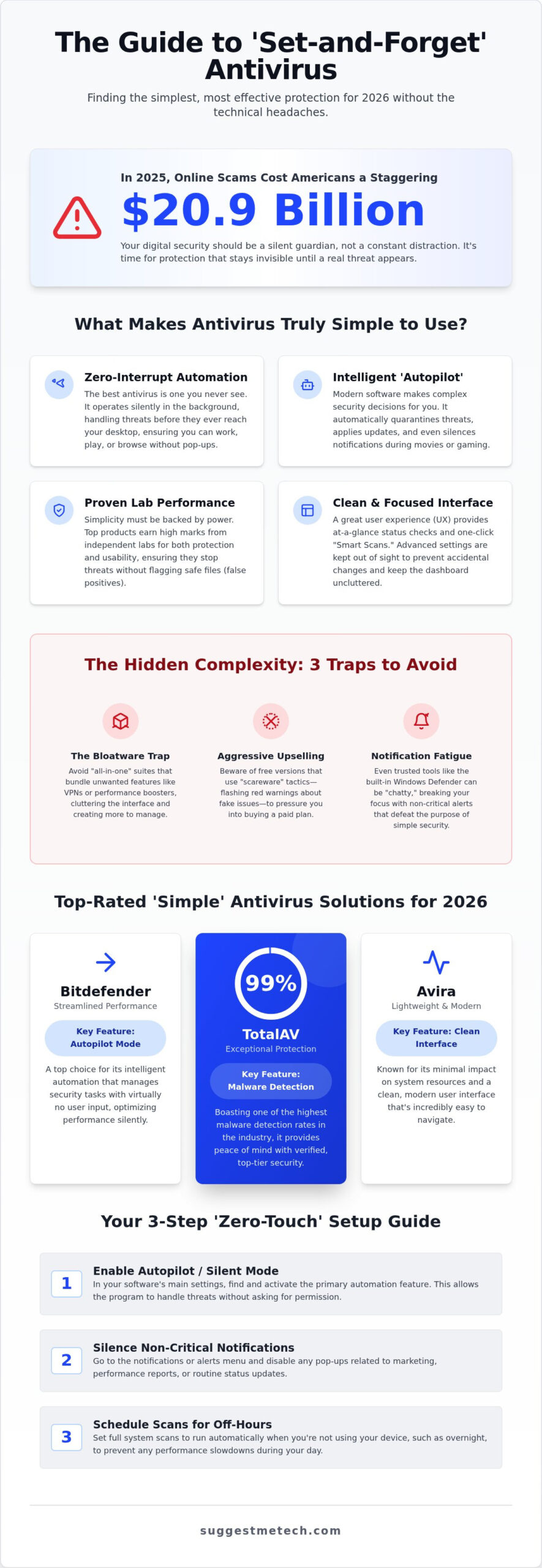
Americans lost a staggering $20.9 billion to online scams in 2025 according to the FBI. That figure is terrifying, but for many of us, the “protection” often feels almost as frustrating as the threat. You probably agree that there’s nothing worse than a security suite that hijacks your screen with constant pop-ups or slows your computer to a crawl during a heavy scan. You want the simplest antivirus to use so you can stay safe without having a second job managing complex settings.
We’ll show you how to achieve a secure computer with zero manual maintenance and a clean, easy-to-navigate interface. This guide highlights the most user-friendly software for 2026 that protects your devices without annoying interruptions. We have performed hands-on testing of leading security suites to see which ones actually deliver on the promise of set-and-forget security. From the 99% malware detection rate of TotalAV to the streamlined performance of Bitdefender, we’ll help you find a partner that offers peace of mind without the technical headaches. It’s time to demystify your digital safety with practical, real-world recommendations that fit your specific needs and budget.
Key Takeaways
- Learn how “Zero-Interrupt” automation defines the modern standard for security, ensuring your protection stays invisible until it is actually needed.
- Identify the simplest antivirus to use by comparing top-rated 2026 picks like Bitdefender’s “Autopilot” mode and Avira’s lightweight, modern interface.
- Discover how to spot the “bloatware trap” and avoid aggressive upselling that often makes free security software more of a burden than a benefit.
- Get actionable steps for a “zero-touch” setup, including how to silence notifications and schedule scans to run only when you aren’t using your device.
- Find the right balance between hardware performance and budget to determine if a free version provides enough protection for your specific PC or laptop.
What Makes an Antivirus Truly Simple to Use?
Simplicity is often confused with a lack of features. When searching for the simplest antivirus to use, you aren’t just looking for a program with fewer buttons. You’re looking for one that makes complex decisions on your behalf. In 2026, the industry has moved toward intelligent automation where the software manages file safety and network traffic without requiring user input. This shift ensures that protection is active from the moment you boot up your device, regardless of your technical skill level.
The “Zero-Interrupt” rule is the gold standard for modern security. It suggests that the best Antivirus software is the one you never see. If a program is constantly pinging you to “Allow” or “Block” a connection, it hasn’t achieved true simplicity. The focus is now on silent background operations that handle threats before they ever reach your desktop. This approach allows you to browse, work, or stream without being forced to manage a security console every few hours.
While ease of use is a priority, technical lab scores remain the backbone of a reliable recommendation. Finding the simplest antivirus to use means choosing a program that balances a clean look with ironclad, third-party verified protection. We look for products that consistently earn top marks from independent testing laboratories in categories like protection and usability. A high usability score is particularly important because it confirms the software won’t flag safe files as dangerous. These false positives are the leading cause of unnecessary alerts that break the user experience and cause needless worry.
The UI vs. UX Debate in Security
A clean dashboard is the first thing you’ll notice, but the user experience (UX) is what keeps you protected. Well-designed interfaces use color-coded status icons to tell you everything is fine at a glance. The “Smart Scan” button has become a staple in 2026, allowing you to check for malware, privacy leaks, and performance issues with a single click. While advanced settings exist, keeping them tucked away in hidden menus is a strategic choice for beginners. This design prevents accidental changes that could compromise your system while keeping the main interface uncluttered.
Automation: The Secret to Set-and-Forget
Automation is what truly separates a simple app from a complex one. Modern suites now feature “Autopilot” modes that handle threat remediation without asking for permission. This means if a virus is detected, the software quarantines it and repairs the registry silently. Background updates ensure you are always protected against the latest threats without needing to click a “Check for Updates” button. Additionally, silent gaming and movie modes automatically suppress notifications when you’re using full-screen apps, ensuring your peace of mind isn’t interrupted by a routine status report or a non-critical alert.
The Hidden Complexity: Why Most Security Software Fails
Many vendors market their products as “all-in-one” solutions, but this approach often leads to bloated software that is anything but simple. When you search for the simplest antivirus to use, you’re likely looking for protection that stays out of your way. Instead, many modern suites bundle VPNs, password managers, and “performance boosters” you didn’t ask for. These extra features clutter the interface and create more menus to manage. This “bloatware trap” turns a security tool into a source of frustration.
Aggressive upselling is another major hurdle, especially with free versions. Some programs use “scareware” tactics, like flashing red warnings about “system issues” that can only be fixed by upgrading to a paid plan. This ruins the user experience and makes the software feel like a digital salesperson rather than a guardian. For a deeper look at how these tools should function, Understanding Anti-Virus Software from CISA provides an excellent baseline for what essential protection looks like.
You might wonder if Microsoft Defender is enough on its own. While it’s built into Windows and requires no setup, it often lacks the specialized “silent remediation” found in premium tools. Defender can be chatty with notifications and sometimes struggles with the newest zero-day threats. For those who want true set-and-forget security, adding a lightweight third-party layer is often the most reliable choice. If you’re struggling to decide which features you actually need, our comparisons at SuggestMeTech can help you cut through the marketing noise.
Feature Creep and User Fatigue
You probably don’t need your antivirus to include a custom browser or a disk optimizer. These additions often serve as vehicles for non-security notifications, distracting you with prompts to “clean” your registry or renew a subscription. Lean security software identifies as “Antivirus Plus” or “Essential” rather than “Ultimate” bundles. These versions focus on core protection, which reduces user fatigue and keeps your dashboard clean.
System Performance as a Usability Factor
A security app that slows your PC isn’t simple to live with. Heavy local scans can consume a massive portion of your CPU, making it impossible to work or play while the software is active. Cloud-based scanning solves this by offloading the heavy lifting to remote servers. Modern 2026 hardware benchmarks suggest that a top-tier security suite should never impact system responsiveness by more than 3% during background operations. This efficiency ensures your computer stays fast while remaining fully protected.
The 3 Best Simplest Antivirus Recommendations for 2026
Bitdefender remains the top choice for users who want zero manual intervention. Its standout feature is “Autopilot,” a dedicated mode that acts as a silent security advisor. Instead of asking you what to do with a suspicious file, it makes the decision based on millions of data points and then gives you a brief report later. For 2026, Bitdefender Antivirus Plus starts at $25 for the first year for a single device. It’s incredibly effective, though some might find the full Total Security suite, which costs between $33 and $39.99 for five devices, a bit heavy if they only need basic protection. You can read our detailed Bitdefender Antivirus Review: Is It the Best Protection? to see if it fits your specific setup.
- Pros: Excellent silent remediation; very few false positives; low system impact during background tasks.
- Cons: The initial install file is quite large; some advanced features are hidden deep in menus.
Avira: Minimalist Protection
Avira is the favorite for students and younger users who prefer a clean, modern interface that looks like a standard smartphone app. It avoids the dark, “hacker-style” aesthetics of older antivirus programs in favor of a bright, minimalist dashboard. Avira handles the transition between free and paid tiers with more grace than most, keeping the “upsell” notifications to a minimum compared to competitors like AVG or TotalAV. If you want a lightweight feel that won’t bog down a newer laptop, check out our Avira Antivirus: A Full Review of Its Features. Whether you are looking for the simplest antivirus to use on a gaming rig or a work laptop, Avira delivers a friction-free experience.
Finally, we have Microsoft Defender. It’s already on your computer if you use Windows, making it the ultimate baseline for simplicity. While it has improved significantly, it still lacks the “Autopilot” finesse of Bitdefender. For users who practice safe browsing and only need the bare essentials, it’s a solid, zero-cost starting point that requires no installation at all.
Setting Up for “Zero-Touch” Protection
Finding the simplest antivirus to use is only half the battle. To achieve true set-and-forget security, you need to spend five minutes optimizing the settings immediately after installation. Most modern software comes with default settings designed to be visible, often to remind you that the software is working or to sell you additional features. By following a structured setup checklist, you can silence the noise and let the automation take over.
Managing your subscription is the final piece of the zero-touch puzzle. Many providers offer a low introductory rate, such as the $19 first-year price for TotalAV Essential, but then renew at $99 or more. We recommend setting a calendar reminder for 11 months after purchase or checking the auto-renewal toggle in your account dashboard. This prevents unexpected billing headaches while keeping your protection continuous. For more hands-on advice on managing your tech subscriptions, visit our guides at SuggestMeTech.
Configuring Notifications for Peace of Mind
The biggest complaint users have with security software is the constant stream of marketing pop-ups. Within your app’s settings, look for a “Privacy” or “Notifications” tab. You should disable “Special Offers,” “Product Recommendations,” and “Monthly Reports.” These aren’t security risks; they’re just distractions. Ensure that critical security alerts remain enabled. You want the software to auto-quarantine threats without asking for permission, but you still need to know if a major breach was blocked on your system.
Scheduling and Maintenance
A “simple” experience means never seeing a progress bar while you’re trying to work. Set your full system scans to run weekly during a time when you’re unlikely to be using the computer, such as 2:00 AM on a Sunday or during your lunch break. Most 2026 suites allow you to check a “Scan only when idle” box, which pauses the process if you start using the mouse. You don’t need to open the full app to check your status. Simply hover over the small shield icon in the Windows taskbar tray to verify that your antivirus is active and your system is protected.
Which Simple Antivirus Is Right for You?
Selecting the simplest antivirus to use depends heavily on your daily habits and the age of your equipment. While we have highlighted Bitdefender and Avira as top-tier choices, your final decision should align with your specific hardware and comfort level with technology. If you are using a machine with limited RAM, a cloud-heavy solution is mandatory to avoid the system slowdowns we discussed earlier. For those who prioritize a modern, intuitive interface above all else, the software’s visual layout will be the deciding factor.
Tailoring Security to Your Device
Mac users often require less aggressive scanning than Windows users, but they still benefit from minimalist tools that block web-based threats. If you have recently invested in one of The Best Laptops of 2026: Our Top Picks, you have the processing power to run almost any suite, but keeping it lean ensures your battery life remains optimal. Mobile security is a different ballgame entirely. On smartphones, simplicity means finding an app that focuses on anti-phishing and lost-device tracking rather than deep file scans that drain your phone’s resources.
Budget is the other major hurdle. When is “Free” simple enough? Programs like AVG AntiVirus Free offer basic protection at no cost, which is fine for users with safe browsing habits. However, paid versions like Bitdefender Antivirus Plus ($25 for the first year) or TotalAV ($19 for the first year) unlock the automation and “Silent Modes” that truly define a set-and-forget experience. These paid tiers also include 30-day money-back guarantees and access to customer support, which is a vital safety net for non-tech users who might need help with installation or threat removal.
Conclusion and Next Steps
The absolute simplest experience for 2026 is Bitdefender, thanks to its Autopilot mode that handles every decision on your behalf. By choosing automation over manual control, you gain peace of mind without the constant notification fatigue. Remember to customize your notification settings and schedule your scans during off-hours to maintain that “zero-touch” environment. If you are also managing an online presence, check out The Best Web Hosting Services of 2024 to ensure your website is as secure as your desktop. For those requiring professional assistance with their business infrastructure, Nutech Digital offers integrated IT support and web development services to streamline your digital operations.
We want to help you stay ahead of the curve. Join the SuggestMeTech newsletter for more practical tech tips and expert analysis delivered straight to your inbox. Our community-focused approach ensures you get the answers you need for your individual tech problems. We invite you to participate in our next software evaluation by sharing your favorite “set-and-forget” tools in the comments below.
Finding the simplest antivirus to use doesn’t mean you have to sacrifice powerful protection. We’ve shown that true simplicity comes from “Zero-Interrupt” automation and clean interfaces that stay out of your way. By avoiding bloated software and optimizing your notification settings during installation, you can achieve a set-and-forget environment that keeps your system fast and secure. Our security experts have performed hands-on testing of these suites to ensure our zero-jargon recommendations focus on real-world usability rather than technical noise.
Whether you choose the intelligent Autopilot mode of Bitdefender or the minimalist design of Avira, you’re taking a vital step toward better digital safety. If you’re ready to dive deeper into our top recommendation, check out our full Bitdefender review for an in-depth look at its simplicity. Taking these small steps today will ensure your computer remains a tool for productivity rather than a source of technical headaches. Stay safe, keep your hardware running smoothly, and enjoy the peace of mind that comes with reliable, automated protection.
Frequently Asked Questions
Is a free antivirus simpler to use than a paid one?
Paid versions are generally the simplest antivirus to use because they prioritize automation over upselling. While free programs offer solid protection, they often interrupt your workflow with frequent prompts to upgrade or “fix” system issues that require a subscription. Paid tiers remove these distractions and include features like silent remediation, which handles threats without asking for your permission every time a suspicious file is detected.
Will a simple antivirus protect me against ransomware?
Yes, the best user-friendly security suites in 2026 include dedicated ransomware protection. These tools monitor your most important folders for unauthorized encryption attempts and block them instantly. Even though the interface is simple, the underlying technology is sophisticated enough to roll back changes if a file is targeted. You don’t need to configure complex firewall rules; the software uses behavioral analysis to stop these attacks automatically.
How do I know if my antivirus is actually working in the background?
You can verify your protection status by checking the system tray in the bottom right corner of your Windows taskbar. Most programs use a green shield or a specific brand icon to signal that everything is running correctly. If you see a red or yellow warning symbol, it’s a sign that an update is pending or a scan was interrupted. Hovering your mouse over the icon usually provides a quick status summary.
Can I use two antivirus programs at once to make things easier?
No, you should never run two third-party antivirus programs at the same time. Doing so creates software conflicts that can slow your computer to a crawl or cause system crashes. These programs compete for the same system resources and may even identify each other as threats. If you want better protection, stick to one high-quality suite that offers comprehensive features rather than trying to layer multiple active scanners together.
What is the best antivirus for seniors who are not tech-savvy?
Bitdefender is widely considered the best choice for seniors because its Autopilot mode makes all security decisions automatically. This removes the stress of deciding whether to allow or block specific files. For those who prefer a very clear visual layout, Avira is another excellent option. Its interface uses large buttons and bright colors to communicate status, making it easy to navigate without needing a deep understanding of technical jargon.
Does Microsoft Defender provide enough protection for a basic user?
Microsoft Defender is a solid baseline for users with very safe browsing habits, but it lacks the advanced automation of premium tools. It doesn’t always handle threat remediation silently, which can lead to confusing notifications for non-tech users. If you want the simplest antivirus to use with zero manual intervention, a paid suite provides a more polished experience and better protection against emerging zero-day threats that Defender might miss.
How often do I need to update my antivirus software?
Your antivirus should update its threat database at least once a day, though most modern suites do this hourly in the background. You don’t need to trigger these updates manually. The software is designed to download the latest virus definitions automatically whenever you are connected to the internet. This ensures you are protected against the newest scams and malware variants without ever needing to click a button yourself.
Why does my antivirus keep sending me pop-up notifications?
Excessive pop-ups are usually caused by non-critical marketing notifications or “system optimization” alerts. Most vendors include these to encourage users to buy additional services. You can stop these by going into the settings menu and disabling “promotional offers” or “product recommendations.” Once these are turned off, the only notifications you should see are critical alerts regarding actual blocked threats, allowing the software to truly fade into the background.

