

Last week, a reader named Susan reached out because she felt paralyzed by a wall of silver laptops and labels like “Neural Processing Unit” and “26H2 updates.” She eventually walked out of the store empty-handed, fearing she’d spend $1,500 on a machine that was too complicated to use. If you’ve ever felt that same pressure to buy high-end features you don’t understand, you’re not alone. Finding the best laptop for a non-technical person should be about your daily life, not a list of confusing specs.
We agree that technology should serve you, not make you feel like you need a degree to check your email. You deserve a computer that starts up instantly, lasts all day on a single charge, and comes with support that actually helps if things go wrong. In this 2026 guide, SuggestMeTech simplifies the buying process by stripping away the jargon. We’ll compare the most reliable models on the market, from the latest M5 MacBooks to user-friendly Windows machines, so you can buy with confidence and get back to what matters.
Key Takeaways
- Understand why high-end technical specs like maximum RAM can actually lead to shorter battery life and a louder, hotter machine.
- Focus on the three “no-hassle” features that matter most, including a durable metal chassis and at least 12 hours of real-world battery.
- Compare the simplicity of ChromeOS against the seamless ecosystem of macOS to find the best laptop for a non-technical person.
- Use five targeted questions to evaluate your specific needs and avoid feeling pressured into buying expensive features you’ll never use.
- Explore our top 2026 recommendations for “Premium Simple” and “Value” categories that prioritize ease of use and long-term reliability.
Why the “Best” Laptop for You Isn’t the Most Powerful One
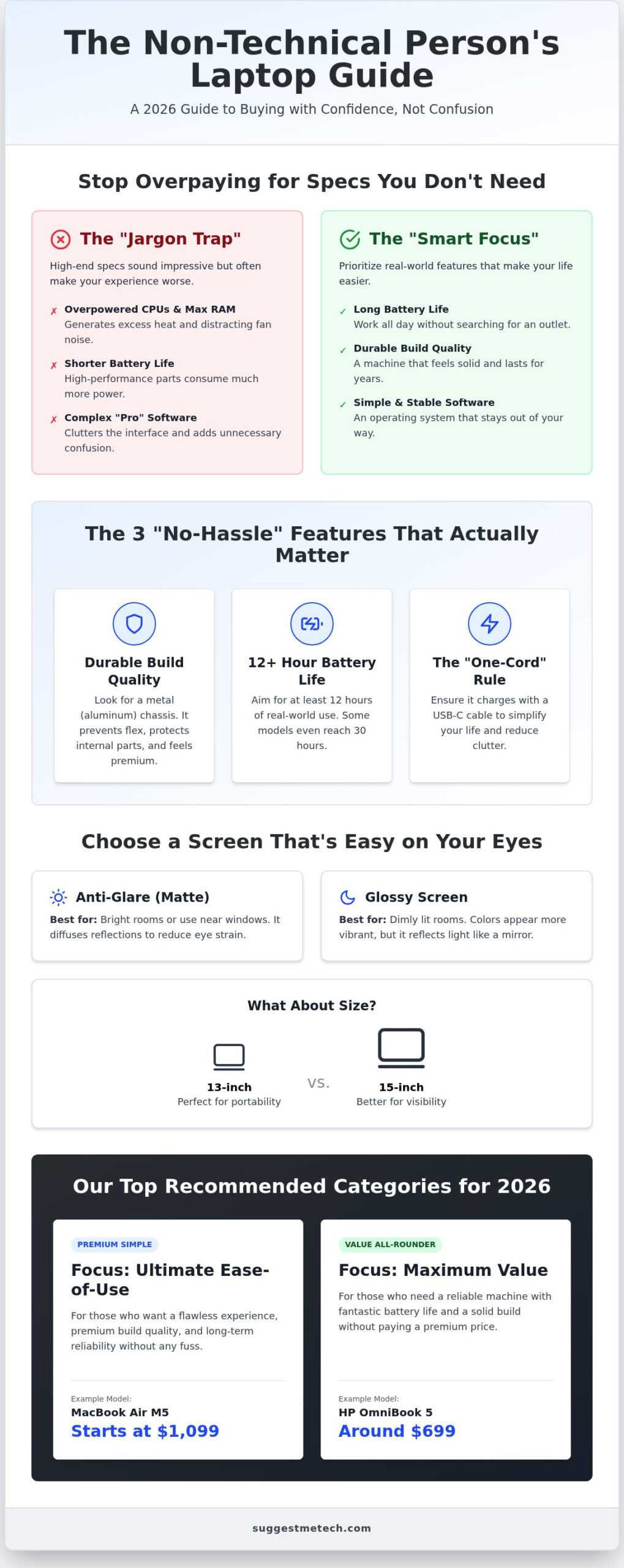
Walking into a tech store in 2026 feels like entering a different world. Salespeople will point you toward “AI PCs” with massive amounts of RAM and processors designed for professional video editors. It’s easy to assume that spending more money or getting the “fastest” model will guarantee a better experience. However, for most people, the best laptop for a non-technical person isn’t the one with the highest numbers on the spec sheet. It’s the one that stays out of your way and lets you finish your tasks without a headache.
The “Jargon Trap” is a real problem. When a laptop has an incredibly fast CPU, it generates a lot of heat. To manage that heat, manufacturers have to install powerful fans that can be loud and distracting. If you’re using your computer for web browsing, social media, or basic office work, you’re paying for power that actually makes your experience worse through shorter battery life and constant fan noise. You don’t need a race car to drive to the grocery store; you need something reliable and easy to park.
The Hidden Cost of Over-Speccing
Paying for professional-grade features often comes with a steeper learning curve. High-end machines frequently include complex settings and software suites that clutter your desktop and send unnecessary notifications. These “pro” features can make a simple task feel like a chore. In the context of simplicity, user experience is the measure of how quickly you can achieve your goal without the technology itself becoming a hurdle. When you buy more power than you need, you’re also buying more potential for things to go wrong. A simpler machine is often a more stable machine.
What “Reliability” Actually Looks Like in 2026
In 2026, reliability is about more than just a computer that turns on. It’s about software stability and physical durability. With the release of macOS Tahoe (version 26) and Windows 11 26H2, modern operating systems are more capable than ever, but they can also be more demanding. True reliability means your software doesn’t require constant troubleshooting or manual updates just to stay functional. You want a system that handles its own maintenance in the background.
Physical build quality is equally important. We recommend looking for hardware that can survive the realities of daily life. This includes:
- A sturdy chassis: Aluminum or high-quality alloys that don’t flex or crack.
- Spill resistance: Keyboards designed to handle a minor coffee mishap.
- Support networks: Choosing a brand with a local repair presence so you aren’t stuck mailing your laptop away for weeks.
Setting a realistic budget is the final step. You don’t need to cross the $2,000 mark for a “just works” machine. Research shows that highly capable, simple laptops like the HP OmniBook 5 have been available for around $699, while premium options like the MacBook Air M5 start at $1,099. Focus your investment on build quality and battery life rather than raw processing speed.
The 3 “No-Hassle” Specs That Actually Matter
Most tech reviews focus on benchmarks and processing speeds that don’t impact your daily life. For a more practical perspective, kingskitchenhq.com provides honest, hands-on reviews that help you understand how consumer products actually function in a home environment. When searching for the best laptop for a non-technical person, three physical factors determine whether you’ll love your computer or regret the purchase. These aren’t about how fast the “brain” of the computer is; they’re about how the machine fits into your routine without causing frustration.
First, prioritize build quality. Cheap laptops often use plastic frames that flex when you type or crack at the hinges after a year of use. A metal chassis, typically made of aluminum, provides a rigid structure that protects the internal parts. It feels more like a premium tool and less like a toy. Second, look for a battery that lasts at least 12 hours. In 2026, some models like the HP OmniBook 5 or Dell XPS 14 are achieving over 30 hours of battery life in specific tests. When your laptop lasts all day, you gain the freedom to leave your charger at home. Finally, follow the “One-Cord” rule. Ensure the laptop charges via USB-C. This allows you to use the same cable for your phone and laptop, simplifying your life and reducing clutter.
Screen Quality: Why Your Eyes Will Thank You
The screen is the part of the laptop you interact with most, yet it’s often overlooked. If you plan to use your laptop in a bright living room or near a window, choose a screen with an anti-glare coating. Glossy screens look vibrant in dark rooms but act like mirrors in sunlight. For size, a 13-inch screen is perfect for portability, while a 15-inch screen is better if you prefer larger text and easier visibility. Many 2026 models also include hardware-level blue light reduction, which helps prevent eye strain during late-night browsing sessions without making the colors look yellow or muddy.
Support and Warranty: Your Safety Net
Even the most reliable hardware can have issues. For a non-technical user, the quality of the safety net is just as important as the laptop itself. We recommend looking for brands that offer “On-Site Support.” This service often costs an extra $50 to $100 but means a technician will come to your home to fix a problem rather than making you mail the laptop away for weeks. Before you commit, check the return policy. A 30-day “no-questions-asked” return window is essential. If the keyboard feels uncomfortable or the trackpad is difficult to use, you should be able to send it back without a fight. You can find more details on which brands currently lead the market in our latest brand reliability rankings.
MacOS vs. Windows vs. ChromeOS: Which is Easiest?
Choosing the operating system is the most important decision when looking for the best laptop for a non-technical person. This software is the “face” of your computer, and it defines how you’ll manage photos, browse the web, and stay organized. While every system has its fans, they each require a different level of “housekeeping” to stay functional and secure.
A seamless online experience depends as much on your internet connection as it does on your hardware; you can learn more about how high-speed fibre providers like Brsk can enhance your home setup.
When we rank these systems by the effort required to keep them running, the order is clear. ChromeOS is the “set it and forget it” champion. It’s designed for users who want to open the lid and get to work immediately. macOS follows closely, offering a stable environment that rarely breaks but carries a higher price tag. Windows remains the most common choice, but it requires the most manual attention to keep it running smoothly over several years.
ChromeOS: The Ultimate Simplicity
MacOS: For the Apple Enthusiast
For those who already own an iPhone, macOS is the most intuitive transition. Features like “Handoff” allow you to answer text messages from your laptop or copy a photo on your phone and paste it directly into a document on your screen. Apple’s software is incredibly consistent, which reduces the learning curve over time. Another advantage is that Macs hold their resale value better than almost any other hardware. If you decide to upgrade in three years, your old machine will still be worth a significant portion of its original price. You can find our top Mac picks in our guide to The Best Laptops of 2026.
Windows is the best laptop for a non-technical person who needs to run specific, older programs that aren’t available on other systems. While Windows 11 26H2 has made great strides in user-friendliness, it still prompts users with more notifications and system alerts than its competitors. It’s a versatile tool, but that versatility often comes with the need for occasional troubleshooting. If you don’t have a specific reason to use Windows, you might find more peace of mind with one of the simpler alternatives.
5 Questions to Ask Yourself Before You Click “Buy”
Before you add a device to your cart, take a moment to reflect on how you actually live. The best laptop for a non-technical person isn’t defined by what a reviewer likes, but by how it fits into your existing habits. Start by asking, “What is the one thing I do most on a computer?” If you spend 90 percent of your time in a web browser—perhaps researching parenting tips on Pregnancy Magazine—your needs are very different from someone who wants to store 20 years of family photos locally. Be honest about your daily routine so you don’t overpay for power you’ll never use.
The Phone Match Test
Matching your laptop to your phone brand can reduce your learning time by 50 percent. When your devices share the same ecosystem, your photos, passwords, and contacts sync automatically without any manual effort. If you already use an iPhone, a Mac will feel familiar because the icons and settings menus look similar. For some users, an iPad with a keyboard attachment might actually be the most intuitive choice. If you are a dedicated Android or Google user, a Chromebook provides that same seamless connection to your Google Photos and Drive. This “Phone Match” strategy ensures that you aren’t fighting against your own technology every time you try to share a file.
The Portability Reality Check
You need to decide if your laptop will live on a desk or travel in a bag. Finding the “Goldilocks” zone between weight and screen size is essential. A 13-inch laptop is light and portable, but a 15-inch screen is much easier on the eyes if you don’t plan to move it often. While “2-in-1” laptops that flip into tablets seem versatile, they are often more trouble than they are worth for beginners. The hinges can be fragile, and the tablet mode often feels clunky compared to a dedicated device. If you plan to use your new machine on the go, check out our Headphones Guide to complete your portable setup.
Finally, consider the “headache” factor. How much are you willing to spend to avoid technical issues? Investing an extra $100 in a machine with a better support reputation or a longer warranty is often smarter than buying a cheaper, faster model. Ask yourself, “Who can I call if this stops working tomorrow?” If the answer isn’t a reliable customer service line or a local store, keep looking. You can browse our full list of recommended models to see which brands currently offer the best support for 2026.
Our Top Recommended Categories for 2026
Selecting the best laptop for a non-technical person often comes down to three main categories. Instead of getting lost in a sea of identical looking machines, you can focus on the category that fits your primary use case. Whether you prioritize a beautiful design, a low price, or a screen that is easy to read, there is a reliable option waiting for you in 2026.
- The Premium Simple Choice: These are lightweight aluminum laptops like the MacBook Air M5. They offer up to 18 hours of battery life and a completely silent, fanless design. They’re perfect if you want a machine that feels high-quality and lasts for many years.
- The Value Choice: High-end Chromebooks, such as certain versions of the HP OmniBook 5, provide incredible speed for a lower price. If you spend your time on websites and social media, these machines handle 99 percent of your daily tasks without the complexity of a traditional computer.
- The Large Screen Choice: If you prefer to keep your laptop on a desk, a 15-inch Windows machine is a great fit. We recommend keeping Windows in “S-Mode.” This safety feature only allows apps from the official store, which significantly reduces the risk of accidentally downloading something harmful.
Why We Recommend These Specific Types
Keeping it Clean and Fast
You don’t need to be a tech expert to keep your new laptop running like new. Simple software habits, such as closing unused browser tabs and emptying your trash bin once a month, prevent the system from becoming cluttered. If you find your other devices are also slowing down, you can use similar maintenance logic; see our guide on How to Clear Cache on iPhone to see how simple it is to free up space. When a minor glitch happens, the “restart and try again” method still solves most problems. If a reboot doesn’t fix the issue, that is your signal to reach out for professional support.
Choose Peace of Mind for Your Next Purchase
Finding the best laptop for a non-technical person is about prioritizing your daily comfort over confusing spec sheets. Focus on durability. Aim for long battery life. By matching your new computer to your current phone’s ecosystem, you’ll skip the steep learning curve and enjoy a machine that feels familiar from day one. This simple approach saves you time and prevents future headaches.
Our experts at SuggestMeTech bring over 15 years of experience to every review. We provide user-first recommendations based on real-world use. We’ve curated a selection of community-voted favorites that emphasize ease of use and longevity. Ready to make your choice? Check out our full list of the Best Laptops of 2026 for every budget. Technology should make your life easier, and with the right guide, you can buy your next machine with total confidence.
Frequently Asked Questions
Do I really need an antivirus on a new laptop in 2026?
You generally don’t need to purchase separate antivirus software in 2026. Modern operating systems like Windows 11 26H2 and macOS Tahoe come with built-in security features that protect against most threats automatically. These integrated tools are designed to work without slowing down your computer. As long as you keep your system updated and avoid clicking suspicious links in emails, the included protection is sufficient for most daily tasks.
Is a Chromebook a “real” laptop for a non-technical person?
Is a Chromebook a “real” laptop for a non-technical person?
For smooth web browsing in 2026, you should aim for at least 16GB of RAM. While 8GB was the standard for years, modern websites and browser tabs now use more memory to run quickly. Having 16GB ensures that your laptop won’t slow down when you have multiple tabs open or if you are streaming music while you work. This small upgrade helps your computer stay fast for a much longer period.
Should I buy a laptop with a touch screen?
Most non-technical users don’t need a touch screen on their laptop. While it seems like a fun feature, touch screens often add extra weight and cost to the device. They also drain the battery faster and lead to a screen covered in fingerprints. Unless you plan to use your laptop specifically for digital art or prefer navigating with your hands, a traditional screen is usually a more practical and affordable choice.
How long should a good laptop last before I need a new one?
A high-quality laptop purchased in 2026 should last between four and six years. Premium models with aluminum frames and 16GB of RAM tend to stay functional longer than budget plastic versions. To get the most life out of your machine, keep it clean and avoid letting the battery drop to zero percent too often. If you notice significant slowdowns after five years, it’s usually time to consider an upgrade.
What happens if I forget my laptop password?
If you forget your password, you can usually reset it using your linked Apple ID, Microsoft account, or Google account. Most modern laptops also feature fingerprint readers or facial recognition, which allow you to log in without typing a password at all. We recommend setting up these biometric features during your initial setup. It provides a much easier way to access your files if you struggle to remember complex login credentials.
Is it better to buy a laptop online or in a physical store?
Can I use Microsoft Word on a MacBook or Chromebook?
You can absolutely use Microsoft Word on both MacBooks and Chromebooks. On a MacBook, you can install the official Microsoft 365 apps directly. On a Chromebook, you can use the web-based version of Word through your browser, which looks and feels almost identical to the desktop version. All your documents will sync to the cloud, allowing you to open them on any device without worrying about file compatibility or losing your work.

