

Imagine waking up to find your website offline, your professional emails bouncing, and a “This Domain Has Expired” notice staring back at you. It is a digital nightmare that hits closer to home than many realize. In the first quarter of 2026, the preliminary renewal rate for .com and .net domains was just 76.3%, meaning millions of owners face this exact crisis every year. You are likely feeling the weight of potential downtime and the fear of a squatter claiming your brand identity. It is a high-stakes situation, but you still have a window of opportunity to fix it.
If you are currently wondering what to do if your domain name expires, don’t panic. You aren’t out of options yet. This guide provides a practical, step-by-step roadmap to recovering your digital identity and restoring your website’s functionality. We will break down the mandatory 30 day Redemption Grace Period, explain why you might face fees between $80 and $288, and show you how to navigate the final “Pending Delete” phase. By the end of this article, you’ll know exactly how to reclaim your domain and set up safeguards so this never happens again.
Key Takeaways
- Identify the four critical stages of the domain lifecycle to understand exactly how much time you have left to act.
- Follow a clear, step-by-step checklist on what to do if your domain name expires to restore your website and email services quickly.
- Learn to navigate the Redemption Period to avoid excessive restoration fees and protect your brand from automated domain squatters.
- Discover why auto-renewal isn’t a foolproof solution and how multi-year registrations provide a more secure safety net.
- Understand the impact of 2026’s shortened domain validation periods on your digital security and TLS certificates.
The Immediate Impact: What Happens When Your Domain Name Expires?
The moment your domain expires, the digital lights go out. It isn’t a subtle transition or a slow fade. Most registrars immediately update your DNS settings, replacing your carefully crafted homepage with a generic “parked” page. These pages often feature intrusive advertisements that generate revenue for the registrar while confusing your loyal customers. This sudden shift happens because the Domain registration process is essentially a temporary lease. Once that lease ends, you lose administrative control over where your traffic is directed. With .com renewal rates hovering around 76.3% in early 2026, millions of owners find themselves in this exact position every year.
If you are currently searching for what to do if your domain name expires, the first 24 hours are your most critical window for a simple, low-cost fix. While you haven’t lost the name permanently, the psychological toll of a broken site can lead to panic. Acting fast prevents your customers from seeing the “This Domain Has Expired” notice, which can permanently stain your brand’s credibility if left online for days. Staying calm and following a logical recovery path is the best way to minimize the damage to your professional reputation.
Why Your Website Disappeared
It is a common misconception that your hosting service has failed when your site goes down. In reality, your hosting is likely still active and your files are safe on the server. The “bridge” between your visitors and those files, the domain, has simply been dismantled. Registrars point your nameservers to their own servers to signal the expiration. You can verify this status quickly by using a WHOIS lookup tool. Look for the “Status” field; if it says “AutoRenewPeriod” or “Expired”, you know exactly where the bottleneck is. This distinction is vital because it means you don’t need to troubleshoot your website code or contact your host; you only need to talk to your registrar.
The Impact on Business Communications
The most damaging part of expiration isn’t the missing website; it’s the DNS blackout affecting your email. Because your MX records, which tell the internet where to send your mail, are tied to your domain, your professional inbox will stop receiving messages instantly. Senders will receive “bounced” notifications, which can make your business look unstable or defunct. If you can’t restore the domain within a few hours, you may need to look into temporary workarounds, such as using a secondary domain for critical outgoing communications. Knowing what to do if your domain name expires means acting before these bounced emails lead to lost contracts or missed opportunities with partners who assume you have gone out of business.
The 4 Stages of the Domain Expiration Timeline
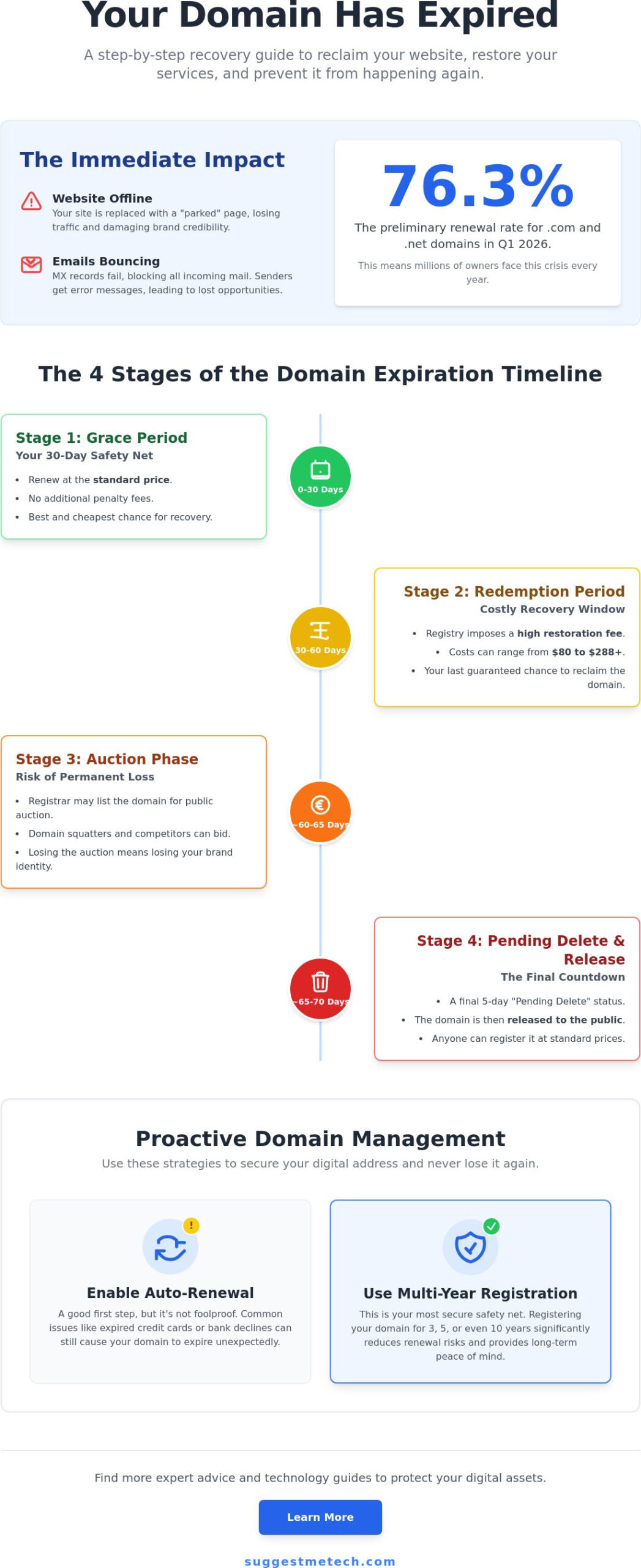
Domain expiration isn’t a single event; it is a predictable four-stage lifecycle that gives you multiple chances to fix the problem. Knowing what to do if your domain name expires starts with understanding where you sit on the clock. While your website might go dark immediately, the actual ownership of the domain doesn’t vanish overnight. Instead, it moves through a series of protective windows designed to prevent accidental loss, though the cost of recovery rises at every step.
- Stage 1: The Grace Period (0–30 days). This is your best chance for a cheap fix. You can usually renew your domain at the standard price without additional penalties.
- Stage 2: The Redemption Period (30–60 days). This is when the “late fees” kick in. Your registrar has likely removed the domain from your control, and the registry requires a restoration fee.
- Stage 3: The Auction Phase. If you don’t act, the registrar may put your domain up for bidding. This is when others can bid on your brand to capture your traffic and SEO value.
- Stage 4: Deletion and Release. The final phase is a 5-day “Pending Delete” status. After this, the domain is released to the public for anyone to register at standard prices.
This process is governed by ICANN’s Expired Registration Recovery Policy, which ensures you have specific windows of opportunity to reclaim your property. If you’re looking for better ways to manage your digital assets, you can find expert advice in our technology reviews and guides.
The Grace Period: Your 30-Day Safety Net
Most registrars provide a safety net immediately after the expiry date. During this window, your domain is “parked,” but it’s still held in your account. You can typically log in and renew it for the standard annual rate. It’s the perfect time to perform an “Auto-Renew” failure check. Often, a domain expires simply because a credit card on file expired or a notification email landed in a spam folder. Keep in mind that this period isn’t standardized; while Namecheap offers 30 days, GoDaddy may only provide 18 days for .com domains.
The Redemption Grace Period (RGP)
Once the initial grace period ends, the domain enters the Redemption Grace Period. This is a technical process where the registrar officially deletes the domain, but the registry holds it in a “restorable” state. To get it back now, you’ll have to pay the standard renewal fee plus a redemption fee, which in 2026 typically ranges from $80 to $288. The RGP is the final 30-day window before the domain is released for public re-registration.
Redemption Fees and Auctions: The Cost of a Missed Renewal
Missing the initial grace period turns a routine renewal into a significant financial hurdle. Once the 30-day safety net vanishes, the price to reclaim your digital identity spikes. Knowing what to do if your domain name expires and enters the redemption phase is about understanding the difference between a simple renewal and a technical restoration. While a standard .com renewal might only cost around $15, redemption fees in 2026 typically range from $80 to $288. This isn’t just a late fee from your registrar; it’s a cost imposed by the registry to pull a domain back from the brink of deletion.
The financial impact goes beyond the restoration fee. Every hour your domain is offline, you face a hidden drain on your business through lost SEO rankings and broken customer trust. Search engines may begin to de-index your pages if they remain unreachable for too long. Additionally, automated bots and “drop catchers” constantly monitor expiration lists. These systems are designed to snag domains with existing traffic or high-quality backlinks the moment they hit the open market. If your brand has any digital footprint, someone is likely waiting to buy it the second you let it go.
Understanding the Redemption Fee
The steep jump from a basic renewal price to nearly $300 feels predatory, but it covers the manual intervention required at the registry level. Registries like Verisign charge registrars a mandatory fee to undo a deletion request. While these fees are often non-negotiable, it’s always worth contacting your registrar’s support team if you’ve been a loyal, long-term customer. In some cases, they may offer a one-time discount on their internal service portion of the fee. It’s a small chance, but when you’re facing a $200 bill, a quick conversation is a smart move.
What to Do If Your Domain Is in Auction
If you fail to pay the redemption fee, your domain may head to an auction house like GoDaddy Auctions or Sedo. At this stage, your focus shifts to bidding against investors who want your name for its resale value. When you’re figuring out what to do if your domain name expires and hits the auction block, the trick is to monitor the listing closely without showing desperation. Don’t drive the price up yourself by bidding too early. If you lose the auction, you may have to negotiate with a domain squatter who will likely demand a much higher price than the original redemption fee.
How to Recover an Expired Domain: A Step-by-Step Action Plan
If you’re currently stressed about what to do if your domain name expires, your first move must be to identify exactly where the domain sits in its lifecycle. Start by performing a WHOIS search. This public database will confirm your current registrar and the domain’s status. If the status says “RenewPeriod” or “Grace,” you can likely fix this in minutes. If it says “Redemption,” you’ll need to prepare for a more involved process. Regardless of the stage, acting immediately is the only way to prevent the name from falling into the hands of a competitor or a professional domain flipper.
Scenario A: You Are Still in the Grace Period
This is the simplest path to recovery. Most registrars allow you to renew directly through your customer dashboard. Simply log in, find your expired domain, and click the “Renew” button. Once you’ve paid the standard renewal fee, check your DNS settings. Registrars often change these to a parked page upon expiration, and while the renewal should trigger a reset, it’s safer to verify them manually. It typically takes 24 to 48 hours for your website to come back online globally due to DNS propagation time. If you need more help with these technical steps, our technology reviews and guides offer deeper dives into registry management.
Scenario B: The Domain Is in Redemption
When a domain hits the redemption stage, the “Renew” button in your dashboard usually disappears. You must call or start a live chat with a human representative at this point. Because the domain has been officially “deleted” from the registrar’s active database, they have to manually request a restoration from the registry. You’ll likely need to provide proof of ownership, such as a government ID or business license that matches the WHOIS contact info. After you pay the restoration fee, the registrar will process the request. Expect a wait of about 24 hours before you see the domain back in your account.
Scenario C: The Domain Has Been Deleted
If the domain has cleared the “Pending Delete” phase, it’s gone from your account and available to the general public. Use a standard domain search tool to see if it’s still available. If it is, you can register it again at the normal price. However, this is risky. Professional “drop catchers” use automated scripts to buy valuable domains the millisecond they are released. If you find your old name is already taken, you may need to learn how to choose and register a domain name that serves as a suitable replacement. Once you’ve successfully reclaimed your address, update your payment method immediately to a card with a long expiration date and verify that your WHOIS contact email is an address you check daily.
Proactive Domain Management: Never Lose Your Address Again
Recovering from a digital blackout is exhausting and expensive. While you now know what to do if your domain name expires, the best strategy is to ensure you never have to use those recovery steps again. Many owners fall into the “Set and Forget” fallacy, believing that toggling the auto-renew switch is a 100% guarantee of safety. It isn’t. Credit cards expire, banks flag international registrar transactions as fraud, and notification emails often get buried in junk folders. Relying solely on a single automated system is a gamble with your brand’s future.
One of the most effective ways to secure your identity is through multi-year registrations. Instead of worrying about an annual bill, you can lock in your domain for five or ten years. This doesn’t just prevent accidental expiration; it also protects you from future price hikes in registry fees. Additionally, most reputable registrars offer “Domain Locks.” This feature prevents unauthorized transfers even if someone gains access to your account. Combining these technical locks with a registrar that provides robust, multi-channel notification systems, including SMS alerts, creates a much stronger defense for your digital assets.
The Ultimate Domain Security Checklist
Securing your domain requires a few manual safeguards that automated systems can’t provide. Use this checklist to harden your account against future lapses:
- Use a non-domain email address: Never use an email tied to the domain you are registering. If your domain expires, your email stops working, leaving you unable to receive password resets or renewal links. Use a reliable third-party service like Gmail or ProtonMail instead.
- Set external calendar reminders: Don’t wait for the registrar’s automated ping. Set your own reminders 60, 30, and 7 days before the expiration date in your personal or business calendar.
- Keep WHOIS data current: As of February 2026, the domain validation reuse period has been shortened to 199 days. Keeping your contact information accurate is now a technical requirement for maintaining services like TLS certificates.
- Verify your secondary contact: Ensure your registrar has a backup email and phone number on file to reach you if your primary inbox is compromised or full.
Choosing the Right Partners
Your registrar and hosting provider are the foundation of your online presence. They should work together seamlessly to provide alerts and security features like domain privacy. If you aren’t satisfied with your current setup, you can explore our list of the best web hosting services to find providers that prioritize account security and uptime. Setting up a resilient system now saves you the panic of wondering what to do if your domain name expires later. Ready to build something new? Start your blog the right way in 2026 with a secure domain strategy that keeps you in control of your digital identity.
Take Control of Your Digital Future
Recovering an expired domain is a high-pressure race against the clock, but you now have the roadmap to win it. You’ve learned that acting during the initial grace period is the most cost-effective path and that understanding the redemption phase is vital for avoiding permanent loss. By setting up multi-year registrations and external calendar alerts, you can shift from crisis management to proactive security. Knowing what to do if your domain name expires is an essential skill, but building a system that prevents it entirely is even better.
If your current registrar let you down with poor notifications or high fees, it’s time for a change. You can find a more reliable home for your domain in our Best Web Hosting guide. Our guide features expert reviews of top registrars, updated 2026 performance data, and beginner-friendly migration guides to help you move your assets safely. Don’t let a simple renewal date threaten your brand’s hard-earned reputation. With the right tools and a little foresight, you’ll keep your digital identity secure for years to come.
Frequently Asked Questions
How long after a domain expires can I get it back?
You typically have a window of 60 to 70 days to reclaim your address before it is lost. This timeline includes a 30 day grace period followed by a 30 day redemption period. Once these stages pass and the domain enters the “Pending Delete” phase, you cannot stop the deletion. Understanding what to do if your domain name expires means acting within these specific windows before the name is released to the public.
Why is the redemption fee so much higher than the renewal fee?
Redemption fees are higher because they involve a manual restoration process at the registry level. When a domain is deleted, your registrar must pay a specific fee to the registry to pull it back from the deletion queue. This technical intervention costs significantly more than a standard automated renewal. These fees also serve as a financial incentive for owners to maintain their registrations before the deadline passes.
Can someone else buy my domain as soon as it expires?
No, other people cannot buy your domain the second it expires. Your domain is protected by the registrar’s grace period and the mandatory redemption window. However, some registrars may put your domain up for auction during the redemption phase. If no one bids and you don’t reclaim it, the domain is eventually released to the open market where anyone can register it for a standard fee.
Will I lose my website content if my domain expires?
No, your website files and database will remain safe on your web server. Domain expiration only breaks the link between your URL and your hosting. Think of it like a house where the phone line is cut; the house and everything inside it are fine, but people can’t call you. You won’t lose your data, but you will lose all traffic and email functionality until the domain is restored.
How do I find out who my domain registrar is if I forgot?
You can find your registrar by using a public WHOIS lookup tool. Simply enter your domain name into a WHOIS search engine to see the “Registrar” field. This will tell you exactly which company holds your lease. Even if you have privacy protection active, the registrar’s name will always be visible. This is the first step in regaining access to an account you haven’t logged into for a while.
Does an expired domain affect my SEO rankings?
Yes, prolonged expiration will negatively impact your search engine rankings. If your site is down for more than a few days, search engines will start to de-index your pages because they are unreachable. While a quick recovery within 24 hours usually has minimal impact, staying offline for weeks can destroy years of accumulated SEO authority. It’s vital to restore the connection as quickly as possible to minimize ranking loss.
What happens if my auto-renew failed due to an expired credit card?
Your registrar will immediately suspend your services and move the domain into a grace period. You’ll need to log in to your account, update your credit card details, and manually process the renewal payment. This scenario is the leading reason why users ask what to do if your domain name expires, so keeping a secondary payment method on file is a smart proactive step for any business owner.
Can I transfer an expired domain to a different registrar?
No, you cannot transfer a domain that is currently in an expired state. Most registrars lock the domain and prevent the generation of transfer authorization codes once the expiration date passes. You must first renew the domain with your current registrar to return it to an “Active” status. After the status is updated, you can then unlock the domain and begin the transfer process to a different provider.

