
Is your security camera actually protecting your privacy, or is it just another monthly bill that pings your phone every time a neighborhood cat walks by? You’ve likely felt the frustration of subscription fatigue from cloud fees that can reach $200 a year or the confusion of choosing between 2K and 4K resolution. Understanding what to look for in a home security camera has become a complex task as we move into 2026, especially with new privacy regulations now active in states like Kentucky and Rhode Island.
We agree that a security system should provide peace of mind, not a list of technical headaches and data leak concerns. This guide will help you master the technical specs, privacy features, and hidden costs so you can choose a camera that actually protects your property. We’ll explore how to get crisp video quality and reliable alerts without falling into all-party consent legal traps or paying for features you don’t need. From local storage hubs that eliminate monthly fees to seamless smart home integration, you’re about to get the practical advice you need to make an informed decision.
Key Takeaways
- Discover why proactive monitoring and 2K resolution often provide better value than passive 4K recording for standard home setups.
- Learn to distinguish between basic motion detection and advanced AI object recognition to stop receiving alerts for every passing animal.
- Identify what to look for in a home security camera to avoid the “subscription trap” where critical features vanish if you stop paying monthly fees.
- Compare local storage options like microSD and NVR against cloud services to keep your private data secure and your long-term costs low.
- Get a step-by-step checklist for auditing your Wi-Fi signal and mapping your property to ensure every camera provides reliable, high-quality video.
Understanding the Modern Home Security Camera Landscape
Home security has moved far beyond the grainy history of security camera technology. Today, these devices act as proactive guardians rather than passive recorders. If you’re deciding what to look for in a home security camera, you should view them as intelligent sensors that can distinguish between a falling leaf and a delivery driver. Most modern setups fall into three primary buckets: indoor units for monitoring pets or kids, rugged outdoor cameras for perimeter protection, and specialized doorbell or floodlight cameras that guard entry points.
You’ll also need to choose between DIY systems and professional monitoring. DIY models like Wyze or Reolink give you full control, often with low or no monthly fees. Services like ADT or SimpliSafe offer 24/7 professional oversight. The right choice depends on whether you want to manage alerts yourself or prefer a dispatcher to call emergency services when you’re unavailable. Modern “smart” cameras now rely on on-device processing to make these decisions faster than ever before. If you’re a property owner who values this kind of streamlined oversight, you can discover TenantStack to find affordable software for managing your rentals.
Indoor vs. Outdoor: More Than Just Weatherproofing
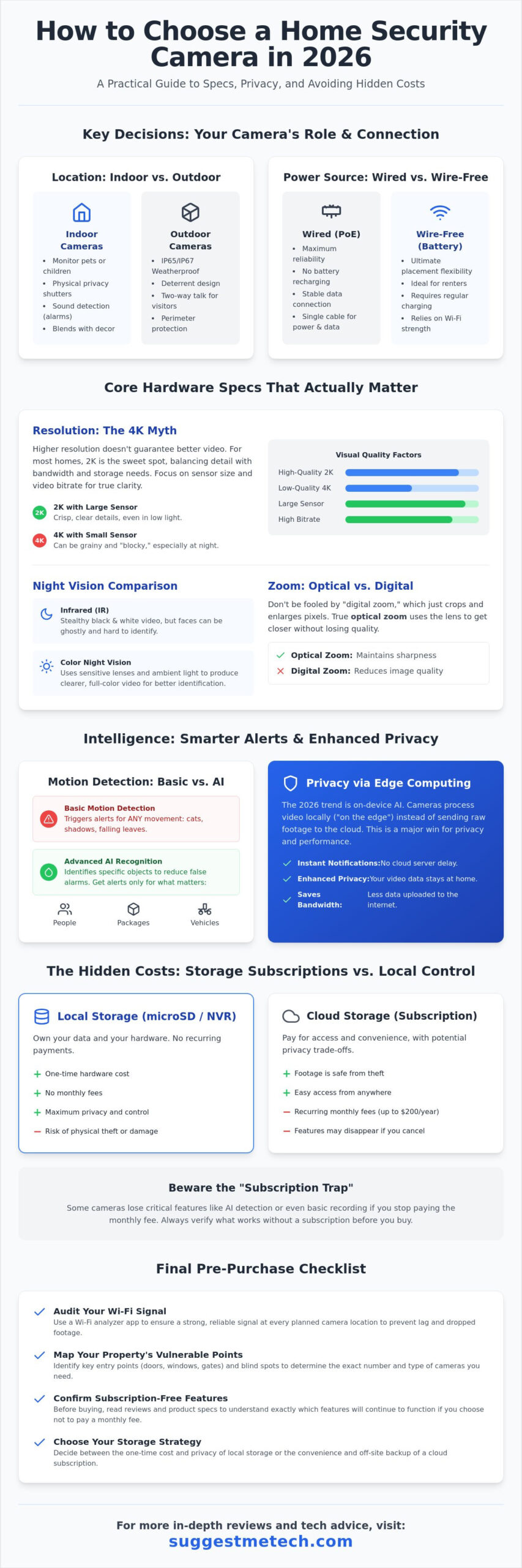
Outdoor cameras require an IP65 or IP67 rating to survive rain, snow, and dust. Some premium models, like the Vivint Outdoor Camera Pro Gen 3, offer even higher durability for extreme climates. Indoor cameras prioritize different features, like physical privacy shutters that block the lens when you’re home. While outdoor audio is often about two-way talk to deter intruders, indoor audio focuses on sound detection, like a smoke alarm or a window breaking. Don’t overlook aesthetics; indoor cameras are designed to blend into your decor rather than stand out as a deterrent.
Wired vs. Wire-Free: Power and Connectivity
The Rise of Edge Computing in 2026
The biggest shift in 2026 is the move toward edge computing. This means the camera’s processor handles AI tasks like facial recognition or package detection directly on the hardware. It doesn’t send your raw video to a distant server for analysis. This tech makes notifications almost instant and significantly improves your privacy. With states like Kentucky and Rhode Island enacting comprehensive privacy laws as of January 1, 2026, keeping data on-device is a major advantage. It also saves bandwidth, which is a key factor in what to look for in a home security camera if you have multiple devices running at once.
Core Hardware Specs That Actually Matter
Marketing materials often push 4K resolution as the gold standard, but it isn’t always the most important factor in what to look for in a home security camera. High resolution means nothing if the sensor is too small to capture enough light or if the bitrate is so low that the video looks blocky. For most residential needs, 2K resolution is the “sweet spot.” It provides enough detail to identify faces without overwhelming your Wi-Fi bandwidth or filling up your storage in a single day. To keep your system running smoothly, you should also secure your home security cameras by following standard network safety protocols.
Resolution and Image Quality: The 4K Myth
A 4K camera with a tiny sensor often produces grainier images than a high-quality 1080p camera with a large sensor. Larger sensors have bigger pixels that capture more light, which is essential for clear footage at dawn or dusk. Bitrate is the true measure of video clarity. If you need to see distant license plates, look for optical zoom rather than digital zoom. Digital zoom just enlarges the existing pixels, while optical zoom uses the lens to maintain sharpness. For more detailed hardware evaluations, you can find expert breakdowns at suggestmetech.com.
Night Vision: IR vs. Color Night Vision
Traditional Infrared (IR) night vision uses LEDs to illuminate a scene in black and white. It’s stealthy because there’s no visible light, but it often results in “ghostly” faces that are hard to identify. Color Night Vision is the modern alternative. It uses high-aperture lenses and built-in spotlights to provide vivid details in total darkness. While spotlights act as a great deterrent, you should prioritize black and white IR if you want your camera to remain unnoticed by passersby at night.
Frame Rate and Motion Blur
Frame rate, measured in frames per second (fps), determines how smooth your video looks. Most budget cameras record at 15fps to save storage, but this can cause motion blur when someone is running. A 30fps camera captures much sharper images of moving objects. You should also look for High Dynamic Range (HDR) support. HDR prevents “blown out” faces when a person stands in front of a bright, sunlit background, ensuring you can actually see their features.
Beyond resolution and night vision, consider the Field of View (FoV). A range between 130 and 160 degrees is ideal for most porches. Anything wider creates a “fish-eye” distortion that makes it hard to judge distances. Finally, don’t ignore two-way audio quality. Clear microphones and speakers are just as vital as video for doorbell cameras, allowing you to give specific instructions to couriers or warn off unwanted visitors with zero lag.
AI Features and Smart Ecosystem Integration
When determining what to look for in a home security camera, you’ll find that AI intelligence is the biggest differentiator between a helpful tool and a nuisance. Older cameras relied on simple motion detection, which triggered an alert every time a tree branch moved or a shadow shifted. Modern systems use on-device AI to categorize movement, ensuring you only get a notification when it actually matters. This level of precision is a key recommendation in any Consumer Reports buying guide, as it directly impacts how often you’ll actually check your phone.
Another essential feature is the ability to set custom “Activity Zones.” This allows you to highlight specific areas, like your driveway or front porch, while ignoring the busy sidewalk or street. By masking out high-traffic public areas, you eliminate the false positives that lead to notification fatigue. In 2026, we’re also seeing a massive trend toward cross-device automation. For example, your camera can trigger your smart outdoor lights to turn on the moment it detects a person in your yard, creating a layer of defense before anyone even reaches your door.
Advanced AI: Person, Vehicle, and Package Detection
Top-tier cameras now distinguish between people, vehicles, and animals with high accuracy. Some even offer facial recognition, sending you a specific “known person” alert when a family member arrives home. Package detection has become a must-have for doorbell cameras. It specifically monitors the ground for new boxes and alerts you if someone attempts to move them. This targeted data helps you prioritize your response instead of sifting through hours of useless footage.
Ecosystem Compatibility: Matter, Alexa, and Google
Your camera shouldn’t live in a silo. You should check for “Matter” support to future-proof your setup, as this standard allows devices from different brands to work together seamlessly. Integration lets you view live feeds on smart displays, your TV, or even your smart laptops while you work. If you’re an Apple user, prioritize HomeKit Secure Video; if you’re on Android, Google Home integration will offer the smoothest experience.
Automated Deterrence Features
Modern cameras don’t just watch; they fight back. Many units now include built-in sirens and strobe lights that you can trigger manually or set to activate automatically when a person is detected late at night. You can also use pre-recorded voice responses. A simple “Can I help you?” or “The police have been notified” can be enough to scare off a potential intruder. These active defense measures turn your camera from a witness into a powerful deterrent.
The Hidden Costs: Storage, Subscriptions, and Privacy
Most buyers focus on the sticker price. That’s a mistake. When considering what to look for in a home security camera, the long-term financial commitment is often more significant than the initial purchase. In 2026, “free” cloud tiers have largely disappeared, leaving users with ongoing monthly fees that can quickly exceed the value of the hardware itself. You’re no longer just buying a lens; you’re entering a service agreement that dictates how much of your own footage you can actually see.
Calculating the Total Cost of Ownership
A “budget” camera costing $50 might seem like a steal. However, if that camera requires a $10 monthly subscription for basic cloud storage and AI features, you’ll spend $650 over five years. Compare that to a premium $200 camera with local storage capabilities. Even with the added cost of a high-end microSD card, your total five-year investment stays closer to $250. You should account for the hardware limitations of microSD cards, as constant overwriting causes wear and tear over time. You can find more detailed cost-benefit analyses of the latest tech at suggestmetech.com.
Data Sovereignty: Keeping Your Footage Local
Local storage through microSD cards, Network Attached Storage (NAS), or dedicated Home Hubs with built-in hard drives offers more than just savings. It provides data sovereignty. Reviewing footage is significantly faster on a local network than waiting for cloud-based apps to buffer or download clips. To ensure your “local” camera isn’t leaking data to the cloud, you can audit its data usage through your router settings. This prevents the device from constantly pinging external servers without your permission, keeping your private life off the manufacturer’s servers.
Privacy Rights and Law Enforcement Access
Privacy is a major pillar of what to look for in a home security camera. Always check a brand’s policy regarding law enforcement. Some companies share footage with police without a warrant in “emergency” situations, while others require strict legal documentation. For indoor security, prioritize cameras with physical privacy shutters that mechanically block the lens when you’re home. On the digital side, ensure the camera supports Two-Factor Authentication (2FA) and uses AES-256 or end-to-end encryption (E2EE) to protect your streams from hackers or unauthorized data leaks.
Final Checklist: How to Choose Your Perfect Setup
Choosing what to look for in a home security camera culminates in this final planning stage. You’ve mastered the specs and understood the hidden costs, so now it’s time to apply that knowledge to your specific property. Follow these four steps to ensure you don’t overspend on hardware you won’t use or miss critical coverage areas.
- Step 1: Map your property. Walk around your home and identify high-traffic entry points. You don’t need a camera in every corner; focus on the front door, back entrance, and any ground-floor windows.
- Step 2: Audit your Wi-Fi signal. Take your smartphone to every planned mounting point and run a speed test. If your upload speed is below 2Mbps at that spot, even a 2K camera will struggle to stream clear video.
- Step 3: Set your privacy threshold. Decide if you prefer the convenience of cloud storage or the data sovereignty of local storage. This choice will narrow your brand options significantly.
- Step 4: Verify ecosystem compatibility. Ensure your new cameras work with your existing smart home hubs. If you often use headphones with integrated voice assistants, check if they can announce person-detection alerts directly to your ears while you’re focused on work.
Placement Strategy for Maximum Security
Mounting height is a critical detail that many DIYers get wrong. Follow the “7-foot rule” by placing cameras about seven feet above the ground. This height is low enough to capture clear facial features but high enough to stay out of easy reach for an intruder. Aim for overlapping views at corners to eliminate blind spots. Always be mindful of legal boundaries; never point your cameras at a neighbor’s windows or backyard, as this can lead to privacy disputes and potential legal trouble.
Maintenance and Long-Term Care
A security camera is only effective if its lens is clear. Clean your lenses every few months using a soft microfiber cloth to avoid scratching specialized anti-glare coatings. Don’t ignore those firmware update notifications; they often contain vital security patches that protect your system from new hacking methods. We recommend testing your motion alerts and checking battery levels every quarter to ensure the system is ready when you actually need it.
Making the Final Decision
Every home has different priorities. If you’re on a tight budget, brands like Wyze offer the best entry-level value. For those prioritizing data privacy, look toward Eufy or systems with dedicated local hubs. Tech enthusiasts will likely prefer Power over Ethernet (PoE) systems or cameras with deep Apple HomeKit or Google Home integration. We’d love to hear about your setup choices or any specific challenges you’ve faced during installation. Share your experience with the SuggestMeTech community to help others build better security systems.
Join our newsletter for the latest tech reviews and security guides!
Secure Your Home with Confidence
Choosing the right protection doesn’t have to be a technical nightmare or a financial drain. By prioritizing 2K resolution, on-device AI processing, and local storage hubs, you can build a system that respects both your privacy and your wallet. You now have the knowledge of what to look for in a home security camera to avoid the subscription traps and notification fatigue that often frustrate homeowners. Your security should work for you, not the other way around.
At SuggestMeTech, we provide expert-led comparison frameworks and independent, affiliate-supported research to simplify these complex tech decisions. Our user-first privacy focus ensures that your security remains a personal matter rather than a corporate data point. If you’re ready to see the top-performing models currently on the market, explore our curated Tech Reviews for more home security recommendations. Taking control of your home’s security is a powerful step toward peace of mind, and we’re excited to help you find the perfect fit for your lifestyle.
Frequently Asked Questions
Do home security cameras work without a monthly subscription?
Yes, many cameras function perfectly without a monthly fee if you choose models with local storage options. You can use a microSD card, a Network Attached Storage (NAS) device, or a dedicated hard drive hub to save footage. While you’ll miss out on long-term cloud history, you still get live views and basic motion alerts. Just be aware that some brands lock advanced AI features behind a paywall.
How much internet bandwidth does a 4K security camera use?
A single 4K camera typically requires between 2Mbps and 4Mbps of upload speed to stream high-quality video smoothly. If you have four cameras running simultaneously, you’ll need at least 16Mbps of dedicated upload bandwidth. Understanding what to look for in a home security camera includes evaluating your home’s upload speeds. If your connection is slow, 2K cameras are a more efficient choice for your network.
What is the difference between a security camera and a surveillance system?
A security camera is a standalone device designed for targeted monitoring of a specific area. A surveillance system is a comprehensive network of multiple cameras connected to a central recorder, like an NVR or DVR. Surveillance systems are built for continuous, 24/7 recording across an entire property. Security cameras are often more flexible for DIY users who only need to watch entry points.
Can home security cameras be hacked, and how do I prevent it?
Any device connected to the internet carries a risk of being hacked, but you can significantly reduce this danger. Always enable Two-Factor Authentication (2FA) and use a unique, complex password for your camera account. Keep your camera’s firmware updated to patch security vulnerabilities. Look for models that offer end-to-end encryption (E2EE) to ensure your video streams remain private and inaccessible to unauthorized users.
Do I need a professional to install my home security cameras?
Most modern security cameras are designed for simple DIY installation and don’t require professional help. Battery-powered and Wi-Fi models usually involve just a few screws and a smartphone app setup. You might only need a pro if you’re installing a complex Power over Ethernet (PoE) system. These require running cables through walls and attics, which can be difficult for those without specialized tools.
How long do security cameras store footage by default?
Storage duration depends entirely on your storage method and settings. Cloud subscriptions usually offer a fixed window, such as 30 or 60 days of event history. Local storage duration depends on the size of your microSD card or hard drive. Once the storage is full, the camera will automatically overwrite the oldest footage. You can extend this time by setting the camera to record only when it detects motion.
What happens to my security cameras if the power or Wi-Fi goes out?
Standard wired cameras will shut down immediately during a power outage unless they’re connected to a backup battery or UPS. If the Wi-Fi goes out, most cameras lose their ability to send alerts or save footage to the cloud. However, some models with local storage can continue recording to a microSD card. You won’t be able to see the live feed until your internet connection is restored.
Are wireless security cameras truly wireless?
The term “wireless” usually refers to the data connection, not the power source. Many wireless cameras still need to be plugged into a standard power outlet to function. When deciding what to look for in a home security camera, checking the power source is vital. If you want a truly wire-free experience, you must choose a model that specifically uses rechargeable batteries or a solar panel for power.

