

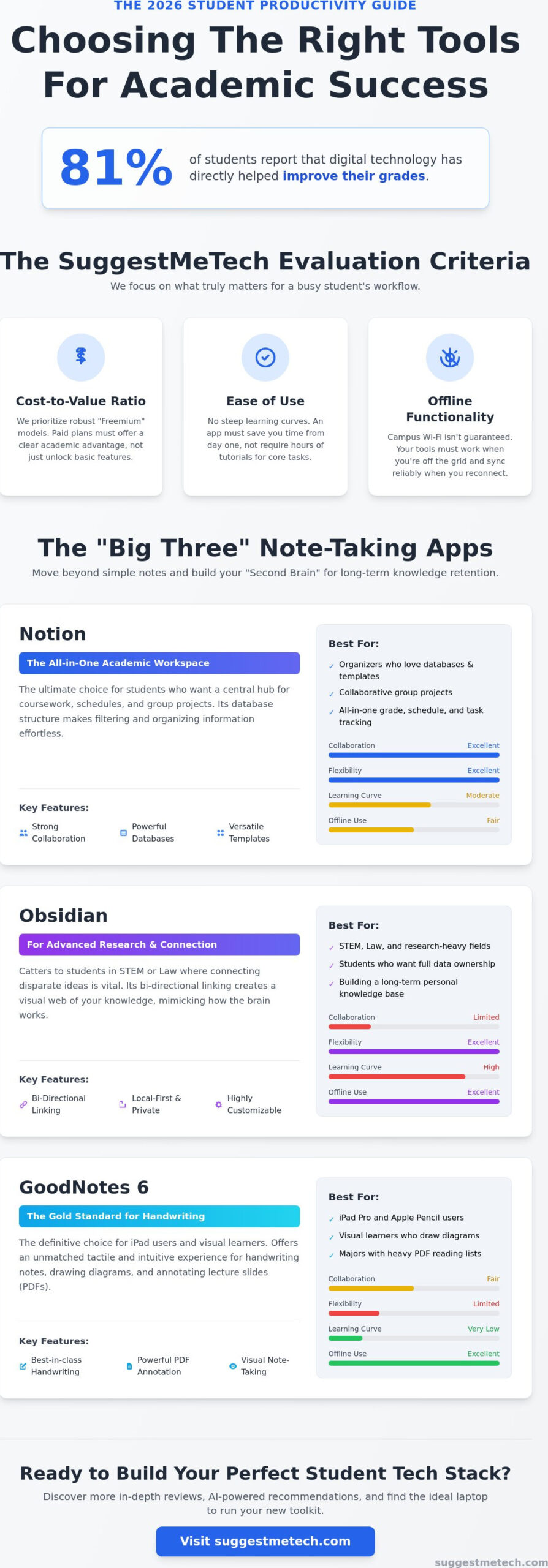
Did you know that 81% of students now report that digital technology has directly helped improve their grades? While the potential for success is higher than ever, the reality of 2026 is often a chaotic mix of overwhelming digital notes and constant social media distractions. You likely feel the pressure of coordinating group projects across multiple platforms while trying to maintain deep focus during study sessions. It’s a difficult balance to strike when your phone is both your greatest tool and your biggest distraction.
We’ve curated this guide to help you cut through the noise and find the best productivity apps for students that actually deliver results. You’ll discover how to create a central hub for all your school work, speed up your research process, and use gamification to stay off your phone. We’re looking at the latest 2026 updates for industry leaders like Notion and Todoist; we’ll also explore specialized tools designed to reduce academic stress. By the end of this list, you’ll have a personalized digital toolkit ready to handle any syllabus.
Key Takeaways
- Learn to move from manual organization to AI-augmented knowledge management to save hours on research and citations.
- Compare the “Big Three” note-taking tools, Notion, Obsidian, and GoodNotes 6, to build a “Second Brain” for long-term retention.
- Discover how AI-driven scheduling tools like Reclaim.ai automate your calendar to prioritize deep study sessions over busy work.
- Identify the best productivity apps for students that prevent “social loafing” and keep group projects on track through clear task delegation.
- Get tailored recommendations for building a minimalist or power tech stack based on your specific major and budget.
The 2026 Student Productivity Landscape: AI and Digital Focus
Your academic success in 2026 depends on more than just highlighters and binders. We’ve entered an era where a “Digital Study Toolkit” is the baseline for staying competitive. This toolkit isn’t just a collection of random downloads; it’s a cohesive system designed to handle the massive influx of information you face every day. We’ve seen a definitive shift from manual organization to AI-augmented knowledge management. You aren’t just storing data anymore; you’re using intelligent systems to synthesize it and connect complex ideas across different subjects.
However, “app fatigue” has become a genuine obstacle for many. It’s easy to spend more time setting up tools than actually studying. Finding the best productivity apps for students means choosing quality over quantity. You need a streamlined stack that offers seamless cross-platform syncing. Whether you’re transitioning from a lecture hall with your tablet to a library desk with your laptop, your data must follow you instantly without friction. If an app doesn’t save you time, it’s just digital clutter.
Why Traditional Methods Aren’t Enough Anno 2026
Paper-based learning has largely been eclipsed by a tidal wave of digital course materials. In 2026, students are expected to process hundreds of pages of digital text and hours of video weekly. AI-summarization tools have changed the game, allowing you to turn a sixty-minute recorded lecture into a five-minute actionable summary. This doesn’t just save time; it frees up mental energy for Deep Work. Without these tools, the constant barrage of notifications and digital noise makes it nearly impossible to reach the state of intense focus required for complex subjects.
Evaluating Apps: The SuggestMeTech Criteria
At SuggestMeTech, we don’t just look at flashy features. We evaluate tools based on how they solve real student problems. Before committing your time to a new platform, we recommend checking a detailed comparison of note-taking software to see how specific features stack up against your needs. Our evaluation process for the best productivity apps for students focuses on three main pillars:
- Cost-to-value ratio: We prioritize “Freemium” models. Most students should rely on robust free tiers, only paying for subscriptions when the advanced features offer a clear academic advantage.
- Ease of use: You don’t have time for a steep learning curve. If an app requires a three-hour tutorial just to start a to-do list, it isn’t practical for a busy semester.
- Offline functionality: Campus Wi-Fi isn’t always guaranteed. Your toolkit must allow you to read, write, and organize even when you’re off the grid, syncing your progress once you’re back online.
Best Note-Taking and Knowledge Management Apps
Choosing the right note-taking tool is the most critical decision in your digital study setup. In 2026, we’ve moved beyond simple text files to “Second Brain” methodologies. This approach treats your notes as a long-term knowledge asset rather than just a place to dump lecture facts. When searching for the best productivity apps for students, the “Big Three” dominate the conversation: Notion, Obsidian, and GoodNotes 6. Each serves a distinct purpose depending on your workflow.
Your hardware choice dictates your software experience. If you’re using an iPad Pro, GoodNotes 6 is the gold standard for handwriting and annotating PDFs. It’s tactile and intuitive for visual learners. However, students who prefer a Windows laptop or a MacBook usually find Notion or Obsidian more powerful for building complex databases. To ensure your hardware can handle these intensive databases without lagging, check out The Best Laptops of 2026 for our latest performance recommendations.
Notion: The All-in-One Academic Workspace
Notion is the ultimate choice for students who want one central hub for everything. You can use pre-built templates to track your coursework, calculate your GPA in real-time, and manage your weekly schedule. It’s particularly strong for group projects because of its robust collaborative features. Multiple students can edit class notes simultaneously, ensuring no one misses a key point from the professor. Its database structure makes it easy to filter notes by subject, date, or priority level.
Obsidian: For Advanced Research and Connection
Obsidian caters to students in fields like STEM or Law where connecting disparate ideas is vital. Its primary strength lies in bi-directional linking. This creates a visual web of information where every note is connected to others, mimicking the way the human brain stores data. It’s a local-first application, meaning your data stays on your device rather than a cloud server. This is a massive plus for privacy-conscious students. You can also customize the entire experience with community-built plugins to add features like flashcard generation or specialized citation formatting.
To truly master academic writing, integrate your chosen notes with research managers like Zotero or Mendeley. These tools allow you to pull citations directly into your note-taking environment, cutting the time spent on bibliographies by half. If you’re still undecided on which setup fits your specific major, we invite you to explore our other technology guides for deeper comparisons of the latest academic software.
Mastering Time: Focus and Scheduling Tools
Managing your schedule in 2026 requires more than a paper planner or a basic digital calendar. You need a system that adapts to your changing priorities in real-time. Finding the best productivity apps for students now involves looking at tools that actively manage your time rather than just listing your tasks. We’ve moved past the era of manual time-blocking. Now, AI-driven scheduling handles the heavy lifting of organizing your week, ensuring your study sessions don’t clash with your personal life or group meetings.
The Pomodoro Technique remains a staple for exam season because it provides a structured rhythm of 25 minutes of work followed by a 5-minute break. However, the modern student pairs this with scientifically-backed soundscapes to mask library chatter and boost concentration. These tools help you enter a flow state faster and stay there longer, making your library sessions far more effective.
AI Schedulers: Let the App Plan Your Day
Apps like Reclaim.ai and Motion are leading the change in how students approach their day. These platforms don’t just sit there; they analyze your syllabus and deadlines to find the perfect windows for study. If a group meeting runs late, the AI automatically shifts your study blocks to ensure you still hit your goals. This solves the common issue of “task paralysis,” where you feel so overwhelmed by your to-do list that you don’t know where to start. AI schedulers eliminate the mental fatigue of decision-making by automatically prioritizing your most urgent assignments within your available time slots.
Deep Work Tools for Distraction-Free Study
Distraction is the enemy of high-stakes studying. If you find yourself scrolling social media instead of writing your thesis, tools like Freedom or Cold Turkey are essential. These apps block specific websites and apps across all your devices, making it impossible to cheat on your focus sessions. For students who need a more visual incentive, Forest and Flora remain popular choices. These apps gamify focus by growing digital trees while you study. If you leave the app to check a notification, your tree dies, providing a simple but effective psychological barrier to distraction.
Software is only half the battle when you’re looking for the best productivity apps for students. Pairing focus apps with high-quality Noise-Cancelling Headphones creates a portable study sanctuary anywhere on campus. You should also take advantage of native Focus Modes on iOS and Android. These allow you to create study-only environments where only educational apps can send you alerts, effectively silencing the rest of the world until your work is done.
Collaboration and Group Project Management
Group projects are often the biggest source of academic stress. Most fail not because of a lack of talent, but because of poor organization and “social loafing,” where some members do less work because roles aren’t clear. To fix this, you need the best productivity apps for students that specialize in transparency and accountability. Moving away from messy WhatsApp threads is the first step. Discord and Slack have become the preferred communication hubs in 2026, allowing you to separate casual chat from specific project channels. This ensures that important instructions don’t get buried under a mountain of memes.
Google Workspace and Microsoft 365 have evolved significantly, featuring deep AI integration that makes real-time collaboration smoother. You can now prompt an AI to summarize the specific changes a teammate made while you were offline. While these suites are great for document editing, specialized task delegation tools like Trello or Monday.com are better for student organizations. They provide a high-level view of who is doing what, ensuring nothing falls through the cracks during the busy mid-semester rush.
Trello: Visualizing Group Progress
Trello uses a simple Kanban board system that is perfect for assigning specific roles within a group. You create cards for every task, from “Initial Research” to “Final Proofreading,” and move them across columns as they progress. It’s incredibly easy to onboard group members who aren’t tech-savvy because the interface is so visual and intuitive. You can also set automated reminders for nearing deadlines. This puts the pressure on the app to remind your teammates about their responsibilities instead of you having to do it yourself.
Canva and Creative Tools for Presentations
By 2026, Canva has become the undisputed standard for student presentations and posters. Its Magic Studio uses AI to generate entire design layouts based on your rough notes, saving you hours on manual formatting. The collaborative editing features are a lifesaver for last-minute changes. You can all work on the same slide deck simultaneously, which prevents those “Version 2_final_FINAL” file name disasters that used to haunt group folders. Everything is saved in one live link, ensuring everyone always sees the most recent version of the project.
If you’re looking to upgrade your entire study setup with the latest hardware and software, check out our latest technology reviews and guides to find the right tools for your academic goals.
Building Your Custom Student Tech Stack: A Buyer’s Guide
Finding the best productivity apps for students is only the first step. To truly excel, you need to combine these tools into a “stack” where each app serves a specific purpose without overlapping. A humanities student focusing on long-form essays needs a different setup than a STEM student managing complex data sets and lab reports. The goal is to create a frictionless workflow that supports your specific academic requirements while protecting your data privacy.
Security is more important in 2026 than ever before. As you integrate AI tools into your workflow, ensure you aren’t leaking sensitive academic data or personal research. Always check the privacy settings of your apps, especially those that “read” your notes to provide summaries. Stick to well-known providers or local-first options like Obsidian if privacy is your top priority. Before you add a new subscription to your monthly bills, audit your current folder. If an app feels like “productivity porn”, which is something you spend hours customizing but never actually use for work, delete it immediately.
The Budget-Friendly Stack (Under $5/mo)
You don’t need a massive budget to build a professional-grade study system. A minimalist stack might combine the free tier of Google Drive for document storage, the free version of Obsidian for your “Second Brain,” and the Forest app for focus. Most major software companies offer student discounts ranging from 50% to 90% off. Always check for these hidden deals using your university email address before paying full price. If you’re working with older hardware to save money, learn how to clear cache on iPhone to keep your budget devices running at peak performance throughout the semester.
The ‘Straight-A’ Power User Stack
For students who want the highest level of efficiency, the “Power Stack” typically involves a combination of Notion, Reclaim.ai, and Readwise. This setup allows you to capture highlights from digital textbooks automatically and sync them into your knowledge hub. Reclaim.ai then schedules time for you to review those notes based on your upcoming exam dates. This level of automation handles the tedious parts of studying, like bibliography generation and calendar management, so you can focus on mastering the material. These skills also prepare you for life after graduation. Learning to manage a complex digital ecosystem makes it much easier to start a blog or build a professional digital portfolio that stands out to future employers.
Take Control of Your 2026 Academic Journey
You now have the blueprint for a high-performance study system. Success in 2026 isn’t about using every tool available; it’s about choosing a focused stack that balances AI automation with deep focus. Whether you’re building a “Second Brain” or automating your schedule, the goal is to reduce friction and reclaim your time. Finding the best productivity apps for students is a continuous process of auditing what works and deleting what doesn’t. We provide expert-vetted recommendations based on real-world testing in 2026 academic environments to ensure you stay ahead of the curve. Our collaborative community feedback helps us demystify complex tech choices so you don’t have to guess. We invite you to stay connected as you refine your digital toolkit.
Join our community for more tech recommendations and exclusive student deals!
You’ve got the tools and the strategy. Now, it’s time to put them into practice and own your semester. We’re here to help you navigate every update and new release along the way.
Frequently Asked Questions
Are productivity apps actually worth the time it takes to set them up?
Productivity apps are worth the initial investment if they automate repetitive tasks or centralize your academic data. You’ll see the biggest return on time when using tools that eliminate manual file searching or complex schedule planning. If you spend more than an hour each week just maintaining the app itself, your system is likely over-engineered. Focus on tools that solve one specific problem first, then expand as your coursework demands it.
What is the best free productivity app for college students on a budget?
Notion remains the top choice for students on a budget because its free plan offers unlimited pages and blocks for individual users. It functions as a complete workspace for notes, schedules, and grade tracking without requiring a monthly subscription. For those who prefer offline access and total privacy, Obsidian is a powerful free alternative. It allows you to build a local knowledge base on your device without any hidden costs.
How do I prevent my productivity apps from becoming another source of distraction?
You can prevent apps from becoming distractions by disabling all non-essential notifications and using native Focus Modes on your devices. Only allow alerts from your calendar or essential group project channels. It’s also helpful to set a strict “admin time” once a week to organize your digital space. This prevents you from “procrastivity,” which is the act of tweaking your app settings instead of actually studying.
Can these apps help with ADHD or neurodivergent learning styles?
Many of the best productivity apps for students are designed with features that support neurodivergent learning styles. Apps like Forest use gamification to provide immediate rewards for staying focused, which helps maintain engagement. Visual task managers like Trello help break down overwhelming projects into smaller, manageable cards. This reduces the executive dysfunction often associated with starting complex academic assignments.
Is it better to use an all-in-one app like Notion or several specialized apps?
Choosing between an all-in-one hub and a specialized stack depends on your major and personal workflow. All-in-one apps reduce “context switching” by keeping your notes and tasks in one place. However, specialized apps often perform their single function, like AI-driven scheduling or citation management, with much more depth. We recommend starting with one central hub and adding specialized tools only when you hit a specific functional limit.
Do I need an iPad to be productive as a student in 2026?
You do not need an iPad to be a productive student in 2026. While tablets are excellent for digital handwriting and annotating PDFs, a high-quality laptop remains the more versatile choice for heavy writing and research. Most modern productivity software is cross-platform. You can achieve excellent results on a Windows or Mac machine by focusing on your workflow rather than specific hardware.
How can I get paid productivity apps for free as a student?
Most students can access premium tools for free by using their official university email address. Microsoft 365 and many professional research tools are often provided directly by colleges at no extra cost. You should also check platforms like Student Beans or the Student App Centre. These sites offer verified academic discounts of up to 90% for apps that don’t have a standard free tier.
Which note-taking app is best for handwriting with a stylus?
GoodNotes 6 is currently the leading note-taking app for handwriting because of its superior ink engine and search capabilities. It can recognize and index your handwritten text, making it searchable just like a typed document. If you need to record lectures while you write, Notability is a strong alternative. It syncs your pen strokes to the audio recording so you can see exactly what you wrote during a specific part of the lecture.

