

Subscription fatigue has reached a breaking point, making 2026 the year that savvy entrepreneurs finally reclaim their digital sovereignty. You’ve likely watched monthly SaaS bills climb while feeling trapped by vendor lock-in and growing privacy concerns. Finding the best open source software for small business is no longer just a way to save money. It’s a strategic move to secure your company’s data and build a tech stack that grows with you.
We’ve tested and curated the most reliable tools to help you run every department without the burden of expensive subscriptions. This guide provides a clear roadmap to the top open source alternatives for CRM, project management, and accounting. You’ll learn how to lower your operational costs while gaining the flexibility that proprietary platforms simply can’t offer.
Quick Answer
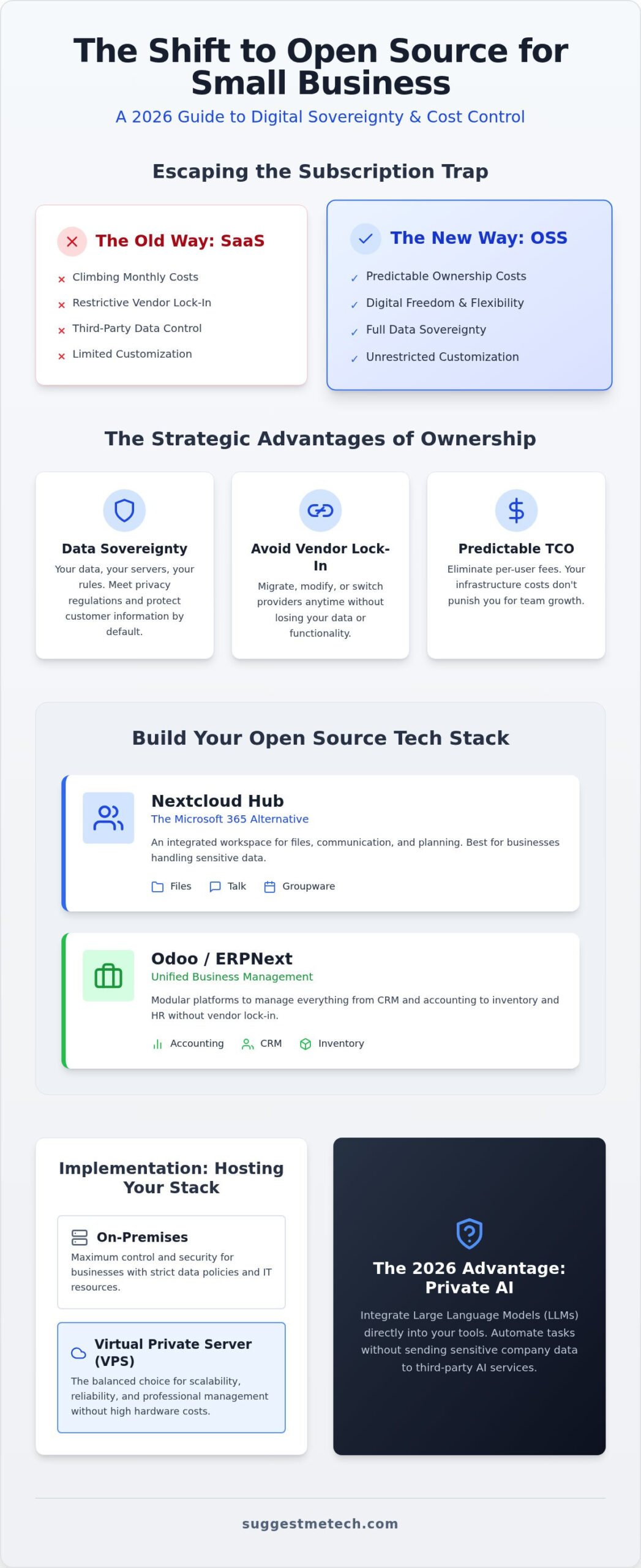
The best open source software for small business in 2026 includes Odoo for ERP, Nextcloud for collaboration, and ERPNext for accounting. These tools provide cost-effective, high-performance alternatives to proprietary SaaS. By self-hosting these platforms, businesses eliminate monthly subscription fees, ensure total data privacy, and avoid vendor lock-in while maintaining full control over their digital infrastructure.
Key Takeaways
- Learn how to identify the best open source software for small business to eliminate high subscription costs and reclaim control over your company’s data.
- Discover how to replace expensive office suites and file-sharing platforms with integrated hubs like Nextcloud and OnlyOffice.
- Explore modular ERP and accounting solutions like Odoo and Akaunting that provide professional-grade features without vendor lock-in.
- Master the deployment process by understanding when to use a Virtual Private Server versus on-premises hosting for better security.
- Tailor your tech stack to your specific business stage, from streamlined solopreneur tools to collaborative systems for growing teams.
Understanding Open Source Software Value for Business in 2026
Open source software (OSS) refers to programs where the source code is available for anyone to inspect, modify, and enhance. In 2026, the relevance of these tools has shifted significantly. While earlier decades focused on the “free as in beer” cost savings, today’s leaders prioritize “free as in speech.” This means you have the liberty to run the software for any purpose and change it to fit your specific needs. Finding the best open source software for small business is now a move toward complete digital independence.
Many small businesses are moving toward “Local-First” software. This approach prioritizes local data storage while allowing for cloud syncing. It solves the pain of slow connections and the fear of a service provider suddenly going offline. While proprietary SaaS platforms often feel like rented apartments, open source is like a home you own. You’re responsible for the maintenance, but you also have total control over the structure and its future.
Total Cost of Ownership (TCO) in this context looks different than a standard subscription. You might pay for a Virtual Private Server (VPS) or dedicated hardware, but you won’t face per-user licensing fees that punish you for growing your team. This makes your tech spend predictable. For a deeper explanation of VPS architecture, we’ll look at hosting options later in this guide.
The Strategic Benefits of Data Sovereignty
Owning your data is essential for meeting modern privacy regulations. When you use a proprietary platform, your customer information lives on someone else’s server under their terms. Open source prevents vendor lock-in, ensuring you aren’t held hostage by sudden price hikes or discontinued features. Imagine moving from a proprietary CRM to an open source alternative like SuiteCRM. You own the database, the history, and the code. If you want to switch hosting providers, you simply move the files. You aren’t begging a vendor for a CSV export of your own data.
Open Source and the AI Revolution
The biggest shift in 2026 is the ability to run local Large Language Models (LLMs) inside your business tools. Using open source options allows you to integrate AI without sending sensitive business intelligence to third-party servers. This keeps your trade secrets and client data private while still benefiting from automation. To run these models effectively, you’ll need the right hardware. Check out our guide on the best laptops of 2026 to ensure your team has the processing power required for local AI tasks.
Essential Productivity and Collaboration Suites
Modern productivity depends on seamless collaboration rather than isolated file editing. Finding the best open source software for small business in 2026 means moving away from fragmented desktop applications toward integrated cloud environments. These tools now provide the same real-time co-authoring and communication features found in Microsoft 365, but without the restrictive per-user monthly fees.
Document compatibility remains a primary concern for many teams. In 2026, the ability to open, edit, and save DOCX and XLSX files without formatting errors is non-negotiable. Leading open source suites have solved this by adopting these formats natively, ensuring your documents look consistent across different platforms and when sharing files with external clients.
Nextcloud: The Open Source Microsoft 365 Alternative
Nextcloud Hub has evolved into the definitive all-in-one workspace for small teams. It combines several critical functions into a single interface, making it a powerful hub for your operations. Key features include:
- Nextcloud Files: High-speed file storage with versioning and secure sharing.
- Nextcloud Talk: Private chat and video conferencing with end-to-end encryption.
- Nextcloud Groupware: Integrated calendar, mail client, and contact management.
This suite is best for businesses that handle sensitive data and must comply with strict privacy regulations. Because Nextcloud is self-hosted, you’ll need a reliable web hosting service to ensure your team has 24/7 access to their files and communication channels.
Professional Document Editing with OnlyOffice
While LibreOffice is a powerful desktop tool, OnlyOffice is often preferred for collaborative teams. It’s built specifically for the web, offering a browser-based experience that feels identical to Google Docs but with superior Microsoft format compatibility. It integrates directly into Nextcloud or Odoo, allowing multiple team members to edit the same spreadsheet or document simultaneously without version conflicts.
For internal communication, tools like Mattermost and Rocket.Chat provide a familiar channel-based workflow. Unlike Slack, these platforms don’t lock your message history behind a paywall. You own the database, which means your internal knowledge remains yours forever. If you are setting up a new office, you might want to browse our technology guides to find the best hardware for running these collaborative tools locally.
Managing Finances and Operations with Open Source ERP and Accounting
Efficiently managing the back office is critical for long-term survival. In 2026, the best open source software for small business includes powerful Enterprise Resource Planning (ERP) systems that were once only accessible to large corporations. These platforms integrate your accounting, inventory, and sales into a single source of truth, removing the data silos that often plague growing teams.
Choosing between a dedicated accounting tool and a full ERP depends on your operational complexity. While a freelancer might only need basic invoicing, a retail business requires robust inventory tracking. Open source solutions allow you to start small and add functionality as your revenue grows, ensuring you never pay for features you don’t use.
Odoo and ERPNext: Choosing Your Foundation
Odoo and ERPNext represent the two primary philosophies in the open source ERP world. Odoo Community Edition uses a modular approach; you install specific “apps” for CRM, point of sale, or project management. This makes the interface cleaner for beginners. In contrast, ERPNext follows an all-in-one structure where almost every feature is available out of the box.
- Choose Odoo if: You prefer a polished, modern user interface and plan to scale one department at a time.
- Choose ERPNext if: You want a comprehensive, fully featured system from day one without managing multiple modules.
Consider a retail business managing both online and physical sales. ERPNext can handle the entire supply chain, from purchase orders to warehouse management, without additional configuration. Odoo might require more setup but offers a more intuitive experience for staff on the sales floor. Both options provide the data sovereignty we discussed earlier, keeping your financial history off proprietary cloud servers.
Modern Accounting with Akaunting
Akaunting has emerged as the leading browser-based alternative to QuickBooks for service-based businesses. It’s designed for ease of use, focusing on the core financial tasks that freelancers and small agencies perform daily. You can manage invoices, track expenses, and generate professional financial reports directly from your dashboard.
The platform is particularly valuable for those who find full ERPs too complex. It provides a user-friendly experience while remaining accessible from any device. For businesses that need to track customer interactions specifically, integrating a tool like SuiteCRM or EspoCRM alongside your accounting software provides a complete view of the customer lifecycle. This modularity allows you to build a custom stack that fits your specific workflow perfectly.
The Implementation Roadmap: Hosting and Security
The implementation roadmap for open source software involves selecting a hosting environment, deploying the application via automated scripts, and configuring security layers like SSL and firewalls. This process ensures that your business tools are accessible, secure, and resilient against data loss through automated backup routines.
Transitioning from selecting tools to active deployment is where many entrepreneurs hesitate. Modern infrastructure has made this process more intuitive than ever. To run the best open source software for small business effectively, you need a deployment strategy that prioritizes uptime and data integrity without requiring a full-time IT department.
The sequence is straightforward: determine your hardware requirements, select a hosting environment, secure the network, and automate your recovery points. In 2026, many of these steps are handled by automated scripts or “one-click” installers. These tools remove the need to manually configure databases or web servers, allowing you to focus on your core operations.
Choosing Your Hosting Environment
A hosting environment is the physical or virtual location where your software resides, typically categorized as on-premises hardware or a Virtual Private Server (VPS). Choosing the right environment depends on your need for physical data control versus the high uptime and scalability provided by professional data centers.
A Virtual Private Server (VPS) is often the ideal choice for most small teams. It provides a dedicated slice of server resources in a professional data center, ensuring your apps stay online even if your local office internet fails. For a deeper explanation of VPS architecture, readers should consult our best web hosting guide.
If you prefer a hands-off approach, managed open source hosting providers like Cloudron or Elestio handle the technical heavy lifting. They offer a “one-click” revolution where you can deploy apps like Nextcloud or Odoo in minutes. If your business is just beginning its online journey, you might also consider starting a blog using WordPress, which remains the gold standard for open source content management.
| Hosting Type | Best For | Main Advantage |
|---|---|---|
| VPS | Growing Teams | High reliability and scalability |
| On-Premises | High Security Needs | Total physical control of data |
| Managed OSS | Non-Technical Users | Zero maintenance required |
Security and Maintenance Basics
Security and maintenance involve the ongoing tasks required to protect software from threats and ensure operational stability. This includes applying regular software updates, configuring firewalls to block unauthorized traffic, and maintaining automated backups to recover data in the event of a system failure.
Maintaining your stack is just as important as the initial setup. Automated backups are your primary insurance policy against data loss. You should also protect your server environment with reputable security software like Bitdefender or Avira to prevent malware from compromising your business intelligence.
Two foundational concepts you’ll encounter are SSL certificates and firewalls. An SSL certificate is a digital passport that encrypts the data moving between your server and your users, making it unreadable to hackers. A firewall acts as a digital gatekeeper, monitoring incoming and outgoing traffic to block unauthorized access attempts. To ensure your hardware is up to the task of managing these security layers, browse our latest technology reviews for the most reliable business gear.
Choosing the Right Stack for Your Business Stage
Selecting the best open source software for small business depends heavily on your current team size and technical capacity. A freelancer’s needs differ wildly from a 20-person agency. Building your stack in stages prevents you from becoming overwhelmed by complex configurations before you actually need them. Start with the most critical pain point, usually file sharing or invoicing, and expand from there.
The Solopreneur Stack focuses on minimum friction and low maintenance. It typically includes managed Nextcloud for files, Akaunting for simple bookkeeping, and LibreOffice for local document editing. This setup keeps costs near zero while ensuring you own your data from day one. It’s a lightweight foundation that doesn’t require advanced server management skills.
The Growing Team Stack prioritizes shared workspaces and granular permissions. At this stage, you’ll likely move to self-hosted OnlyOffice for real-time collaboration and Mattermost for internal chat. This prevents the “information silos” that happen when teams grow. The Enterprise Alternative is for businesses ready for a unified data environment, utilizing a full ERP like Odoo or ERPNext to link inventory, sales, and human resources into a single system.
Decision Framework: Technical Skill vs. Budget
This framework helps you decide between “plug-and-play” managed services and the total control of self-hosting. While self-hosting offers the lowest long-term costs, it requires a higher initial investment in learning or consulting fees. We recommend testing any new tool in a “sandbox” environment, a separate test server, before migrating your live business data.
| Technical Level | Recommended Tools | Primary Hosting Strategy |
|---|---|---|
| Low | WordPress, Nextcloud | Managed SaaS or One-Click VPS |
| Medium | OnlyOffice, Akaunting | Self-hosted on VPS |
| High | Odoo, ERPNext, Mattermost | Dedicated Server or Private Cloud |
If your team lacks a dedicated IT person, hiring a consultant for the initial setup of complex ERPs is a wise investment. They can handle the data migration and security hardening, leaving you to manage the daily operations. Once the “pipes” are laid, daily maintenance is often minimal.
The SuggestMeTech Verdict
After evaluating dozens of platforms, SuggestMeTech identifies three essential tools that provide the best open source software for small business in 2026. Nextcloud Hub is the non-negotiable foundation for any team. OnlyOffice provides the most reliable document compatibility for professional environments. Finally, Odoo Community Edition offers the most scalable path for managing operations without per-user fees.
Don’t feel pressured to switch everything overnight. Start small by moving one department, such as your marketing files or your internal chat, to an open source alternative. You’ll quickly see the benefits of lower costs and greater data control. We want to hear about your journey. Which open source tool changed your business? Let us know!
Building Your Future-Proof Tech Stack
Adopting the best open source software for small business isn’t just a cost-saving measure; it’s a strategic investment in your company’s independence. By choosing tools like Nextcloud for collaboration and Odoo for operations, you ensure that your data remains under your control while avoiding the trap of rising SaaS fees. These solutions provide the flexibility to scale your infrastructure exactly when your revenue supports it.
Success depends on pairing the right software with a foundation that offers high uptime and security. Our 2026 updated recommendations are tested for small business compatibility and follow strict no-hype editorial standards to help you make informed choices. You can find the best hosting for your open source tools here to get started today. Switching one department at a time makes the transition manageable and rewarding. You now have the tools and a clear roadmap to digital sovereignty. It’s time to take back control of your business technology and build a stack that truly serves your vision.
Frequently Asked Questions
Is open source software really free for businesses?
The source code itself is free to download and use under open licenses; however, businesses should account for operational costs. You’ll avoid per-user monthly subscription fees, but you’re responsible for hosting and maintenance. This model is often described as “free as in speech” because it grants you total liberty over the code. While the software doesn’t cost anything to acquire, you should budget for a Virtual Private Server or local hardware to run it.
How do I get support for open source software if something breaks?
Support is primarily found through extensive community forums, official documentation, and third-party specialists. Many major projects also offer optional paid enterprise support tiers for businesses that require guaranteed response times. For most teams, the community-driven model is highly effective. You can also hire independent consultants who specialize in the best open source software for small business to handle complex deployments or provide ongoing technical assistance for your specific stack.
Is open source software more secure than Microsoft or Google?
Open source tools are often more secure because their code is transparent and audited by thousands of developers worldwide. This “many eyes” approach leads to faster identification and patching of vulnerabilities compared to proprietary software. Because you control the hosting environment, you can implement your own security layers and firewalls. This reduces the risk of being caught in a large-scale data breach that targets a single major cloud provider’s centralized servers.
Can I use open source software on a Mac or Windows laptop?
Most modern open source business applications are cross-platform or web-based, ensuring they work flawlessly on Mac, Windows, and Linux. Desktop programs like LibreOffice provide native installers for all major operating systems. Tools like Nextcloud or Odoo are accessed through any standard web browser, which provides a consistent experience for your entire team. This flexibility allows your employees to use their preferred hardware without worrying about software compatibility or restricted file formats.
What is the best open source alternative to Microsoft Office?
LibreOffice is the top choice for a powerful desktop suite, while OnlyOffice is the superior option for teams needing real-time collaboration. OnlyOffice is particularly well-regarded for its high compatibility with Microsoft’s DOCX and XLSX formats. If you’re looking for a full cloud-based workspace that mirrors Microsoft 365, Nextcloud Hub integrates these document editing tools with file storage, email, and calendar functions to create a unified productivity environment for your business.
Do I need a server to run open source business software?
Most open source business tools require a server to host their databases and web interfaces. You don’t necessarily need to manage physical hardware in your office. Most small businesses use a Virtual Private Server (VPS) from a reliable provider, which offers professional-grade uptime and security. This setup allows you to run the best open source software for small business remotely, making it accessible to your team from any location with an internet connection.
What happens to my data if an open source project is discontinued?
Your data remains entirely under your control because you own the database and the files. Unlike proprietary SaaS platforms, where a company closure could result in total data loss, open source software uses standard formats that are easy to export. If a project stops receiving updates, you can continue running your current version indefinitely. You also have the freedom to migrate your data to a “fork” or a competing platform without needing any vendor’s permission.

