
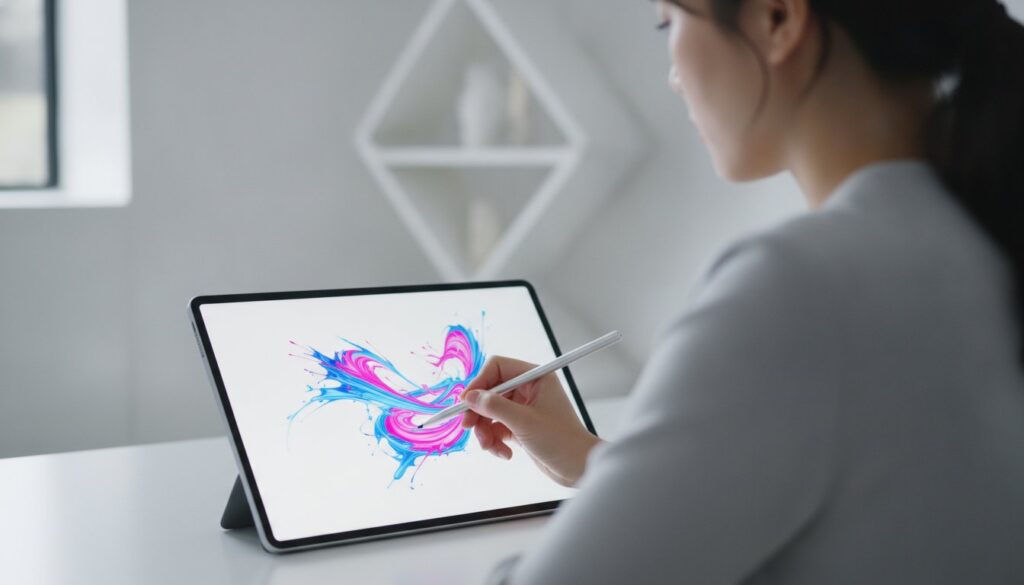
What if the most expensive device on the shelf is actually the biggest bottleneck for your specific illustration style? Finding the best tablet for artists and designers in 2026 isn’t just about chasing the highest specs; it’s about matching a tool to your unique creative rhythm. You’ve likely felt the frustration of decision paralysis while staring at technical sheets or worrying if a portable tablet can truly handle your heavy Adobe Creative Cloud files without noticeable lag.
We understand that you need a device that disappears into your workflow, offering that elusive natural pen-on-paper feel and professional-grade pen latency. This guide provides a practical breakdown of the top-performing tablets for creative professionals, ensuring you get the best value for your specific budget. We’ll compare everything from the AI-powered Samsung Galaxy Tab S11 Ultra to the industry-standard Wacom Cintiq Pro 16, helping you choose the perfect canvas for your next masterpiece.
Key Takeaways
- Identify whether a screenless pen tablet or an intuitive pen display fits your studio ergonomics and drawing style.
- Learn why “zero-gap” lamination and minimal parallax are more critical for a natural feel than inflated pressure sensitivity specs.
- Compare the professional ecosystems of Apple, Wacom, and Samsung to find the best tablet for artists and designers that fits your software needs.
- Match your hardware choice to your specific creative persona, ensuring you have the color accuracy and resolution your niche demands.
- Factor in the essential “hidden” costs of professional stands and specialized nibs to ensure your setup is truly production-ready.
Understanding Tablet Categories: Which Canvas Fits Your Studio?
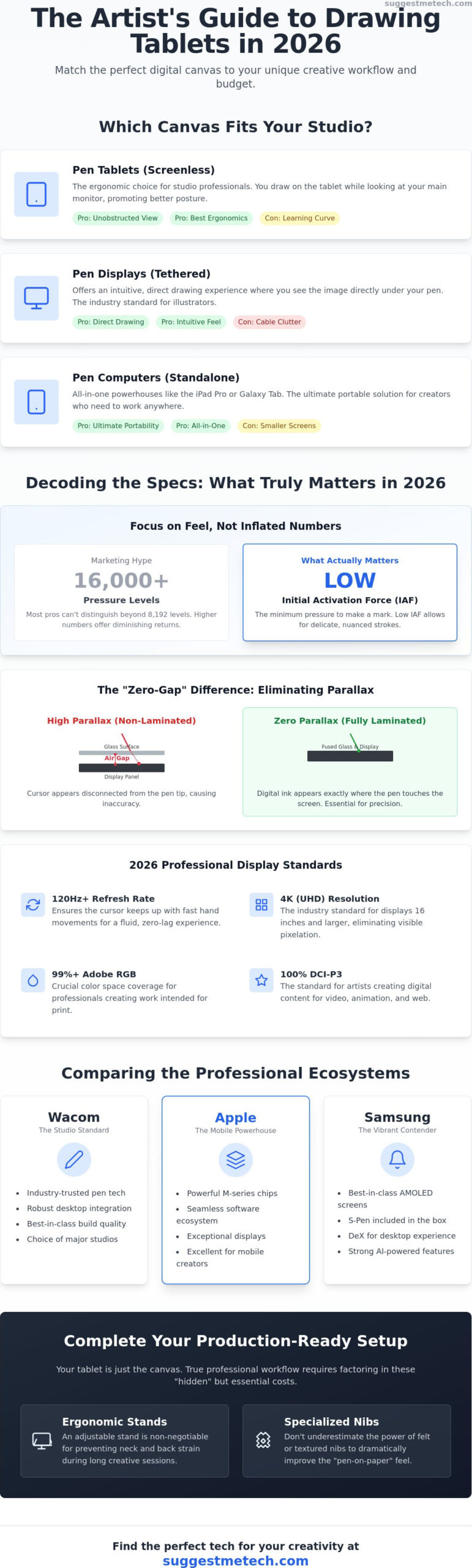
Choosing the best tablet for artists and designers starts with a hard look at your desk, not just your budget. Your physical workspace dictates which category of hardware will actually help you produce better work without causing chronic neck pain. Most professionals categorize these tools into three distinct buckets: screenless pen tablets, tethered pen displays, and standalone pen computers. Each serves a specific type of creator, and picking the wrong one can lead to a cramped workflow or unnecessary eye strain.
A traditional Graphics tablet, which lacks a built-in screen, requires you to look at a monitor while your hand moves on the desk. This separation can feel counterintuitive initially. However, it allows you to utilize a much larger, higher-resolution external monitor that might already be calibrated for professional color work. If you spend eight hours a day retouching or illustrating, ergonomics should be your top priority. Hunching over a screen for a full shift is a recipe for fatigue.
- Pen Tablets (Screenless): These are affordable, durable, and keep your posture upright.
- Pen Displays: These provide an intuitive, direct drawing experience but often require a maze of cables.
- Pen Computers: These are all-in-one powerhouses like the iPad Pro or Galaxy Tab S11 Ultra, designed for mobile creators who need to work anywhere.
The Screenless Advantage: Why Pros Still Use Pen Tablets
Screenless tablets remain the industry standard for many high-end retouching and 3D modeling studios. The primary benefit is an unobstructed view of your work. Your hand never covers the UI or the specific area you’re painting. These models are also significantly cheaper than their display-based counterparts. You aren’t paying for a screen, so more of your investment goes into the precision of the digitizer and the pressure sensitivity of the pen. The learning curve for hand-eye coordination usually takes about a week, but the ergonomic payoff lasts for years.
Pen Displays vs. Mobile Tablets: The Portability Trade-off
If you need to see exactly where your nib hits the digital canvas, a pen display is the logical choice. Modern 4K displays offer a “zero-gap” experience that feels nearly identical to traditional media. However, these are usually tethered to a workstation. If you’re a mobile creator, the best tablet for artists and designers might be a standalone mobile device. Mobile tablets offer unmatched “anywhere” creativity, though you’ll need to weigh the convenience against smaller screen sizes and potential software limitations compared to full desktop suites.
Technical Specs That Matter for Artists in 2026
Don’t get distracted by the “more is better” marketing trap. While a spec sheet might boast 16,000 levels of pressure sensitivity, as seen on the XPPen Artist Ultra 16, most professionals can’t actually distinguish between that and the standard 8,192. The best tablet for artists and designers is defined by how those specs translate into a tactile experience. You need to prioritize the Initial Activation Force (IAF), which is the minimum pressure required for the tablet to register a mark. A low IAF allows for delicate, wispy strokes that feel like real graphite on paper, a far more important metric than total pressure levels.
Achieving a professional workflow also requires a “zero-gap” drawing experience. This is achieved through full lamination, where the glass and the display panel are fused together to eliminate the air gap. This reduces parallax, ensuring that your digital ink appears exactly where your pen tip touches the screen. Combined with a 120Hz refresh rate, which is now the baseline for professional pen tracking, your lines will feel fluid and immediate.
- Refresh Rate: 120Hz or higher ensures the cursor keeps up with fast hand movements.
- Color Accuracy: Aim for at least 99% Adobe RGB coverage for print work or 100% DCI-P3 for digital and video content.
- Resolution: 4K is the current industry standard for displays 16 inches and larger to avoid pixelation.
The Evolution of Pen Latency and Initial Activation Force
AI-driven stabilization has become a massive trend in 2026 software. Updates like Clip Studio Paint 5.0 use machine learning to predict your stroke path, effectively neutralizing the 2ms latency found in high-end displays. This creates a “zero-lag” experience that keeps up with even the fastest illustrators. If you’re looking for curated lists of how these specs stack up in real-world use, you can see them in this guide to the Top 13 Drawing Tablets of 2026. These predictive algorithms ensure that your digital pen feels as responsive as a physical brush.
Display Technology: OLED vs. Mini-LED for Designers
The best tablet for artists and designers often features Tandem OLED technology, like the M4 iPad Pro. This setup provides perfect blacks and a peak brightness of 1,600 nits, which is vital for HDR content creation. For those doing color-critical photo editing, Mini-LED remains a strong contender due to its sustained high brightness levels. You should also consider the screen texture; etched glass provides a natural tooth that mimics paper, while glossy screens might require a specialized screen protector to avoid a slippery feel. If you’re unsure which display tech fits your specific niche, you can browse our detailed technical reviews to see side-by-side comparisons.
The Big Three: Comparing Apple, Wacom, and Samsung
Most professional decisions come down to three major players. While technical specs like refresh rates and lamination provide the foundation, the brand you choose determines your software ecosystem and daily ergonomics. Apple, Wacom, and Samsung each cater to different creative niches. Your choice should reflect whether you need a portable sketchpad, a dedicated studio display, or a versatile Android powerhouse. It’s no longer just about the hardware; it’s about which platform supports your specific professional apps in 2026.
- Apple: Focuses on a seamless, portable experience with the most intuitive touch interface.
- Wacom: Prioritizes the professional studio environment with superior pen ergonomics and desktop software compatibility.
- Samsung: Offers the best out-of-the-box value for Android users, including the stylus at no extra cost.
IPad Pro with Apple Pencil Pro: The Illustrator’s Favorite
The iPad Pro remains a dominant force for mobile creators. With the M4 chip, the 11-inch model starts at $999, while the 13-inch version begins at $1,299. This device is often cited as the best tablet for artists and designers who prioritize a streamlined workflow. The Apple Pencil Pro introduced haptic feedback, barrel roll, and squeeze gestures, making digital painting feel more tactile. For users running Procreate 5.4, the integration is flawless. It’s the ideal choice for social media creators and concept artists who need to produce high-quality work while commuting or traveling.
Wacom Movink and Pro Displays: The Studio Workhorse
Wacom continues to be the industry standard for high-end 3D, VFX, and animation workflows. The Wacom Cintiq Pro 16, priced at $1,599.95, is built for reliability and long-term studio use. Unlike mobile tablets, Wacom displays are designed to be tethered to a Mac or PC, giving you access to full desktop versions of ZBrush, Maya, and the complete Adobe Creative Cloud suite. The Pro Pen 3 is a standout feature, offering customizable weight and balance. For those seeking portability without sacrificing the Wacom feel, the Movink series uses OLED technology to provide a slim, lightweight alternative that challenges the iPad’s display dominance.
The Samsung Galaxy Tab S11 Ultra is the primary alternative for those who find the Apple ecosystem too restrictive. Starting at $1,299.99 for the 256GB model, it includes the S-Pen and features advanced AI-powered art generation tools. While Android apps have improved significantly with releases like Clip Studio Paint 5.0, there is still a gap between mobile and desktop software capabilities. If your work requires complex 3D rendering or massive print files, a tethered Wacom display is still the most robust solution. However, for digital painting and vector work, the gap between these three giants has never been smaller.
Matching Your Tablet to Your Creative Persona
Finding the best tablet for artists and designers isn’t a one-size-fits-all process. Your specific creative persona determines whether you need a massive 24-inch studio display or a compact mobile device. A logo designer’s requirements for vector precision are vastly different from a concept artist’s need for sprawling digital canvases. By identifying your primary workflow early, you can avoid overspending on features that don’t actually serve your daily output.
- Graphic Designers: Prioritize color accuracy and the ability to map your tablet to a high-resolution monitor.
- Concept Artists: Look for large-format displays that allow you to paint complex scenes without constant zooming.
- Hobbyists and Students: Focus on devices with high durability and a robust software ecosystem that grows with your skills.
- Calligraphers and Lettering Artists: Tilt and rotation sensitivity are non-negotiable for mimicking traditional nib angles.
The Vector Workflow: Best Tablets for Logo and Layout Design
If you spend most of your time in Adobe Illustrator, a screenless pen tablet is often the superior choice. This setup allows you to keep your hands on the desk and your eyes on a color-calibrated monitor. Many professional designers integrate their tablet with a mechanical keyboard for rapid shortcut access. Since these tablets don’t handle the heavy lifting of the software, you’ll need to pair them with a powerful machine. You can find our top recommendations in our guide to The Best Laptops of 2026 to complete your workstation.
Digital Painting and 3D: High-Performance Requirements
High-end digital painting and 3D sculpting demand hardware that won’t stutter under the weight of massive texture files. When working in ZBrush or Blender, the best tablet for artists and designers must offer a high-resolution display to see fine surface details. A 4K resolution is now considered the industry standard for professional painting. It prevents pixelation when you’re zoomed in to 300 percent for fine-detail work. Devices with high RAM and dedicated GPU support are essential for handling these complex files without software crashes. If you’re ready to upgrade your professional toolkit, explore our comprehensive tablet comparisons to find your match.
Lettering artists should pay close attention to the stylus technology. The Apple Pencil Pro’s barrel roll feature is a game-changer for calligraphers, allowing you to rotate the pen to change the stroke width naturally. This mimics the behavior of a physical flat-nib pen. While a student might find a basic pen tablet sufficient for learning the ropes, professionals in this niche will benefit significantly from the advanced sensors found in flagship models.
Maximizing Your ROI: Accessories and Studio Setup
Don’t let the sticker price fool you. Owning the best tablet for artists and designers involves more than just the device itself. You need to account for the total cost of ownership, which includes everything from ergonomic furniture to recurring software fees. Ignoring these “hidden” expenses can lead to a compromised workflow or even physical strain over time. Planning your studio ecosystem is just as vital as picking the tablet’s processor or screen type.
- Professional Stands: A sturdy, adjustable stand is non-negotiable for display tablets to prevent neck fatigue and provide a stable drawing surface.
- Pen Nibs: Felt nibs offer a toothy, paper-like resistance, while plastic nibs glide faster for quick sketching and general navigation.
- Software Subscriptions: Factor in the ongoing costs of Adobe Creative Cloud or the $54 annual fee for the latest Clip Studio Paint 5.0.
Once your studio is set up and you’re producing professional-grade work, you’ll need a place to showcase it. We recommend following our guide on how to start a blog in 2026 to build a professional portfolio that attracts high-paying clients and builds your personal brand.
Essential Accessories for Every Digital Artist
A drawing glove is a cheap but vital addition. It reduces friction between your hand and the glass, which also helps prevent accidental palm-rejection errors on sensitive displays. For those using screenless tablets or compact displays, an external Express Key remote can save hours of digging through menus. Creating a distraction-free environment is just as important as your hardware. We suggest pairing your setup with the right gear from our Headphones: The Ultimate Guide to maintain focus during intensive illustration sessions.
Maintenance and Longevity
Protect your investment by following a strict cleaning routine. Use only a dry microfiber cloth or a specialized screen cleaner that won’t strip away expensive anti-glare coatings. If you’re using a portable pen computer like the iPad Pro or Galaxy Tab S11 Ultra, managing battery health is critical. Don’t let the charge drop to zero percent frequently. Most professional tablets have a lifecycle of four to five years. You’ll know it’s time to find the best tablet for artists and designers again when your software requirements consistently outpace your hardware’s processing speed or when the battery no longer lasts for a full creative session.
Ready to Upgrade Your Creative Toolkit?
We base our recommendations on expert testing of the latest 2026 models and real-world workflow assessments. This unbiased, affiliate-supported research ensures you find a device that survives the rigors of a professional studio. If you’re ready to make a final decision, check out our curated Technology Reviews and Guides for the latest hardware deals. Your perfect digital canvas is waiting to help you bring your next big idea to life. We’re excited to see what you create next.
Frequently Asked Questions
Is an iPad Pro better than a Wacom Cintiq for professional work?
An iPad Pro is better for mobility and quick sketching, while a Wacom Cintiq is superior for high-end studio production. The iPad Pro excels with Procreate and its M4 chip portability. Wacom displays provide a dedicated, ergonomic workspace for full desktop apps like Maya or ZBrush. Your choice depends on whether you need a standalone mobile device or a tethered display for an existing workstation.
Do I need 8,192 levels of pressure sensitivity?
You don’t necessarily need more than 8,192 levels, but it remains the professional baseline for modern hardware. Most artists find that Initial Activation Force (IAF) impacts the drawing experience more than total pressure levels. A tablet that registers a stroke with the slightest touch feels more natural. While some 2026 models offer 16,000 levels, the difference is often indistinguishable in a standard creative workflow.
What is the best budget drawing tablet for beginners in 2026?
The XPPen Artist Ultra 16 represents excellent value for beginners looking for a pro-level display without the Wacom price tag. It features a 4K OLED screen and high pressure sensitivity for under $900. If you prefer a screenless option, a medium-sized Wacom Intuos is a durable and affordable entry point. These devices provide the essential specs needed to learn digital art without a massive initial investment.
Can I use a drawing tablet without a computer?
You can use standalone pen computers like the iPad Pro or Samsung Galaxy Tab S11 Ultra without an external computer. These devices house their own processors, RAM, and storage. In contrast, pen displays like the Wacom Cintiq are secondary monitors and must be tethered to a Mac or PC. If you want to work at a coffee shop or on a plane, a standalone device is the best tablet for artists and designers.
Which tablet is best for Adobe Photoshop and Illustrator?
A tethered Wacom display or a screenless pen tablet is often the best tablet for artists and designers who need the full desktop versions of Adobe Photoshop and Illustrator. While the iPad versions of these apps have improved, they still lack the complete feature set found on macOS and Windows. Professional designers often prefer the precision of a desktop environment for complex vector layouts and heavy photo manipulation.
Is a larger screen always better for digital art?
A larger screen provides more drawing real estate but can lead to increased shoulder fatigue over long sessions. Displays between 13 and 16 inches are often the sweet spot for ergonomics and portability. Larger 24-inch or 27-inch displays are better suited for concept artists working on complex, multi-layered scenes. Consider your desk space and how much you need to move your arm before committing to a massive screen.
What is parallax and why does it matter for artists?
Parallax is the visible gap between where you place your pen tip and where the digital line actually appears. It occurs because of the thickness of the glass covering the display panel. Modern tablets use full lamination to fuse the glass and display, reducing parallax to near zero. This ensures a more intuitive experience, as the digital ink feels like it’s flowing directly from your nib.
Are Android tablets like the Samsung Galaxy Tab good for professional design?
Samsung’s Galaxy Tab S11 Ultra is a legitimate professional tool, particularly for illustrators using Clip Studio Paint 5.0. It offers a 120Hz refresh rate and includes the S-Pen in the box, providing great value compared to Apple’s ecosystem. While it still faces some software limitations compared to a full desktop, its AI-powered art tools and high color accuracy make it a top choice for designers on the Android platform.

