
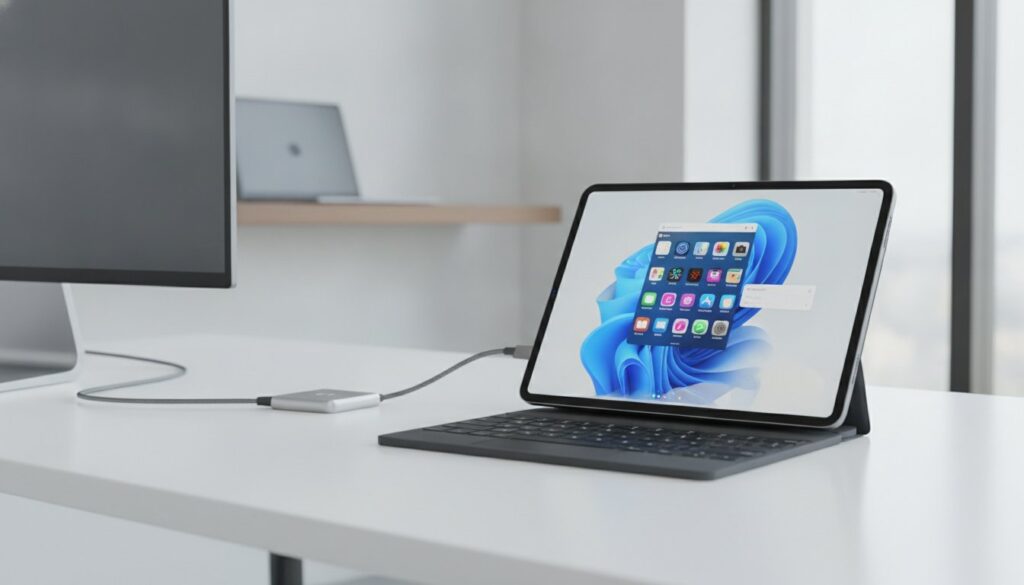
The iPad is no longer a laptop replacement; it’s a workflow evolution that requires a total mindset shift from windows to widgets. You’ve likely spent years wondering is an ipad a good laptop replacement, especially now that the M5 chip and iPadOS 27 have pushed hardware limits further than ever. It’s a tempting shift, but the transition often feels like a gamble when you’re staring down a $300 keyboard invoice or struggling with file management that still doesn’t quite feel like a desktop.
We know the struggle of wanting that lightweight portability while fearing your essential Adobe or Office 365 tools won’t make the cut. This article breaks down the practical reality of going tablet-first in 2026. You’ll get a clear “Yes” or “No” verdict based on your specific career, a breakdown of the hidden costs that Apple doesn’t advertise, and a look at why the M4 iPad Air might actually be the smartest productivity pick over the Pro. Let’s find out if your workflow is ready for the leap.
In this guide, you will:
- Decide if is an ipad a good laptop replacement for your needs by comparing the M5 chip’s power to the constraints of iPadOS 27.
- Discover why the iPad Air (M4) is the “Goldilocks” productivity model for most students and office workers.
- Identify the “deal-breaker” tasks, such as complex data entry and file management, that still favor a traditional laptop.
- Calculate the hidden costs of essential accessories, from the Magic Keyboard to USB-C hubs, that impact your total investment.
- Get a final verdict tailored to your profession, ensuring you choose the right tool for your daily workload.
The 2026 State of iPadOS: Hardware Power vs. Software Limits
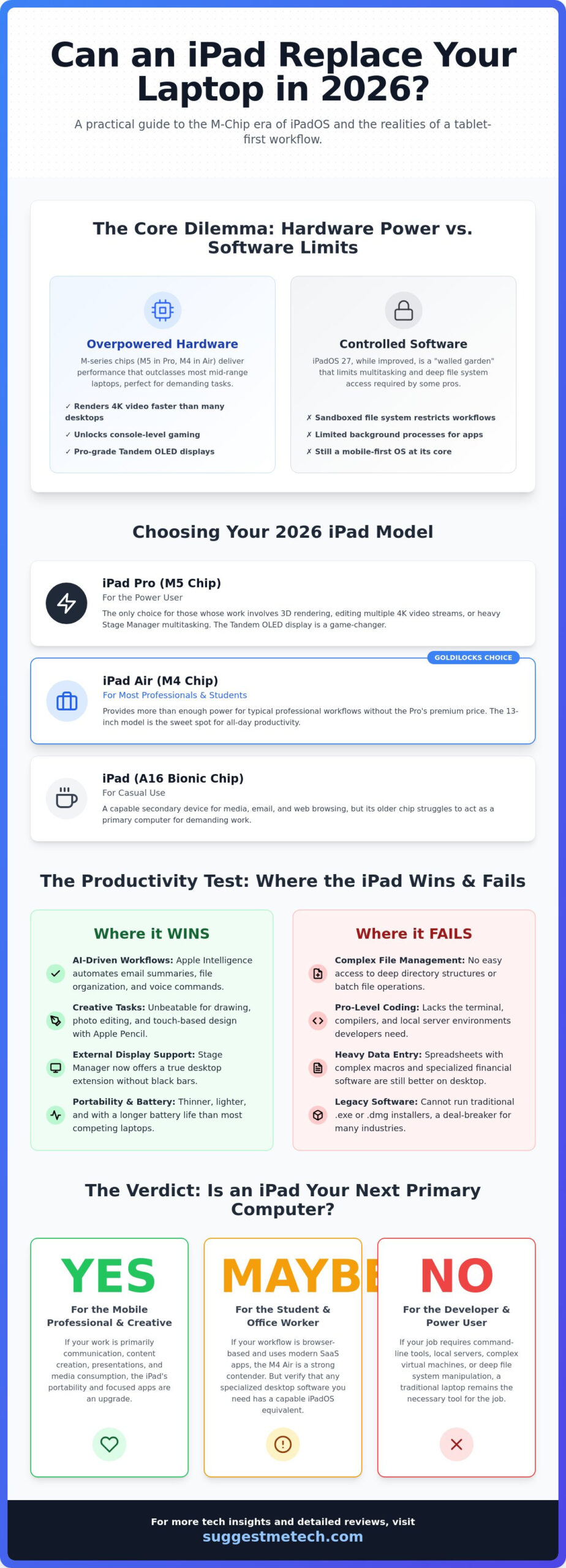
Defining a laptop replacement in 2026 has shifted. It’s no longer about whether a tablet can run a basic browser; it’s about whether it can sustain a professional 9-to-5 workload without friction. When you ask is an ipad a good laptop replacement, you’re really asking if iPadOS has finally caught up to the M-series silicon. Currently, the hardware is staggering. The M5 chip in the Pro models and the M4 in the Air provide more raw power than most mid-range Windows laptops on the market.
For a comprehensive overview of the iPad and its journey from a media player to a workstation, it’s clear Apple wants this to be your primary computer. However, the hardware remains miles ahead of the software. While an iPad can render 4K video faster than many desktops, the sandboxed nature of iPadOS creates a “wall” for users who need deep file access or specialized background utilities. It’s a powerful engine trapped in a very controlled environment.
The Evolution of Stage Manager and Multitasking
Stage Manager has matured significantly in iPadOS 27. Window management now feels intuitive rather than experimental. You can finally resize windows freely and snap them into layouts that mirror a desktop experience. The most vital update is the refined external display support. Plugging into a monitor now transforms the iPad into a legitimate workstation with full resolution scaling and no black bars. There’s still a catch. The “one active window” philosophy remains. If you need multiple apps running heavy background processes simultaneously, you’ll still feel the constraints of a mobile-first operating system.
Apple Intelligence and Productive Workflows
Apple Intelligence is the bridge that helps users scale the iPadOS wall. By 2026, AI has moved beyond simple chatbots into deep system integration. It automates the tedious parts of a professional day that used to be difficult on a touchscreen. These tools include:
- AI Writing Tools: System-wide features summarize long email chains and rewrite drafts to match specific professional tones instantly.
- Voice-to-Action: You can skip clunky menus by telling Siri to “move all PDFs from my downloads to the Project Alpha folder.”
- Smart Organization: The Files app now uses automatic categorization to surface documents based on your current calendar event or location.
These features make the iPad feel faster than a traditional laptop for communication and organization. It’s a different kind of productivity that relies on automation rather than manual file management.
Despite these leaps, the fundamental difference in file systems persists. If your job relies on complex directory structures or legacy software installers, the iPad’s simplicity might feel like a limitation. For many, the question of whether is an ipad a good laptop replacement comes down to whether they can trade manual control for AI-driven efficiency. It’s a trade-off that works for some, but leaves others reaching for a MacBook.
Choosing the Right Model: iPad Pro vs. iPad Air vs. iPad
Selecting the right hardware is where the question is an ipad a good laptop replacement becomes a personal decision. If you choose a model that underperforms for your specific workload, the transition from a traditional laptop will be frustrating. By 2026, the gap between the entry-level models and the Pro lineup has widened, making your initial choice more critical than ever.
The iPad Pro, equipped with the M5 chip, is the only choice for power users. If your day involves rendering 3D environments, editing multiple streams of 4K video, or heavy multitasking in Stage Manager, the Pro’s raw performance is necessary. For most students and office workers, the iPad Air with the M4 chip is the “Goldilocks” model. It provides enough power for professional workflows without the premium price tag of the Pro. The base iPad remains a capable secondary device, but with its A16 Bionic chip, it struggles to act as a primary computer for anyone beyond basic web browsers and email users.
Screen size is the most overlooked factor in this transition. While an 11-inch tablet is incredibly portable, it’s often too small for a primary work device. Running two apps side-by-side on an 11-inch screen feels cramped and leads to constant app switching. If you intend to work on this device for eight hours a day, the 13-inch models for both the Air and Pro are the only realistic options for maintaining desktop-level productivity. You can see how these dimensions compare in our latest hardware comparisons to find your perfect fit.
Display Tech: OLED vs. Liquid Retina
The Pro’s Tandem OLED display is a game-changer for anyone who works in varied lighting. It offers peak brightness levels that make the screen legible even in direct sunlight, a feat the Air’s Liquid Retina display can’t quite match. Furthermore, the Pro’s 120Hz ProMotion refresh rate significantly reduces eye strain during long reading or writing sessions. This makes the iPad an ideal device for reading digital editions of Israel Magazine on israelmagazine.co.il, providing an experience that feels as crisp as print. Creative professionals will require the Pro for its superior color accuracy, though the Air’s display remains excellent for standard spreadsheets and documents.
Storage and Connectivity Considerations
In 2026, 128GB of storage is no longer sufficient for a laptop replacement. Modern apps and system files will consume that space quickly. Aim for a minimum of 256GB. Connectivity also varies by model; the Pro features a Thunderbolt port for high-speed transfers with external SSDs, while the Air uses standard USB-C. If you truly want to “work from anywhere,” the 5G cellular option is a necessity rather than a luxury. Relying on public Wi-Fi is often the fastest way to kill your productivity.
The Productivity Test: Where the iPad Wins and Fails
Testing an iPad in a professional environment reveals exactly where the “laptop replacement” dream succeeds or stalls. To determine if is an ipad a good laptop replacement for your specific needs, you have to look past the marketing and focus on your daily repetitive tasks. For many, the iPad isn’t just a different device; it’s a different way of working that rewards some professions while penalizing others.
Writing and content creation remain the iPad’s strongest suit. For journalists, bloggers, and social media managers, the combination of a distraction-free interface and the ability to switch between a keyboard and the Apple Pencil for markup is unmatched. However, data analysts will find the experience less polished. While basic budgeting works fine, complex Excel macros and advanced pivot tables remain a persistent struggle. The mobile versions of Office 365 have improved, but they still lack the deep feature parity required for high-level financial modeling.
Web browsing has seen major leaps. Safari on iPadOS 27 is truly desktop-class, handling complex sites like Squarespace or Jira without crashing. However, if you rely on specific Chrome extensions for your workflow, you’ll be disappointed. Chrome on iPad is essentially a skin for Safari’s engine. It does not support the vast library of extensions found on Windows or MacOS. Similarly, for developers, the iPad is still a “no-go” for local environment compilation. While web-based IDEs like GitHub Codespaces are excellent, you can’t yet run a local Docker container directly on the device, a topic often explored by the Brazilian tech community at Casa do Dev.
The “App vs. Web” Dilemma
In 2026, the best way to use an iPad is often through a browser rather than a dedicated app. Many professional tools now offer Progressive Web Apps (PWAs) that provide a more consistent experience than their App Store counterparts. Interestingly, even “pro” apps like Final Cut Pro for iPad still lack some of the advanced color grading and plugin support found in the desktop version. Always check the web version of your software before assuming the app is the superior choice.
File Management: The Files App Reality
The Files app has matured, especially with support for high-speed external SSDs via Thunderbolt. You can drag and drop files with ease, but the frustration starts with bulk operations. If you need to rename fifty photos at once or manage deep, nested folder structures for a complex project, the interface feels clunky compared to Finder. The Files app remains the biggest hurdle for power users because it prioritizes a simplified mobile view over the granular, high-speed file manipulation required for professional workflows.
Ultimately, whether is an ipad a good laptop replacement depends on your tolerance for these software quirks. If your work is linear and app-focused, you’ll love it. If your work requires jumping between dozens of files and complex spreadsheets, the friction might outweigh the portability.
The Hidden Costs: Essential Accessories for a Laptop Setup
The sticker price of an iPad is often a distraction. When calculating if is an ipad a good laptop replacement, the math only works if you include the accessories required to make it functional. A bare tablet is a media consumption device. To turn it into a computer, you’ll need a keyboard, a pointing device, and likely a way to connect external peripherals. By the time you’ve fully kitted out an M5 Pro, you might find the total bill exceeds that of a high-end MacBook.
The Magic Keyboard is the most significant hidden cost. It’s often priced at a premium, representing nearly a third of the total setup cost for some models. While it provides a superior trackpad and a pass-through charging port, it’s a heavy investment. For those on a tighter budget, comparing the total cost of an iPad setup against The Best Laptops of 2026 reveals that a traditional laptop is often the more affordable choice for pure performance per dollar.
USB-C Hubs are another non-negotiable for professionals. Since even the Pro models only feature a single port, you’ll need a hub for HDMI output, SD card reading, or Ethernet. A reliable hub can easily add $100 to your total. If you aren’t an artist, the Apple Pencil Pro might be an expense you can skip. The $79 USB-C version handles basic note-taking and document markup perfectly without the “Pro” price tag.
Keyboard Alternatives: Logi vs. Apple
The Logitech Combo Touch is the strongest competitor to Apple’s own keyboard. It offers better edge protection and a detachable keyboard, which is ideal if you want to use the tablet as a tablet without removing the whole case. For writers who prefer a tactile feel, a Bluetooth mechanical keyboard paired with a stand is a great alternative. However, be careful with cheap third-party trackpads. Most lack the precision and gesture support found in Apple or Logitech options, leading to a frustrating navigation experience.
Ergonomics and Portability
Lapability remains the biggest ergonomic hurdle. Unlike a traditional laptop, an iPad with a keyboard case can feel top-heavy on your lap. It’s much better suited for a flat desk. Weight is also a factor. A 13-inch iPad Pro combined with a Magic Keyboard actually weighs slightly more than a MacBook Air. To keep your setup running smoothly, remember to clear cache on iPhone/iPad regularly. This prevents background clutter from slowing down your M-series chip during heavy workloads.
Check out our full accessory guide to see which hubs and keyboards offer the best value for your budget.
Final Verdict: Should You Switch to an iPad in 2026?
Deciding if is an ipad a good laptop replacement depends entirely on your professional persona. After reviewing the hardware leaps of the M5 chip and the refinements in iPadOS 27, the answer isn’t a universal yes. It’s a conditional shift. For many, the iPad has moved from a secondary tablet to a primary work tool, but that transition requires specific sacrifices in software flexibility and file management.
- The Student Verdict: It’s the perfect campus companion. The ability to record lectures, take handwritten notes with the Apple Pencil, and carry a 1.3-pound device between classes makes it superior to a bulky laptop.
- The Creative Verdict: It’s unmatched for illustrators and photographers. However, it remains a mixed bag for high-end video editors who need the full plugin architecture and background rendering capabilities of a desktop.
- The Business Verdict: It’s excellent for frequent travelers and managers who live in meetings. It’s risky for analysts or accountants who spend their day in heavy data work and complex spreadsheets.
Many power users are finding that a hybrid approach is the most productive. They use an iPad for mobile work and communication, paired with a powerful desktop at home for specialized tasks. This setup avoids the frustration of hitting the “iPadOS wall” when a project gets too complex for a mobile interface.
A Decision Matrix for Your Workflow
To determine your “iPad readiness,” run through this quick checklist. If you can’t check every box, you might find the experience more frustrating than functional.
- Do you spend at least 90% of your workday in a web browser or a specific creative app like Procreate?
- Are you comfortable using cloud storage for the majority of your file management?
- Can your essential software run without specialized desktop extensions or macros?
- Is your budget flexible enough to include the high cost of a Magic Keyboard or a Pro-level hub?
An iPad is a good laptop replacement only if your work lives in a browser or a creative suite. If your workflow requires legacy software or deep system-level access, the tablet experience won’t feel like a promotion.
What to Buy Instead if the iPad Fails Your Test
If the limitations of iPadOS feel like a deal-breaker, the MacBook Air remains the king of value for most users. It provides the same M-series efficiency with a “real” operating system and a built-in keyboard. For those who need Windows, ultra-portable laptops from Dell or Microsoft offer similar portability without the software restrictions. If you’re planning to build a professional site on your new device, check out our best web hosting guide to ensure your backend is as powerful as your hardware.
Choosing Your Productivity Path for 2026
The decision to switch depends entirely on where you spend your workday. If you live in a web browser or a creative suite, the M5 iPad Pro offers a level of portability and power that no traditional laptop can match. However, if your job involves deep file management or complex data modeling, you’ll still find yourself hitting the software limits of iPadOS 27. It’s a powerful tool, but it rewards specific types of creators while challenging others.
Ultimately, asking is an ipad a good laptop replacement requires looking at the total cost of ownership. Once you add the Magic Keyboard and necessary hubs, the price often aligns with premium laptops. Our expert tested reviews and real-world productivity benchmarks show that while the hardware is ready, the software remains a curated experience. It’s about choosing the right environment for your professional growth.
If you’re still undecided, we can help you compare these tablets against the most capable computers on the market. Find the perfect device for your needs in our Best Laptops of 2026 guide. We’ve included a comparative pricing analysis to ensure you get the best value for your specific career. Your ideal setup is out there; it just takes the right perspective to find it.
Frequently Asked Questions
Is an iPad Pro as powerful as a MacBook Air?
Yes, the M5 iPad Pro features processing power that is equivalent to or even faster than a standard MacBook Air. While the raw hardware benchmarks are nearly identical, the real world difference lies in how that power is used. The iPad excels at short, intensive bursts of speed like photo editing, but the MacBook Air has a better thermal design for long, sustained tasks like rendering large video files.
Can I run full Microsoft Office on an iPad?
No, you cannot run the full desktop version of Microsoft Office on iPadOS. While the mobile apps for Word, Excel, and PowerPoint handle about 90% of standard office tasks, they lack advanced features. You won’t find complex Excel macros or deep pivot table customization. For most users, these apps are excellent for editing, but they aren’t a total replacement for high level financial modeling.
Do I need a mouse to use an iPad as a laptop?
You don’t strictly need a mouse, but it’s essential for a productive laptop experience. Using a trackpad or mouse makes selecting small text and navigating dense spreadsheets much faster than using your finger. Most users find that a keyboard and mouse setup is what truly determines if is an ipad a good laptop replacement for their specific daily workflow.
What is the best iPad for a college student in 2026?
The 13-inch iPad Air with the M4 chip is the best balance of price and performance for campus life. It provides the large screen real estate needed for split-screen note-taking without the $1,199 starting price of the Pro model. Pair it with a Logitech keyboard and an Apple Pencil to create a versatile machine that handles everything from lectures to research papers with ease.
Can I code or develop apps on an iPad?
You can code using web-based environments like GitHub Codespaces or Apple’s Swift Playgrounds, but it isn’t a primary machine for full-stack developers. You can’t run local servers, Docker containers, or full IDEs like VS Code natively. It’s a great tool for front-end tweaks or learning Swift; however, it lacks the system-level access required for complex software engineering projects.
How much total will an iPad laptop replacement setup cost?
A complete setup usually costs between $800 for an Air-based kit and over $1,600 for a 13-inch Pro configuration. This total includes the tablet, a high-quality keyboard case, and a USB-C hub for external connections. When you calculate these necessary extras, the price often matches or exceeds a MacBook Air. It becomes a choice of form factor rather than a way to save money.
Does the iPad support external monitors for a desktop setup?
Yes, M-series iPads support full external display resolution via Stage Manager. When you connect to a monitor, the iPad drives a separate workspace with up to four active windows. This feature is a key reason why many professionals believe is an ipad a good laptop replacement for a home office. It allows you to transition from a portable tablet to a multi-window workstation instantly.
Is the iPad battery life better than a laptop?
No, the battery life is typically shorter than a MacBook Air. While the iPad reliably offers about 10 hours of active use, the MacBook Air can often reach 15 to 18 hours on a single charge. The iPad is more than capable of lasting through a full workday or a cross-country flight, but the laptop remains the king of long-distance endurance for power users.

